
Pharmacy Workflow Management Tips for Smoother PrescriptionsOctober 24, 2026
A busy pharmacy doesn’t always have a volume problem. Often, the workflow is the bottleneck. Common issues include unclear handoffs, repeated data entry, task switching, and delays at verification. Practical pharmacy workflow management tips start with identifying where prescriptions stall, then clarifying each step and who is responsible.
It’s frustrating when the team works hard but prescriptions still pile up, patients wait, and the owner has little time for personal life or business growth. Because demanding shifts are common across clinical fields, platforms like DownToDate have emerged to help healthcare professionals connect outside of work with peers who understand the lifestyle. On the operational side, the answer isn’t always another tool or a faster pace—a clear process can help staff use time and workspace more effectively.
This article covers ways to map prescription flow, involve staff in improvements, and use coaching and checklists to sustain changes. The CDC’s Appointment Based Model is one example of an approach that assigns patients a designated day to pick up medications. The guidance below focuses on practical workflow decisions for community pharmacies.
Author: Datascan Pharmacy Software provides pharmacy management solutions for independent and retail pharmacies.
Key Takeaways
- Map each prescription step from intake through counseling to identify where work stalls and clarify handoffs.
- Ask staff to track unnecessary movement and time-consuming tasks, then test practical changes to roles or workspace layout.
- Monitor wait times, turnaround, errors, and near misses to see whether a workflow change is helping.
- Use coaching, clear procedures, and daily or weekly checklists to make improvements part of routine pharmacy operations.
- Review state requirements before adjusting technician responsibilities, since permitted duties can vary.
1. Mapping prescription intake, verification, dispensing, and counseling
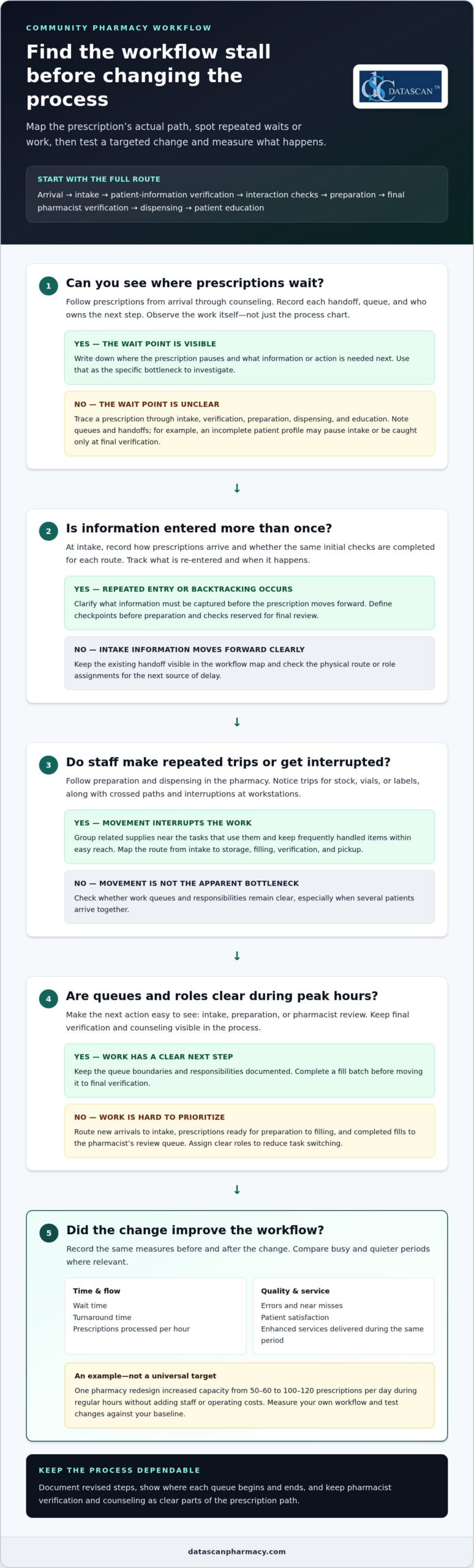
Map a prescription’s path from arrival to patient counseling, noting each handoff and queue. Include intake, patient-information verification, interaction checks, preparation, final verification, dispensing, and education. A written sequence shows where prescriptions wait, where information is re-entered, and who owns the next step. For example, note whether an incomplete patient profile pauses intake or is caught only during final verification.
At intake, record how prescriptions arrive, such as electronically or at the counter, and document the same initial checks for each route. Track whether staff confirm patient details and capture the information needed for processing before moving the prescription forward. At verification, distinguish checks that happen before preparation from those reserved for final review. Clear checkpoints reduce avoidable backtracking and keep clinical decisions with the pharmacist.
Follow a prescription through preparation and dispensing rather than relying on a process chart alone. Observe where staff retrieve stock, print labels, assemble a fill, and place it for final verification. If a technician must leave the workstation for vials or labels, record the movement and how often it interrupts work. During counseling, show how staff flag prescriptions that need a pharmacist conversation, so the queue reflects the next action, not just the next bag.
During peak hours, separate work into visible queues, assign clear roles, and complete a fill batch before moving it to final verification. Route new arrivals to intake, prescriptions ready for preparation to filling, and completed fills to the pharmacist’s review queue. This organized flow makes priorities easier to see and reduces task switching when several patients arrive together.
Map the physical layout alongside the prescription steps. Walk the route from intake to storage, filling, verification, and pickup, then mark repeated trips and crossed paths. Group related supplies near the tasks that use them, and keep frequently handled items within easy reach. A directional assembly-line layout can clarify each medication touch point without adding a system or changing the prescription sequence.
Assess throughput by recording prescriptions processed per hour alongside enhanced services delivered during the same period. Compare busy and quieter periods, then consider staffing, technology, and workspace use together. Track wait time, turnaround time, and patient satisfaction before changing the layout, then review the same measures afterward to see whether the change helped.
One pharmacy redesign increased capacity from 50–60 to 100–120 prescriptions per day during regular hours without adding staff or operating costs. Treat that result as an example, not a universal target. The useful lesson is to measure the existing workflow, remove avoidable movement, and test whether automation or clearer handoffs address the actual bottleneck.
Document the revised steps and show staff where each queue begins and ends. This map gives the team a practical baseline for improving efficiency while keeping verification and counseling visible parts of the prescription process.
2. Encouraging staff innovation and sharing successful practices
Staff can spot reimbursement problems that consume an owner’s time, from repeated claim rework to unclear payment discrepancies. Ask employees who handle claims to note where the process stalls, what information is missing, and which step needs follow-up. For example, a rejected claim may need correction, while a payment that differs from the expected amount needs review. Separating these situations helps the team suggest useful process changes instead of treating every issue alike.
Observe the work involved in resolving a claim, from submission through reconciliation. Note when staff switch between the pharmacy management system, payer information, and internal records, and where they re-enter details. A written map can show whether delays stem from an incomplete workflow, unclear ownership, or disconnected information. Discuss the map with the employees doing the work, then choose a small improvement that removes unnecessary steps without weakening review.
Ask staff to record recurring reimbursement issues in a consistent format. Useful details include claim status, amount paid, expected amount, reason for review, and action taken. This creates a clearer record for spotting patterns and preparing questions for payer follow-up. Rather than relying on memory or scattered notes, use shared tracking so the owner can see unresolved work without personally reviewing every claim as it arrives.
Technology can support this process by organizing claim information and making exceptions easier to find. Pharmacy management software can keep relevant transaction records and work queues together, depending on its capabilities and configuration. Before changing systems, identify the information staff need to review reimbursement differences and the reports they use for follow-up. A defined process helps the owner assess whether technology is reducing manual work.
Clarify who owns each reimbursement task. For example, assign one employee to monitor claim exceptions, another to gather supporting transaction details, and a designated person to review unresolved discrepancies. Provide focused training on how to record and escalate each issue. Clear ownership prevents duplicated investigations and helps pharmacy owners reserve time for decisions that need their attention.
Share successful practices across shifts so reimbursement work doesn’t restart when staffing changes. At a team meeting, review an anonymized example of a resolved claim issue and document the process staff followed. Note which records helped, what action resolved the issue, and who owns the next step in similar cases. Keep the procedure practical and update it when staff encounter a different type of exception.
PBM policies and reimbursement terms can change, so give staff a way to raise new patterns for review. A brief, recurring discussion of unresolved exceptions can help owners see where operational time is going and decide what needs attention. Improvements to documentation, ownership, and system use can make reimbursement follow-up more manageable for independent pharmacies.
3. How can I improve my pharmacy workflow without adding more tools?
Start with a brief log of prescription bottlenecks, medication errors, and near misses. For each event, record the workflow step, what interrupted it, and what happened next. For example, note whether a misplaced shelf item caused a delay or an unclear handoff led to a near miss. Review the log with staff and choose one practical change at a time. This turns everyday observations into specific improvements without adding another system.
Track the same measures before and after each change: prescription turnaround time, patient wait time, errors, near misses, and patient feedback. Separate events by workflow stage, such as intake, filling, verification, or pickup. If wait times rise at pickup while filling remains steady, the bottleneck may be at the counter rather than in dispensing. Use those patterns to focus the next review instead of changing several parts of the process at once.
Walk the medication route and look for unnecessary steps between storage, filling, verification, and pickup. Arrange work areas so related supplies stay close together, and place frequently used items within easy reach. For example, staff shouldn’t have to cross the pharmacy repeatedly for labels, bags, or common supplies. Keep medication storage organized, return stock to its assigned location, and make misplaced items visible during routine checks.
Color-coded baskets can distinguish work stages or priorities, provided every staff member understands the system. Agree on what each color means, where baskets belong, and when prescriptions move to another stage. Don’t rely on color alone: add a clear label or consistent placement. A defined setup makes prescription status easier to see and reduces confusion during a busy shift.
Patient engagement can also affect workflow. Ask patients about barriers to refilling, then use a suitable reminder process to prompt action before a prescription runs out. Well-timed, personalized patient reminders improve adherence rates by 25%. A reminder should make the next step clear, such as requesting a refill or contacting the pharmacy about a question. Staff can also gather feedback on wait times and communication to identify issues patients notice first.
Medication synchronization and personalized counseling can help pharmacies organize patient interactions around individual needs. For example, staff can identify patients with several ongoing prescriptions and discuss a coordinated refill plan. Counseling also gives pharmacists a chance to address questions that might otherwise lead to repeated calls or missed pickups. Coordinate communication with the patient’s healthcare team when it supports medication reconciliation and continuity of care.
Schedule regular workflow reviews and use the same measures each time. If medication errors cluster around one handoff, observe that step and adjust its instructions or workspace. If patients report confusion about pickup, revise the communication they receive. Small, measured changes help staff improve accuracy and patient experience with the people, space, and routines already in place.
4. Using staff coaching and checklists to sustain improvements
A workflow change lasts when every pharmacy technician understands the new step and its purpose. Coach alongside the task: observe a handoff, ask what caused a delay, then demonstrate the agreed process. For example, if refill messages wait in an unclear queue, show staff where to record the next action. Have the employee repeat the process, then revisit it during a later shift. Keep coaching specific to patient care, not a general reminder to work faster.
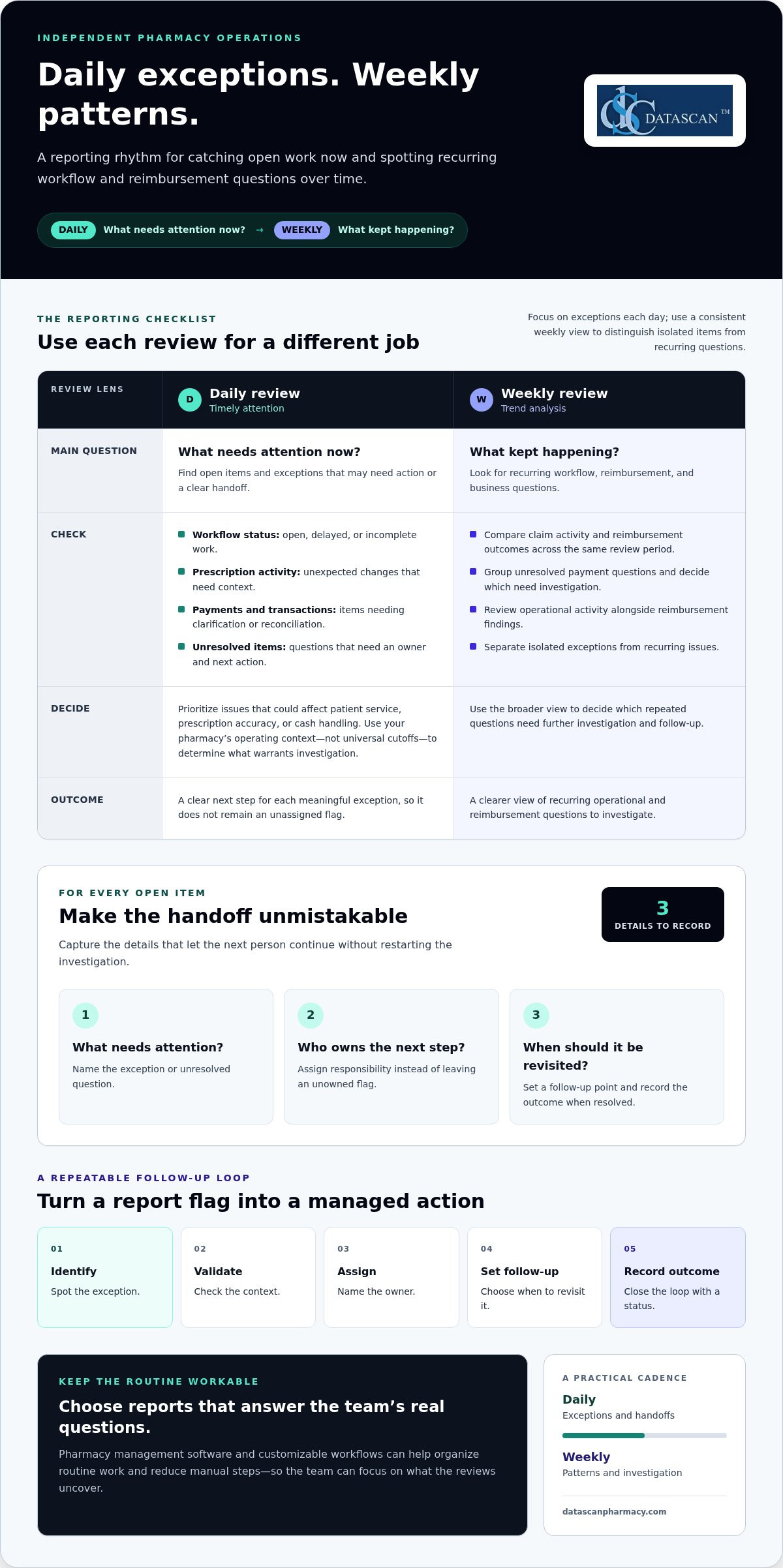
Use standard operating procedures for routine tasks, then turn the most important steps into daily and weekly checklists. A daily opening checklist might cover work queues, pending prescriptions, and messages requiring follow-up. A weekly review might flag recurring interruptions or incomplete handoffs. Keep each checklist brief enough to use during a real shift, assign an owner, and define what completion means. Update it when staff feedback or a process change reveals a missing step.
Measure whether coaching improves the work, not just whether staff completed training. Track prescription fill times, patient wait times, and inventory turnover before and after the adjustment. If fill times improve but waits remain long, examine pickup communication or consultation handoffs next. Review the same measures regularly and share the results with the team. This makes performance monitoring a practical guide to what needs improvement, not just an exercise in collecting numbers.
Clear communication prevents small questions from turning into delays. Use a consistent handoff note for pending work, including prescription status, the next action, and who owns it. In a brief team meeting, review unresolved items and clarify process updates before the shift gets busy. For patient communication, agree on how staff explain a delay, refill status, or need for pharmacist consultation. Consistent language helps patients understand what happens next and gives staff a reliable response.
Not every improvement needs another tool. A shared paper checklist, clearly labeled queue, or short start-of-shift huddle can address a process gap. For example, staff can agree to finish one defined work queue before switching tasks, then note exceptions for pharmacist review. Keep the change simple, identify who maintains it, and observe whether it removes unnecessary steps. If it adds duplicate documentation, revise the process instead of giving staff extra work.
Invite staff to identify one recurring workflow problem during each team review. Ask which step is unclear, where information gets lost, and what change would help the next shift. Test one suggestion, such as placing a checklist beside the task it supports, then discuss the result at the next meeting. Credit the employee who raised the issue and record the adopted process. This feedback loop keeps frontline experience central to decisions and helps improve your pharmacy.
5. What regulations govern pharmacy workflow in the United States?
For workflow redesign, the key regulatory point is that technician responsibilities depend on state permission. Pharmacy workflow changes can shift certain responsibilities to advanced technicians only in states that permit those duties. A process that works at one location may not fit another state’s rules, so map each proposed task to the pharmacy location and role before changing assignments.
Start by listing the tasks affected by the redesign, such as prescription intake, data entry, preparation, and final verification. Mark who performs each task now and who would perform it after the change. Identify any task proposed for an advanced technician and determine whether that responsibility is permitted in the relevant state. Keep the pharmacist’s review points clearly marked in the workflow.
For pharmacies operating in more than one state, don’t assume one procedure is suitable everywhere. Create a location-specific role map that names the tasks assigned to technicians and pharmacists. If a task differs by state, make that difference clear in the local procedure and staff training. This reduces the risk of employees relying on a familiar process that doesn’t match the duties permitted at their location.
Separate regulatory boundaries from operational preferences. A manager may prefer to shift a step to reduce a queue, but that preference doesn’t establish that the role change is allowed. Document the proposed change, responsible role, affected workflow step, and reason for the adjustment. This record helps managers review the decision consistently when staffing, locations, or procedures change.
Before rollout, walk through a sample prescription using the revised process. At each handoff, confirm that the assigned role matches the state’s permitted duties and that pharmacist responsibilities remain clear. Train affected staff on the exact procedure, including when to pause and refer a question to the pharmacist. Update written procedures when the approved workflow changes, then use staff questions to find unclear instructions.
Keep the review active. When a pharmacy changes its workflow, adds a location, or reassigns a task, revisit the role map for that state. Regular procedure reviews can also catch outdated instructions still in circulation after staffing or workflow changes. For a complex task assignment, document the question and decision before training staff on the new process.
Use these practical checks before implementing a role change:
- Identify the state and location affected by the proposed workflow.
- Describe the exact task and the role expected to perform it.
- Confirm that state rules permit the responsibility for that role.
- Update the local procedure and train the affected pharmacy staff.
Discuss your pharmacy workflow needs as you plan process changes and role assignments.
Datascan Pharmacy Software: Datascan Pharmacy Management Software
Datascan Pharmacy Software’s Datascan Pharmacy Management Software is a natural next step when manual handoffs and disconnected tasks make prescription flow harder to manage. It provides pharmacy management tools for independent and retail pharmacies, helping teams support day-to-day operations and efficiency.
Consider Datascan when you’re ready to assess how technology can support the workflow improvements identified in this article. Datascan Point of Sale (POS), MobileScripts Patient Mobile App, and Datascan Mobile Delivery App support other parts of pharmacy operations and patient services.
The right setup depends on your pharmacy’s processes and priorities. Contact Datascan Pharmacy Software to discuss how its offerings may fit your workflow.
Build a Workflow That Gives You Room to Grow
Choose one operational improvement that can give your team more time for patients and business priorities. Apply the pharmacy workflow management tips that fit your current needs, then consider whether pharmacy management software could reduce repetitive work or improve coordination.
Datascan Pharmacy Software offers Datascan Pharmacy Management Software Suite, Datascan Point of Sale (POS), and MobileScripts Patient Mobile App. Each supports a different part of pharmacy operations, so focus on the workflow challenge you want to solve rather than changing everything at once.
A focused conversation can help you explore how these offerings may fit your pharmacy’s processes. Contact Datascan Pharmacy Software to discuss your workflow priorities and possible next steps. With a clear goal and the right support for your team, smoother operations are within reach.
Frequently Asked Questions
What are the most common pharmacy workflow problems?
Common problems include rejected claims, missing prescription details, repeated phone interruptions, and unclear ownership of follow-up. These issues often interact: a rejected claim may require contacting a prescriber while the prescription remains unresolved in another queue. Look for work that repeatedly changes status or requires the same information to be entered in multiple places. Those patterns point to process friction that can affect staff focus and patient service.
How can I improve my pharmacy workflow without adding more tools?
Reduce duplicate work within the processes you already use. For example, agree on one place to record an unresolved issue and one person responsible for its next action. Review routine tasks for repeated approvals, unnecessary handoffs, or duplicate notes. If staff keep separate records for the same exception, decide which record is authoritative and retire the redundant step. A simpler process can reduce administrative work without introducing another system.
What are the key steps in an efficient pharmacy workflow?
Beyond the prescription’s basic path, define how the team handles exceptions and closes each task. For example, a claim awaiting clarification should have an owner, a documented next action, and a clear point for returning it to active processing. Set completion criteria, such as confirming that the patient has been notified. These details prevent unresolved work from lingering after the routine task appears finished.
How can pharmacies reduce prescription wait times and bottlenecks?
Set realistic pickup expectations by identifying prescriptions that need extra processing before patients arrive. If a refill depends on prescriber clarification or an insurance response, communicate its status early rather than waiting until pickup. During a rush, avoid promising a specific completion time unless the team can support it. Explaining what remains and who is handling it helps patients plan and reduces repeated status calls.
What pharmacy workflow management software and automation tools are available?
Pharmacies can consider management systems, electronic prescription processing, automated refills, inventory tools, and dispensing automation. The right category depends on what is creating manual work. For example, automated patient communication can support routine refill outreach, while pharmacy management software can organize prescription and transaction information. Datascan offers Datascan Pharmacy Management Software Suite, Datascan Point of Sale (POS), and MobileScripts Patient Mobile App for pharmacy operations and patient engagement.
What staffing levels and role assignments improve pharmacy workflow?
Staffing should reflect actual demand by time of day, service mix, and workload complexity, rather than a fixed prescription count alone. Compare scheduled coverage with periods requiring more patient support, claim resolution, or clinical attention. Cross-training employees on appropriate operational tasks can provide flexibility when someone is absent. Keep role expectations clear, and account for state rules before assigning technicians responsibilities that vary by jurisdiction.
How can pharmacies improve prescription accuracy and prevent medication errors?
Make accuracy easier by reducing distractions around tasks that require careful attention. For example, keep non-urgent questions away from the designated verification area and make updated patient information available to the staff member processing the prescription. Review recurring error patterns with the team, focusing on contributing conditions rather than assigning blame. A practical change might be clarifying a confusing label-handling convention or where staff document a patient profile update.
How should pharmacies manage inventory, shortages, and expired medications?
Use consistent stock rotation so items with the earliest expiration dates are selected first, and make expiration dates visible during routine stock reviews. Keep a shortage record identifying affected medications, outstanding orders, and prescriptions needing follow-up. Set reorder points based on usage and supplier timing, then review them when demand shifts. Separate expired stock from active inventory and follow the pharmacy’s established handling and documentation procedures.

Article by
Sarah Callioras
Sarah Callioras is Vice President at Datascan Pharmacy Software, bringing nearly 25 years of experience across independent pharmacy operations and pharmacy technology. Since joining Datascan in 2016, she has played a key role in driving business growth, strengthening client relationships, and supporting independent pharmacies through innovative software solutions. With a strong background in pharmacy operations, business development, and strategic leadership, Sarah is passionate about helping independent pharmacies succeed in an evolving healthcare landscape.