
The safest prescription fill isn’t the fastest one. It’s the one that follows the same checks every time. To learn how to reduce prescription filling errors, verify the patient and prescription details, compare the written order with the computer record, and pause to clarify anything unclear. Consistent checks help catch mistakes before medication reaches the patient.
It’s easy to see why errors can happen: similar drug names, incorrect data entry, interruptions, and unclear instructions can disrupt a busy workflow. A reliable process gives each prescription focused attention, from identifying the medication and dose to checking the label and confirming the right patient at pickup. The FDA’s medication error resources offer further context on medication safety.
This article covers practical ways to strengthen checks in an independent or community pharmacy, from accurate data entry to clarification and repeatable workflows. These steps can help your team catch preventable errors while keeping daily operations moving. Author: Datascan Pharmacy Software, which provides pharmacy management solutions for independent and retail pharmacies.
Key Takeaways
- Separate medications with similar names and use clear shelf labels or visual alerts to make selection safer.
- Capture patient details and prescription directions accurately, then verify identity and allergy information.
- Compare the written order with the computer record, and pause to resolve anything that doesn’t match.
- Clarify illegible instructions and unfamiliar abbreviations with the prescriber instead of guessing.
- Standardize each team member’s role and the steps from filling through final handoff to help reduce distractions.
1. Preventing look-alike and sound-alike medication mix-ups
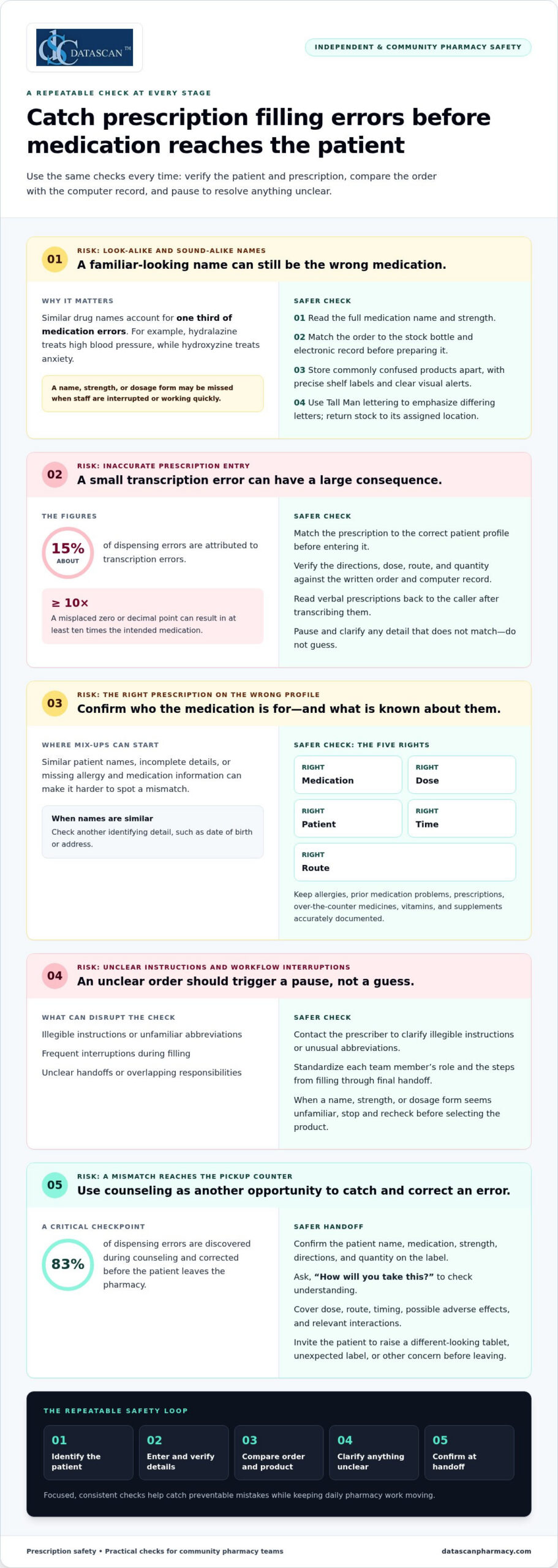
Common prescription filling errors include selecting the wrong medication or dose, entering an incorrect quantity, and dispensing to the wrong patient. Similar drug names, data-entry mistakes, unclear communication, and frequent interruptions can contribute. Similar drug names account for one third of medication errors, making name checks an essential part of dispensing.
Hydralazine treats high blood pressure, while hydroxyzine treats anxiety. Their similar names can make selection difficult, especially when staff are interrupted or working quickly. Compare the full drug name, strength, and dosage form on the prescription with the stock bottle and computer record. Don’t rely on the first few letters or a familiar-looking label.
Make look-alike and sound-alike medications easier to distinguish where products are selected. Store commonly confused products apart, use clear visual alerts, and label storage locations precisely. Tall Man lettering, which capitalizes part of a name, can highlight differences on stock bottles and electronic medication orders. Emphasize the differing letter patterns in similar names so staff notice them before selecting a product.
- Read the full medication name and strength on the order.
- Compare the product label with the electronic record before counting or preparing it.
- Return stock promptly to its assigned, clearly marked shelf location.
- Pause and recheck when a name, strength, or dosage form seems unfamiliar.
Patients can provide useful context during a medication check. Ask what prescriptions, over-the-counter medicines, vitamins, and supplements they take, and document known allergies or previous medication problems. This information helps the pharmacist assess potential interactions and spot an order that differs from the patient’s usual therapy. Encourage patients to share an up-to-date medication list with each doctor and pharmacist, especially when multiple prescribers are involved.
At pickup, invite the patient to check the medication and ask questions if its appearance differs from what they expected. Confirm who the prescription is for and explain how to take it. If the patient notices a different tablet or an unexpected label, that can prompt another check before they leave the pharmacy.
Dosage form matters, too. Long-acting medications shouldn’t be cut, crushed, or chewed unless a doctor or pharmacist says it’s appropriate, because the medicine may release too quickly. If a patient has trouble swallowing a tablet, recommend discussing a suitable formulation with a doctor or pharmacist rather than changing the medication independently. Each check addresses a different risk, but both depend on matching the product and instructions accurately.
2. Accurate prescription entry and patient identification
Accurate entry starts with matching the prescription to the correct patient profile. Confirm the patient’s identifying details before entering directions, dose, route, and quantity. Transcription errors account for about 15% of dispensing errors, and a misplaced zero or decimal point can result in at least 10 times the intended medication. Read verbal prescriptions back to the caller after transcribing them.
Use the five rights of medication safety as a final verification prompt: right medication, dose, patient, time, and route. Check the patient’s date of birth or address when names are similar. In hospital settings, the Joint Commission requires at least 2 patient identifiers when medications are administered. Accurate identification and current patient information help prevent medication errors, including an incorrect drug being dispensed.
Patients should check the prescription label before leaving the pharmacy. Confirm the patient name, medication, strength, directions, and quantity, then compare the label with what the prescriber said to expect. Ask the pharmacist to explain any mismatch, unfamiliar direction, or change in tablet appearance before taking the medication.
At pickup, invite patients to describe how they’ll take the medication. An open-ended question such as, “How will you take this?” can reveal confusion that a yes-or-no question may miss. Counseling should cover the dose, route, timing, possible adverse effects, and relevant interactions. About 83% of dispensing errors are discovered during counseling and corrected before the patient leaves the pharmacy.
- Ask about prescription medicines, over-the-counter drugs, vitamins, and supplements.
- Make sure allergies and prior medication problems are recorded accurately.
- Explain what to do if a dose is missed, using the prescription’s specific instructions.
To prevent errors during a transfer or refill, give the receiving pharmacy an up-to-date medication list and identify the exact prescription and prescriber. Confirm that the pharmacy has the current directions, strength, and allergy information. Once the refill is prepared, compare its label and appearance with the previous supply, and ask about unexpected changes.
If a patient discovers an incorrect fill, they should stop and contact the dispensing pharmacy promptly. Don’t take another dose until the pharmacist or prescriber explains what to do. If the medication has already been taken and concerning symptoms occur, seek urgent medical care.
In the United States, patients can report a suspected dispensing error to the pharmacy manager or owner and ask how to file a formal complaint. They can also contact their state pharmacy regulator for information about its complaint process. Keep the label, packaging, receipt, and prescription details available when describing the event.
3. Checking written prescriptions against computer records
Pharmacies prevent wrong-drug and wrong-dose errors by comparing the prescription with the computer record, verifying patient-specific details, and arranging an independent check. To understand how to reduce prescription filling errors, treat a mismatch as a reason to stop and investigate, not as a detail to correct from memory. Clarify concerns with the prescriber or patient as appropriate.
Use the original written order as the reference, not memory or a previous fill. Compare the patient, medication, strength, dosage form, directions, and quantity with the entered record. For example, if the prescription says one strength but the computer entry shows another, stop processing until the mismatch is resolved. Technicians and pharmacists should use the same comparison steps, even when a familiar prescription seems routine.
A second-person check can catch a mistake that self-checking may miss. When possible, have a pharmacist independently compare the written order, computer record, and prepared medication. The reviewer should inspect the original instructions rather than rely on the first person’s verbal summary. If the check is delayed, keep the prescription and product clearly associated, then complete verification before dispensing.
Dose review must account for the patient, not just the drug. Verify age- and weight-based doses, particularly for pediatric and geriatric patients. Compare the prescribed amount with the patient’s recorded age and weight, and check the units, frequency, and dosage form. A dose that looks unusual for a child’s weight or an older patient’s profile needs investigation before the medication is released.
Review the profile for other prescriptions that could create harmful interactions or duplicate therapy. Patients with multiple doctors may have prescriptions from clinicians who don’t know what another clinician ordered. Check the medication history and relevant alerts, then assess whether the current order fits the patient’s existing regimen. A possible interaction is a reason to investigate and communicate, not to make an unsupported change.
Use a consistent double-check sequence for each prescription:
- Match the written order to the correct patient record.
- Compare the drug, strength, dosage form, instructions, and quantity.
- Review age, weight, allergies, and medication history.
- Compare the prepared product and label with the verified order.
- Resolve discrepancies before dispensing.
Document clarifications in the pharmacy record so the final instructions reflect the prescriber’s response. If an order changes during a phone call, update the computer entry and compare it again with the clarified directions. This creates a clear record linking the original prescription, the correction, and the medication dispensed.
For teams considering how to reduce prescription filling errors, every unresolved order needs a clear next step. Set it aside, record the specific discrepancy, and involve another qualified team member before proceeding. Don’t repeat the same quick check or rely on memory to fill in missing information.
4. Clarifying illegible prescriptions and unusual abbreviations
If a prescription is illegible, incomplete, or open to more than one interpretation, pause dispensing and clarify it with the prescriber. Guessing at a medication, dosage, route, or frequency can turn a small uncertainty into an incorrect fill. A clear answer gives the pharmacist a reliable basis for preparing the prescription and counseling the patient.
Start by identifying exactly what is unclear. Is the drug name hard to read, or does the order omit a strength, dosage form, route, or frequency? If a written direction could indicate different amounts, don’t choose the most familiar interpretation. Mark the order for follow-up and keep it separate from prescriptions ready for filling.
Unusual abbreviations and puzzling symbols also need clarification. A shorthand term may seem routine to one staff member but mean something different to another. Don’t assume an abbreviation has the same meaning across prescribers or medication types. Ask the prescriber to state the intended instruction in plain language, then record that wording in the pharmacy system.
Use a consistent clarification process so the next step is clear to every team member:
- Identify the specific word, number, symbol, or direction that creates uncertainty.
- Contact the prescribing office and ask for the intended medication instructions.
- Read the clarified order back to confirm the drug, strength, dosage, route, and frequency.
- Document the response and update the prescription record before filling.
- Have the pharmacist review the resolved order before dispensing.
Missing details matter, too. If an order names a medication but omits a dosage or route, don’t fill the gap using a previous prescription. The patient’s current condition, treatment plan, and other medicines may differ. Ask the prescriber for the missing information, and document the clarification so the final label matches the authorized directions.
Check for conflicts between the order and the patient profile. For example, if a newly clarified medication conflicts with a recorded allergy or appears inconsistent with the patient’s existing instructions, bring the concern to the pharmacist. The pharmacist can assess the information and contact the prescriber when needed. This helps address potential risks without staff making unsupported changes.
Keep the patient informed while the team resolves uncertainty. Explain that the pharmacy needs a clear instruction before dispensing, and ask whether the patient has relevant context, such as a recent treatment change. Patient input can help identify what to ask, but it doesn’t replace prescriber clarification. Once the answer arrives, compare the updated record with the final label and directions. Documenting this handoff helps prevent an unresolved question from carrying into preparation or counseling.
5. Standardizing prescription-filling workflows
A repeatable workflow gives each prescription a defined path, even during a busy shift. Assign clear responsibilities for intake, data entry, preparation, pharmacist review, and handoff. When pharmacy technicians know which step they own, fewer tasks get lost between coworkers. A written process also makes it easier to identify where mistakes happened and improve the routine. Teams aiming to reduce prescription filling errors can start by mapping these handoffs.
Keep each patient’s prescriptions together and separate them from other work in progress. Return stock promptly after selecting a medication, and clear unused products from the filling area before starting another order. For example, finish preparing one patient’s prescription and attach its label before moving to the next. This reduces the chance of mixing products, labels, or instructions across orders.
Set up the physical workspace to support the process. Keep frequently used tools in consistent locations, remove clutter from the counting area, and ensure only the active prescription is on the immediate work surface. A standardized shelf layout helps staff return products to the correct location. If the pharmacy uses an automated pill-counting machine, include routine checks and maintenance in its workflow.
Use a clear sequence that staff can follow for every fill:
- Receive the prescription and route it to the assigned team member.
- Enter and prepare the order using the pharmacy’s established steps.
- Keep the product and patient label together during preparation.
- Complete pharmacist review before the prescription moves to pickup.
- Return stock and reset the work area before starting another order.
Define how staff should handle interruptions. If a phone call or patient question pauses a fill, leave the order in a marked, secure location and note the step completed. On returning, restart at the last verified point rather than relying on memory. An interactive voice response system can handle routine calls and refills, reducing interruptions during dispensing.
Workload management matters to accuracy. Pharmacy leaders can monitor queues, balance assignments, and provide breaks so fatigue and competing tasks don’t undermine focus. Build training into the workflow for new and existing staff, including pharmacy technicians, and review procedures when errors or near misses reveal a weak handoff. Report dispensing errors so the team can identify patterns and prevent similar problems.
A computer-supported workflow can make status and ownership easier to track, but staff still need clear steps for exceptions. Define who contacts the doctor when clarification is needed, who records the response, and who resumes the order. Reducing filling errors also means checking whether each stage has a clear owner and documented next step. A customizable pharmacy workflow can organize responsibilities around how the pharmacy operates. Consistency makes the process easier to follow, even when work shifts between team members.
Datascan Pharmacy Software: Datascan Pharmacy Management Software
Datascan Pharmacy Software provides Datascan Pharmacy Management Software for independent and community pharmacies. If your team is reviewing how prescriptions move from entry through verification and pickup, pharmacy management software can support that operational review. Map the steps staff follow, identify where handoffs or interruptions create friction, and assess whether your current system supports the way your pharmacy works.
Datascan also offers Datascan Point of Sale (POS), MobileScripts Patient Mobile App, and Datascan Mobile Delivery App. These tools support different parts of pharmacy operations, while prescription accuracy still depends on clear procedures and careful staff checks.
Contact Datascan Pharmacy Software or visit datascanpharmacy.com to learn more.
Make safer checks part of your next improvement
A practical answer to how to reduce prescription filling errors is to treat accuracy as an operating standard, not just a final inspection. Next, review how your pharmacy’s procedures and technology work together during a real shift. Which handoffs are hardest to manage? Where do staff need clearer steps to keep prescriptions moving without skipping verification?
Use those questions to guide a focused conversation with your team. A process that works on paper should also make sense at the counter, in the filling area, and during a busy pickup period. Aligning pharmacy management software with consistent procedures can help staff follow the workflow more easily.
If you’re considering how Datascan Pharmacy Software could support your pharmacy’s operations, contact Datascan Pharmacy Software to discuss your needs. Every deliberate improvement helps build a more dependable process for your team and patients.
Frequently Asked Questions
How can patients verify a prescription is filled correctly before leaving the pharmacy?
Ask the pharmacist to identify the medication’s active ingredient and explain whether the dispensed product matches the treatment your prescriber intended. If the packaging or manufacturer looks unfamiliar, ask whether that reflects a product change. Patients can also ask what to do if the medication’s appearance changes at a later refill. Resolve those questions before leaving, so you know whom to contact if the next supply differs.
How can pharmacists reduce dispensing errors during prescription processing?
Build safeguards into the order queue so duplicate requests, early refills, and incomplete prescriptions receive attention before moving forward. For example, if a refill request arrives while the same prescription is already being processed, flag it for review rather than treating it as a separate routine order. Clear status labels also help staff distinguish new, pending, and completed work without relying on memory during a busy period.
How can patients prevent errors with generic substitutions and look-alike medication names?
Ask the pharmacist to explain a substitution by its active ingredient, strength, and dosage form, then confirm whether the prescribed directions remain the same. Don’t switch products or adjust how you take them based only on packaging or tablet appearance. If a refill looks different, bring the container or a clear photo of the previous product to the pharmacy and ask the pharmacist to explain the difference.
How should patients use medication lists and patient portals to catch prescription discrepancies?
Use the portal as a comparison tool, not as the only record of current treatment. After a specialist visit, urgent-care appointment, or hospital stay, review the medication section for entries that may no longer reflect the plan you were given. Note which clinician prescribed each medicine and when the information changed. If portal details conflict with discharge papers or current instructions, ask the care team to reconcile the records before relying on an outdated entry.
 Kevin Minassian is the President of Datascan Software. Under his leadership, the company rapidly expanded to provide pharmacy management software on a national level. Over the last 15+ years, he has ensured that Datascan has continuously evolved to offer innovative solutions for independent pharmacies while still offering world-class customer support. He is passionate about helping independent pharmacies to remain competitive, achieve success, and offer the very best service to their communities.








