Improving prescription pickup workflow starts with making the work visible and clarifying who owns each handoff. That helps teams spot why patients arrive before prescriptions are ready and where staff are repeating status checks, rather than simply asking everyone to move faster.
If pickup interruptions pull your team away from dispensing and patient care, a predictable process can help reduce avoidable delays without making speed more important than accuracy or service. The first step is to trace delays back to where they begin, not just focus on the wait at the counter.
This guide shows how to map staff handoffs, build a repeatable pickup process, and identify where technology can reduce manual coordination. Pharmacy management software and customizable workflow tools can help independent pharmacies organize work around their own processes. The goal is a more dependable pickup experience that gives your team more room to focus on patient care.
Key Takeaways
- Trace pickup delays from patient arrival back to prescription readiness and staff handoffs to find where bottlenecks begin.
- Map each step across counter and drive-thru pickup to clarify shared tasks, channel-specific steps, and ownership.
- Improve coordination by removing avoidable waits and clarifying staff roles, not by skipping accuracy checks or patient-care steps.
- Test one change at a time and review practical measures, such as repeat lookups or status inquiries.
- Use pharmacy management software and customizable workflow tools to support coordination while keeping staff judgment central.
What makes prescription pickup workflow break down in independent pharmacies?
Prescription pickup workflow is the sequence connecting prescription readiness, patient arrival, required verification, the medication handoff, and completion of the pickup. A delay at the counter may begin earlier, when readiness is unclear, an update doesn’t reach the right person, or the next step has no clear owner.
The visible wait isn’t always where the problem started. A team can protect time for accurate processing and patient care while removing avoidable pauses, such as searching for a prescription with an unclear status or repeating a check because information wasn’t passed along. Improving the workflow means addressing those process gaps, not rushing work that requires professional attention.
Where do prescription pickup delays usually begin?
Look upstream from the pickup counter. Common sources include unclear readiness, incomplete communication, repeated searches, and competing staff responsibilities. Because pharmacy work includes dispensing and patient care, pickup depends on coordinated steps across the team, not only the moment a patient arrives.
For example, a patient arrives while a technician is helping someone else. A colleague checks the prescription, but the available information doesn’t show whether it’s ready or who owns the remaining work. The delay appears at pickup, but the cause may be an earlier status update or an unassigned task. Trace the sequence before changing the counter routine.
Why do clear handoffs matter at pickup?
As work moves between dispensing, support, and pickup staff, responsibility can become unclear. If each person assumes someone else will share a status change or handle the next step, work can stall. AHRQ’s Patient Safety Network identifies handoffs as points where clear communication matters for continuity; its overview of handoffs and signouts offers relevant context for designing reliable transitions.
Define each handoff plainly: who passes the work, what information the next person needs, and who takes responsibility for moving it forward. When a prescription moves from dispensing toward pickup, make the next role and required status clear. Predictable coordination helps staff serve patients without encouraging rushed checks.
Independent pharmacies can use a workflow map to identify gaps across counter and drive-thru service, then align responsibilities with the steps staff actually perform. Datascan customizable workflow tools support processes designed around a pharmacy’s needs, helping structure coordination while leaving professional judgment with pharmacy staff.
How should a pharmacy map the prescription pickup workflow?
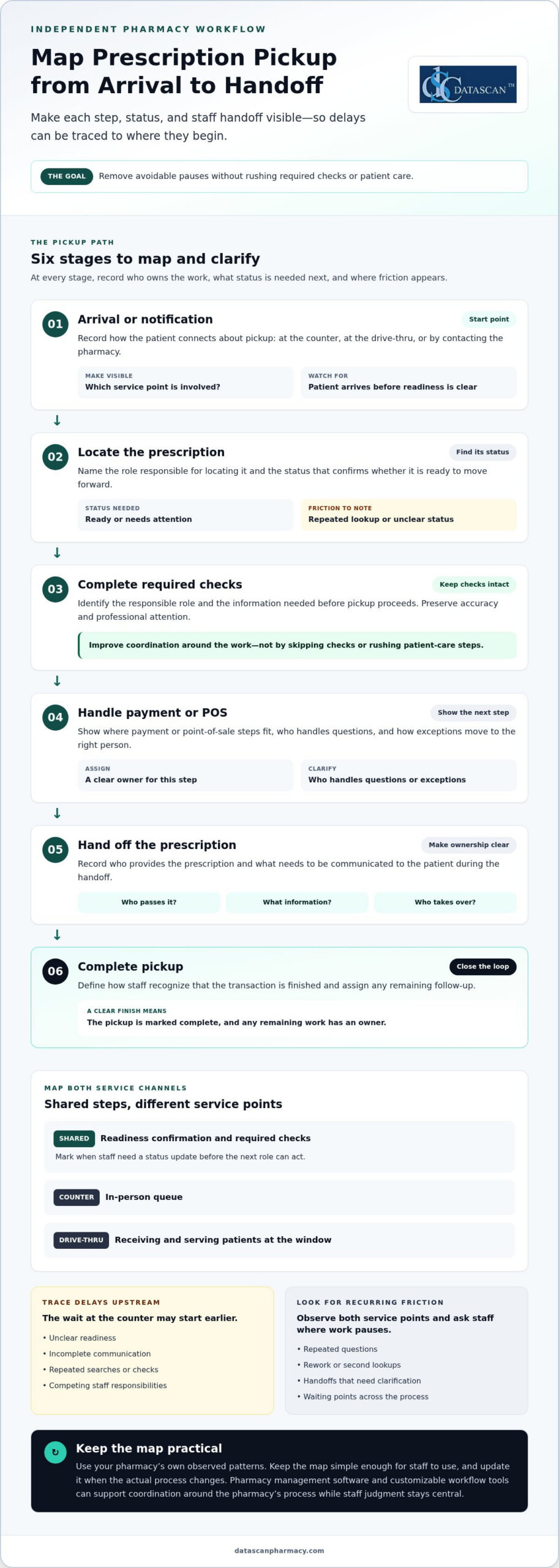
Map pickup from patient arrival or notification through the final handoff. For every step, record its owner, the status needed to proceed, and any friction. Include counter and drive-thru service so the map reflects how work moves across the pharmacy, not just through one channel.
What stages belong on a prescription pickup workflow map?
Start with the patient-facing journey, then add the staff actions behind it. Focus dispensing details on the status needed at pickup, and connect those steps to your pharmacy management software, which supports the broader prescription workflow.
- Arrival or notification: Record whether the patient arrives at the counter, uses the drive-thru, or contacts the pharmacy about pickup.
- Locate the prescription: Note who finds it and what status confirms it is ready to move forward.
- Complete required checks: Identify the responsible role and the information needed before pickup can proceed. Keep required checks intact.
- Handle payment or POS: Show where payment or point-of-sale steps fit, and who handles questions or exceptions.
- Hand off the prescription: Record who provides it to the patient and what needs to be communicated during the handoff.
- Complete pickup: Define how staff recognize that the transaction is finished and assign any remaining follow-up.
Some steps are shared across channels, such as confirming readiness and completing required checks. Others differ: counter pickup involves an in-person queue, while drive-thru work includes receiving and serving patients at the window. Map the channels side by side and mark each point where staff need a status update before the next role can act.
Use a simple working template. Add a row for each stage, then fill in the owner, the status needed, the friction observed, and a possible improvement.
| Stage | Owner | Status needed | Friction point | Proposed improvement |
|---|---|---|---|---|
| Locate prescription | Assigned role | Ready or needs attention | Repeated lookup | Clarify status and handoff |
| Patient handoff | Pickup role | Checks complete | Unclear next step | Define handoff ownership |
How can a team identify recurring pickup bottlenecks?
Observe representative shifts at both service points and note repeated questions, rework, and waiting points. Ask staff which handoffs most often need clarification or a second lookup. Existing operational records can add context; use your pharmacy’s own patterns rather than imposing an unsupported benchmark.
As the team maps each step, improving prescription pickup workflow becomes a practical exercise in spotting where work pauses and making ownership visible. Keep the map simple enough for staff to use, and update it when the actual process changes.
How can pharmacies improve pickup speed without compromising accuracy?
Improve pickup speed by removing avoidable pauses, clarifying staff responsibilities, and making information easier to use at each step. Don’t speed up required prescription checks or patient-care conversations. Faster coordination means less idle time between tasks, not faster clinical or safety checks. Give those checks the attention they require.
Choose an intervention based on the friction you observe. A written handoff may address uncertainty about who acts next, while a process change may eliminate an unnecessary repeat lookup. Pharmacy management software can support connected operational workflows, but the pharmacy’s process design should determine what needs coordination, and staff judgment should guide each patient interaction.
| Intervention | Suitable bottleneck | Expected workflow effect | Watch-out |
|---|---|---|---|
| Clarify handoff ownership | Staff aren’t sure who handles the next step | Makes responsibility and the next action easier to identify | Keep role expectations clear when the usual owner is occupied |
| Standardize status communication | Repeated questions or searches for prescription status | Helps staff locate relevant information with less back-and-forth | Don’t treat a status update as a substitute for required checks |
| Define an exception path | Unusual cases interrupt the usual pickup sequence | Gives staff a consistent way to route work that needs attention | Allow for individual circumstances rather than forcing every case into one path |
| Align workflow tools with the process | Manual coordination makes handoffs harder to follow | Supports a workflow designed around the pharmacy’s operations | Technology should support staff, not make decisions in their place |
Which workflow changes reduce avoidable waiting?
Make the next action clear at each transition. Staff should know who receives a task and what information signals that it can move forward. If team members repeatedly check the same status, review whether the information is easy to locate and communicated consistently. For exceptions, define how staff route the case for attention while preserving the flexibility to handle individual needs.
When can pharmacy management software support pickup coordination?
Software is useful when the team needs a more structured way to support its operational workflow. First decide what the process requires, then consider how pharmacy management software and customizable workflow tools fit that design. Datascan’s pharmacy workflow optimization software supports this approach: align workflow tools with the pharmacy’s chosen processes rather than expecting technology to replace staff judgment. Improving prescription pickup workflow is a deliberate operational effort, not a push to rush every transaction.
How can a pharmacy test and refine a better pickup process?
Test one change at a time: choose a specific friction point, trial a practical adjustment, gather staff and patient feedback, then refine the process based on what happened. Use a few pharmacy-defined measures and the same observation method before and during the trial. This helps the team judge whether coordination improved without setting arbitrary targets or assuming a particular result.
- Select one friction point. Choose an observable issue, such as repeat status inquiries or a handoff that often needs clarification.
- Describe the change. Specify what staff will do differently, which roles are involved, and how exceptions will be handled during the trial.
- Observe the process. Use the same method used to document the original issue, and note where the revised step helps or creates a new pause.
- Review and refine. Consider staff feedback, patient comments, and patient-care needs before deciding whether to keep, adjust, or stop the change.
What should a pharmacy measure during a workflow pilot?
Track a small set of signs connected to the chosen friction point, such as repeat lookups, unclear handoffs, status inquiries, or patient questions. Observe the workflow consistently before and during the trial so the comparison is useful. Pair those observations with staff feedback and patient-care considerations. Fewer interruptions matter only if the process still supports appropriate attention and service.
Keep the record simple. For each observation, note the step involved, what happened, whether rework or clarification was needed, and any relevant feedback. Use existing operational records where they help explain a pattern, but don’t treat a single busy shift as proof that a change succeeded or failed. Look for a practical explanation of what the team experienced.
How can pharmacy teams make a workflow change stick?
Explain the reason for the change in plain language and make each role’s responsibility clear. Invite staff to flag exceptions or new friction during the trial, then revise steps that don’t fit the pharmacy’s actual work. A concise reference covering the agreed process, status cues, and follow-up owner gives staff something useful to rely on during busy shifts.
Close the loop by documenting what changed, what the team observed, and who owns the next review. If the workflow needs further adjustment, assign follow-up rather than leaving the decision open-ended. Customizable workflow tools can support a process shaped around a pharmacy’s operations, while the team remains responsible for evaluating how it works in practice. Improving prescription pickup workflow is an ongoing cycle of observation and refinement, not a one-time instruction.
For support connecting your pharmacy’s workflow goals with technology, talk with Datascan about your workflow needs.
How can pharmacy technology support a more reliable pickup workflow?
Pharmacy technology can support a reliable pickup process when it reflects how the pharmacy handles prescriptions, staff responsibilities, and handoffs. It should help organize operational work, not replace staff judgment or change the attention required for patient care. Start with the workflow: identify where information or coordination is needed, then assess how pharmacy management software and customizable workflow tools can support that process.
What should independent pharmacies look for in workflow technology?
Start with practical fit, not a long list of features. Compare the tool with the stages and responsibilities your team has mapped, including where staff need relevant prescription information to take the next step. Consider how it fits with the pharmacy’s existing system and processes. Technology is most useful when it supports work staff already need to coordinate, without creating another disconnected task or source of uncertainty.
- Workflow alignment: Can the tool support the pharmacy’s actual pickup stages and role assignments?
- Operational fit: Does it relate to the pharmacy’s existing system and everyday processes?
- Staff usability: Can team members understand how it supports their work without obscuring who owns a handoff?
- Patient engagement: Could a patient-facing option support refill engagement as part of the broader pickup experience?
These questions keep the evaluation grounded in needs the pharmacy has already identified, such as repeated status inquiries or unclear transitions. They also help pharmacy owners focus technology discussions on operational priorities instead of assuming a system will resolve every bottleneck on its own.
How can Datascan support pharmacy workflow improvement?
Datascan Pharmacy Management Software and customizable workflow tools help pharmacies organize their operational processes. Use your pickup stages and handoffs to evaluate how these tools fit the workflow. Consider pharmacy management software in light of the needs your team has identified, rather than treating software as a substitute for process design or professional judgment.
Patient refill engagement may also be part of the pickup picture. The MobileScripts Patient Mobile App gives pharmacies a tool for patient engagement around refills. An app alone does not resolve readiness gaps or staff handoffs: the operational process still needs clear ownership, and the pharmacy team remains central to managing individual needs.
For independent pharmacy owners balancing daily operations with patient care, improving prescription pickup workflow is an opportunity to use technology purposefully: support coordination, reduce avoidable manual effort, and preserve staff time for work that needs their attention. Talk with Datascan about your pharmacy’s workflow needs and explore how pharmacy management software and customizable workflow tools fit your process.
Make your next workflow change count
A pickup process shouldn’t depend on staff remembering unwritten workarounds. Turn what your team learns into a clear, repeatable approach, then adjust it as patient needs and pharmacy operations evolve. Improving prescription pickup workflow is an ongoing commitment to smoother coordination, not a demand to rush care.
Technology can support that commitment by helping your pharmacy align operational tools with the process your team has designed. Datascan is family-owned and operated and provides U.S.-based support as part of its service model. That support can help independent pharmacy owners consider how workflow technology fits their daily operations and priorities.
Talk with Datascan about improving your pharmacy workflow and explore a practical next step for your team. Make pickup more predictable while keeping attentive, patient-centered care at the heart of the process.
Frequently Asked Questions
How can a pharmacy reduce prescription pickup wait times?
Set realistic pickup expectations when patients request a prescription, based on what the pharmacy can reliably communicate. If a patient plans to visit, explain how they can check readiness before leaving home using the pharmacy’s established communication options. Improving prescription pickup workflow also means noticing whether a particular day, request type, or service channel repeatedly creates uncertainty, then addressing that pattern rather than treating every wait as the same problem.
Can pharmacy software help staff coordinate prescription pickup?
Yes. Pharmacy software can support consistent operations when staff use it as a shared reference for the information it contains. Pharmacy management software and customizable workflow tools can fit into a pharmacy’s process design. Owners can also review available operational records to spot recurring sources of pickup friction. Software should support the team’s chosen approach, while staff remain responsible for interpreting information and responding to each patient’s circumstances.
What should a pharmacy do when a patient arrives before a prescription is ready?
First, find out whether the patient has a time-sensitive concern, such as being close to running out of a medication, and involve the pharmacist when clinical judgment is needed. Then explain the next available options clearly and respectfully, without promising a completion time the team can’t support. A brief, private conversation can help staff understand the patient’s immediate concern and determine an appropriate next step.
How can patients request prescription refills before pickup?
Patients can request refills through the channels their pharmacy provides, including the MobileScripts Patient Mobile App. They should provide the information requested by the channel and flag any changes to their medication routine. The app supports patient refill engagement. Patients should still follow the pharmacy’s instructions to understand whether a refill request has been processed and is ready for pickup.
Does medication synchronization affect prescription pickup workflow?
It can help coordinate refill timing for a patient’s medications, but synchronization doesn’t mean every prescription will be filled or ready on the same day. The pharmacy must account for each medication’s refill timing and the patient’s individual circumstances. A discussion with the pharmacy team can clarify which medications may be coordinated and what the patient should expect for pickup, avoiding assumptions based only on a shared refill schedule.
How can a pharmacy improve pickup workflow without adding more staff?
Review how the existing team divides attention during pickup periods. For example, note whether routine questions repeatedly pull the same staff member away from another task, then consider a clear way to route those questions without disrupting essential work. Reviewing recurring interruptions can help owners decide whether a process adjustment or clearer task prioritization would make better use of current capacity without compromising prescription checks or patient care.
Should pharmacies use the same pickup process at the counter and drive-thru?
Keep patient-care standards consistent, but tailor service details to each channel. The counter may be better suited to a conversation that needs privacy or more explanation, while the drive-thru offers a different way to serve patients who use that option. Give staff a clear way to move a conversation to a more appropriate setting when needed, so convenience doesn’t come at the expense of a patient’s ability to ask questions.
 Kevin Minassian is the President of Datascan Software. Under his leadership, the company rapidly expanded to provide pharmacy management software on a national level. Over the last 15+ years, he has ensured that Datascan has continuously evolved to offer innovative solutions for independent pharmacies while still offering world-class customer support. He is passionate about helping independent pharmacies to remain competitive, achieve success, and offer the very best service to their communities.