A useful pharmacy manager daily and weekly reporting checklist separates urgent exceptions from patterns that need a closer look. Review daily activity to decide what needs attention now, then use a weekly review to spot recurring workflow and reimbursement questions.
Reports can compete for time with dispensing, staffing, inventory, and patient needs. A focused routine helps prevent open items from getting lost and makes it easier to assess PBM reimbursement patterns without reviewing every figure every day.
This checklist covers daily workflow and transaction checks, weekly reimbursement and business reviews, and a straightforward way to assign follow-up. Pharmacy management software and customizable workflows can help organize routine work and reduce manual steps, giving independent pharmacy teams more time to act on what they find.
Author bio: Datascan Pharmacy Software provides pharmacy management software for independent and retail pharmacies.
Key Takeaways
- Separate urgent daily exceptions from patterns that need a weekly review.
- For every open item, record what needs attention, who owns the next step, and when it should be revisited.
- Review claim activity, reimbursement outcomes, and unresolved payment questions weekly to identify recurring issues.
- Use a consistent follow-up process: identify the exception, validate the context, assign responsibility, set a follow-up point, and record the outcome.
- Use pharmacy management software and customizable workflows to support a repeatable reporting routine.
What should a pharmacy manager review in daily and weekly reports?
Review workflow exceptions and transaction questions daily, then use a weekly review to look for patterns in operations and reimbursement. A report is most useful when it answers a specific management question, such as which work items remain open or which payment questions need investigation.
Daily monitoring helps surface issues that may need timely action, while weekly analysis helps reveal whether they are recurring. Scanning every available figure each day can overwhelm a busy team. Inconsistent reviews, on the other hand, make it harder to track outstanding questions. Treat this cadence as a practical approach, then shape it around your pharmacy’s workflow and priorities.
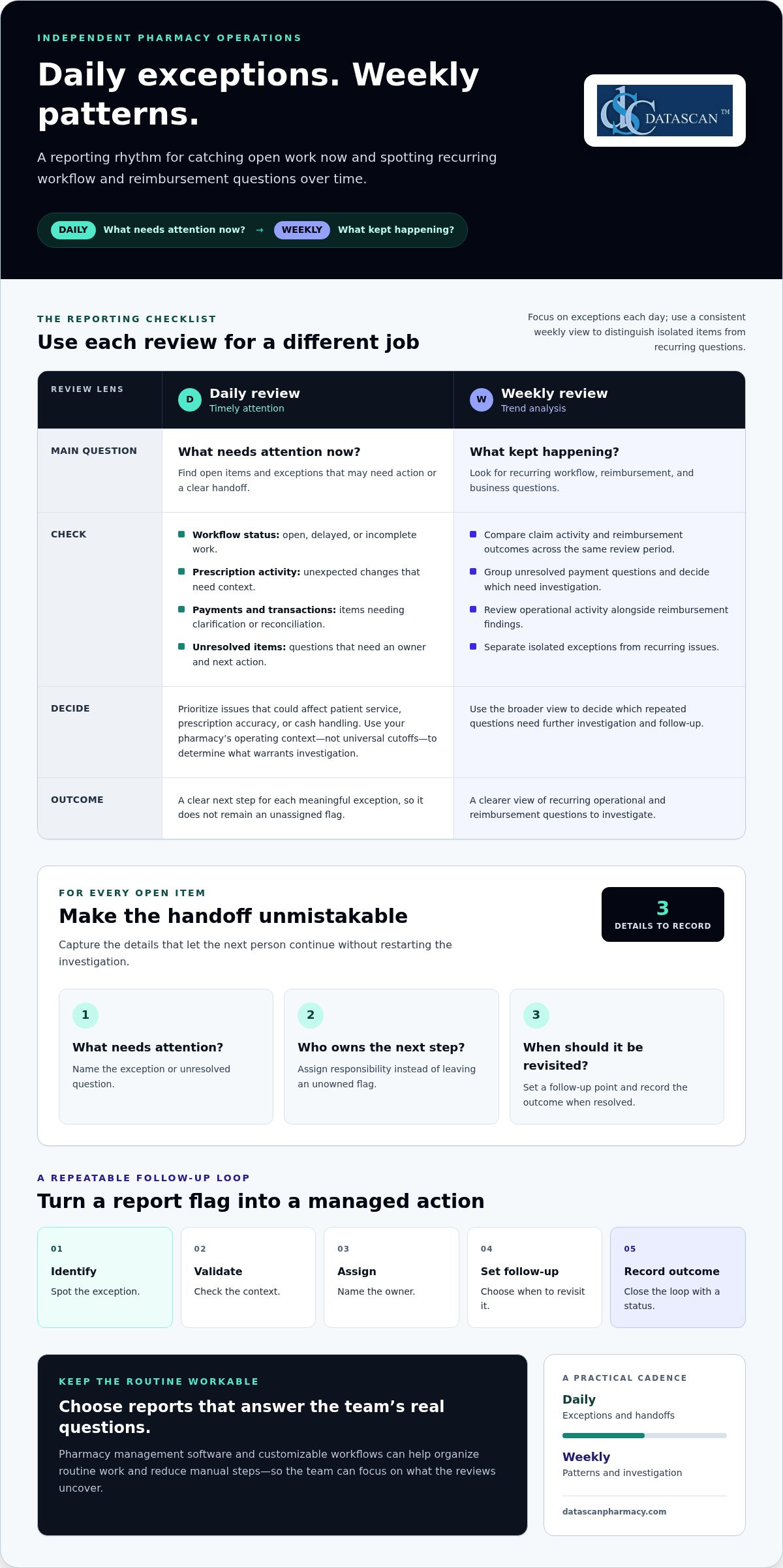
A useful pharmacy manager daily and weekly reporting checklist distinguishes operational oversight from trend analysis. Ask, “What needs attention now?” during the daily review. During the weekly review, ask, “What kept happening, and what should we investigate?” A pharmacy management system helps structure pharmacy operations. Choose reports that answer the questions your team needs to resolve.
Which daily reports help a manager catch issues early?
Focus on exceptions rather than scanning every data point. Review open or delayed workflow items, prescription activity that needs context, and unresolved payment or transaction questions. For each item, decide whether it needs action, then record the next step so it is not left as an unassigned flag.
- Workflow status: Find prescriptions or other work items that remain open, delayed, or incomplete.
- Prescription activity: Review unexpected changes and determine whether they need follow-up.
- Payments and transactions: Identify items that need clarification or reconciliation.
For each exception, record what needs attention, who owns the next step, and when it should be revisited. This gives the next person a clear handoff instead of an unassigned note.
What belongs in a weekly pharmacy review?
Use the weekly review to look beyond individual exceptions and assess patterns across a consistent period. Consider operational activity alongside reimbursement and business questions. CMS’s Medicare Part D rule effective January 1, 2024, requires nearly all pharmacy price concessions to be reflected in the negotiated price at the point of sale. Consistent attention to reimbursement outcomes and cash-flow signals is therefore a relevant management practice. The rule does not prescribe a particular review frequency.
- Compare claim activity and reimbursement outcomes across the same review period.
- Group unresolved payment questions and decide which need further investigation.
- Review operational activity alongside those findings to identify recurring issues.
Weekly analysis complements daily oversight; it does not replace it. Use the broader view to distinguish isolated items from recurring questions and assign follow-up. Pharmacy management software can help organize routine work, while a pharmacy management software workflow can support a repeatable review process.
Which reports should pharmacy managers check every day?
Check the daily information that helps you address workflow exceptions, transaction discrepancies, and unresolved items before they carry into the next shift. Prioritize issues that could affect patient service, prescription accuracy, or cash handling instead of treating every figure as equally urgent.
A practical daily checklist can include:
- Workflow exceptions: Find open, delayed, or incomplete work that needs review or staff follow-up.
- Prescription activity: Look for activity that appears unusual in context and decide whether it needs attention.
- Payment and transaction checks: Review transaction totals and exceptions as part of the pharmacy’s established closing process.
- Unresolved items: Carry open questions forward with a named owner and a clear next action.
Use your pharmacy’s operating context to decide what warrants investigation. A delayed item during a busy period may call for a different response than work that remains unresolved after an expected handoff. Avoid universal cutoffs that ignore the way your team works. The pharmacy manager daily and weekly reporting checklist should help distinguish meaningful exceptions from normal variation.
How should a manager review daily workflow and prescription activity?
Scan open or delayed work, identify where tasks are accumulating, and decide what support or follow-up is needed. The goal is to understand the workflow, not assign blame. For example, if prescriptions are waiting at one stage, identify what is holding them up and who can move the work forward. Pharmacy workflow tools can help teams organize repeatable processes. For broader management context, the American Pharmacists Association’s pharmacy management resource offers a professional reference point.
For every exception, capture three details: what needs attention, who owns the follow-up, and what action comes next. Add a brief status or outcome when the issue is resolved. That record gives the next person enough context to continue without restarting the investigation.
What daily payment and transaction checks are useful?
Compare transaction totals and exceptions with the pharmacy’s established closing process. If something does not align, note the item, identify who will review it, and follow the process for resolving it. A pharmacy point-of-sale system can support this operational check, but a daily transaction review is not a full profitability or accounting analysis.
Keep the routine proportionate to the day’s needs. A focused review that flags service, accuracy, or cash-handling concerns is more useful than an exhaustive scan that leaves no time for follow-up. Pharmacy management software and consistent workflows can support a repeatable review, while the manager applies local controls and judgment.
How can weekly reporting reveal reimbursement and business patterns?
Weekly reporting helps managers determine whether claim activity, reimbursement outcomes, and unresolved payment questions are isolated or recurring. A useful review connects those patterns to a specific question and a clear next step.
Daily reviews surface exceptions that may need timely attention. Weekly analysis adds context: it can show whether similar questions keep coming up, whether an operational bottleneck is repeating, or whether a change deserves a closer look. The pharmacy manager daily and weekly reporting checklist works best when these reviews have distinct purposes.
| Review focus | Daily monitoring | Weekly analysis |
|---|---|---|
| Claim activity | Flag an item that needs attention | Look for recurring changes or questions |
| Reimbursement outcomes | Record an exception for follow-up | Compare related information across a consistent period |
| Unresolved payment questions | Assign the next action | Check what remains open and whether similar issues recur |
| Operations | Address an immediate disruption | Identify repeated bottlenecks or shifts in activity |
How should pharmacy managers review PBM reimbursement patterns?
Choose a consistent review period and compare relevant claim and reimbursement information using your pharmacy’s records. Group similar open questions to see whether they share a pattern. Document what needs investigation and assign someone to follow up. A recurring discrepancy is a reason to examine supporting records and the reconciliation process, not proof that a particular amount will be recovered.
Ground the review in the information available to your pharmacy. Differences can have different causes, so avoid applying a universal benchmark across payers and claims. Note the details needed for follow-up, track whether each question is resolved, and carry open items into the next review. This creates a clearer record for management decisions without overstating what the data shows.
Which business trends deserve weekly follow-up?
Look for recurring operational bottlenecks, shifts in prescription or claim activity, and payment questions that remain unresolved. One unusual result may reflect a one-off circumstance; a pattern across the review period deserves investigation. Check the context before deciding whether to adjust a process, gather more information, or keep monitoring.
For broader financial context, compare operational observations with the concepts covered in the published Calculating Pharmacy Gross Profit: 2026 Guide. The goal is not to turn a weekly report into a full accounting review. Identify which questions merit deeper analysis and assign a practical next step. Pharmacy management software can help organize routine activity for review, while consistent records make it easier to discuss reimbursement concerns and operational changes with the right team members.
How do you turn pharmacy reports into clear follow-up actions?
A report becomes useful when each exception leads to a decision, an owner, and a recorded outcome. Verify what happened, decide how soon it needs attention, and make the next step visible so the issue does not disappear into the day’s workload.
Use this sequence for each item that needs follow-up:
- Identify the exception. Describe the specific workflow, transaction, or payment item that needs attention.
- Validate the context. Check the underlying transaction or workflow record before drawing a conclusion. An exception is a prompt to investigate, not proof of an error.
- Assign an owner. Name the person responsible for the next step so responsibility is clear.
- Set the follow-up point. Decide when to review the issue again based on its impact and the information still needed.
- Record the resolution. Note what you found and whether the item is resolved or needs further investigation.
What should a manager do when a report shows an exception?
Start with the source record and compare it with the relevant workflow or transaction context. If a payment question looks unusual, document what information needs to be reconciled before deciding what it means. Assign a team member to review or gather that information, set the next review point, and update the record when there is an answer. If the facts remain unclear, keep the item open with a defined next action.
Set timing according to potential impact rather than an invented universal threshold. An issue that could affect service, prescription accuracy, or cash handling may warrant same-day attention under the pharmacy’s own procedures. A recurring question without an immediate operational impact may fit the weekly review, where related items can be compared and further investigation considered. Let local controls and context guide the decision.
How can the team keep reporting manageable?
Reporting does not have to become a second workload. Use a short, repeatable checklist and capture only what moves an issue forward: what happened, who owns it, the next action, and the outcome. Match the review frequency to the decision. Address immediate exceptions promptly; assess broader patterns in the weekly review. Avoid reopening resolved items unless new information changes the picture.
Clear workflows make handoffs easier because team members can see what needs attention and what happens next. The published Pharmacy Workflow Optimization Software guide offers related workflow context, and pharmacy workflow software can help organize routine work consistently. Keep the pharmacy manager daily and weekly reporting checklist practical: review, assign, follow up, and close the loop.
For questions about how pharmacy technology can support clearer workflows and reporting routines, the Datascan team’s contact page provides a place to discuss your pharmacy’s needs.
How can pharmacy management software support a consistent reporting routine?
Pharmacy management software helps organize operational work and gives managers a more consistent basis for daily and weekly reviews. Its value comes from connecting routine information to a defined management question and follow-up process, not from reviewing every available data point.
A repeatable routine is easier to maintain when it fits the pharmacy’s dispensing and point-of-sale processes. For example, review workflow exceptions as part of an operational check, then assess reimbursement questions separately during the weekly review. Build the checklist around information your team can access and use reliably.
What should pharmacy managers look for in reporting workflows?
Start with the basics: Can the people who need the information access it? Does each review have a clear purpose? Is there a practical way to record who will follow up and what happens next? These questions help show whether the reporting routine supports decisions or simply adds another task to the workday.
Then consider how management software fits your current operations. The review process should work alongside dispensing and point-of-sale routines rather than creating disconnected steps. Pharmacy management software can organize operational work, while a customizable workflow can be shaped around the pharmacy’s needs. That flexibility matters because community pharmacies may have different handoffs and priorities.
- Accessible information: Team members can find what they need for the review.
- Clear purpose: Each review answers a specific operational or management question.
- Defined follow-up: Exceptions have an owner and a next step.
- Fit with existing routines: The process complements dispensing and point-of-sale work.
Technology can support consistency, but it does not replace management judgment. For PBM reimbursement monitoring, software can help organize routine pharmacy activity for review. Managers still need to examine relevant records, assess context, and decide which questions require follow-up. Focus on whether the information and workflow support the decisions your team needs to make.
How can managers take the next step?
Before discussing software, write down where the current routine breaks down. Note which daily issues are easy to miss, which weekly patterns are difficult to assess, and where follow-up ownership becomes unclear. Connect those gaps to the pharmacy’s broader workflow and reimbursement priorities. A short list of practical needs gives the conversation a clear starting point.
The pharmacy manager daily and weekly reporting checklist should remain useful as processes evolve. Datascan Pharmacy Software and customizable workflows help independent pharmacies organize routine work and reporting practices. The Datascan contact page is a place to discuss the workflow and reporting needs you have identified.
Make your reporting routine work for your pharmacy
A useful pharmacy manager daily and weekly reporting checklist should evolve with your team. As workflows, reimbursement questions, and management priorities change, revisit which information supports decisions and where follow-up gets stuck. This also helps you assess whether your pharmacy management software supports the routine your pharmacy needs.
Datascan is a family-owned company founded in 1981, with U.S.-based support. When planning a reporting cadence or refining existing workflows, bring your priorities and pain points into the discussion. A clear picture of what your team reviews, what it needs to follow up on, and what takes too much manual effort can guide the next step.
Talk with Datascan about your pharmacy’s reporting and workflow needs and take the next step toward a routine that gives your team clearer direction and more time to manage the work ahead.
Frequently Asked Questions
What should a pharmacy end-of-day report include?
A pharmacy end-of-day report should give the manager enough information to close out the day and hand off anything that still needs attention. Include relevant workflow status, prescription activity, transaction totals or exceptions, and open questions with their current status. A pharmacy manager daily and weekly reporting checklist helps make closeout consistent. Adapt it to your pharmacy’s closing process and the information your team uses.
How often should a pharmacy manager review PBM reimbursements?
Review reimbursement information on a regular weekly cadence to spot recurring questions, and look at an individual item sooner if it needs timely operational follow-up. Keep the review period consistent and retain enough claim context to investigate differences. A weekly review helps organize follow-up, but it does not by itself establish why a reimbursement outcome occurred.
Can pharmacy management software help reduce manual reporting work?
Pharmacy management software can organize routine operational information and support consistent workflows, reducing repeated manual steps. Agree on where staff record an exception and how its status is maintained, rather than copying information into several places. Software can support the routine, but the team still needs to review findings and decide what to do.
What should a manager do when pharmacy reports do not match?
First, check that the reports cover the same date range and type of activity. Then compare the underlying records, such as transaction details or claim status, to identify where the difference appears. A mismatch does not prove an error; timing, report scope, or an unresolved item may explain it. Record what you checked, assign any remaining investigation, and keep the issue open until its status is clear.
Is a weekly pharmacy report the same as a financial statement?
No. A weekly pharmacy report is a management tool for reviewing selected operating activity and identifying questions that need attention. A financial statement serves a broader accounting purpose and follows the pharmacy’s accounting process. A weekly review may help managers decide what financial information to examine more closely, but it is not a substitute for formal financial records, reconciliation, or advice from the pharmacy’s accounting professional.
Who should be responsible for reviewing pharmacy reports?
A designated manager should own the review routine and make sure findings lead to appropriate follow-up. Team members who handle a particular workflow or transaction can provide context or investigate an assigned item, while the manager tracks outstanding questions and confirms their status. Define responsibility in a way that fits your pharmacy’s roles and access controls. Clear ownership prevents duplicate work and helps ensure important findings are not overlooked.
How can a small pharmacy keep reporting manageable?
Keep the routine focused on a small set of decisions the team needs to make regularly. Choose a consistent place to record open items, skip information that does not support a current decision, and fold checks into existing operating routines where practical. Start with the reports your pharmacy already uses, then adjust the cadence if issues are being missed or reviews take too much time. A simple process the team follows is more useful than an exhaustive checklist.
 Kevin Minassian is the President of Datascan Software. Under his leadership, the company rapidly expanded to provide pharmacy management software on a national level. Over the last 15+ years, he has ensured that Datascan has continuously evolved to offer innovative solutions for independent pharmacies while still offering world-class customer support. He is passionate about helping independent pharmacies to remain competitive, achieve success, and offer the very best service to their communities.