What can a barcode check add to a dispensing workflow, and what can’t it do? For independent pharmacies, barcode verification in dispensing process can help compare the product selected with the medication information expected for a prescription. Staff still need to review exceptions and complete every required check.
A useful scan should fit naturally into the work, not become a box to tick or a step staff bypass when the pharmacy gets busy. Barcode verification can flag a mismatch, but it can’t replace professional judgment or prevent every error.
This guide explains where barcode checks can fit in dispensing, what information they may compare, and how to handle scan exceptions. It also covers practical ways to set up checkpoints and make responsibilities clear. Pharmacy management software can help organize dispensing information and workflow steps as part of broader pharmacy operations, without making the process fail-safe.
About the author: Datascan Pharmacy Software is a family-owned pharmacy software company that has served pharmacies since 1981.
Key Takeaways
- Barcode verification in dispensing process compares a scanned product identifier with information expected for a prescription.
- Choose scan checkpoints that fit your dispensing workflow, and define what staff should do when information doesn’t match.
- Barcode checks can support specific safety checks, but they can’t guarantee error-free dispensing or replace staff judgment.
- Map the current workflow, assign responsibility for exceptions, train staff, and establish downtime procedures to support consistent scanning.
- Pharmacy management software can help organize dispensing information and workflow steps within a broader operational process.
What does barcode verification in the dispensing process actually check?
Barcode verification in the dispensing process compares a readable product identifier with dispensing information expected for a prescription. It can flag a mismatch between the selected product and the product intended. The exact information compared depends on the pharmacy’s workflow, system configuration, and the identifiers on the package.
Barcode verification is a point-of-work check: it compares scanned product information with expected prescription details. It supports, but does not replace, professional review or guarantee error-free dispensing. A scan is one part of the safety process. Pharmacist review and final verification remain separate responsibilities, guided by pharmacy procedures and applicable requirements.
What information can a dispensing barcode check compare?
A scan may identify a product and compare it with information associated with the prescription, such as the intended medication, strength, or dosage form. Systems do not all compare the same fields, so pharmacy teams should understand what their own setup reads and checks.
In the United States, the National Drug Code (NDC) identifies the labeler, drug product, and package size. If the scanned product identifier doesn’t match the information the system expects, staff can pause, review the prescription and package, and resolve the discrepancy before proceeding. A mismatch is a reason to investigate, not proof of what caused the difference.
Barcode Medication Administration (BCMA) is a related safety concept, but medication administration checks and retail dispensing checks happen at different points in care. The Bar Code Medication Administration (BCMA) overview provides background on barcode checks in medication administration.
Where does barcode verification fit in a prescription workflow?
An independent or community pharmacy’s workflow may move from prescription entry to product selection, preparation, and final review. One practical scan point is product selection, where the team checks the stock package against the intended medication before using it to fill the prescription. The system’s configuration and the pharmacy’s procedures determine what happens next.
A pharmacy may add scans at other points, but there is no single sequence for every operation. Staff should know which step requires a scan, what information it compares, and who handles a mismatch. Clear instructions help keep checks practical during a busy day and prevent staff from treating a successful scan as a substitute for the full review.
Pharmacy management software and a well-designed workflow can help organize dispensing information and responsibilities. Learn how pharmacy workflow software can support a more consistent operational process.
How does barcode verification work at each dispensing checkpoint?
Barcode verification works as a defined checkpoint: staff scan when the workflow calls for it, the system compares the scan with relevant prescription information, and the result guides the next step. A pharmacy does not need to scan at every stage for the check to be useful. A match still doesn’t replace the pharmacist’s review.
A scan is useful only when it leads to a clear next action. Staff can continue after a routine match if the workflow allows it. A mismatch should pause the affected step until the team reviews and resolves it under pharmacy procedures.
Which dispensing steps can include a barcode scan?
In an independent or community pharmacy, possible scan points include product selection and preparation. The right sequence depends on how the pharmacy designs its workflow and configures its systems.
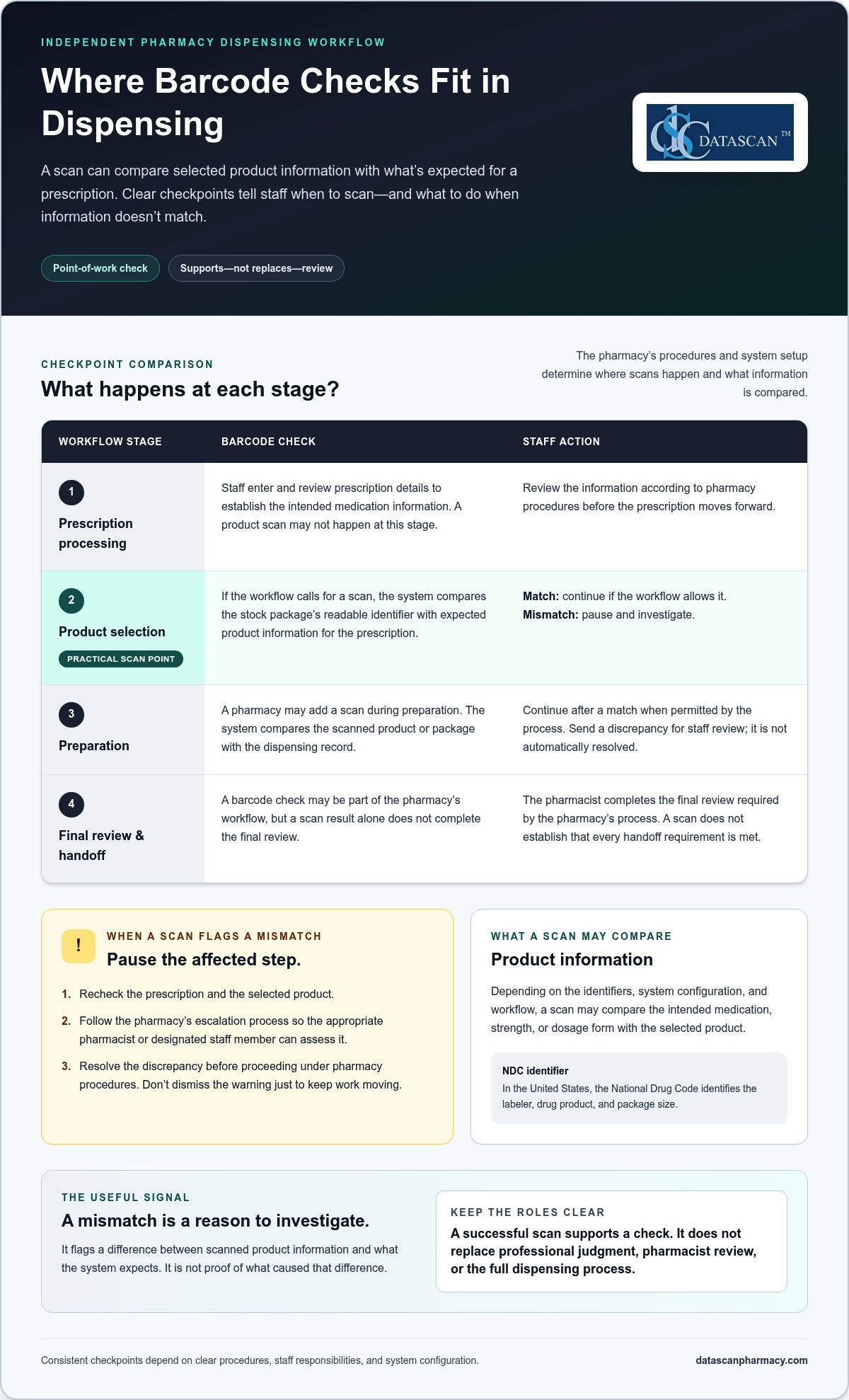
- Prescription processing: Staff enter and review prescription details. This establishes the intended medication information for later checks; a product scan may not happen at this stage. The prescription moves forward after staff review the information according to pharmacy procedures.
- Product selection: If the workflow calls for a scan, staff scan the selected stock package. The system compares its readable identifier with the expected product information available for the prescription. If the information matches, staff continue. If it doesn’t, they pause and investigate.
- Preparation: A pharmacy may include another scan during preparation. Staff scan the product or package specified by the local process, and the system compares it with the dispensing record. A match allows the workflow to continue. A discrepancy should go to staff for review, not be treated as automatically resolved.
- Final review and handoff: The pharmacist completes the final review required by the pharmacy’s process. A barcode check may be part of that workflow, but a scan result alone doesn’t complete the review or establish that every handoff requirement has been met.
The Indian Health Service’s clinical overview of BCMA explains barcode medication administration in a hospital setting. This context helps distinguish administration checks from the dispensing checkpoints a community pharmacy designs for its own operations.
What should staff do when a scan flags a mismatch?
Pause the affected step. Recheck the prescription and selected product, then follow the pharmacy’s escalation process so the appropriate pharmacist or designated staff member can assess the discrepancy. Don’t dismiss a warning just to keep work moving.
After review, document and resolve the exception according to pharmacy procedures before continuing. Clear ownership and consistent next steps make barcode verification in dispensing process more practical in daily operations. Pharmacy management software and customizable pharmacy workflows can help organize responsibilities and keep dispensing steps clear.
Can barcode verification prevent every dispensing error?
No. Barcode verification can support selected checks, but it can’t guarantee error-free dispensing. It may flag a discrepancy when the relevant product information is readable, encoded, and compared with the correct prescription data. It can’t confirm information it doesn’t scan or catch problems that happen outside the checkpoint.
For an independent pharmacy, a product scan might flag that the selected package doesn’t match the information expected for a prescription. But a scan can’t make an incorrect prescription record accurate, identify every problem with a label, or ensure staff complete a check if the workflow allows them to bypass it. The result is evidence about one specific comparison, not confirmation that the entire prescription is correct.
What can barcode verification help catch, and what can it miss?
The check’s value depends on what information is encoded and what the system is configured to compare. A mismatch can prompt staff to stop and look closer. A successful scan indicates only that the scanned data matched the data used for that particular check.
Risks remain if a label is unreadable, the information in the system is incorrect, or an error occurs at a step that isn’t scanned. A scan also can’t resolve conflicting information on its own. Staff need a clear procedure for investigating a warning rather than assuming the system has identified its cause.
| Check or limitation | What it means | Staff response |
|---|---|---|
| Product information matches | The scanned identifier agrees with the information compared at that checkpoint. | Continue with the workflow and complete the remaining review steps. |
| Information doesn’t match | The scan has flagged a discrepancy, but not necessarily its cause. | Pause the affected step and review the prescription and selected product. |
| Label won’t scan | The product information can’t be read at that moment. | Follow the pharmacy’s procedure for failed scans; don’t treat the failure as a match. |
| Issue falls outside the check | The relevant information may not be encoded, compared, or scanned. | Use the pharmacy’s normal review and escalation process. |
Does barcode scanning replace pharmacist review?
No. Scanning supports a process; it doesn’t replace professional review. If scan results fail, conflict with the prescription, or raise an exception, a pharmacist or designated staff member must assess the information and follow pharmacy procedures. The barcode verification in dispensing process is one safeguard within a broader workflow, not a substitute for trained judgment. Clear roles help staff use scan results appropriately while keeping the full review intact.
How can a pharmacy build barcode checks into daily dispensing?
Build barcode checks around the dispensing steps your team already follows. Map the current process, select clear scan points, assign responsibility for exceptions, and train staff. A practical design makes checks easier to follow without adding duplicate steps or treating a scan as a substitute for professional judgment.
- Map the current workflow. Trace a prescription from entry through product selection, preparation, review, and handoff. Note where staff already confirm product information and where a barcode scan could reinforce that step.
- Define scan points. Specify what staff scan, what information is compared, and what to do after either a match or a mismatch. Keep the sequence clear and consistent with pharmacy procedures.
- Assign exception ownership. Decide who handles a mismatch, unreadable barcode, or system interruption. Staff should know when to pause, who to involve, and how to record the resolution under pharmacy procedures.
- Review and refine. Gather staff feedback and look for confusing handoffs, unnecessary duplicate work, or steps that are difficult to complete during busy periods.
How should a pharmacy prepare staff for barcode checks?
Explain each checkpoint in plain, role-specific language: what to scan, what the system compares, and what to do next. Practise routine matches, mismatches, and unreadable-barcode scenarios before relying on the workflow. Ask staff to identify delays, unclear responsibilities, or duplicate steps. Their feedback can help managers refine the process and keep the purpose of each check clear.
Document a downtime procedure as well. Staff need to know how to handle dispensing steps when the scanner or related system is unavailable, including how to record the issue and resume the normal process. Follow applicable pharmacy procedures rather than improvising a workaround.
How can pharmacies review whether the workflow is working?
Review exception patterns, scan failures, and workflow interruptions over time. Track an indicator only if the pharmacy can define it consistently and explain what it does, and doesn’t, show. For example, a rise in unreadable scans is an operational signal to investigate labels or workflow conditions, not proof of a particular clinical outcome. Periodically look for skipped scans or workarounds, then address the cause with staff.
Good workflow design should support consistent dispensing while protecting staff time for the broader demands of pharmacy operations. Explore this pharmacy workflow optimization guide for ways to consider process design alongside pharmacy management software. To discuss your pharmacy’s workflow with Datascan, start a conversation about your dispensing process.
How can pharmacy management software support a safer dispensing workflow?
Pharmacy management software can organize prescription information and support consistent workflow steps, helping staff follow a clear process from intake through final review. It is part of the pharmacy’s broader operations, not a guarantee against errors or proof that a particular barcode-verification feature is available.
For independent pharmacies, the practical value is clarity: staff can work with organized information, understand the next step, and know how exceptions should move through the team. Barcode verification in dispensing process is one potential checkpoint within that larger workflow. A scan supports only the information and comparison configured for it; staff still need clear responsibilities and review procedures.
Explore pharmacy management software and pharmacy workflow software to see how system organization and adaptable workflows fit into day-to-day pharmacy operations.
What should independent pharmacies look for in dispensing workflow support?
Look for workflow support that can adapt to your pharmacy’s operations, clarify task ownership, and give staff a defined path for handling exceptions. The goal isn’t to add software steps for their own sake. It’s to make routine work more consistent and reduce avoidable confusion, so the team can protect time for patient-care priorities and the other responsibilities of running a pharmacy.
If you’re considering broader system changes, start by documenting how work moves through the pharmacy today. Identify where information is entered, where staff hand off a task, and what happens when a detail doesn’t match. This simple map can help shape an implementation plan around real operational needs rather than assumptions.
How can pharmacies take the next step?
Choose one dispensing workflow to map. Identify where verification matters most, who owns each step, and how exceptions should be handled. This focused review gives your team a practical starting point before changing a wider process.
Datascan has served pharmacies since 1981, bringing longstanding experience with the operational needs of independent and retail pharmacies. For a low-pressure conversation about how your workflow is organized, discuss your pharmacy workflow with Datascan.
Make Every Dispensing Check Part of a Clear Workflow
Barcode verification works best when it is built into defined dispensing steps, with a clear response for matches, mismatches, and failed scans. It can help staff compare product information, but it doesn’t guarantee error-free dispensing or replace professional review. The value of barcode verification in dispensing process depends on how well the check fits the pharmacy’s real workflow and how consistently staff act on its results.
For independent and community pharmacies, start by mapping one workflow, setting practical scan points, and assigning responsibility for exceptions. Pharmacy management software and customizable workflows can help organize information and clarify steps, while staff keep their time and judgment focused on the full demands of pharmacy operations.
Datascan is a family-owned pharmacy software company serving pharmacies since 1981, with U.S.-based support. If you’re considering how your systems and processes can better support your team, discuss your pharmacy workflow with Datascan. A thoughtful, practical workflow is a strong step toward more consistent daily operations.
Frequently Asked Questions
What does barcode verification check in the dispensing process?
Barcode verification compares a readable product identifier with information expected for a prescription. Depending on the pharmacy’s workflow and system setup, a scan may help check whether the selected product matches details such as the medication, strength, or dosage form. In the United States, an NDC identifies the labeler, drug product, and package size. A match applies only to the information actually scanned and compared.
How does barcode verification work in a pharmacy?
Staff scan a medication package at a checkpoint selected by the pharmacy, often during product selection or preparation. The system compares the scanned identifier with expected dispensing information available for that step. If the details match, staff continue with the workflow and remaining review. If they don’t, the team pauses the affected step and follows its procedure to investigate and resolve the mismatch.
Does barcode scanning replace pharmacist verification?
No. Barcode scanning supports a dispensing process; it doesn’t replace pharmacist review or professional judgment. A scan compares specific information, while a pharmacist’s review considers the prescription and the broader context required by pharmacy procedures. If scan results conflict with the prescription, a barcode won’t read, or an exception arises, staff should pause and follow the pharmacy’s process for review and escalation.
What should pharmacy staff do when a barcode will not scan?
Pause the affected step and follow the pharmacy’s procedure for a failed scan. Staff should not treat an unreadable barcode as a successful match or bypass the check without an approved process. Review the prescription and selected product, then involve the appropriate pharmacist or designated team member. Follow established downtime steps, document and resolve the exception as required by pharmacy procedures, and resume the workflow only when appropriate.
Can pharmacy management software support barcode verification workflows?
Pharmacy management software can help organize prescription information, clarify workflow steps, and support consistent handling of exceptions. Its role depends on the software’s capabilities and configuration, so don’t assume every system includes barcode scanning or product verification. Barcode verification in dispensing process still requires a defined scan point, clear staff responsibilities, and appropriate review. Software supports the broader workflow, but it doesn’t guarantee error-free dispensing.
 Kevin Minassian is the President of Datascan Software. Under his leadership, the company rapidly expanded to provide pharmacy management software on a national level. Over the last 15+ years, he has ensured that Datascan has continuously evolved to offer innovative solutions for independent pharmacies while still offering world-class customer support. He is passionate about helping independent pharmacies to remain competitive, achieve success, and offer the very best service to their communities.