Clinical services work best when their workflows fit the pharmacy’s day instead of adding another layer of manual tasks. Pharmacist clinical workflow tools help organize medication therapy management (MTM), documentation, and patient follow-up alongside daily pharmacy operations.
For independent pharmacists, dispensing, staffing, and reimbursement pressures can leave little time to coordinate care consistently. The goal is not simply to add software. It is to make patient-care tasks easier to see, assign, and complete within the pharmacy’s existing processes.
This article explains which clinical workflow steps technology can support, how to compare tools, and how pharmacy management software with customizable workflows can help bring clinical and operational tasks together.
Key Takeaways
- Separate clinical-care workflows from dispensing, inventory, and retail tasks, then identify where handoffs need attention.
- Use pharmacist clinical workflow tools to track care opportunities, assign next steps, and organize documentation without replacing clinical judgment.
- Compare tools by task visibility, documentation, follow-up, and how well they fit your pharmacy’s actual processes.
- Map the current process, identify points of friction, define requirements, then test and review a focused workflow change.
- Consider how pharmacy management software and customizable workflows can connect clinical tasks with broader pharmacy operations.
How do clinical workflow tools help pharmacies?
Pharmacist clinical workflow tools organize patient-care tasks, documentation, and follow-up. Pharmacy management software can also help connect this work with broader pharmacy operations. For independent pharmacies facing pressure on pharmacist time and reimbursement, organized records make it easier to review completed work and locate relevant information. Software does not determine payment or guarantee reimbursement.
Clinical workflows are distinct from dispensing, inventory, and front-end retail workflows, even when they interact. A pharmacy management system supports pharmacy operations broadly, while clinical workflows structure care activities such as medication reviews and follow-up. PBM reform discussions have also drawn attention to PBM practices and their effects on pharmacies. The Federal Trade Commission’s report on pharmacy benefit managers provides context for that scrutiny.
Which pharmacy tasks count as clinical workflow?
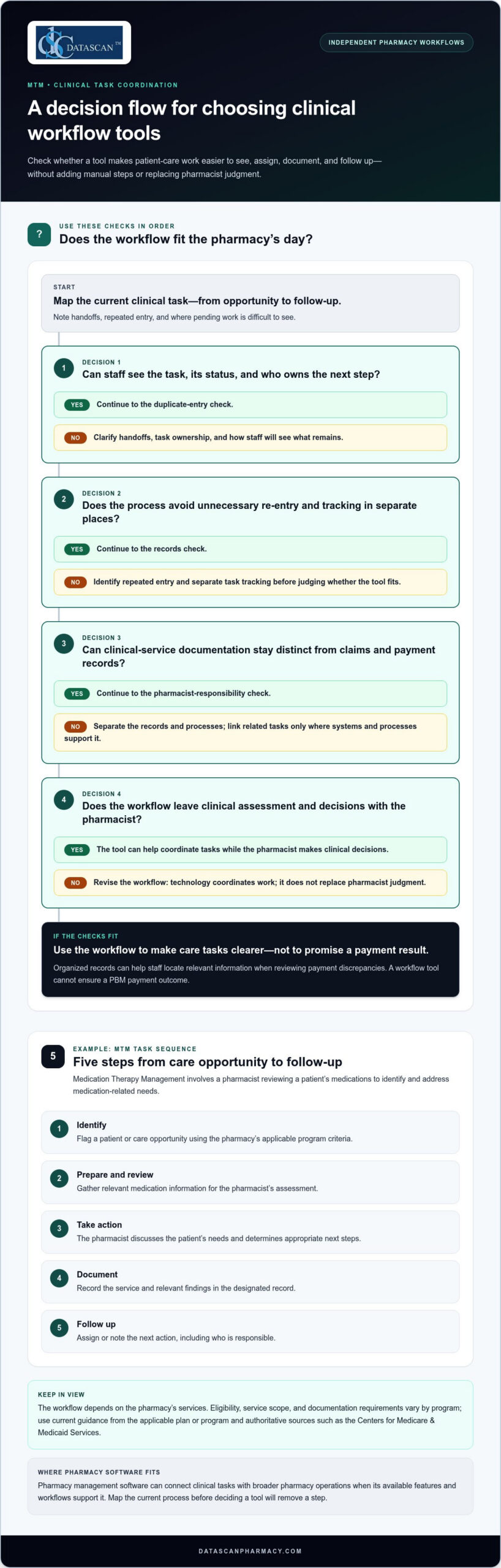
A clinical workflow can begin with identifying a patient-care opportunity and continue through preparation for a medication review, service documentation, and follow-up. The steps depend on the services your pharmacy provides. Make task ownership and status visible so staff can coordinate handoffs and see what remains. Keep clinical-service documentation distinct from claims and payment records, while linking related tasks where your systems and processes support it.
- Identify: Flag a care opportunity for attention.
- Review: Prepare relevant information for the pharmacist.
- Document: Record the service and relevant details.
- Coordinate: Assign the next action and its owner.
Technology can coordinate tasks, but the pharmacist remains responsible for clinical assessment and decisions. For reimbursement review, organized records can help staff locate relevant transactions or documentation when examining payment discrepancies. The information available depends on the pharmacy’s systems and workflow, and no workflow tool can ensure a PBM payment outcome.
How do MTM and e-care plans fit into the workflow?
Medication Therapy Management (MTM) is a pharmacist service that includes reviewing a patient’s medications to identify and address medication-related needs. Depending on the pharmacy’s services and applicable program requirements, the workflow may include preparation, review, documentation, care-plan updates, and follow-up. Medication synchronization and e-care plans are also useful activities to include when mapping patient-care tasks alongside routine operations. Define the steps around the services your pharmacy provides, then assess whether technology makes those steps clearer without requiring unnecessary entry or mixing clinical documentation with reimbursement reconciliation.
How can clinical workflow tools support MTM without adding more manual work?
Clinical workflow tools make MTM tasks easier to see and coordinate, but they do not make clinical decisions for the pharmacist. Their value depends on how well they fit the pharmacy’s process. If staff must re-enter information or track tasks in separate places, the technology can add work instead of reducing it.
What are the main steps in an MTM workflow?
Medication Therapy Management (MTM) involves a pharmacist reviewing a patient’s medications to identify and address medication-related needs. A practical workflow might include these steps:
- Identify: Flag a patient or care opportunity using the pharmacy’s applicable program criteria.
- Prepare and review: Gather relevant medication information for the pharmacist’s assessment.
- Take action: The pharmacist discusses the patient’s needs and determines appropriate next steps.
- Document: Record the service and relevant findings in the designated record.
- Follow up: Assign or note the next action, including who is responsible.
Eligibility, service scope, and documentation requirements vary by program. Use current guidance from the applicable plan or program and authoritative sources, such as the Centers for Medicare & Medicaid Services, when defining your process.
Where can technology reduce workflow friction?
Look for repeated handoffs, follow-ups that are easy to overlook, and records staff must search for across separate systems. A visible task sequence can show what is pending, what has been documented, and where a handoff is needed. Pharmacy management software can reduce duplicate entry when its workflow and available features support using information across connected tasks. Map the current process before deciding that a tool will eliminate a step.
For independent pharmacies, pharmacy workflow software provides a configurable structure for organizing operational tasks. The aim is clearer coordination, with the pharmacist retaining responsibility for clinical assessment and decisions.
How should pharmacies discuss PBM-related clinical work?
Keep clinical-service documentation distinct from prescription claims adjudication and payment reconciliation. An MTM service record supports the pharmacy’s documentation process, but it does not establish that a PBM will pay a particular amount or reimburse the service. PBM reimbursement pressures make careful organization valuable. Pharmacist clinical workflow tools coordinate tasks, not reimbursement outcomes.
Review whether each step has a clear owner, whether information is entered more than once, and how the team sees pending follow-up. Make changes only where the software’s capabilities support them, then confirm that the revised process still meets the relevant program’s requirements.
Which clinical workflow tools should an independent pharmacy compare?
Compare pharmacist clinical workflow tools against real tasks in your pharmacy, not the length of a feature list. Check whether staff can see pending work, record care activities, coordinate follow-up, adapt the process to your services, and avoid entering the same information in multiple places.
| What to compare | What it means in practice |
|---|---|
| Workflow visibility | Can staff tell which clinical tasks are pending, in progress, or ready for a handoff? |
| Documentation | Can the team record the service and its next action consistently? |
| Follow-up | Is it clear what needs to happen next and who is responsible? |
| Customization | Can the workflow reflect the pharmacy’s actual services and division of work? |
| System fit | Does clinical work connect sensibly with pharmacy operations, patient communication, and existing records, or does it create duplicate entry? |
Does the tool fit the pharmacy’s clinical services?
Start with services you provide or plan to organize, such as MTM, medication synchronization, and care-plan activities. Separate essential needs, such as recording a completed review or assigning follow-up, from optional functions. A tool should support your process without requiring staff to maintain a parallel workflow. For broader context on pharmacy management software, see Datascan’s pharmacy management software.
Can staff see and coordinate the work?
Trace a task from its starting point to the next action. Can the right team member identify what is waiting, understand their responsibility, and see whether follow-up remains open? Consider how the clinical process intersects with dispensing and patient communication, while keeping those workflows distinct where needed. Review the steps in the system itself rather than relying on a feature label to explain how they work.
What evidence should support a tool’s claims?
Evaluate the tool using a representative pharmacy workflow, such as identifying a care opportunity, documenting the pharmacist’s action, and recording follow-up. Check that claims about documentation or program requirements align with current authoritative guidance. Watch for repeated information entry and confirm that staff can follow the task sequence clearly.
Choose the tool that fits your pharmacy’s clinical workflow, not the one with the longest feature list. This keeps the comparison grounded in daily operations and your team’s needs.
How can a pharmacy map and improve its clinical workflow?
Map the clinical process your team follows before changing software or adding steps. A practical review shows where ownership is unclear, information is entered more than once, or follow-up stalls. Use those findings to focus pharmacist clinical workflow tools on real operational needs. Keep the plan workable for your staff and the time you can give it.
How do you map the current clinical process?
Choose one service, such as an MTM review or care-plan follow-up, and write down each step from identifying the patient-care task through completing the next action. Include handoffs between the pharmacist and other team members. Keep the map simple enough to reflect a normal workday, not just an ideal process.
- Record who starts the task and what prompts it.
- Note what information staff need and where they document it.
- Mark repeated entry, unclear ownership, and delayed next steps.
- Show how the team records completion or assigns follow-up.
Use only the information needed for the review, and follow your pharmacy’s procedures for protecting patient information. A workflow map should clarify the process without becoming an informal record containing unnecessary patient details.
How should a pharmacy test a workflow change?
Define the problem before selecting a solution. If follow-up tasks are often left unclear, for example, test a change that makes responsibility and status easier to track. Decide what you will observe in advance, such as whether each task has an owner and whether the next action is documented. Avoid arbitrary time-saving targets or assuming a change worked without pharmacy-specific evidence.
Get feedback from the staff who use the process, including team members managing dispensing alongside clinical services. If a new step creates extra entry or interrupts work at a busy point in the day, revise it. The goal is a process the team can follow consistently, not a more elaborate workflow diagram.
When should a pharmacy revisit its workflow?
Review the process when services, staffing, or operating needs change, or when recurring issues show that the current steps no longer fit. Pharmacy management software with customizable workflow capabilities can help align task sequences with the way your pharmacy works. Let the process guide the configuration, not the other way around. Keep this review focused on clinical tasks rather than broader software-conversion decisions.
If you’re ready to review how your pharmacy handles clinical tasks, discuss your pharmacy workflow with Datascan.
How can Datascan pharmacy management software support clinical workflows?
Datascan pharmacy management software includes customizable workflow capabilities that pharmacies can assess against their clinical services, staff responsibilities, and daily processes. Use those capabilities to consider whether a workflow can reflect how your team handles tasks. Software does not make clinical decisions or guarantee a particular result.
What should a pharmacy look for in customizable workflow?
Start with the process you mapped: what initiates a task, who handles each step, what needs documenting, and how follow-up is assigned. Then assess whether a workflow can be adapted to those needs without adding unnecessary steps or duplicate entry. A pharmacy providing MTM, medication synchronization, or care-plan services may have different coordination needs from a pharmacy offering a different mix of services.
Datascan offers pharmacy workflow software with customizable workflow capability. Use your pharmacy’s process as the reference point when considering how that capability fits your team’s work.
How does pharmacy management software fit clinical services?
Clinical tasks take place alongside dispensing and other pharmacy operations, so consider how a system fits into the broader management process. Datascan’s pharmacy management software serves independent and retail pharmacies. Medication synchronization and e-care plans are relevant activities to include in a workflow discussion. Map the steps your pharmacy needs for each activity, including documentation and follow-up, rather than assuming a particular sequence or outcome.
Compare the system with the criteria established earlier: whether staff can understand pending work, record necessary information, coordinate next steps, and avoid needless re-entry. Consider how the workflow fits available staff capacity. For independent pharmacy owners balancing dispensing, operations, and reimbursement pressures, a clear, practical process matters more than added complexity.
What is the next step for evaluating fit?
Bring a specific workflow challenge to the discussion, such as unclear task ownership, fragmented follow-up, or repeated documentation. Include the staff roles involved, the steps you want to support, and the information the team needs to record. A focused conversation makes it easier to assess how Datascan’s customizable workflow aligns with your pharmacy’s processes, without presuming a clinical or reimbursement result.
Talk with Datascan about your pharmacy’s workflow and the clinical tasks your team wants to organize.
Build a Clinical Workflow That Fits Your Pharmacy
Effective pharmacist clinical workflow tools make patient-care tasks easier to organize while keeping clinical judgment in the pharmacist’s hands. Start by mapping your current process, then compare tools by task visibility, documentation, follow-up, and fit with your pharmacy’s services and staffing.
For independent pharmacies balancing patient care with daily operations and PBM pressures, the right workflow supports coordination without promising reimbursement or adding unnecessary steps. Datascan pharmacy management software includes customizable workflow capabilities, which your team can assess against the processes it needs to manage. Datascan has been family-owned and operated since 1981, with U.S.-based technical support.
A focused conversation can clarify your workflow priorities and system-fit questions. Talk with Datascan about your pharmacy’s clinical workflow and the processes your team wants to support. Start with the way your pharmacy works today.
Frequently Asked Questions
What are pharmacist clinical workflow tools?
Pharmacist clinical workflow tools organize patient-care tasks, including identifying a care opportunity, preparing for a medication review, documenting the service, and coordinating follow-up. They are distinct from dispensing, inventory, and retail workflows, though pharmacy management software may support both clinical and operational work. These tools help staff coordinate tasks; pharmacists retain responsibility for clinical judgment. For a broader overview of MTM in Medicare, see Medicare’s description of Medication Therapy Management programs.
How can pharmacy software support medication therapy management?
Pharmacy software can organize the administrative steps around Medication Therapy Management (MTM), a medication review service for eligible Medicare Part D enrollees. A pharmacy might use a workflow to track preparation, document the review, and record follow-up. Program details and eligibility criteria can vary, so use current guidance. Medicare explains MTM program basics, while CMS provides program requirements for Part D sponsors.
Can workflow tools help independent pharmacies save pharmacist time?
Workflow tools can reduce avoidable effort when they make tasks visible and help prevent unnecessary duplicate entry. A clear process, for example, can show who owns a follow-up and whether documentation remains to be completed. The effect depends on the pharmacy’s process and the tool’s actual capabilities. Review the workflow with staff, identify repeated steps, and assess changes using your pharmacy’s own observations rather than assuming a particular time saving.
What should an independent pharmacy look for in clinical workflow software?
Look for support for your services and daily processes: visible pending tasks, consistent documentation, clear follow-up ownership, customization, and fit with broader pharmacy operations. Test the system using a representative task, such as moving from a care opportunity to a documented next action. Check whether staff must re-enter information or switch between disconnected processes. Prioritize a workflow your team can use, and verify program requirements against current CMS or payer guidance.
How do clinical workflows relate to PBM reimbursement?
Clinical workflows organize care tasks and service documentation. They do not determine prescription claims adjudication or guarantee PBM reimbursement. Keep clinical-service records distinct from claims processing and payment reconciliation. PBM contract and payment practices are separate from documenting patient care. The Federal Trade Commission’s report on pharmacy benefit managers provides context on PBM practices, but software cannot promise a payment amount or change contract terms.
Can pharmacy management software support e-care plans and medication synchronization?
Pharmacy management software can help organize workflows related to patient-care activities and routine pharmacy operations. Datascan identifies e-care plans and medication synchronization among its feature areas. The workflow should reflect the pharmacy’s services and operating process, including the tasks staff need to coordinate. For Medicare MTM, use current Medicare program information and applicable sponsor guidance rather than assuming one documentation process applies to every service.
How can a pharmacy tell whether a workflow tool is adding extra steps?
Trace a real task from start to finish and note each handoff, information entry, and staff action. Repeatedly entering the same details, tracking status elsewhere, or unclear responsibility for the next step can signal extra work. Ask staff where the process feels duplicated or confusing, then compare the actual workflow with the intended one. Review changes against applicable documentation procedures and program guidance, including current CMS guidance for Medicare Part D MTM where relevant.
 Kevin Minassian is the President of Datascan Software. Under his leadership, the company rapidly expanded to provide pharmacy management software on a national level. Over the last 15+ years, he has ensured that Datascan has continuously evolved to offer innovative solutions for independent pharmacies while still offering world-class customer support. He is passionate about helping independent pharmacies to remain competitive, achieve success, and offer the very best service to their communities.