
Reconciling PBM payments means checking claim-level payment details against remittance records, bank deposits, and the contract terms that apply. A deposit can look reasonable overall while individual claims are short-paid or missing, so comparing those records is more informative than relying on a lump-sum total.
That comparison can take time. Claim records and payment statements may use different references or cover different periods, and unexplained differences need investigation. A consistent method helps your team distinguish items that warrant follow-up from routine timing differences or documented adjustments.
This guide explains how to match claims to payments, check amounts against contract details, investigate common discrepancies, and document findings. It also covers how to prioritize variances so your team can focus its effort where it is most useful.
A repeatable workflow makes the work easier to manage. Pharmacy management software can support organized pharmacy operations, while clear procedures help reduce repetitive administrative work. The goal is a process that fits your pharmacy, not an assumption that software automatically detects or resolves PBM payment issues.
Author bio: The Datascan Pharmacy Software editorial team covers pharmacy operations and software for independent and retail pharmacies.
Key Takeaways
- Compare claim records, remittance information, deposits, and the contract terms that apply to understand what was paid.
- When reconciling PBM payments, treat differences as items to review, not automatic proof of recoverable underpayments.
- Prioritize discrepancies by amount, recurrence, available documentation, contract relevance, and any applicable filing deadlines.
- Use a repeatable process to gather records, match claims, investigate variances, document findings, and track follow-up.
- Review whether your pharmacy management software and workflows can help organize reconciliation records and reduce repetitive administrative work.
What does reconciling PBM payments mean for a pharmacy?
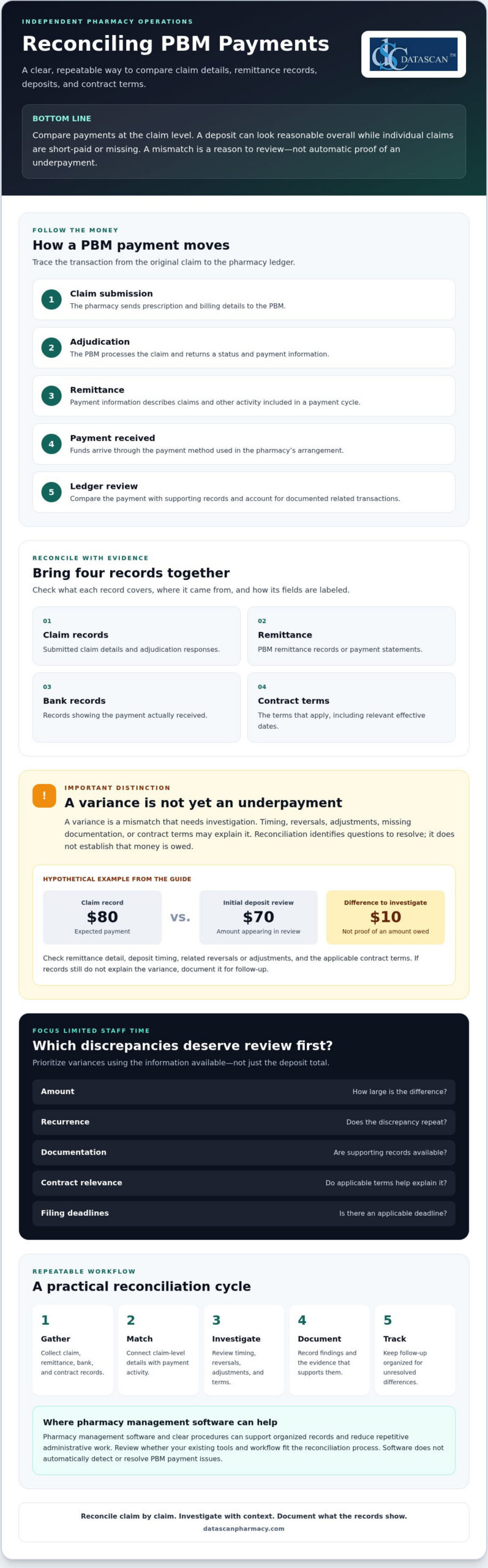
Reconciling PBM payments means comparing the money received with claim-level records and the PBM contract terms that apply. The goal is to find differences that need review, not to assume every mismatch is an error or that every amount can be recovered.
Payment information develops across several stages. At adjudication, the pharmacy receives a response showing how the claim processed and the payment information calculated at that point. Remittance information later describes payment activity, while the bank deposit confirms the cash received. Reversals, adjustments, or other transactions may affect the amount ultimately deposited. For background on the role of a Pharmacy Benefit Manager (PBM), see the Federal Trade Commission’s interim staff report on prescription drug middlemen, which examines PBMs’ role in the prescription drug supply chain.
A deposit total alone may not show how individual claims contributed to the payment. Comparing the underlying records supports cash-flow monitoring, gross profit review, and reliable documentation for questions or follow-up. It also helps pharmacy owners direct limited staff time toward differences with a reasonable basis for investigation.
Which records should a pharmacy compare?
Gather the records available through your pharmacy and PBM arrangements. Formats and access vary, so confirm where each record comes from, what period it covers, and how its fields are labeled.
- Submitted claim details and adjudication responses
- PBM remittance records or payment statements
- Bank records showing the payment received
- Relevant contract terms, including the effective dates that apply to the claims under review
Keeping these sources organized through a defined process or with pharmacy management software can make it easier to trace a difference back to the supporting records.
What is the difference between a payment variance and an underpayment?
A variance is a mismatch that needs investigation. It becomes a potential underpayment only after the pharmacy checks whether timing, a reversal, an adjustment, missing documentation, or applicable contract terms explain the difference. Reconciliation identifies questions to resolve. It does not establish that money is owed.
Hypothetical example: A claim record shows an expected payment of $80, while an initial deposit review appears to show $70. Before treating the $10 difference as an underpayment, check the remittance detail, deposit timing, any related reversal or adjustment, and the contract terms that apply. If the records still do not explain the variance, document it for follow-up.
How does a PBM payment move from claim to pharmacy deposit?
A PBM payment generally moves through five stages: the pharmacy submits a claim, receives an adjudication response, gets remittance information, receives payment, and reviews the transaction in its ledger. Following that sequence helps staff connect the original claim to the money received instead of trying to explain a deposit total in isolation.
- Claim submission: The pharmacy sends prescription and billing details to the PBM.
- Adjudication: The PBM processes the claim and returns a status and payment information.
- Remittance: The PBM provides details about claims and other payment activity included in a payment cycle.
- Payment: Funds arrive through the payment method used in the pharmacy’s arrangement.
- Ledger review: Staff compare the payment with supporting records and account for related transactions where documented.
The sequence can become less straightforward when a claim is reversed and rebilled, an adjustment appears later, or records cover different processing periods. A claim may appear in one report while its related transaction appears elsewhere. Files, timing, and terminology depend on the PBM and pharmacy arrangements, so use the pharmacy’s actual records rather than assuming every payer follows the same format.
What claim and remittance fields help with matching?
Use the strongest matching details available in both records. These may include a prescription or claim reference, service date, claim status, paid amount, and adjustment details. Compare claim-level activity rather than relying on the remittance total. Check the field names, file formats, and available information in your pharmacy’s PBM and payment records, since labels and data availability can differ.
Why may a remittance total differ from a bank deposit?
A mismatch between a remittance and a deposit is a signal to investigate, not a diagnosis. Payment timing, grouped transactions, reversals, adjustments, or incomplete records may explain the difference. Check whether the records cover the same payment period and whether a transaction is recorded separately before concluding that a claim-level variance remains unresolved.
For example, activity on a remittance may settle on a different banking date than expected. Compare the remittance date, payment reference, deposit record, and any associated claim changes. Track timing differences separately from unresolved variances to keep the follow-up list focused.
For Medicare Part D transactions, confirm current payment and price-concession interpretations against applicable CMS guidance before applying them to a reconciliation process. Policy details can affect how records are understood, so do not rely on an outdated summary.
A defined workflow can make these checks easier to repeat. If you’re reviewing whether your pharmacy software and processes support organized payment records, you can discuss your workflow with Datascan.
Which PBM payment discrepancies should a pharmacy investigate first?
Not every difference is an underpayment, and not every variance needs the same immediate effort. Prioritize items that are large, recurring, supported by clear records, connected to a specific contract term, or approaching an applicable filing or dispute deadline. This gives your team a consistent way to focus its review without treating an unexplained amount as proof that the PBM owes money.
For each item, compare the expected reimbursement with the contract terms that apply to the claim, including the relevant effective date, and check the documented claim facts. Do not apply one PBM’s reimbursement method to another. When reconciling PBM payments, keep unresolved items distinct from differences your records explain.
| Potential issue | Possible explanation | Next verification step |
|---|---|---|
| Payment appears missing | It may be included in a different payment period or linked to another transaction record. | Search by available claim references and service date, then compare the related remittance and deposit records. |
| Repeated difference for similar claims | A contract term, fee schedule, or processing detail may affect the calculation. | Check the claim facts and applicable contract language, then compare other claims processed under the same terms. |
| Apparent MAC pricing mismatch | The applicable list, effective date, or claim details may not match the comparison being made. | Verify the relevant MAC terms, effective date, and claim information before treating the difference as an error. |
| Negative amount or adjustment | A reversal, rebill, or other adjustment may be recorded separately. | Look for a related transaction and confirm whether the records support the adjustment. |
Could the difference come from a reversal, adjustment, or timing issue?
Check whether a related reversal, rebill, or adjustment appears under a separate reference or in another payment period. Match transaction references and service dates where your records allow. If the records explain the difference, document the reason and close the review item. If they do not, keep it open and note what information is missing.
How can contract terms help identify a potential underpayment?
Use the contract and applicable fee schedule to determine the reimbursement terms for the claim. Check the effective date and any relevant MAC provisions. A MAC comparison is a prompt to review, not proof of an error on its own. Confirm that the claim facts and contract terms support the comparison, and assess each PBM arrangement separately.
For efficient follow-up, record the amount or pattern being reviewed, the supporting documents, the contract provision checked, any applicable deadline, and the next action. This audit trail helps staff return to open questions without restarting the investigation.
How can a pharmacy reconcile PBM payments consistently?
Use the same sequence each cycle: gather records, match claims, flag variances, investigate, document findings, and follow up. Choose a review period your pharmacy can maintain with its available records and staff time. A steady process helps surface exceptions while keeping the workload manageable.
What should a PBM payment reconciliation checklist include?
Define the period under review, then collect the claim, remittance, deposit, and contract records that apply. Match transactions using identifiers available in your files, and set exceptions aside for review rather than manually rechecking every item. A checklist can help keep each cycle consistent:
- Gather: Collect records for the chosen review period and confirm they cover the same activity.
- Match: Compare claims with remittance details and payments received.
- Flag: Separate unmatched transactions or unexplained variances from items that reconcile.
- Investigate: Check supporting records and applicable contract terms.
- Document and follow up: Record evidence, assign responsibility, and track each item to a documented outcome.
For each variance, maintain a log with the claim identifier, amount, evidence reviewed, assigned owner, current status, next action, and resolution. Pharmacy management software and a well-defined workflow may help organize operational records, but confirm what your system can support rather than assuming it performs PBM reconciliation automatically.
How should a pharmacy document and follow up on a discrepancy?
Retain relevant claim and remittance evidence according to your pharmacy’s recordkeeping procedures. Use the PBM’s documented inquiry or appeal process, and verify any applicable submission deadlines before sending a request. Track the submission date, supporting documents, responses, next steps, and final outcome. Do not mark an item resolved until the records support that conclusion.
Reviewing payment variances alongside gross profit calculations can give owners broader context for profitability decisions. Use your pharmacy’s established gross profit method and records to connect reimbursement review with the wider financial picture.
To discuss whether your current pharmacy management software and workflow support organized review, contact Datascan about your pharmacy workflow.
Can pharmacy management software make PBM payment reconciliation easier?
Pharmacy management software may support a more organized reconciliation workflow by helping staff keep relevant operational records and review steps in order. Capabilities vary by product and configuration. Before relying on software for reconciling PBM payments, confirm exactly what data it can access, display, or export. Do not assume it automatically matches PBM payments or identifies underpaid claims unless the vendor verifies that capability. Much like utilizing insurance discovery software for healthcare to streamline coverage verification in clinical billing, pharmacy platforms should be evaluated on the specific reimbursement and reporting tasks they actually support.
Evaluate how the software fits your existing process. Ask the vendor:
- Which claim details, payment records, and adjustment information can users access or export?
- Can staff document exceptions, assign follow-up responsibility, and track an item’s status?
- Are reports or audit trails available for the information your pharmacy needs to review?
- Can the vendor demonstrate the relevant functions using your pharmacy’s actual reconciliation workflow?
Bring representative records and explain how your team reviews a payment, flags a variance, and records its resolution. A demonstration can show where the software may support the process and where staff may still need separate records or steps.
How can Datascan fit into a pharmacy operations discussion?
Datascan Pharmacy Management Software is part of Datascan’s offerings for independent and retail pharmacies, alongside customizable workflows. These offerings can be discussed in the context of how your pharmacy organizes operations, but their availability alone does not confirm PBM reconciliation, claim matching, payment exports, or underpayment detection. Ask which specific functions are available for your needs and verify them directly.
For broader process ideas, consult a pharmacy workflow optimization guide and consider how clear responsibilities and consistent steps could fit your team. Then compare that process with the capabilities your current software vendor confirms, so expectations reflect what the system can actually do.
If you’re assessing whether your software and workflows support organized pharmacy operations, talk with Datascan about your pharmacy workflow.
Make PBM payment review part of a stronger pharmacy workflow
Reliable reconciling PBM payments starts with a clear comparison: connect claim details to remittance records, deposits, and the contract terms that apply. Investigate variances based on their evidence and urgency, and document each finding and next step. A repeatable process keeps payment questions visible without treating every difference as an error.
Pharmacy management software and well-designed workflows can support organized operations, but confirm which records and functions your system actually provides. Datascan offers pharmacy management software and customizable workflows for independent and retail pharmacies. The company has been family-owned and operated since 1981, with U.S.-based technical support.
Your reconciliation process should fit the way your pharmacy works. Discuss your pharmacy workflow with Datascan and explore whether your current tools and processes support the organized review your team needs. Clear records and practical steps help you approach payment questions with greater confidence while keeping your focus on serving patients.
Frequently Asked Questions
What does reconciling PBM payments mean?
Reconciling PBM payments means comparing what the pharmacy received with claim-level records and the contract terms that apply. Staff review submitted claims, adjudication responses, remittance details, deposits, and related adjustments to identify differences that need attention. A variance is a prompt to investigate, not proof of an error or recoverable amount. The purpose is to understand payment activity, document findings, and follow up on unresolved questions.
How do pharmacies identify PBM underpayments?
Compare each claim’s documented facts and adjudication details with payment and remittance records, then check the contract terms and effective date that apply. Look for missing payments, unexplained shortfalls, or recurring differences, and rule out timing, reversals, and adjustments first. Prioritize items based on amount, recurrence, supporting evidence, contract relevance, and any applicable filing deadline. A mismatch alone does not establish that a PBM underpaid a claim.
How often should a pharmacy reconcile PBM payments?
Set a recurring review period that fits your pharmacy’s records, payment cycles, and available staff time. Consistency is key: a defined schedule helps prevent unreviewed transactions from accumulating and makes open items easier to track. Decide who owns the review, which records they will gather, and how they will document exceptions. Reassess the schedule if payment timing, record availability, or staffing changes make the process difficult to maintain.
Why does a PBM remittance amount differ from a pharmacy deposit?
A remittance total may differ from a bank deposit because the records reflect different timing or transaction groupings. Reversals, rebills, later adjustments, or incomplete records can also affect what appears in each source. First confirm that the remittance and bank records cover the same payment activity, then trace available references and dates. Keep a timing difference separate from an unresolved claim-level variance until supporting records explain the mismatch.
What records does a pharmacy need to reconcile PBM payments?
Gather submitted claim details, adjudication responses, PBM remittance records, bank deposits, and the relevant contract terms, including their effective dates. Keep related reversal, rebill, and adjustment details available when they apply. Files, labels, and data fields vary by PBM and pharmacy arrangement, so confirm which records your pharmacy can access. Matching identifiers, service dates, statuses, and amounts can help connect activity across sources.
Can pharmacy management software help with PBM payment reconciliation?
Pharmacy management software may support organized records and repeatable workflows, but capabilities depend on the specific system and configuration. Ask your vendor what claim, payment, and adjustment information users can access or export, and whether they can document exceptions and assign follow-up. Do not assume software automatically reconciles PBM payments or identifies underpaid claims unless the vendor confirms those functions. Verify capabilities with a demonstration based on your pharmacy’s process.
What should a pharmacy do when a PBM payment discrepancy remains unresolved?
Keep the discrepancy open and document the claim identifier, amount, records reviewed, contract terms checked, assigned owner, and next action. Follow the PBM’s documented inquiry or appeal process, and verify any applicable deadline before submitting supporting evidence. Track the submission, responses, and outcome under your pharmacy’s recordkeeping procedures. Do not assume a recovery is guaranteed. Close the item only when the records support a clear resolution.
 Kevin Minassian is the President of Datascan Software. Under his leadership, the company rapidly expanded to provide pharmacy management software on a national level. Over the last 15+ years, he has ensured that Datascan has continuously evolved to offer innovative solutions for independent pharmacies while still offering world-class customer support. He is passionate about helping independent pharmacies to remain competitive, achieve success, and offer the very best service to their communities.








