
What if safer dispensing could also give your team more time to care for patients? The right technology to improve pharmacy safety can support consistent prescription workflows, help pharmacists spot potential issues, and reduce repetitive manual steps. The goal is to make accuracy part of an efficient process, not a trade-off against speed.
Independent pharmacy owners know what’s at stake: a missed detail can put a patient at risk, while manual verification and PBM paperwork can stretch a team thin. Pharmacy management software can bring key workflow steps together, helping staff follow a clearer process and giving owners better visibility into daily operations.
This 2026 guide explains how pharmacy software can strengthen safety while helping your business run more efficiently. You’ll learn how verification tools and customizable workflows support safer dispensing, how technology can ease administrative work, and what to consider when reviewing PBM reimbursement pressures.
About the author: Datascan Pharmacy Software is a family-owned pharmacy technology company founded in 1981. Its pharmacy management software and POS systems are designed for independent and retail pharmacies.
Key Takeaways
- See how integrated pharmacy systems can replace fragmented manual records with clearer, more consistent dispensing workflows.
- Learn how clinical decision support and medication synchronization can help teams identify potential risks and support patient adherence.
- Understand how barcode verification can connect a stock bottle to a prescription as an additional dispensing safety check.
- Explore how technology to improve pharmacy safety can support clinical documentation and reduce repetitive administrative work.
- Use practical criteria to evaluate pharmacy software vendors, including support, workflow fit, and ongoing product development.
How does technology improve pharmacy safety for independent pharmacies?
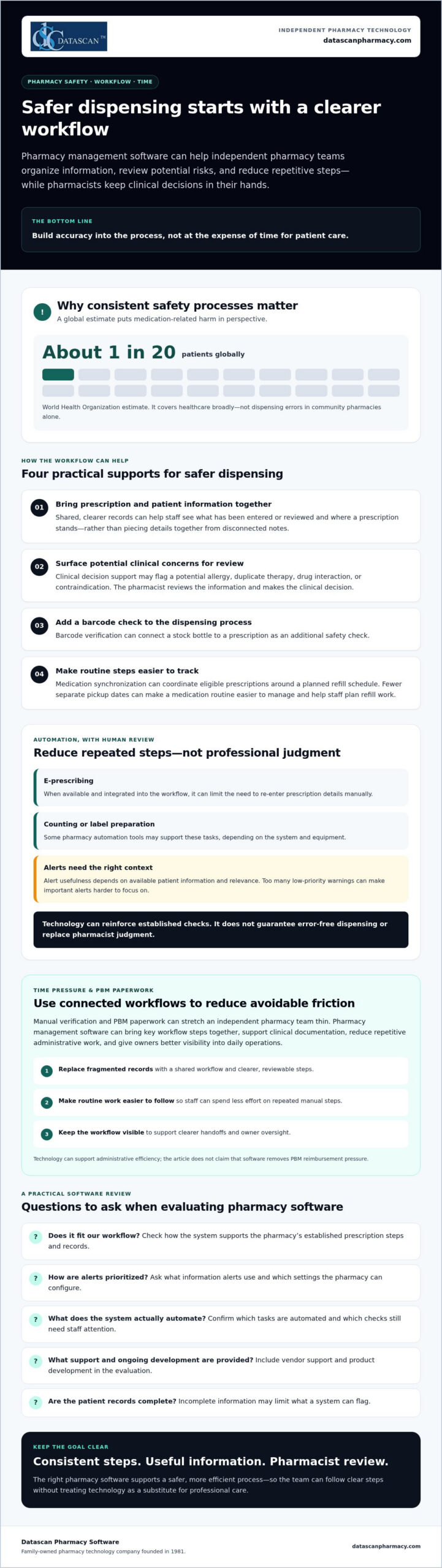
Technology can improve pharmacy safety by helping independent pharmacies replace fragmented manual processes with connected, consistent workflows. It can give pharmacists a clearer view of the information and steps involved in a prescription while keeping clinical decisions in their hands. The World Health Organization reports that medication-related harm affects about 1 in 20 patients globally. That estimate covers healthcare broadly, not dispensing errors in community pharmacies alone, but it underscores why reliable safety processes matter.
Moving from paper notes and disconnected records to an integrated pharmacy system can make relevant information easier to find and routine steps easier to track. In a busy community pharmacy, interruptions can make informal handoffs and memory-dependent processes harder to manage. Technology to improve pharmacy safety should reinforce the team’s established checks, not promise to eliminate errors.
Why is pharmacy software the foundation of patient safety?
Pharmacy management software can organize prescription and patient information in a shared workflow. Staff can work from consistent records instead of piecing details together manually, making it easier to see what has been entered or reviewed and where a prescription stands. Datascan’s pharmacy management software is designed for independent and retail pharmacies. The right system should fit the pharmacy’s processes and help staff maintain clear, reviewable records.
How does automation reduce human error in dispensing?
Automation can reduce repeated data entry and make routine steps more consistent, while pharmacists remain responsible for professional review. E-prescribing, where available and integrated into the workflow, can limit the need to re-enter prescription details manually. Other pharmacy automation tools may support counting or label preparation, depending on the system and equipment. Ask vendors which tasks their software actually automates and which checks still require staff attention.
Clear records can also help a pharmacy review how a prescription moved through its process if a concern arises. They do not prevent every error or remove professional liability, but a well-designed system can make responsibilities and documented steps easier to follow. The World Health Organization’s Medication Without Harm initiative describes medication safety as a global priority.
What specific pharmacy management software features prevent medication errors?
Pharmacy management software can support safer dispensing by organizing patient information, flagging potential clinical concerns, coordinating refills, and guiding prescription steps. These features can help staff catch issues and follow a consistent process, but they do not replace pharmacist judgment or guarantee error-free dispensing. The best technology to improve pharmacy safety fits the pharmacy’s workflow and presents information the team can review and act on.
How do clinical alerts protect your patients?
Clinical decision support may flag a potential allergy, duplicate therapy, drug interaction, or contraindication for pharmacist review during prescription processing. Its usefulness depends on the quality of the patient information available and how relevant the alert is to the decision at hand. The Agency for Healthcare Research and Quality’s overview of clinical decision support systems explains how these tools provide patient-specific information to support clinical decisions.
Alert design matters. Too many low-priority warnings can make it harder for staff to focus on alerts that need attention. Ask vendors how alerts are prioritized, what information they use, and which settings the pharmacy can configure. Pharmacy system software can help staff review available patient history in context, though incomplete records may limit what the system can flag.
What is the role of medication synchronization in safety?
Medication synchronization, or Med Sync, coordinates eligible prescriptions around a planned refill schedule. Fewer separate pickup dates can make a medication routine easier for patients to manage and help staff plan refill work. Synchronization may support adherence, but it cannot ensure that a patient takes each dose. Pharmacists should review each patient’s regimen and circumstances before coordinating refills.
Coordinated refill dates can also help the pharmacy anticipate prescription workload and review inventory needs. Ask how the software tracks upcoming refills, exceptions, and staff follow-up, and whether those steps fit your current process. A well-fitted setup can reduce informal handoffs without adding unnecessary tasks.
How do care plans and workflow checks add another safety layer?
E-care plans can help document patient goals, care activities, and follow-up over time. Customizable workflow stages can make responsibilities clearer by identifying where a prescription needs review or an additional check. Ask vendors how completed steps are recorded and how exceptions are surfaced. The tools should support consistent practice without creating alerts or checkpoints staff cannot usefully act on.
How does barcode verification protect your dispensing process?
Barcode verification adds a scan-based check to dispensing by comparing a medication’s barcode with prescription information at defined workflow points. It can help a team catch a product mismatch, including a look-alike or sound-alike medication selected by mistake. It does not guarantee accuracy or replace a pharmacist’s final review.
Use scans at the checkpoints your pharmacy has established, then resolve any mismatch before the prescription moves forward. A barcode only helps when the product is correctly labeled, the system has reliable data to compare, and staff follow the process consistently. Barcode verification is one useful form of technology to improve pharmacy safety, not a substitute for sound procedures.
What are the steps for a secure barcode verification workflow?
Your pharmacy can review a workflow like this with its software and equipment vendors. Exact steps depend on the system and the pharmacy’s procedures:
- Scan the stock bottle: At the filling station, scan the manufacturer bottle and compare the scanned product with the prescription being prepared.
- Resolve mismatches: Confirm the drug and prescription details before proceeding. If the system flags a discrepancy, pause and investigate rather than overriding it automatically.
- Complete the final check: Use the pharmacy’s designated final verification process before handoff. Include a point-of-sale scan only if the system supports that check and the pharmacy has configured it appropriately.
Barcode scanning can help distinguish products with similar names or packaging, but it cannot catch every error. Staff still need to verify the patient, medication, strength, directions, and label. For background on barcode use in medication workflows, see this barcode verification reference.
How can barcode verification support inventory accuracy?
If a pharmacy’s system connects dispensing scans with inventory records, those scans may help keep stock counts aligned with prescriptions filled. Ask whether the system supports updates at the point of dispensing, along with lot or expiration tracking if those functions matter to your procedures. Capabilities vary, so do not assume a barcode scan automatically provides batch tracking or prevents every dispense-to-stock discrepancy.
A customizable pharmacy workflow can help define where scanning and review belong in the dispensing process. Ask how the software handles exceptions and records completed checks. To discuss how workflow features may fit your pharmacy, contact Datascan Pharmacy Software.
How can safety technology help you overcome PBM challenges and free up time?
Technology can help independent pharmacies respond to PBM pressure by organizing claims and operational data, documenting patient care, and reducing repetitive work. It cannot guarantee better reimbursement or eliminate performance-based fees, but it can give owners clearer information for reviewing contract outcomes and deciding where staff time is best spent.
Can technology help with PBM reform and reimbursements?
Yes, if the pharmacy system captures useful information and the team reviews it consistently. Pharmacy management software may help organize claim details and document clinical interventions, creating a clearer record for internal review and conversations with PBMs or plan representatives. Ask vendors whether their system supports the reports and documentation your pharmacy needs. Do not assume it automatically identifies every underpayment or challenges claims on your behalf.
PBM reform is a transition, not an instant fix for pharmacy reimbursement. Major Medicare Part D changes, including a shift toward flat PBM service fees and an “any willing pharmacy” provision, take effect in 2028. In the meantime, pharmacies can use available claims and business data to assess plan performance and prepare informed questions about reimbursement terms.
Documented patient care can also help a pharmacy understand the work behind its services. Better visibility may support discussions about the value of independent pharmacy care, while streamlined processes can leave staff more capacity for appropriate clinical services. Improved adherence may relate to plan quality measures, but technology alone cannot promise higher star ratings or lower DIR-related fees. Review each PBM contract and applicable measure before making business decisions.
How does automation give pharmacy owners their time back?
Refill requests and routine patient communications can create a steady stream of interruptions. A patient app may give customers another way to request refills, while mobile delivery tools can help organize delivery workflows. For example, the MobileScripts Patient Mobile App supports patient engagement. Ask how its features fit your pharmacy’s refill process and what staff steps remain.
Well-designed workflow automation can route routine tasks consistently, so owners spend less time chasing handoffs and more time overseeing operations, supporting patients, or reviewing business performance. The benefit depends on how the pharmacy configures its processes, not simply on installing software. Operational efficiency can support financial resilience: fewer avoidable rework loops and clearer records can help protect staff capacity and support more informed decisions about profitability.
To discuss how pharmacy technology could fit your reimbursement and workflow priorities, contact Datascan about your pharmacy’s needs.
Why is choosing the right pharmacy software vendor critical for patient safety?
The vendor behind your pharmacy software affects more than system performance. Product updates, support, and workflow fit all influence whether staff can use safety features reliably during a busy day. Choose a partner that understands independent pharmacy operations and can explain how its tools and support help your team manage risk without adding unnecessary steps.
Support matters when a team encounters an alert, workflow issue, or system question that could affect prescription processing. Ask what support channels are available, who handles pharmacy-specific questions, and how urgent safety concerns are triaged. Datascan offers U.S.-based support. Confirm the support process and response expectations directly with any vendor you evaluate.
What questions should you ask a pharmacy software vendor about safety?
Ask for clear answers, demonstrations, and documentation. A vendor should be able to explain how its features work in your pharmacy, not just describe them in general terms.
- How are clinical databases and safety alerts updated? Ask what information the alerts rely on and how updates are communicated.
- Can we configure workflows for our dispensing process? Check whether required review steps fit your team’s roles and pharmacy layout.
- What training is available? Find out how staff learn to use safety features and where they can turn with questions after implementation.
- How are product updates handled? Ask how the vendor shares changes that may affect daily processes and staff training.
These questions help you assess whether technology to improve pharmacy safety will work in practice, rather than remain an underused feature. A polished demonstration matters less than a process your team can follow consistently.
Why does Datascan’s independent-pharmacy focus matter?
Independent pharmacies face distinct operational pressures, from patient care demands to PBM requirements and tight owner schedules. A vendor familiar with this environment can understand why workflow flexibility, useful updates, and responsive support matter. Family ownership alone does not guarantee a better experience, so evaluate the people, processes, and product direction behind the claim.
Datascan has been family-owned since 1981 and focuses on pharmacy management software for independent and retail pharmacies. Its customizable workflows and e-care plans support adaptable operations and patient engagement. As you compare vendors, ask how new features reflect pharmacy needs and whether the system can support efficiency without compromising your team’s safety checks. The right partnership should help your pharmacy protect patients and make day-to-day work more manageable.
Technology to Improve Pharmacy Safety: Build a Safer, Stronger Pharmacy Workflow
Patient safety and operational resilience go hand in hand. The right technology to improve pharmacy safety can help your team follow consistent dispensing checks, organize patient information, and reduce repetitive work. Barcode verification and clinical alerts can add useful safeguards, while pharmacy management software can help owners review workflows and make informed decisions about PBM pressures.
Choose tools that fit how your independent pharmacy works, and make sure your team understands how to use them. Support and flexibility matter as much as features. Datascan is family-owned and operated since 1981, offers U.S.-based support, and provides customizable workflows designed for independent pharmacies.
Ready to make your pharmacy workflow safer and more manageable? Connect with Datascan to discuss pharmacy software for your needs. With the right systems and a trusted partner, your team can spend less time wrestling with process and more time focused on patients and the future of your business.
Frequently Asked Questions
How much does pharmacy management software cost for an independent pharmacy?
Pharmacy management software costs vary by vendor, selected features, and the pharmacy’s needs, so request a tailored quote rather than relying on a generic estimate. Compare proposals carefully: ask what is included, which optional tools have separate fees, and whether ongoing support, updates, training, or mobile apps affect the total. A clear breakdown helps you weigh value alongside price, including how the system could support safer workflows and reduce manual work.
Can technology really reduce medication errors in a busy pharmacy?
Technology can reduce opportunities for error by supporting consistent workflows, surfacing potential clinical concerns, and checking prescription details at key steps. For example, an alert can prompt pharmacist review, while barcode scanning can help identify a product mismatch. These safeguards are not guarantees and depend on accurate patient information and proper use. Technology to improve pharmacy safety should assist, not replace, professional judgment and established checking procedures.
What is the most important technology for improving pharmacy safety?
There is no single feature that is most important for every pharmacy. A strong starting point is pharmacy management software that connects prescription processing, available patient information, and consistent workflow steps. Clinical alerts, barcode verification, and medication synchronization can add value when they fit the pharmacy’s processes and staff know how to use them. Evaluate how the tools work together, what information they rely on, and where pharmacist review remains essential.
How does barcode verification work in a retail pharmacy setting?
Barcode verification scans a medication package and compares its identifying information with prescription details in a compatible system. If the scanned product does not match, the discrepancy can be reviewed before dispensing continues. Pharmacies should confirm which products and workflow stages their system supports, then establish a process for resolving mismatches. Scanning is an additional check, not proof that every prescription detail is correct or a substitute for pharmacist verification.
Will new pharmacy software slow down my filling process?
New software may require staff to learn different steps, so the transition can affect workflow at first. Over time, a system that fits your pharmacy’s processes may help reduce duplicate entry and make checks more consistent. Before choosing, ask the vendor to demonstrate common tasks using realistic scenarios, explain training options, and show how workflows can be configured. Consider whether the system makes safety checks clear without adding unnecessary steps.
How can technology help my pharmacy with PBM reimbursements?
Pharmacy software may help organize claims information and document clinical interventions, giving owners a clearer basis for reviewing reimbursement patterns and discussing concerns. Ask what reports are available and whether the system flags potential discrepancies or simply provides data for your team to assess. Technology can support analysis and documentation, but it cannot guarantee a particular reimbursement, identify every underpayment, or replace reviewing PBM contracts and claim details.
Do I need special hardware to use modern pharmacy safety features?
Hardware needs depend on the safety feature and the software configuration. Barcode verification, for example, requires a compatible way to scan product barcodes, while other features may rely on information entered into the pharmacy system. Before purchasing equipment, ask the vendor which hardware is required, whether your existing equipment is compatible, and what setup or maintenance is involved. Do not assume every safety feature works with every pharmacy workstation or scanner.
Is U.S.-based support really better for pharmacy software?
U.S.-based support can make communication easier for pharmacies that value working with a support team familiar with their operating context, but support quality also depends on availability, expertise, and issue handling. Ask vendors how pharmacy-related questions are routed and what support channels they provide. Datascan offers U.S.-based support and has served the pharmacy industry as a family-owned business since 1981. Compare support arrangements as part of your vendor decision.
 Kevin Minassian is the President of Datascan Software. Under his leadership, the company rapidly expanded to provide pharmacy management software on a national level. Over the last 15+ years, he has ensured that Datascan has continuously evolved to offer innovative solutions for independent pharmacies while still offering world-class customer support. He is passionate about helping independent pharmacies to remain competitive, achieve success, and offer the very best service to their communities.








