What if a smoother prescription pickup didn’t require adding another complicated task to an already busy shift? Pharmacy will-call automation works best when prescription organization, pickup communication, and staff workflow are treated as connected but distinct needs.
It’s frustrating when staff have to search for prescriptions, piece together pickup status, or manage uncollected orders while patients wait. Automation can help by making it easier to organize finished prescriptions and follow consistent steps from storage to handoff, while clear communication helps patients know when to collect them.
This guide explains the different parts of will-call automation, how to spot a practical workflow improvement, and what to consider when evaluating pharmacy management software. You’ll also see how configurable workflows can help independent pharmacies create consistent daily processes and free staff time for patient care and other priorities. With PBM reimbursement pressures adding to the demands on pharmacy owners, the right technology should support more organized operations without creating unnecessary complexity.
About the author: Datascan Pharmacy Software provides pharmacy management software and customizable workflow capabilities for independent and retail pharmacies.
Key Takeaways
- Pharmacy will-call automation combines related but distinct elements: prescription organization, pickup communication, and staff workflow.
- Map each handoff from prescription completion to pickup so staff know who manages staging, status updates, and exceptions.
- Compare manual pickup steps with physical organization and status-based communication to pinpoint where bottlenecks occur.
- Roll out workflow changes in phases: observe the current process, identify friction points, then assign clear responsibilities.
- Pharmacy management software and customizable workflows can support more consistent daily processes without replacing professional judgment.
What Is Pharmacy Will-Call Automation, and Which Pickup Problems Can It Address?
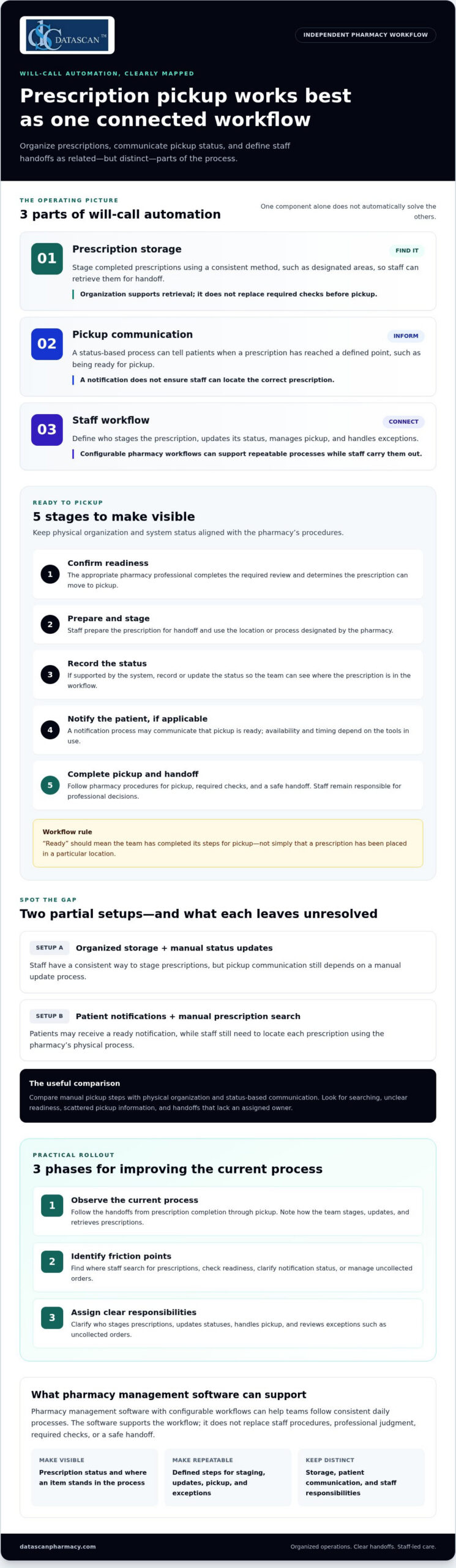
Pharmacy will-call automation uses systems or defined processes to support the pickup of completed prescriptions. It can include tools for organizing prescription storage, sending patients status-based notifications, or guiding staff through preparation and handoff. These parts work together, but they aren’t the same thing.
For example, a pharmacy might use designated, organized storage while staff update pickup status manually. Another pharmacy might notify patients when prescriptions are ready but rely on staff to locate each bag. Thinking of will-call as a workflow, rather than a single device or notification, helps independent pharmacies identify which part needs attention.
- Pickup storage helps staff organize completed prescriptions so they can be retrieved for handoff.
- Patient notification communicates a relevant pickup status through a chosen process or system.
- Staff workflow connects prescription completion, staging, status updates, and pickup responsibilities.
These distinctions matter because buying or adopting one component doesn’t automatically address the others. A storage method won’t tell a patient a prescription is ready, and a notification won’t ensure staff can quickly find the correct prescription. Broader pharmacy automation can involve mechanical processes for handling and distributing medications, but a pharmacy’s will-call process also depends on clear staff procedures.
What does pharmacy will-call automation include?
Organized storage is one possible component. Prescriptions can be staged according to a consistent method, such as designated areas or another system the team can follow. The purpose is to make retrieval more orderly, not to replace the checks staff perform before handing a prescription to a patient.
Status-based notifications are a separate component. They communicate that a prescription has reached a defined point in the process, such as being ready for pickup. Staff procedures connect the steps: who stages the prescription, who updates its status, and who handles the pickup or an exception. Configurable pharmacy workflow software can support repeatable processes, while staff remain responsible for carrying them out.
Why do pharmacies automate the will-call process?
During a busy shift, staff may spend time searching for a prescription, checking whether it’s ready, or clarifying whether a patient has already been notified. These tasks can interrupt other work, particularly when pickup information is spread across separate notes or when team members use different handoff habits.
A more defined process can make responsibilities and prescription status easier to follow. For instance, if a bag is staged but its status hasn’t been updated, the workflow should make clear who completes that step. If a prescription remains uncollected, the team should know who reviews its status and what procedure to follow. The right approach depends on the pharmacy’s existing process, but clarifying these handoffs may reduce avoidable searching and uncertainty without promising specific time savings or error elimination.
How Does an Automated Pharmacy Will-Call Workflow Move from Ready to Pickup?
A will-call workflow moves a completed prescription through preparation, staging, any applicable patient notification, and pickup. Pharmacy will-call automation can make the process easier to follow, but the exact system actions depend on the tools in use. Pharmacists and staff remain responsible for professional decisions, required checks, and a safe handoff.
A clear sequence also makes it easier to see where an item stands. A system record might show a status, while physical organization helps staff locate the prescription. Those signals need to align with the pharmacy’s procedures: “ready” should mean the team has completed its steps for pickup, not simply that a prescription has been placed in a particular location.
What happens after a prescription is marked ready?
Once the prescription is complete and the pharmacy’s checks are finished, staff prepare it for pickup according to established procedures. Depending on the pharmacy’s setup, the team may use physical organization, system records, or both to keep the prescription identifiable and retrievable. A notification may also be part of the workflow, but it’s a separate action whose availability and timing depend on the tools being used.
- Confirm readiness: The appropriate pharmacy professional completes the required review and determines that the prescription can move to pickup.
- Prepare and stage: Staff prepare the prescription for handoff and place it in the location or process designated by the pharmacy.
- Record the status: If the system supports it, staff record or update the relevant status so the team can understand where the prescription is in the workflow.
- Notify the patient, if applicable: A notification process may communicate that pickup is ready. The pharmacy’s procedures should clarify who initiates or oversees that step.
These steps can be handled through a mix of technology and staff action. A status display, for example, is only useful if staff know what each status means and keep it current. Configurable pharmacy workflow software can support consistent processes, while the pharmacy defines staff responsibilities and safeguards.
How should staff complete the pickup handoff?
At pickup, staff should follow a consistent method to locate the prescription, confirm it’s the correct item for the intended patient, and complete the pharmacy’s handoff process. Avoid relying on a shelf location or a ready status alone as proof that the prescription is appropriate to release. Staff must follow the pharmacy’s established dispensing and privacy safeguards.
After the handoff, the designated staff member should update the pickup status according to pharmacy procedures, if the tools support that action. This keeps the record aligned with what happened and helps colleagues distinguish prescriptions that are still waiting from those already collected. If the patient doesn’t collect the prescription, staff should follow the pharmacy’s process for reviewing its status rather than assuming that a notification or elapsed time resolves the item.
Before adopting a new workflow, map who handles each transition and how exceptions are managed. If you’re considering how configurable pharmacy workflows could support your team’s process, talk with Datascan about your workflow needs.
Will-Call Automation vs. Manual Pickup: What Should Your Pharmacy Compare?
Will-call automation supports pharmacy staff; it doesn’t replace professional judgment or patient care. The right comparison isn’t simply “manual versus automated.” Look at the specific bottleneck: finding staged prescriptions, repeating patient outreach, or keeping the team aligned on status and handoffs. A process may combine staff-led steps with physical organization or technology, depending on the pharmacy’s needs.
Choose automation based on the bottleneck, not the label. Before comparing approaches, consider which tasks take staff attention, what information they can see, and what procedures or tools each approach depends on.
Does will-call automation replace pharmacy staff?
No. Staff remain responsible for pharmacy-specific review, dispensing safeguards, and patient interactions. Automation may support repetitive coordination, such as organizing pickup information or handling a defined notification step, but it doesn’t take over professional responsibilities. It also shouldn’t be treated as a guarantee of accuracy, compliance, or labor savings. The pharmacy’s procedures and staff oversight still matter.
Compare each approach against the work it supports:
Approach
Workflow fit
Staff tasks and visibility
Operational dependencies
Manual process
Useful when the existing pickup volume and process are manageable through staff-led steps.
Staff locate prescriptions, communicate status, and coordinate handoffs using the pharmacy’s current procedures. Visibility depends on how consistently the team records and shares updates.
Clear task ownership and consistent communication between team members.
Physical organization
Addresses difficulty locating prescriptions that have already been staged for pickup.
Staff follow an organized storage method to retrieve the correct item. Physical organization can improve visibility of where an item is staged, but doesn’t by itself notify patients or confirm pickup status.
A consistent method for staging and retrieving prescriptions, plus staff adherence to it.
Status-based notification
May help with repetitive patient outreach tied to a defined prescription status.
A notification process communicates a status to patients. Staff still need to manage prescription preparation, exceptions, and the pickup handoff.
Accurate status updates and a clear process for initiating or overseeing notifications.
Which will-call approach fits which operational need?
Match the change to the friction your team observes. If staff spend time searching for staged items, improve physical organization. If repeated outreach takes attention away from other work, assess whether status-based notifications fit the workflow. If people aren’t sure who updates status or handles exceptions, clarify the process first. Pharmacy will-call automation works best when its role is specific and staff responsibilities remain clear.
A pharmacy management software workflow may support consistent staff processes, but the fit depends on how the pharmacy uses its tools. For independent pharmacies, customizable pharmacy workflows can help align repeatable steps with daily operations without confusing software coordination with professional judgment.
How Can an Independent Pharmacy Plan a Will-Call Automation Rollout?
Plan a will-call rollout in phases: observe how pickup works now, identify the recurring bottleneck, define the change you want, then test it with staff before expanding. This keeps pharmacy will-call automation focused on a real operational need instead of adding tools or steps that don’t solve the problem.
Start with a short workflow review during representative shifts. Note where staff pause to locate prescriptions, verify pickup status, communicate with patients, or clarify who owns the next step. Look for patterns across the process, while keeping occasional exceptions separate so they don’t drive a broad change the pharmacy rarely needs.
How do you identify the right process to automate?
Choose a focused problem first. For example, if prescriptions are usually staged correctly but staff regularly have to ask whether a patient was notified, the main issue may be status ownership rather than storage. If the team knows an item is ready but takes time finding it, physical organization may deserve attention before notification changes.
Use observations and staff feedback to define what should improve. A useful goal is specific and practical, such as making pickup status easier for the team to interpret or clarifying who updates it. Avoid assuming that a particular automation type will fix every friction point.
How do you prepare staff and systems?
Document the current steps, then map the proposed process from prescription readiness through pickup. At each handoff, name the role responsible, the status information staff need, and what happens if the usual path doesn’t apply. Review how pharmacy management software and other workflow tools fit into those steps, without assuming that every tool performs the same actions.
Before expanding the change, test it with a defined workflow and gather input from the staff using it. Check whether responsibilities are clear, status information stays aligned with the work completed, and exceptions have a practical path. If a step creates confusion or extra work, adjust the process and test again. Pharmacy workflow optimization software can support repeatable processes, but the team’s feedback helps determine whether the workflow fits daily operations.
- Observe: Follow the existing pickup process and note recurring delays, repeated checks, or unclear handoffs.
- Prioritize: Select one high-friction issue and describe the intended change in plain language.
- Map: Document staff roles, status ownership, system touchpoints, and exception handling.
- Test: Try the defined process with the team and collect feedback on what works and what needs adjustment.
- Refine: Update the workflow before considering whether to apply it more broadly.
A phased approach helps independent pharmacies make deliberate changes while protecting the responsibilities and patient care at the center of pickup. To discuss how pharmacy software and configurable workflows can support your operational goals, connect with the Datascan team.
How Can Pharmacy Management Software Support a More Consistent Will-Call Workflow?
Pharmacy management software can help organize operational information and support repeatable workflows, giving staff a clearer framework for completing routine steps. It should complement pharmacy procedures, not be mistaken for physical pickup equipment or a substitute for staff judgment. The right setup depends on how the pharmacy manages its work and which tools it uses.
For will-call, consistency matters at the points where work moves between people or stages. Staff need to understand what information guides the next step, who is responsible for it, and how the pharmacy handles exceptions. Software may support that broader workflow, while the pharmacy’s procedures define how the team uses it.
What should pharmacy management software contribute to will-call operations?
Look for ways software can support a shared, repeatable process without assuming it includes a specific notification, kiosk, or storage function. A pharmacy can map its own procedures around how work is prepared, how staff communicate status, and how pickup is handled. The goal is to reduce ambiguity in everyday coordination, not to automate professional review or patient-facing responsibilities.
Customizable workflow is valuable because independent pharmacies may have different staffing patterns, service mix, and operating practices. A process that fits one pharmacy may not fit another. Configurable steps can help a team align routine work with its own procedures, while staff remain responsible for following safeguards and responding to exceptions. Physical storage equipment serves a different role: it organizes where prescriptions are placed and retrieved. Software workflow support and storage may complement each other, but one does not automatically provide the other.
How can Datascan support an independent pharmacy’s broader workflow?
Datascan Pharmacy Software serves independent and retail pharmacies with pharmacy management software and customizable workflow capabilities. Used thoughtfully, a pharmacy management system can be part of a broader effort to make daily work more consistent, including how the team defines and follows pickup-related steps. It shouldn’t be described as a specific will-call notification or storage solution.
Pharmacy owners also need a technology partner that understands independent pharmacy operations. Datascan is family-owned and was founded in 1981, and it offers U.S.-based technical support. That experience provides relevant context as pharmacies consider how software fits their operating needs. For a broader view of the platform, explore Datascan pharmacy management software.
As you assess your process, identify the steps that need clearer ownership, more consistent information, or a better fit with your existing workflow. Then consider how configurable pharmacy management software can support those needs alongside your team’s established procedures. A practical discussion starts with how your pharmacy works today and what you want to improve.
Discuss your pharmacy workflow with Datascan
Make Your Next Workflow Improvement Count
Your next step doesn’t have to be a major technology overhaul. Choose one pickup task that regularly interrupts the team, define what a smoother process would look like, and use that goal to guide decisions about pharmacy will-call automation. A focused improvement can give your staff a practical starting point while keeping patient care and professional judgment at the center.
As you plan, consider how pharmacy management software and customizable workflows could support the way your independent pharmacy operates. Datascan brings experience serving pharmacies and a personal approach to helping owners think through their technology needs.
Start a conversation about your pharmacy’s workflow, and take the next step toward a process that works better for your team and patients.
Frequently Asked Questions
What is pharmacy will-call automation?
Pharmacy will-call automation uses technology or structured processes to help manage prescription pickup. It may support organizing completed prescriptions, tracking their status, or communicating pickup readiness to patients. These are separate functions: organized storage helps staff retrieve an item, while a notification communicates information to a patient. A pharmacy can improve one part of will-call without automating every part of the pickup process.
How does an automated pharmacy will-call system work?
The process generally starts after the pharmacy completes its required prescription review and marks the item ready for pickup. Staff then prepare and stage it using the pharmacy’s process. If the tools support it, a status update may prompt patient communication. At pickup, staff follow established procedures to confirm the correct handoff and record the outcome. Clear status definitions help prevent a “ready” label from being mistaken for “collected.”
Does pharmacy will-call automation replace pharmacy staff?
No. Automation can support coordination, but pharmacy staff remain responsible for professional review, dispensing safeguards, and patient interaction. For example, a system may help organize routine information, while a pharmacist or staff member addresses a question about a prescription or an exception to the usual process. Technology doesn’t guarantee accuracy, compliance, or labor savings. Its role is to support the pharmacy’s procedures, not replace staff judgment.
Can pharmacy will-call automation work with pharmacy management software?
It may, but compatibility depends on the software and other tools involved. Before changing a workflow, map what information needs to move between systems, such as a prescription’s readiness or pickup status, and identify who keeps that information current. Pharmacy management software can support consistent operations, but specific will-call functions vary. Avoid assuming that separate storage, messaging, or pickup tools automatically share information with the pharmacy system.
What is the difference between a pharmacy pickup kiosk and will-call notification automation?
A pickup kiosk is a physical interface intended to support the patient pickup experience; its exact functions depend on the system. Will-call notification automation communicates information about pickup readiness through a notification process. One concerns the pickup point, while the other concerns patient communication. Neither term alone explains how prescriptions are staged, how staff oversee the handoff, or how the pharmacy handles exceptions.
How can an independent pharmacy decide what part of will-call to automate?
Start with the recurring bottleneck, not a product category. Notice whether staff most often search for staged prescriptions, check unclear statuses, repeat patient outreach, or pause because handoff ownership is uncertain. Separate routine friction from unusual exceptions, then choose one process to improve first. Define what should become clearer or easier for staff, test the change, and use their feedback to decide whether to adjust or expand it.
 Kevin Minassian is the President of Datascan Software. Under his leadership, the company rapidly expanded to provide pharmacy management software on a national level. Over the last 15+ years, he has ensured that Datascan has continuously evolved to offer innovative solutions for independent pharmacies while still offering world-class customer support. He is passionate about helping independent pharmacies to remain competitive, achieve success, and offer the very best service to their communities.