
Automated outbound calls for pharmacies can confirm specialty pharmacy appointments and support refill reminders, pickup notifications, and other routine patient communications. For URAC-accredited specialty pharmacies, appointment confirmations should be documented automatically as part of the call.
These messages serve different purposes. A will-call notification goes out when a prescription is ready for pickup; a refill reminder prompts a future action. Distinguishing between them helps pharmacies choose the right message for each step in the prescription process. This article explains how outbound calls and interactive phone systems can support appointment confirmations, prescription updates, and patient follow-up, while freeing staff to focus on work that needs their attention.
Key Takeaways
- Use automated menus for routine requests while giving patients a clear path to staff for clinical or sensitive concerns.
- See how refill outreach and medication synchronization can help coordinate follow-up around each patient’s prescriptions.
- Learn which call outcomes and follow-up tasks can help staff keep patient communications organized.
- Plan campaign timing around the purpose of each call, and consider how patients can reach services outside normal business hours.
- Understand how prescription management software can connect phone workflows with the pharmacy’s broader operations.
Should Your Pharmacy Be Using an Automated Phone System?
An automated phone system can handle routine reminders and direct patients to the right service, while staff remain available for sensitive or clinical questions. A pharmacy should assess whether its call flow reduces repetitive work without making it harder for patients to reach a person.
Recorded Messages and Calling Channels
A recorded message delivers prepared information by phone, while a text provides it in writing and a live call connects the patient with a staff member. Each channel suits different needs. A staff-recorded message can feel personal, while a text gives patients a reminder they can revisit. Live calls remain useful when a conversation requires judgment or clarification.
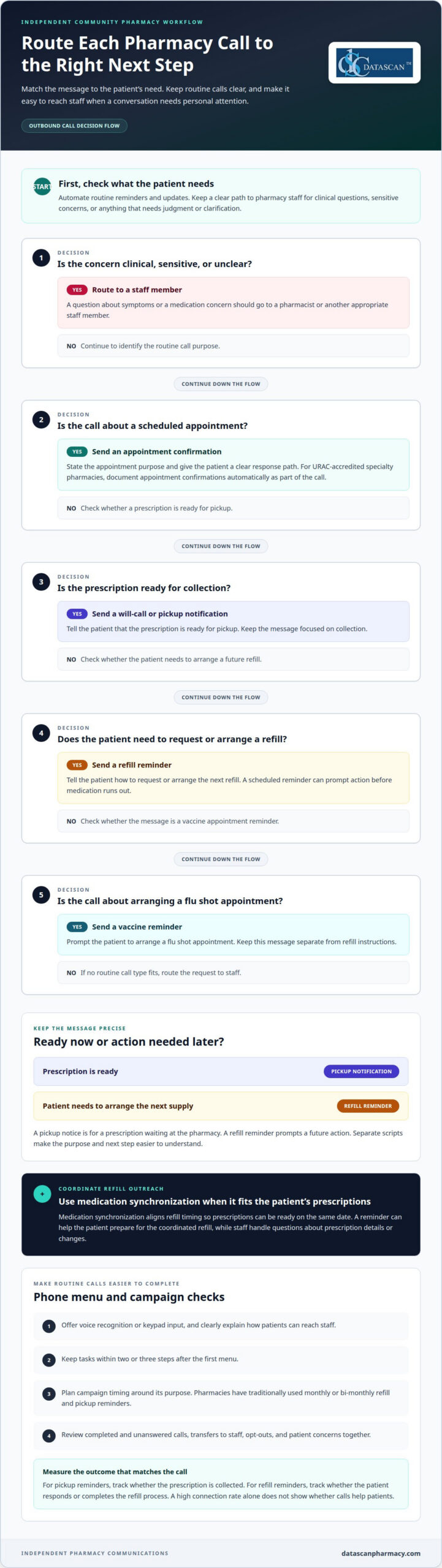
Automated outbound calls for pharmacies can support reminders, but they shouldn’t replace conversations with staff. A pickup notice can be automated; a question about symptoms or a medication concern should go to a pharmacist or another appropriate staff member.
Call Rules and Privacy Requirements
FCC and TCPA considerations for pharmacy calls and texts depend on the communication method, purpose, consent, and how patients can stop messages. HIPAA privacy considerations depend on the information shared and how the pharmacy handles a patient’s response. Keep messages focused on their purpose and route sensitive discussions to staff.
Requirements can also vary by state, so pharmacies need to account for the states where they contact patients. For each campaign, document its purpose, communication channel, consent process, and opt-out handling. These are practical review points, not a substitute for assessing applicable rules.
Costs, Risks, and Opt-Outs
Automated calling system costs depend on capabilities, integration needs, and call volume; pricing is determined after a quote request. Beyond cost, incorrect numbers can send messages to someone other than the intended patient, while excessive detail can create privacy concerns.
Create a process for correcting contact information and honoring opt-outs. If a patient asks to stop calls, staff need a clear way to record the request and prevent further messages through the relevant campaign. Keep a route to a staff member available for patients who need help.
Measuring Call Effectiveness
Measure a campaign against its intended outcome. For a pickup reminder, track whether the prescription is collected; for a refill reminder, track whether the patient responds or completes the refill process.
Review completed and unanswered calls, transfers to staff, opt-outs, and patient concerns together. A high connection rate alone doesn’t show whether calls help patients. If reminders reach patients but prescriptions often remain uncollected, review the message timing and the next steps patients must take.
Phone menus should offer voice recognition or keypad input, clearly explain how to reach staff, and keep tasks within two or three steps after the first menu. These choices make routine calls easier to complete without blocking access to personal help.
Can automated outbound calls handle appointment confirmations for specialty pharmacies?
Yes. Automated calls can confirm specialty pharmacy appointments and remind patients about refills and medication pickup. For URAC-accredited specialty pharmacies, appointment confirmations should be documented automatically as part of the call. This links patient outreach with a record of whether the appointment was confirmed.
Refill reminders and appointment confirmations serve different purposes. A refill message prompts a patient to request or arrange medication, while an appointment call concerns a scheduled visit. Keep each script specific: explain why you’re calling, describe the next action, and provide a clear way to reach staff if the patient needs help.
Pharmacies have traditionally used automated communications for monthly or bi-monthly refill and pickup reminders. A scheduled refill reminder can prompt patients before medication runs out. A pickup reminder can help them remember a prescription waiting at the pharmacy. These routine messages reduce the need for staff to place every reminder manually.
Outbound calls can also support appointment scheduling with healthcare providers and flu shot reminders. A flu shot message, for example, can tell patients how to arrange an appointment, while a refill script focuses on the prescription action. Separate messages make the purpose clear and help patients respond appropriately.
Medication synchronization gives pharmacies another reason to coordinate outreach. It aligns refill timing across a patient’s prescriptions so they can be ready on the same date. A reminder can help the patient prepare for the coordinated refill, while staff handle questions about prescription details or changes.
For each campaign, match the message to the patient’s next step:
- Appointment confirmation: State the appointment purpose and provide a clear response path.
- Refill reminder: Tell the patient how to request or arrange the next refill.
- Pickup reminder: Explain that a prescription is ready for collection.
- Vaccine reminder: Prompt the patient to arrange a flu shot appointment.
A clear script matters. Avoid combining appointment details, refill instructions, and promotional content in one call. Patients should understand why the pharmacy called and what action to take. If a call raises a clinical or personal concern, staff can continue the conversation directly.
When planning refill outreach alongside prescription workflows, discuss your pharmacy’s workflow with a team that understands pharmacy operations.
How do call notes, task creation, and prescription updates work?
Automated calls work best when their outcomes connect to a clear pharmacy workflow. Start by defining each call’s purpose, then connect relevant patient and prescription information through the pharmacy management system and configure the message and staff routing. Before launching the campaign, decide how staff will record responses and follow up.
A call may lead to a completed refill request, a question for the pharmacist, or no response. Each outcome needs a next step. Staff can document a callback request, create a follow-up task, and assign it to the appropriate team member. They can then update the prescription record after reviewing the patient’s request.
Keep call notes useful and focused. Record the reason for the call, the patient’s response, and any action still needed. A note such as “patient asked about vaccine appointment, return call requested” gives the next staff member context without becoming a transcript. Sensitive or clinical details belong in the appropriate pharmacy record, not a general message field.
Inbound call routing can build on a patient’s menu selection. An interactive voice response (IVR) system uses recorded prompts to direct callers to services such as prescription refills. A menu can distinguish a refill request from a question for staff and route routine needs efficiently. Keep clear instructions for reaching a staff representative available throughout the call.
Voice recognition and keypad choices give patients different ways to navigate. A well-designed menu keeps a task within two or three steps after the first menu. For instance, a caller can choose refills, identify the prescription, and follow the next prompt. Avoid long menu trees that make patients repeat information or abandon the call.
IVR handles defined prompts and choices. An assistant-style call flow may guide patients through a more conversational exchange, but the pharmacy still needs clear boundaries. A refill request can follow a routine path; a reaction, dosage concern, or unclear prescription request should go to a staff member for review.
- Call completed: Record the outcome and close the related task.
- Patient needs help: Route the request to the right staff member.
- No response: Follow the pharmacy’s planned contact workflow.
- Prescription information changes: Have staff review and update the record.
These steps keep calls, notes, and prescription records aligned. A phone system can guide the conversation, but staff judgment remains essential when a patient’s request changes the medication record or needs clinical attention.
How should pharmacies set calling hours and campaign schedules?
Automated pharmacy phone systems can provide patients with service outside normal business hours, including 24/7 access to phone services. That doesn’t mean every outbound campaign should call at every hour. Set the schedule around the message, patient expectations, and the action required, such as arranging a refill or responding to a pickup reminder.
Separate routine reminders from time-sensitive calls. A prescription pickup notice can be triggered when an order is ready, while a refill reminder can be scheduled for a later point in the medication cycle. Flu shot reminders have another purpose: prompting patients to arrange an appointment. Separate schedules keep each communication focused.
Which pharmacy outbound call automation platforms are available in the United States? Pharmacies can use interactive voice response systems for tasks such as pickup and flu shot reminders, alongside automated calling services. Options include systems connected to pharmacy workflows and outsourced calling services; the right format depends on the campaign and how staff need to handle responses.
With outsourced outbound calling, a third party makes calls according to the pharmacy’s campaign instructions. The pharmacy still needs to define the message, audience, timing, and process for routing patient questions. For an independent pharmacy, outsourcing routine calls can shift the calling workload, but clinical or sensitive issues still need a clear path to pharmacy staff.
Give every repeat campaign a defined purpose and schedule. A pharmacy might plan recurring refill reminders, for example, and use a separate process for a one-time ready-for-pickup notification. The call type determines whether a message repeats or responds to a specific prescription event. Avoid duplicate reminders for the same action.
- Appointment campaign: Schedule calls around the appointment confirmation task.
- Refill campaign: Set a repeat schedule for planned refill outreach.
- Pickup notification: Send the message when the prescription reaches ready status.
- After-hours access: Keep phone services available outside normal business hours.
Review campaign results before repeating them. Compare completed calls, patient responses, staff follow-up, and prescriptions still awaiting pickup. If a pickup campaign prompts questions staff cannot answer promptly, adjust the message or routing plan before the next run. A useful schedule supports patient communication without adding avoidable interruptions to daily workflow.
Keep instructions concise and give callers a clear route to a staff member. Phone menus should let callers complete a task in two or three steps after the first menu. Patients calling back after a reminder should be able to reach the relevant service, rather than restart a long menu or hear unrelated campaign information.
How do automated calls work when a prescription is ready?
A prescription-ready call is triggered when the prescription reaches ready-for-pickup status in the pharmacy management system. Because the notification follows the order’s actual status, staff don’t need to call every patient manually or maintain a separate list. The patient receives a message tied to a specific event in the prescription workflow.
This differs from a scheduled refill reminder. A refill reminder is planned and may repeat; a ready-for-pickup notification is triggered when the prescription becomes ready. Keeping the messages distinct helps patients understand whether to arrange a refill or collect medication already prepared for pickup.
Consider a patient with prescriptions in progress. A scheduled reminder might prompt them to request a refill, but shouldn’t suggest the medication is ready. Once the prescription reaches ready status, a separate notification can explain that pickup is available. The trigger matters: the message should match the order’s current state.
For an independent pharmacy, the operational value comes from linking communication to the order instead of relying on a manually maintained call list. Staff can focus on prescriptions that need attention, while patients receive pickup information after the relevant status change. The message should explain its purpose and provide a clear path for questions.
A practical workflow distinguishes these events:
- Refill needed: A scheduled reminder prompts the patient to take the next refill step.
- Prescription in process: No ready-for-pickup message is sent before the order reaches that status.
- Ready for pickup: The status change triggers a one-time notification.
- Patient has a question: The call directs the patient to pharmacy staff for help.
That distinction also helps staff interpret call activity. A missed pickup notification doesn’t mean the patient ignored a refill reminder, because the messages serve different purposes. Reviewing the order status alongside the call outcome gives the pharmacy a clearer picture of where follow-up may be needed.
Keep message wording aligned with its trigger. A ready notice can say the prescription is available for pickup, while a recurring reminder should ask the patient to arrange the refill. Don’t promise that medication is ready before the pharmacy management system shows that status. Clear language reduces confusion and unnecessary calls to the pharmacy.
Before using status-triggered notifications, map each relevant prescription status to its message and intended action. Make sure a patient response or question has a route to staff; an automated call is not a substitute for assistance. This keeps the workflow useful without confusing routine pickup communication with pharmacy support.
Discuss prescription-ready communication workflows for your pharmacy’s operations.
Datascan Pharmacy Software
Datascan Pharmacy Software helps independent pharmacies manage pharmacy operations through a connected set of tools. If you’re reviewing how prescription status, pickup communication, and staff workflows fit together, Datascan Pharmacy Management Software can be part of that broader assessment.
The platform includes Datascan Point of Sale (POS), MobileScripts Patient Mobile App, and Datascan Mobile Delivery App, alongside pharmacy management software and workflow tools. Each supports a different part of pharmacy operations, so the right combination depends on the processes your team wants to manage. Automated calls should still rely on accurate prescription information and give patients a clear path to pharmacy staff.
If you’re considering how pharmacy software can support your patient communication workflows, contact Datascan Pharmacy Software to discuss your pharmacy’s needs.
Build a Communication Workflow That Fits Your Pharmacy
If you’re evaluating automated outbound calls for pharmacies, start by deciding how patient communication should fit your daily workflow. Consider which tasks need a routine message, where staff judgment matters, and how patients can get help when a call raises a question. A clear plan gives your team a practical basis for choosing the next step.
Datascan’s Independence-First platform includes Datascan Pharmacy Management Software, Datascan Point of Sale (POS), and the MobileScripts Patient Mobile App. These tools support different parts of pharmacy operations. Where to begin depends on the processes your pharmacy wants to address and how your team serves patients.
You don’t need to redesign every workflow at once. Start with the communication challenge creating the most friction for staff or patients, then consider how pharmacy management software can support that priority.
Contact Datascan Pharmacy Software to discuss your pharmacy’s needs and next steps.
Frequently Asked Questions
Does automated will-call calling work 24/7?
A pharmacy phone system can provide patient services 24/7, but that doesn’t mean every will-call alert should be placed at any hour. A ready-for-pickup call is tied to the prescription reaching that status, while the pharmacy’s campaign schedule determines when the message goes out. For example, a pharmacy can plan notifications to fit its operating workflow and make sure patients know how to get help with questions.
Does automating outbound reminders work across multiple facilities?
Reminder campaigns can be planned for multiple facilities, but each location needs a clear identity and follow-up path. Patients should know which pharmacy is calling, where the prescription is available, and which staff team can answer questions. A multi-location operator, for example, can organize campaigns by facility and review each location’s call outcomes separately, helping prevent reminders from directing patients to the wrong pickup site.
How is this different from a pharmacy IVR?
Outbound calls can deliver pharmacy messages, while an IVR can guide callers through prompts. IVR can direct inbound callers to a refill service or staff representative. A pharmacy may use both approaches for different tasks: an outbound message can notify a patient, and IVR can help them respond or navigate a later call.
Is automated outbound calling available around the clock?
Automated pharmacy phone systems can provide patient services outside normal business hours, including 24/7 access to phone services. That availability doesn’t mean every outbound campaign should call patients around the clock. A pharmacy can distinguish between always-available phone access and outbound campaign timing. For example, a patient might hear service options after hours, while a routine reminder follows a schedule chosen for that campaign.
What about elderly patients, or patients who dislike AI on the phone?
Give patients straightforward ways to navigate, without relying on a single interaction style. A phone system can support keypad input and voice recognition, with clear instructions for reaching a staff member. Keep the menu short and avoid making patients repeat information. For those who prefer speaking to a person, a clear staff option makes automation a convenience rather than a barrier to pharmacy support.
What are automated outbound calls for pharmacies used for?
Pharmacies use automated calls for prescription pickup and refill reminders, appointment confirmations, flu shot reminders, and messages about pharmacy services. Calls can also invite patients to share feedback or help identify concerns for staff follow-up. The best use depends on the message’s purpose: a pickup notice should explain collection details, while a service reminder should clearly state the next action.
Can pharmacy calls be automated for refill reminders, prescription readiness, and adherence outreach?
Yes. Pharmacies can schedule refill reminders, notify patients when prescriptions are ready for pickup, and use calls to support medication adherence outreach. These messages serve different purposes, so each should match the patient’s next step. An adherence call can encourage patients to follow their prescribed routine, while clinical concerns or medication questions should go to pharmacy staff.

Article by
Sarah Callioras
Sarah Callioras is Vice President at Datascan Pharmacy Software, bringing nearly 25 years of experience across independent pharmacy operations and pharmacy technology. Since joining Datascan in 2016, she has played a key role in driving business growth, strengthening client relationships, and supporting independent pharmacies through innovative software solutions. With a strong background in pharmacy operations, business development, and strategic leadership, Sarah is passionate about helping independent pharmacies succeed in an evolving healthcare landscape.
 Kevin Minassian is the President of Datascan Software. Under his leadership, the company rapidly expanded to provide pharmacy management software on a national level. Over the last 15+ years, he has ensured that Datascan has continuously evolved to offer innovative solutions for independent pharmacies while still offering world-class customer support. He is passionate about helping independent pharmacies to remain competitive, achieve success, and offer the very best service to their communities.