
Independent pharmacies don’t need to operate like large chains to compete effectively. The right technology that gives independents an edge can connect ordering, sales, marketing, and financial workflows while reducing repetitive operational tasks. The advantage comes from choosing tools that support the way your pharmacy works, not from adding complexity for its own sake.
You already know how quickly routine demands can crowd out time for patient care and business decisions. Pharmacy management software can organize day-to-day work, while connected sales and operational information gives owners a clearer view of activity. This article explains how pharmacy technology can support dispensing, retail sales, patient communication, delivery, and financial workflows. It also covers how digital tools can help pharmacies review reimbursement information, which repeated tasks may suit automation, and what to consider when selecting and implementing a system. The goal is to show where software can support your team and where staff judgment remains essential.
Key Takeaways
- Connect ordering, sales, marketing, and financial workflows to make daily decisions with clearer information.
- Use pharmacy technology to organize reimbursement data and spot patterns that can inform responses to PBM challenges.
- Identify repetitive tasks that can be automated, freeing staff to focus more time on patients and pharmacy operations.
- Choose technology based on your pharmacy’s priorities, how it fits existing workflows, and the support your team needs to adopt it.
- Explore pharmacy management software and related tools that align with the operational challenges you want to address.
How Can Technology Improve an Independent Pharmacy’s Ordering, Sales, Marketing, and Financial Workflows?
Connected pharmacy technology can organize information across ordering, sales, marketing, and financial work. It helps owners base decisions on business activity, from stock movement to retail transactions. When technology that gives independents an edge fits existing workflows, it can make routine decisions easier to manage without adding unnecessary complexity.
How Can POS and Inventory Software Support Pharmacy Work?
Point-of-sale software records retail transactions and front-end inventory activity in one workflow. Staff can review sales, manage inventory, and use that information to guide purchasing decisions. A pharmacy POS platform makes transaction records more useful by connecting checkout and front-end operations.
For example, reviewing seasonal-item sales alongside current stock can inform a reorder instead of relying only on memory. Pharmacy point-of-sale tools can also give owners a clearer view of retail transactions alongside prescription activity.
A practical ordering workflow starts with reviewing inventory, identifying items to replenish, and using past movement to inform quantities. Pharmacy management software can make inventory information available alongside other daily operations. Shared records give staff a consistent basis for decisions when several people handle receiving, stocking, and ordering.
Sales analysis can guide merchandising. If one category sells steadily while another remains on the shelf, an owner can adjust purchasing or product placement. Patient communication tools can support relevant updates, such as promoting a seasonal service and reviewing the response. Keep messages appropriate to the audience and protect patient information.
Financial workflows benefit when sales and purchasing records are easier to review together. Owners can compare transaction totals with purchasing activity, review expenses by category, and spot patterns that deserve attention. Clearer records help show where working capital may be tied up, such as in slow-moving inventory or recurring expenses, supporting more informed operational decisions.
How Should a Pharmacy Choose and Implement Business Technology?
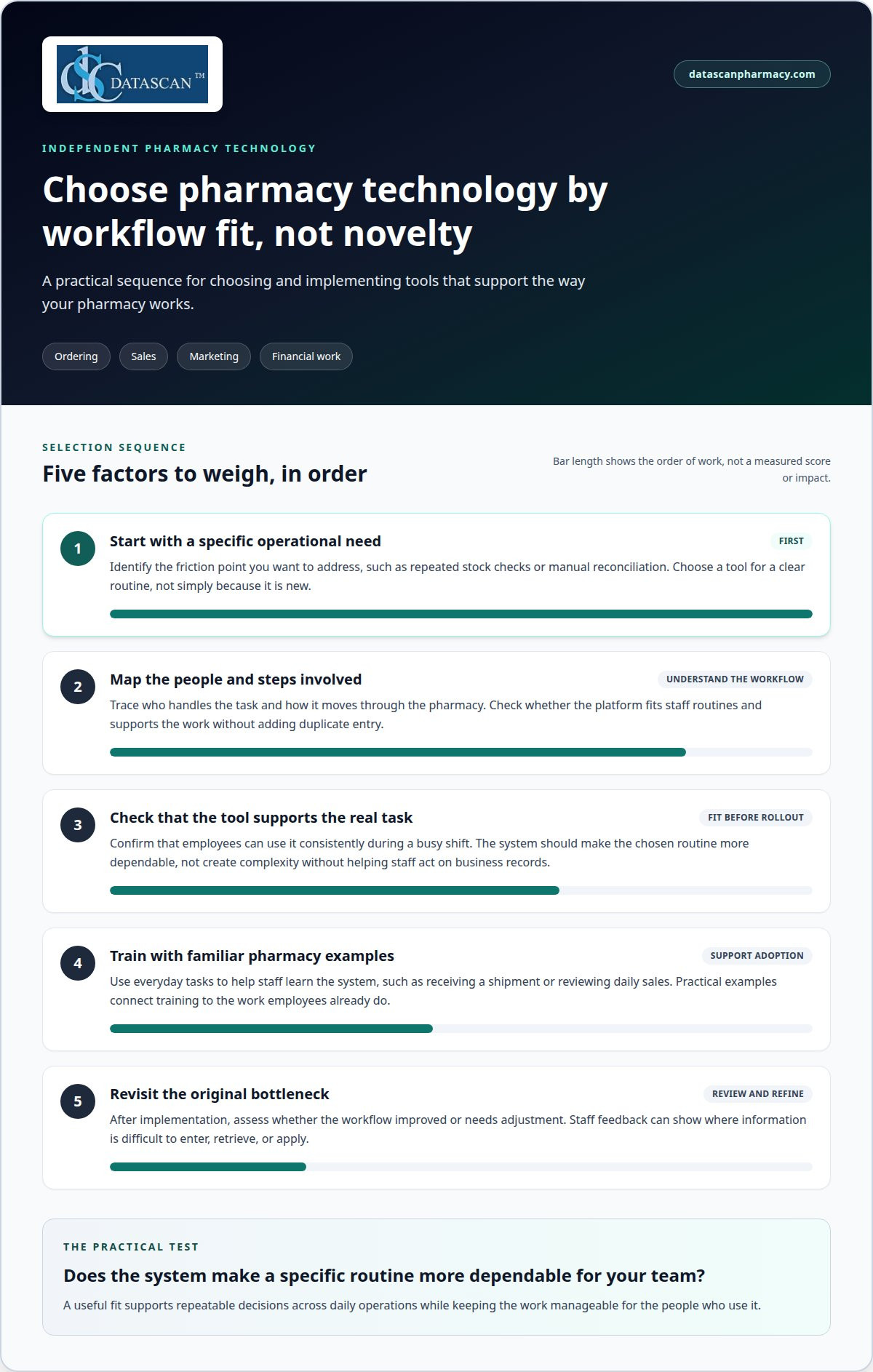
Choosing and implementing business technology starts with defining an operational need and selecting a platform that fits staff routines. Software only helps when employees can use it consistently during a busy shift. Technology that gives independents an edge should address a specific friction point, such as repeated stock checks or manual reconciliation.
Map the people and steps involved, then assess whether the system supports those tasks without creating duplicate entry. Train staff with familiar examples, such as receiving a shipment or reviewing daily sales. After implementation, revisit the original bottleneck and assess whether the workflow improved or needs adjustment.
Every technology investment should be assessed by whether it makes a specific routine more dependable, not simply by whether it is new. Market competition can incentivize the discovery of new technologies. A highly innovative firm in a competitive market usually has some time before competitors catch up with its innovations, but a pharmacy still needs to decide whether a tool fits its own ordering, sales, marketing, or financial work. Independent distributors in North America represent over $1.4 trillion in annual sales. That scale offers a reminder that distribution is a substantial part of commercial activity, while each pharmacy’s choices still depend on its own workflow. Owners can look for tools that improve visibility into purchasing and transactions, then consider whether staff can use the information consistently. An advantage is more useful when it supports repeatable decisions than when it adds complexity without helping employees act on business records.
Technology choices also sit within a broader environment for innovation. A public good is nonexcludable and nonrivalrous, making it difficult for market producers to sell to individual consumers. This distinction can help owners think carefully about which services are individually provided tools and which benefits may be shared more broadly; it does not mean that a pharmacy’s business software is itself a public good. The U.S. science and engineering workforce also reflects international participation: the share of foreign-born workers in the U.S. science and engineering workforce was 12 percent in 2006, up from 6 percent in 1994. That workforce figure provides context for the people contributing to scientific and engineering work, without determining which product a pharmacy should select. For an owner, the practical test remains whether a chosen system supports clear records and usable decisions across daily operations. Staff feedback during implementation can reveal where information is difficult to enter, retrieve, or apply, giving the pharmacy a basis for refining its routines.
How Can Technology Help Independent Pharmacies Respond to PBM Reimbursement Challenges?
Technology can organize claim, adjudication, payment, and transaction records so owners can spot reimbursement patterns and investigate discrepancies. It can support financial analysis and clearer documentation, but it cannot set a PBM’s reimbursement terms or resolve broader policy issues. Organized records help a pharmacy identify where operational follow-up may be needed.
Reimbursement pressure can be difficult to assess when payment details are spread across separate records. A pharmacy can use a consistent review process to connect a claim with its adjudication outcome, payment information, and any later adjustment. That makes it easier to distinguish a single unusual transaction from a pattern worth examining.
For example, an owner might review claims for a particular drug alongside the amounts recorded as paid. If a discrepancy appears, staff can gather the relevant claim and payment details, review the transaction history, and document the outcome. Clear records support internal decisions and organize information for follow-up through the pharmacy’s established channels.
How Can Pharmacy Technology Support Reimbursement Analysis?
Pharmacy management software can help centralize business records used in day-to-day operations. When relevant claim and payment information is easier to retrieve, owners can review trends by drug, payer, or time period rather than relying on memory or scattered notes. A pharmacy management software system can provide a more organized foundation for that review.
Technology is most useful when the pharmacy defines what it wants to examine. A recurring review might consider:
- Whether recorded payments align with the available claim details.
- Whether adjustments or reversals appear repeatedly in a particular category.
- Whether reimbursement trends change after a contract or operational update.
These checks do not explain why a PBM set a particular payment. They help the pharmacy identify transactions that need closer attention and preserve a clear record of what happened. Staff can document when a claim was reviewed and what information was gathered, reducing repeated searches for the same details.
What Role Does Technology Play in PBM Reform?
PBM reform discussions often focus on transparency and accountability in pharmacy benefit arrangements. Organized operational records can help owners understand how reimbursement changes affect their business and prepare focused questions for relevant business or policy discussions. Technology supports the analysis; it does not create reform or determine how a proposal will affect an individual pharmacy.
That distinction matters. Useful analysis combines transaction records with the pharmacy’s operating context, including purchasing decisions and dispensing activity. With a consistent review routine, owners can move from a general sense of pressure to specific patterns they can investigate. Better information won’t solve every reimbursement challenge, but it can clarify the financial picture and make follow-up more deliberate.
Which Repetitive Pharmacy Operations Can Technology Automate?
Pharmacy technology can reduce repeated data entry, routine status updates, and task handoffs. For example, software can route an incoming refill request to the appropriate queue while staff retain responsibility for clinical review. This can move routine tasks forward, leaving employees more time for patient conversations and work requiring professional judgment.
Start with tasks that follow the same sequence each time. A refill request may involve intake, assignment, status tracking, and a patient update. A digital workflow can organize those steps and show staff what remains outstanding. The system helps manage the task; a pharmacist still makes appropriate clinical decisions.
Repeated information entry is another time-consuming task. When staff copy the same details between separate records, each handoff takes attention and creates opportunities for mistakes. Workflow software can make the next task visible to the employee responsible. That’s a practical way to support consistency, not a replacement for staff expertise.
Patient communication can also involve repeated steps. A pharmacy may need to notify someone that a request is being processed or coordinate a delivery update. A defined workflow helps employees follow the same sequence instead of remembering each step independently, leaving them better able to focus on questions that need a personal response.
Some operations involve repeating a check and responding to a condition. A thermostat offers a simple example: sensors monitor conditions, thresholds guide action, and feedback supports adjustment. A pharmacy workflow can use a similar pattern for administrative tasks, such as flagging a queue item when its status changes. The comparison concerns task control, not clinical judgment.
Useful automation follows clear boundaries. It makes routine work more orderly while keeping decisions with the people accountable for them. In pharmacy, a software prompt can organize tasks but cannot replace a pharmacist’s review of patient-specific questions.
To find a starting point, map one recurring task from beginning to end. Note each handoff, repeated entry, and status update. Then separate actions that follow a stable rule from those requiring human judgment. Automate predictable steps first, and review the workflow with staff after implementation. Technology should save time without disrupting every operation at once.
A system’s value depends on whether it removes avoidable steps and helps staff deliver attentive service. Choose an operation with visible friction, such as repeated intake updates, and assess whether the new process makes responsibilities clearer. Keep human decision points clear.
How Should an Independent Pharmacy Choose and Implement Technology?
Choose pharmacy technology by weighing compatibility, data handling, operational impact, and the work required to move existing information. A system may look suitable in a demonstration, but implementation also depends on how it connects with current tools and how the pharmacy will manage the transition.
Start by documenting the systems your pharmacy already relies on, including prescription processing, payment processing, and communications. Identify what information needs to move between them and where duplicate entry occurs. A platform that connects dispensing, POS, mobile, and delivery workflows can reduce fragmentation; one that leaves key tools isolated may add extra steps for staff.
Before selecting a system, clarify these practical points:
- Data transition: Determine what records need to transfer, how they will be organized, and who is responsible for the transition.
- Access controls: Define which roles need access to patient, financial, and administrative information.
- Operational continuity: Plan how the pharmacy will handle essential tasks during setup or a system change.
- Integration needs: Identify the outside systems the pharmacy depends on and how information will pass between them.
- Ongoing terms: Review agreement length, renewal conditions, support arrangements, and any costs tied to optional components.
Ask for a demonstration based on your pharmacy’s real operating conditions, not just a polished overview. Examine how a prescription record moves through processing, how access is assigned, and how staff find information for a routine task. These scenarios reveal whether the system’s design matches your pharmacy’s requirements.
Prepare for the transition by assigning clear responsibility for data preparation, access setup, and timing. Keep a record of unresolved questions and decisions, including who approves changes to system settings. Before moving sensitive information, review the system’s safeguards and your pharmacy’s internal access practices.
Be careful with technology released before thorough testing. New tools may fail to deliver as expected, consuming time or putting sensitive information at risk. Weigh a new capability’s potential value against its maturity, operational importance, and the consequences of interruption. New is not automatically better.
Define what a successful implementation means before work begins. That could mean staff can access the records needed for assigned tasks, information transfers as intended, and essential pharmacy operations continue through the change. Clear acceptance criteria give owners a practical basis for deciding whether the system is ready for broader use.
What Does Datascan Pharmacy Software Offer Independent Pharmacies?
Datascan Pharmacy Software provides an Independence-First platform for independent pharmacies, bringing together pharmacy management software, point-of-sale, mobile patient tools, and delivery workflows. The platform helps organize dispensing and retail operations, support patient communication, and manage delivery. A useful starting point is the workflow that needs attention, whether prescription management, front-end transactions, refill communication, or delivery coordination.
Datascan Pharmacy Management Software supports pharmacy management workflows, giving the team a central software foundation for day-to-day operations. It may suit a pharmacy looking to organize routine processes and reduce friction between tasks. For owners facing scattered workflows, management software can be a practical place to evaluate how operational steps fit together.
Retail activity has its own demands. Datascan Point of Sale (POS) handles checkout, front-end inventory, signatures, and a unified transaction experience. It can suit pharmacies seeking a more connected workflow for front-end transactions alongside pharmacy operations.
Patient-facing tools address other parts of the experience. The MobileScripts Patient Mobile App gives pharmacies a mobile app offering for patient interactions. Pharmacies considering digital options for refill communication can explore how a patient app may fit their service approach. The Datascan Mobile Delivery App addresses delivery workflows, making it relevant when coordinating pharmacy delivery is part of daily operations.
These offerings address different needs rather than one technology solving every challenge. A pharmacy focused on core operations may start with management software; one seeking point-of-sale support may consider POS; patient communication or delivery workflows may point toward the corresponding mobile app. The useful choice is the one that matches a defined operational priority and fits staff routines.
Technology can organize work, but it doesn’t determine PBM reimbursement terms or replace professional judgment. Its value depends on how well the platform fits the pharmacy’s processes and how consistently staff use it. Independent community pharmacies assessing pharmacy management software can consider Datascan’s integrated platform for dispensing, sales, patient communication, and delivery.
If you’re considering a technology change for your independent pharmacy, contact Datascan Pharmacy Software to discuss the workflow you want to support.
Frequently Asked Questions
What technology gives independent businesses a competitive edge?
Technology gives independent pharmacies an advantage when it helps staff use information effectively and deliver a consistent patient experience. Pharmacy management software can connect operational workflows, while patient-facing tools support convenient communication. For example, Mobile Scripts lets patients manage prescriptions and communicate with the pharmacy, while staff remain available for questions that need a personal conversation. Choose tools that address a real business need.
How can independents use technology to compete with large companies?
Independent pharmacies can use technology to strengthen personal service while keeping everyday work organized. Patient communication tools can help share relevant updates, with staff following up directly when someone needs more help. An integrated platform can also help owners manage business activity and respond to changing priorities without losing sight of community needs. The goal isn’t to copy a chain’s scale, but to pair efficient systems with personal care. Explore Datascan’s Independence-First platform to find the tools that fit your pharmacy’s workflows.

Article by
Sarah Callioras
Sarah Callioras is Vice President at Datascan Pharmacy Software, bringing nearly 25 years of experience across independent pharmacy operations and pharmacy technology. Since joining Datascan in 2016, she has played a key role in driving business growth, strengthening client relationships, and supporting independent pharmacies through innovative software solutions. With a strong background in pharmacy operations, business development, and strategic leadership, Sarah is passionate about helping independent pharmacies succeed in an evolving healthcare landscape.
 Kevin Minassian is the President of Datascan Software. Under his leadership, the company rapidly expanded to provide pharmacy management software on a national level. Over the last 15+ years, he has ensured that Datascan has continuously evolved to offer innovative solutions for independent pharmacies while still offering world-class customer support. He is passionate about helping independent pharmacies to remain competitive, achieve success, and offer the very best service to their communities.