Datascan has built pharmacy software for independent pharmacies since 1981. When a pharmacy converts to Datascan, Datascan maps the data from the previous pharmacy software so that every record lands in the right field. Once that mapping is complete, Datascan checks the converted data internally before the pharmacy’s staff review it.
On the pharmacy’s side, the work comes down to checking the converted records and setting aside time to train staff. A typical Datascan conversion runs 6 to 8 weeks, from signed agreement to the first day on the new system. Datascan provides an easy-to-follow, step-by-step checklist for the pharmacy staff to follow to ensure all data is there, correct and properly mapped. The purpose of that step is to keep the pharmacy from going live with missing or incorrect data.
“We give the pharmacy time to review its records before the switch,” said Sarah Callioras, vice president of Datascan Pharmacy Software. “The staff know their patients, so they can catch details that need another look. We also encourage owners to schedule that review time early, rather than trying to fit it around a busy day at the counter.”
A conversion begins at the agreement and runs through data review, staff training and the first weeks on the new system.
Key Takeaways
- Settle who reviews converted data, when the final records move, and what on-site support looks like before you sign.
- Assign one person to the data checklist and put review, training, and switch-week coverage on the calendar early.
- Spot-check known patients, recent fills, prescribers, refills, images, and controlled substance records before go-live.
- Train in stages, notify partners early, and keep patient-facing app changes planned with clear counter guidance.
- Expect after-hours cutover, on-site support for the first days, and project-manager check-ins through day 90.
What to Know Before Committing to a Pharmacy Software Conversion
Before signing, owners should get clear answers on who reviews the data, when the vendor moves the final records and what support the store has during the first days. This means looking at:
- Who checks the converted data first, and how many rounds of review the vendor expects before the switch.
- When the vendor pulls the final data, so the last prescriptions filled on the old system land on the new one.
- Whether someone from the vendor works in the store during the first days, or whether that support is remote, how many staff they plan to send and how much it will cost. Also ask whether that team is available after hours for questions and additional training.
Datascan converts all data, including all patient history, images, drug and prescriber information. Datascan moves the final records once the last prescription is filled on the old software the evening before cutover. The next day, Datascan brings the store onto the new system with no downtime. Owners still comparing vendors can start with Datascan’s guide on how to evaluate pharmacy software before switching systems.
The First Week After Signing
An owner can get ahead of the conversion by settling three decisions early.
- Put one person in charge of the data review. A pharmacist-in-charge or lead technician who knows the store’s patients should run the checklist, with time set aside on the schedule to work through it.
- Get review and training time on the calendar. Setting up short blocks across several weeks is more manageable than fitting everything into long evenings at the end of the process.
- Lock the switch week on the staff calendar. Move large inventory orders to another week and confirm staff is available.
Checking the Converted Data
The review goes faster when there’s a method in place. Datascan hands the pharmacy a detailed checklist to work through the converted records step by step.
Staff can start with a small group of records that are likely to reveal conversion problems:
- Pull the patients staff know best. Longtime patients with complex histories, several prescribers or compounded medications quickly reveal whether everything came across intact.
- Recheck a recent day. Take a handful of prescriptions filled in the past week and compare each one across both systems.
- Verify prescribers, not just prescriptions. A prescriber mapped to the wrong record throws off every prescription attached to it.
- Spot-check refills and quantities on active prescriptions. Those are the numbers the counter relies on the first morning.
- Open the stored images on a few scripts. Ask the vendor whether images are part of the conversion, then open a few to verify.
- Check controlled substance records against state requirements. Flag anything that doesn’t match while the old system is still available.
- Send corrections in batches. One prompt list of issues moves the conversion faster than scattered notes over several weeks.
If a record looks wrong, send a screenshot of it next to the same record in the old system, and note which patient or prescription it is. That gives the conversion team something specific to trace, and they can check whether the same problem happened in other records.
Preparing the Staff
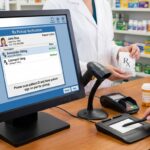
Technicians and pharmacists pick up a new system in stages. Datascan starts with a remote introduction by phone, moves to self-paced videos and documents through a customer login on its site, and ends with a live session in the store the day before the switch.
The owner’s job is to fit those stages to the store:
- Schedule the self-paced work during slower hours so it doesn’t move to the last night.
- Pair the most confident technician with the least confident one.
- Give the trainers a short list of the store’s most common tasks, such as a new prescription, a refill, a pickup and a rejected claim, so the in-store session tracks real work.
- Add one extra person on the busiest shifts during the week of the switch so staff can learn on live prescriptions without the counter backing up.
Walk the staff through what will look different before the switch. Patients and prescribers stay the same, but the screens, the steps and the shortcuts all change.
Telling Partners and Patients
A pharmacy keeps its existing claims switch, processor and third-party interfaces, including IVR, robotics and delivery systems, when it moves to Datascan. Each one still needs early notice of the date and contact info to get in touch with the conversion team. To spot which connections the store runs, owners can check Datascan’s software interfacing list. After signing, onboarding covers the rest of the store’s connections: third-party vendor relationships, wholesaler EDI accounts and FSA card acceptance. Datascan coordinates each one with the pharmacy so they are in place before the store goes live.
Patients notice nothing, since their profiles and histories carry over in the conversion. The exception is any patient-facing tool that changes with the system, like a refill app. A pharmacy moving patients to a new app should work out ahead of time how it will tell them and walk them through the updated process. Datascan can provide small, easy-to-see counter signage with QR codes so patients can download the app.
The Day of the Switch
Most of the cutover happens after hours, once the old system closes for the last time. Datascan’s team remotely converts the final data, then arrives in the store at least an hour before the doors open the next morning.
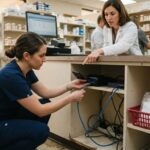
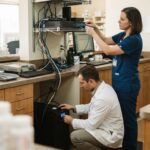
The night before, the owner should confirm the old system’s final closing time with the conversion team and arrange for someone with keys and alarm codes to let the installers in early. From there, the team works alongside staff through the first four to five days, staying past closing for questions and extra training.
The First Weeks on the New System
After the switch, staff may discover missing report configurations, unfamiliar label settings or shortcuts that were part of their old workflow. Keeping a running list of those items and working through them at each scheduled check-in prevents problems later.
A Datascan project manager or assistant checks in weekly through the first month, then every other week through the second month. At the 90-day mark, Datascan looks to schedule a session it calls Optimization Training, focused on automating features that can provide the pharmacy and its patients more convenience. This is another opportunity to optimize and improve the system now that the staff has been working with it for three months.
At Datascan, conversions are free for established pharmacies. Pharmacies can find more information about Datascan’s process on its pharmacy software conversions page.
Frequently Asked Questions
Does the pharmacy keep filling on its old system during the conversion?
Yes. The pharmacy fills on its old system as usual through its last day while the converted data is reviewed. Prescriptions filled during those weeks are carried over in the final data pull, so the staff does not enter them again on the new system.
How much staff time does data verification take during a switch?
It varies with the size of the pharmacy’s records and how many rounds the data needs. A store with a large active patient base, many compounded medications or a long list of prescribers has more to check than a small retail store, and the reviewer needs uninterrupted time at a workstation. Owners should ask the vendor for an estimate based on their experience working with similar pharmacies.
Does a pharmacy need new hardware when it switches software?
It depends on the vendor and on the age of the pharmacy’s current equipment. Owners should ask for a written list of supported workstations, label printers, scanners and signature pads and compare it against what the store already owns. Order replacement hardware before the switch to ensure it’s available once the system is ready.
What has to be set up again after a pharmacy software conversion?
Records convert, and the staff usually works on modifying settings. Patient profiles, prescription histories, prescribers, drug records and images move with the data, while choices made inside the old system, such as label formats, report setups and user permissions, may not. Confirm which settings will carry over and which ones will have to be set up again.
What should a pharmacy keep from its old system after switching?
Read access for the first weeks, and an export of its records for the longer term. Read access helps when staff need to look up an older note or report soon after the switch. State recordkeeping rules for prescriptions and controlled substances vary, so a pharmacy should check its state’s requirements and keep whatever access or export those rules call for.
When is the final data pull scheduled during a software switch?
At Datascan, this happens once the pharmacy fills its last prescription the evening before the go-live date. The team pulls the remaining activity and converts it down to the last prescription filled, so everything from that day is on the new system by the next morning. Closing staff should know to stop entering anything on the old system after that point.

Article by
Sarah Callioras
Sarah Callioras is Vice President at Datascan Pharmacy Software, bringing nearly 25 years of experience across independent pharmacy operations and pharmacy technology. Since joining Datascan in 2016, she has played a key role in driving business growth, strengthening client relationships, and supporting independent pharmacies through innovative software solutions. With a strong background in pharmacy operations, business development, and strategic leadership, Sarah is passionate about helping independent pharmacies succeed in an evolving healthcare landscape.
 Kevin Minassian is the President of Datascan Software. Under his leadership, the company rapidly expanded to provide pharmacy management software on a national level. Over the last 15+ years, he has ensured that Datascan has continuously evolved to offer innovative solutions for independent pharmacies while still offering world-class customer support. He is passionate about helping independent pharmacies to remain competitive, achieve success, and offer the very best service to their communities.