
A backup is more than an IT safeguard: pharmacy data backup and recovery solutions can support HIPAA readiness by helping protect patient information and restore access after an outage. HIPAA contingency planning covers data backup, disaster recovery, emergency mode operations, testing and revision, and criticality analysis. A backup plan matters, but it is only one part of the work.
Pharmacy owners know that losing access to records and systems can disrupt daily operations. The practical questions are whether backups can be restored when needed and whether encryption and access controls help protect the data they contain.
This article explains how backups and recovery work, what HIPAA readiness involves, and how to assess recovery priorities, backup frequency, security safeguards, and restore testing. You’ll have a clearer basis for choosing an approach that fits your pharmacy’s systems and daily needs.
Key Takeaways
- Build a recovery plan around the pharmacy systems and records that matter most to daily operations.
- Include restore testing and validation so you know whether backed-up data can be recovered when needed.
- Use backups as one part of HIPAA contingency planning, alongside emergency operations and regular plan review.
- Look for safeguards such as encryption, restricted access, and protected copies to reduce exposure if an account or system is compromised.
- Choose backup frequency and recovery priorities based on how often your pharmacy data changes and how long operations can tolerate disruption.
Why is software data backup important for my pharmacy?
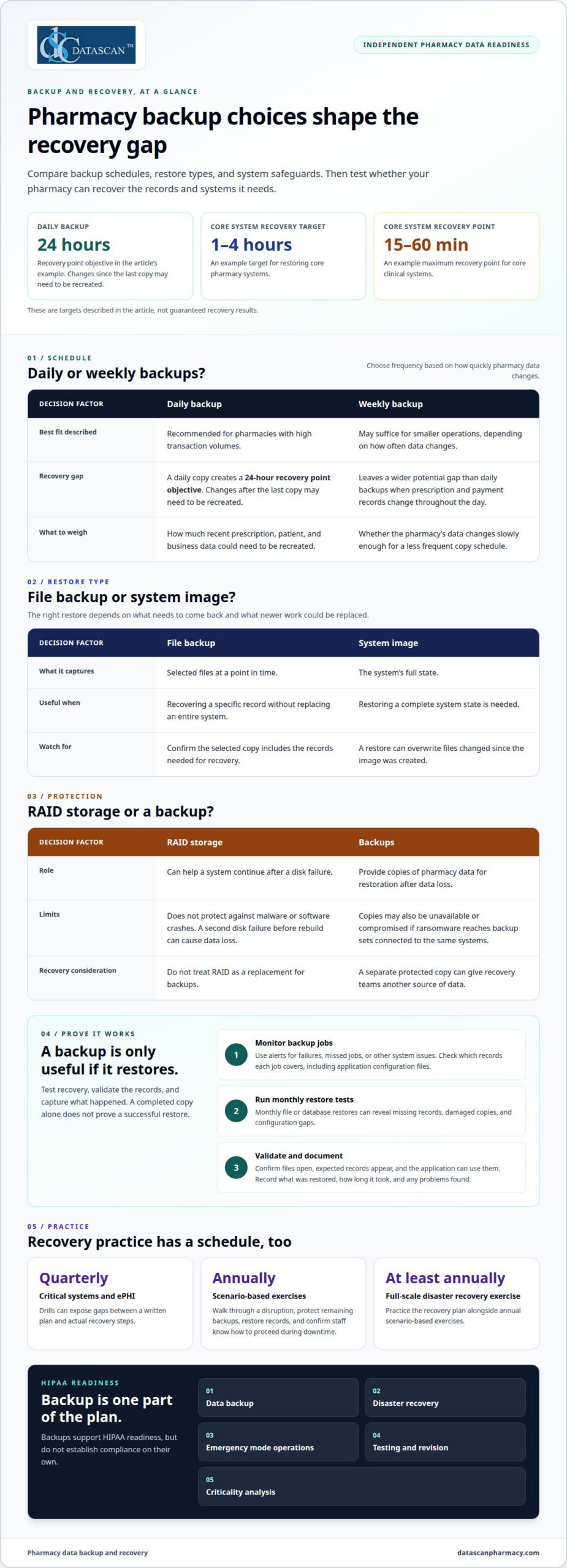
Backups give your pharmacy a way to restore prescription, patient, and business records after ransomware or a disaster. For pharmacies with high transaction volumes, daily backups may reduce the gap between saved copies. Weekly backups may suit smaller operations, depending on how often data changes.
How can pharmacies prepare for ransomware and disasters?
Ransomware is malicious software that can block access to pharmacy systems and records, while fires or floods can damage local equipment and storage. Both risks can interrupt prescription processing, so recovery planning needs to account for more than hardware failure.
In 2023, the Akira ransomware group claimed healthcare victims and demanded ransoms of up to $4 million. If ransomware reaches backup sets connected to the same systems, those copies may also become unavailable or compromised. A separate protected copy can give recovery teams another source of data.
Recovery exercises test whether staff can restore systems and resume essential work. Quarterly drills for critical systems and ePHI can expose gaps between a written plan and actual recovery steps. Scenario-based exercises involving IT, security, clinical, and compliance teams should take place annually, alongside at least annual full-scale disaster recovery exercises.
During an exercise, teams can walk through a ransomware scenario: identify affected systems, protect remaining backups, restore records, and confirm staff know how to proceed during downtime. Pharmacies that handle compounding workflows can also consider how a disruption affects those records and processes, including compounding pharmacy workflows.
How often should pharmacies back up their data?
Backup risk includes both how often copies are created and whether an incident can reach them. A daily backup creates a 24-hour recovery point objective, meaning changes made after the last copy may need to be recreated. That gap matters for prescriptions, patient information, and business transactions.
Set backup frequency according to how quickly data changes. Daily backups are recommended for pharmacies with high transaction volumes, while weekly backups may suffice for smaller operations. If prescription and payment records change throughout the day, a weekly schedule leaves a wider potential gap than daily backups.
RAID storage can help a system continue after a disk failure, but it does not replace backups. RAID does not protect against malware or software crashes. A degraded RAID array also remains vulnerable: a second disk failure can cause data loss before the array is rebuilt.
Monitor backups and use alerts to flag failures, missed jobs, or other system issues. A backup that silently stops running offers no dependable recovery point. Review which records each job covers, including application configuration files, so a restored system has the information it needs to operate.
What are Backup and Recovery Solutions?
A backup is a copy of pharmacy data; recovery is the process of restoring access after a failure. A sound approach defines what gets restored, in what order, and how teams validate recovered records before resuming clinical and business work.
How do you restore data, files, and system images?
Restoration brings backed-up files or a complete system image back into use after data loss. A file backup captures selected files at a point in time, which can help recover a specific record without replacing an entire system.
An image backup captures the system’s full state, but restoring it can overwrite files changed since the image was created. That distinction matters if a pharmacy needs one recent file rather than a full system rollback. Recovery planning should identify which backup type contains the needed data and what newer work a restore could replace.
Clinical restoration order also matters. A pharmacy can prioritize the systems needed to access prescription records and resume essential dispensing work, then restore supporting business functions. For example, restoring a payment record alone won’t restore the application or system needed to use it. Core clinical systems may target recovery within 1-4 hours, with a recovery point of no more than 15-60 minutes.
How do you test and validate restores?
A restore test checks whether a backup can be recovered and whether its data is usable. It turns a scheduled backup from an assumption into a tested recovery method. Monthly file or database restores can reveal missing records, damaged copies, and configuration gaps before a real failure forces the issue.
Validation should confirm that restored files open, expected records appear, and the relevant application can use them. For a prescription database, check record integrity and confirm that users can access the information needed for their work. A completed copy alone does not prove a successful restore.
Keep test results connected to the backup schedule. Record which data was restored, how long it took, and any problems found. If an image restore replaces newer files, document that consequence as part of the test. Repeat testing after system or backup-setting changes, since an earlier success may not reflect the current setup.
A useful recovery plan connects each system to its backup type, restoration priority, and validation step. That gives the team a clear sequence during an outage instead of forcing staff to guess which copy to use. If you’re reviewing how pharmacy technology supports daily operations, talk with our team about your pharmacy software workflow.
Can a backup system help with HIPAA compliance?
Yes. Backups support HIPAA readiness, but they do not establish compliance on their own. HIPAA contingency planning covers data backup, disaster recovery, emergency mode operations, testing and revision, and criticality analysis. Retention periods depend on record type and applicable federal and state rules, so set schedules by category and jurisdiction.
How does a backup program support regulatory compliance?
A pharmacy backup program supports compliance by helping protect patient information and restore access after data loss. Automatic backups can reduce reliance on staff remembering manual tasks, while frequency should reflect how often records change and applicable compliance needs. Documenting backup schedules and recovery tests also connects technical safeguards to continuity planning.
Retention and backup serve different purposes. A retention schedule defines how long a pharmacy keeps a record; a backup copy supports recovery after failure or loss. For each record category, identify applicable federal and state requirements, then set a retention schedule that preserves required records beyond routine backup rotation.
Other frameworks may apply to specific records. The FDA identifies 21 CFR Part 11 as covering electronic records and signatures in pharmaceutical compliance. A pharmacy handling those records should distinguish preservation requirements from operational backups, so routine rotation does not remove records that must remain available.
ISO 27001 alignment can help organize security controls alongside HIPAA planning. Map backup access, protection, monitoring, and recovery evidence to the relevant framework controls. Treat the mapping as a way to identify shared safeguards, not as proof that meeting one framework automatically satisfies the other.
What should a healthcare contingency plan include?
Healthcare contingency planning sets out how an organization will protect data and continue essential operations during an outage. Under HIPAA, the plan covers backup, disaster recovery, emergency mode operations, testing and revision, and criticality analysis. Each part has a distinct role: backups preserve data, while emergency procedures guide work during system downtime.
A pharmacy can connect each critical system to a recovery action. For example, a plan can identify where prescription records are backed up, who coordinates restoration, and how staff access information during an outage. Criticality analysis helps prioritize systems according to their role in patient care and business continuity.
Testing and revision keep the plan aligned with actual infrastructure. A scheduled exercise can expose unclear responsibilities, missing recovery steps, or records staff cannot access during emergency mode. Update the plan after system changes, then record revised procedures and test results for the next review.
How do encryption, immutability, and access controls protect pharmacy backups?
Encryption protects backup data from unauthorized use, immutability helps prevent copies from being changed or deleted, and access controls limit who can manage them. These safeguards address distinct risks: exposure during transfer or storage, ransomware tampering, and misuse of accounts with backup privileges.
How should pharmacy backups be encrypted?
Encryption converts readable backup data into protected form, making it harder to use if someone gains access without authorization. Encrypt backup data in transit and at rest with AES-256 or an equivalent method. Applying protection at both stages secures records as they move to storage and while they remain there.
Consider a backup moving from a pharmacy system to a separate repository. Encryption in transit protects the copy during transfer; encryption at rest protects stored files. Keep encryption keys separate from the data they unlock, and limit key access to authorized roles. If the same compromised account can access both a backup and its keys, encryption may offer less protection during an attack.
Review how the backup process handles encryption throughout the data path. Include scheduled copies, database exports, and removable media. An unprotected export can become a weak point even when the primary backup set is encrypted. Document how each copy is protected so staff can identify gaps during a security review.
What makes a pharmacy backup immutable?
An immutable backup is designed to resist alteration or deletion during its protected period. This separation matters when ransomware attempts to encrypt or erase accessible copies. For highly critical systems, use weekly air-gapped copies written to WORM storage or a physically isolated repository.
Air-gapping separates a copy from routine network access, while WORM means write once, read many. These approaches make it harder for malware on connected systems to change every recovery copy. They complement, but do not replace, restore testing and secure account management.
Decide which data needs this added layer based on its role in pharmacy operations and the impact of losing it. Document the copy’s location and restoration process so authorized staff can find it during recovery without reconnecting it to compromised systems prematurely.
How should pharmacies control access to backups?
Backup access controls define who can view, restore, alter, or delete copies. Restricting permissions reduces the chance that one compromised account can affect pharmacy records and their recovery source.
Assign access according to job responsibilities. For example, staff who restore files may not need permission to delete backup sets or change retention settings. Use separate administrative access for backup management, and review permissions when roles change. Remove access that no longer supports a current responsibility.
Monitor backup activity and set alerts for failures or unexpected changes. A failed scheduled job, unusual deletion attempt, or sudden access change can signal a problem. Document who responds and how they protect remaining copies. Review vendor security and recovery documentation to understand how access, encryption, and restoration work together.
How do you choose a pharmacy backup solution?
Pharmacies can choose scheduled file or database backups, system images, local storage, offsite copies, or a hybrid approach. Local backups remain at the pharmacy, offsite copies are stored separately, and hybrid approaches use both. Each option affects how records are accessed and which disruptions the pharmacy can recover from.
Compare pharmacy data backup and recovery solutions by the systems covered, the data each copy contains, and the steps required to restore it. The right fit depends on pharmacy workflows, transaction volume, access controls, and how much downtime the business can manage.
What backup options are available to pharmacies?
Options include scheduled file copies, database-aware backups, system images, and disaster recovery plans. A file copy can help recover selected records, while an image captures a broader system state. Match each type to a practical need, such as retrieving a document or restoring an application after equipment failure.
Set recovery priorities around the systems that support dispensing and business operations. A pharmacy may need its prescription database available before routine processing can resume. Database-aware backups paired with log shipping or continuous backup can support recovery point objectives of 5 to 15 minutes for Tier 0 and Tier 1 healthcare systems. Consider the acceptable data gap alongside the time required to restore each system.
Automation can reduce reliance on staff remembering each backup. Include application configuration files in your coverage plan, since data files alone may not restore the settings needed to use an application. Monitoring matters, too. Pharmacy data backup and recovery solutions should make it possible to identify a failed job before staff need a recovery copy.
How do local, offsite, and hybrid backups differ?
Local backups store copies on equipment at the pharmacy. Staff can access them directly, but a fire, flood, or theft could affect production systems and nearby copies together. Offsite backups separate copies from the pharmacy’s premises. A hybrid approach combines local and offsite storage, giving the pharmacy different recovery paths.
Consider how each option would work during a specific disruption. A local copy may be useful if remote access is unavailable, while an offsite copy can provide another source after damage at the pharmacy. A hybrid design uses both, but staff still need documented access procedures and a tested restoration process.
Before choosing, map each option to likely events, such as a failed workstation, damaged server, or building outage. Then identify the records and configuration files each copy protects. Pharmacy data backup and recovery solutions are useful only when staff can locate the right copy and restore it through a clear process.
To discuss how pharmacy systems and workflows fit into your operational planning, contact our team.
How can Datascan Pharmacy Software support your pharmacy?
Datascan Pharmacy Software helps independent pharmacies manage daily operations with pharmacy management software, point of sale, a patient mobile app, and delivery tools. Include these systems in your inventory of essential applications when planning backup priorities and recovery procedures.
Start by identifying which pharmacy workflows depend on each system and what staff need to resume work after an outage. This helps your pharmacy coordinate its software environment with its separate backup and recovery plan, without confusing operational tools with backup safeguards.
If you’re reviewing how your pharmacy systems fit into daily operations, contact Datascan Pharmacy Software to discuss your needs.
How can you make recovery planning part of your next systems review?
Your next step is to connect recovery priorities with the pharmacy systems your team relies on each day. Map the workflows that matter, identify the applications that support them, and make sure your backup plan accounts for those dependencies. This provides a clearer basis for evaluating pharmacy data backup and recovery solutions as your operations change.
Datascan Pharmacy Software supports pharmacy operations with Datascan Pharmacy Management Software, Datascan Point of Sale (POS), and the MobileScripts Patient Mobile App. These offerings address different parts of the pharmacy workflow, so consider how each fits your operational environment when reviewing continuity needs.
A practical recovery plan should fit the way your pharmacy works, not add unnecessary complexity. If you’re ready to discuss how your systems and workflows fit into that planning, start a conversation with Datascan Pharmacy Software. You can take the next step with a clearer path forward.
Frequently Asked Questions
What are the benefits of offsite backups?
Offsite backups keep a recovery copy separate from the pharmacy’s premises, which can help if a local event damages equipment and nearby storage. For example, a fire could affect both a pharmacy’s systems and copies stored in the same building. A remote copy provides another recovery option, but staff still need a clear process for accessing it and restoring the applications that use the data.
What happens if I lose my pharmacy data?
Data loss can leave staff unable to access prescription, patient, or business records until systems are restored. The impact depends on which data is affected and whether a usable backup exists. Follow the pharmacy’s response plan, determine which systems and records are unavailable, and restore from an appropriate copy. Then validate the recovered information before relying on it for dispensing, billing, or other daily work.
How much do pharmacy backup and recovery solutions cost?
Costs depend on factors such as data volume, retention needs, backup frequency, recovery priorities, storage approach, and support requirements. A solution covering several systems and longer retention needs may differ from one protecting a smaller set of records. Pricing depends on the pharmacy’s requirements and is provided after a quote request. Compare the full scope, including setup, ongoing storage, restore support, and testing needs.
What are the HIPAA requirements for pharmacy data backups and disaster recovery?
A pharmacy should connect these elements in a written plan. For example, identify which records and systems support essential work, how staff access necessary information during an outage, and how recovery procedures are tested and updated. A backup alone does not address every part of contingency planning.
How do pharmacies protect backups from ransomware and data breaches?
Pharmacies can reduce exposure by encrypting backup data, limiting administrative access, monitoring backup activity, and keeping a protected copy separate from routine system access. For example, if an employee account is compromised, restricted permissions can limit its ability to delete recovery copies. Alerts for failed backup jobs or unexpected changes can also help staff spot problems before they need a restore.
How can a pharmacy restore data and resume operations after an outage or cyberattack?
Use the recovery plan to contain the incident, identify affected systems, and select a backup copy that predates the disruption. Restore the systems needed for essential pharmacy work, then confirm that records and application functions are usable. Record what was restored and any data that needs reconciliation. Staff can then resume affected workflows in a controlled order instead of switching systems without a clear recovery sequence.
What should pharmacies look for when comparing backup vendors and service-level agreements?
Compare each vendor’s supported backup types, restoration process, security controls, monitoring, retention options, and recovery responsibilities. Review how the agreement defines response and restoration commitments, exclusions, escalation procedures, and customer access to backup data. Ask how the vendor handles a failed backup job and what information the pharmacy receives. These details clarify who does what during an outage and where responsibilities lie.
How should pharmacies test backup recovery and disaster recovery plans?
Test more than whether a backup job reports success. Restore representative files or databases, confirm records open correctly, and check that the pharmacy application can use them. Include a scenario where a key system is unavailable, then assess whether assigned staff can follow recovery procedures and communicate responsibilities. Document failures, missing dependencies, and corrective actions, then update the plan so the next exercise tests those changes.

Article by
Sarah Callioras
Sarah Callioras is Vice President at Datascan Pharmacy Software, bringing nearly 25 years of experience across independent pharmacy operations and pharmacy technology. Since joining Datascan in 2016, she has played a key role in driving business growth, strengthening client relationships, and supporting independent pharmacies through innovative software solutions. With a strong background in pharmacy operations, business development, and strategic leadership, Sarah is passionate about helping independent pharmacies succeed in an evolving healthcare landscape.
 Kevin Minassian is the President of Datascan Software. Under his leadership, the company rapidly expanded to provide pharmacy management software on a national level. Over the last 15+ years, he has ensured that Datascan has continuously evolved to offer innovative solutions for independent pharmacies while still offering world-class customer support. He is passionate about helping independent pharmacies to remain competitive, achieve success, and offer the very best service to their communities.