
Central verification works best when the system directs each prescription to the right review path instead of sending every item through the same manual checks. A workflow for central verification of prescriptions coordinates intake, shared provider data, review queues, exception routing, and traceable controls before dispensing.
That structure matters because verification involves more than a final check. Intake review can identify issues with drug identity or dosage, while queue summaries show what needs attention and system-directed routing sends discrepancies for review. Pharmacists still apply their professional judgment, especially when an item falls outside the routine workflow.
This article explains how centralized verification works, what a broader workflow system contributes, and how intake checks, shared data, queue visibility, and traceability fit together. These elements can reduce duplicate handling while keeping exceptions visible, helping pharmacy teams coordinate fulfillment with a clearer view of each prescription’s status.
Key Takeaways
- Centralized provider data and clear queue updates can help teams avoid repeating routine reviews and spot work that needs attention.
- Closed-loop controls make it easier to trace prescription status, document review activity, and manage staff access by role.
- System-directed routing helps coordinate clinical and operational steps while sending discrepancies to the right review path.
- Consistent intake checks, including review of prescription or referral images, can catch key details before fulfillment moves forward.
- A customizable pharmacy workflow can help independent pharmacies organize routing around their operations and identify where software may reduce manual handoffs.
How can centralized provider data reduce repeated manual prescription review?
Centralized provider data gives each verification point a shared reference for prescriber details, reducing repeated manual searches across intake and fulfillment. When a prescription moves between queues, staff can use the same provider record instead of rebuilding context at each handoff. Pharmacists can then focus their review on the prescription and any exceptions.
Safety risks include mismatched patient or prescriber details, incorrect drug identity or dosage, and missed discrepancies. A shared record reduces duplicate lookups, but it does not replace professional review of the prescription itself.
Repeated manual verification adds work when separate steps ask staff to confirm the same provider information. For example, an intake reviewer may locate a prescriber record, then a fulfillment reviewer repeats the lookup because the first result did not follow the prescription. Each handoff adds another chance for inconsistent details or delays.
A centralized provider record can keep commonly used prescriber details in one place. Staff compare the prescription’s information with that record, then route mismatches for review. This is especially useful when a central-fill or mail-order workflow handles prescriptions from multiple locations, including digital consultations from telehealth services like Aussie Scripts. Inherited verification can reduce redundant checks on routine items, leaving pharmacists more time for exceptions and clinical activities.
- Automatic queue refresh: A workflow can update queue visibility when an item’s status changes, helping reviewers see newly ready prescriptions or exceptions without repeating a manual search.
- Manual queue refresh: A reviewer can refresh the queue after resolving a discrepancy or completing a handoff, then confirm which items remain open.
- Shared provider data: Staff can use consistent prescriber details across intake and fulfillment, reducing repeated lookups and conflicting entries.
For example, if a prescription arrives with provider details that differ from the shared record, the item can remain visible for review instead of blending into routine work. The reviewer resolves the mismatch before the prescription advances. If the details align, the workflow can carry the existing verification forward rather than repeating the same lookup at every stage.
Queue summaries help supervisors see where work is waiting. A queue showing ready items, pending reviews, and discrepancies gives the team a practical view of workload. Automatic refresh supports current visibility during active processing, while manual refresh lets staff deliberately update the list after an action. Clear queue states reduce uncertainty, but each prescription still needs its required review.
How do closed-loop workflow controls support traceability and security?
Quality controls for central verification should record who reviewed a prescription, the decision, and when it advanced. A closed-loop workflow links each action to the prescription record, so pharmacy leaders can follow its progress during quality review. This supports accountability while keeping patient care and dispensing decisions tied to documented work.
Controlled-substance prescriptions, such as those issued by addiction treatment clinics like Recovery Care, require additional attention. Federal and state requirements include stricter recordkeeping, refill limits, and controls intended to prevent misuse and diversion. A central workflow can route these prescriptions for appropriate review and preserve their documentation. If an item raises a concern, staff can hold it for review instead of allowing it to move forward as routine work.
U.S. federal rules assign responsibility for proper prescribing and dispensing to the prescribing practitioner, with corresponding responsibility for the pharmacist who fills the prescription. A workflow can support accountability by recording review actions and retaining verification records. For example, if a pharmacist pauses an order because of a discrepancy, the record can show the pause and its reason.
Closed-loop traceability links a prescription’s workflow actions to its prescription or order record. Electronic records of verification checks can provide an audit trail for compliance and quality assurance. Integrated verification systems can also capture images of dispensed medications and securely store related verification data, giving reviewers more context when examining a completed transaction.
- Record the action: Keep the review result, reviewer identity, and status change with the prescription.
- Document exceptions: Preserve the reason an item was held and the recorded resolution.
- Control access: Assign permissions by staff role and limit access to necessary actions.
NIST SP 800-53 Rev 5 identifies IA-2 as Identification and Authentication for Organizational Users, AC-6 as Least Privilege, and AU-2 as Event Logging. These controls relate to verifying staff identities, limiting permissions, and recording events. In a pharmacy workflow, they provide useful control concepts for identity checks, role separation, and reviewable activity records.
CIS Controls v8 identifies CIS-6 as Access Control Management, relevant to managing permissions and role separation in clinical systems. NIST SP 800-63 Digital Identity Guidelines provides guidance on strong authentication and assurance for high-stakes access decisions. Together, these references help frame how systems can manage user identity and access without replacing pharmacist judgment.
Identity checks show who acted, access controls limit available actions, and event logs record activity. Connected records help reviewers understand how a prescription moved through the process. These controls give pharmacy leaders a structured basis for examining exceptions, reviewing quality, and strengthening accountability across dispensing workflows.
How does system-directed routing coordinate pharmacy workflow?
System-directed routing moves prescriptions through defined clinical and operational steps based on their status. It can send routine items forward while directing discrepancies or replenishment events for review. This gives each item a clear next step and helps teams coordinate work without relying on informal handoffs.
A routing system connects fulfillment stages to item-level and order-level status. For example, an intake-ready prescription can move to clinical review, then proceed to filling after required checks. The order record shows broader progress, while the item record tracks an individual prescription. Both views help staff see where work stands.
Routing also separates routine processing from exceptions. If a discrepancy appears, the workflow can pause inherited verification and send the item for review. A replenishment event can trigger the same pause. The pharmacist reviews the affected item before it returns to the appropriate stage, while other prescriptions continue along their assigned paths.
- Clinical review: Send prescriptions requiring pharmacist attention to the appropriate review queue.
- Operations: Direct cleared items to the next fulfillment stage, such as filling or packaging.
- Exception handling: Pause an affected item when a discrepancy or replenishment event requires review.
This coordination matters when clinical and operational teams work across different stages. A remote pharmacist can verify prescriptions while fulfillment staff handle assigned tasks at the pharmacy. The workflow links these actions through item and order status, helping each role follow the same process instead of passing incomplete instructions between people.
System-directed workflows can reduce variability compared with repeated manual decisions about where each prescription should go. They also clarify the next action when staff encounter an exception. For example, a flagged item can remain in a review state while unaffected items continue through fulfillment. This helps prevent one problem from obscuring the rest of the queue.
Technology should fit the pharmacy’s existing workflow. Pouch verification tools, for example, can integrate with pharmacy workflow software to connect medication checks with fulfillment activity. Clear routing rules define when an item advances, pauses, or returns for review. This coordinates movement across clinical review and pharmacy operations, with fewer ambiguous handoffs.
What should pharmacies verify at prescription or referral intake?
At intake, check that the patient, prescriber, medication, and dosage details are legible and consistent across the submitted information. Compare the prescription or referral image with the entered record, then route mismatches for pharmacist review before dispensing.
Start with the image. Confirm it is complete, readable, and attached to the correct patient record. Then compare the drug identity and dosage shown in the image with the intake entry. These checks can catch transcription errors before an item enters routine fulfillment.
A focused intake review can follow a consistent sequence:
- Match the patient: Confirm the submitted document is linked to the intended patient record.
- Review the medication: Compare the drug identity and dosage on the image with the entered details.
- Check prescriber information: Make sure the information on the document matches the associated provider record.
- Assess the image: Look for missing pages, cut-off text, glare, or details that cannot be read.
- Route exceptions: Hold unclear or conflicting information for review instead of advancing it as routine work.
Referral intake requires the same attention to source documents and patient matching. For example, if a referral image names one patient but the intake record points to another, pause processing and resolve the mismatch. If a page is cut off, request a complete image through the pharmacy’s established process before relying on missing details.
Images can streamline review when staff follow a consistent viewing process. Open the document beside its intake record, enlarge small text, and review each page in sequence. If the image is unreadable, incomplete, or inconsistent with the entry, mark the item for follow-up. This keeps unclear submissions from blending into the ready queue.
A central queue can help organize image review. Grouping new submissions, incomplete records, and items awaiting pharmacist review gives staff a clear next step. For example, an intake reviewer can resolve a legible image with matching details while routing a dosage discrepancy to a pharmacist. The workflow should preserve the reason for the hold and the item’s status.
Prescription verification helps prevent errors involving drug identity and dosage. Intake checks are an early filter, not a substitute for clinical review. A clear image, correct patient match, and consistent prescription details give the pharmacist a stronger starting point. The practical takeaway is to resolve document and data mismatches before the prescription moves forward.
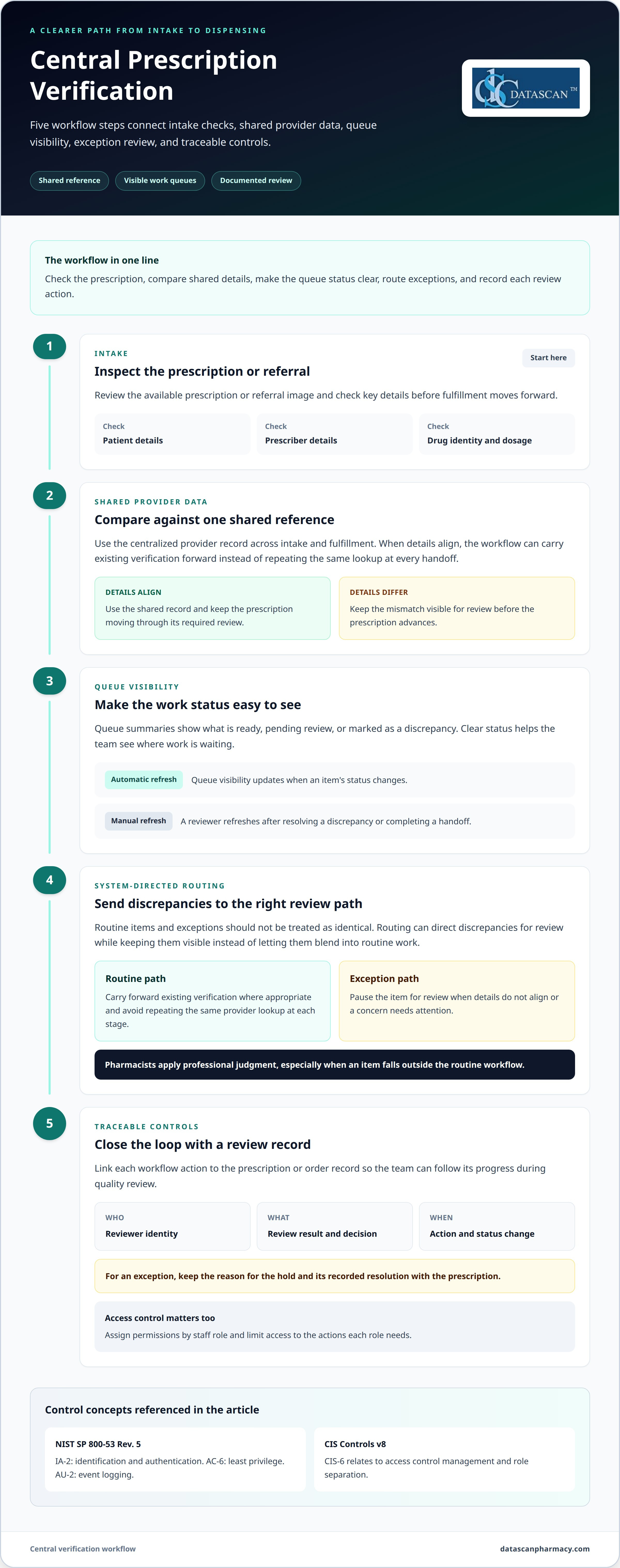
What are the steps in a centralized prescription verification workflow?
A workflow for central verification of prescriptions starts with clear operating rules, not software settings alone. Pharmacy leaders define which prescription types the process covers, which roles make decisions, and which conditions require pharmacist judgment. That groundwork helps the team apply the same process to routine work and less common cases.
- Set the scope: Identify the prescriptions and locations included. For example, a pharmacy may define separate paths for routine community prescriptions and specialty orders.
- Assign decision roles: Clarify which tasks belong to intake staff, pharmacists, and fulfillment staff. Keep clinical decisions with the pharmacist.
- Define routing criteria: Establish what qualifies for routine processing and what requires a different path. A transfer request, for example, may need a distinct review from a standard refill.
- Set exception ownership: Specify which role takes responsibility for each exception type and how the team records its resolution.
- Test representative scenarios: Walk through typical and unusual cases before using the process broadly. Check whether each case reaches the intended role and ends with a clear decision.
- Review and refine: Examine recurring delays, returned items, and staff questions. Adjust the written workflow when an unclear rule causes inconsistent handling.
Scenario testing makes abstract routing rules practical. A pharmacy can trace a routine prescription, a transfer, and an order requiring clinical judgment through the proposed process. The goal is to identify unclear ownership before live work depends on the workflow. Record what should happen at each decision point, including who can resolve the issue.
Written procedures give staff a shared reference for unusual cases. Keep the approved process aligned with the roles and terminology used in the pharmacy. If a responsibility changes, update the procedure and communicate the change to affected staff. A workflow that exists only in one person’s memory is difficult to apply consistently.
Review the process using operational signals such as repeated returns, unresolved tasks, and staff requests for clarification. These can point to a routing rule that needs revision. They do not replace professional judgment; they help leaders identify where the workflow itself creates friction.
A workflow for central verification of prescriptions should remain a living operating model. Revisit its scope and decision rules when pharmacy services or responsibilities change. This keeps the written process aligned with actual practice and helps teams understand their roles without adding unnecessary steps.
How can Datascan customizable workflow support prescription routing?
Datascan Pharmacy Software offers a customizable workflow for pharmacies that want prescription routing to fit their operations. It can be a relevant next step when staff rely on repeated handoffs, unclear task ownership, or processes that don’t match how the pharmacy handles prescriptions.
A pharmacy’s routing needs depend on its services, staff roles, and fulfillment process. A community pharmacy handling walk-in prescriptions may organize work differently from one coordinating delivery or compounding. Customization lets the pharmacy shape its workflow around those differences instead of forcing every task into the same path.
With customizable pharmacy workflow, teams can consider where a prescription enters the process, who handles each stage, and how work moves onward. For example, a pharmacy might want intake tasks separated from pharmacist review, while keeping exceptions visible for the right team member. The goal is a clearer process that fits daily operations.
Consider a defined workflow if staff spend time clarifying who owns the next task, or if the same prescription follows different paths depending on who handles it. It can make handoffs more consistent and give pharmacy leaders a practical way to review whether current steps match how the business operates.
Datascan Pharmacy Management Software is relevant for pharmacies looking to coordinate prescription work within pharmacy management software. The right fit depends on the workflow challenge. If the issue is limited to one handoff, a focused process change may be enough. If routing affects intake, review, and fulfillment, a broader workflow discussion can help identify the right structure.
Before changing a process, map its existing stages in plain terms: where prescriptions arrive, which roles handle them, and where delays or unclear handoffs occur. Then identify which steps need distinct routing. A referral or prescription requiring pharmacist attention, for example, should have a clear path separate from routine operational tasks.
Customizable workflow is most useful when it addresses a defined operational need, not when it adds steps without a clear purpose. Datascan Pharmacy Software can help pharmacies explore how workflow and pharmacy management software may support their routing needs. To discuss your pharmacy’s workflow, contact Datascan Pharmacy Software.
Frequently Asked Questions
Why does this “verify once” approach hold up operationally?
The process works when the pharmacy defines what the initial review covers and what changes require another review. For example, a prescription with unchanged details may follow the established process, while a changed medication or new discrepancy returns for pharmacist attention. Teams can assess the approach by reviewing completed cases and exceptions, then clarifying any rule staff interpret differently.
What is central verification of prescriptions in pharmacy practice?
Central verification is an arrangement for conducting prescription review through a coordinated process, often for work handled by multiple locations or fulfillment teams. It changes where and how review is organized, not the need for professional judgment. A pharmacy considering this model can identify which prescription types and responsibilities fit a shared process and which remain tied to local operations.
What technology and software are used for central prescription verification?
Technology can range from pharmacy management software that coordinates fulfillment stages to tools that inspect medication during packaging. For example, pouch verification can compare a medication’s size, shape, and color with approved reference images. Pouch inspection serves a different purpose: it examines pouch integrity and sealing. Pill imaging can also help pharmacies examine dispensing trends, error patterns, and inventory usage.
What are U.S. federal and state requirements for centralized prescription verification?
Federal rules assign responsibility for proper prescribing and dispensing to the prescribing practitioner, with corresponding responsibility for the pharmacist who fills the prescription. State requirements may also apply to pharmacy practice. A practical starting point is to identify the responsibilities that apply to the pharmacy’s process, then ensure its written procedures and staff roles reflect them. Centralizing review does not erase those responsibilities.
How are controlled substances handled in centralized prescription verification?
Controlled-substance prescriptions are subject to additional federal and state requirements, including stricter recordkeeping, refill limits, and controls intended to prevent misuse and diversion. A pharmacy’s process should account for those requirements when defining who reviews these prescriptions and what information the record needs to preserve. Centralization changes how review is organized, not the need to follow applicable controls.
How does centralized prescription verification compare with on-site pharmacist verification?
On-site verification places the pharmacist’s review within the local pharmacy’s operations; centralized verification organizes review through a shared process that may support work across teams or locations. The choice affects staff coordination, handoffs, and how exceptions reach the pharmacist. For a pharmacy with one location and direct pharmacist involvement, on-site review may be simpler. More distributed fulfillment may call for coordinated review.
What staffing, turnaround-time, and cost factors affect a central verification workflow?
Repeated manual verification can increase labor needs and slow fulfillment. Inherited verification can reduce redundant checks, helping pharmacies maintain throughput and support growth without a proportional increase in verification labor.

Article by
Sarah Callioras
Sarah Callioras is Vice President at Datascan Pharmacy Software, bringing nearly 25 years of experience across independent pharmacy operations and pharmacy technology. Since joining Datascan in 2016, she has played a key role in driving business growth, strengthening client relationships, and supporting independent pharmacies through innovative software solutions. With a strong background in pharmacy operations, business development, and strategic leadership, Sarah is passionate about helping independent pharmacies succeed in an evolving healthcare landscape.
 Kevin Minassian is the President of Datascan Software. Under his leadership, the company rapidly expanded to provide pharmacy management software on a national level. Over the last 15+ years, he has ensured that Datascan has continuously evolved to offer innovative solutions for independent pharmacies while still offering world-class customer support. He is passionate about helping independent pharmacies to remain competitive, achieve success, and offer the very best service to their communities.