
Scattered refill dates create extra trips and more follow-up for patients managing ongoing prescriptions. Medication synchronization brings those regular refills together on one convenient date each month, while medication synchronization software can help pharmacy teams coordinate the work behind that schedule. The aim is simpler: prepare eligible prescriptions together and give patients a clearer refill routine.
Coordinating refills takes more than moving dates on a calendar. Pharmacy staff need to review each patient’s medication list, confirm changes before refills, and use short fills when appropriate to align refill dates. This guide explains medication synchronization, how to organize the process step by step, and how to handle short fills without treating every prescription alike. It also covers how pharmacy management software can support the workflow and why patient preferences and regular follow-up matter.
Key Takeaways
- Use pharmacy software to organize eligible patients, refill dates, and follow-up tasks in one workflow.
- Set a monthly pickup date that reflects the patient’s preferences, then review medication changes before preparing refills.
- Short-fills can help align refill dates during an initial sync cycle, while ongoing and short-term prescriptions may need different handling.
- Coordinate refill timing with prescription quantities and insurance rules to avoid preventable claim issues.
- Connect synchronized refills with pickup or delivery workflows to make the process easier for patients and pharmacy staff.
What Is a Medication Sync Program?
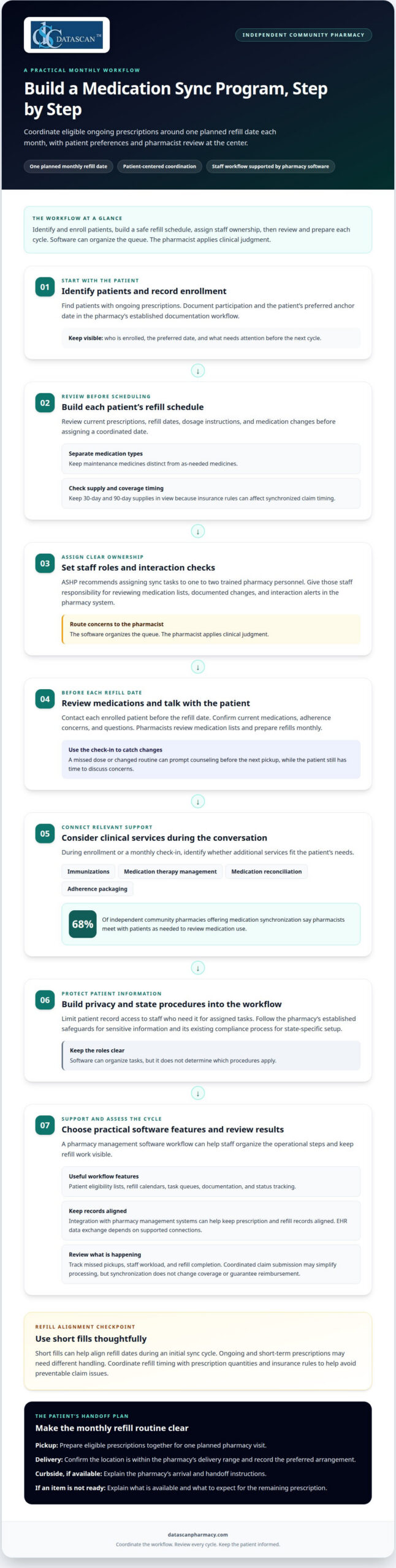
A medication synchronization program coordinates a patient’s ongoing prescriptions around one planned refill date each month. Pharmacy software can help staff organize eligible patients, track schedules, and prepare follow-up, while pharmacists review medication details and speak with patients.
- Identify patients and record enrollment. Use a pharmacy management system to find patients with ongoing prescriptions, then document their participation and preferred anchor date. A clear record helps staff see who is enrolled and what needs attention. Keep enrollment information in the pharmacy’s established documentation workflow so staff can find it when preparing the next cycle.
- Build each patient’s schedule. Review current prescriptions, refill dates, dosage instructions, and medication changes before assigning a coordinated date. Separate maintenance medications from as-needed medicines. Keep 30-day and 90-day supplies in view because insurance rules can affect the timing of synchronized claims.
- Assign ownership and interaction checks. ASHP recommends assigning sync tasks to one to two trained pharmacy personnel. Give those staff responsibility for reviewing medication lists, checking documented changes or interaction alerts in the pharmacy system, and routing concerns to the pharmacist. The software organizes the queue; the pharmacist applies clinical judgment.
- Coordinate monthly reviews and counseling. Contact each enrolled patient before the refill date to confirm current medications, adherence concerns, and questions. Pharmacists review medication lists and prepare refills monthly. A conversation about a missed dose or changed routine can prompt counseling before the next pickup, while the patient still has time to discuss concerns.
- Connect clinical services to the conversation. During enrollment or a monthly check-in, identify whether services such as immunizations, medication therapy management, comprehensive medication reconciliation, or adherence packaging fit the patient’s needs. Among independent community pharmacies offering medication synchronization, 68% say pharmacists meet with patients as needed to review medication use.
- Build privacy and state-specific procedures into the workflow. Limit access to patient records to staff who need them for their assigned tasks, and follow the pharmacy’s established safeguards for handling sensitive information. For state-specific program setup, use the pharmacy’s existing compliance process to guide configuration. Software can organize tasks, but it does not determine which procedures apply.
- Choose practical features and review results. Look for patient eligibility lists, refill calendars, task queues, documentation, and status tracking. Integration with pharmacy management systems can help keep prescription and refill records aligned; EHR data exchange depends on supported connections. For billing, coordinated claim submission may simplify processing, but synchronization doesn’t change coverage or guarantee reimbursement. Track missed pickups, staff workload, and refill completion to assess results. Software can’t replace pharmacist review or prevent every delay. A pharmacy management software workflow can help streamline these operational steps.
What is Medication Synchronization?
For patients with several ongoing prescriptions, coordinating refills can turn separate trips into one pharmacy visit or a planned delivery. The pharmacy prepares eligible medicines together, and the patient uses the pickup or delivery option that suits their situation.
- Confirm how the patient wants to receive prescriptions. Before preparing the coordinated order, record whether the patient plans to pick up prescriptions or use delivery. A patient who visits the pharmacy may prefer one monthly trip, while someone whose location falls within the pharmacy’s delivery range may choose delivery. A clear preference helps staff prepare for the right handoff.
- Organize the pickup as one visit. Prepare eligible prescriptions together so the patient can collect them during a single pharmacy visit each month. This can be especially helpful when someone manages several ongoing medicines and would otherwise need separate trips. Keep the patient’s requested pickup arrangement clear, including any instructions the pharmacy uses to complete the handoff.
- Make delivery details part of coordination. For a patient choosing delivery, confirm that the location is within the pharmacy’s delivery range and record the preferred arrangement in the appropriate workflow. Delivery gives patients another way to receive prescriptions prepared together. It also gives the pharmacy a concrete fulfillment plan instead of assuming every enrolled patient will arrive at the counter.
- Explain curbside pickup when it is available. If the pharmacy offers curbside pickup, tell the patient how to request the handoff and where to wait. Keep the directions specific to the pharmacy’s process. For example, the patient may need to call after arriving or follow another established arrival procedure. Clear instructions prevent confusion when several prescriptions are ready together.
- Plan for prescriptions that are not ready together. If one prescription cannot be included in the same handoff, explain which medicines are ready and what the patient should expect for the remaining item. Don’t imply that every prescription will always be available at once. This helps the patient make an informed pickup or delivery plan and reduces uncertainty at the point of handoff.
- Use the combined handoff to support continuity. A coordinated pickup can make it easier for patients to receive multiple ongoing prescriptions in one visit, while delivery can serve eligible patients who prefer that option. Make the fulfillment choice clear before the scheduled handoff, then ensure the patient knows how to receive the prepared medicines. The practical benefit is a simpler way to collect prescriptions without requiring separate trips for each refill.
Medication synchronization and refill coordination
Refill coordination turns a shared schedule into a repeatable pharmacy workflow. Use these steps to organize chronic prescription refills, reminders, short fills, and delivery without treating every prescription alike.
-
Review the refill workflow before changing it
Map how refill requests move from patient outreach to pharmacist review, claim submission, filling, and pickup. Identify where a missed approval or unresolved question can pause the process. If your pharmacy uses EnterpriseRx Enhanced Refill Processing, assess how its current workflow supports those same coordination steps. Focus on accurate records, clear task ownership, and timely patient follow-up.
-
Set Up Auto-Refills and Reminders
Enroll eligible patients in auto-refills only after obtaining consent and confirming which chronic prescriptions belong in the program. Set reminders before the anchor date so staff can ask about medication changes, adherence barriers, and pickup plans. Automated reminders, including interactive voice response, can reduce the need for staff to call about pickup dates. However, an automated message should not replace a pharmacist conversation when a concern needs review.
-
Use Short Fills to Align Schedules
Use a one-time short fill when a prescription needs a quantity adjustment to reach the patient’s synchronization date. Review the medication, remaining supply, and refill timing before coordinating the next cycle. Keep 30-day and 90-day supplies distinct when planning dates. According to McKesson, review third-party contracts before setting synchronization date ranges, since ranges set too high can increase Refill Too Soon exceptions.
-
Coordinate claims, reminders, and fulfillment
Prepare eligible refills together, then submit claims for prescriptions filled on the same date where appropriate. Synchronization does not change insurance coverage, so account for plan rules and supply limits during coordination. Confirm whether the patient expects pickup or delivery, and communicate the planned handoff clearly. A consistent process can simplify refills for patients and help staff anticipate medication demand.
Review the workflow regularly: track unresolved refill requests, missed pickup dates, and questions that required pharmacist follow-up. These checkpoints show where coordination is breaking down and where a task or reminder needs adjustment. To discuss how refill coordination fits your pharmacy’s workflow, talk with our pharmacy software team.
Synchronization can also be understood as a way to make refill timing easier to manage across a patient’s medications. Pharmacies may provide a few extra doses initially to align a patient’s medications to one refill date. In 2022, 80% of surveyed independent community pharmacies in the United States reported offering synchronized medication refills. This level of reported use makes coordination a relevant part of pharmacy refill processes.
The ASHP guide recommends contacting patients about synchronized refills approximately 1 week before or a few days before their anchor date. It also recommends reviewing medication changes, adherence issues, and patient concerns during that contact. Medication synchronization programs are reported to be associated with better medication adherence than programs without synchronization. A study described on the page reported lower healthcare costs due to reduced hospitalizations and emergency room visits among patients in medication synchronization programs. These reported outcomes can help inform how pharmacies assess their coordination efforts.
Medication synchronization definition
Medication synchronization software supports the administrative work of running a sync program by organizing patient records, refill tasks, and workflow status. It helps staff see what needs action, while pharmacists make clinical decisions and address patient concerns.
- Separate the software from the care process. Medication synchronization is the pharmacy’s operational and patient-care approach. Software is a tool for managing records and tasks. The distinction matters: a system may display an incomplete medication list, so staff still need a reliable process to review and correct information before acting on it.
- Define what the system needs to track. Identify program tasks such as enrollment documentation, prescription review, patient outreach, and refill preparation. Assign each task a clear status, such as waiting for a patient response or ready for pharmacist review. This gives the team a shared view of the work without mistaking an unfinished task for a completed clinical decision.
- Make exceptions visible. A patient’s situation can change after enrollment. A new prescription, a discontinued medicine, or an unanswered outreach attempt may require attention before the next refill is processed. Use the workflow to flag these exceptions for review rather than letting them proceed as routine tasks.
- Keep clinical judgment with the pharmacist. Software can organize information and route a concern, but it cannot determine whether a medication change is appropriate for a patient. For example, a documented dose change should prompt a review of the prescription record and any needed communication, not an automatic assumption that every related refill is ready.
- Use patient contacts to update the record. When a patient reports a change or concern, record the information through the pharmacy’s established process and route it to the appropriate staff member. A clear note helps the next person understand what was reported and what action remains. This is especially useful when several team members handle different parts of the program.
- Review whether the workflow is working. Look for unresolved tasks, records that need clarification, and repeated handoff delays. ASHP describes medication synchronization as an appointment-based model that supports long-term monitoring and timely adjustments with prescribers and other healthcare team members. Use that broader purpose to assess whether the pharmacy’s process supports ongoing follow-up, not just task completion.
Program design also involves deciding how work will be managed and staffed. The ASHP guide notes that medication synchronization may require additional personnel to establish and sustain the program. Account for both setting up the workflow and maintaining it over time when defining tasks.
The ASHP guide identifies automated systems and paper models as options for managing a medication synchronization program. Whichever model the pharmacy uses, tasks and their status need to be clear to the people handling them. These programs cover regular, ongoing prescriptions; short-term medicines such as antibiotics can be filled separately when needed. Keeping that boundary clear helps staff distinguish medicines in the ongoing sync process from those handled separately, while preserving the pharmacist’s role in review and decisions.
Short-filling prescriptions to align refill dates
A short fill adjusts the quantity for an eligible prescription so its next refill aligns with the patient’s medication synchronization date. Use it as a coordination step, not as a reason to change treatment or combine prescriptions with different supply schedules.
- Review the prescriptions and target date. Start with the patient’s active medication list, current refill dates, and agreed synchronization date. Identify ongoing prescriptions that are out of step and whether a quantity adjustment could bring them closer. For example, if a maintenance prescription comes due before the patient’s other eligible medicines, a one-time short fill may help align its next refill.
- Use a short fill only for the alignment cycle. A pharmacy may adjust the quantity during the first synchronization cycle, then return to the regular refill schedule. Explain the purpose and timing to the patient so they understand why this fill differs from their usual prescription. Tie the quantity decision to the prescription and refill date, and document the coordination in the pharmacy workflow.
- Keep 30-day and 90-day fills on appropriate schedules. Keep prescriptions with different supply lengths on appropriate schedules. Different supply lengths can create mismatched refill timing and claim complications. Review the patient’s plan rules and prescription supply before assigning a shared date. McKesson advises pharmacies to review third-party contracts before setting synchronization date ranges, because ranges set too high can increase Refill Too Soon exceptions.
- Separate short-term medicines from ongoing synchronization. Antibiotics and other short-term prescriptions can be filled separately when needed. Do not hold a newly prescribed short-term medicine just to match the next monthly date. If a patient has prescriptions with different purposes, keep the regular maintenance schedule distinct from treatment for a new or temporary condition.
- Adjust schedules when prescriptions change. A new dose, discontinued medicine, or renewal request can shift the refill plan. Coordinate with the patient’s healthcare providers when refills need updating or renewals need to be requested in advance. If travel overlaps with a planned refill, the patient can ask the pharmacy to adjust the refill date or prepare medicines early to help prevent a missed pickup.
Use pharmacy workflow tools to keep the adjusted quantity, next refill date, and patient communication connected. Discuss refill coordination with our team to explore how your pharmacy can organize these steps.
Datascan Pharmacy Software
Datascan Pharmacy Software helps independent pharmacies connect medication synchronization with the broader work of managing prescriptions and patient service. Datascan Pharmacy Management Software supports pharmacy operations, while customizable workflow can help teams organize tasks around their refill process.
Patient communication and prescription handoff matter, too. MobileScripts Patient Mobile App lets patients manage prescriptions and communicate with the pharmacy, while Datascan Delivery supports delivery routing and management tied to the pharmacy workflow. Datascan Point of Sale (POS) handles checkout and front-end inventory. These integrated tools can help independent pharmacies coordinate refill work across daily operations.
If you’re assessing how pharmacy management software could support medication synchronization and refill workflows, contact Datascan Pharmacy Software to discuss your pharmacy’s needs.
Make Refill Coordination Part of Your Workflow
Use your next planning conversation to define what an effective synchronization process should look like in your pharmacy. Decide who owns patient follow-up, how refill exceptions reach the pharmacist, and which operational signals the team will review. Clear ownership gives staff a practical way to manage the work without letting scheduled refills become another disconnected task.
Then assess whether your current pharmacy management software supports the workflow your team needs. Medication synchronization software should fit how your pharmacy manages prescription records and patient communication, not force clinical decisions into an automated process. Keep pharmacist oversight central as the team refines its approach.
Datascan Pharmacy Software offers pharmacy management, point-of-sale, and patient app tools for independent pharmacy operations. If you’re ready to discuss how your pharmacy’s refill workflow could fit your broader technology needs, contact Datascan Pharmacy Software. A thoughtful next step can help your team build a process that works for both staff and patients.
Frequently Asked Questions
How can a pharmacy implement medication synchronization software?
Start by mapping how refill requests, pharmacist review, and patient communication move through your pharmacy. Then identify where a synchronization workflow fits, assign staff responsibilities, and introduce the process in manageable stages. Datascan includes medication synchronization in its pharmacy system, without requiring a third-party interface. This keeps synchronization work connected to daily pharmacy operations rather than separated into another system. Review workflow issues with staff as the program develops.
What HIPAA, privacy, and security requirements apply to medication synchronization software?
Limit patient-record access to staff who need it for assigned tasks, follow the pharmacy’s established safeguards for sensitive information, and use its existing compliance process for state-specific procedures.

Article by
Sarah Callioras
Sarah Callioras is Vice President at Datascan Pharmacy Software, bringing nearly 25 years of experience across independent pharmacy operations and pharmacy technology. Since joining Datascan in 2016, she has played a key role in driving business growth, strengthening client relationships, and supporting independent pharmacies through innovative software solutions. With a strong background in pharmacy operations, business development, and strategic leadership, Sarah is passionate about helping independent pharmacies succeed in an evolving healthcare landscape.
 Kevin Minassian is the President of Datascan Software. Under his leadership, the company rapidly expanded to provide pharmacy management software on a national level. Over the last 15+ years, he has ensured that Datascan has continuously evolved to offer innovative solutions for independent pharmacies while still offering world-class customer support. He is passionate about helping independent pharmacies to remain competitive, achieve success, and offer the very best service to their communities.