Pharmacy profit maximization tools help independent pharmacy owners organize business information, manage workflows, and make better-informed decisions. They can support operational improvements, but they cannot guarantee financial results or change payer terms.
Independent pharmacy owners face reimbursement changes while managing daily operations and patient care. When time is limited, choose technology that addresses a specific business priority rather than adding another system to oversee.
This guide explains how to evaluate pharmacy tools against your needs, improve visibility into business decisions, and assess how pharmacy management software, point-of-sale tools, and patient engagement technology can fit your workflows.
About the author: Datascan Pharmacy Software publishes practical guidance on pharmacy operations and technology for independent pharmacies.
Key Takeaways
- Separate technology from business strategy and payer decisions: tools can improve visibility and support action, but they can’t change reimbursement terms.
- Match pharmacy profit maximization tools to a specific priority, such as management visibility, transaction workflows, patient engagement, or delivery operations.
- Compare options by how well they fit your workflows, support staff adoption, and provide information relevant to your decisions.
- Introduce a tool in manageable steps: choose one problem, record a baseline, train users, and review results at a pace your team can sustain.
- Assess pharmacy management software, POS, patient app, and delivery tools as parts of an operational toolkit aligned with your pharmacy’s priorities.
What tools can help an independent pharmacy protect profitability?
Profit maximization tools help pharmacy owners understand business activity and decide where to focus. For an independent pharmacy, that may involve using pharmacy software to organize business information and support decisions about reimbursement, staff workflows, inventory, front-end sales, and patient relationships. These tools provide operational support and information for review. They don’t replace business strategy, professional judgment, or changes to payer terms.
Think of profitability as a management discipline, not a software feature. Owners set priorities, assess trade-offs, and decide what action makes sense. A report is useful when it helps answer a business question or improve a workflow. For example, if staff repeatedly encounter delays in the same process, identify which step is causing the delay, who handles it, and what change could make the process easier to follow. That gives the team a specific issue to address instead of another dashboard to check without a next step.
Which pharmacy business problems should a profit tool address?
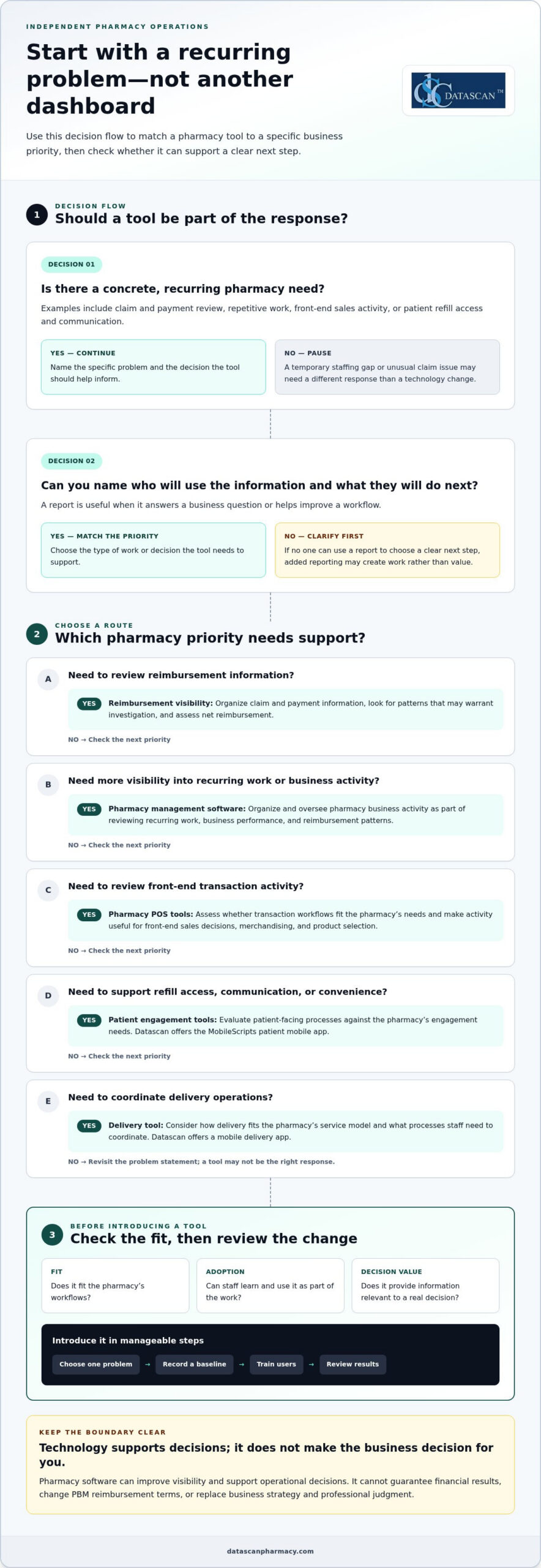
Start with a concrete, recurring need. Pharmacy profit maximization tools are most useful when they connect a known problem to a practical decision, such as:
- Reimbursement visibility: Organize claim and payment information for review. Look for patterns that may warrant investigation and assess net reimbursement.
- Time-consuming work: Identify repetitive tasks or workflow bottlenecks that may benefit from a more consistent process.
- Front-end sales: Review transaction activity to inform decisions about merchandising and the products the pharmacy carries.
- Patient retention: Assess whether refill access, communication, and other patient-facing processes support continuity and convenience.
Separate ongoing patterns from one-off disruptions. A recurring workflow bottleneck may call for a process or technology change, while a temporary staffing gap or unusual claim issue may require a different response. Before adopting a tool, define the decision it should support and who will act on the information. If no one can use a report to choose a clear next step, additional reporting may add work rather than value.
Can pharmacy software directly increase profit?
Pharmacy software can support visibility and operational decisions, but it can’t guarantee a financial result. A pharmacy can review processes, organize available business information, and decide how to manage inventory or staff workflows. Software alone can’t set PBM reimbursement terms, change a contract, or control every external factor affecting a claim.
Pharmacy profit tools help owners understand performance and guide controllable business decisions; they don’t guarantee profit or determine payer reimbursement. Keep that distinction in mind when evaluating pharmacy management software. A pharmacy management system supports core pharmacy operations. This pharmacy management system overview provides a general explanation of the category. The right tool should fit the pharmacy’s work and provide information owners can use, while leaving financial decisions and payer negotiations in human hands.
Which pharmacy profit maximization tools support each business priority?
The right tools depend on what the pharmacy needs to understand or improve. Group pharmacy profit maximization tools by business priority, then identify the information or workflow that would help the owner make a decision. For reimbursement concerns, the priority is to track and review claim and payment information, not to expect software to change a PBM’s terms or payment decisions.
- Management visibility: Pharmacy management software helps organize and oversee pharmacy business activity. Use it as part of a review of recurring work, business performance, and reimbursement patterns.
- Transaction workflows: Pharmacy POS tools support front-end transactions. Assess whether POS processes fit the pharmacy’s needs and make activity relevant to front-end sales decisions easier to review.
- Patient engagement: Patient-facing tools can support goals for refill access, communication, and convenience. Datascan offers the MobileScripts patient mobile app; assess it against the pharmacy’s specific engagement needs.
- Delivery operations: Datascan offers a mobile delivery app. Consider how delivery fits the pharmacy’s service model and what processes staff need to coordinate.
What can pharmacy management software help owners oversee?
Pharmacy management software is an operational system, not a substitute for the owner’s judgment. Use it as part of a broader review of the questions that matter to the business: Where is staff time going? Which recurring processes need attention? What reimbursement patterns should the pharmacy investigate? Datascan provides pharmacy management software for pharmacies evaluating these operational needs.
For more context on how pharmacy management software fits into pharmacy operations, see the pharmacy management software guide.
How can patient-facing and delivery tools support pharmacy priorities?
Patient engagement and delivery are separate priorities, so assess them separately. For patient-facing tools, define what the pharmacy wants to make easier for patients, such as accessing refill services. For delivery operations, identify the coordination needs involved. Datascan offers MobileScripts and a mobile delivery app. Evaluate each against a specific need, rather than assuming a particular financial result.
These categories can work together as an operational toolkit, but each should have a clear purpose. A pharmacy POS tool addresses transaction workflows, while a patient app supports a different part of the pharmacy experience. Focus reviews on information tied to a priority, so owners can spend less time collecting data without a defined use and more time making decisions.
How should you compare pharmacy profit tools, and what can’t they fix?
Compare pharmacy profit maximization tools by the business decision they support, how well they fit existing workflows, whether staff can use them consistently, and whether their reporting leads to action. No software can rewrite a PBM contract or guarantee higher reimbursement. A tool can help organize information for review, but the pharmacy still needs to interpret it and decide what to do.
| Business need | Tool category | Decision supported | Limitation |
|---|---|---|---|
| Review reimbursement patterns | Pharmacy management software or a financial reporting process | Which claims or payment patterns warrant investigation or follow-up? | It cannot set payer terms or determine the final outcome of a reimbursement review. |
| Reduce time spent on recurring tasks | Workflow or pharmacy management software | Which processes need attention, clarification, or a more consistent approach? | Results depend on staff adoption and whether the workflow fits daily practice. |
| Understand front-end activity | Point-of-sale tools | What transaction activity should inform front-end business decisions? | Information alone doesn’t decide what to stock, promote, or change. |
| Support patient-facing or delivery operations | Patient engagement or delivery tools | Which patient services or operational processes should the pharmacy review? | A tool can support a process, but it can’t guarantee retention, revenue, or labor savings. |
Which questions help determine whether a tool fits your pharmacy?
Start with the recurring task or decision you want to support. Identify who will use the tool, what information they need, and how the pharmacy will review and act on it. Then separate essential capabilities from features that don’t address the problem. A good fit should be apparent in the day-to-day workflow, not just in a product demonstration or a long list of reports.
For financial review, define the measure you want to understand before comparing systems. The guide to calculating pharmacy gross profit can help frame that measurement, but a software report is not a complete financial analysis. Useful reporting should answer a specific question, such as whether a recurring pattern merits further review, rather than create work with no clear next step.
Can software solve low PBM reimbursements?
No. Pharmacy software cannot set PBM reimbursement terms or promise that a payer will increase payment. It may help a pharmacy organize relevant information and identify items for review, but contract terms, payer decisions, and follow-up remain outside the software’s control. The Federal Trade Commission’s staff report on pharmacy benefit managers offers broader context on PBMs and their role in prescription drug markets.
Keep the evaluation grounded in decisions your team can make, workflows it can sustain, and information it can use. That gives owners a practical basis for comparing options and tracking financial performance, without confusing better visibility with control over reimbursement.
How can a pharmacy introduce profit tools without adding work?
Introduce pharmacy profit maximization tools in a focused sequence: choose one recurring problem, record a baseline, select a tool, train the people who will use it, and review whether it supports the original need. Starting with one issue helps protect staff time and gives the owner a clearer basis for deciding whether to continue, adjust, or expand the tool’s use.
- Choose one problem. Define a specific issue, such as a recurring workflow delay or a reimbursement review task that takes time to complete.
- Document a baseline. Record how the current process works and what measure reflects the problem before making a change.
- Select a tool. Focus on capabilities tied to the stated need, not features that add complexity without supporting the intended decision.
- Train the users. Explain the purpose of the tool and how it fits into the affected workflow.
- Review the results. Set a manageable, consistent cadence to check whether the tool is being used and supports the original business question.
What should you measure before adopting a tool?
Choose measures that reflect the problem, such as time spent on a task, transaction patterns, or completion of a defined review process. Record the measurement period and information source so a later comparison is meaningful. Keep observations separate from conclusions: a change after implementation doesn’t, by itself, prove that the tool caused a financial result or improved profitability.
Keep the review cadence small enough to sustain. Set a recurring time to check the selected measure and note questions for follow-up, rather than adding a new daily reporting task. The right interval depends on the workflow and the pharmacy’s capacity. Consistency matters more than a complicated review routine. If the information isn’t helping the team decide what to do next, simplify the measure or revisit the use case.
How do you make adoption manageable for a busy pharmacy team?
Begin with the staff members and workflow directly affected by the selected use case. Set a practical training and feedback process before expanding: show users the intended task, give them a way to flag friction, and agree on who will review the feedback. This keeps adoption connected to daily work instead of making the entire team responsible for a new process at once.
Workflow planning should account for how a task moves through the pharmacy and where staff need clarity. Datascan’s customizable workflow is one option to evaluate as part of that planning. Keep the review focused on the original problem, such as whether the defined process is easier to follow, rather than assuming a tool has improved profit.
Use this measured approach to decide whether a tool fits your pharmacy’s priorities and capacity. Learn more about how Datascan’s pharmacy software can support your workflow needs by visiting the Datascan contact page.
How can Datascan pharmacy software fit into a profitability strategy?
Datascan pharmacy software fits into a broader profitability strategy when each offering is matched to a pharmacy’s priorities and implementation plan. The goal isn’t to expect software to guarantee financial results. It’s to choose operational tools that fit the work the pharmacy wants to support, from management processes to point-of-sale, patient engagement, and delivery.
Which Datascan tools align with common pharmacy priorities?
Start with the need the pharmacy has already identified. Datascan’s offerings address different categories of work, so choose based on the pharmacy’s workflows and priorities:
- Pharmacy operations: Datascan Pharmacy Management Software supports pharmacies assessing their operational needs.
- Front-end transactions: Datascan Point of Sale (POS) supports transaction workflows.
- Patient engagement: MobileScripts Patient Mobile App supports patient-facing engagement needs.
- Delivery operations: Datascan Mobile Delivery App supports delivery operations.
- Workflow needs: Datascan customizable workflow can be configured around the pharmacy’s day-to-day processes.
These categories address different needs, so a pharmacy doesn’t have to treat them as one all-or-nothing decision. If the immediate priority is a particular workflow, start there. If the pharmacy is considering broader changes, map the affected processes and users before deciding which tools to introduce and in what order. This keeps implementation focused and helps owners assess whether a tool fits the work it is meant to support.
Datascan is a family-owned company that has operated since 1981 and provides U.S.-based technical support. These details describe the company and its support model; they aren’t evidence of a particular financial outcome. For an independent pharmacy managing time pressure and reimbursement concerns, technology decisions should still be grounded in specific operational needs, staff readiness, and a realistic plan for reviewing how the tools are used.
What is a practical next step for an independent pharmacy?
Before discussing software, write down three things: the priority you want to address, how the current process works, and what operational improvement you want to evaluate. For example, identify a recurring task that takes time, describe how staff handle it now, and define what a more manageable process would look like. This gives the conversation a practical starting point without assuming a particular financial result.
Bring those priorities to a conversation about fit and implementation. Datascan’s offerings can be matched to the pharmacy’s needs, with the focus on selecting an appropriate starting point rather than adding tools without a clear purpose. Discuss your pharmacy software needs with Datascan and take the next step with a clear view of the work you want to support.
Keep Your Pharmacy’s Priorities in Focus
Your next move doesn’t have to be a major technology overhaul. Choose the business question that matters most right now, then use it to guide how you assess pharmacy profit maximization tools. As reimbursement pressures, workflows, and patient needs shift, revisit whether your technology still supports the decisions your pharmacy needs to make.
Start with your priorities, not a promise of guaranteed results. Share the workflow or business need you want to address, and explore the pharmacy software options that fit that goal. Start a conversation about your pharmacy’s priorities with Datascan.
Independent pharmacies are strongest when their technology choices serve the people and work at the heart of the business. Take the next step with purpose, and keep building on what makes your pharmacy distinct.
Frequently Asked Questions
What are pharmacy profit maximization tools?
Pharmacy profit maximization tools are systems and resources that help owners understand business activity and decide where to focus attention. They can include pharmacy management software, point-of-sale systems, patient engagement tools, and delivery tools. A pharmacy reviewing front-end activity, for example, may need a different tool than one assessing a recurring operational task. These tools can inform decisions, but they can’t guarantee profit or control payer terms.
Can pharmacy management software improve profitability?
Pharmacy management software can support operational visibility and decision-making, depending on its capabilities and how the pharmacy uses it. Start by stating a measurable business question, such as whether a defined task is being completed as intended. Then assess whether the software offers relevant information or workflow support. Treat the result as evidence of support for that process, not proof that the software alone increased profitability.
Can technology help independent pharmacies respond to PBM reimbursement pressure?
Technology can’t set PBM contract terms or guarantee better reimbursement. It may help owners organize business information for review and decide what issues call for follow-up, but the pharmacy must assess the situation and determine next steps. For broader U.S. context on PBMs and pharmacy markets, see the Federal Trade Commission’s staff report on pharmacy benefit managers.
How do I know whether a pharmacy profit tool is working?
Define the problem and record a relevant baseline before putting a tool into use. Compare the same measure over a consistent period, using the same data source where possible. Note other changes that may affect the result, such as a workflow adjustment or staffing change. Then ask whether the tool helped the team make a useful decision or complete the process. A change alongside tool use doesn’t prove the tool caused it.
What should an independent pharmacy look for in pharmacy software?
Look for a fit with your actual workflows, the business questions you need to answer, staff adoption needs, and the support process. Separate essential capabilities from optional features by linking each requirement to a pharmacy task. Identify who will use a function and what decision it should inform. There’s no single feature set for every independent pharmacy, so assess the system in the context of your operations.
Can pharmacy software save owners time?
It can support more organized workflows, but whether that saves time depends on the task, implementation, and staff adoption. Pick a repetitive process and document how it currently works, including who handles each step and where delays or extra effort arise. Then assess whether the software’s capabilities address that process. Don’t assume a tool will reduce workload by a specific amount before your team evaluates it in practice.
Should a pharmacy choose one tool or an integrated software suite?
The better fit depends on your pharmacy’s priorities, existing processes, and how its operational needs relate to one another. A suite may bring related functions together, while separate tools may address narrower requirements. Compare both approaches by workflow fit, information needs, and usability for the staff involved. Consider the work required to introduce and maintain each option, and don’t assume either structure guarantees stronger financial results.
 Kevin Minassian is the President of Datascan Software. Under his leadership, the company rapidly expanded to provide pharmacy management software on a national level. Over the last 15+ years, he has ensured that Datascan has continuously evolved to offer innovative solutions for independent pharmacies while still offering world-class customer support. He is passionate about helping independent pharmacies to remain competitive, achieve success, and offer the very best service to their communities.