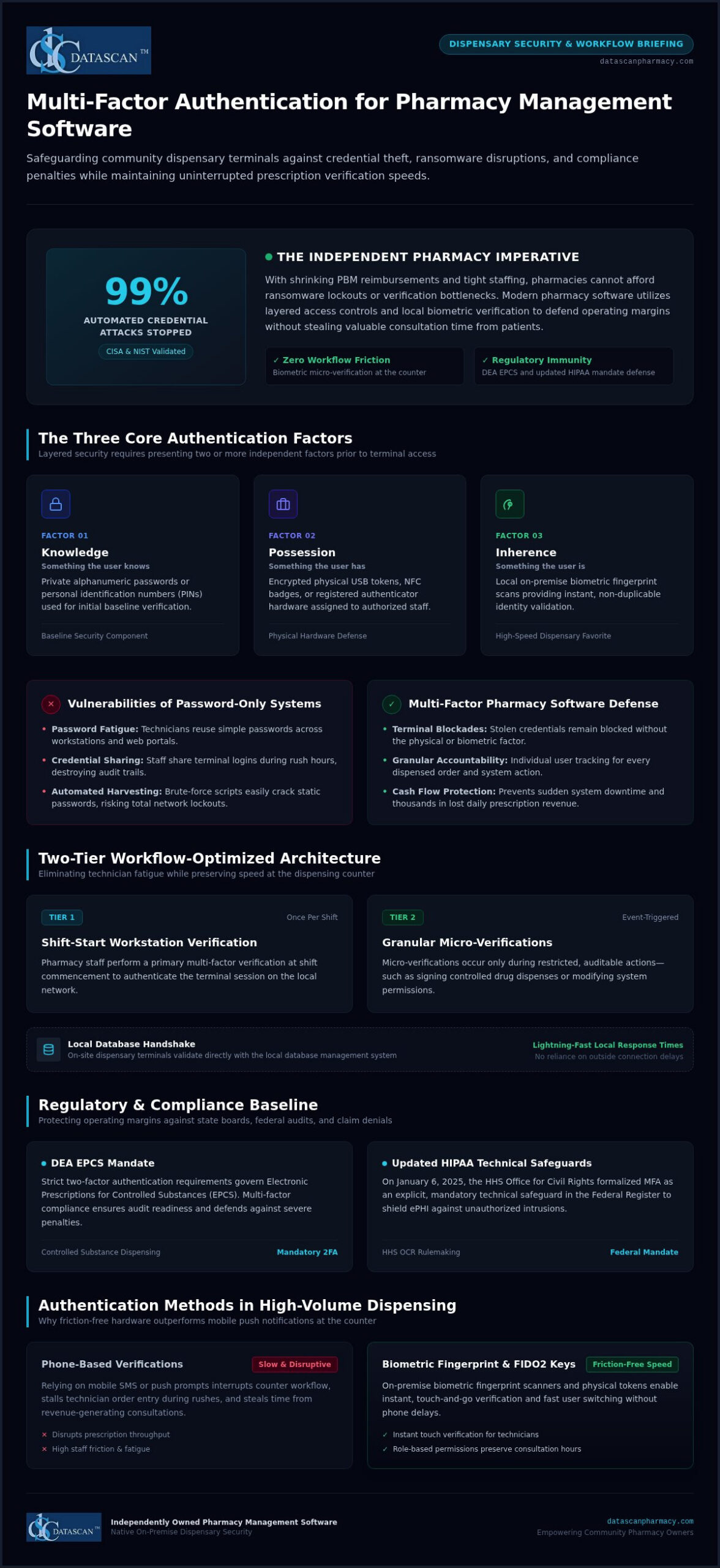
According to CISA and NIST assessments, multi-factor authentication stops up to 99% of automated credential attacks, and implementing multi-factor authentication for pharmacy software doesn’t have to slow down your dispensing counter. As an independent pharmacy owner, you already carry the heavy burden of shrinking PBM reimbursements and tight staffing. The last thing your technicians need during the afternoon rush is frustrating phone-based verification prompts that disrupt prescription throughput and steal time from patient consultations.
The right pharmacy management software solves this dilemma by pairing robust access controls with high-speed dispensary workflows, using on-premise biometric fingerprint scanners and fast user switching to keep staff productive and fully compliant. In this 2026 security guide, you’ll discover how to safeguard your pharmacy software against devastating ransomware disruptions, satisfy DEA EPCS and updated HIPAA mandates, and defend your operating margins without sacrificing a second of patient care.
Key Takeaways
- Deploying multi-factor authentication for pharmacy software safeguards your dispensary terminals against credential theft while maintaining uninterrupted prescription verification speeds.
- Meeting DEA EPCS two-factor mandates and updated HIPAA technical safeguards protects your dispensary from catastrophic audit fines and insurer claim denials.
- Biometric fingerprint scanners and FIDO2 physical keys provide fast, friction-free verification that eliminates phone-prompt delays for busy technicians.
- Role-based access permissions and customizable workflow configurations prevent staff fatigue while preserving valuable hours for revenue-generating patient consultations.
- Choosing an independently owned pharmacy management software partner ensures native on-premise security designed specifically to protect community pharmacy operating margins.
What is multi-factor authentication for pharmacy software?
Multi-factor authentication (MFA) is a layered security defense that requires pharmacy staff to present two or more independent credentials before gaining entry to dispensing records, point-of-sale data, or operational controls. Instead of trusting a solitary password, multi-factor authentication verifies user identity by cross-referencing distinct categories to guarantee that an unauthorized actor cannot access the local system using compromised credentials alone.
Every effective access management framework relies on three standard credential factors:
- Knowledge: Something the user knows, such as a private alphanumeric password or a personal identification number (PIN).
- Possession: Something the user has, such as an encrypted physical USB token, an NFC badge, or a registered authenticator device.
- Inherence: Something the user is, verified through biometric data like a local fingerprint scan.
Relying on standard passwords leaves community pharmacies dangerously exposed. When an external threat actor intercepts or guesses a password, single-factor defense collapses instantly. Implementing multi-factor authentication for pharmacy software ensures that even if login credentials are stolen in an automated credential-stuffing attack, unauthorized access remains completely blocked at the terminal. That defense stops catastrophic network lockouts and prevents unexpected downtime that can halt prescription dispensing, disrupt cash flow, and cost thousands in lost daily revenue.
Why do standard passwords fail to protect modern pharmacy computer systems?
Dispensary teams work in high-speed environments where password fatigue causes technicians to reuse simple passwords across internal workstations and personal web portals. In many busy community pharmacies, staff fall into the dangerous habit of sharing terminal logins to speed up order entry. This creates enormous compliance blind spots. Brute-force scripts and automated credential harvesting easily crack static passwords, leaving on-premise servers vulnerable to severe intrusions without an audit trail identifying who performed the action.
How does multi-factor authentication work across pharmacy management software?
Modern dispensary security splits access verification into strategic tiers to prevent workflow disruption. A pharmacy team member performs a primary multi-factor verification at the start of their shift to validate the workstation session on the local network. Throughout the day, secondary micro-verifications occur only when performing restricted, auditable actions, such as signing controlled drug dispenses or altering system permissions.
This design relies on secure local authentication handshakes between on-site dispensing terminals and your on-premise database management system. Secure local validation eliminates dependence on outside connections while maintaining lightning-fast terminal response times. As detailed in our guide to pharmacy management software, embedding multi-factor authentication for pharmacy software directly into everyday dispensing operations gives independent pharmacies ironclad data security without delaying patient pickups at the counter.
Why is multi-factor authentication essential for pharmacy regulatory compliance?
Enforcing multi-factor authentication for pharmacy software is no longer an optional security recommendation; it’s a mandatory operational baseline across federal healthcare rules, controlled substance regulations, and commercial underwriting standards. State boards of pharmacy and federal regulators hold independent pharmacy owners personally accountable for securing dispensing records against unauthorized access. If your pharmacy computer systems experience an intrusion due to single-factor authentication vulnerabilities, the legal and financial repercussions can easily destroy your dispensary operating margins.
How does MFA satisfy HIPAA Security Rule and ePHI requirements?
On January 6, 2025, the U.S. Department of Health and Human Services (HHS) Office for Civil Rights published a Notice of Proposed Rulemaking in the Federal Register formalizing MFA as an explicit, mandatory technical safeguard under HIPAA Security Rule standards. This regulatory shift eliminates the historical ambiguity between “addressable” and “required” specifications. Your on-premise local servers and dispensing workstations must enforce multi-factor authentication for any workforce member accessing electronic protected health information (ePHI).
HIPAA compliance audits scrutinize granular system audit trails to verify unique user accountability. When technicians use shared accounts or simple passwords, proving which employee viewed or exported sensitive patient data becomes legally impossible. Unauthorized access to ePHI triggers mandatory federal breach notifications, severe financial penalties from the HHS, and public disclosure requirements that undermine local community trust.
What are the EPCS DEA requirements for two-factor authentication?
The Drug Enforcement Administration strictly regulates Electronic Prescriptions for Controlled Substances (EPCS) under 21 CFR § 1311.115. Pharmacists who digitally sign, approve, or alter controlled substance dispenses must authenticate using two distinct factors:
- Knowledge factor: A secure password or PIN.
- Possession factor: A hard token key that meets FIPS 140-2 Security Level 1 standards, kept completely separate from the workstation.
- Inherent factor: A biometric scanner (such as a fingerprint reader) engineered with a false match rate of 0.001% or lower per 21 CFR § 1311.116.
Every Schedule II electronic prescription requires a DEA-validated digital signature that permanently binds the dispensing pharmacist’s verified credentials to the internal dispensing record. Compliant pharmacy management software enforces these protocols automatically during verification, creating unalterable daily audit logs that protect your DEA registration during unexpected inspections.
How do cyber insurance providers evaluate independent pharmacy authentication?
Commercial cyber liability carriers have turned MFA into a strict underwriting mandate rather than an optional discount. Actuarial reports reveal that over 80% of healthcare cyber insurance claims subjected to forensic investigation face coverage disputes, reduced payouts, or total claim denials if MFA was inactive on the breached endpoint.
With the average healthcare data breach climbing to $7.42 million according to IBM Security, insurance underwriters routinely exclude coverage for credential-theft ransomware incidents when basic controls are bypassed. Verifying your security posture against the 2026 pharmacy self-inspection checklist helps safeguard your operating capital against devastating policy exclusions. If you want to confirm that your local dispensary terminals meet current state board and federal standards, contact our software specialists to review your dispensary setup.
Which multi-factor authentication methods work best in a high-volume pharmacy?
High-volume dispensaries process hundreds of prescriptions every shift, meaning identity verification tools must combine bulletproof access control with sub-two-second execution. Generic corporate IT security setups fail behind a busy retail counter. Selecting the correct multi-factor authentication for pharmacy software requires matching authentication hardware to the physical realities of pill trays, barcode scanners, and rotating dispensary staff.
| Authentication Method | Speed | Dispensing Reliability | Sanitation Impact | Regulatory Standing |
|---|---|---|---|---|
| Biometric Fingerprint Scanners | Under 2 seconds | Very High | Requires optical sensors resistant to counting dust | Meets DEA EPCS thresholds (21 CFR § 1311.116) |
| FIDO2 Physical Hardware Keys | 2–3 seconds (tap/insert) | High | Easily sanitized with alcohol wipes | Full FIPS 140-2 Level 1 compliance |
| Time-Based Authenticator Apps (TOTP) | 15–30 seconds | Moderate (requires mobile handling) | Cross-contaminates bench via personal phones | Complies with general HIPAA standards |
| SMS Text Verification Codes | 30–90+ seconds | Poor (cellular dead zones) | Slows workflow, encourages mobile distraction | Classified as weak by federal cybersecurity baselines |
How do authenticator apps compare to hardware security keys?
Software-based TOTP authenticators generate rolling numerical codes on smartphones, which works well for occasional remote manager logins. In an active dispensary, however, requiring technicians to pull phones out of their pockets while counting tablets introduces cross-contamination and wastes critical minutes. Dedicated FIDO2 physical keys plug directly into local workstation USB ports, allowing staff to authenticate with a physical touch. They eliminate mobile distractions while preventing phishing attacks by validating cryptographic handshakes locally on the terminal.
Why are SMS text verification codes considered a liability for pharmacies?
According to official CISA multi-factor authentication guidance, SMS text messaging codes remain highly vulnerable to SIM-swapping and cellular interception. Beyond these security holes, SMS delivery creates massive operational bottlenecks. Independent pharmacies often feature shielded walls or basement storage where cellular reception drops, causing verification codes to lag by several minutes. When patients are queued at the register, waiting on a one-time code paralyzes your fill counter.
Can biometric verification streamline staff log-in at the dispensary terminal?
Integrated optical fingerprint readers deliver the fastest verification speeds at the dispensing bench. A single touch allows pharmacists to digitally sign controlled orders or switch terminal profiles without typing passwords. While powder residue from split tablets can accumulate on older optical glass, modern commercial scanners handle routine pill dust without false rejections. Using fast biometric switching ensures full personal accountability for every dispensed bottle while keeping dispensary throughput moving at peak speed.
How can independent pharmacies implement MFA without slowing down dispensary workflow?
Independent pharmacies can deploy multi-factor authentication for pharmacy software without slowing down prescription processing by establishing role-based access controls, smart session persistence, and fast local biometric re-authentication. Protecting your dispensary workstations doesn’t require paralyzing your counter staff with constant phone verification prompts. Following a structured rollout blueprint ensures full regulatory defense while keeping your daily dispensing queue moving rapidly:
- Audit dispensary access points: Map every local terminal, compounding station, and management computer across your dispensary local area network.
- Assign role-based access tiers: Restrict administrative settings and claim ledger access while granting technicians streamlined permissions for daily order entry.
- Configure smart session caching: Enforce full multi-factor verification during initial morning boot-up, then rely on instant biometric or PIN re-authentication during daily dispensing.
- Deploy hardware redundancies: Pre-register backup security tokens and store them securely on-site to handle misplaced staff keys immediately.
How do you map role-based access across dispensing and point-of-sale stations?
Technicians spend their days typing intake details, counting pills, and printing prescription labels; they don’t require access to wholesale pricing ledgers, tax records, or audit management tools. Cashiers handling retail transactions on your pharmacy POS system need fast checkout capabilities without access to detailed patient clinical profiles. Relief pharmacists need complete clinical verification permissions without access to sensitive store financial data. Segmenting access by job role protects sensitive PBM claim data and stops technicians from facing constant elevated-credential prompts.
How should pharmacy owners configure session duration to reduce pharmacist burnout?
Overly aggressive workstation lockout policies trigger constant friction. If a terminal locks every two minutes, pharmacists spend precious minutes re-authenticating instead of counseling patients or verifying orders. The most effective configuration pairs an all-day authorized primary shift session with a 10-to-15 minute idle screen lock. Once initial authentication occurs at opening, staff unlock terminals using a two-second optical fingerprint scan. Integrating these policies into your customizable workflow software balances physical terminal security with high-throughput dispensing speed.
What staff protocols prevent prescription filling delays during token failures?
Hardware tokens can get dropped, and mobile devices run out of battery charge. To keep your filling counter moving when staff misplace an authenticator, store two pre-configured, encrypted hardware keys inside the dispensary safe under managerial lock. If a technician forgets their device, the pharmacist-in-charge can assign a temporary token through on-premise admin controls in seconds. Running simple five-minute team training drills ensures your staff knows the backup routine before peak dispensary rushes arrive. If you’re ready to upgrade your dispensary security while protecting staff productivity, schedule a workflow demo with our team.
What security capabilities should owners look for in a pharmacy software vendor?
Pharmacy owners should look for native, built-in access controls rather than fragmented third-party add-ons, ensuring that multi-factor authentication for pharmacy software operates seamlessly within daily dispensing routines. Relying on bolted-on security utilities creates workstation software conflicts, introduces latency during prescription verification, and complicates local terminal updates. Built-in authentication guarantees that user identity verification happens instantly at the local database level without interrupting retail transactions.
When evaluating a prospective software partner, look for these vital capabilities:
- Native hardware integration: Direct support for optical fingerprint scanners and FIDO2 physical keys without requiring secondary software subscriptions.
- Granular role-based controls: The ability to isolate point-of-sale registers, billing ledgers, and dispensing benches under distinct authorization rules.
- Immutable system logging: Automated recording of every claim transmission, price override, and prescription verification tied to a verified user profile.
- Responsive technical assistance: Direct access to an experienced, in-house support team capable of resolving terminal lockouts immediately.
How does integrated security protect margins against PBM audits and clawbacks?
Independent pharmacy owners face constant margin compression from predatory PBM clawbacks and unpredictable DIR fees. PBM auditors routinely target technical discrepancies and missing verification timestamps to justify recouping reimbursements. When robust security is embedded directly into your pharmacy management software, every prescription intake, adjudication, and dispensing approval generates an unalterable audit log tied to a verified staff member. This tamper-proof tracking defends your claims during aggressive payer audits while eliminating manual documentation, freeing up hours for owners to focus on profitable clinical services. For a broader look at protecting your store against these pressures, explore our complete guide to future-proofing your independent pharmacy with the technology and operational strategies you need in 2026.
Why does experienced U.S.-based software support matter during technical issues?
Dispensary terminals cannot sit idle while staff wait on hold with an outsourced call center. When an authentication key malfunctions or an employee lockout occurs during a busy prescription rush, immediate resolution is essential. Datascan has served community pharmacies as an independent, family-owned provider since 1981, backing its pharmacy software with a dedicated, in-house U.S.-based customer support team. Having access to long-term technicians who understand the daily workflow demands of independent pharmacies ensures that your on-premise systems remain fully protected, compliant, and operational without costing you valuable dispensing time.
Secure Your Dispensary and Accelerate Counter Throughput
Safeguarding patient records and satisfying strict DEA EPCS standards doesn’t mean your dispensary has to grind to a halt. When you implement native multi-factor authentication for pharmacy software, your staff gains the speed of fast biometric switching and physical hardware keys without the distraction of personal smartphone prompts. Reliable local security also protects your dispensing logs, providing immutable proof during aggressive PBM audits while keeping your counter moving at peak efficiency.
Since 1981, Datascan has stood beside independent community pharmacies across the nation as a trusted, family-owned technology partner. Our customizable workflow technology is engineered specifically to maximize retail dispensing efficiency, backed by a dedicated, long-term U.S.-based support team that answers when you need them. You shouldn’t have to choose between total regulatory compliance and rapid prescription throughput. Ready to protect your operating margins and simplify daily operations? Connect with the Datascan team today to see how our pharmacy software keeps your business secure.
Frequently Asked Questions
Is multi-factor authentication legally required for all retail pharmacy software?
Yes, multi-factor authentication is mandatory under federal healthcare regulations and controlled substance laws. The HHS OCR Notice of Proposed Rulemaking published in January 2025 formally establishes MFA as an explicit technical safeguard for all workforce members accessing ePHI. In addition, the DEA mandates two-factor authentication for all electronic prescriptions for controlled substances (EPCS) under 21 CFR § 1311.115, making compliant access controls non-negotiable for retail operations.
Can multi-factor authentication be bypassed during urgent prescription dispensing emergencies?
Multi-factor authentication cannot be disabled or bypassed without violating federal compliance rules, but modern pharmacy software provides break-glass administrative overrides. In critical situations, a supervising pharmacist can authorize emergency access through manager credentials or assign a pre-registered backup hardware key stored on-site. This maintains continuous system accountability and logs the emergency dispensation in your local audit trail without leaving the network open to unauthorized intrusions.
How much time does multi-factor authentication add to filling a daily prescription?
When properly configured, multi-factor authentication adds less than two seconds to routine dispensing tasks. Using integrated biometric fingerprint readers or USB hardware keys allows pharmacists to authenticate verification steps instantly without typing passwords. Implementing multi-factor authentication for pharmacy software alongside smart session persistence ensures your team only completes full credential verification at morning start-up, preserving counter momentum during busy dispensary hours.
What happens if a pharmacy technician loses their authentication token or mobile device?
A lost authentication device is quickly resolved on-site without stopping dispensary operations. The pharmacist-in-charge accesses the administrative management console within the local pharmacy management software, immediately revokes the missing token’s access rights, and pairs a pre-configured spare hardware key to the technician’s profile. This rapid local reassignment protects the database against stolen tokens while ensuring staff return to prescription processing in minutes.
Is SMS text verification compliant with DEA EPCS regulations for controlled substances?
No, standard SMS text messages do not meet DEA EPCS authentication standards. Under 21 CFR § 1311.115, EPCS requires two independent factors using knowledge, biometrics, or a separate hardware cryptographic token certified to FIPS 140-2 standards. Because SMS verification relies on unencrypted cellular networks vulnerable to SIM swapping and interception, federal agencies and cyber insurers classify text codes as restricted authenticators unfit for controlled substance verification.
Does multi-factor authentication protect pharmacy software running on a local server network?
Yes, deploying multi-factor authentication for pharmacy software is vital for securing on-premise local area networks. Most modern ransomware attacks compromise internal networks by stealing static employee credentials and moving laterally across local terminals. Enforcing MFA across on-site workstations, local server consoles, and administrative portals blocks unauthorized network traversal, ensuring that an exposed password on one workstation cannot compromise your entire dispensary database. Many community healthcare facilities partner with professional network specialists—such as teams providing managed IT services Ontario CA—to maintain proactive network monitoring and prevent intrusions before they disrupt operations.
How does multi-factor authentication defend independent pharmacies against cyber liability claims?
Active multi-factor authentication prevents insurance carriers from denying breach claims during forensic audits. Commercial cyber liability underwriters require verified proof of enforced MFA across all administrative and dispensary endpoints as a strict policy condition. Maintaining immutable access logs inside your pharmacy software proves regulatory compliance, eliminates policy exclusion loopholes after an incident, and protects your business from devastating out-of-pocket recovery costs. Alongside access controls, organizations seeking complete endpoint resilience often implement solutions like Managed MXDR services UK to deliver 24/7 threat hunting and immediate incident response across all connected systems.
 Kevin Minassian is the President of Datascan Software. Under his leadership, the company rapidly expanded to provide pharmacy management software on a national level. Over the last 15+ years, he has ensured that Datascan has continuously evolved to offer innovative solutions for independent pharmacies while still offering world-class customer support. He is passionate about helping independent pharmacies to remain competitive, achieve success, and offer the very best service to their communities.