A proof of delivery app for pharmacy should give staff a clear, retrievable record of delivery status and help them know when follow-up is needed. If it creates a disconnected record or duplicates existing work, it can add tasks instead of saving time.
That distinction matters when pharmacy teams are balancing patient service, daily operations, and pressure on reimbursements. Paper records and unclear delivery status can lead to avoidable follow-up. A tool that doesn’t fit your pharmacy’s workflow can leave staff managing yet another system.
This guide explains how to assess delivery documentation, workflow fit, and the way delivery tools work alongside pharmacy management software. You’ll find practical questions to use when comparing options and learn how Datascan’s pharmacy-focused delivery tools fit into the evaluation. Author bio: Datascan Pharmacy Software provides pharmacy management software and delivery tools for independent and retail pharmacies.
Key Takeaways
- A proof of delivery app for pharmacy should document delivery status and help staff review it. It is not the same as route planning or patient communication.
- Map each delivery step, from preparation to driver handoff and pharmacy follow-up, to identify where a tool fits your current process.
- Compare workflow fit, status visibility, record access, staff usability, and how the app relates to your pharmacy management software.
- Before adopting an app, define staff responsibilities, training needs, exception handling, and who needs access to delivery records.
- Review how Datascan’s Mobile Delivery App and Electronic Delivery System fit into pharmacy delivery management.
What Does a Proof of Delivery App for Pharmacy Need to Prove?
A proof-of-delivery app records delivery completion and helps pharmacy staff review a delivery’s status. Its core purpose is to make the handoff easier to account for. Staff should be able to see whether a delivery is complete or needs follow-up without piecing together events from scattered notes, calls, or messages.
That purpose is narrower than general delivery logistics. Route planning helps determine where a driver goes; dispatch coordinates the work; patient communication shares updates. Delivery proof records the outcome of the handoff. A tool may combine some of these functions, but they aren’t interchangeable. A planned route doesn’t show that a delivery was completed, and a message to a patient doesn’t, by itself, establish the delivery outcome.
Use a practical test: can staff find a clear delivery status, understand what it means, and identify the next action when the status is unresolved? A useful process gives pharmacy staff and drivers a consistent handoff and gives the team a shared reference when questions arise. Pharmacy management software and delivery tools work best when they support the way the pharmacy already handles prescriptions and delivery work. Datascan’s Electronic Delivery System is part of its pharmacy delivery technology.
What counts as proof of delivery in a pharmacy?
Proof of delivery (POD) is a record showing that a delivery reached its intended completion point. The evidence included depends on the system and the pharmacy’s process, so don’t assume that every app captures the same information. For general background on the term and its electronic use, see Proof of delivery (POD).
Keep the meaning precise. A delivery confirmation concerns the delivery handoff. On its own, it doesn’t prove that a prescription was dispensed or that clinical counselling took place. Those are separate pharmacy activities. Define what “complete” means for each delivery workflow so staff record the right status without treating one event as evidence of another.
Why do independent pharmacies need delivery visibility?
When staff can’t tell whether a delivery is complete, a routine patient question can trigger several manual checks. Someone may need to find a paper note, call a driver, or ask a colleague what happened. A visible, retrievable delivery record gives the team a shared reference for follow-up and helps distinguish unresolved deliveries from completed ones.
Pharmacy proof of delivery is a retrievable record that shows whether a prescription delivery reached its defined completion point. For an independent pharmacy, that clarity can support a more organized handoff and make status checks easier to manage. It doesn’t replace route planning, dispensing records, or patient counselling.
How Does a Pharmacy Proof of Delivery App Fit the Delivery Workflow?
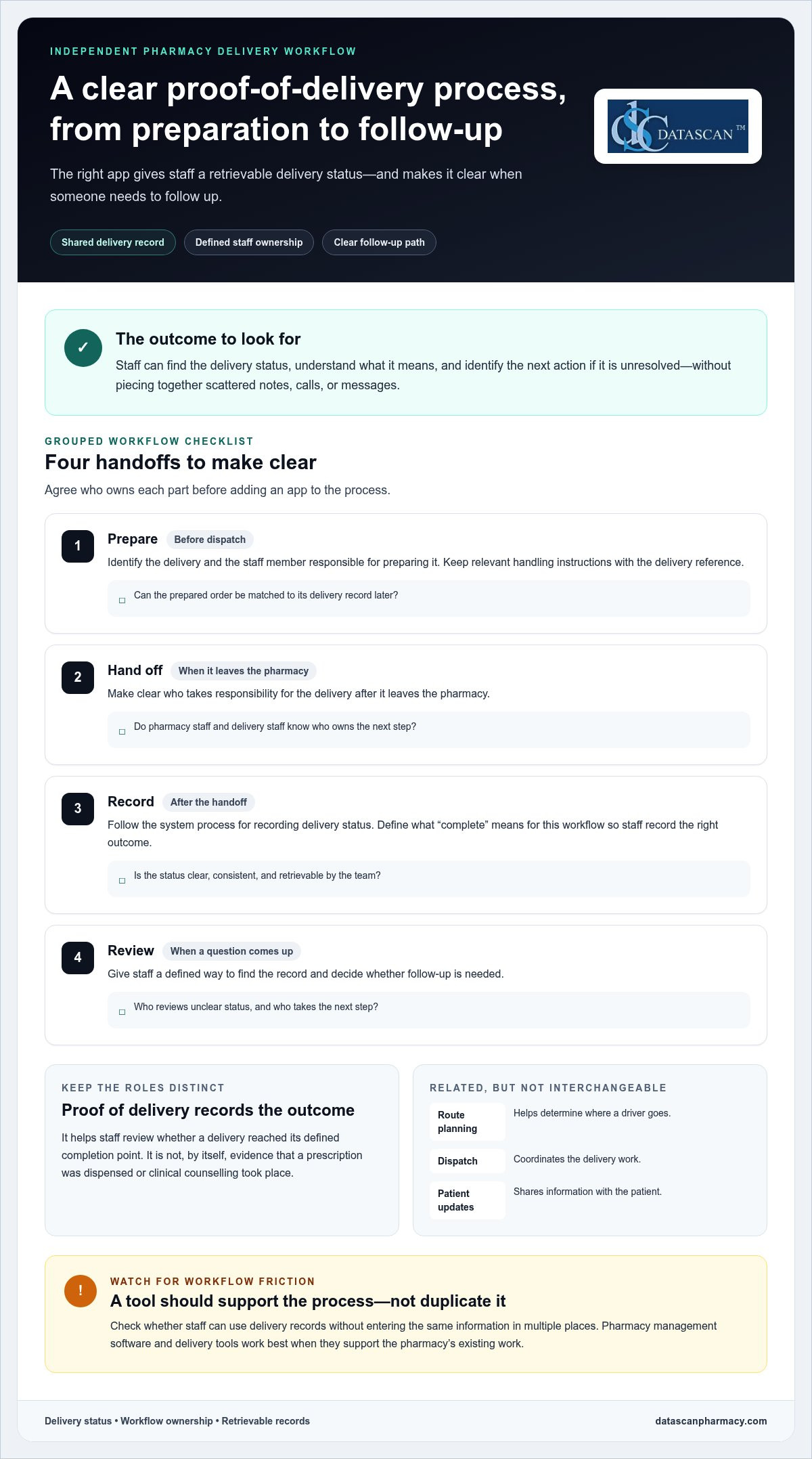
A pharmacy proof of delivery app fits between preparing an order for delivery and reviewing what happened after the driver handoff. It works best when staff know who prepares the delivery, who records its status, and who handles exceptions. Define those responsibilities first so the app supports the pharmacy’s process instead of creating a parallel set of tasks.
Think of the workflow as a chain of handoffs. The pharmacy identifies the delivery, assigns responsibility for the next step, records the status after the handoff, and uses that record to guide follow-up. The app can give staff a shared place to review delivery information, but the pharmacy still needs to decide who updates the record and acts on it. Software alone can’t resolve unclear ownership.
Where should delivery information enter the workflow?
Start before dispatch, when staff identify which order is going out and note any handling instructions relevant to that delivery. Prescription-processing details belong in the pharmacy’s established process. Delivery staff need a consistent reference that connects the prepared order to its delivery record. Using the same reference at preparation, handoff, and review makes it easier to match a record to the delivery later.
This is where the wider system matters. Pharmacy management software supports core pharmacy operations, while the delivery process needs to connect clearly to the work staff already do. Review how pharmacy management software fits into your operating process, then map delivery handoffs around your team’s actual responsibilities.
- Prepare: Identify the delivery and the staff member responsible for preparing it.
- Hand off: Make clear who takes responsibility for the delivery after it leaves the pharmacy.
- Record: Follow the system process for recording the delivery status.
- Review: Give pharmacy staff a defined way to find the record and decide whether follow-up is needed.
These steps define workflow ownership, not a promise that an app automates each task. During evaluation, check whether staff can use the app’s records without entering the same information in multiple places. The aim is a dependable handoff, not extra data entry for its own sake.
What should happen when delivery status needs follow-up?
Set an exception process before the team starts using a new tool. Staff should know how to identify a delivery with an unclear status, who reviews the available record, and who takes the next step. Define when an unresolved item moves from routine review to a designated supervisor or manager.
Keep reference details consistent across preparation, handoff, and review. If the pharmacy uses different labels or identifiers at each stage, staff may struggle to match a delivery record to the order they’re checking. A short written procedure can establish who records the status, how the team finds the record, and where to document the outcome of follow-up.
Delivery status records also serve a different purpose from supply-chain traceability. The FDA’s Drug Supply Chain Security Act (DSCSA) information addresses drug supply-chain security, not the pharmacy’s delivery workflow. To discuss how delivery tools fit into pharmacy operations, visit Datascan’s contact page.
Which Proof of Delivery App Features Matter Most to a Pharmacy?
The most useful features are those that support your delivery workflow and make delivery status and records easy for staff to review. Compare tools against real tasks, not the length of a feature list. A capability is valuable when it addresses an operational need without adding unnecessary steps.
Use this table to focus your evaluation:
| Evaluation area | What to assess | Why it matters |
|---|---|---|
| Workflow fit | Can staff use the tool within the steps they already follow? | A natural fit can reduce workarounds and duplicate handling. |
| Delivery status visibility | Can staff find and understand the available status? | Clear status helps the team respond to questions and identify items needing review. |
| Record access | Can the appropriate staff locate delivery information when needed? | Accessible records can support organized follow-up and internal review. |
| Staff usability | Can pharmacy staff and drivers follow a repeatable process? | A usable process is easier to apply consistently. |
| System fit | How does the delivery tool relate to pharmacy management software and existing work? | A considered fit can limit disconnected steps. |
How can I assess delivery records and visibility?
Evaluate the record from a staff member’s perspective. Can they locate a delivery, interpret its status, and review the available information efficiently? Ask to see a typical pharmacy delivery workflow in a product demonstration. Confirm specific capabilities rather than inferring them from labels. Timestamps, signatures, and location data are product-specific details to verify, not assume.
Retrievable delivery information may also help staff organize an internal review when a PBM reimbursement question involves delivery documentation. It can give the team relevant information to examine, but it doesn’t determine whether a claim qualifies for reimbursement or guarantee a particular result. Assess how easily staff can find the records they need, and keep documentation review within your pharmacy’s established process.
How do I judge usability and pharmacy system fit?
Test the process with the people who will use it: staff preparing deliveries, drivers handling them, and team members reviewing records. Look for a simple, repeatable sequence that doesn’t rely on undocumented steps. Evaluate delivery tools in the context of your actual pharmacy workflows and pharmacy management software.
A proof of delivery app for pharmacy should help staff complete necessary work with clear roles and usable records. Prioritize capabilities that address a known gap rather than adding features without an operational purpose. Assess delivery documentation separately from any specific PBM reimbursement or review criteria your pharmacy follows.
Can a Proof of Delivery App Improve Accountability Without Adding Staff Work?
Yes, if the app fits the responsibilities your team already has. A proof of delivery app for pharmacy can make delivery work easier to review, but unclear ownership or duplicate entry can add steps instead of reducing them. Before choosing a tool, test how it works for the people preparing deliveries, handling handoffs, and reviewing exceptions.
Clear delivery ownership gives staff a defined way to record, review, and act on delivery information. That can make it easier to handle status questions without repeatedly chasing updates. Accountability comes from a clear process, not from adding software alone.
What should a pharmacy test before choosing an app?
Walk through representative situations with the staff who will use the tool. Include a routine delivery, a failed handoff, and a patient or staff member asking for a status update. At each point, note who records the information, who can find it, and who decides what happens next. This reveals workflow gaps that a feature list may not show.
- Staff roles: Identify who prepares a delivery, records its status, reviews unresolved items, and handles follow-up.
- Training: Determine what drivers and pharmacy staff need to learn to complete their part consistently.
- Exceptions: Agree on how the team handles a failed handoff, incomplete status, or record that needs clarification.
- Record access: Establish which staff need to locate delivery information and how they’ll use it during follow-up.
- Product capabilities: List open questions and verify specific functions instead of assuming they’re included based on a feature name.
Use the same scenarios to compare your current process with the proposed one. Note repeated entry, unclear handoffs, or steps that depend on informal messages. The aim isn’t to eliminate every staff action. It’s to see whether the app makes necessary work clearer without creating avoidable workarounds.
How can a pharmacy introduce delivery technology smoothly?
Begin with a written workflow that shows who owns each step and where staff turn when an exception occurs. Orient the team to that process before relying on the tool, then apply the same procedure consistently. Broader pharmacy workflow optimization can help show how delivery tasks fit into pharmacy operations.
After introducing the process, gather staff feedback on points that cause confusion or extra handling. Clarify responsibilities or steps as needed, and make sure the people responsible for follow-up can access the records they need. A small, repeatable process is more useful than a complicated workflow that only one team member understands.
Datascan’s pharmacy software and delivery tools are designed for pharmacy operations. Learn more about discussing your pharmacy’s delivery workflow on Datascan’s contact page.
How Can Datascan Support Pharmacy Delivery Management?
Datascan supports pharmacy delivery management with the Datascan Mobile Delivery App and Electronic Delivery System. These tools are designed for pharmacy operations. Evaluate their fit against your team’s real workflow: how deliveries are prepared, how responsibility is handed off, and how staff review delivery records. This helps you assess how delivery technology can complement pharmacy management software rather than become a disconnected task.
Where do Datascan’s delivery tools fit?
The Datascan Mobile Delivery App provides mobile delivery tracking, while the Electronic Delivery System offers electronic delivery tools. Pharmacies can evaluate these delivery-focused options alongside pharmacy management software. Focus on how the tools relate to your operation’s needs and the capabilities that matter to your delivery process.
As you assess records and workflow, consider how the Electronic Delivery System relates to the way your team handles delivery information. Compare the tools with your evaluation criteria: workflow fit, status visibility, record access, staff usability, and system fit. Focus on your pharmacy’s needs and distinguish demonstrated functions from assumptions based on a product name or feature label.
Delivery management is one part of the broader pharmacy operation. Pharmacy management software supports the wider environment in which staff prepare and manage pharmacy work, while delivery tools address delivery-related processes. Reviewing both together can help identify where a consistent workflow may support accountability and reduce unnecessary staff follow-up. Keep responsibilities clear for tasks your team still needs to perform.
What is the next step for evaluating fit?
Prepare a short outline of your current process before discussing options. Note the steps from delivery preparation through handoff and record review, identify the staff roles involved, and list common situations that require follow-up. Bring questions about how delivery records are accessed and which product capabilities matter to your operation. This keeps the discussion focused on your team’s needs rather than a generic feature checklist.
Datascan has served pharmacies since 1981 as a family-owned and operated company, and U.S.-based technical support is part of its offering. This is relevant context for independent and community pharmacies considering technology for day-to-day operations, including the time demands placed on owners and staff.
A proof of delivery app for pharmacy should be evaluated within the full delivery workflow, with clear roles and useful records at the center. Datascan’s pharmacy software and delivery tools offer a pharmacy-focused option to consider as you compare workflows. Bring your delivery steps, staff responsibilities, and key questions to the conversation.
Talk with Datascan about pharmacy delivery management and how delivery tools can fit your pharmacy’s operations.
Make Your Next Delivery Decision Practical
Turn your evaluation into a clear picture of how delivery work should move through your pharmacy. Identify where staff need better visibility, which records they must be able to review, and what responsibilities belong to each team member. This gives you a practical basis for deciding whether a proof of delivery app for pharmacy will support your operation or add another task to manage.
Keep the goal focused: give your team a dependable way to understand delivery status and act on unresolved issues, while protecting time for the work only pharmacy staff can do. A thoughtful workflow discussion can connect delivery tools with the way your pharmacy already operates.
Discuss your pharmacy delivery workflow with Datascan and take the next step toward a delivery process built around your team’s needs.
Frequently Asked Questions
What is a proof of delivery app for a pharmacy?
A proof of delivery app for pharmacy use records delivery outcomes for staff to review. It helps answer an operational question: what information is recorded about this handoff? On its own, it doesn’t establish that a prescription was dispensed correctly or that counselling occurred. Before selecting an app, define what your pharmacy considers a completed delivery and how staff will use the record during a patient inquiry or internal review.
How does a pharmacy proof of delivery app work?
A pharmacy delivery app gives staff and drivers a process for associating a delivery with its status and reviewing the available record. For example, if a patient calls about an order, staff can use the pharmacy’s chosen reference to locate the delivery information and determine whether further investigation is needed. The exact steps and captured details depend on the product, so build your workflow around demonstrated capabilities.
What should I look for in a pharmacy delivery app?
Look for a tool that addresses a specific need in your operation, such as finding a delivery record or clarifying who handles an unresolved status. Test common tasks with the people who will use the system: have a staff member locate a sample record, explain its status, and identify the next action. Verify specific evidence and functions rather than assuming they come with a feature label.
Can a proof of delivery app help reduce delivery follow-up work?
It can help staff answer some status questions using a retrievable record, but follow-up is still needed when information is missing or an exception requires investigation. Consider which delivery questions your team receives and what information staff need to resolve them. This gives you a practical way to assess whether a proposed process could make routine inquiries easier to handle, without assuming every follow-up will disappear.
Does a pharmacy delivery app need to integrate with pharmacy management software?
System fit depends on how your pharmacy handles delivery information. Determine whether staff can follow the workflow without unnecessary duplicate entry or confusing references. During evaluation, trace one delivery through the systems your team uses and note where information is created, reviewed, and retrieved. Assess the workflow and any direct integration claims against product-specific information.
How can a pharmacy introduce a delivery app without disrupting staff workflows?
Prepare staff before changing the routine: document the current process, explain who owns each delivery step, and show how the team will handle an exception. Use representative scenarios in orientation, such as a routine handoff and a delivery that needs follow-up. Invite staff to flag unclear steps, then refine the written procedure. A shared reference helps team members apply the process consistently across shifts.
Is a proof of delivery app the same as pharmacy route optimization software?
No. A proof of delivery app focuses on recording delivery outcomes and making available records reviewable. Route optimization software focuses on planning or organizing travel between stops. A product may offer both types of capability, but one doesn’t automatically mean the other is included. Decide whether your pharmacy needs delivery documentation, route planning, or both, then assess each capability against its operational purpose.
 Kevin Minassian is the President of Datascan Software. Under his leadership, the company rapidly expanded to provide pharmacy management software on a national level. Over the last 15+ years, he has ensured that Datascan has continuously evolved to offer innovative solutions for independent pharmacies while still offering world-class customer support. He is passionate about helping independent pharmacies to remain competitive, achieve success, and offer the very best service to their communities.