
Automated inventory reordering for pharmacy works best when routine replenishment follows clear rules and pharmacists stay in control of exceptions and purchasing decisions. Automation should reduce repetitive work, not turn every reorder into an order no one has reviewed.
If your team spends valuable time checking shelves and repeating purchase orders, small inefficiencies can quickly add up. When PBM reimbursements pressure margins, excess stock can tie up cash, while a poorly timed reorder can leave essential items unavailable.
This guide explains how to build a practical approach: set reorder rules around actual demand, purchasing priorities, and stock levels; identify items that need pharmacist review; and assess how pharmacy management software fits your inventory, purchasing, and dispensing workflow. You’ll also learn what to look for in software so your team can reduce manual tasks, protect working capital, and make informed decisions without handing over control. The goal is a replenishment process that supports the realities of an independent pharmacy and gives owners and pharmacists more time for work that needs their attention.
Key Takeaways
- Automated inventory reordering for pharmacy can guide routine replenishment while leaving exceptions and purchasing decisions under pharmacist oversight.
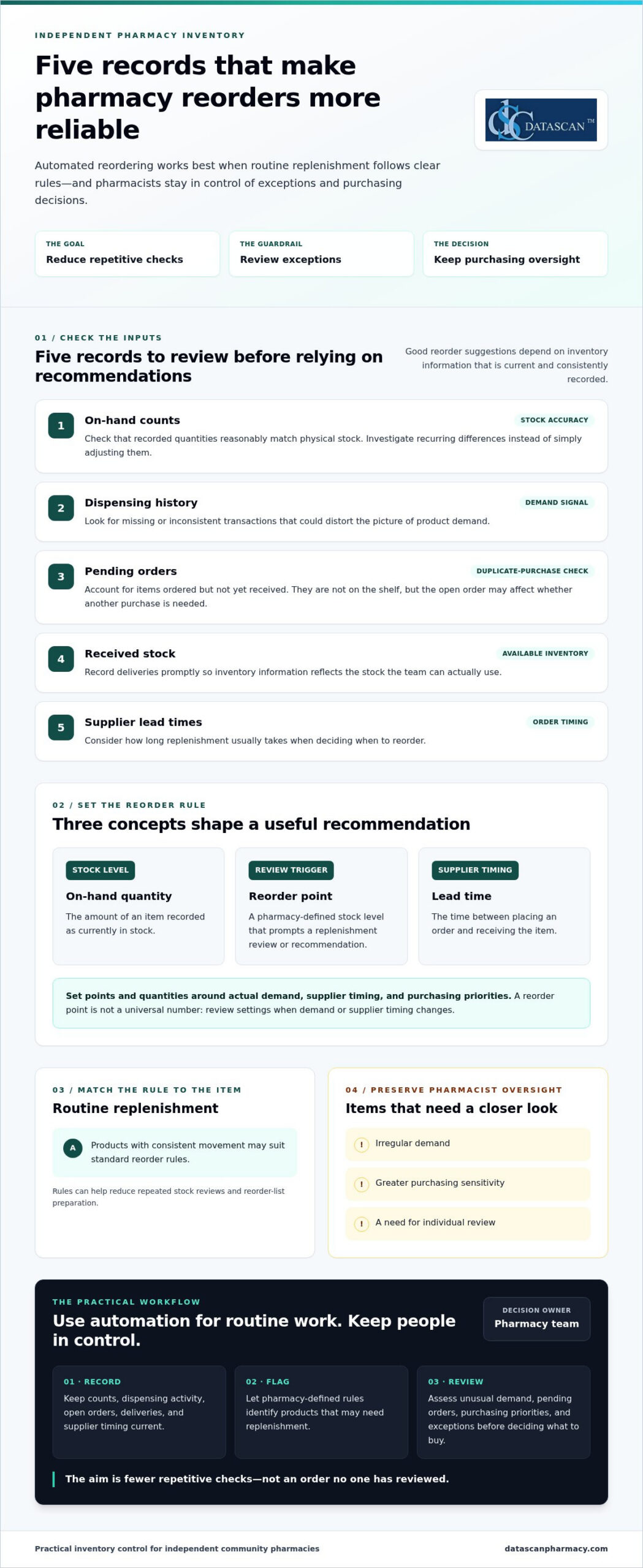
- Review on-hand counts, dispensing history, pending orders, and supplier lead times before setting reorder rules.
- Separate routine items from products that need closer individual review to reduce the risk of unsuitable orders.
- Start with a manageable group of routine items, test the process, and refine the rules before expanding.
- Compare pharmacy software based on inventory visibility, configurable rules, exception handling, workflow fit, reporting, training, and support.
What does automated inventory reordering for a pharmacy actually do?
Automated inventory reordering for a pharmacy uses inventory records and pharmacy-defined rules to guide replenishment. It can identify products that may need to be reordered and prepare a recommendation or reorder list. Whether the system only suggests an order or submits one without staff review depends on the software and how the pharmacy sets up its process.
The goal is to reduce routine stock checking while supporting product availability and keeping purchasing oversight with the pharmacy team. For independent pharmacies managing tight budgets and reimbursement pressure, a useful process makes replenishment more deliberate. Staff can focus on items that need review instead of repeatedly checking every product. Pharmacy automation covers a range of tasks, including inventory management. The right level of automation depends on the pharmacy’s workflow and purchasing decisions.
Three terms help explain how the process works:
- On-hand quantity: The amount of an item recorded as currently in stock.
- Reorder point: The stock level set to prompt a replenishment review or recommendation.
- Lead time: The time between placing an order and receiving the item. Supplier lead times help inform when to reorder.
How is an automated reorder recommendation created?
Pharmacy software can compare recorded stock with a threshold set by the pharmacy. When an item reaches or falls below its reorder point, the system may flag it for replenishment. Dispensing history helps the team assess demand, while supplier lead times inform when to reorder and what quantity may be appropriate. Recommendations are only as useful as their inputs, so counts and transactions need to be recorded and updated consistently.
What pharmacy tasks can automation reduce?
Replenishment rules can reduce repeated stock reviews, reorder-list preparation, and routine follow-up on items flagged for purchase. They don’t replace professional judgment. Staff still need to assess unusual demand, pending orders, purchasing priorities, and other exceptions before deciding what to buy. The practical benefit is fewer repetitive checks competing for attention, giving pharmacists and owners more room to manage daily operations and focus on work that requires their expertise. Pharmacy management software should support this broader workflow rather than create another disconnected task.
What data and reorder rules does a pharmacy need before automating?
Before automating replenishment, a pharmacy needs reliable inventory records and reorder rules that reflect its demand and purchasing practices. This matters for independent pharmacies managing cash carefully while PBM reimbursements can pressure margins or arrive later than acquisition costs. Reordering too much may tie up funds the pharmacy needs elsewhere; ordering too little can put routine availability at risk. Review the underlying data first, then decide which products suit routine replenishment and which call for closer review.
Which inventory records affect reorder accuracy?
Start with the quantity recorded on hand and whether dispensing activity is entered consistently. Compare system counts with physical stock, and investigate recurring differences instead of simply adjusting them. Review open purchase orders too. An item already ordered but not received isn’t available on the shelf, but the pending order may affect whether another purchase is needed. Record deliveries promptly so inventory information reflects stock the team can actually use.
Before relying on automated inventory reordering for pharmacy workflows, review these inputs:
- On-hand counts: Check that recorded quantities reasonably match physical stock.
- Dispensing history: Look for missing or inconsistent transactions that could distort the picture of demand.
- Pending orders: Account for items ordered but not yet received to help avoid duplicate purchases.
- Received stock: Record deliveries so available inventory is represented accurately.
- Supplier lead times: Consider how long replenishment usually takes when planning order timing.
Resolve recurring discrepancies before using recommendations to guide purchasing. Reliable records help the pharmacy judge whether a proposed quantity suits real demand and current purchasing priorities, rather than committing cash based on incomplete information.
How should a pharmacy set reorder points and quantities?
A reorder point is a pharmacy-defined trigger for reviewing replenishment, not a universal number for every product. Set it by considering demand, supplier lead time, and the pharmacy’s preferred ordering cadence. Determine quantities with purchasing priorities in mind, balancing availability with cash committed to stock. Review settings when demand or supplier timing changes rather than assuming an old threshold still fits.
Routine products with consistent movement may suit standard rules. Items with irregular demand, greater purchasing sensitivity, or a need for individual oversight may warrant staff review. This distinction helps teams reduce repetitive checks while applying extra care to purchases that could have a greater effect on cash flow, especially when reimbursement pressure makes working capital important.
Pharmacy management software is part of the wider process for recording information and coordinating daily work. Datascan’s pharmacy management software is designed for independent and retail pharmacies and includes customizable workflow capabilities.
Can automated pharmacy reordering create unwanted orders?
Yes. Automated pharmacy reordering can create unsuitable recommendations or orders when inventory records are inaccurate, reorder rules are outdated, or unusual conditions go unreviewed. Automation is most useful for consistent, routine decisions. The process should also make exceptions visible so staff can apply purchasing judgment before an order affects cash flow or stock availability.
A reorder recommendation and a submitted order are different levels of automation. In a recommendation-only workflow, software flags items for staff to review and approve. A workflow that submits orders automatically can reduce more manual steps, but it also makes clear approval rules and exception handling especially important. Neither approach is right for every product or pharmacy. The choice depends on how much purchasing control the team wants to retain and how dependable its inventory information is.
Which reorder recommendations deserve staff review?
Staff review is valuable when a recommendation doesn’t match what the team knows about current conditions. Common prompts include an unexpected change in dispensing demand, a stock count that doesn’t match what’s on the shelf, or a supplier issue that could affect an open order. Products with irregular or highly variable use may also need closer attention, since a short-term change can make past demand a poor guide to the next purchase.
Pharmacist oversight isn’t a failure of automation. It’s a deliberate control that lets software handle repeatable work while experienced staff assess exceptions, purchasing priorities, and the risk of tying up cash in unnecessary stock.
How can a pharmacy balance automation and purchasing control?
Start by defining staff responsibilities. Decide who reviews recommendations, who can approve or submit orders, and how the team records the reason for an override or unusual purchase. Then assess whether the software and workflow support controls such as approval thresholds, an exception queue, and periodic checks of reorder rules.
For routine items, a team may find that recommendations requiring approval offer a practical balance: they reduce repetitive list-building while keeping a person between a suggestion and a purchase. Automatic submission may suit a narrower set of well-understood orders, provided the pharmacy has clear limits and a process for exceptions. Revisit that choice as demand, supplier reliability, and purchasing priorities change.
Purchasing discipline also connects to gross profit. A reorder should support availability without ignoring the financial effect of buying more than the pharmacy can use efficiently. Reviewing inventory decisions alongside gross profit calculations helps owners consider both the need to keep products available and the cash committed to stock. With automated inventory reordering for pharmacy, the aim isn’t to remove judgment. It’s to focus that judgment where it matters most.
How can a pharmacy implement automated reordering step by step?
Implement automated reordering gradually: document how orders are handled now, validate inventory records, define pharmacy-specific rules, test recommendations on routine items, and refine the process before expanding. Assign clear responsibility for reviewing recommendations and exceptions so automation reduces repetitive work without weakening purchasing oversight.
- Map the current process. Record how staff check stock, build reorder lists, account for pending orders, and follow up on deliveries. Note where tasks are repeated or handoffs create delays.
- Review inventory records. Check recorded on-hand quantities against physical stock, and look for recurring discrepancies in dispensing or receiving records. Correct the underlying process where possible before using recommendations to guide orders.
- Define rules and responsibility. Set reorder triggers and quantities based on each item’s demand, supplier lead time, and your purchasing preferences. Name who reviews recommendations, handles exceptions, and approves changes to the rules.
- Test a manageable group. Begin with routine items that have relatively consistent demand. Keep staff involved and compare recommendations with recent dispensing and purchasing activity before relying on them.
- Refine, then expand. Adjust rules when recommendations don’t fit actual conditions. Broaden the process only when the team understands how the workflow handles exceptions and pending orders.
What should a pharmacy test before expanding automation?
Check whether recommendations make sense alongside recent dispensing and purchasing activity. Review how pending orders, stock corrections, and exceptions appear to staff, and ask the people responsible for inventory and purchasing where the process is unclear or adds work. Track measures that matter to your pharmacy, such as staff effort, product availability, and purchasing exceptions. Set a local baseline and review the same indicators as the process changes.
How does pharmacy management software fit the process?
Pharmacy management software should fit the way your team records inventory, shares purchasing information, and hands off routine tasks. Evaluate how clearly staff can view relevant information and whether the system fits the workflow you mapped. Datascan’s pharmacy management software is designed for independent and retail pharmacies, with customizable workflow capabilities.
Keep the rollout practical: make responsibilities clear, capture staff feedback, and revisit the rules as purchasing needs change. To discuss your pharmacy workflow and software needs, connect with Datascan.
How should you choose pharmacy software for automated reordering?
Choose pharmacy software that helps your team see inventory clearly, manage repeatable work efficiently, and retain control over purchasing decisions. For an independent pharmacy facing PBM reimbursement pressure, an effective operational workflow can help staff make informed purchasing decisions and avoid tying up cash unnecessarily. Compare systems against your actual processes and the controls your team needs.
| What to evaluate | Questions to ask | Why it matters |
|---|---|---|
| Inventory visibility | Can staff quickly understand stock information and related purchasing tasks? | Clearer visibility can reduce time spent hunting for information and support informed buying. |
| Configurable workflow | Can the process reflect the pharmacy’s ordering routines and priorities? | A fit with daily work can reduce duplicate effort and keep purchasing decisions grounded in the pharmacy’s needs. |
| Exception handling | Can staff identify recommendations or situations that need individual review? | Oversight helps the team respond thoughtfully to unusual conditions and protect purchasing discipline. |
| Integration fit | How does the system fit with existing pharmacy processes and information flows? | Better fit may help avoid disconnected tasks and repeated data handling. |
| Reporting, training, and support | Can staff understand the reports, learn the workflow, and access ongoing support? | Practical tools and support matter when owners and pharmacists have limited time to manage operations. |
What questions reveal whether a system fits your pharmacy?
Ask how staff will find inventory information, handle purchasing tasks, and review exceptions during a busy day. Consider whether reports make it easier to understand purchasing activity and whether the workflow avoids adding manual steps. For pharmacies managing PBM reimbursement pressure, purchasing visibility can support more deliberate decisions about cash committed to inventory. Training and ongoing support also matter because a process is only useful if the team can apply it consistently.
Datascan Pharmacy Management Software is designed for independent and retail pharmacies, with customizable workflow capabilities to support broader operational needs. Explore the pharmacy management software overview as part of your evaluation.
What should the next step be for an independent pharmacy?
Write down how orders are handled today, where staff time is going, which purchasing decisions need oversight, and how reimbursement pressure affects inventory priorities. Bring those needs into a focused discussion about your pharmacy’s workflow and software requirements with Datascan. Discuss your pharmacy workflow with Datascan.
Build a Reordering Process That Works for Your Pharmacy
Effective automated inventory reordering for pharmacy operations isn’t about handing purchasing decisions to software. It’s about using accurate inventory records and pharmacy-specific rules to handle repeatable tasks, while keeping staff involved when demand shifts, records don’t match, or an order needs closer review.
Start with reliable stock information, set reorder points around your pharmacy’s demand and purchasing practices, then test the process with routine items before expanding. Clear staff responsibilities and regular reviews help keep recommendations useful, protect purchasing oversight, and reduce time spent on repetitive checks.
Pharmacy management software should fit the way your team works across inventory and daily operations. Datascan is a family-owned pharmacy software company operating since 1981, with U.S.-based support and customizable workflow capabilities. These features give independent pharmacies a way to consider software in the context of their broader workflow and operational needs.
Ready to explore how your pharmacy’s ordering process and software needs fit together? Discuss your pharmacy workflow with Datascan. A practical, well-managed process can give your team more room to focus on the work that needs its expertise.
Frequently Asked Questions
What is automated inventory reordering for a pharmacy?
Automated inventory reordering for a pharmacy uses inventory records and pharmacy-defined rules to flag products for replenishment. Depending on the workflow, software may suggest an order for staff review or submit an order automatically. These are different levels of automation, so pharmacies should define which products need approval. The Pharmacy automation overview provides general background on the subject.
How does pharmacy inventory reordering software decide what to reorder?
Software can compare recorded stock with a pharmacy-set reorder point, then use dispensing history and supplier lead times to inform a recommendation. Pending orders and received stock also affect the inventory picture. The pharmacy sets its own thresholds and purchasing practices. Recommendations depend on accurate, consistently updated records, and staff should review exceptions when actual conditions don’t match the information or rules the software is using.
Can automated reordering place orders without pharmacist approval?
It depends on the software and the pharmacy’s configured workflow. A recommendation-only process leaves the order for staff to review, while another process may submit orders automatically. Pharmacies should decide who reviews exceptions and approves purchases, and which products require closer oversight. Automatic submission may reduce manual steps, but clear limits and a process for addressing unusual demand or supplier issues help preserve purchasing control.
What data does a pharmacy need for automated reordering?
A pharmacy needs current on-hand counts, consistently recorded dispensing activity, pending purchase orders, received stock, and supplier lead times. It also needs reorder points and quantities based on its demand and purchasing practices. Review recurring record mismatches before relying on recommendations. For example, account for a purchase that has been placed but not received so staff can make an informed decision about whether another order is needed.
How can automated reordering help an independent pharmacy save time?
Automated reordering can reduce repeated stock checks, manual preparation of reorder lists, and routine follow-up on replenishment needs. This can free pharmacy staff to focus on exceptions and other daily operational responsibilities. It doesn’t eliminate professional purchasing judgment: staff still need to assess unusual demand, discrepancies, and products that require individual review. The goal is to make suitable routine tasks more consistent, not to automate every purchasing decision.
What should I look for in pharmacy management software for reordering?
Look for clear inventory visibility, configurable workflows, understandable reporting, and a practical way for staff to review recommendations and exceptions. Also consider how the software fits existing processes, plus training and ongoing support. Datascan Pharmacy Management Software is designed for independent and retail pharmacies and includes customizable workflow capabilities.
Author information: This FAQ is published by Datascan Pharmacy Software, a family-owned pharmacy software company operating since 1981. The company provides pharmacy management software for independent and retail pharmacies and U.S.-based support. No individual author credentials are stated here.
 Kevin Minassian is the President of Datascan Software. Under his leadership, the company rapidly expanded to provide pharmacy management software on a national level. Over the last 15+ years, he has ensured that Datascan has continuously evolved to offer innovative solutions for independent pharmacies while still offering world-class customer support. He is passionate about helping independent pharmacies to remain competitive, achieve success, and offer the very best service to their communities.








