
Expired stock is easier to control with a repeatable workflow than with a rushed cleanup. Managing expired pharmacy stock starts with consistent rotation and scheduled checks, so staff can spot approaching dates before products become a loss.
Independent pharmacies often have limited time for manual checks, and inconsistent routines can leave expired products on the shelf or tie up inventory. A clear process helps staff identify items nearing expiration, separate expired products from usable stock, and track follow-up.
This guide covers practical ways to prevent avoidable expirations, handle expired medicines consistently, and improve inventory visibility. It explains how to build stock rotation into everyday work, assign clear steps for expired products, and review inventory records. Pharmacy management software may support the process when it has the functions your team needs, but it works alongside staff procedures and pharmacy judgment.
Key Takeaways
- Managing expired pharmacy stock works best as a repeatable process for preventing, identifying, separating, and resolving expired inventory.
- Build expiration checks into purchasing, receiving, storage, and routine inventory reviews. Document discrepancies according to pharmacy procedures.
- When staff find expired products, separate them from usable stock, record the finding, and choose next steps based on the product, supplier terms, pharmacy policy, and applicable requirements.
- Track expired removals, near-expiration findings, unresolved actions, and inventory adjustments to see where the process needs attention.
- When assessing pharmacy management software, confirm that it supports the inventory visibility and workflow your team needs, including any date capture or reporting functions.
What does managing expired pharmacy stock involve?
Managing expired pharmacy stock means identifying products that are nearing or past their expiration date, preventing avoidable expirations through routine stock control, separating expired items from usable inventory, and resolving them according to pharmacy procedures. Near-expiration and expired products are not the same. A product nearing expiration may still be usable if its date and product instructions allow, while an expired item should be removed from usable stock and handled through the pharmacy’s established process.
This work supports orderly shelves and reliable inventory records. If staff remove a product but don’t update its record, the on-hand count may remain inaccurate. That can lead to purchasing decisions based on stock that is no longer available for use, extra checks for the next staff member, and avoidable write-offs that weigh on pharmacy margins. A consistent process makes each item’s status and next step easier to see.
Why does expired pharmacy stock create an operational problem?
Expired products take up space and can distort inventory records until they’re identified, separated, and accounted for. For example, if staff find a package past its date during a shelf check but don’t adjust the inventory record, another team member may assume it is available when checking stock or placing an order. Searching shelves for date-sensitive items can also interrupt routine work. Clear roles for checking and recording findings help avoid repeated checks and keep inventory decisions grounded in what’s actually usable.
What do expiration date, lot number, and FEFO mean?
These terms help staff organize and review products consistently:
- Expiration date: The date shown on a product’s labeling that indicates its expiration. For background on the topic, see this overview of drug expiration and disposal.
- Lot number: A manufacturer-assigned identifier for a specific group of products. Recording it can help staff distinguish one group from another when reviewing stock or investigating a product-related issue.
- Stock rotation: Arranging inventory so suitable stock with an earlier expiration date is positioned for use before stock with a later date.
- FEFO: “First-Expired, First-Out.” Where appropriate, staff select suitable stock with the earliest expiration date first, rather than relying only on the order products arrived.
FEFO can help reduce avoidable expirations, but it doesn’t replace checking the product itself. Follow product-specific instructions and pharmacy procedures when deciding whether an item is suitable for use. These definitions give the team a shared starting point. The next step is to build them into purchasing, receiving, storage, and review routines.
How can a pharmacy prevent stock from expiring?
Preventing expirations takes a connected process across purchasing, receiving, storage, review, and follow-up. Set a pharmacy-defined review schedule and incorporate date checks into existing work. This helps staff spot approaching expirations without creating a duplicate inventory task. The FDA explains how expiration dates are established, which can help staff understand why checking the labeled date and following product instructions matter. See its FDA guidelines on expiration dates.
How should staff check stock when orders arrive?
At receiving, compare each product with the order and follow the pharmacy’s receiving procedures. Check dates and packaging condition before placing items into stock. Record product or lot details when the pharmacy’s process calls for them. If an item arrives short-dated, damaged, or inconsistent with the order, document the discrepancy and follow the pharmacy’s escalation process, including applicable wholesaler terms.
How can teams build expiration checks into daily work?
Make the routine clear enough for staff to complete consistently during an existing inventory task. Assign responsibility for checking, recording findings, and resolving follow-up items. Use consistent storage locations and rotate suitable products so earlier-expiring stock is easier to find. A checklist or completion prompt within an established routine can help prevent missed steps without asking staff to repeat the same work elsewhere.
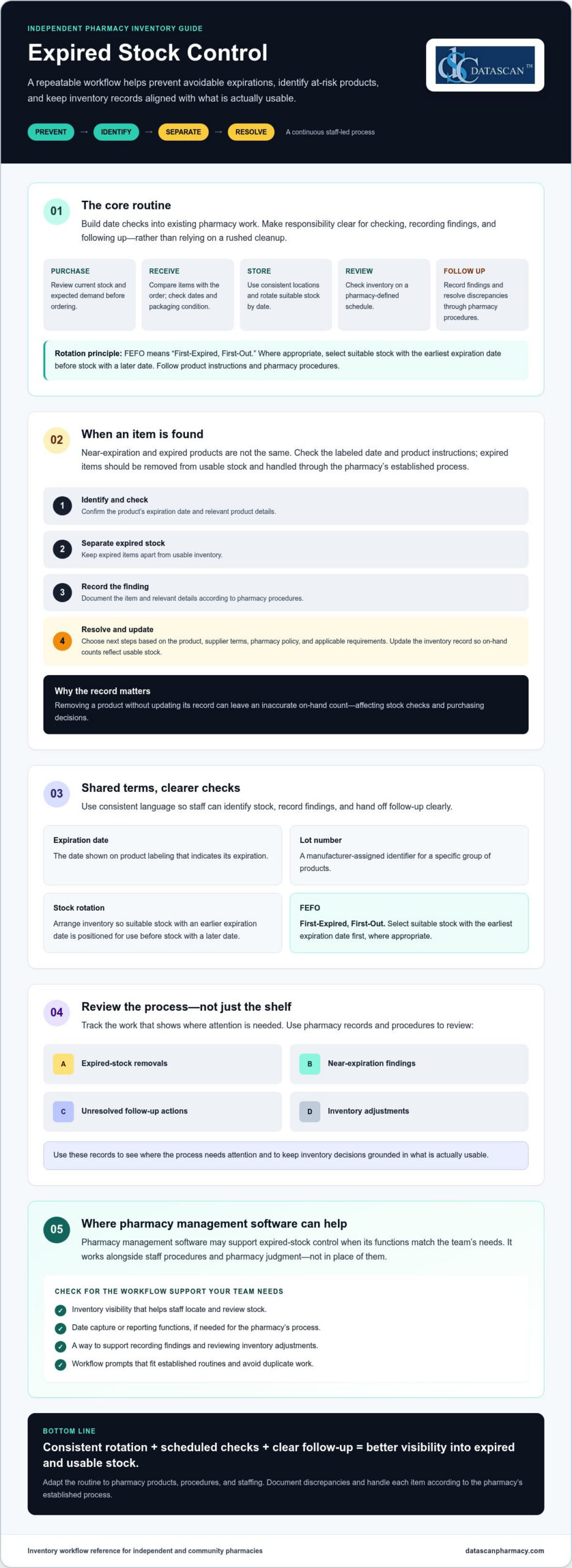
Use this five-part workflow as a starting point, then adapt it to your pharmacy’s products, procedures, and staffing:
- 1. Purchase thoughtfully. Review current stock and expected demand before ordering. Consider whether the order quantity is realistic given the pharmacy’s ability to use the products before their expiration dates.
- 2. Check at receipt. Compare received items with the order, inspect dates and condition, and document discrepancies according to pharmacy procedures.
- 3. Store and rotate. Keep products in consistent locations and position suitable stock with the earliest expiration date so it will be selected first. Don’t rely only on delivery order.
- 4. Review on a set schedule. Choose a review frequency based on your pharmacy’s inventory and workflow. Check designated areas, flag approaching dates, and record findings so another team member can see what needs attention.
- 5. Follow through. Assign an owner to each finding and document the outcome, such as an inventory adjustment or another step under pharmacy policy. Close the loop instead of leaving flagged items unresolved.
Consistent routines make managing expired pharmacy stock less dependent on memory. If you’re assessing whether pharmacy management software could support your inventory workflow, confirm which relevant functions are available before relying on them. Staff procedures and pharmacy judgment remain essential.
What should staff do with expired pharmacy stock?
Staff should identify expired products, remove them from usable inventory, document the finding, and assign a clear next step. Return, disposal, and recordkeeping depend on the product, supplier terms, pharmacy policy, and applicable requirements. Follow the pharmacy’s procedures and verify current federal and state guidance rather than applying one disposal rule to every item.
General workflow: Identify the expired item, separate it from stock available for dispensing or sale, record and reconcile it according to pharmacy procedures, then confirm and complete the appropriate return or disposal process. This is an operational guide, not legal advice.
How should a pharmacy separate expired products from usable inventory?
Move expired items to a designated, clearly controlled area consistent with pharmacy procedures. Keep them physically apart from usable stock, and use the pharmacy’s established method to ensure they can’t be selected for dispensing or sale. Make the area and process clear to staff, including who may access the items and who is responsible for follow-up.
Record enough information for the team to identify and resolve each item. Depending on pharmacy procedures, that may include the product, quantity, expiration date, lot number, date found, and assigned action. Then reconcile the removal against inventory records. If an item leaves the shelf but the on-hand count stays unchanged, staff may continue to rely on an inaccurate count when checking availability or making purchasing decisions.
Can expired medicines be returned or must they be disposed of?
Some products may be eligible for return, but eligibility can vary with supplier terms and the product’s circumstances. Check those terms and document the decision according to pharmacy policy. If return isn’t an option, don’t assume one disposal method applies to every medicine. Confirm product-specific steps with current authoritative guidance and the appropriate federal or state source for your situation.
The Specialist Pharmacy Service offers a practical reference on best practices for expired stock, including stock-control considerations. It’s a UK resource, so use it for general workflow ideas, not as guidance on U.S. requirements. For U.S. handling decisions, verify current requirements with the relevant authorities and follow your pharmacy’s procedures.
- Identify: Confirm the item is expired and note its location.
- Separate: Remove it from usable inventory and place it in the designated controlled area.
- Document: Record the details and reconcile the inventory record using pharmacy procedures.
- Assign and close: Determine whether return or disposal is appropriate, assign an owner, and record the completed action.
Clear ownership keeps managing expired pharmacy stock from becoming a shelf-side reminder that no one follows up. Consistent records also help the team distinguish items awaiting action from inventory that remains available for use.
How can a pharmacy measure and improve its expired-stock process?
Measure the process with consistent records, clear definitions, and a regular review period. Track expired removals, near-expiration findings, unresolved follow-up, and inventory adjustments. Use the patterns to review purchasing and staff procedures. Accurate inventory records can add context to business decisions and stock write-offs, but they don’t replace analysis of other financial pressures.
Which indicators help reveal recurring expiration problems?
Review findings by product or category and compare them with available purchase, on-hand, and removal records. Repeated findings can prompt a closer look at order quantities, demand, storage, or review routines, but they don’t prove a single cause. Keep definitions consistent, such as what counts as a near-expiration finding, and compare the same types of records over the same review period.
- Expired removals: Items taken out of usable inventory and recorded as expired.
- Near-expiration findings: Products flagged for follow-up under the pharmacy’s own criteria.
- Unresolved actions: Findings still awaiting review, return consideration, or another next step.
- Inventory adjustments: Changes made to align recorded quantities with stock status.
Manual checks and software-supported visibility can both contribute to oversight. Manual logs may suit a simpler workflow, while a system may make records easier to review if it captures the right information. Compare options by asking whether staff can find relevant data, record findings consistently, assign follow-up, and review unresolved items. Keep inventory measures distinct from other financial figures unless your system and review process explicitly connect them.
What should pharmacy software do to support stock oversight?
Before relying on technology, confirm whether it can capture relevant dates, support the pharmacy’s review process, and report inventory exceptions in a useful format. Ask the vendor to demonstrate each function. Don’t assume expiration alerts, lot-level records, or automated rotation are included. Pharmacy management software may support inventory visibility when the needed functions are confirmed, but it doesn’t replace staff procedures or pharmacy judgment.
Use the findings to make a focused process change, then review the same indicators again using consistent definitions and periods. If a product category repeatedly appears in near-expiration checks, examine its purchasing and storage records before changing the routine. This gives the team a clearer basis for managing expired pharmacy stock without drawing unsupported conclusions about the cause of financial results.
To discuss how your pharmacy’s workflow and inventory records could be assessed, contact Datascan.
How can pharmacy management software support better expired-stock control?
Pharmacy management software may support expired-stock control by making relevant inventory information easier to record, review, and act on, but capabilities vary by system. Before relying on software, confirm that it can handle the dates, reports, and review steps your pharmacy needs. Better-organized inventory work may help staff spend less time searching through records and more time on day-to-day operations. Technology doesn’t replace staff procedures or pharmacy judgment.
What questions should owners ask about inventory features?
Ask a vendor to demonstrate tasks your team would actually perform rather than relying on a general feature description. Confirm whether staff can:
- Record expiration dates and search for them later.
- Include date information in inventory reports.
- Identify items for review and document what staff did next.
- Use the system in a way that fits the pharmacy’s existing procedures.
Also ask how implementation, staff training, and support work, and what responsibilities remain with the pharmacy team. Don’t assume alerts, lot-level tracking, or automated stock rotation are included. Datascan offers pharmacy management software and customizable workflows, but specific expiration-tracking functions should be verified directly before making them part of your process.
How can a pharmacy assess whether its current process is working?
Set a pharmacy-defined review interval and compare recurring expired removals, stock discrepancies, and staff feedback with the pharmacy’s written procedures and operational priorities. If staff repeatedly need to search for dates or resolve unclear records, identify where the process breaks down before changing it. Consistent definitions and review periods make comparisons more useful and help owners see whether a workflow change addresses the original issue.
Software fit is about more than a feature checklist. Consider whether staff can use the system consistently, whether its reports support the pharmacy’s review routine, and whether the workflow accommodates how the team assigns and closes follow-up. A system that matches your process may help organize work, while an awkward or unverified function can add steps. Learn more about pharmacy workflow optimization software as you consider where workflow flexibility may fit your broader operations.
Managing expired pharmacy stock remains a team responsibility. Use technology only for functions you’ve confirmed, and keep inventory reviews aligned with pharmacy procedures. Datascan can discuss how its software and customizable workflows may fit your pharmacy’s operations.
Make Expiration Control Part of the Routine
Managing expired pharmacy stock is easier to sustain when it’s built into everyday inventory work. Check dates as products arrive, rotate suitable stock so earlier-expiring items aren’t overlooked, and give staff a consistent process for separating, recording, and following up on expired items.
Then review recurring removals, near-expiration findings, unresolved actions, and inventory adjustments using consistent definitions. These records can help your team spot patterns and make more informed purchasing and workflow decisions. Pharmacy management software may support inventory visibility, but confirm that any date capture or reporting functions you need are available before relying on them.
Datascan is a family-owned company operating since 1981, with U.S.-based support, pharmacy management software, and customizable workflows. If you’re evaluating how technology could fit your pharmacy’s procedures, discuss your pharmacy’s workflow and software needs. A clear process, supported by suitable tools and team ownership, helps keep inventory decisions organized.
Frequently Asked Questions
How often should a pharmacy check for expired stock?
Set a repeatable review schedule that fits your pharmacy’s inventory volume, staffing, and written procedures. There is no universal frequency established here, so assign responsibility for completing and documenting checks rather than relying on memory. Review whether your process identifies products before they expire, then adjust the schedule based on what your records show. Confirm any applicable requirements with authoritative sources.
What should a pharmacy do when it finds expired medication?
Follow the pharmacy’s written process to identify and separate the product from usable stock, update relevant records, and assign a next step. Return eligibility and disposal instructions can depend on the product, supplier terms, and applicable requirements. Don’t assume one method applies to every medicine. For managing expired pharmacy stock, follow pharmacy policy and confirm current handling guidance with authoritative sources.
Can expired medications be returned to a wholesaler?
Sometimes, but return eligibility depends on the supplier’s terms and the product’s circumstances. Check the applicable return policy and document the decision according to pharmacy procedures. If a return isn’t available, confirm the appropriate next step using current authoritative guidance and your pharmacy’s policy. Avoid assuming all expired products follow the same return or disposal process.
How can a pharmacy prevent medication from expiring on the shelf?
Build expiration checks into receiving, storage, and routine inventory reviews. Check dates when orders arrive, rotate suitable products so earlier-expiring stock isn’t overlooked, and monitor items approaching their dates under a pharmacy-defined schedule. If the same products repeatedly appear in reviews, examine purchasing patterns and stock records. Assign staff responsibility and keep documentation consistent, while following product instructions and pharmacy policy.
What does FEFO mean in pharmacy inventory management?
FEFO means “first-expired, first-out.” Where appropriate, it guides staff to use suitable stock with the earliest expiration date before stock with later dates. Consistent storage and rotation make earlier-expiring products easier to identify and less likely to be overlooked. FEFO doesn’t override product instructions, pharmacy procedures, or other factors that affect whether a product is suitable for use.
Can pharmacy software track expiration dates?
Some pharmacy systems may offer inventory functions related to dates or reporting, but capabilities vary by product and configuration. Ask the vendor whether expiration dates can be recorded, searched, reviewed, and included in reports. Request a demonstration of how staff would flag an item and document follow-up. Don’t assume a specific feature is available until the vendor confirms it for the system you’re evaluating.
How does expired pharmacy stock affect profitability?
Products removed after expiration represent inventory that can’t be sold or dispensed, which can affect purchasing decisions and gross profit. The impact depends on the pharmacy’s products, purchasing practices, return eligibility, and records, so generic loss estimates may not reflect your situation. Track removals consistently, look for recurring patterns, and review purchasing and stock practices with the appropriate team to identify potential process changes.
About the Author
Author: Datascan Pharmacy Software. Family-owned and operating since 1981, Datascan Pharmacy Software serves independent and retail pharmacies with pharmacy management software and related tools, and provides U.S.-based support. The company’s experience serving pharmacies informs its perspective on pharmacy operations. This article offers general workflow information, not legal advice.
To discuss how Datascan’s pharmacy management software and customizable workflows could fit your pharmacy’s needs, contact Datascan.
 Kevin Minassian is the President of Datascan Software. Under his leadership, the company rapidly expanded to provide pharmacy management software on a national level. Over the last 15+ years, he has ensured that Datascan has continuously evolved to offer innovative solutions for independent pharmacies while still offering world-class customer support. He is passionate about helping independent pharmacies to remain competitive, achieve success, and offer the very best service to their communities.








