
Managing charge accounts for patients works best when clear account terms and a consistent process are backed by an organized pharmacy management software and POS workflow. Link charges, payments, and statements to the correct patient or facility account so staff can review balances without reconstructing them from paper records.
Flexible payment options can support patient convenience, but poorly tracked balances create collection and reconciliation work. That risk grows when staff record transactions in separate ledgers or spreadsheets, especially while independent pharmacies are managing reimbursement pressure and tight operating margins. A consistent process makes charge accounts easier to oversee and helps keep account activity visible.
This guide explains how to set account terms, monitor balances, prepare statements, and follow up on overdue payments. It also covers how pharmacy management software can connect point-of-sale activity with patient ledgers and reduce duplicate entry. About the author: Datascan Pharmacy Software is a family-owned pharmacy software company founded in 1981, serving independent and retail pharmacies with pharmacy management software and related tools.
Key Takeaways
- Set clear eligibility rules and payment terms so staff and patients know how charge accounts work.
- Use integrated pharmacy management software to reduce duplicate entry and make account balances easier to review.
- Review balances regularly and send timely statements to keep receivables organized and support follow-up.
- Offer convenient payment options and use patient app notifications to remind customers about outstanding balances.
- Connect pharmacy software with POS to simplify charge tracking and reduce manual recordkeeping.
What is a pharmacy charge account and why is it important?
Managing charge accounts for patients means maintaining an internal credit ledger in your pharmacy management software. Approved patients or care facilities can receive prescriptions or over-the-counter (OTC) items and pay later, while the account records purchases, payments, and the remaining balance. This can offer payment flexibility while keeping each transaction organized.
A charge account, sometimes called a “house account,” differs from a standard retail transaction. A retail customer pays at checkout. With a house account, the pharmacy records the sale against an approved patient or facility account for later payment. The balance becomes part of the pharmacy’s accounts receivable, so staff need a reliable way to track charges and payments.
Independent pharmacies may use charge accounts for long-term care (LTC) facilities and established retail patients who value a familiar way to manage purchases. A ledger in pharmacy management software can connect each charge to the right account, rather than leaving staff to match receipts with handwritten notes later. Pharmacy management software can keep account activity in one consistent record for staff to review.
How do charge accounts build patient loyalty?
Flexible billing can make purchases easier for elderly patients, caregivers, and facility staff who may prefer not to carry cash or settle every purchase at the register. Clear account records and predictable statements help make the arrangement feel professional and straightforward. For a community pharmacy, that convenience can reinforce a relationship built on knowing patients and making routine transactions easier.
The benefit is more than credit. A structured account process can help patients continue using a familiar local pharmacy while giving the pharmacy a clear way to record and manage outstanding balances.
What are the common risks of manual account management?
Paper slips and separate spreadsheets can lead to missed sales, duplicate entries, or balances recorded under the wrong patient. When transaction details are scattered across records, staff spend time reconciling the register with individual ledgers instead of helping customers.
Manual records also make it harder to review aging balances and follow up consistently. A clear ledger and itemized statements give patients a record of charges and payments, including details they may need to organize personal paperwork during tax season. Paper receipts may be manageable at first, but become harder to reconcile as account activity grows.
How do you set up an efficient patient charge account system?
Build the process around clear account rules and one connected ledger. Set eligibility criteria, payment terms, and individual credit limits. Then ensure each charge entered at the register updates the patient’s account in your pharmacy management software. This pharmacy-specific workflow reduces duplicate entry and gives staff a consistent way to review balances and prepare statements.
Step 1: How should you set credit limits and payment terms?
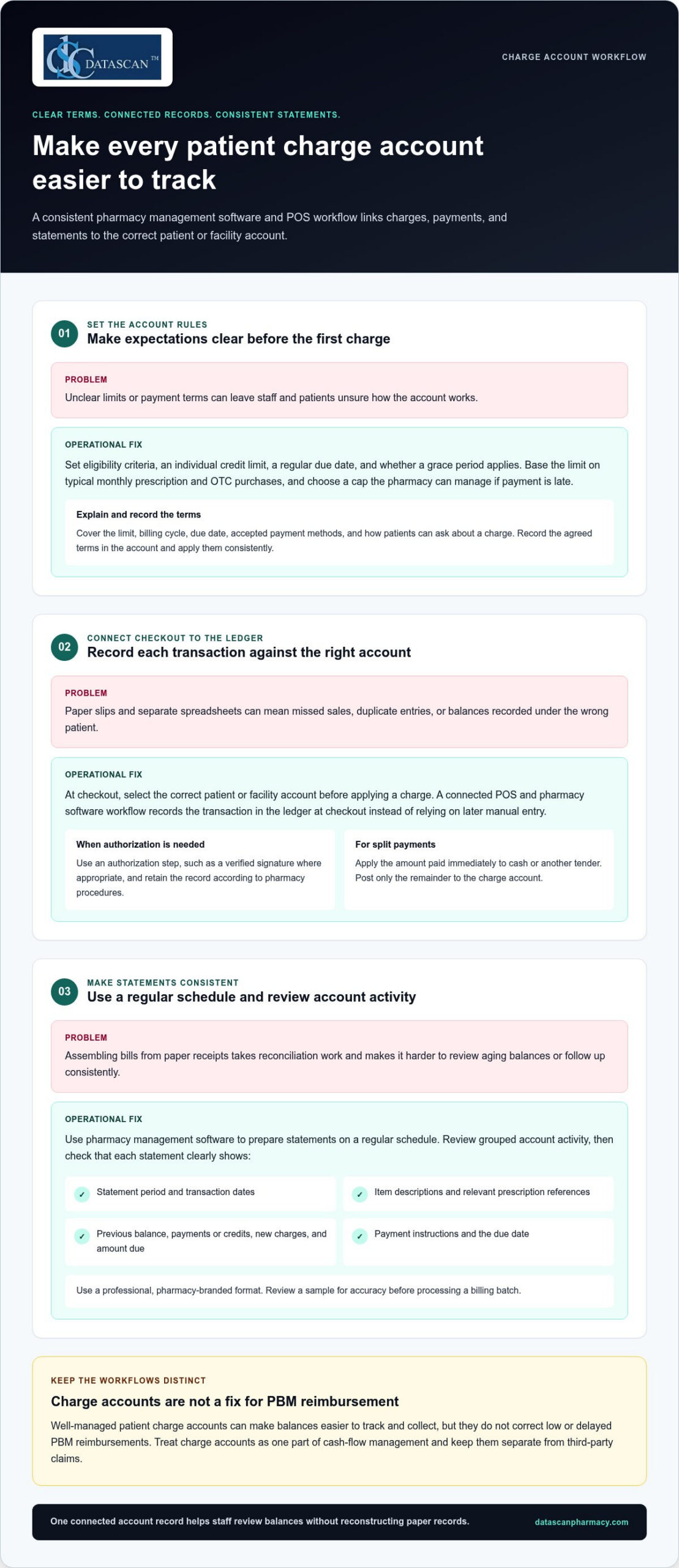
Set each limit with the patient’s or facility’s typical monthly prescription and OTC purchases in mind, and choose a cap your pharmacy can manage if payment is late. Decide on a regular due date and whether to allow a grace period, then apply those terms consistently. At sign-up, explain the limit, billing cycle, due date, accepted payment methods, and how patients can ask about a charge. Record the agreed terms in the account.
Step 2: How do you link POS transactions to the patient ledger?
At checkout, staff should select the correct patient or facility account before applying a charge. Use an authorization step, such as a verified signature where appropriate, and retain the record according to your pharmacy’s procedures. A connected POS and pharmacy software workflow records the transaction against the ledger at checkout instead of relying on a later manual entry. For split payments, apply the amount paid immediately to cash or another tender and post only the remainder to the charge account.
Step 3: How can you make monthly statements consistent?
Use pharmacy management software to prepare statements on a regular schedule. Review grouped account activity rather than assembling each bill from paper receipts. Before sending a statement, check that it clearly shows:
- Statement period and transaction dates
- Item descriptions and relevant prescription references
- Previous balance, payments or credits, new charges, and amount due
- Payment instructions and the due date
Use a professional, pharmacy-branded format so patients can identify the statement and understand what they owe. Review a sample for accuracy before processing a billing batch. An integrated pharmacy management software system can support a more consistent account workflow, reducing time spent reconciling records and leaving staff more time to help patients.
How does managing charge accounts impact pharmacy profitability?
Well-managed patient charge accounts can make balances easier to track and collect, but they don’t correct low or delayed PBM reimbursements. They are one part of cash-flow management and should be kept separate from third-party claims. Managing charge accounts for patients through an organized pharmacy software workflow can reduce manual bookkeeping, while other pharmacy management software tools can help teams process claims and review reimbursement activity.
Keep these financial streams distinct. Patient charge accounts record amounts patients or facilities owe your pharmacy. PBM claims track amounts due from third-party payers under reimbursement terms. Technology can help organize both, but review PBM claim and payment records separately from patient receivables to identify processing issues, payment delays, or differences that need follow-up. Charge account collections are not a substitute for PBM reform or a solution to inadequate reimbursement.
How can structured billing support cash flow?
A consistent statement cycle gives patients and facilities a regular reminder to review and pay balances. Aging reports help staff spot overdue accounts and follow up under pharmacy policy before balances become harder to collect. For high-copay medications, an account may record a patient’s responsibility for later payment, but set clear limits and monitor outstanding balances. Until collected, a charge is a receivable, not available cash.
Technology can also support a separate reimbursement workflow. Pharmacy teams can use claim-processing and financial reporting tools to organize payer activity, compare submitted claims with payment records, and flag items for review. These tools don’t determine whether a PBM reimbursement is fair, but organized data can help staff investigate discrepancies and make informed business decisions. Consider sales and product margins as well as collections when evaluating profitability.
How can automation reduce administrative burnout?
Manual posting may require staff to enter and verify transactions in multiple records. Integrated POS and pharmacy management software can connect patient charges, payments, and credits to account records, reducing duplicate work and making discrepancies easier to investigate. Separate claims workflows can help staff manage reimbursement information without mixing payer activity into patient ledgers.
Automation doesn’t guarantee a specific time saving or cash-flow result. It can reduce routine data-entry steps and make financial information easier to review. That can give pharmacists and owners more room to focus on patient care and business decisions instead of reconstructing account histories by hand.
What are the best practices for collecting payments on charge accounts?
Make payment easy, follow up consistently, and handle overdue balances respectfully. Offer practical payment choices, send clear reminders, and review account activity regularly. Pharmacy management software and a patient-facing app can help organize the work, but keep payment terms and communication consistent across channels.
Offer options that suit different preferences, such as paying in-store, mailing a check, or using a digital payment method your pharmacy accepts. Explain how to identify the account and where to send payment so staff can post it accurately. If your POS system supports card-on-file payments, consider offering the option with clear patient authorization and appropriate safeguards. Don’t assume every patient wants the same method.
How can digital tools support faster collections?
A patient app can make balance communication easier to access. MobileScripts can support payment notifications, prompting patients to review an outstanding balance or statement. Learn about the patient-facing tool through the MobileScripts patient app. Avoid promising that a balance appears in real time or that a specific statement alert is available unless that function is part of your configured workflow.
Set a routine for reviewing new charges, payments, credits, and declined transactions. If a charge is declined or an account reaches its limit, pause additional charges under your policy. Explain the situation privately and professionally, and tell the patient what steps are available. A consistent response helps staff avoid awkward surprises at checkout.
How should staff follow up on overdue accounts?
Use a calm, predictable sequence rather than waiting until a balance becomes difficult to resolve. For example, schedule a friendly reminder when an account reaches 15 days past due, then review the account and document each follow-up. The reminder should identify the balance and explain how to pay without disclosing sensitive account details to the wrong person.
Train staff on when to move an account from routine pharmacy-led follow-up to a formal collection process, and apply the same written criteria consistently. Keep conversations focused on resolving the balance while preserving the patient relationship. Review aging reports regularly to see which balances need attention and whether follow-up is keeping pace.
Managing charge accounts for patients works best when payment options, reminders, and escalation steps form one repeatable workflow. Use pharmacy software to keep account activity organized, and make app-based notifications part of a broader, considerate follow-up process.
How can Datascan Pharmacy Management Software automate your charge accounts?
Datascan connects pharmacy management software and POS charge account tools so staff can track balances at the register, apply credit limits, and generate statements without maintaining a separate manual ledger. This integrated workflow helps independent pharmacies organize account activity and reduce duplicate recordkeeping. For busy owners, the practical benefit is clearer account information and fewer billing steps to manage by hand.
With Datascan Point of Sale working alongside pharmacy management software, staff can associate a charge with the relevant patient account during checkout. The balance can then be tracked as part of the pharmacy’s account workflow, rather than reconstructed later from receipts or separate spreadsheets. Staff also have a consistent place to review account activity when a patient asks about a charge.
How does the workflow support independent pharmacies?
Charge account needs differ across community pharmacies. A pharmacy may manage individual retail accounts as well as facility accounts, each with different purchasing patterns and billing routines. Datascan’s customizable workflow features let pharmacies shape processes around how their teams handle account activity. Credit limits help staff keep agreed account boundaries visible at the register.
Statement generation supports a more structured billing cycle than assembling bills manually. Pharmacies can use a consistent statement process and review balances as part of routine follow-up. The goal is not to replace staff judgment, but to give the team organized records for answering questions, checking payments, and identifying accounts that need attention.
What makes Datascan a long-term pharmacy software partner?
Datascan has been family-owned since 1981 and provides US-based support. That history matters to independent owners looking for pharmacy software grounded in the day-to-day realities of community pharmacy operations. Integrated POS and pharmacy management tools bring related workflows together, while customizable options help pharmacies align the system with their established processes.
Technology can’t resolve PBM reimbursement challenges on its own, but it can reduce the operational work surrounding patient accounts. By bringing charge tracking and pharmacy transactions into a coordinated workflow, Datascan helps staff spend less time reconciling records and more time supporting patients and running the business.
Make Charge Account Management Work for Your Pharmacy
Patient charge accounts can support loyalty and give patients more flexibility, but they need clear terms, consistent follow-up, and accurate records. Managing charge accounts for patients is easier when pharmacy management software connects account activity with POS transactions, reducing manual reconciliation and keeping balances visible.
Set individual limits and payment expectations, use a regular statement cycle, and offer convenient ways to pay. Automated account tracking can give your team more time for patient care and daily pharmacy operations, while clearer reporting helps you monitor outstanding balances.
Datascan brings pharmacy software and POS together to support a more connected charge account workflow. Family-owned and operated since 1981, Datascan also provides US-based technical support for its pharmacy tools.
Explore how Datascan can help streamline your pharmacy’s charge account workflow and take the next step toward a more manageable process. With the right tools and clear policies, your team can offer flexibility while keeping account management organized.
Frequently Asked Questions
Is it legal for pharmacies to charge interest on patient accounts?
It depends on the credit arrangement and the laws that apply, so don’t assume interest can be added automatically. Under the federal Truth in Lending Act’s Regulation Z, certain consumer-credit arrangements may be covered when a creditor regularly extends credit and the agreement includes a finance charge or requires more than four installments. See the Regulation Z definition of a creditor. State requirements may also apply. Get legal guidance before setting interest or installment terms.
How do I handle charge accounts for nursing homes or assisted living facilities?
Use a separate facility account with written billing terms, designated contacts, and a clear process for approving and documenting purchases. Reconcile account activity with invoices and recorded payments, and organize resident-level details according to your pharmacy’s procedures. These are practical controls, not a substitute for reviewing the facility agreement or applicable privacy and billing requirements with qualified advisers.
What is the difference between a patient credit and a charge account?
A patient credit generally represents an amount available to the patient or owed back to them, such as an overpayment recorded on the account. A charge account tracks purchases the patient or an authorized organization has agreed to pay later. Pharmacy systems may use different labels, so define each term in your policies and make sure staff can distinguish credits, charges, payments, and adjustments in the ledger.
Can I manage charge accounts without separate accounting software like QuickBooks?
Pharmacy management software with integrated charge-account tracking can record account transactions without requiring staff to maintain a separate manual ledger. That doesn’t necessarily replace the accounting system your pharmacy uses for broader books, tax records, and financial reporting. The IRS recommends keeping business records that support income and expenses; see its small-business recordkeeping guidance. Establish a process for reconciling pharmacy records with your accounting workflow.
How often should I send out pharmacy charge account statements?
Choose a statement schedule your pharmacy can maintain consistently, and explain it when the account is opened. A monthly cycle is one practical option, but it isn’t a universal requirement for every pharmacy or account. Make the billing period, transactions, payments or credits, balance, due date, and payment instructions easy to understand. Review account activity between statement runs so staff can follow up according to your written policy.
What should I do if a patient passes away with an outstanding balance?
Pause routine reminders, document the account, and handle communications with care. Don’t assume a relative is personally responsible simply because they’re family. Identify an appropriate estate representative if one is involved, and get legal guidance before deciding whom to contact or how to pursue the balance. The Consumer Financial Protection Bureau explains how a deceased person’s debts may be handled through an estate in its guidance on debts after someone dies.
How does integrated POS software prevent internal theft on charge accounts?
Integrated POS software doesn’t guarantee that theft will be prevented, but it can make account activity easier to review by connecting transactions to patient records. Pair that visibility with pharmacy-defined controls: restrict who can adjust balances, document account changes, and regularly reconcile POS activity with payments and ledger entries. Investigate discrepancies consistently and follow your organization’s procedures for access and review.
Can I set different credit limits for different types of patients?
Yes. A pharmacy can set different limits for individual patient and facility accounts as part of a consistent credit policy. Base each limit on expected account use and your pharmacy’s ability to manage unpaid balances, then record the limit and terms in the account. Review them periodically and explain what happens if a purchase would exceed the limit. Pharmacy management software can help staff see balances while processing charges.
 Kevin Minassian is the President of Datascan Software. Under his leadership, the company rapidly expanded to provide pharmacy management software on a national level. Over the last 15+ years, he has ensured that Datascan has continuously evolved to offer innovative solutions for independent pharmacies while still offering world-class customer support. He is passionate about helping independent pharmacies to remain competitive, achieve success, and offer the very best service to their communities.








