
What if coordinating a family’s prescriptions didn’t require combining their medical records? Managing family prescriptions in one profile should mean using a shared workflow for refill timing and pickup while keeping each person’s prescriptions and medication history separate. That distinction helps families stay organized without creating identity or record mix-ups.
Families may want one convenient way to track several people’s refill needs. Pharmacy teams may want fewer repeat calls about prescription status and pickup. But a household connection must never blur who a prescription belongs to or who is authorized to access information. The goal is coordination with clear, patient-by-patient identification.
This guide explains how independent and community pharmacies can handle family prescription requests, refills, and pickup while maintaining accurate records. It also covers what to consider when evaluating pharmacy management software and patient-facing mobile tools, including why family-profile and authorization capabilities should be confirmed before they’re promised. About the author: Datascan Pharmacy Software is a family-owned pharmacy software provider serving independent and retail pharmacies since 1981.
Key Takeaways
- Coordinate household refill and pickup needs through a shared process, not a merged clinical record.
- Keep each person’s prescriptions and medication history distinct, and confirm access before sharing patient information.
- Compare staff-assisted, patient-initiated, and technology-supported workflows to find a practical fit for your pharmacy.
- Use clear steps for intake, identity checks, documentation, and escalation so staff can handle family requests consistently.
- When evaluating pharmacy management software for managing family prescriptions in one profile, verify its family-specific features rather than assuming they’re included.
How can a pharmacy manage family prescriptions in one profile?
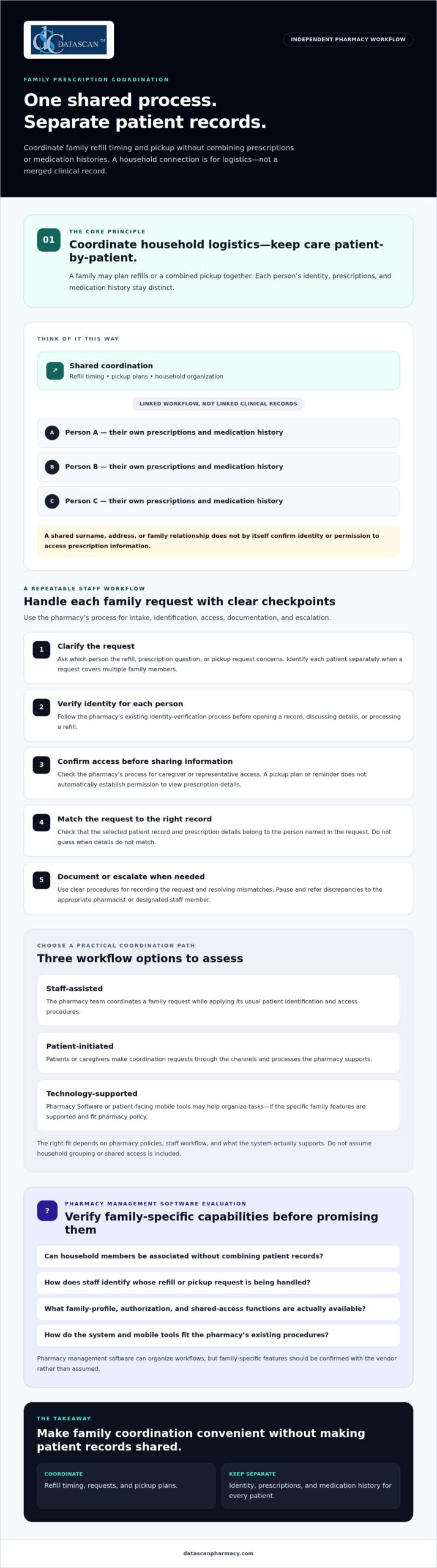
A pharmacy can coordinate family prescriptions through a shared process while keeping a distinct patient record for each person. “One profile” should mean an organized way to manage household logistics, such as refill timing or pickup plans. It should not mean a single clinical record that combines prescriptions and medication histories.
Families may ask for coordination when several prescriptions need attention around the same time or one caregiver is planning a pharmacy visit for more than one person. A clear process helps staff respond consistently and explain what can be coordinated. Because available options depend on pharmacy policies and Pharmacy Software, staff should check what the system supports rather than assume it offers household grouping or shared access.
What does one family prescription profile actually mean?
A coordination view may link household members for practical tasks while preserving a separate profile for each patient. For example, a caregiver might plan a combined pickup, but each person’s prescriptions and medication history remain tied to that individual. This keeps medication information from being confused with a relative’s and supports patient-specific work.
Think of it as a shared calendar, not a merged chart. Coordinating logistics is also different from reviewing a person’s full medication regimen. Pharmacists assessing an individual’s medicines may draw on principles of comprehensive medication management, which focus on that patient’s medication profile. A family coordination feature should not blur that patient-specific work.
Who benefits from coordinated family prescription management?
Parents may want to plan children’s refills together, following the pharmacy’s procedures and applicable requirements. An adult helping a relative may coordinate a pickup or send a reminder, but that alone doesn’t establish permission to access the relative’s prescription details. The pharmacy should explain what the person can do and what steps are needed before sharing information.
For community pharmacies, a defined coordination process makes requests easier to handle without relying on memory or informal assumptions. Pharmacy management software can organize workflows, but staff should verify any family-specific functions with the vendor. Ask whether the system can associate household members without combining records, and how staff identify whose refill or pickup request they’re handling. A pharmacy can review its pharmacy management software workflow options while confirming that any family-profile capability is supported.
How can pharmacies coordinate prescriptions without mixing patient records?
Use each patient’s identity as the organizing principle. Keep profiles, prescriptions, and medication histories separate, even when a family coordinates refill timing or pickup. A shared errand is a logistics arrangement, not automatic permission to view or discuss every family member’s prescription information.
This distinction matters at the counter and during routine phone calls. If a caregiver asks about several prescriptions, staff should identify the specific patient for each request and follow the pharmacy’s process before opening a record, discussing details, or processing a refill. Don’t infer identity or access from a shared surname, address, or family relationship.
How should staff verify each family member’s identity?
Apply the pharmacy’s existing identity-verification process to every patient and interaction. Before viewing or discussing a prescription, confirm which person the request concerns. Before processing it, check that the selected record and prescription details match that patient.
If names, dates, or other identifying details don’t match, pause and escalate the discrepancy to the appropriate pharmacist or designated staff member. Guessing can attach a request to the wrong record. A written procedure should clarify who resolves mismatches and when a request must wait for more information.
How should pharmacies handle caregiver access and consent?
Document how staff determine whether a caregiver or representative may receive information or act on a patient’s behalf. A family relationship alone shouldn’t be treated as universal access permission. Shared pickup plans and refill reminders also don’t, by themselves, establish authorization to access prescription records.
Privacy and consent requirements can depend on the circumstances and applicable guidance. Pharmacy leadership should review current authoritative sources and the pharmacy’s policies, then train staff on what to verify, what to document, and when to ask a pharmacist for direction. A software setting is not a substitute for a clear process.
Pharmacists can contribute to coordinated care while preserving patient-by-patient accountability. The American Academy of Family Physicians discusses pharmacists’ role in team-based care and collaborative practice agreements; that care-team role is distinct from permission to access a relative’s records. For independent pharmacies, thoughtful pharmacy workflow software may help staff follow consistent steps. Verify the system’s capabilities and align its use with approved procedures. That is the practical foundation for managing family prescriptions in one profile without merging patient records.
Which family prescription workflow works best for an independent pharmacy?
The best workflow fits your pharmacy’s staffing, patient preferences, and existing systems while keeping every patient’s record distinct. An independent pharmacy can start with staff-assisted coordination, invite patients to initiate requests, or use technology to support parts of the process. These approaches can also be combined.
Compare the options against your pharmacy’s needs. Whichever approach you choose, tie each request to the correct patient record.
| Workflow | Convenience | Staff effort | Record accuracy | Software dependency |
|---|---|---|---|---|
| Staff-assisted | Helpful for families who prefer direct support from the pharmacy. | May require more manual follow-up. | Relies on consistent intake and patient identification. | Can begin with existing procedures. |
| Patient-initiated | Lets patients contact the pharmacy about their own prescriptions. | Staff still need to verify and process each request. | Supported by handling each request under the correct patient record. | Depends on the available request channels. |
| Technology-supported | May make refill steps or communication easier to organize. | Depends on how well the tool fits the pharmacy’s process. | Requires clear patient identification and separate records. | Requires software or an app with the needed functions. |
When is staff-assisted coordination the right starting point?
Staff-assisted coordination is a practical option when families need help planning refills or pickups and the pharmacy wants to establish a clear process before adding technology. Staff can record coordination preferences according to pharmacy policy, then document and process each patient’s request separately.
Repeated calls to clarify status, pickup plans, or whose prescription a request concerns may indicate that the intake process needs review. Look for avoidable follow-ups and unclear handoffs, then adjust the steps before adding tools.
When can pharmacy software or a patient app help?
Pharmacy management software may help organize the workflow, but don’t assume it offers household profiles or shared access. Ask the vendor how the system handles separate patient records, refill requests, communication, and staff review. Medication synchronization may help coordinate refill timing when it fits patients’ needs and the pharmacy’s workflow. Confirm how it would work in practice.
A patient-facing app may offer another channel for refill communication, but verify its current functions before presenting it as a family coordination tool. Datascan offers the MobileScripts Patient Mobile App, though family-profile capabilities should be confirmed before making claims about them. Pharmacies can review this guide to pharmacy management software and assess which features support their intended process.
How do you set up a safe family prescription coordination process?
Set up a repeatable workflow that handles the family’s coordination request while verifying and documenting each patient’s needs separately. Clear steps help staff manage requests consistently, reduce avoidable follow-up, and know when to pause for a pharmacist or manager.
- Receive the request. Ask which family members the caller or visitor wants to coordinate and what they’re requesting, such as refill planning or pickup coordination. Don’t assume the request includes access to prescription information.
- Verify each patient. Follow the pharmacy’s established identity-check process before accessing or processing an individual’s prescription. If details conflict or identity is uncertain, stop and escalate rather than guessing.
- Clarify the coordination requested. Confirm which logistics the pharmacy can coordinate under its procedures. Refer questions about caregiver access, consent, or unclear authority to the pharmacist or designated lead.
- Document appropriately. Record the request, relevant communication preferences, and any permission details only as pharmacy policy allows. Keep each patient’s identity and prescription information distinguishable.
- Coordinate and follow up. Handle each prescription through the appropriate patient record, explain the next steps, and route unresolved questions to the responsible staff member.
What should the pharmacy document when a family requests coordination?
Use the pharmacy’s established documentation process to record what the family wants coordinated and which patient each request concerns. Document communication preferences or permission details only when policy allows, and avoid notes that imply broader access than has been confirmed. Documentation should help the next staff member without replacing identity checks.
How can staff make the process repeatable?
Create a short checklist covering intake, identity verification, coordination, documentation, and patient communication. Train staff to pause and escalate uncertain identity, consent, or prescription details rather than merging or correcting records based on assumptions. Assign a pharmacist or designated lead to resolve exceptions and clarify the procedure.
Keep the process practical for a busy independent pharmacy. Ask staff which steps cause uncertainty, and note recurring patient questions, repeat calls, and handoff problems. Review those patterns with the team and adjust the checklist when pharmacy needs or software workflows change. Rather than setting an arbitrary performance target, focus on whether the process is clear, consistently followed, and preserves separate patient records.
For broader guidance on structuring pharmacy tasks, review this resource on pharmacy workflow optimization. A well-designed process can make managing family prescriptions in one profile more orderly, but confirm that software features fit the pharmacy’s approved procedures. To discuss workflow options for your pharmacy, contact Datascan.
Can pharmacy management software support family prescription coordination?
Yes, pharmacy management software may support parts of family prescription coordination, but pharmacies should confirm family-specific functions with the vendor. Software can help organize routine workflows while staff continue to follow procedures that keep each patient’s records distinct.
Technology can also help independent pharmacy teams organize day-to-day work amid PBM reimbursement pressures. A clearer refill workflow may free staff time for owners and managers to review reimbursement information and consider changing PBM requirements. Software doesn’t change a PBM’s payment terms, so evaluate workflow tools for the operational support they actually provide.
What should a pharmacy ask a software vendor?
Ask for a walkthrough using realistic scenarios, such as coordinating separate refill requests or planning a pickup for multiple household members. Confirm how the system handles:
- Identity and records: How does it distinguish each patient?
- Workflow and permissions: What coordination and communication functions are supported, and what staff steps are required?
- Documentation and exceptions: How are actions recorded, and what happens when details don’t match?
- Practical fit: What implementation, training, and support details should your pharmacy plan for?
Datascan serves independent and retail pharmacies with pharmacy management software. Its platform includes medication synchronization and e-care plans, and the MobileScripts Patient Mobile App may provide a patient communication channel. These offerings may be relevant to pharmacy workflows, but confirm current capabilities, including any family-specific functions, before relying on them. When reviewing Datascan’s pharmacy management software, assess how its demonstrated features fit your processes and operational priorities.
Start with the coordination problem your team wants to solve, then verify how the system supports it without merging individual patient records. Talk with Datascan about your pharmacy workflow and the capabilities your team should evaluate.
Build a family coordination workflow your team can trust
Managing family prescriptions in one profile works best when the workflow coordinates refill and pickup needs without combining individual patient records. Clear identity checks, documented procedures, and defined staff responsibilities help families stay organized while keeping each person’s prescription information distinct.
Choose a process your pharmacy can follow consistently, whether it’s staff-assisted, patient-initiated, or supported by technology. Pharmacy management software, medication synchronization, e-care plans, and patient apps may support parts of the workflow, but confirm specific family coordination and access features before relying on them. Tools should fit your procedures and help staff manage routine tasks without adding uncertainty.
Datascan has served independent and retail pharmacies as a family-owned business since 1981, with U.S.-based support for pharmacy clients. If you’re reviewing your processes or software fit, discuss your pharmacy workflow with Datascan. With a clear process and suitable technology, your team can make prescription coordination more convenient while protecting accurate individual records.
Frequently Asked Questions
Can a pharmacy put multiple family members’ prescriptions in one profile?
A pharmacy can coordinate a household’s prescription needs, but it should keep each person’s patient record, prescriptions, and medication history distinct. “One profile” may mean a household coordination view, if the pharmacy’s system supports one, rather than a merged clinical record. Ask what the pharmacy’s software and procedures allow, since family grouping and shared access aren’t available or handled the same way everywhere.
How can a pharmacy coordinate family refills without mixing up patients?
Have staff identify the specific patient for every refill request, verify the matching record, and process each prescription separately. A shared pickup plan can help coordinate logistics, but it shouldn’t replace patient identification or the pharmacy’s established procedures. If a name or other detail doesn’t match, staff should pause and ask a pharmacist or designated team member to resolve it rather than guess.
Can one family member manage another person’s prescriptions?
A family member may be able to help coordinate tasks such as pickup or refill reminders, but the relationship alone shouldn’t be treated as automatic permission to access prescription details. The pharmacy should follow its procedures for confirming what information can be shared and what actions the person can take. For online accounts, check the pharmacy’s current authorization process and applicable guidance before assuming access is available.
Does medication synchronization help families manage prescriptions together?
Medication synchronization may help coordinate the refill timing of a patient’s eligible prescriptions, which can make planning easier. It doesn’t combine family members’ records or automatically synchronize prescriptions across a household. The pharmacy should review each patient’s needs and determine whether the process fits their prescriptions and workflow. Ask how synchronization would affect refill requests, patient communication, and pickup planning before relying on it for family coordination.
What should an independent pharmacy look for in software for family prescription management?
Evaluate whether pharmacy management software supports the workflow you need while preserving separate patient records. Ask the vendor to demonstrate identity handling, refill processing, communication, documentation, permissions, and exception steps. Also consider staff usability, training, and support. Datascan Pharmacy Software serves independent and retail pharmacies; confirm directly whether its current capabilities fit your family coordination needs before making a decision.
Can a pharmacy mobile app manage prescriptions for an entire family?
Some patient apps may support refill communication, but family profiles, delegated access, and household-level prescription management depend on the app’s specific functions. Don’t assume one account can manage everyone’s prescriptions. Ask the pharmacy or app provider how individual patients are identified, what access options exist, and what authorization steps apply. Datascan offers the MobileScripts Patient Mobile App, but confirm its current family-related capabilities before relying on them.
How can pharmacies reduce staff time spent coordinating family prescriptions?
Use a consistent intake and follow-up process, assign responsibility for unclear requests, and document coordination according to pharmacy procedures. Clear patient identification and communication steps can help limit repeated questions and avoidable handoffs. Pharmacy management software may organize parts of the workflow, but confirm that its features match the pharmacy’s process. Review recurring patient questions and staff feedback to find practical improvements without assuming a particular tool will eliminate follow-up.
 Kevin Minassian is the President of Datascan Software. Under his leadership, the company rapidly expanded to provide pharmacy management software on a national level. Over the last 15+ years, he has ensured that Datascan has continuously evolved to offer innovative solutions for independent pharmacies while still offering world-class customer support. He is passionate about helping independent pharmacies to remain competitive, achieve success, and offer the very best service to their communities.








