What if the problem isn’t that you need new pharmacy software, but that your current system no longer fits the way your pharmacy works? Switching from Computer-Rx is worth considering when specific workflow limitations, changing business needs, or support gaps affect daily operations, not simply because another vendor makes bigger promises.
It’s understandable to hesitate. A pharmacy management software change can affect dispensing, staff routines, and patient service, so the decision takes more than a polished demo. This guide will help you assess whether a switch is justified, compare options against your pharmacy’s needs, and prepare questions for a productive vendor conversation.
We’ll cover how to document workflow friction, evaluate tools that may help your team manage day-to-day work and review PBM reimbursement information, and ask vendors about conversion, training, and support before you commit. The goal isn’t to rush you away from Computer-Rx. It’s to help you choose pharmacy software based on fit for your independent pharmacy and the operations you need to support.
About the author: Datascan Pharmacy Software is a family-owned U.S. pharmacy software provider founded in 1981. Its offerings include pharmacy management software and related tools for pharmacy operations.
Key Takeaways
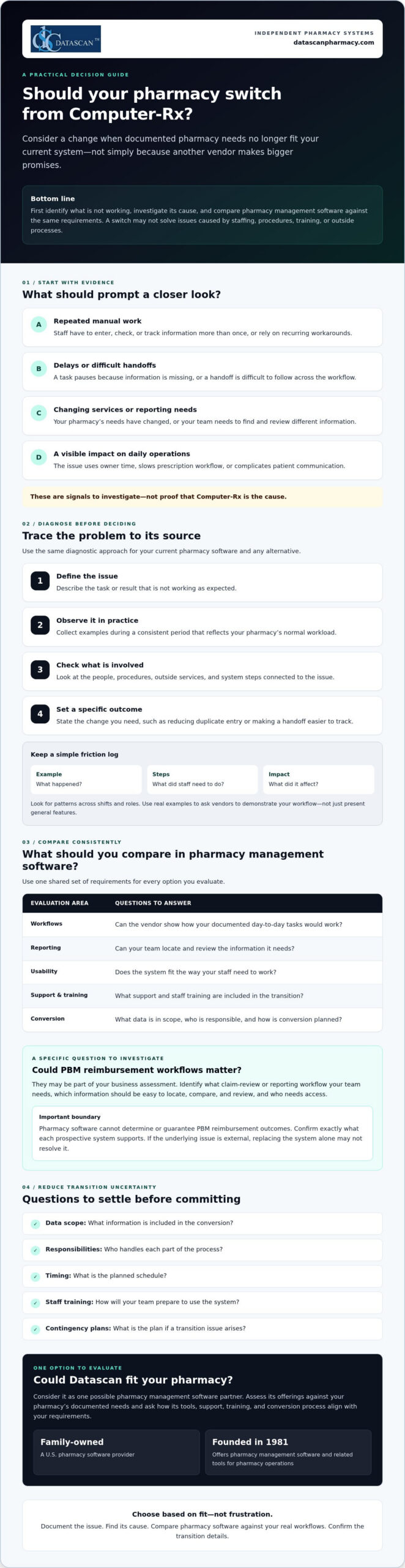
- Consider switching from Computer-Rx when documented pharmacy needs no longer fit your current system, rather than reacting to sales claims alone.
- Investigate recurring workflow problems by checking whether they stem from software, staffing, procedures, training, or third-party processes.
- Compare pharmacy management software options against the same requirements for workflows, reporting, usability, support, training, and conversion.
- Reduce transition uncertainty by confirming data scope, responsibilities, timing, staff training, and contingency plans with a prospective vendor.
- Evaluate Datascan as one possible fit for your independent pharmacy, considering its pharmacy software suite, U.S.-based support, and family-owned history since 1981.
Why are independent pharmacies considering switching from Computer-Rx?
A switch is worth evaluating when your documented pharmacy needs no longer match your current system. That doesn’t mean Computer-Rx is necessarily causing a problem. First, ask whether your pharmacy management software supports the way your team works today and the services you may need to provide next.
For an independent pharmacy, the pressure points are often practical. Are staff repeating manual steps to complete routine tasks? Do workarounds take time away from prescription workflow or patient communication? Have your services or reporting needs changed? Is it difficult for your team to find and review information relevant to reimbursement? Treat these as questions to investigate, not assumptions about Computer-Rx.
A pharmacy software switch is a needs-and-fit decision, not a reaction to dissatisfaction alone. A pharmacy management system supports key pharmacy activities, but whether a different system can address a specific concern depends on its cause and the capabilities you need.
What problems should I document before changing pharmacy software?
Ask staff to record recurring friction when it happens. Note a specific example, the steps involved, and what the issue affects. A short log can help you distinguish a system limitation from a training gap, an unclear procedure, or an outside process your software doesn’t control.
- Manual steps and workarounds: What does staff have to enter, check, or track more than once?
- Delays: Where does a task pause, and what information or handoff is missing?
- Impact: Does the issue use owner time, slow prescription workflow, or complicate patient communication?
Look for patterns across shifts and roles. A clear record makes it easier to ask vendors to demonstrate how they would handle your actual workflow, rather than relying on a general feature presentation.
Could PBM reimbursement challenges be part of the decision?
They may be part of your business assessment, but pharmacy software can’t determine or guarantee PBM reimbursement outcomes. Instead, identify the claim-review or reporting workflow your team needs. Which information must be easy to locate, compare, and review, and who needs access to it? Then confirm exactly what each prospective system supports. For broader financial context, consult a pharmacy gross profit guide alongside your software evaluation.
Keep the decision grounded in evidence. If the root cause is staffing, process design, or an external reimbursement issue, replacing the system alone may not resolve it. If your documented needs point to a genuine mismatch, you’ll be better prepared to compare alternatives based on fit, not frustration.
How do I tell whether my current pharmacy system is the real problem?
Use a simple diagnostic before deciding that changing pharmacy management software is the answer: define the issue, observe it, identify dependencies, and set a specific desired outcome. This helps separate a software constraint from problems caused by staffing, procedures, training, or third-party processes.
- Define the issue: Describe the task or result that isn’t working as expected.
- Observe it: Collect examples during a consistent period that reflects your pharmacy’s normal workload.
- Identify dependencies: Check which people, procedures, external services, or system steps are involved.
- Set an outcome: State what needs to change, such as reducing duplicate entry or making a handoff easier to track.
A recurring workaround is evidence to investigate, not proof a vendor is at fault. As you assess switching from Computer-Rx, use the same diagnostic criteria for your current system and any alternative. The Health IT Playbook also offers broader guidance on technology selection and implementation that can inform your planning.
Which pharmacy workflows should I review first?
Map prescription intake, dispensing, verification, pickup, and refill communication at a high level. Then examine reporting and front-end tasks, noting where information is re-entered, a handoff stalls, or staff need a workaround. Check whether each process fits your pharmacy’s service mix and daily workload. Review POS, delivery, or patient-app needs only if they’re relevant to your operations.
How can I measure whether a workflow needs to change?
Choose a defined observation period and track the same measures throughout it. Keep the measures practical and consistent:
- How often staff repeat a task or enter the same information more than once.
- Where handoffs occur and whether they require follow-up.
- Which steps staff identify as sources of friction, with a brief example.
- How often a task needs rework and what happened immediately before it.
Use your own baseline rather than a vendor’s generalized benchmark. Compare systems using the same definitions and workflow examples, and don’t attribute financial or clinical outcomes to software without evidence. If you want to explore whether another workflow approach fits your needs, you can discuss your pharmacy’s requirements with Datascan.
What should I compare before choosing a Computer-Rx alternative?
Compare each pharmacy management software option against the same written requirements, not the size of its feature list. The best-fit pharmacy software is the one that meets your documented operational requirements and supports the work your team needs to do.
Build a short scorecard from your pharmacy’s priorities, then ask each vendor to demonstrate the same real tasks. For broader system context, review this guide to pharmacy management software as part of your research.
| Area to compare | Questions to ask |
|---|---|
| Required workflows | Can you show how the system handles the tasks we identified, including our service needs? |
| Usability | Can staff complete common tasks in a clear, repeatable way? Show us the steps, not just a feature overview. |
| Reporting and data | Which reports and data are included? Can we review examples relevant to our operations and claim-review process? |
| Support | When is support available, how do we contact the team, and what is the escalation process? |
| Training | Who provides training, what does it cover, and what responsibilities fall to our staff? |
| Conversion | What data can be transferred, who is responsible for each step, and what should we plan for? |
Which questions should I ask a pharmacy software vendor?
Bring your workflow examples to the demonstration and ask the vendor to walk through them with you. Confirm which data, reports, and integrations are included, and request written clarification for anything that affects your requirements. Ask who handles implementation, staff training, and ongoing support. Before deciding, verify the proposed scope, responsibilities, and timing.
How should I compare support and workflow flexibility?
Support models differ, so confirm availability and escalation paths directly with each vendor rather than assuming they match your needs. Ask whether the system can accommodate your operating model and what changes, if any, that would involve. Don’t assume customization is available or included. Consider workflow software only if task coordination is a documented need, and ask the vendor to demonstrate how it would address that need.
To keep the comparison fair, score each vendor against your requirements using the same scale, such as whether a need is met, partly met, or not met. Add notes from demonstrations and written answers. If switching from Computer-Rx remains under consideration, this process gives your team a clear basis for comparing alternatives and discussing trade-offs before committing.
How can I reduce the risk of switching pharmacy software?
Changing a core pharmacy management system takes planning and should never be treated as risk-free. Before committing, agree with the selected vendor on what the conversion covers, who owns each task, when key steps are expected, how staff will prepare, and what the pharmacy will do if an issue arises.
Put the plan in writing and make sure it reflects your pharmacy’s actual workflow. Clarify how the vendor will communicate progress, who can answer questions, and how concerns will be escalated. A contingency plan should identify who makes decisions if a critical step is delayed or information needs additional review. These discussions won’t remove every uncertainty, but they can make responsibilities and next steps clearer.
What should I confirm about pharmacy software conversion?
Ask which patient, prescription, inventory, and historical records can be transferred, and which information may need separate handling. Confirm who is responsible for preparing, transferring, and reviewing data, as well as the review points and escalation path. Before relying on the new system, use a pharmacy-approved checklist to validate the information your team considers critical.
Don’t assume that “conversion included” means every record or workflow is covered. Ask the vendor to define the scope and identify any dependencies or decisions required from your pharmacy. Record the answers alongside the agreed timing so staff know what to expect and whom to contact with questions.
How should I prepare staff for a system change?
List the roles involved and the tasks each person will need to practice, such as intake, dispensing, verification, pickup, refill communication, or reporting. Agree with the vendor on the training scope and timing, then set a clear process for staff to raise questions and escalate problems. A dedicated implementation roadmap can help organize these responsibilities. Confirm its details with the vendor.
As you plan for switching from Computer-Rx, involve staff who perform the day-to-day work. They can flag role-specific needs and identify where a change may affect patient communication or routine handoffs. Set expectations for how updates will be shared, who will coordinate decisions, and how unresolved issues will be tracked during the transition.
Use the vendor conversation to test whether the proposed conversion, training, and support plan matches your pharmacy’s requirements. Datascan provides pharmacy management software and U.S.-based support. Ask its team to clarify the scope and responsibilities relevant to your situation. Review your conversion and training requirements with Datascan as part of your vendor evaluation.
Could Datascan be the right next pharmacy management software partner?
Datascan is one option for independent pharmacies to evaluate, not an automatic fit for every operation. The company has been family-owned and operated since 1981, provides U.S.-based support, and offers a pharmacy software suite. Whether it’s right for your pharmacy depends on how well its capabilities and proposed support meet your documented needs.
As you consider switching from Computer-Rx, compare Datascan using the same workflows and vendor questions you’re using for other options. Bring concrete examples from your pharmacy, such as how staff manage dispensing, communicate with patients, review reports, or coordinate front-end tasks. Ask the team to explain what the software supports and confirm any conversion, training, or support details directly rather than assuming they’re included.
What does Datascan offer independent pharmacies?
Pharmacy management software is Datascan’s core offering, with related tools available for pharmacy operations. Depending on your requirements, ask about its POS, MobileScripts patient mobile app, mobile delivery app, compounding pharmacy software, and customizable workflow capabilities. Start with the Datascan pharmacy management software overview, then discuss which offerings are relevant to your operation. If workflow coordination is a priority, review its workflow software and ask how it aligns with your specific tasks.
For example, a pharmacy that relies on delivery or patient refill communication may want to evaluate those tools, while a pharmacy with compounding needs can ask about the compounding software. The goal is to assess fit for your service mix, not to adopt features that don’t address an identified need.
What is a practical next step before deciding?
Prepare a concise vendor brief before a conversation. Include recurring pain points, priority workflows, relevant reporting needs, and questions about conversion responsibilities, training, and ongoing support. Ask Datascan to respond to those requirements and clarify the proposed scope. This gives you a practical basis for comparing its pharmacy management software with your other options.
A thoughtful evaluation keeps the decision in your hands. You can review your pharmacy software needs with Datascan as part of that process.
Make Your Next Pharmacy Software Decision With Confidence
Switching from Computer-Rx is worth evaluating when documented operational needs no longer fit your current pharmacy management software. Before you decide, identify what’s causing workflow friction, compare vendors against the same pharmacy-defined requirements, and confirm conversion, training, and support responsibilities directly.
Technology can help organize pharmacy work and make key information easier for your team to review, but it can’t guarantee PBM reimbursement outcomes or resolve issues outside the system. Ground your decision in your pharmacy’s service needs, staff workflows, and patient care priorities.
Datascan is one option to assess. It’s family-owned and operated since 1981, provides U.S.-based support, and offers pharmacy management software and related operational tools. Ask how its capabilities align with your requirements, then verify the details that matter to your pharmacy.
To discuss your requirements and take the next step with a clear set of questions, contact Datascan about your pharmacy software needs. A careful evaluation can help you move forward with confidence, whether you switch or stay.
Frequently Asked Questions
Why are pharmacies switching from Computer-Rx?
Pharmacies may consider switching when their documented needs no longer fit their current system. Possible reasons to investigate include recurring workarounds, delays in daily tasks, changing service needs, or difficulty reviewing reports relevant to reimbursement. These are questions for each pharmacy to assess, not proof of a Computer-Rx shortcoming. Before deciding, check whether the cause is the software, staff training, procedures, or an external process.
Is switching from Computer-Rx difficult?
Switching can be complex because pharmacy management software supports core operations, and a change requires planning. The level of effort depends on the conversion scope, the pharmacy’s workflows, and the vendor’s process. Before committing, ask what data can be transferred, who handles each task, how staff training is planned, and how issues will be escalated. Build a contingency plan with the vendor rather than assuming the transition will be risk-free.
How do I compare Computer-Rx with another pharmacy system?
Compare both systems against the same written requirements from your pharmacy. Prioritize the workflows your team uses, usability, reporting, support availability, training, and conversion responsibilities. Ask each vendor to demonstrate the same real tasks, such as intake, dispensing, refill communication, or reporting. Confirm in writing which data, reports, and integrations are included. A shared scorecard helps your team focus on fit instead of counting features.
What data should I ask about before a pharmacy software conversion?
Ask which patient, prescription, inventory, and historical records can be transferred, and which information may need separate handling. Confirm who prepares, transfers, and reviews the data, what validation steps your pharmacy should complete, and how exceptions will be escalated. Request a written description of the conversion scope and responsibilities. Use a pharmacy-approved checklist to verify critical information before your team relies on the new system.
Will changing pharmacy software improve PBM reimbursements?
Changing software can’t determine or guarantee PBM reimbursement outcomes. It may be useful to assess whether a system supports the reporting or claim-review workflows your pharmacy needs to examine reimbursement. Identify the information your team needs to review, then ask vendors to demonstrate how their system handles that workflow. Also consider broader financial factors, since reimbursement challenges can involve processes and decisions outside the pharmacy software itself.
How long does it take to switch pharmacy management software?
There isn’t one timeline that applies to every pharmacy. The schedule depends on factors such as the agreed conversion scope, data handling, staff training, and the vendor’s implementation plan. Ask for proposed milestones, what your team must complete before each one, and how changes or delays will be communicated. Get the expected timing and responsibilities in writing, and avoid relying on a general estimate that doesn’t reflect your pharmacy’s needs.
What should I ask Datascan before switching from Computer-Rx?
Ask Datascan to explain how its pharmacy management software fits your required workflows, which related operational tools match your service needs, and what data conversion, training, and support would involve. Confirm responsibilities and proposed timing directly with the team. You can review Datascan’s pharmacy management software overview, then compare the information with your documented requirements and confirm any details relevant to your pharmacy directly with Datascan.
 Kevin Minassian is the President of Datascan Software. Under his leadership, the company rapidly expanded to provide pharmacy management software on a national level. Over the last 15+ years, he has ensured that Datascan has continuously evolved to offer innovative solutions for independent pharmacies while still offering world-class customer support. He is passionate about helping independent pharmacies to remain competitive, achieve success, and offer the very best service to their communities.