
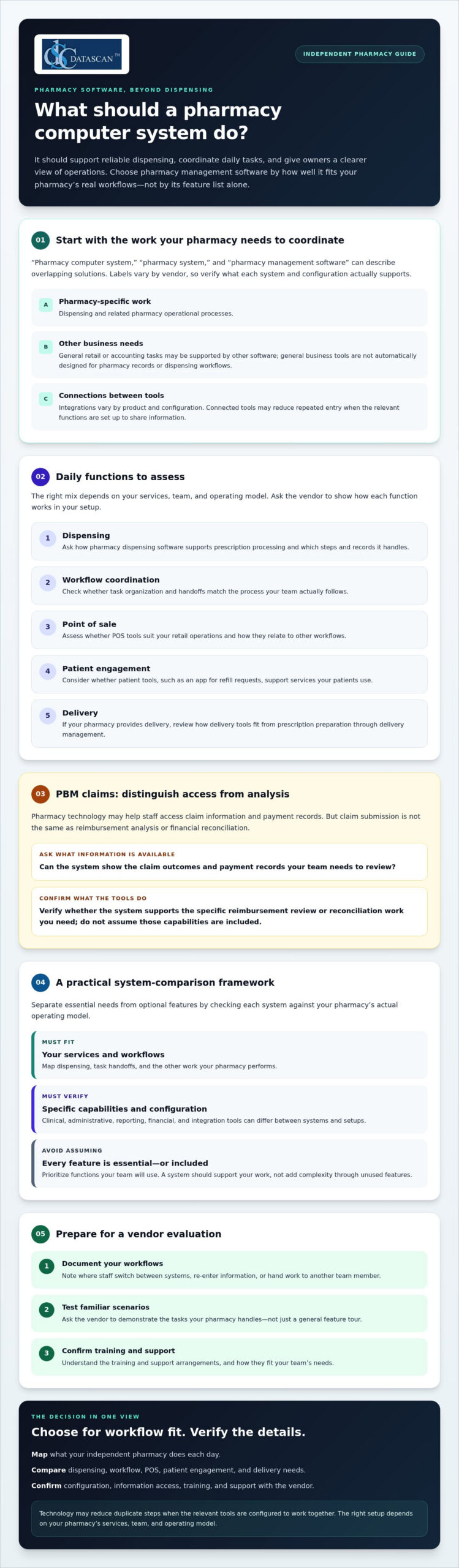
What should a pharmacy computer system do beyond moving prescriptions through the queue? For an independent pharmacy, it should support reliable dispensing, coordinate daily tasks, and give owners a clearer view of operations.
Disconnected tools can create duplicate work, while PBM reimbursement challenges make financial visibility important. When time is limited, choosing software means looking beyond feature lists and focusing on what fits your pharmacy’s workflows.
This guide explains which capabilities to assess, how technology may support workflow and reimbursement oversight, and what to ask when comparing systems and vendors. Use it to identify a solution that fits your team and operating needs.
About the author: Datascan Pharmacy Software is a family-owned company founded in 1981. It serves independent and retail pharmacies and provides U.S.-based technical support.
Key Takeaways
- Understand what a pharmacy computer system coordinates and why the terms pharmacy system and pharmacy management software can overlap.
- Prioritize functions according to daily needs, from dispensing and workflow coordination to point of sale, patient engagement, and delivery.
- Use a comparison framework to distinguish must-have capabilities from features that may not fit your pharmacy’s operating model.
- Prepare for vendor evaluations by documenting workflows, testing familiar scenarios, and confirming training and support arrangements.
- Use Datascan’s pharmacy software offerings as one option to evaluate, and verify which capabilities fit your needs.
What should a pharmacy computer system do for an independent pharmacy?
A pharmacy computer system coordinates pharmacy-specific records, tasks, and operational tools. The terms “pharmacy computer system,” “pharmacy system,” and “pharmacy management software” often refer to overlapping solutions, although vendors may use them differently. Assess what a particular system and configuration actually support rather than relying on the label.
A pharmacy-specific system is built around pharmacy work, including prescription dispensing and related operational processes. General business or retail software may support other needs, such as sales, but it is not automatically designed to manage pharmacy records or dispensing workflows. Some pharmacies use additional tools alongside their pharmacy software. Integrations can connect parts of an operation, but available connections vary by product and configuration.
For a foundational overview of the purpose and common functions of a pharmacy management system, see Wikipedia’s summary. Use it as background, then confirm specific capabilities with each vendor. Do not assume every system includes the same clinical, administrative, reporting, or financial tools.
How is a pharmacy computer system different from general business software?
Pharmacy software is designed for workflows centered on dispensing and pharmacy operations. General business software supports broader tasks, such as retail sales or accounting. For organizations that need comprehensive support across their broader workplace technology and network infrastructure, it can also be beneficial to explore Managed IT Services alongside specialized operational platforms. The distinction matters when staff move between steps: separate tools can require repeated entry, while a connected setup may reduce it if the relevant functions are configured to share information. Ask vendors to demonstrate the workflow your team actually uses.
Who benefits most from pharmacy management software?
Independent and community pharmacy owners, managers, and teams may benefit when pharmacy management software brings everyday work into a clearer process. That can matter for owners balancing patient care with staffing, administration, and reimbursement oversight. The right setup depends on the pharmacy’s services, team, and operating model, so define your needs before treating any feature as essential.
Start by mapping the work your pharmacy handles and noting where staff switch between systems or re-enter information. Consider how dispensing, point of sale, patient tools, and delivery fit your operation. Then verify which functions are available and how they work together. For example, a pharmacy assessing delivery workflows can review Datascan’s electronic delivery system and confirm whether it fits its needs.
Connected processes may reduce duplicate steps, but the result depends on configuration and how your team uses the tools. A system should support the work your pharmacy performs, not add complexity through features you will not use.
Which pharmacy management software functions support daily pharmacy work?
Pharmacy management software supports prescription dispensing and the operational work of running a pharmacy. The right functions depend on your pharmacy’s services and setup. Evaluate how the tools handle everyday tasks, and verify specific capabilities with the vendor rather than assuming every system works the same way.
A pharmacy computer system may bring several kinds of work together. Assess whether the software supports the tasks your team needs in these areas:
- Dispensing: Ask how pharmacy dispensing software supports prescription processing, and confirm which steps and records it handles.
- Workflow coordination: Look for ways to organize tasks and handoffs that match your team’s actual process.
- Point of sale: Assess whether POS tools fit the pharmacy’s retail operations and how they relate to other workflows.
- Patient engagement: Consider whether a patient app supports services your patients use, such as refill requests.
- Delivery: If your pharmacy provides delivery, ask how delivery tools fit into the work from prescription preparation through delivery management.
For computerized prescription records, review the FDA guidance on pharmacy records and ask vendors how their systems support your recordkeeping needs. Confirm the details that apply to your pharmacy with appropriate compliance resources.
Can a pharmacy system help manage PBM claims and reimbursements?
Pharmacy technology may help staff access claim information and payment records, but claim submission is not the same as reimbursement analysis or financial reconciliation. Ask whether the system shows the information your team needs to review claim outcomes, compare them with payment records, and identify items for follow-up. Do not assume it will explain reimbursement differences, reconcile payments, or recover revenue. Verify each capability and how it works in your configuration.
Which connected tools can reduce fragmented pharmacy workflows?
Connected tools may reduce duplicate entry when they share relevant information, but integration and setup matter. Datascan offers pharmacy management software, point-of-sale tools, a patient mobile app, delivery tools, and customizable workflows. These are distinct offerings, so confirm which products and functions fit your needs rather than assuming they are all included together. Explore the pharmacy management software overview and ask how available functions relate to your current process.
A customizable workflow may help align tasks with how your team operates. Delivery tools are relevant only if delivery is part of your service model. To discuss which Datascan offerings may fit your pharmacy’s workflow, contact the Datascan team.
How do you compare pharmacy computer systems for your pharmacy?
Compare each pharmacy computer system against your actual workflows, not just a vendor’s feature list. Classify each capability as essential, relevant, or not needed based on your services and operating model. Then ask the vendor to demonstrate it and confirm what is included in your configuration.
| Capability | Starting priority | What to verify |
|---|---|---|
| Dispensing | Essential | Which prescription processing steps and records does the system support? |
| Workflow | Essential | Can staff coordinate the tasks and handoffs your pharmacy uses? |
| Point of sale | Relevant | Does it fit your retail process, and how does it work with other tools? |
| Patient tools | Relevant | Do the available tools match the patient services you provide? |
| Reporting | Relevant | What claim, payment, and business information can staff review? |
| Support | Essential | What support is available, and how do staff access it? |
These priorities are starting points, not universal ratings. For example, delivery tools may be essential for a pharmacy with an active delivery service, but unnecessary for one that does not offer delivery. For broader context on the software category, see this pharmacy management software guide.
What questions should you ask a pharmacy software vendor?
Ask which workflows the system supports directly and which require separate tools or manual steps. Clarify how implementation, staff training, data handling, and ongoing support work. Then request a demonstration built around routine tasks your team recognizes. A realistic scenario can reveal extra steps or dependencies that a general product overview may not show.
How can technology support PBM reimbursement oversight?
Ask what claim and payment information the software makes available, and whether its reporting supports your pharmacy’s existing review and reconciliation process. Confirm the details in a demonstration or written product information. Claim submission, access to payment records, and financial analysis are different functions. Software may help organize information for review, but it does not change PBM contract terms or guarantee a particular payment or reimbursement outcome.
Separate demonstrated functionality from vendor promises. Record what you saw, what is documented for your configuration, and what still needs clarification. Ask who will confirm any unresolved capability before you decide. If you are assessing Datascan against your requirements, contact the team with your questions.
How can you assess implementation, support, and day-to-day fit?
Assess a pharmacy computer system by tracing the path from your current workflow to daily use. Document how work gets done, define requirements, test realistic scenarios, and confirm support and implementation responsibilities. A strong demonstration is useful, but it will not replace clear answers about data conversion, staff training, testing, timelines, or how dispensing operations will continue during the transition.
- Document current workflows. Note routine steps, handoffs, and pain points, including where staff switch tools or repeat data entry.
- Set requirements. Separate must-haves from optional capabilities based on your services, staffing, and operating model.
- Test scenarios. Ask the vendor to demonstrate familiar tasks from start to finish, including the steps staff perform during a typical shift.
- Confirm the plan. Clarify who handles data conversion, what your team must provide, how testing works, and what implementation timelines depend on before making commitments.
Planning for training and operational continuity gives the team time to learn key workflows and surface gaps before relying on the new setup in daily work. Ask how testing will verify that important records and routine processes are ready, and agree on how staff should handle work during the transition. For more migration-planning detail, the outlined pharmacy software implementation plan can help structure vendor discussions.
What should a pharmacy system demonstration include?
Use real pharmacy scenarios, not just a feature tour. Include team members who will use the system on shift, and ask them to follow routine dispensing and administrative tasks. Have someone record unanswered questions, unexpected steps, and any capability the vendor says is available. Request written confirmation of those points, including whether they apply to your proposed configuration.
How do you judge ongoing support and staff usability?
Ask who provides support, how staff reach them, and what the service arrangement covers. Have employees try key workflows during the demonstration and ask what training is available. Compare vendors using documented support details and observed usability, not assumptions based on a sales presentation. Datascan states that it provides U.S.-based technical support. Confirm the specific support arrangements relevant to your pharmacy.
Before selecting a system, keep a short decision record with required functions, demonstrated results, open questions, implementation responsibilities, and support terms. It helps owners compare options without relying on memory while managing daily operations. To discuss Datascan’s pharmacy management software and how it may fit your pharmacy’s needs, contact the Datascan team.
How can Datascan pharmacy management software fit your next steps?
Datascan serves independent and retail pharmacies with pharmacy management software and related tools. The family-owned business was founded in 1981 and provides U.S.-based technical support. Whether its offerings fit your pharmacy depends on your services, workflows, and required capabilities. Confirm what is available in the configuration you are considering.
Which Datascan tools may be relevant to your pharmacy?
Datascan’s offerings include pharmacy management software, point-of-sale tools, the MobileScripts Patient Mobile App, mobile delivery tools, compounding pharmacy software, 340B management tools, and customizable workflows. These are options to evaluate, not a promise that every tool is included in every configuration. For front-end operations, review Datascan’s point-of-sale tools and ask how they fit your pharmacy’s needs.
PBM reform also makes it useful to ask how your technology supports operational visibility. The Consolidated Appropriations Act, 2026 includes federal PBM changes, with key Medicare Part D compensation provisions beginning in 2028 and most provisions taking effect in 2029 for calendar-year plans. These changes do not mean software can alter contract terms or determine how a rule applies to your pharmacy. Instead, ask whether the information and workflows in your proposed setup can support your team’s review of claims, payments, and changing operational requirements.
- Workflow fit: Which recurring tasks could the software support, and what would still require another tool or manual step?
- Owner time: Which administrative processes take attention away from managing the business, and can the proposed setup make them easier to oversee?
- PBM oversight: What claim, payment, or financial information is available for review? Confirm specific reporting and reconciliation functions directly.
What should you prepare before contacting a pharmacy software provider?
Bring a list of your current systems, recurring workflow bottlenecks, and key questions. Identify the capabilities you need for dispensing, reimbursement review, patient services, and staff workflows. Then ask the vendor to show how the proposed configuration addresses those priorities and what it does not cover.
Discuss your pharmacy system needs with Datascan and use your requirements to guide the conversation.
Choose a system that supports the way your pharmacy works
The right pharmacy computer system should fit your daily operations, not just offer a long list of features. Compare systems against your dispensing and workflow needs, check what claim and payment information they provide for reimbursement oversight, and confirm implementation, training, and support details before deciding.
Keep your priorities clear. Choose capabilities that address real workflow friction, and verify each promised function in a demonstration or product documentation. Pharmacy management software can support coordinated work, but reimbursement review still depends on the information available and your pharmacy’s processes.
Datascan is a family-owned pharmacy software company founded in 1981, with U.S.-based technical support. Its offerings include pharmacy management software, POS, patient apps, and delivery tools. The right combination depends on your pharmacy’s needs, so use your requirements to guide the conversation.
Discuss your pharmacy’s needs with Datascan and take the next step toward a system that fits your team. A clear evaluation plan can help you make a considered choice and focus on running your pharmacy.
Frequently Asked Questions
What is a pharmacy computer system?
A pharmacy computer system is software that coordinates pharmacy-specific records, tasks, and operational tools. It commonly supports dispensing work and may connect with other pharmacy functions, depending on the product and configuration. The terms “pharmacy system” and “pharmacy management software” are often used for overlapping solutions. Check what a specific system does, since features and available tools can differ between vendors.
What is the difference between pharmacy software and pharmacy management software?
Pharmacy software is a broad term for software used in pharmacy operations, while pharmacy management software typically refers to systems focused on coordinating pharmacy work, including dispensing-related processes. In practice, vendors and pharmacy teams may use these terms interchangeably. Compare capabilities rather than relying on the name: ask which tasks the product supports, what requires another tool, and which functions apply to your proposed setup.
Can pharmacy management software help independent pharmacies review PBM reimbursements?
It may help staff access claim and payment information, but its value depends on the system’s functions and configuration. Ask whether it provides the details your team needs to review claim outcomes and compare them with payment records. Claim submission, reimbursement analysis, and financial reconciliation are different tasks. Software alone does not change PBM contract terms or guarantee a particular reimbursement outcome.
What features should I look for in a pharmacy computer system?
Start with the work your pharmacy needs the system to support. Common areas to evaluate include prescription dispensing, workflow coordination, point of sale, patient tools, delivery, reporting, and vendor support. Not every pharmacy needs every function. Classify each capability as essential, relevant, or not needed based on your services and operating model. Then ask the vendor to demonstrate essential tasks and confirm what is available in your configuration.
How do I choose pharmacy software for an independent pharmacy?
Choose pharmacy software by comparing systems against your team’s real workflows, service needs, and operational priorities. Document current tools and recurring bottlenecks, then test realistic tasks in vendor demonstrations. Ask about training, data handling, implementation responsibilities, and support. For reimbursement oversight, confirm what claim, payment, and reporting information the system provides. Treat unconfirmed features as questions to resolve, not promised outcomes.
Can a pharmacy system include point-of-sale and delivery tools?
Yes. Some pharmacy software providers offer point-of-sale and delivery tools alongside pharmacy management software, though available products and how they work together vary. Datascan offers point-of-sale tools and mobile delivery tools, as well as pharmacy management software. Ask which offerings fit your pharmacy and whether they are part of the configuration you are evaluating. A pharmacy that does not provide delivery may not need delivery tools.
What should I ask a pharmacy software vendor before choosing a system?
Ask the vendor to demonstrate your routine dispensing and administrative workflows, and clarify which tasks need separate tools or manual steps. Confirm how data handling, implementation, testing, staff training, and ongoing support work. For PBM oversight, ask what claim and payment information is available and whether it supports your review process. Request clear answers about any capability that has not been demonstrated or documented for your setup.
 Kevin Minassian is the President of Datascan Software. Under his leadership, the company rapidly expanded to provide pharmacy management software on a national level. Over the last 15+ years, he has ensured that Datascan has continuously evolved to offer innovative solutions for independent pharmacies while still offering world-class customer support. He is passionate about helping independent pharmacies to remain competitive, achieve success, and offer the very best service to their communities.








