
A pharmacy inventory count shouldn’t compete with dispensing and patient care. The best way to do pharmacy cycle counting is to count small, prioritized groups on a repeatable schedule, then investigate each mismatch before changing the inventory record. This keeps the work manageable and helps staff understand why counts differ instead of treating adjustments as a routine shortcut.
A full inventory count can put daily operations under pressure, while inconsistent counting practices make records harder to trust. A steady cycle-counting process offers a practical alternative: focus on selected inventory, assign clear responsibilities, and make reconciliation part of every count. Pharmacy management software can support the broader operational workflow, while written procedures help staff apply the same standards from one count to the next.
This guide explains how to choose a counting approach, set a schedule, and document results. You’ll also learn how to investigate common discrepancies before making changes and build a repeatable process suited to an independent or community pharmacy.
Key Takeaways
- The best way to do pharmacy cycle counting is to count manageable portions on a recurring, documented schedule.
- Define what to count, who counts it, who reviews results, and who can approve record changes.
- Use scheduled, rotating, or exception-based counts to match inventory priorities and pharmacy workflows.
- Before adjusting a record, recount the item, confirm its identity, and review relevant receiving or dispensing records.
- Pharmacy management software and customizable workflows can help organize operational information and clarify staff responsibilities.
What is the best way to do pharmacy cycle counting?
The best way to do pharmacy cycle counting is to verify manageable portions of inventory on a recurring, documented schedule. Rather than relying only on a broad count of all stock at one time, staff check selected items, compare the physical quantity with the inventory record, and investigate differences. A cycle count is a repeatable way to verify parts of inventory.
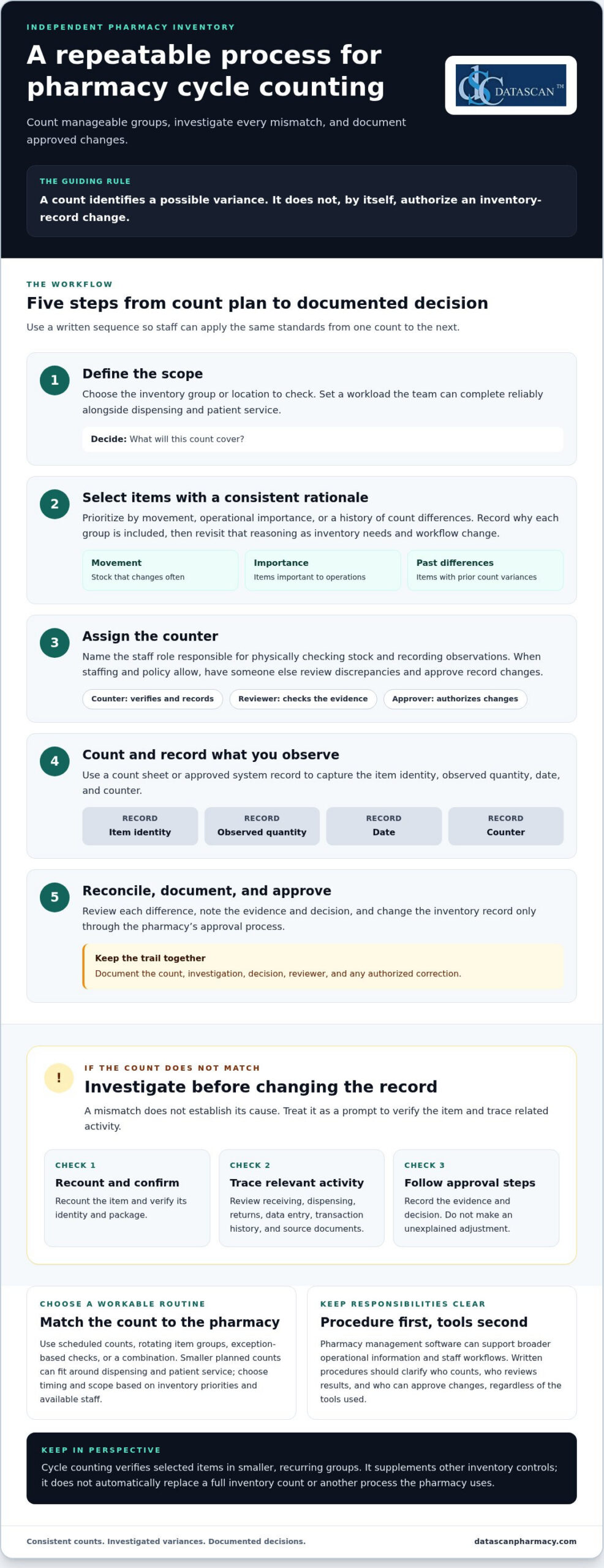
A count identifies a possible variance; it doesn’t authorize an immediate change to the record. First confirm that staff counted the right product and package. Then review the discrepancy and follow the pharmacy’s approval process. Document the count, investigation, decision, and any authorized correction. Separating these steps helps prevent an unexplained mismatch from becoming an inaccurate adjustment.
Keep the routine suited to your pharmacy. Choose items and timing based on your inventory profile, operational priorities, and available staff. Accurate, accessible inventory records won’t change PBM reimbursement terms, but a consistent process can reduce uncertainty about stock and time spent resolving avoidable inventory questions. That gives independent pharmacies more room to review broader business pressures, including reimbursement performance, alongside daily operations.
How is pharmacy cycle counting different from a full inventory count?
A full inventory count aims to check a broad range of stock, while cycle counting verifies selected items in smaller, recurring groups. Breaking the work into scheduled tasks distributes effort across normal operations instead of concentrating it in one large counting event. Cycle counting supplements other inventory controls; it doesn’t automatically replace a full count or any other process the pharmacy uses.
Why do pharmacy inventory records develop discrepancies?
Receiving, dispensing, returns, and data entry are useful places to start an investigation. A mismatch could involve a transaction that was entered incorrectly, recorded late, or associated with the wrong item, but the count alone can’t establish what happened. Check relevant transaction history and source documents before deciding how to resolve a variance.
A count reveals a variance, but it doesn’t establish its cause. Treat each difference as a prompt to verify the item and trace related activity, not as proof of a particular error. Consistent documentation helps staff follow the same process and maintain a more dependable operational picture.
How do you set up a pharmacy cycle-counting process?
Set up cycle counting by defining the scope, choosing items, assigning a counter, recording the physical count, reviewing differences, and documenting approved changes. A written sequence gives staff a consistent method and helps keep inventory checks manageable alongside dispensing and patient service.
- Define the scope. Decide which inventory group or location the count will cover, then choose a workload the team can complete reliably.
- Select items. Use a consistent rationale, such as movement, operational importance, or previous discrepancies.
- Assign a counter. Identify the staff role responsible for physically checking stock and recording observations.
- Count and record. Use a count sheet or approved system record to capture the item identity, observed quantity, date, and counter.
- Reconcile and document. Review any difference, note the supporting evidence and decision, and change records only through the pharmacy’s approval process.
Choose a scope that fits both the inventory and the shift. A high-movement group may need closer attention because stock changes often, while a smaller group may suit a busy period when staff capacity is limited. Document the selection logic so the next count is planned consistently rather than chosen at random.
Which pharmacy items should you count first?
Prioritize items based on how often they move, their operational importance, or a history of count differences. There’s no universal order or frequency that fits every pharmacy. Record why each group is included, then revisit that rationale as inventory needs and workflow change. This makes the schedule easier to maintain and explain.
Who should count, review, and approve inventory changes?
Assign a named role to perform each physical count and record observations. When staffing and policy allow, have someone other than the counter review a discrepancy and approve any record change. Document who reviewed it and what evidence informed the decision, such as relevant transaction records. For additional context, see the University of Illinois College of Veterinary Medicine’s guidance on controlled substance cycle counts.
Pharmacy management software can support broader inventory and staff workflows, but written procedures should make responsibilities clear regardless of the tools used. For a wider look at system considerations, explore this guide to pharmacy management software.
Should pharmacies use scheduled, rotating, or exception-based cycle counts?
Pharmacies can combine scheduled counts, rotating item groups, and exception-based checks. Smaller planned counts distribute work around dispensing and patient service, while a clear owner helps ensure counts don’t disappear during a busy shift. The best way to do pharmacy cycle counting is to choose an approach that fits your workload and inventory priorities, then apply it consistently.
| Approach | Purpose | Operational advantage | Limitation |
|---|---|---|---|
| Scheduled | Set aside planned time to count selected stock. | Makes counting a regular task that staff can plan around. | A count may be delayed if dispensing demands take priority. |
| Rotating | Assign different inventory groups to successive counting periods. | Spreads coverage across the inventory instead of concentrating effort in one event. | Groups can be missed if the rotation isn’t tracked and owned. |
| Exception-based | Review an item after a recorded mismatch or workflow concern. | Directs attention to a specific issue as it arises. | It’s reactive and can’t replace planned coverage. |
These methods work well together. For example, a pharmacy can use a rotating plan for routine coverage and add an exception count when a mismatch or process concern warrants review. Set frequency according to the pharmacy’s inventory profile and staff capacity, rather than assuming one interval suits every operation. A brief, predictable count window can help avoid peak dispensing activity, but consistent ownership matters more than the calendar alone.
When does a rotating count schedule make sense?
A rotation makes sense when counting all selected inventory at once would be difficult to fit into daily operations. Divide stock into identifiable groups, assign each group to a planned counting period, and track completion. Set the timing according to the pharmacy’s priorities and available staff. A written rotation reduces the chance that quieter or less visible groups are repeatedly overlooked.
When should a pharmacy investigate an exception?
Use a recorded mismatch or a concern about a stock-handling step as a reason to review the item. Confirm its identity and recount it, then check relevant receiving, dispensing, return, and adjustment records before deciding what the difference means. Guidance on investigating inventory discrepancies reinforces the value of a consistent review process.
An exception is a reason to investigate, not proof of loss or error. Record what prompted the review, what information was checked, and what action was approved. This helps staff respond promptly without jumping to conclusions or making unsupported inventory changes.
How do you investigate and resolve pharmacy cycle-count discrepancies?
Before changing an inventory record, recount the stock, verify the item’s identity, and review relevant transaction history. A mismatch is a reason to investigate, not proof of theft, a dispensing error, or a compliance failure. Following the same review steps each time helps independent and community pharmacies resolve differences carefully and keep the process clear for staff.
What should staff check before adjusting an inventory record?
Start by confirming the product and package using the pharmacy’s usual identification process. If the count is uncertain, recount before proceeding. Then compare the observed quantity with the recorded quantity and review records that could explain a difference, including receiving, dispensing, returns, and prior adjustments where applicable.
Look for transactions that may be unposted, delayed, duplicated, or recorded incorrectly. Treat these as possibilities to check, not assumptions about the cause. Follow the pharmacy’s documented approval process before making a correction, and have another authorized person review the finding when policy and staffing allow.
How should a pharmacy document a count variance?
Keep a clear record of what was counted and how the pharmacy resolved the difference. The documentation should capture:
- Count date and item identifier
- System quantity and observed quantity
- Investigation steps and relevant supporting records
- Reviewer and authorized disposition, including any approved correction
Preserve the audit trail according to the pharmacy’s established procedures. If similar variances recur, summarize the pattern and review the relevant workflow. Repeated differences may point to a handoff or recordkeeping step that needs attention; they aren’t automatic evidence of wrongdoing. Clear task ownership helps staff know who counts, who reviews, and who approves changes. A structured pharmacy workflow can support that role clarity alongside the broader inventory process.
The best way to do pharmacy cycle counting is to make each variance traceable from the first observation through the final decision. That discipline helps the team correct records only when supported by review, rather than adjusting first and searching for an explanation later. For help thinking through pharmacy workflow needs, talk with the Datascan team.
How can pharmacy management software support cycle counting?
Pharmacy management software can help organize inventory information and staff workflows, but it should support a process your team has defined, not replace one. The best way to do pharmacy cycle counting is still to set clear priorities, assign responsibility, review differences, and document decisions. Choose tools based on how well they fit those steps and the pace of dispensing.
What should pharmacy owners look for in software-supported counting?
Start with the pharmacy’s actual inventory and review process. Consider whether staff can access the inventory records they need, understand who owns each task, and distinguish a count observation from an approved correction. The goal is a clear path from selecting an item to reviewing its count, not simply a longer list of software features.
Turn each need into a workflow question before evaluating systems:
- Which inventory information do counters and reviewers need to see?
- How will staff record the observed quantity and compare it with the inventory record?
- Who reviews a variance, and who is authorized to approve a correction?
- How can counting fit around dispensing and other daily responsibilities?
Then assess whether the system and its configured workflows support those answers. For example, if staff need clearer handoffs, define who passes a variance to a reviewer and how the review is documented. A configurable pharmacy workflow can help organize operational responsibilities without making inventory decisions on the team’s behalf.
How can an independent pharmacy make the process sustainable?
Keep the starting scope manageable. Assign an owner, establish a recurring review of completed counts and unresolved differences, and adjust the routine when staffing, inventory movement, or observed discrepancy patterns change. A process that is too large for the team to maintain won’t provide dependable oversight. Build around the pharmacy’s real workload, then refine it as the team identifies handoffs or recordkeeping that need attention.
Use pharmacy management software as part of the broader operating picture, alongside written procedures and staff accountability. Datascan provides pharmacy management software and customizable workflows for independent and retail pharmacies. To assess fit, document your current counting steps, the information staff use, and where reviews or handoffs slow down. The pharmacy management software overview can help you consider how a system fits into your workflow.
Make Inventory Accuracy a Repeatable Part of Your Workflow
The best way to do pharmacy cycle counting is to make it small enough to sustain and disciplined enough to trust. Set a recurring schedule that fits your inventory and staffing, assign clear responsibility for each count, and investigate differences before approving record changes. A consistent process turns count results into useful information without letting inventory work overwhelm dispensing and patient service.
Pharmacy management software can support the organization of inventory information and staff workflows, while clear procedures keep review and approval responsibilities transparent. The right approach should fit how your pharmacy operates and adapt as staffing, inventory movement, and process needs change.
Datascan has been family-owned and operated since 1981, providing pharmacy management software, customizable workflows, and U.S.-based support for independent and retail pharmacies. Discuss pharmacy management software for your workflow and consider how a system can support your team’s operational priorities. A manageable process, applied consistently, can help your pharmacy build greater confidence in its inventory records over time.
Frequently Asked Questions
How often should a pharmacy do cycle counts?
Set a frequency that fits your inventory, operational priorities, and available staff. Items with frequent movement or previous discrepancies may warrant more attention than other stock, but there isn’t one schedule that suits every pharmacy. Document which items are counted and when, then review whether the routine is manageable and useful. Adjust the plan when inventory patterns, staffing, or observed count differences change.
Which pharmacy inventory items should be cycle counted first?
Start with items prioritized by movement, operational importance, or a history of count differences. For example, a pharmacy might select frequently dispensed products for closer review because their inventory changes often. The right starting group depends on the pharmacy’s stock and workload. Write down why items were selected so staff can apply the same logic consistently and revise priorities as needs change.
What should staff do when a pharmacy cycle count does not match the system?
Recount the item and confirm its identity before changing the inventory record. Then review relevant transaction history and source documents, such as receiving, dispensing, return, or adjustment records, as applicable. Record the observed and system quantities, the investigation, the reviewer, and the approved disposition. A mismatch is a prompt to investigate, not proof of theft, a dispensing error, or another specific cause.
Can pharmacy cycle counting replace a full inventory count?
Cycle counting shouldn’t automatically be treated as a replacement for a full inventory count or other inventory controls. It checks selected stock in smaller groups, while a full count provides broader coverage. Pharmacies should maintain their established counting and recordkeeping procedures and use cycle counts as an additional way to review inventory during normal operations. The right combination depends on the pharmacy’s policies and applicable requirements.
How can a pharmacy do cycle counts without disrupting dispensing?
Keep each count focused on a manageable group and plan the work around staffing and dispensing demands. Assign a clear owner, define which items are included, and record the count using a consistent process. A rotation can spread effort across planned counting periods instead of concentrating it in one event. If patient care needs take priority, track postponed counts and assign a new time so they aren’t forgotten.
Can pharmacy management software help with cycle counting?
Pharmacy management software can help organize inventory information and staff workflows, but it should support a documented counting and review process rather than replace it. Evaluate whether staff can access relevant records, understand task ownership, and follow the pharmacy’s approval process for corrections. Match software considerations to actual workflow needs, including how counts fit around dispensing. Evaluate specific system capabilities against the steps your pharmacy needs to carry out.
 Kevin Minassian is the President of Datascan Software. Under his leadership, the company rapidly expanded to provide pharmacy management software on a national level. Over the last 15+ years, he has ensured that Datascan has continuously evolved to offer innovative solutions for independent pharmacies while still offering world-class customer support. He is passionate about helping independent pharmacies to remain competitive, achieve success, and offer the very best service to their communities.








