A dashboard won’t improve patient care on its own. Pharmacy data analytics for patient outcomes is useful when prescription and workflow information helps your team identify a follow-up opportunity and take a practical next step.
Independent pharmacy owners know that consistent care takes time, and operational reports don’t always show whether patients are getting the follow-up they need. Prescription and clinical information can also be scattered across daily work, leaving little time to look for patterns. Pharmacy management software can help organize information used in care workflows, making it easier for a busy team to review.
This article explains how to connect pharmacy data with patient-care questions, interpret findings carefully, and turn useful patterns into manageable actions. About the author: The Datascan Pharmacy Software team focuses on pharmacy management software and operational workflows for independent and retail pharmacies.
Key Takeaways
- Connect a specific care question to measures your team can review and act on.
- Compare dispensing and refill records, medication synchronization activity, care-plan documentation, and patient feedback, while considering the limits of each source.
- Separate baseline, process, and patient-outcome measures so completed tasks aren’t mistaken for improved health.
- Build a repeatable review cycle around actionable exceptions and your team’s capacity.
- Use pharmacy management software and customizable workflows to organize review and follow-up, not as proof of clinical impact.
What does pharmacy data analytics for patient outcomes actually measure?
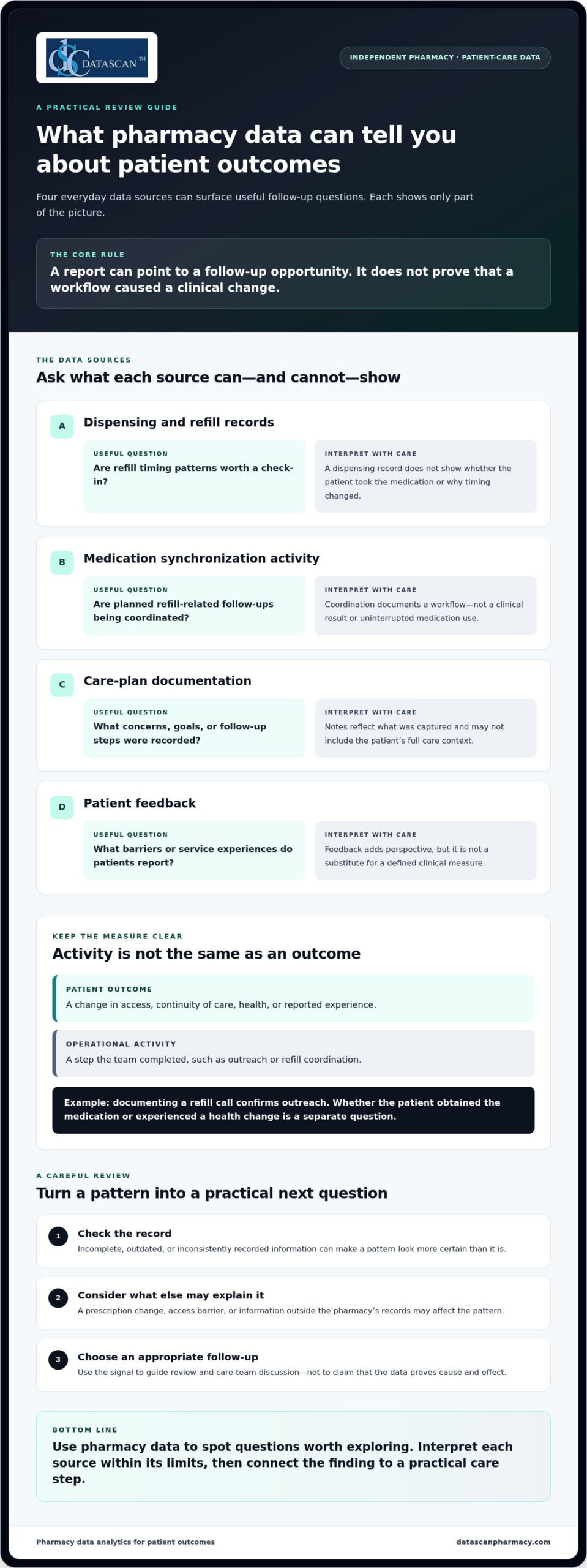
Pharmacy data analytics for patient outcomes connects information a pharmacy already handles to practical questions about care, follow-up, and patient experience. It can help an independent pharmacy identify where a patient may need attention. A report is a starting point for review, not proof that a particular service caused a clinical change.
Outcome measures describe a change in a patient’s health, medication access, continuity of care, or reported experience. Pharmacy activity measures describe work the team completed, such as outreach or refill coordination. Both can be useful, but an activity shouldn’t be presented as an outcome.
This work uses pharmacy information to support healthcare decisions. For clinical measures, consult the Pharmacy Quality Alliance’s measure resources and other appropriate clinical guidance to understand how a measure is defined and what it captures. Pharmacy management software can organize information used in established workflows, but a measure’s meaning depends on its definition, the information available, and the patient’s circumstances. A pharmacy management software system can support those workflows; it doesn’t independently prove cause and effect.
Which patient outcomes can a community pharmacy reasonably examine?
Start with areas the pharmacy can observe or document: whether a patient was able to obtain medication, whether refills appear consistent over time, whether planned follow-up took place, and how patients describe their experience. These indicators can flag a need for a closer look. Dispensing records alone, however, may not explain why a prescription wasn’t filled or whether a patient took the medication.
For clinical measures, use a validated definition and interpret results in the appropriate clinical context. Some long-term health outcomes depend on information outside the pharmacy’s view, so routine operational data may not show the full picture.
How are patient outcomes different from operational metrics?
An operational metric shows whether a step occurred. A patient-level measure asks whether something about the patient’s access, continuity, health, or experience changed. Operational indicators can point to useful follow-up opportunities, but completing a task doesn’t establish that the patient’s condition improved.
For example, a record that staff contacted a patient about a refill documents outreach. Whether the patient obtained the medication, continued treatment, or experienced a health change is a separate question that may require additional information and context.
Interpret findings cautiously. If patients who received follow-up show a different pattern later, that association can guide the team’s next question, but it doesn’t establish that follow-up caused the difference. Other factors may be involved, including a prescription change, access barriers, or information the pharmacy doesn’t hold.
For a useful review, label each measure as a patient outcome, a process measure, or a contextual indicator. This helps owners and staff discuss what the data shows, what it can’t show, and what follow-up may be appropriate, without mistaking a completed workflow step for better care.
What pharmacy data can help you understand patient outcomes?
Useful pharmacy data can come from routine dispensing, refill coordination, documented care-plan activity, and patient feedback. Together, these sources can help an independent pharmacy identify questions for follow-up, but each offers only part of the picture. Pharmacy data analytics for patient outcomes is most useful when the source, question, and limits of interpretation are clear.
Data quality affects how confidently a result can be interpreted. Incomplete, outdated, or inconsistently recorded information can make a pattern look more certain than it is. Before drawing conclusions, check what the record captures and what may be missing.
| Data source | Possible question | Interpretation caveat |
|---|---|---|
| Dispensing and refill records | Are there refill timing patterns that may warrant a check-in? | A record shows dispensing activity, not whether the patient took the medication or why timing changed. |
| Medication synchronization activity | Are planned refill-related follow-ups being coordinated? | Coordination documents a workflow, not a clinical result or uninterrupted medication use. |
| Care-plan documentation | What concerns, goals, or follow-up steps were recorded? | Documentation reflects what was captured and may not include the patient’s full care context. |
| Patient feedback | What barriers or service experiences do patients report? | Feedback adds perspective, but isn’t a substitute for a defined clinical measure. |
Can dispensing and refill patterns reveal follow-up needs?
They can point to a question worth asking, but they don’t establish adherence or health status. A refill later than expected might prompt staff to review the record or follow up. Timing can also reflect a prescription change, supply on hand, access issues, or a patient’s circumstances. Medication synchronization can help coordinate refill timing and related follow-up; the activity itself doesn’t prove that treatment continued.
How can care plans and patient feedback add context?
Care-plan notes can show what was discussed, what follow-up was planned, and whether a concern was documented alongside prescription information. Patient feedback can add another useful signal, such as a reported difficulty obtaining medication or understanding a process. Consider these sources together, while keeping feedback distinct from validated clinical measures and recognizing that documentation may not capture every interaction.
Information may be spread across systems or recorded differently by team members. First establish which records are available and how consistently they’re maintained. Access and use also depend on the pharmacy’s workflows and applicable requirements. Tie each measure to a defined question, then check whether the records contain the details needed to answer it.
For example, if the question is whether refill coordination is happening as intended, distinguish a record of planned contact from a patient-reported barrier or clinical measure. That separation helps avoid treating missing documentation as proof that care did or didn’t occur. A clear, manageable workflow can help the team capture follow-up consistently. Discuss pharmacy workflow needs in the context of your day-to-day processes.
How do you analyze pharmacy data without confusing activity with better outcomes?
Use a simple sequence: define a care question, choose a measure, check the data, interpret the pattern, and decide what action is appropriate. This keeps pharmacy data analytics for patient outcomes focused on decisions your team can make instead of reports without a clear purpose.
- Define one question. Tie it to a specific care priority, such as whether a follow-up process is reaching the patients it is intended to reach.
- Select a measure. Specify exactly what will be counted, for whom, and from which records.
- Review data quality. Check whether records are complete, consistent, and relevant to the question.
- Interpret the pattern. Compare like with like, and document changes in patients, prescriptions, or workflows that could affect the result.
- Choose an action. Decide whether the finding calls for follow-up, a workflow adjustment, or more information before drawing a conclusion.
Keep three measure types distinct. A baseline measure describes the starting point for comparison. A process measure records an activity, such as a documented outreach attempt. A patient-outcome measure describes a defined patient-level result. A process measure may help explain how care was delivered, but it doesn’t substitute for an outcome measure.
Which measure should a pharmacy choose first?
Choose one care question that matters to the pharmacy and can be answered with information the team can reliably review. Define the measure in plain terms, including its data source and the population it describes. If staff can’t interpret the result or connect it to a reasonable next step, the indicator may add reporting work without helping care decisions.
How can you interpret trends responsibly?
Use consistent time periods and definitions when comparing results. Note missing records, changes in documentation, and workflow adjustments, since these can affect what appears in the data. For clinical measures, follow the measure’s published specification and appropriate clinical guidance rather than creating a local definition that looks similar but counts something different.
A before-and-after change alone cannot prove that a pharmacy action caused the difference. A trend may be associated with an intervention, but other explanations can include a change in patient mix, a therapy change, or incomplete records. The data can help identify a pattern, but it can’t isolate cause and effect by itself.
Consider a pharmacy reviewing a follow-up process over time. If documented contacts increase, that may show a change in recorded activity. It doesn’t establish that patients had better access or a different clinical result. Check whether the patient-level measure was defined and captured consistently, and whether other changes could explain the pattern.
When the meaning or clinical significance of a measure is unclear, avoid overinterpreting it. Consult an appropriate clinical expert or the authoritative source that defines the measure. Pharmacy software can help teams organize information within existing work, but careful definitions and sound judgment are what make the analysis useful.
How can an independent pharmacy turn analytics into patient-care action?
Turn analytics into action by building a small, repeatable review cycle around work your team already does. Choose a care question, review only the information needed to answer it, assign appropriate follow-up, and check whether the process is useful before expanding it. Pharmacy data analytics for patient outcomes should lead to a manageable decision, not another report competing with patient care.
A practical review cycle can look like this:
- Select a priority. Choose a care process the pharmacy wants to understand, such as whether planned follow-up is reaching the intended patients.
- Review actionable exceptions. Focus on records that may need attention rather than scanning every metric. Confirm the information before treating an exception as a care need.
- Assign responsibility. Make clear who reviews the information, who handles appropriate follow-up, and where the action is documented.
- Assess the workflow. Consider whether the review led to a useful next step and whether the team can sustain it with available capacity.
Keep documentation focused on the decision and action. Limit access to patient information according to appropriate team responsibilities and applicable privacy requirements. For practical ways to align review steps with daily pharmacy work, consider pharmacy workflow optimization.
How can you fit a data review into a busy pharmacy day?
Start with a small set of defined measures linked to existing care processes, then assign review and follow-up within the team’s current responsibilities. A brief, consistent review is more manageable than adding a reporting task with no clear owner. Before expanding, check whether the information led to a useful action and whether the process fits the pharmacy’s capacity.
Customizable workflows and pharmacy management software can help organize information around established responsibilities. Medication synchronization and e-care plans can support consistent follow-up processes, but they don’t guarantee clinical results. The pharmacy still needs a clear purpose for each review and a practical way to document the next step.
How can analytics support PBM-related patient-care decisions?
Keep reimbursement analysis separate from patient-outcome measurement. Reimbursement records can help the owner understand financial performance, while care measures address questions about patient access, follow-up, or experience. The two areas can overlap operationally because financial pressure may constrain the time or resources available for care activities, but assess that connection locally rather than assuming it.
For example, a reimbursement review may help identify a business concern, while a separate care review tracks whether planned follow-up is taking place. Keeping the questions distinct makes both analyses easier to interpret. Pharmacy software can support organized workflows, but it can’t establish that a reimbursement change caused a patient outcome or that an operational adjustment improved care.
Choose an analytics workflow that fits your team’s care priorities and daily responsibilities. Talk with Datascan about pharmacy workflow needs and how software can support a more manageable review process.
How can pharmacy management software support patient-outcome analytics?
Pharmacy management software can support patient-outcome analytics by organizing operational information within established pharmacy workflows, helping staff document care activity and identify records for review. It provides structure for the process, not a clinical conclusion. Pharmacists still interpret information, apply professional judgment, and decide what follow-up is appropriate.
For independent pharmacies, that distinction matters. A useful system should support the path from information to action without turning analytics into a separate administrative burden. Dispensing details, refill coordination, and documented care-plan activity may inform a review, while the pharmacy team determines what the information means for an individual patient. Data alone can’t establish that a workflow caused a particular outcome.
What should pharmacy management software contribute to an analytics process?
Look for practical support in three areas: organized information staff can use in their work, visibility into relevant workflow steps, and consistent documentation of follow-up. These features can help a team review its process more reliably. Software should assist the pharmacist’s judgment, not replace clinical expertise or turn an operational record into a clinical assessment.
Before adding a measure, connect it to a clear workflow question. Can the team locate the information needed for review? Is follow-up documented consistently? Does the result point to an action the team can take? If those links aren’t clear, adding more reports may create work without improving the decision process. A customizable workflow can help align review responsibilities and documentation with the pharmacy’s operations.
Datascan’s pharmacy management software is designed for independent and retail pharmacies. Its software suite includes medication synchronization and e-care plans, which can support organized refill coordination and consistent follow-up processes. These are workflow supports, not guarantees of improved adherence or other clinical outcomes.
How can Datascan help independent pharmacies connect insight with action?
Datascan provides pharmacy software for independent and retail pharmacies. Its customizable workflows can help align information review and follow-up with how a pharmacy team works, while medication synchronization and e-care plans support care processes. The pharmacy team remains responsible for interpreting information and choosing appropriate next steps.
Datascan is a family-owned company founded in 1981 and offers U.S.-based support. Its experience provides context for its focus on pharmacy operations, but software features don’t prove that a particular intervention produced a patient outcome. Keep measures clearly defined and use the system to support a careful review process.
When evaluating how software fits an analytics process, consider whether it can support the questions your team wants to answer, the information it needs to review, and the follow-up steps it can reasonably sustain. A conversation about your pharmacy’s workflows can help clarify what an organized process could look like. The goal is not more data for its own sake, but useful information that supports sound decisions and patient care.
Choose one patient-care question to act on
Your next step doesn’t need to be a large analytics project. Choose one patient-care question that matters to your pharmacy, decide what information would help answer it, and identify who can review the finding and determine a reasonable next step. A focused starting point keeps pharmacy data analytics for patient outcomes connected to real decisions instead of adding another task without a clear purpose.
As your approach develops, keep the process grounded in your team’s capacity. The right pharmacy management software should support how your pharmacy organizes information and follow-up, while leaving clinical interpretation and care decisions with your pharmacy professionals.
If you’re considering how technology could fit your patient-care workflows, start a conversation with Datascan about pharmacy management software. Your team can build a practical path forward, one useful question and one manageable workflow at a time.
Frequently Asked Questions
Can pharmacy data analytics prove that a pharmacy service improved patient health?
No. Pharmacy data analytics for patient outcomes can show changes or relationships in defined measures, but it can’t establish on its own that a service caused a health result. A measure may shift after a new follow-up process begins while other factors also change. Document what was introduced, check for competing explanations, and use appropriate clinical evidence before making claims about impact.
What patient outcomes can an independent pharmacy track?
The right measure depends on the care question and the information the pharmacy can reliably access. A pharmacy might select a defined measure related to medication access, continuity, or patient-reported experience, then specify which patients and records it covers. Use a validated definition where available, and state any limits clearly. A dispensing record alone, for example, can’t confirm how a patient used the medication.
How can pharmacy analytics help identify patients who may need follow-up?
Analytics can help surface records for review, such as a refill workflow that appears interrupted or a planned follow-up without documented completion. Treat these as prompts, not diagnoses. A staff member should verify the record, consider relevant context such as a changed prescription, and follow the pharmacy’s established process to decide whether outreach is appropriate. A flag should guide professional review, not automatically trigger a clinical conclusion.
What is the difference between a pharmacy process measure and a patient outcome?
A process measure records what the pharmacy team did, while a patient outcome describes a defined result for the patient. For instance, documenting that a medication review was completed measures an activity; a separately defined patient-level measure is needed to assess a result. Tracking both can help show whether a service was delivered and what happened afterward, but one measure shouldn’t substitute for the other.
Does pharmacy management software automatically improve patient outcomes?
No. Pharmacy management software can support organized records and repeatable workflows, but its presence doesn’t guarantee a clinical result. A system may help staff track a planned follow-up, while the pharmacy team still needs to assess the patient’s situation and determine an appropriate response. Evaluate software by how it supports a defined care process, not by assuming a feature itself improves health.
How can a pharmacy use analytics without adding too much staff workload?
Start with one question tied to a process the team already performs, and choose information that can be reviewed within existing responsibilities. Assign a clear owner to check exceptions and record the outcome of that review. If the information doesn’t lead to a decision or useful follow-up, simplify the measure or stop collecting it. Expand only after the initial process proves practical for the team.
How should a pharmacy protect patient information when reviewing analytics?
Use established pharmacy privacy and security procedures, limit access according to team roles, and review information only for an appropriate purpose. Before setting up a new report or review process, identify where its information comes from, who will see it, and how findings will be recorded. Requirements depend on the activity and applicable rules, so use current authoritative guidance and the pharmacy’s compliance resources for decisions about specific obligations.
 Kevin Minassian is the President of Datascan Software. Under his leadership, the company rapidly expanded to provide pharmacy management software on a national level. Over the last 15+ years, he has ensured that Datascan has continuously evolved to offer innovative solutions for independent pharmacies while still offering world-class customer support. He is passionate about helping independent pharmacies to remain competitive, achieve success, and offer the very best service to their communities.