
Buying more security tools does not automatically make business data safer. The right data protection software helps organizations manage sensitive information, support compliance, protect systems across hybrid environments, and prepare to restore operations after ransomware. It works best alongside clear policies and tested recovery processes.
For independent and community pharmacies, data protection is part of daily work: patient and prescription records, billing details, and the systems staff rely on to serve customers. The challenge is choosing software capabilities that address real risks without adding another disconnected system to manage.
This guide explains how data protection tools support auditability and privacy requirements, compares options by purpose and strengths, and covers security across on-site and hybrid environments. It also looks at how backup and recovery capabilities can limit ransomware disruption, and what pharmacy management software contributes to efficient operations. Start with the capabilities your business needs, not the longest feature list.
Key Takeaways
- Match audit trails and reporting to the compliance evidence your organization needs to maintain.
- Distinguish privacy management tools by the work they support, such as consent, data discovery, and request handling.
- Assess how access controls and data visibility work across on-site systems and hybrid environments.
- Look for ransomware protections that support both prevention and practical recovery planning.
- Compare security features against the requirements of frameworks such as GDPR, HIPAA, FedRAMP, and NIST.
Auditability and regulatory compliance
Compliance tools help organize evidence, track access, and show how policies work in practice. Their value depends on matching each control to a real regulatory obligation. For tax and accounting practices navigating these data governance requirements, Apex Tech 4 Tax Pros offers customized Written Information Security Plans and specialized cybersecurity solutions to establish compliant operations.
Compliance Support and Audit Trails
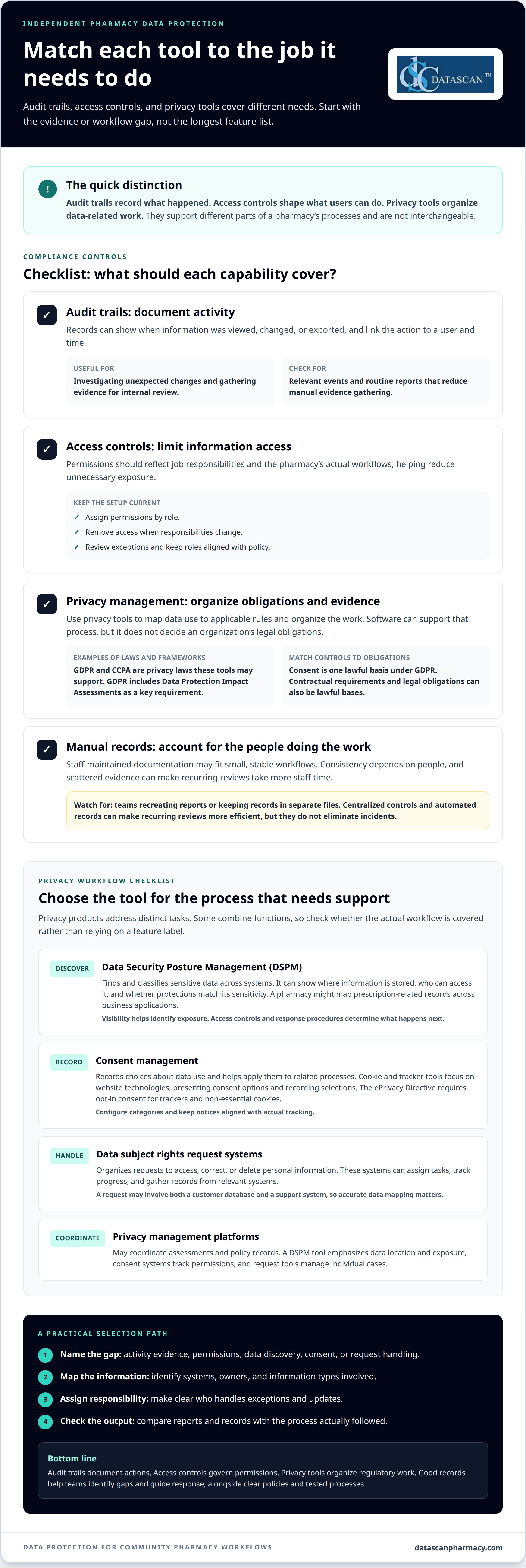
An audit trail records actions such as viewing, changing, or exporting information, and links each action to a user and time. Unlike access controls, it documents what happened rather than deciding who can act. For example, a pharmacy can use event records to investigate an unexpected change and gather evidence for an internal review. Automating routine reports can reduce manual evidence gathering.
Data Access Control
Access controls limit information according to job responsibilities, reducing unnecessary exposure and helping demonstrate that permissions follow policy. Unlike an audit trail, which documents activity afterward, access controls shape what users can do during daily work. A practical setup assigns roles, removes access when responsibilities change, and reviews exceptions. Role-based permissions work best when policy reflects actual workflows.
Compliance Costs and Incident Reduction
Compliance work takes staff time when evidence is scattered across files or teams have to recreate the same reports. Centralized controls and automated records can make recurring reviews more efficient, while access restrictions can reduce the chance of accidental disclosure. These measures do not eliminate incidents. They help teams identify gaps, investigate activity, and guide response using records rather than guesswork.
Privacy Compliance and Regulations
Privacy management tools help map data use to applicable rules, but software does not decide an organization’s legal obligations. The GDPR and CCPA are examples of privacy laws these tools may support. According to the European Union, consent is one lawful basis for processing personal data under the GDPR; contractual requirements and legal obligations can also be lawful bases. The European Union also identifies Data Protection Impact Assessments as a key GDPR requirement.
Compare capabilities by the evidence each one can produce. The table distinguishes common approaches, not specific vendors.
| Option | Primary criteria | Best fit | Deployment consideration |
|---|---|---|---|
| Audit trails | User activity and change history | Investigating incidents | Capture relevant events |
| Access controls | Permissions and role alignment | Limiting information access | Keep roles current |
| Privacy management | Data use and obligations | Organizing privacy work | Map rules to processes |
| Manual records | Staff-maintained documentation | Small, stable workflows | Consistency relies on people |
Choose based on the evidence gap: audit trails document actions, access controls govern permissions, and privacy tools organize regulatory work. For pharmacy workflows, workflow software can help structure repeatable processes alongside those controls.
Types of data privacy management software
Privacy management software covers distinct tasks, from locating sensitive records to documenting consent and handling individual requests. Choose a tool based on the process you need to govern, then connect systems where information moves between teams.
What are the risks and limitations of data protection software? It can miss records, apply outdated rules, or produce incomplete results if systems and ownership are not mapped correctly. It supports processes, but does not replace sound governance, staff judgment, or legal review.
Data Security Posture Management (DSPM) focuses on discovering and classifying sensitive data across an organization’s systems. It can show where information is stored, who can access it, and whether protections match its sensitivity. For example, a pharmacy might map prescription-related records across business applications. DSPM provides visibility; access controls and response procedures determine what happens next.
Consent management platforms record choices about data use and help apply them to related processes. Cookie and tracker tools focus on website technologies, presenting consent options to visitors and recording their selections. The ePrivacy Directive requires opt-in consent for all trackers and non-essential cookies. A consent tool can support enforcement, but teams still need to configure categories and keep notices aligned with actual tracking.
Data subject rights request systems organize requests to access, correct, or delete personal information. They can assign tasks, track progress, and gather records from relevant systems. For example, a request may require locating information in both a customer database and a support system. A defined workflow reduces scattered email handling, but accurate data mapping remains essential.
These products support different parts of data governance. A privacy management platform may coordinate assessments and policy records; a DSPM tool emphasizes data location and exposure; consent systems track permissions; and request tools manage individual cases. Some products combine functions, so feature labels alone do not show whether a workflow is covered.
- Start with the process: identify whether the gap is discovery, consent, or request handling.
- Map data sources: include systems, owners, and information types.
- Assign responsibility: name who handles exceptions and updates.
- Review outputs: compare records with the actual process.
Manual work remains necessary when a system cannot identify a record or resolve conflicting information. Poor configuration can also create false confidence: a dashboard may show coverage while an unconnected application remains outside its view. Test one defined workflow, such as a cookie consent change, before expanding the deployment to other processes.
If you’re mapping privacy processes to pharmacy operations, start a conversation about your workflow.
Data security across hybrid environments
Hybrid environments spread sensitive information across local systems, remote devices, and connected services. Security depends on clear visibility, consistent controls, and integration across those locations.
Data protection tools coordinate policies for information, while backup software restores copies, endpoint security protects devices, and data loss prevention tools monitor or restrict movement. To select and implement a platform, map important data and workflows, identify gaps, then test controls and reporting against a defined use case.
Data Immutability and Secure Storage
Immutable storage prevents saved information from being changed or deleted during a defined retention period. Unlike ordinary storage, protected copies cannot be freely altered by permitted users, which can help preserve recovery data after an account or system is compromised. In a hybrid environment, identify where copies reside, who can change retention settings, and how recovery access is controlled.
Data Security Platform Features
A data security platform may combine discovery, classification, access monitoring, policy enforcement, and reporting across connected systems. Its value is in bringing separate views together, rather than adding another isolated dashboard. For example, a unified inventory can show that a sensitive file sits on a local server while a related workflow uses a remote application. Integration helps teams trace the data across both.
Data Protection and Adjacent Security Tools
These tools solve related but distinct problems. Backup software preserves copies for restoration; endpoint security focuses on threats to devices; data loss prevention monitors or restricts information leaving approved channels. A broader protection platform can connect data location, access, and policy activity, but it does not replace specialized controls. Compare tools by the risk each addresses and the evidence each produces. Organizations looking to coordinate their IT defenses and data protection infrastructure can consult managed IT specialists at reisinformatica.com for technical support.
AI and agentic workflows add another access path to review. If an automated agent can retrieve records, summarize files, or trigger actions, its permissions and activity should be visible alongside human access. Define which data each workflow may use, limit permissions to its task, and retain action records. For example, an agent preparing a routine internal summary should not inherit access to unrelated sensitive records.
Implementation works best as a sequence, not a broad deployment. Start by mapping sensitive data across local systems, devices, and connected services. Identify owners and existing controls. Then test integration, reporting, and access rules against a workflow staff already use. Review exceptions and adjust policies before expanding coverage. This approach reveals gaps between written governance and daily operations while limiting disruption to working teams.
Ransomware prevention and recovery
Ransomware planning has two tracks: reduce the chance of unauthorized changes, then restore essential work if systems are disrupted. Data protection software can support both through access controls, data loss prevention (DLP), protected copies, and response procedures. Each capability addresses a different point in the incident lifecycle.
DLP tools monitor or restrict how information moves through channels such as email, file transfers, and removable media. For example, a policy could flag a file containing sensitive patient information before an employee sends it to an unapproved destination. DLP helps teams enforce handling rules, but it does not replace endpoint security or recovery planning.
Classification gives those controls context. A team can label records by sensitivity, then apply different handling rules to patient details, payment records, and general business documents. Without accurate classification, a DLP rule may block routine work or miss information that needs tighter controls. Start with a few important data types, document permitted uses, and refine policies as staff workflows reveal exceptions.
Prevention also depends on limiting access and reviewing changes to critical systems. Separate ordinary user permissions from administrative privileges, and avoid broad access when a job requires only a narrow task. For example, staff processing routine transactions may not need permission to change security settings. These controls reduce exposure and make unusual activity easier to investigate.
Recovery planning turns backup capabilities into a usable response. Identify the records and services operations depend on, assign recovery responsibilities, and define how teams will confirm restored files are usable. A protected copy matters only if it remains available and can be restored without compromised credentials. Document the sequence, including who authorizes recovery and who communicates service status.
Use a repeatable exercise to find gaps before an incident. A tabletop scenario can ask staff to walk through these steps:
- Identify affected systems and isolate them using the organization’s response procedures.
- Notify assigned decision-makers and preserve relevant activity records.
- Restore priority information from a protected copy, then validate key workflows.
- Record what slowed response and update the recovery plan.
Keep the exercise focused. A pharmacy might test whether staff can access essential prescription and transaction information after a simulated system outage. This checks operational priorities without assuming every application has the same recovery needs. Track unresolved issues by owner, then revisit them during the next risk management review.
Finally, balance enforcement with staff effort. Test DLP rules against real workflows before applying them broadly, and record approved exceptions with a reason and owner. Review alerts for recurring false positives, then adjust classification or policy scope. Clear procedures help employees report suspicious activity quickly, giving the response team useful context instead of scattered messages.
Data protection features for GDPR, HIPAA, FedRAMP, and NIST frameworks
GDPR, HIPAA, FedRAMP, and NIST 800-171 each create different compliance contexts, so a single software label doesn’t prove that an organization meets them. Auditability can help demonstrate adherence by connecting security controls to records of activity, access, and response. The practical goal is evidence that reflects how systems and staff actually handle data across daily operations.
For GDPR-related work, focus on discovery, documented processing decisions, and traceable changes to controls. The European Union identifies Data Protection Impact Assessments as a key GDPR requirement. Software can organize assessment records, link risks to mitigations, and preserve updates as systems change. For example, a new record-handling workflow should have an identifiable owner, purpose, and review history.
HIPAA, FedRAMP, and NIST 800-171 also require attention to evidence and control operation. The features that help demonstrate adherence include access records, configuration histories, monitoring alerts, and incident response documentation. An enterprise team can use a control-to-evidence map to connect each internal requirement with a report or record. That map makes gaps visible without treating a software dashboard as proof of compliance on its own.
Build the evidence flow around real operations. Start with discovery: identify data stores, users, and systems involved in a defined process. Then connect each control to the evidence it should produce. A pharmacy reviewing payment and prescription workflows, for example, might track who can access each system, which changes are logged, and how an incident is escalated. Keep ownership clear so a missing report has an assigned team rather than disappearing between departments.
- Access evidence: records show permissions, changes, and review activity.
- Monitoring evidence: alerts and event records support investigation and follow-up.
- Incident evidence: response steps, decisions, and outcomes remain traceable.
- Control mapping: reports connect each selected requirement to relevant evidence.
Compare platforms by the quality and usefulness of their evidence, not by the number of framework names in a feature list. Check whether reports can be organized by control, system, and time period, and whether authorized teams can retrieve records without manual reconstruction. During deployment, test an operational workflow from data discovery through incident response. This shows where integration is missing and whether reports match actual activity.
Use the same approach across GDPR, HIPAA, FedRAMP, and NIST 800-171: define the requirement, identify the operating control, and confirm what evidence demonstrates that control in practice. Discuss pharmacy workflow needs with the team.
How does Datascan Pharmacy Software support independent pharmacies?
Datascan Pharmacy Software is an Independence-First platform built for independent community pharmacies. It brings pharmacy management, point of sale, mobile patient access, delivery, and workflow components together to support pharmacy operations.
Datascan Pharmacy Management Software is part of that platform, alongside Datascan Point of Sale (POS), MobileScripts Patient Mobile App, and Datascan Mobile Delivery App. If you’re considering how pharmacy technology fits your operations, contact Datascan Pharmacy Software to discuss your needs.
Build your next step around pharmacy operations
Choose data protection software based on the risks and workflows your pharmacy needs to address. Then consider how safeguards will fit alongside the systems your team uses each day. A clear view of those needs can guide a practical technology plan without treating one tool as a substitute for every security measure.
If you’re weighing the next steps for your pharmacy, talk with Datascan Pharmacy Software about your operational needs and technology goals.
Take it one decision at a time. A focused plan gives your team a sound place to start.
Frequently Asked Questions
Why do businesses need tools to protect their data?
Businesses use these tools to make information handling more consistent as staff, systems, and responsibilities change. For example, when an employee changes roles, a documented process can help ensure their former access is reviewed. The same approach helps a pharmacy keep daily record handling aligned with internal policies. The technology works best when someone owns those policies and knows how to handle exceptions.
What should a business expect from a data protection platform?
Capabilities vary by product, so start with the business task it needs to support. A useful evaluation exercise is to follow one record through its lifecycle: who creates it, which team uses it, and when it should be archived or removed. Then assess whether the platform supports the decisions and records required at each stage. This reveals gaps a feature checklist may miss.
How should businesses assess products in 2026?
There is no universal product ranking for every organization. Create a short evaluation scenario based on a real workflow, such as onboarding an employee who needs limited access to business records. Ask each product to demonstrate how administrators set permissions, review changes, and handle an exception. Comparing the same scenario across options makes differences easier to assess than comparing marketing descriptions.
How can businesses compare backup, encryption, access control, and recovery?
Use a consistent test plan for each option. Record which systems are covered, who manages settings, what alerts administrators receive, and how staff learn about exceptions. For instance, a pharmacy can assess whether the proposed setup accounts for its dispensing and checkout systems without disrupting routine work. Document gaps and assign owners so the comparison reflects operational readiness, not just available features.
How much does data protection software cost in the United States?
There is no single price that applies to every United States business. The total quote can depend on the number of systems and users, storage needs, implementation work, and selected functions. Ask for costs to be separated by component so you can distinguish recurring charges from setup work. A written scope also helps teams compare proposals consistently and avoid budgeting for capabilities they do not plan to use.
What type of platform suits small businesses or large enterprises?
Choose according to the complexity of the work and the people available to manage it. A small business may prefer a focused setup with clear ownership and simple administration. An enterprise may need delegated responsibilities across departments and consolidated oversight. In either case, define who approves policy changes, handles exceptions, and reviews activity. Those roles help determine whether a platform fits the organization’s actual structure.
How can software support compliance with CCPA and HIPAA?
Start by assigning owners for processes tied to the information your organization handles. A pharmacy, for example, can document who receives privacy-related inquiries, who gathers relevant records, and who approves the response. Then use system records to review whether the workflow followed internal policy. CCPA and HIPAA have distinct contexts, so map each obligation to the applicable business activity rather than applying one generic checklist.
What security certifications and safeguards should buyers look for?
Ask what a certification or assessment covers, which product or environment it applies to, and when its scope was last reviewed. Then examine practical safeguards through a sample user journey: account creation, permission changes, and removal of access when someone leaves. A certification alone does not explain how your team will operate the system. Clear documentation and assigned responsibilities help translate stated safeguards into everyday practice.

Article by
Sarah Callioras
Sarah Callioras is Vice President at Datascan Pharmacy Software, bringing nearly 25 years of experience across independent pharmacy operations and pharmacy technology. Since joining Datascan in 2016, she has played a key role in driving business growth, strengthening client relationships, and supporting independent pharmacies through innovative software solutions. With a strong background in pharmacy operations, business development, and strategic leadership, Sarah is passionate about helping independent pharmacies succeed in an evolving healthcare landscape.
 Kevin Minassian is the President of Datascan Software. Under his leadership, the company rapidly expanded to provide pharmacy management software on a national level. Over the last 15+ years, he has ensured that Datascan has continuously evolved to offer innovative solutions for independent pharmacies while still offering world-class customer support. He is passionate about helping independent pharmacies to remain competitive, achieve success, and offer the very best service to their communities.