
More security features don’t automatically mean better protection for an independent pharmacy. The right tools support recovery, fit your compliance obligations, cover the devices you use, and work with daily workflows and operating costs. Effective protection safeguards the pharmacy without adding avoidable complexity.
It’s easy to focus on a long feature list, but security tools help only when they fit the way your team works. Protection, recovery, and practical fit all matter.
This comparison explains how security options differ in backup and recovery, compliance and data governance, device coverage, and total operating costs. It also shows how organizational needs shape the choice, helping you focus on protections that matter to your pharmacy.
Key Takeaways
- Compare recovery options by how well they support reliable restoration, ransomware resilience, and controlled access, not by feature count alone.
- Match data governance measures to the sensitive information you handle and the compliance obligations that apply to your organization.
- Include every operating system and device your team uses in your coverage review, including Windows, macOS, Android, and iOS.
- Look beyond purchase price: implementation, staff training, ongoing administration, and renewal costs all affect the total cost of ownership.
- Choose tools that fit your pharmacy’s size and workflows, then consider how pharmacy management software and related tools can support daily operations.
Backup, recovery, and ransomware resilience
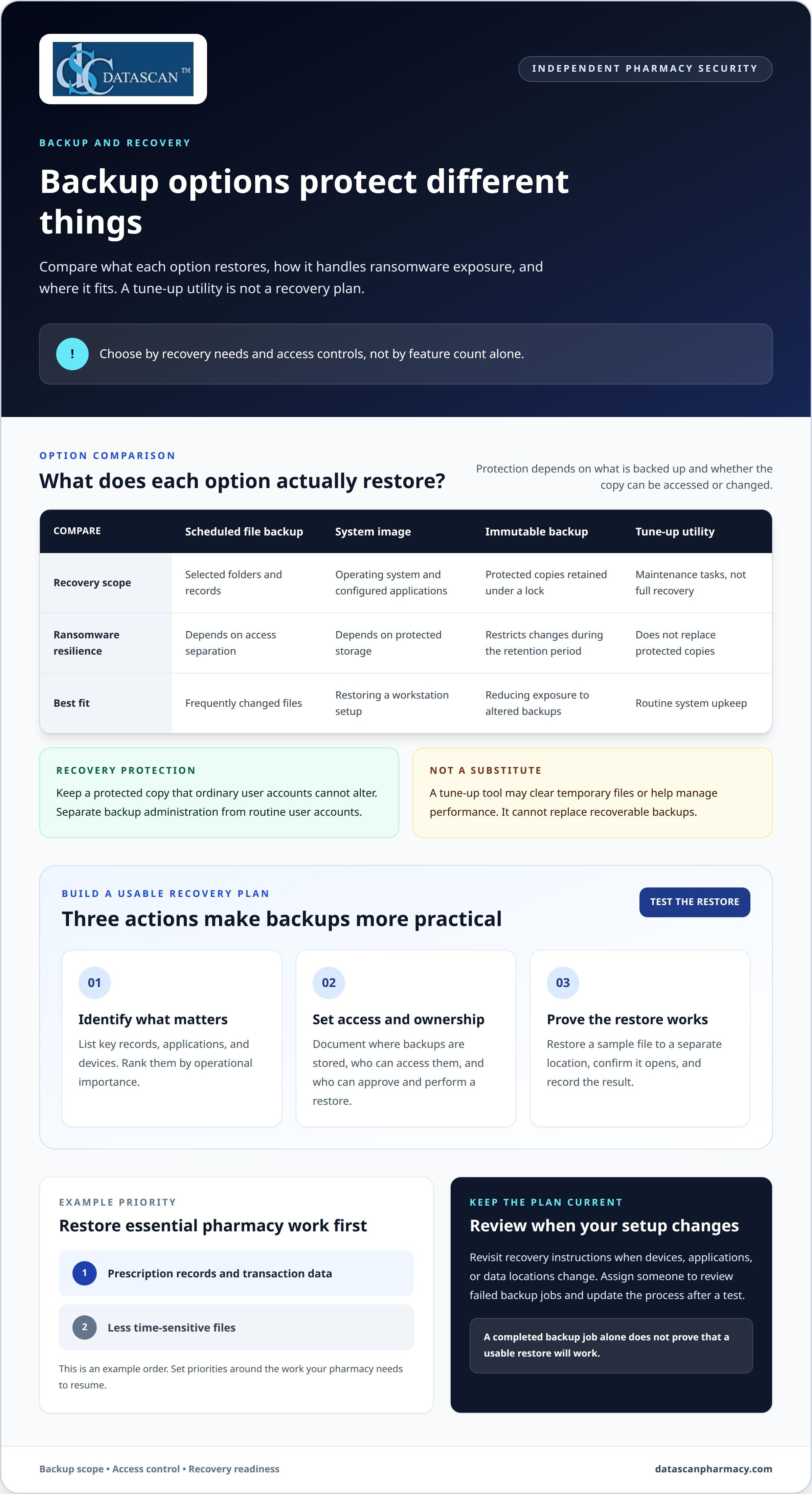
Effective recovery takes more than making copies. A sound plan identifies sensitive data, separates backups from everyday access, and tests whether staff can restore the records and systems pharmacy operations need. Security tools can help manage these protections, but clear recovery steps still matter. Define who can authorize a restore and which business tasks must resume first.
Start with discovery: list key records, applications, and devices, then rank them by operational importance. For example, a pharmacy might prioritize prescription records and transaction data before restoring less time-sensitive files. Document where each backup is stored and who can access it. This inventory gives the team a practical starting point during an incident, instead of leaving staff to search through systems under pressure.
Ransomware can encrypt accessible files and backups. Immutable backups help limit this risk by preventing changes or deletion during a defined retention period. Keep backup administration separate from routine user accounts, and protect recovery credentials. Austin Community College District notes that phishing tactics evolve rapidly, so staff awareness remains important alongside technical controls. Protection tools should support the recovery plan, not replace staff understanding of it.
Automated backups reduce reliance on someone remembering to copy files. Set a schedule based on how often records change, then assign an owner to review failed jobs. Test recovery by restoring a sample file to a separate location. A completed backup job alone doesn’t prove that a usable restore will work. Record what was restored, who performed the test, and whether the file opened as expected.
- Keep a protected copy that ordinary user accounts can’t alter.
- Record who can approve and perform a restore.
- Test a sample recovery and document the steps.
Backup and tune-up utilities serve different purposes. A tune-up tool may clear temporary files or help manage system performance, but it cannot replace recoverable backups. On a Microsoft workstation, keep routine maintenance separate from the process for restoring business records after an attack. This distinction helps prevent a cleanup utility from being mistaken for a recovery plan.
| Option | Recovery scope | Ransomware resilience | Best fit |
|---|---|---|---|
| Scheduled file backup | Selected folders and records | Depends on access separation | Frequently changed files |
| System image | Operating system and configured applications | Depends on protected storage | Restoring a workstation setup |
| Immutable backup | Protected copies retained under a lock | Restricts changes during retention | Reducing exposure to altered backups |
| Tune-up utility | Maintenance tasks, not full recovery | Doesn’t replace protected copies | Routine system upkeep |
Choose a security option based on what must be restored, how quickly operations need it, and who controls backup access. A pharmacy workflow plan should document recovery responsibilities alongside pharmacy workflow processes, so staff know which tasks resume first.
Review the plan whenever devices, applications, or data locations change. A practical test follows three steps: select a sample record, restore it separately, and confirm authorized staff can use it. Record the result and update the instructions if the process changes. Repeating the test helps keep recovery procedures aligned with actual pharmacy operations.
Regulatory compliance and data governance
Compliance tools help organizations connect applicable requirements with practical safeguards and records. Start by identifying the sensitive information you hold, the rules relevant to your operations, and the controls used to protect that information. Clear ownership and consistent reporting make governance easier to manage across teams and systems.
How can you prepare compliance reports and stay audit-ready?
Compliance reporting gathers evidence about safeguards and organizes it for review. About 85% of companies say compliance has become more complex over the past three years, making scattered records harder to manage. Map each applicable mandate to its controls, assign an owner, and keep reports showing control status across email, collaboration tools, endpoints, and databases.
For example, a report can link an employee’s identity to their access permissions and record when those permissions changed. This differs from broader information governance, which sets how data is handled throughout its lifecycle. Use reporting to summarize control activity, while keeping supporting records available for specific audit questions.
Which organizations need GDPR, HIPAA, and CCPA compliance?
GDPR, HIPAA, and CCPA may apply depending on an organization’s location, operations, and data. The European Union identifies GDPR as a data protection regulation that organizations may need to comply with. The U.S. Department of Health and Human Services identifies HIPAA as a data protection regulation that organizations in the United States may need to comply with.
These frameworks differ in scope and application, so map relevant obligations to the information and operations they cover. GDPR fines have reached €6 billion across cases. Build controls around the data your organization handles, including appropriate access restrictions, encryption, and data loss prevention measures, rather than treating one set of controls as universal.
What evidence helps demonstrate auditability and compliance?
Audit evidence shows how safeguards operate, who had access, and when relevant events occurred. Examples include access records, encryption settings, data loss prevention alerts, and dated policy approvals. Unlike a summary report, evidence supports individual control claims, while a report gives reviewers a broader view of activity and status.
Organize records by control, owner, and the data involved. For instance, keep the access decision and related activity record together so an authorized reviewer can follow the decision without searching through disconnected files. Consistent evidence also helps teams spot gaps between written policies and actual practice.
Information governance defines the operating rules behind these records. Specify who can approve access, how teams document changes, and how sensitive information is classified. PCI DSS is a standard for handling credit card information. Failure to comply with applicable data protection regulations can result in fines, legal consequences, and reputational damage.
Cross-platform security for Windows, macOS, Android, and iOS
A data security platform protects sensitive information from unauthorized access, theft, loss, and security threats. Endpoint security focuses on individual devices, while broader cybersecurity platforms may cover additional systems and risks. The main difference is scope: data protection centers on information, not just the device holding it.
For a pharmacy using Windows workstations, macOS laptops, Android phones, and iOS devices, security coverage should reflect the actual mix. A platform can centralize security management, support consistent controls, and help teams assess their security posture. This central view makes it easier to review activity across devices instead of treating each operating system as a separate island.
Begin selection with an inventory of devices and data. List each operating system, the applications staff use, and the sensitive data each system can access. Then map existing safeguards, such as encryption, access controls, and data loss prevention, to those devices. Integration matters: a security tool that creates separate alerts or duplicate administration can add work without improving visibility.
| Platform approach | Coverage focus | Integration consideration | Best fit |
|---|---|---|---|
| Endpoint security | Individual workstations and mobile devices | Connect device activity to broader data controls | Organizations prioritizing device-level protection |
| Data security platform | Sensitive information across systems | Unify data controls and security reporting | Teams focused on information access and use |
| Cybersecurity platform | Broader security operations and systems | Coordinate data safeguards with wider monitoring | Organizations managing multiple security functions |
Compare platforms by practical capabilities, not labels alone. Check whether each option supports the operating systems in use, brings activity into a useful view, and helps apply consistent access controls. For example, a staff member might open a record on a Windows workstation and later use an iPhone for an approved task. The platform should help administrators understand access across both environments.
- Coverage: Confirm support for Windows, macOS, Android, and iOS devices in your environment.
- Visibility: Review whether administrators can assess relevant activity from one management process.
- Control: Compare how tools support encryption, access restrictions, and data loss prevention.
- Integration: Map connections to existing applications and security tools before deployment.
Platform features should match real work. A pharmacy may need to distinguish a shared counter workstation from a staff phone because users and access needs differ. Consistent identity controls link permissions to people, while device coverage helps apply protection wherever authorized work occurs. Choose a platform that covers your devices, connects with your current security stack, and makes data protection easier to manage.
Operational overhead and total cost of ownership
Buyers should weigh implementation time, staff workload, integration needs, and ongoing administration, not just feature lists. Consider risks such as configuration gaps, excessive alerts, and relying on automated decisions without review.
Deployment Timelines and Operational Overhead
Deployment covers discovery, data classification, configuration, integration, testing, and staff training. Some data security tools take 12 to 18 months to implement fully, so a complex enterprise rollout can occupy security and operations teams for an extended period. A smaller environment may require less coordination, but still needs clear ownership and testing.
Operational overhead continues after launch. Someone must review alerts, update access rules, investigate threats, and resolve conflicts between security settings and daily work. For example, a rule that blocks a staff member from accessing a needed record may protect sensitive data but also interrupt a pharmacy task. Assign an owner to handle exceptions and document the reason for each change.
AI-assisted privacy operations can help sort alerts, flag unusual activity, and support data classification. Treat these capabilities as decision support, not a substitute for oversight. A classification system may mislabel a document when its context is unclear; staff review can catch the error before it drives an access decision. Define which actions require human approval.
- Identify systems, data stores, and teams involved before configuration.
- Test integrations with representative user accounts and workflows.
- Set alert priorities so staff can distinguish urgent events from routine activity.
- Review AI-generated classifications and recommendations before changing permissions.
Total Cost of Ownership
Total cost of ownership includes more than the purchase or subscription amount. Account for implementation labor, integration work, staff training, administration, maintenance, and time spent handling alerts. This differs from deployment planning: total cost of ownership measures the continuing resources needed to operate the tool over its useful life.
Compare options using the same categories. One tool, for instance, may offer broad classification features but require more configuration, while another may fit existing workflows with less operational effort. Map each feature to a real need, such as protecting sensitive records or producing useful reports. Avoid paying for capabilities that add complexity without addressing a defined risk.
For a practical estimate, list each cost area and the team responsible for it. Include security staff, IT, operations, and training time. Then consider how the tool changes current processes: does it consolidate reviews or create another queue? A platform that centralizes controls may reduce fragmented administration, while poor integration can add manual steps.
Before selecting a tool, document the threats it must address, the data requiring protection, and the staff capacity available for ongoing oversight. Compare expected workload alongside deployment and operating costs. This gives decision-makers a clearer view of fit than a feature checklist alone.
Choosing data security tools by organization and environment
The right choice depends on what your organization protects, where its data sits, and who manages security. Start with data discovery and classification, then match controls to your environment, applicable obligations, and available staff capacity.
An independent community pharmacy, a multi-location retailer, and an enterprise have different operating demands. A pharmacy may prioritize prescription and transaction information, while a larger organization may need coordinated controls across departments, offices, and databases. The goal is to find the right fit, not the longest feature list.
Use these steps to narrow the options:
- Map the environment: List devices, applications, databases, and the people who use them.
- Classify information: Identify sensitive records and note where each category is stored or accessed.
- Set priorities: Rank risks by likely operational impact, such as unauthorized access to business records.
- Match controls: Compare discovery, encryption, access restrictions, loss prevention, and audit visibility against those priorities.
- Plan ownership: Assign staff to manage alerts, review permissions, and maintain the controls.
Environment matters as much as organization size. A business with Windows workstations and staff phones needs controls suited to those devices and how people use them. A team with multiple databases may need stronger discovery and classification across separate information stores. Detection is useful when it helps staff identify relevant activity and understand its context, rather than generating alerts no one can review.
Organizations with specific framework obligations should include them in the comparison. NIST 800-171 is a framework some organizations may need to demonstrate adherence to. A tool should support the evidence and control processes relevant to that environment, rather than adding features unrelated to its actual requirements. For a pharmacy, daily workflow also matters: safeguards that obstruct routine tasks can create pressure to bypass them.
Use a short decision guide before choosing:
- Choose focused protection when the environment is limited and staff need a manageable set of controls.
- Choose centralized management when teams need consistent oversight across locations, platforms, or departments.
- Prioritize integration when existing tools already handle parts of discovery, access control, or reporting.
- Reassess the fit when new locations, applications, or data types change the risk profile.
The strongest match is the option that protects the data your organization relies on and fits its ability to operate the controls. To discuss how technology fits your pharmacy’s workflows, talk with the Datascan team.
Datascan Pharmacy Software
Datascan Pharmacy Software supports independent pharmacies with tools for managing daily operations and patient services. If your security review has highlighted gaps in pharmacy workflows, the next step is to consider how your pharmacy technology fits those processes.
Datascan Pharmacy Management Software, Datascan Point of Sale (POS), MobileScripts Patient Mobile App, and Datascan Mobile Delivery App support different parts of pharmacy operations. Together, these offerings connect pharmacy management, transactions, patient engagement, and delivery workflows. They are pharmacy tools, not replacements for dedicated security controls such as access management, encryption, or backup protection.
Consider Datascan when evaluating pharmacy management software alongside your chosen security tools. Contact Datascan Pharmacy Software to discuss your pharmacy’s operational needs.
Put Your Next Security Decision Into Practice
Make your next step practical: connect security decisions to the pharmacy systems and workflows your team uses every day. A policy helps when it fits real operations, assigns clear responsibility, and supports staff without unnecessary friction. As you evaluate data security software, consider how your chosen tools will fit into daily pharmacy work.
Datascan Pharmacy Software offers technology for different parts of pharmacy operations. Its pharmacy management, point-of-sale, and patient mobile offerings support pharmacy workflows, but they are not replacements for dedicated security controls. Evaluate how your data security software will work alongside the systems your pharmacy already relies on.
Consider how operational systems and security tools should work together, then take the next step when you’re ready. Contact Datascan Pharmacy Software to discuss your pharmacy’s needs. You can build a clearer path forward, one practical decision at a time.
Frequently Asked Questions
What Are the Must-Have Features of a Great Data Security Platform?
Look for controls that help staff see who can access sensitive records, respond to unusual activity, and document decisions. Also consider approval workflows for permission changes, clear alert ownership, and reports that teams can interpret without specialist support. For example, a pharmacy manager should be able to identify who handles an access request and where its approval is recorded. A strong platform fits the organization’s actual work.
What is data security software and what features does it include?
Data security software helps organizations manage how information is accessed, used, and protected. Depending on the product, capabilities may include data discovery, access management, encryption, loss prevention, monitoring, and reporting. One practical example is tracking a sensitive file from its storage location through authorized use and eventual retention or disposal. Assess each capability against a real process, since a long feature list alone doesn’t show whether staff can use it effectively.
What are the best data security software products for businesses in 2026?
There isn’t one best product for every business in 2026. The right choice depends on the organization’s data, devices, obligations, and staff capacity. Compare products using the same test cases: a new employee needing access, a departing employee losing access, and an administrator investigating an unusual event. Record which products handle each scenario clearly and fit existing operations. This gives you a useful comparison without relying on a generic ranking.
How do data security software platforms compare on encryption, access controls, and data loss prevention?
Compare how each platform applies these controls to the same example, such as a staff member sharing a sensitive report. Check whether the file remains protected, whether access follows the person’s role, and whether the organization can identify an inappropriate transfer. Consider how exceptions are handled and documented, too. A side-by-side test of a realistic workflow can reveal practical differences that feature descriptions may not make clear.
How much does data security software cost in the United States?
Costs in the United States depend on the product’s scope, number of users and systems, implementation effort, and ongoing administration. Some organizations also need training or integration work. Compare the full operating cost, not just the initial quote, and use the same assumptions for every option. For example, include staff time for reviewing alerts and maintaining access rules. Request a quote based on your organization’s actual requirements.
What data security software is best for small businesses?
Small businesses benefit most from tools that match their data risks without creating a heavy administrative burden. Prioritize straightforward user management, useful alerts, clear reports, and manageable integration with existing systems. For a pharmacy, consider how staff roles change between counter operations, management, and mobile work. A product that supports these tasks may be more practical than a broad platform whose advanced functions require ongoing specialist attention.
How can security tools protect pharmacy data?
Start by identifying which applications hold business or customer information and who can access each one. Then assess whether your security tools can apply consistent identity controls, record relevant activity, and support investigation when access looks unusual. For example, a manager reviewing a staff account should be able to connect the person’s permissions with recorded activity. The right protections depend on the application, data sensitivity, and organizational workflow.
What regulations should data security software help U.S. businesses comply with, such as HIPAA, CCPA, and GLBA?
Choose tools that help your organization apply controls and produce evidence relevant to its applicable obligations. The European Union identifies GDPR as a data protection regulation, while the U.S. Department of Health and Human Services identifies HIPAA as a regulation that organizations in the United States may need to comply with. CCPA also calls for attention to sensitive data, access, and protection. Map GLBA-related needs separately to your organization’s obligations.

Article by
Sarah Callioras
Sarah Callioras is Vice President at Datascan Pharmacy Software, bringing nearly 25 years of experience across independent pharmacy operations and pharmacy technology. Since joining Datascan in 2016, she has played a key role in driving business growth, strengthening client relationships, and supporting independent pharmacies through innovative software solutions. With a strong background in pharmacy operations, business development, and strategic leadership, Sarah is passionate about helping independent pharmacies succeed in an evolving healthcare landscape.
 Kevin Minassian is the President of Datascan Software. Under his leadership, the company rapidly expanded to provide pharmacy management software on a national level. Over the last 15+ years, he has ensured that Datascan has continuously evolved to offer innovative solutions for independent pharmacies while still offering world-class customer support. He is passionate about helping independent pharmacies to remain competitive, achieve success, and offer the very best service to their communities.