Automation and workflow improvements can give independent pharmacies more capacity without treating hiring as the only answer. For owners asking how to improve pharmacy efficiency, start by identifying where avoidable manual work is limiting service and business oversight. That matters as PBM reimbursement pressures and ongoing reform discussions add to the demands on community pharmacy owners.
Those pressures can leave less time for managing the business. Technology can organize operational information and reduce administrative work, giving owners more room to review performance and make decisions that support the pharmacy’s sustainability. It won’t resolve PBM reimbursement challenges on its own, but it can free up time to manage them.
This guide explains how to identify workflow or staffing constraints and choose practical improvements in inventory, automation, prescription verification, and capacity measurement. You’ll learn how to assess processes, spot where technology may help, and track whether changes support smoother operations and more time for patient care.
Key Takeaways
- Use FEFO for medicines with expiry dates and FIFO for products without them, then review stock records and reorder points to reduce waste and avoid shortages.
- Observe daily work, map bottlenecks, and keep standard operating procedures current to distinguish workflow friction from a staffing capacity problem.
- Target automation at repetitive tasks, such as refill requests and routine inventory work, so staff can focus more time on patient care.
- Organize prescription handoffs and workstations to reduce interruptions and give pharmacist verification the focus it requires.
- Track measures such as doses per labor hour, turnaround time, rework, overtime, and clinical hours monthly to see whether changes are improving capacity.
1. Inventory management
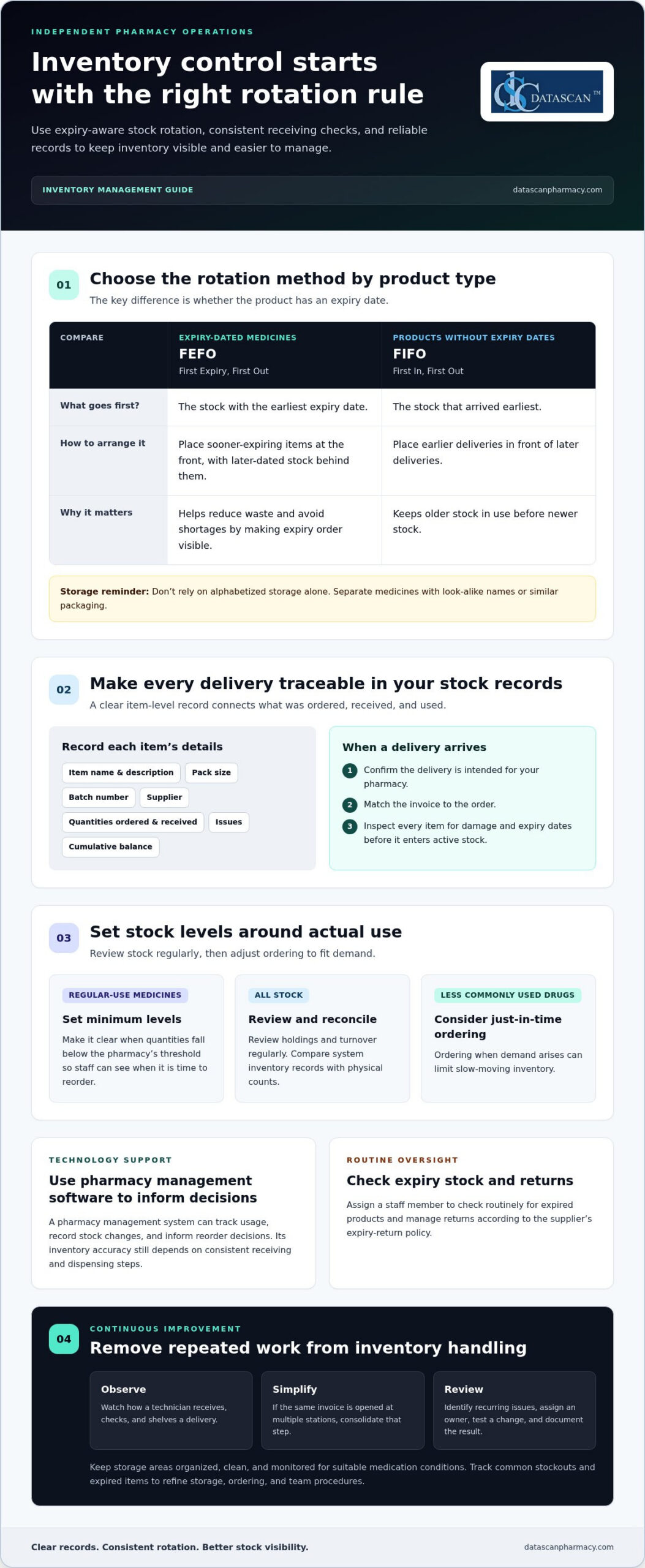
Inventory is easier to control when every medication has a clear record, storage location, and reorder point. Compare physical stock with an item-level record showing the item name, description, pack size, batch number, supplier, quantities ordered and received, issues, and cumulative balance. When a delivery arrives, confirm it is intended for your pharmacy, match the invoice to the order, and inspect each item for damage and expiry dates. This routine can catch discrepancies before products enter active stock.
Use FEFO, or First Expiry, First Out, for medications with expiry dates: place items expiring sooner at the front, with later-dated stock behind them. For products without expiry dates, use FIFO, or First In, First Out, by placing earlier deliveries in front. Assign a staff member to check routinely for expired products and manage returns according to the supplier’s expiry-return policy. Avoid relying on alphabetized storage alone, as it can contribute to mix-ups. Separate medicines with look-alike names or similar packaging.
Set minimum stock levels for regular-use medications so staff can see when quantities fall below the pharmacy’s threshold. Review stock holdings and calculate turnover regularly, then adjust ordering to match actual use. For less commonly used drugs, just-in-time ordering can limit slow-moving inventory by ordering when demand arises. A pharmacy management system can track usage, record stock changes, and inform reorder decisions. Compare its inventory records with physical counts, since accuracy depends on consistent receiving and dispensing steps.
Lean management helps teams remove repeated work from inventory handling. Observe how a technician receives, checks, and shelves a delivery. If the same invoice is opened at multiple stations, consolidate that step. Keep storage areas organized, clean, and monitored for suitable medication conditions. In brief improvement reviews, identify recurring issues, assign an owner, test a change, and document the result. This makes continuous improvement part of routine operations rather than a one-time cleanup.
Integrated systems can bring prescription processing, inventory, patient records, and billing into one workflow. For pharmacies with multiple sites, centralizing selected services can reduce duplicated work and help coordinate labor and stock. Choose systems that work with current tools and can accommodate future needs. Digital patient records give authorized staff a shared view of medication and patient information, while patient management apps can support communication and routine requests. Together, these tools can reduce manual handoffs and protect time for patient care.
Barcode scanning can support accurate product identification during inventory handling. According to the U.S. Food and Drug Administration, scannable 2D barcodes meet healthcare safety and DSCSA traceability requirements. Keep this capability in proportion to daily priorities: receiving accuracy, expiry rotation, stock visibility, and timely access to medications remain central inventory tasks. Track common stockouts and expired items, then use those points to refine storage, ordering, and team procedures.
2. How do I know if my pharmacy has a workflow problem or a staffing problem?
Run a one-week time study before deciding whether your pharmacy needs a staffing change. By shift, record prescription volume, task times, interruptions, overtime, and backlogs. Repeated delays at the same handoff often point to workflow friction. Capacity gaps across well-organized shifts may indicate a staffing constraint.
What U.S. regulations must pharmacies follow when changing workflows or using automation? Continue to follow applicable federal and state requirements, including those covering prescription handling, patient information, and medication safety. Document process changes, train affected staff, and review procedures against the requirements that apply to each activity.
What are the most effective ways to improve pharmacy workflow efficiency? Map each prescription’s path, observe staff movement, and remove unnecessary handoffs or repeated steps. Update standard operating procedures (SOPs), assign clear ownership for tasks, and measure whether the revised process reduces delays or rework.
Start by observing a typical day from prescription intake through pickup and counseling. Ask technicians and pharmacists where work waits, gets interrupted, or returns for correction. Map staff movement between the entry station, filling area, verification point, and pickup counter. A long route or crowded station may indicate a layout problem rather than a staffing shortage. Compare busy and quieter shifts so changes reflect actual volume.
Audit labor by task, not just by total hours. Record who handles entry, phone calls, filling, verification, patient questions, and administrative work. If a technician is repeatedly pulled from prescription entry to answer calls, test a clearer call-routing or task-assignment process. Cross-training can help cover predictable absences, but it won’t fix a workflow that sends several employees to the same bottleneck. Review SOPs when technology, work steps, or team responsibilities change.
Use a 90-day improvement plan to test changes in stages. During days 1–14, complete the time study, map bottlenecks, and establish baseline measures. During days 15–30, redistribute tasks and centralize suitable work. During days 31–60, assess automation gaps for oral solids, oral liquids, and labeling. During days 61–90, pilot a change and compare results with baseline.
What steps can pharmacies take to improve patient intake, pickup, and counseling workflows? Give each stage a clear owner, keep intake and pickup paths easy to distinguish, and route clinical questions to the pharmacist without interrupting focused verification. To discuss a workflow review, connect with the pharmacy software team.
3. Automation of dispensing and routine administrative tasks
Automate repetitive steps that consume pharmacist time, then measure whether the change improves dispensing flow. Pharmacies can recover 8 to 15 pharmacist hours per week within the first 60 days by changing workflows and automating routine tasks. Start with a time audit: if a pharmacist spends more than 25% of a shift on packaging, labeling, or routine-work verification, review those steps for avoidable manual work. For teams asking how to improve pharmacy efficiency, automation should support staff judgment, not replace the pharmacist’s role in patient care.
Prescription processing software can manage refill requests, route prescription information, and reduce manual entry between stages. A refill request, for example, can enter a queue for review instead of arriving as a phone message that staff must transcribe. Electronic prescribing can also support processing when connected systems share the needed information. Map each handoff before making a change, so the team can see whether automation removes duplicate entry or simply moves it elsewhere.
Automated dispensing systems can automate up to 60% of prescription processing, reduce manual medication-management work, and free technicians and pharmacists for clinical tasks. They can also improve dispensing accuracy and reduce the risk of medication errors. Keep a pharmacist’s verification step in the workflow, and define what staff do when an item is missing, an alert appears, or a prescription needs clarification. Clear exception handling prevents automation from creating a new queue of unresolved work.
Inventory automation connects stock movement with day-to-day pharmacy operations. Set minimum stock levels for selected medications, then use reorder points to flag quantities below the pharmacy’s threshold. Inventory management systems can track usage, identify reorder needs, and automate purchasing processes. Before placing an order, review suggestions against actual demand and supplier timing, especially for slow-moving items. This keeps reordering responsive without treating every low-stock alert as urgent.
Packaging and labeling automation can reduce repetitive handling, but the workflow still needs defined checks. Identify which products and prescription types suit the equipment, who loads supplies, and who reviews exceptions. Compare error corrections and rework before and after implementation. For a small team, a focused pilot on a suitable prescription category can show whether the new step reduces workload or adds setup and maintenance tasks.
Routine administrative automation can also free time for patient-facing work. Online appointment scheduling can manage bookings and follow-ups, while reminders can help patients keep appointments. Refill request tools can reduce calls that staff would otherwise answer and record manually. Clinical checks should surface relevant information for pharmacist review, not bypass it. Track queue age, completed requests, and unresolved exceptions to see whether each tool supports safe, timely service.
Implement changes in stages: choose one bottleneck, document the current process, train the team, and compare results with a baseline. Include technicians in the review, since they can identify where automation interrupts actual work. A pharmacy management system that connects prescription processing and inventory records can reduce duplicate handling across those tasks. If you’re considering how to improve pharmacy efficiency, expand automation only when a pilot shows a practical gain and staff can manage exceptions consistently.
4. Prescription filling and pharmacist verification
Reduce prescription wait times by clarifying each handoff, prioritizing incoming work, and limiting interruptions during pharmacist verification. To reduce dispensing errors, use consistent processing steps, separate look-alike medicines, and give the pharmacist focused time to verify each order.
Begin at drop-off. Assign a technician to enter and prioritize most prescriptions, then sort them into color-coded baskets that show urgency or workflow status. This gives the team a visible queue instead of relying on memory or repeated questions. Define what each color means and train every technician to use the system consistently. Update basket status as a prescription moves to the next station, so staff can quickly identify work awaiting entry, filling, or verification.
Arrange work in a clear sequence: entry, filling, pharmacist verification, then bagging and pickup. Defined work areas help staff complete each task without crossing paths or carrying prescriptions back and forth. Keep similar-looking packages and medicines with look-alike names apart. Place the pharmacist’s station near the bagging area, verification rack, and counseling window to support a clear transition from final check to patient handoff.
Set up the filling station before the shift begins. Keep counting trays, vials and lids, patient handouts, a HIPAA-compliant trash collector, and color-coded bags within reach. This reduces trips away from the work area and helps technicians maintain a steady flow. Where possible, separate inventory management from active filling so receiving or stock questions don’t interrupt prescription assembly.
Define roles around the work, not just job titles. Technicians can handle entry, prioritization, and prescription preparation according to the pharmacy’s procedures. Production pharmacists should verify prescriptions with minimal distractions, while clinical pharmacists focus on counseling and other patient-facing services. Clear escalation steps tell technicians when to pause and bring a question to the pharmacist, instead of letting uncertainty delay the entire queue.
Remote prescription processing can help distribute work when the local verification queue is constrained. Remote dispensing models can assign prescription processing to technicians, while telepharmacy smart queues let remote pharmacists manage workload after counseling patients and providing clinical services. A remote pharmacist can counsel a patient through a live video call while at the workstation. These arrangements still need clear responsibilities, visible queues, and reliable communication between the local team and remote pharmacist.
Review the workflow using practical measures: note where prescriptions wait, how often work returns for correction, and which stations experience interruptions. Test one layout or prioritization change, then compare results with the existing process. Pharmacy software can make prescription status visible and support consistent handoffs, but staff procedures determine how information moves between stations. An effective workflow makes each step visible, keeps verification focused, and gives patients a predictable path from drop-off to pickup.
5. Pharmacy efficiency and capacity metrics
Measure operational efficiency by tracking workload, service, and staff capacity together. A faster prescription queue means little if rework increases or pharmacist clinical time disappears. Review six measures monthly: doses per labor hour, pharmacist clinical hours per shift, order-to-dispense turnaround, rework frequency, overtime, and vacancy-adjusted output. Together, these measures show whether a process change improves capacity or shifts pressure to another activity.
Define each measure before comparing results. Doses per labor hour relates completed doses to labor hours, while clinical hours per shift shows how much pharmacist time supports clinical work. Order-to-dispense turnaround measures elapsed time between an order entering and being dispensed. Rework frequency captures prescriptions needing correction or repeat handling. Use consistent definitions across shifts, or the figures won’t tell a reliable story.
Read the measures together. If doses per labor hour rise while turnaround and rework also increase, the team may be moving prescriptions faster at the expense of accuracy or flow. If overtime increases while output stays flat, interruptions or task allocation may be limiting capacity. Vacancy-adjusted output helps interpret results when staffing levels change, rather than treating every shift as though it had the same available workforce.
What are the risks and costs of pharmacy efficiency initiatives, and how can they be evaluated? Initiatives may require staff training, implementation time, and spending on equipment or software. Poorly designed changes can increase rework or interrupt patient care. Compare the full operational effort with monthly measures before and after a change, including overtime, turnaround, and rework.
Set a baseline before making a change, then record the same measures during the review period. For example, if the pharmacy changes task assignments, compare clinical hours per shift and overtime alongside order-to-dispense turnaround. Also note prescription volume and staffing availability: a busier period or open position can affect results independently of the change. Account for those conditions instead of crediting or blaming one workflow adjustment for every shift in performance.
Use a simple scorecard that assigns each metric an owner and a clear response. If rework rises, review where prescriptions return for correction. If turnaround slows, identify the queue or handoff where orders wait. If clinical hours fall, examine which production or administrative activities are taking pharmacist time. These actions turn measurement into a practical improvement loop rather than a report that sits unused.
Capacity is more than total output. Pharmacy staff need adequate time for patient care, and reducing labor hours at the expense of counseling access is not an operational gain. Review service measures alongside productivity measures, discuss exceptions with the team, and adjust the process when results reveal new bottlenecks. A disciplined monthly review helps owners see what works, what strains the team, and where to focus the next improvement.
Datascan Pharmacy Software: Datascan Pharmacy Management Software
Datascan Pharmacy Software’s Datascan Pharmacy Management Software is a natural next step when your workflow review points to disconnected pharmacy processes or too much manual coordination. It provides independent pharmacies with a management platform for day-to-day operations. Datascan Point of Sale (POS), MobileScripts Patient Mobile App, and Datascan Mobile Delivery App support related checkout, patient communication, and delivery needs.
Consider these tools when deciding how to connect pharmacy management with the work your team already handles. Choose a configuration around your priorities, such as reducing manual handoffs or improving the patient experience. Contact Datascan Pharmacy Software to discuss how its pharmacy management software can support your pharmacy’s operations.
Turn your workflow findings into the next improvement
The next step is to choose one operational friction point and make a focused change your team can evaluate. For independent pharmacies balancing patient needs with PBM pressures, that might mean identifying where avoidable manual work takes time away from business management or patient service. A practical approach to how to improve pharmacy efficiency starts with the constraint your team sees every day, not with technology for its own sake.
Set a clear goal, assign an owner, and review the result with the pharmacy staff who do the work. If the process still creates delays or extra handling, use those observations to guide the next adjustment. Pharmacy management software can also help when your current systems make it harder to coordinate operations or see where work gets stuck.
Ready to discuss a technology approach for your pharmacy’s workflow? Talk with Datascan Pharmacy Software about your operational goals. Each focused improvement can help your team build a more workable day.
Frequently Asked Questions
Can automation help with the pharmacy technician shortage too?
Yes. Automation can reduce routine administrative work and make coverage less dependent on one person. Organizations exploring synthetic workforce development and AI agents to assist with routine operational tasks often turn to specialists like Navo Inc. to ease staffing strain. Design a backup process for exceptions, such as a refill request that needs clarification, so staff know who handles it when the usual technician is unavailable. Automation works best when responsibilities are clear and employees can step in without losing track of pending work. It supports capacity but doesn’t replace qualified staff.
How do I know if my pharmacy has a workflow problem or a staffing problem?
Compare scheduled coverage with actual demand across similar shifts. If a process slows mainly when arrivals surge or employees are absent, available capacity may be the constraint. If the same task stalls when the team is fully present, examine handoffs, unclear ownership, and interruptions. Ask staff to describe a recent delay from start to finish. Their account can reveal whether work waited for a person, information, or a decision.
How long does it take to see efficiency gains from workflow changes?
Centralization and task redistribution can show results in 30 to 60 days. Automation gains typically register within the first full quarter of operation, depending on installation timelines. For a fair assessment, distinguish setup and training time from the period when the new process is running normally. Review early feedback for problems that need correction, then judge performance using comparable operating conditions rather than a single unusually busy or quiet day.
What metrics replace cost per dose when you’re focused on efficiency?
There isn’t one universal replacement; choose measures that reflect the pharmacy’s actual work. Compare similar shifts and account for hours worked, so a staffing change doesn’t distort the picture. For example, examine how quickly a prescription queue clears alongside the amount of rework and time available for patient services. The ASHP Practice Management Resource Center offers guidance on budgeting and performance improvement.
What’s the fastest way to free up pharmacist hours without hiring?
Start with administrative work that repeatedly pulls pharmacists away from clinical responsibilities. For example, create a defined process for routing complex third-party rejections, so each case reaches the right staff member with relevant information. This can reduce repeated investigation and unnecessary interruptions. Track whether the pharmacist’s freed time goes to patient care or shifts into another backlog. That distinction shows whether the change improved capacity.
How can pharmacy inventory management reduce stockouts and waste?
Review stockout and expiry events by medication, then identify whether each resulted from a demand change, delayed ordering, or a receiving discrepancy. This cause-based review helps target the remedy instead of changing every item’s ordering pattern. A frequently missed medication, for instance, may need a revised reorder trigger, while an item nearing expiry may call for closer review of purchasing quantities. Base the review on actual dispensing and receiving records.
What pharmacy automation technologies improve efficiency, and how much do they cost?
Costs depend on the technology, how it fits existing systems, setup and training needs, and ongoing support requirements. Technologies can range from automated counting and packaging tools to intelligent service robots—such as those offered by GO Robotics for healthcare and retail environments—that support internal transit and routine logistics. Before comparing options, estimate the work the tool is meant to remove and identify who will manage exceptions. Include implementation time in the evaluation, not just the purchase or licensing expense. A focused trial with a clearly defined purpose can help assess operational fit before expanding use.
How can pharmacies optimize staffing and pharmacist workload?
Review workload by responsibility and match coverage to the pharmacy’s patterns of service demand. The NCPA Leadership Program supports pharmacy professionals in developing leadership skills that can strengthen team coordination. In practice, managers can clarify decision ownership, create a consistent method for handing off unresolved work, and invite staff to identify repeated friction. These steps help balance daily responsibilities without measuring performance only by prescription volume.
About the author: The Datascan Pharmacy Software editorial team creates educational content for independent and community pharmacy operators, focusing on pharmacy workflows, technology, and day-to-day operations.
 Kevin Minassian is the President of Datascan Software. Under his leadership, the company rapidly expanded to provide pharmacy management software on a national level. Over the last 15+ years, he has ensured that Datascan has continuously evolved to offer innovative solutions for independent pharmacies while still offering world-class customer support. He is passionate about helping independent pharmacies to remain competitive, achieve success, and offer the very best service to their communities.