A refill workflow can move faster without making every refill fully automatic. Software to manage prescription refills can centralize routine intake, work queues, and status tracking, while staff handle exceptions that need clinical or operational review. The goal is fewer scattered steps, not removing judgment from the process.
It’s understandable to want software to manage prescription refills that cuts down on calls, manual follow-ups, and time spent piecing together a prescription’s status. The right workflow tools organize refill requests and help pharmacy teams see what needs attention, giving owners more time for patient care and business operations.
This guide explains how centralized refill management works, which software and workflow costs to consider, and how pharmacies can coordinate fill dates while handling early-refill exceptions. You’ll also learn where automation helps, why staff review remains important, and what to look for in pharmacy management software for an independent or community pharmacy.
Key Takeaways
- Centralize refill requests and status tracking so staff can see what needs action without piecing together updates across disconnected workflows.
- Assess software costs alongside staff time, training, and workflow changes to understand the full operational impact.
- Use medication synchronization to coordinate fill dates and make pickup routines easier for patients with multiple prescriptions.
- Build a clear review process for early refill exceptions so automation organizes requests while staff handle cases needing attention.
- Compare pharmacy management software by how well it fits your refill workflow, patient communication needs, and daily pharmacy operations.
Centralized electronic prescription refill management
Centralized electronic refill management brings incoming requests, prescription details, and staff follow-up into one pharmacy workflow. Instead of tracking a request across phone messages, paper notes, and separate screens, staff can review its status, identify the next action, and route exceptions for attention. The goal is organized work, not the removal of professional review.
What are the best prescription refill management platforms for independent pharmacies?
Choose pharmacy management software with refill tools that fit your team’s workflow, along with a patient communication option for electronic requests. A good fit keeps requests and prescription records visible to the staff handling them, including requests that need follow-up.
What HIPAA and state privacy requirements apply to prescription refill software?
Medication apps that handle health data should comply with HIPAA standards and applicable health-data management and storage regulations. Pharmacy teams should also account for privacy rules in the states where they operate when setting access and information-handling procedures.
What features should prescription refill software include?
Look for electronic request intake, a refill work queue, prescription and patient context, status tracking, staff assignment, and patient notifications. A queue, for example, should show whether a request is awaiting review, being processed, or needs follow-up, so staff can see the next action.
Does prescription refill software integrate with pharmacy management systems and EHRs?
Integration depends on the platform and its supported connections. A pharmacy management system should share the information needed for its refill workflow; EHR integration depends on whether the systems support an appropriate exchange. Pharmacy management software can serve as the operational center for prescription workflows.
How does software automate refill reminders and patient notifications?
A reminder tool can use refill timing or request status to prompt a patient or staff member to take the next step. An electronic notice might confirm that the pharmacy received a request, while a work queue flags requests that still need staff review.
How can pharmacies implement prescription refill management software?
Start by mapping how requests arrive and who handles each step. Configure the queue, access, notification rules, and escalation path. Then test routine requests and exceptions with staff before rolling out the workflow across the pharmacy. Testing can reveal unclear handoffs and give the team a chance to adjust its process before issues affect daily work.
Are there prescription refill apps patients can use with U.S. pharmacies?
Yes. Patients can use pharmacy-linked mobile apps to submit refill requests or receive pharmacy notifications, where those functions are available. Connect the patient-facing process to the pharmacy’s internal workflow so requests reach the team responsible for processing them, rather than remaining in a separate channel.
- Pharmacy management system: Organizes prescription records and refill work.
- Patient mobile app: Gives patients an electronic route to submit requests and receive updates.
- Notification tool: Prompts patients or staff about the next workflow step.
Pricing models and workflow costs
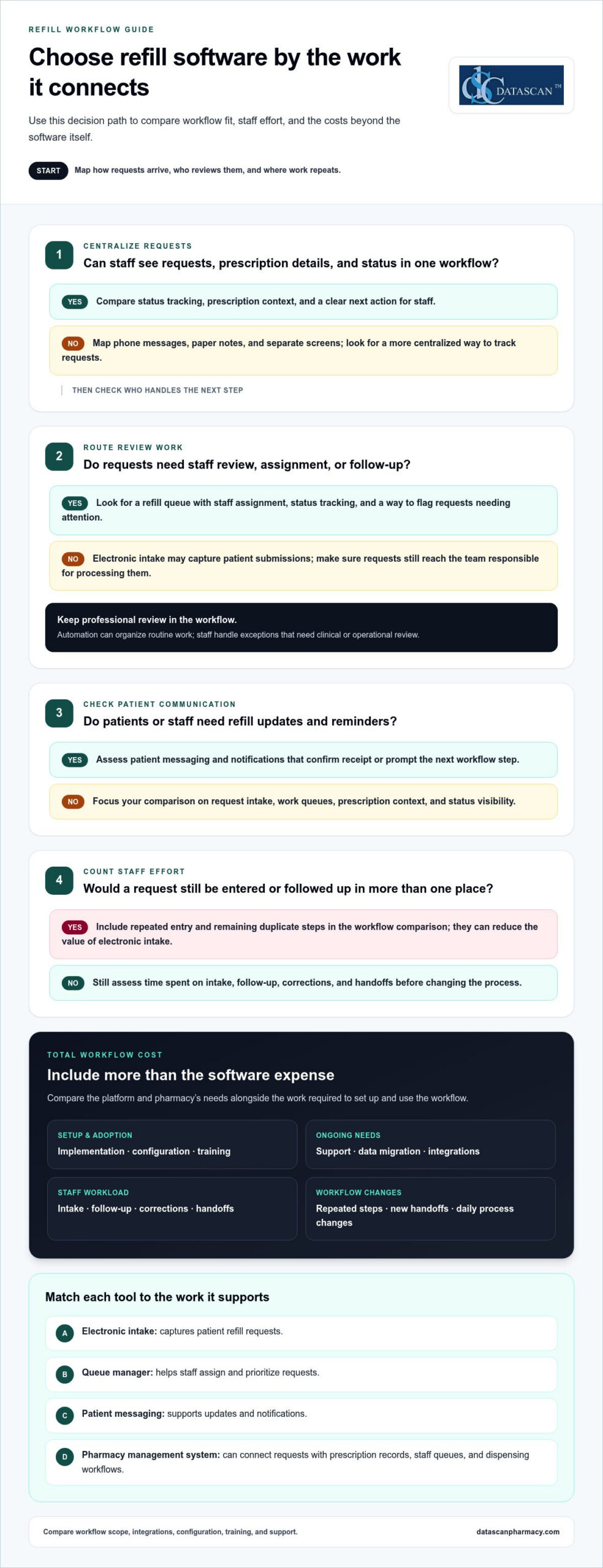
Compare refill systems by the work they support, not by a feature list alone. A basic electronic request tool may capture patient submissions, while a broader pharmacy management system can connect requests with prescription records, staff queues, and dispensing workflows. That distinction matters when a request needs review, clarification, or follow-up. Start by comparing your current process with the tasks a new system would change.
How do pharmacy refill management systems compare in features and pricing? Systems vary in request intake, queue management, patient messaging, reporting, and connections to pharmacy operations. Software costs depend on the platform and pharmacy’s needs. Compare workflow scope, integrations, configuration, training, and support when evaluating the total cost.
Separate software expenses from the staff time and workflow changes needed to use it. Account for implementation, training, data migration, ongoing support, and any duplicate steps that remain. If staff must enter a refill request into both a patient tool and the pharmacy system, for example, that repeated work can reduce the value of electronic intake.
Use this evaluation sequence before comparing proposals:
- Map current work: Note how requests arrive, who reviews them, and where staff repeat entry or follow-up.
- Match tools to tasks: Compare a patient request portal, messaging tool, work-queue manager, and pharmacy management system by the work each supports.
- Assess staff effort: Track time spent on intake, follow-up, corrections, and handoffs before changing the workflow.
- Review total scope: Include setup, training, support, and the integrations needed for medication management.
Each tool serves a distinct purpose. Electronic intake captures requests, a queue manager helps staff assign and prioritize them, patient messaging supports updates, and reporting can reveal recurring workflow bottlenecks. Clinical review remains important when a refill request raises a question about therapy or adherence.
To assess operational value, compare the work removed with the work added. Fewer phone-based intake steps can help, for instance, but only if staff can process app requests without re-entering the same information elsewhere. Follow the workflow from the patient’s first request through staff follow-up, noting each time-consuming handoff or source of duplicate work.
Use those findings to define the system requirements before reviewing options. A workflow discussion can help you frame the pharmacy’s priorities and evaluate how refill tasks fit into daily operations.
Use these findings to compare expected time savings with the labor and workflow costs of each option. Treat estimates as planning inputs, not guaranteed outcomes. Consider them alongside your assessment of the pharmacy’s actual workflow.
Adjusting prescription fill dates
Medication synchronization helps patients coordinate multiple prescriptions around one planned pharmacy visit each month. Pharmacy teams can use a medication management calendar and refill queue to identify prescriptions with different due dates, then coordinate eligible fills through the established workflow. This can reduce separate pickup trips without treating every prescription as interchangeable.
Start with the patient’s medication profile. Identify the prescriptions the patient wants to align, review their current fill timing, and mark the intended synchronization date. A calendar view helps staff see which prescriptions fit that date and which need separate review. Seeing the dates together is useful, but automatically changing every date is not.
A pharmacy can leave a prescription unenrolled on its first fill, then use a short-fill approach on a subsequent refill to synchronize it with the patient’s other prescriptions. If one medication’s refill timing falls out of step, for example, staff can consider a short fill during a later refill to align the schedule. Any adjustment should follow the pharmacy’s review process and applicable coverage details.
- Medication synchronization tools: Group prescriptions by patient and target date, helping staff plan coordinated fills.
- Refill calendars: Show upcoming dates and highlight prescriptions that may need alignment.
- Work queues: Assign review tasks and keep exceptions visible instead of burying them in notes.
- Patient communication tools: Explain the planned date and help patients understand which medications are included.
Keep the workflow clear. First, confirm the patient’s preferred pickup timing and the prescriptions they want coordinated. Next, review each medication’s refill status and identify dates that do not align. Route prescriptions that need a short fill or another decision to staff review. Finally, record the agreed schedule and communicate it to the patient. A defined sequence limits repeated data entry and unclear handoffs.
Synchronization also needs ongoing maintenance. If a prescription changes, a patient starts a medication, or a fill is delayed, review the schedule again. Staff can flag the affected profile in a refill queue, update the planned date, and notify the patient. Targeted follow-up is easier than rebuilding the entire schedule from scattered messages.
Assess the process by reviewing missed pickups, repeated date corrections, and staff follow-up tasks over time. If patients repeatedly arrive for only part of a synchronized set, check whether the calendar, communication, or queue handoff failed. These practical checks help pharmacies refine the workflow and keep medication timing visible to the team.
Avoiding refill-too-soon exceptions
A refill-too-soon exception is easier to resolve when the pharmacy can see the request, prescription history, and claim status together. Pharmacy management software can help staff identify what needs review, but an exception is not permission to bypass plan rules or dispense automatically. Keep it visible until the underlying issue is resolved.
Begin by comparing the recorded fill date with the new request. If a patient asks for a refill but the pharmacy record shows a recent completed transaction, confirm whether the request is a duplicate or the prescription record needs attention. A refill work queue can assign the task to a staff member instead of leaving it in an intake message.
Common workflow causes include:
- Duplicate requests: A patient submits an app request after calling the pharmacy, creating two open tasks for one medication.
- Outdated status: A prescription appears unprocessed in one screen even though its transaction has moved forward elsewhere.
- Changed directions: A prescription’s recorded instructions differ from the current information being used to assess the request.
- Unclear follow-up: Staff need information from the patient, but the request lacks an owner or next action.
A pharmacy platform can reduce avoidable exceptions by organizing the steps before claim submission. Use a structured intake form to capture the medication, patient request, and relevant notes. Then have staff compare the request with the prescription record and current workflow status. If details conflict, route the item for review instead of repeatedly resubmitting it.
Reminders can also prevent avoidable last-minute requests. A patient notification can prompt them to contact the pharmacy before they run out, while an internal task can flag a request that still needs action. Keep messages focused on the next step, such as contacting the pharmacy about a request, rather than implying a fill is guaranteed.
For a practical exception process, use these steps:
- Review the alert: Open the exception and identify the medication and request details.
- Check the record: Compare fill and transaction status with the submitted request.
- Resolve the cause: Correct duplicate intake, clarify mismatched information, or follow the pharmacy’s established review path.
- Document the outcome: Record the action and update the task so another staff member can see its status.
Track recurring causes in a simple exception report. If duplicate patient requests are common, refine the intake instructions. If outdated statuses recur, review how staff update transactions. Targeted changes can reduce repeat work while keeping each refill exception visible and accountable.
What software manages prescription refill requests for pharmacies?
Pharmacies use pharmacy management systems, patient request tools, and workflow software to handle prescription refills. For independent pharmacies, the system also needs to make reimbursement-related work visible. PBM reform may change the operating environment, but software cannot set reimbursement terms. It can help teams organize prescription and claim information, spot items needing review, and keep follow-up visible during busy daily operations.
A pharmacy management system can connect prescription activity with financial review. For example, a team can follow a consistent process to examine a refill-related claim, record its outcome, and identify recurring issues that need attention. This context can support conversations about PBM reimbursements by helping owners see operational patterns instead of relying on scattered notes or staff recollection.
- Pharmacy management system: Keeps prescription workflows and related work visible to pharmacy staff.
- Patient request tool: Collects refill requests through a patient-facing channel, which can reduce separate intake paths.
- Claim review workflow: Helps staff organize reimbursement questions and route them for follow-up.
- Reporting tools: Help owners review recurring issues and identify where more analysis is needed.
These tools address different needs. Patient-facing intake captures the request, the pharmacy system supports the prescription workflow, and a review process connects relevant claim concerns to the appropriate transaction. Coordinating these functions can help owners understand how prescription operations intersect with reimbursement pressures, without suggesting software can resolve PBM policy or contract terms on its own.
When assessing a platform, test a refill that raises a reimbursement question. Follow the transaction through staff review and see whether the relevant records and next steps are accessible. Consider whether the team can distinguish a routine refill task from one requiring financial review. That separation helps keep reimbursement work from getting lost among ordinary prescription tasks.
Use this evaluation sequence:
- Identify the issue: Define the reimbursement question the pharmacy wants to track.
- Trace the workflow: Find where staff can record and review the related claim information.
- Assign follow-up: Make ownership and the next action clear to the team.
- Review patterns: Use available reporting to guide internal analysis and reimbursement discussions.
For independent pharmacies looking to connect refill operations with broader financial workflows, discuss your pharmacy software needs with Datascan Pharmacy Software.
For an independent pharmacy, look for a pharmacy management system that works with a patient-facing refill request tool, claim review workflow, and reporting tools. Evaluate how well it tracks a refill-related claim, assigns follow-up, and separates routine refill tasks from items needing financial review.
Medication synchronization can also coordinate a patient’s medications to support adherence and improve pharmacy efficiency. State legislation and updated practice acts frequently recognize these expanded clinical services in connection with modern pharmacists’ practice authority.
Datascan Pharmacy Software: Datascan Pharmacy Management Software
Datascan Pharmacy Software offers the Datascan Pharmacy Management Software Suite for independent and community pharmacies seeking to organize prescription workflows. Its customizable workflow can shape refill tasks around how your team handles intake, review, and follow-up, rather than forcing every request through the same path.
For patient-facing refill communication, the MobileScripts Patient Mobile App lets patients view their history, send refill requests, and use two-way chat. Datascan Point of Sale (POS) and Datascan Mobile Delivery App support other pharmacy operations alongside prescription management. Together, these tools connect day-to-day tasks and give pharmacy owners more room to focus on patients and business decisions.
If your current refill process creates disconnected steps or extra staff work, explore whether the Datascan Pharmacy Management Software Suite fits your pharmacy’s needs. Contact Datascan Pharmacy Software or visit datascanpharmacy.com to learn more.
Make your next workflow change count
Choose one refill bottleneck to address first, such as repeated status checks or requests that stall between intake and review. Map who handles each step, what information they need, and where the handoff breaks down. This gives your team a practical way to assess whether software to manage prescription refills fits the workflow you want to improve.
Then define what a useful change would look like for your pharmacy. It might mean clearer task ownership, fewer duplicate entries, or more time for patient care and business decisions. Starting with a focused goal makes conversations about pharmacy management software more productive and helps you prioritize operational needs over a long feature list.
When you’re ready to discuss your pharmacy’s workflow, contact Datascan Pharmacy Software. Take the next step toward a refill process that gives your team greater clarity and control.
Frequently Asked Questions
Can refill management be fully automated?
No. Software can automate administrative steps, but staff review is still needed when a request involves a changed prescription, unclear patient information, or a question about therapy. For example, a patient might submit a routine request and later report that their directions have changed. The system can route the request for attention, while a qualified team member reviews the new information before processing continues.
What is prescription refill management software?
Software to manage prescription refills helps a pharmacy organize requests and related work from intake through completion. It may include staff-facing tools for sorting and assigning requests, alongside patient-facing options for submitting requests or receiving messages. For example, a patient app can collect a request, while the pharmacy’s internal system lets staff review its status and record follow-up.
What are the risks of automating prescription refill approvals?
Automated approvals can create problems if the system acts on outdated records, incomplete requests, or information that no longer matches the prescription. A request might move forward without staff noticing that the patient provided new details. Reduce this risk by limiting automation to suitable routine tasks, routing exceptions for review, and keeping a clear record of what the system processed and what staff changed.
 Kevin Minassian is the President of Datascan Software. Under his leadership, the company rapidly expanded to provide pharmacy management software on a national level. Over the last 15+ years, he has ensured that Datascan has continuously evolved to offer innovative solutions for independent pharmacies while still offering world-class customer support. He is passionate about helping independent pharmacies to remain competitive, achieve success, and offer the very best service to their communities.