
A signature at pharmacy checkout is not required for every transaction. Whether staff need to capture one can depend on state and payer requirements, but pharmacies commonly document prescription pickup and counseling offers. With pharmacy POS electronic signature capture, staff can collect a signature and associate it with the purchase and transaction record.
That can make checkout activity easier to document than paper forms that must be filed and retrieved. You’ll learn when a pharmacy checkout may need a signature, how electronic capture can link it to pharmacy records, and what to consider when choosing a checkout workflow. We’ll also cover pickup and counseling records, including cases where a customer signs for multiple prescriptions at once.
Key Takeaways
- Learn when a checkout signature can document prescription pickup or a counseling offer, and how a clear pickup workflow can help staff reduce mix-ups.
- See how signature records can connect to transactions while protecting patient information through careful access and handling practices.
- Find out how transaction reports can help review checkout activity and how pharmacy technology can support reimbursement review without replacing it.
- Explore ways to streamline checkout workflows so staff can spend less time on manual steps and more time assisting patients.
- Learn how Datascan’s pharmacy management, POS, patient app, and delivery tools can support connected pharmacy operations.
Does a pharmacy checkout need signature capture?
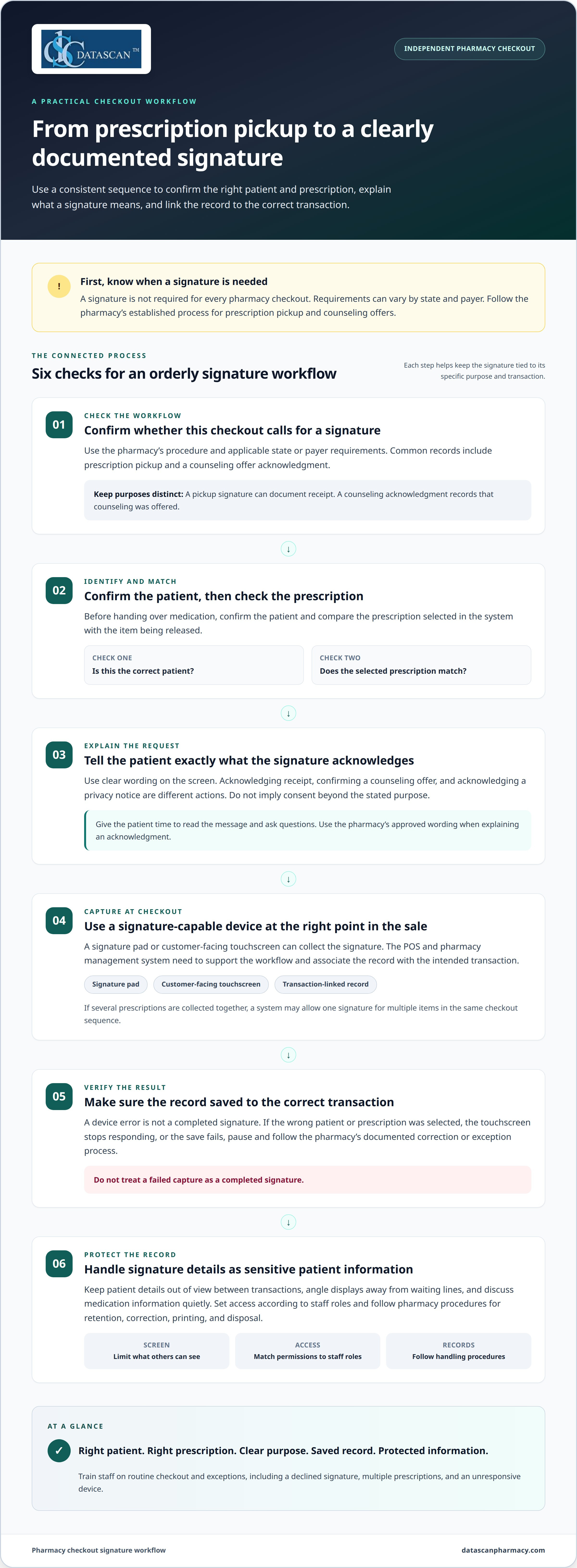
Pharmacy checkout does not require the same signature for every transaction. Pharmacies commonly capture signatures for prescription pickup and counseling offers, while requirements can vary by state and payer. A clear process helps staff know when to request a signature, which prescription it relates to, and what to do if capture fails.
When are signatures used for prescription pickup and counseling?
At prescription pickup, a signature can document that the medication was received. A separate acknowledgment can record that counseling was offered. The workflow should distinguish those purposes, so the patient understands what each signature represents. If several prescriptions are collected together, a system may let the patient sign for multiple items in one checkout sequence.
Some states require pharmacies to offer counseling when dispensing prescriptions. The applicable process can depend on state and payer requirements. Staff should follow the pharmacy’s established procedures for presenting counseling offers and recording the patient’s response.
What hardware and setup support signature capture?
What hardware is needed for pharmacy POS electronic signature capture? A signature pad or customer-facing touchscreen can collect a signature at the register. The POS and pharmacy management system also need to support the workflow and associate the record with the intended transaction.
Which pharmacy POS systems support electronic signature capture? Systems with signature-capable payment devices and an integration with prescription workflows can support this task. Before launch, train staff to confirm the patient, select the prescription, present the signature screen at the right point, and handle a missed or declined signature.
Can pharmacy POS systems capture signatures for prescriptions, delivery, and patient consent? Prescription pickup and counseling acknowledgments are common uses; systems may also support privacy-notice workflows. Delivery signatures depend on the system’s capabilities and integration. Each workflow should state clearly what the patient is signing for, rather than treating every signature as the same authorization.
Pickup steps can also help staff catch a medication mismatch. Before handing over a prescription, staff can confirm the patient and compare the selected prescription with the item being released. Checking the patient and prescription separately is a practical safeguard when multiple items are ready at the counter.
What are common risks and troubleshooting issues with pharmacy POS signature capture? Selecting the wrong patient or prescription, an unresponsive touchscreen, or a failed save can interrupt checkout. Staff should pause, correct the transaction or follow the pharmacy’s documented exception process, and never treat a device error as a completed signature.
Training should cover realistic checkout situations, such as a customer collecting several prescriptions, declining to sign, or encountering a device that stops responding. A brief practice run helps staff learn the steps and exceptions before using the workflow with patients.
Pharmacy POS systems can capture patient signatures for prescription pickup, counselling acknowledgement, and other required records, then store them securely and link them to the transaction. Counseling acknowledgments can be one use of pharmacy electronic signature capture. Pharmacy POS systems should provide signature-capable payment devices, such as signature pads or touchscreens.
How does electronic signature capture affect patient records and privacy?
Electronic signature records can contain identifying details, so pharmacies should treat them as sensitive patient information. Protecting privacy takes more than saving a signed form: staff should limit what appears on screens, explain what the patient is acknowledging, and handle each record under the pharmacy’s established privacy procedures.
A signature should represent a specific, clearly stated action. Acknowledging receipt of a privacy notice, for example, differs from authorizing a medication purchase or agreeing to another service. Use plain wording on the screen and give patients time to read it before signing. A signature should not imply consent beyond the stated action.
HIPAA requires pharmacies to offer patients a privacy notice at the point of dispensing. Staff can make the notice available so patients can review it without exposing another person’s information. If a patient asks what the acknowledgment means, staff should explain it using the pharmacy’s approved wording.
Protect privacy at the counter with simple screen and conversation practices. Angle customer-facing displays away from waiting lines, avoid leaving patient details visible between transactions, and discuss medication information quietly. Staff can pause the workflow if someone nearby could see or hear information that should remain private.
Set access controls according to staff roles. A cashier may need to complete checkout, while a pharmacist handles clinical questions. Pharmacies can define who may view, print, or export signature-related records, then train staff not to share login credentials or leave an active workstation unattended.
Records also need consistent handling after checkout. Follow internal procedures for retention, correction, and disposal, including how to handle a misplaced printout or a request for a copy. Avoid keeping duplicate paper copies just for convenience if they create another place where patient details could be exposed.
Use staff training to make privacy expectations part of routine practice. Have staff rehearse explaining an acknowledgment, positioning the screen, and responding when a patient declines to sign or asks for clarification. A supervisor can review these steps during routine workflow discussions, helping the team protect patient information without slowing service or making a signature feel like blanket permission.
How does electronic signature capture work for in-store pharmacy transactions?
In-store electronic signature capture records a patient’s signature during a point-of-sale transaction and associates it with relevant checkout activity. A pharmacy POS electronic signature capture workflow can link a signed acknowledgment to its transaction record. Staff can then review the signature alongside the relevant purchase details instead of handling a separate paper form.
What is electronic signature capture in pharmacy POS systems? It’s a workflow that displays a signature prompt on a signature pad or customer-facing touchscreen, then saves the signature with the transaction. For example, a patient can acknowledge a counseling offer or privacy notice during pickup. Staff should explain the purpose of each prompt before the patient signs.
How does pharmacy POS signature capture work for prescriptions and transactions? The pharmacy POS can retrieve prescription information, confirm the patient, and record the transaction in both the POS and pharmacy system. Staff review the displayed details, select the appropriate signature workflow, and complete checkout. This sequence helps associate the recorded activity with the intended transaction.
For a retail purchase, the register can handle payment separately from a signature for another record. Pharmacy payment processing should use PCI DSS-compliant processing with point-to-point encryption and tokenisation. Keeping payment approval distinct from an acknowledgment helps staff interpret each record correctly during later reviews.
Transaction reports let managers review checkout activity over time. After an upgrade, pharmacy POS reporting can help track pickup record accuracy and signature completeness. A manager can look for recurring gaps, clarify a staff step, or review how a prompt appears. Reports help reveal patterns, but they do not replace pharmacy procedures.
A mobile register can support checkout away from a fixed counter, including a drive-thru workflow. Staff can follow the same transaction review sequence before presenting a signature prompt. If a device fails or a record does not appear in reporting, the pharmacy’s documented exception process gives staff a clear way to resolve the issue.
Inventory management and checkout records serve different purposes, but both contribute to organized pharmacy operations. A connected POS can help staff associate a purchase with the relevant point-of-sale activity. Clear transaction labels also make it easier to distinguish prescription-related records from unrelated retail activity during routine reviews.
How can pharmacy technology help independent pharmacies manage PBM reimbursements?
Pharmacy technology can organize prescription, claim, payment, and remittance records, giving staff more context when reviewing reimbursement activity. It cannot set a PBM’s reimbursement terms or guarantee claim payment, but a consistent transaction trail can make discrepancies easier to investigate.
PBM reimbursement pressure can affect a prescription’s margin after dispensing. Reform discussions often focus on reimbursement transparency, payment methods, and how PBM practices affect community pharmacies. For an independent pharmacy, a practical first step is to understand what happened on each claim, then compare the available transaction details with the corresponding remittance.
A pharmacy management system can help organize prescription and transaction information. For a specific claim, staff might review the prescription, amount submitted, PBM response, and payment shown in the remittance. Matching records by transaction identifier and date helps pinpoint differences. The system supports review, but it does not determine whether a PBM owes an additional payment.
A repeatable process makes review more useful. Staff can group claims by status or PBM, identify entries that need attention, and compare them with remittance details. If a claim appears in the transaction history but its payment is unclear, for example, the reviewer can trace the record and document the question for follow-up. Organized information avoids reconstructing transactions from scattered notes.
Technology can help pharmacies identify patterns in their own records. A recurring difference tied to a claim type, transaction step, or payer warrants closer review. Staff can record the issue, retain relevant claim details, and track whether later remittances show the same pattern. This creates a clearer record for internal decisions and discussions with PBMs.
Keep the limits clear. Software can support accurate data entry, transaction organization, and reporting when those functions are available in the pharmacy’s system. It cannot interpret a contract, determine the correct reimbursement rate, or guarantee a successful dispute. Staff still need to compare claim and payment information with applicable terms and document their findings.
The strongest workflow links daily dispensing records with a disciplined reimbursement review. When prescription details, claim activity, and payment records are easier to find, independent pharmacies can spend less time assembling basic information and more time examining exceptions. That visibility supports better decisions, while broader PBM reform remains a separate policy issue.
How can pharmacy POS technology save time during checkout?
A pharmacy POS workflow can reduce repeated entry by organizing checkout steps around the transaction. Staff can select the purchase, process payment, capture any needed signature, and confirm that the record is saved. Each step has a clear place, helping keep a signature or receipt attached to the purchase.
For prescription pickup, the register can read the customer’s card before staff hand over a tablet for a signature. The captured signature can then be linked to the prescription transaction for later retrieval. A signature pad or touchscreen gives customers a direct way to sign, while staff keep checkout moving without filing a separate paper form.
That connection also helps distinguish different records. A credit card authorization documents payment activity; a prescription pickup signature documents another part of the transaction. Associating both with the correct purchase makes later tracking more straightforward. Staff can retrieve a signature for review instead of searching through paper forms.
Retail purchases add another workflow at the same counter. A pharmacy POS can handle a retail purchase and payment while keeping prescription or counseling steps tied to their own records. Payment processing should use PCI DSS-compliant processing with point-to-point encryption and tokenisation. Clear prompts help staff distinguish payment approval from a signature acknowledgment.
- Select the correct prescription or retail transaction before presenting a signature prompt.
- Let the customer sign on the designated pad, touchscreen, or supported tablet workflow.
- Confirm that the signature record is attached to the transaction before completing checkout.
These steps give staff a repeatable sequence, not another manual form to manage. A flexible workflow can accommodate prescription pickup, retail purchases, and payment processing without treating every transaction alike. For example, a customer buying an over-the-counter item may need payment processing, while prescription pickup may also require a documented acknowledgment.
After checkout, a signature-capable POS should support secure storage and retrieval for audits. Staff can use transaction records to locate the related signature and check whether the workflow was completed. When a signature is missing or a device fails, a defined exception process helps staff resolve the issue before closing the transaction.
The time benefit comes from reducing disconnected steps. When the POS workflow, payment record, and signature record stay connected, staff spend less effort filing paper and reconstructing purchases. Pharmacy teams can focus on the next customer while keeping transaction details available for follow-up and review.
How can Datascan Pharmacy Software support pharmacy checkout?
Datascan provides an Independence-First platform for pharmacy operations, with management software, point of sale, patient engagement, and delivery tools. For checkout, consider how these components fit your pharmacy’s daily workflow, from prescription pickup and retail sales to patient communication beyond the counter.
Datascan Pharmacy Management Software supports pharmacy management, while Datascan Point of Sale (POS) handles checkout, front-end inventory, signatures, and a unified transaction experience. Together, they let pharmacies consider dispensing and register workflows in context. When mapping prescription pickup, for example, identify where staff confirm the transaction, handle payment, and record any required acknowledgment.
Signature capture should fit the checkout sequence, not become a disconnected task. A pharmacy can define when staff present the prompt, how they identify the related transaction, and what to do if a record needs review. Clear steps make the workflow easier to follow during a busy pickup period.
Patient and delivery workflows extend beyond the register. MobileScripts Patient Mobile App and Datascan Mobile Delivery App address those areas of pharmacy operations. A pharmacy considering checkout changes can also account for how patients engage with the pharmacy outside an in-store visit and how delivery activity fits into its overall processes.
- Use Datascan Pharmacy Management Software for pharmacy management workflows.
- Consider Datascan Point of Sale (POS) for register and checkout processes.
- Include MobileScripts Patient Mobile App and Datascan Mobile Delivery App when planning patient and delivery workflows.
Start by mapping a real transaction from beginning to end. Document how staff handle prescription pickup, a retail purchase, payment, and any signature or acknowledgment required by the pharmacy’s process. This outline clarifies where staff need a prompt, where records belong, and which handoffs need attention.
Datascan’s pharmacy tools can support a coordinated approach to these operational questions, while the pharmacy defines its procedures and recordkeeping needs. If you’re reviewing checkout workflows or planning a change, contact Datascan Pharmacy Software to discuss your pharmacy’s needs.
Frequently Asked Questions
What does Pharmacy Point of Sale Include?
A pharmacy point of sale can handle checkout, front-end inventory, signatures, and transaction activity. In a pharmacy, the register may support retail purchases as well as prescription-related workflows. Staff can use one system to process an over-the-counter sale and manage a signature step tied to another transaction. Specific capabilities depend on the POS system and its integration with pharmacy operations.
What HIPAA and PCI requirements apply to pharmacy POS signature capture?
HIPAA and PCI DSS address different information. Pharmacies must offer patients a privacy notice at dispensing, while payment processing should use PCI DSS-compliant processing with point-to-point encryption and tokenisation. A signature tied to a privacy acknowledgment does not establish compliance with every privacy obligation. Pharmacies should handle patient information under their privacy procedures and keep payment controls distinct from prescription documentation.
How are pharmacy POS electronic signatures stored, secured, and retrieved?
A pharmacy POS should securely store captured signatures and make them retrievable for audits or record reviews. A practical approach links each signature to its transaction, then uses the system’s lookup workflow to find it later. Pharmacies should limit access to staff who need it and follow internal procedures for handling patient information. Confirming the transaction association helps prevent retrieving a signature from the wrong checkout record.
How does pharmacy POS signature capture compare with paper signatures?
Paper signatures create physical records that staff must file and locate, requiring storage space and potentially complicating audit retrieval. Electronic capture can link a signature to its transaction and make it easier to retrieve through the POS workflow. Paper may remain part of a pharmacy’s process, but electronic records still need secure handling, clear retention practices, and a defined process for correcting missing or misfiled entries.

Article by
Sarah Callioras
Sarah Callioras is Vice President at Datascan Pharmacy Software, bringing nearly 25 years of experience across independent pharmacy operations and pharmacy technology. Since joining Datascan in 2016, she has played a key role in driving business growth, strengthening client relationships, and supporting independent pharmacies through innovative software solutions. With a strong background in pharmacy operations, business development, and strategic leadership, Sarah is passionate about helping independent pharmacies succeed in an evolving healthcare landscape.
 Kevin Minassian is the President of Datascan Software. Under his leadership, the company rapidly expanded to provide pharmacy management software on a national level. Over the last 15+ years, he has ensured that Datascan has continuously evolved to offer innovative solutions for independent pharmacies while still offering world-class customer support. He is passionate about helping independent pharmacies to remain competitive, achieve success, and offer the very best service to their communities.