The safest prescription fill isn’t the fastest one. It’s the one that follows the same checks every time. To learn how to reduce prescription filling errors, verify the patient and prescription details, compare the written order with the computer record, and pause to clarify anything unclear. Consistent checks help catch mistakes before medication reaches the patient.
It’s easy to see why errors can happen: similar drug names, incorrect data entry, interruptions, and unclear instructions can disrupt a busy workflow. A reliable process gives each prescription focused attention, from identifying the medication and dose to checking the label and confirming the right patient at pickup. The FDA’s medication error resources offer further context on medication safety.
This article covers practical ways to strengthen checks in an independent or community pharmacy, from accurate data entry to clarification and repeatable workflows. These steps can help your team catch preventable errors while keeping daily operations moving. Author: Datascan Pharmacy Software, which provides pharmacy management solutions for independent and retail pharmacies.
Key Takeaways
Separate medications with similar names and use clear shelf labels or visual alerts to make selection safer.
Capture patient details and prescription directions accurately, then verify identity and allergy information.
Compare the written order with the computer record, and pause to resolve anything that doesn’t match.
Clarify illegible instructions and unfamiliar abbreviations with the prescriber instead of guessing.
Standardize each team member’s role and the steps from filling through final handoff to help reduce distractions.
1. Preventing look-alike and sound-alike medication mix-ups
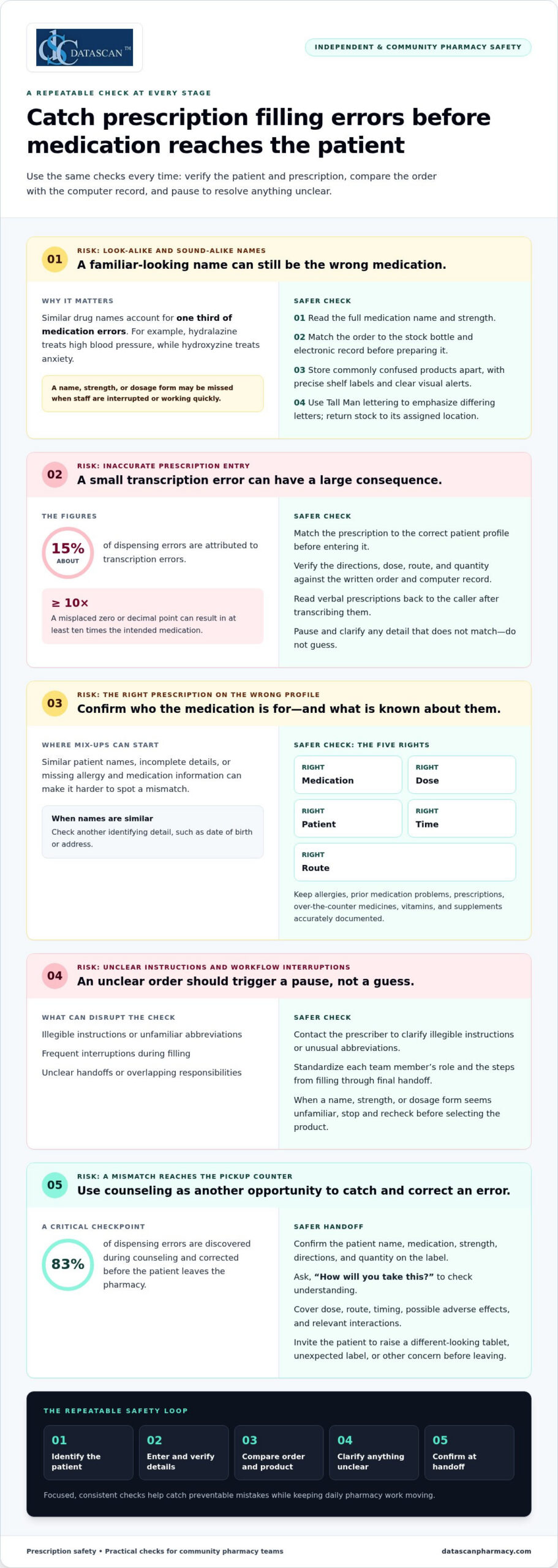
Common prescription filling errors include selecting the wrong medication or dose, entering an incorrect quantity, and dispensing to the wrong patient. Similar drug names, data-entry mistakes, unclear communication, and frequent interruptions can contribute. Similar drug names account for one third of medication errors, making name checks an essential part of dispensing.
Hydralazine treats high blood pressure, while hydroxyzine treats anxiety. Their similar names can make selection difficult, especially when staff are interrupted or working quickly. Compare the full drug name, strength, and dosage form on the prescription with the stock bottle and computer record. Don’t rely on the first few letters or a familiar-looking label.
Make look-alike and sound-alike medications easier to distinguish where products are selected. Store commonly confused products apart, use clear visual alerts, and label storage locations precisely. Tall Man lettering, which capitalizes part of a name, can highlight differences on stock bottles and electronic medication orders. Emphasize the differing letter patterns in similar names so staff notice them before selecting a product.
Read the full medication name and strength on the order.
Compare the product label with the electronic record before counting or preparing it.
Return stock promptly to its assigned, clearly marked shelf location.
Pause and recheck when a name, strength, or dosage form seems unfamiliar.
Patients can provide useful context during a medication check. Ask what prescriptions, over-the-counter medicines, vitamins, and supplements they take, and document known allergies or previous medication problems. This information helps the pharmacist assess potential interactions and spot an order that differs from the patient’s usual therapy. Encourage patients to share an up-to-date medication list with each doctor and pharmacist, especially when multiple prescribers are involved.
At pickup, invite the patient to check the medication and ask questions if its appearance differs from what they expected. Confirm who the prescription is for and explain how to take it. If the patient notices a different tablet or an unexpected label, that can prompt another check before they leave the pharmacy.
Dosage form matters, too. Long-acting medications shouldn’t be cut, crushed, or chewed unless a doctor or pharmacist says it’s appropriate, because the medicine may release too quickly. If a patient has trouble swallowing a tablet, recommend discussing a suitable formulation with a doctor or pharmacist rather than changing the medication independently. Each check addresses a different risk, but both depend on matching the product and instructions accurately.
2. Accurate prescription entry and patient identification
Accurate entry starts with matching the prescription to the correct patient profile. Confirm the patient’s identifying details before entering directions, dose, route, and quantity. Transcription errors account for about 15% of dispensing errors, and a misplaced zero or decimal point can result in at least 10 times the intended medication. Read verbal prescriptions back to the caller after transcribing them.
Use the five rights of medication safety as a final verification prompt: right medication, dose, patient, time, and route. Check the patient’s date of birth or address when names are similar. In hospital settings, the Joint Commission requires at least 2 patient identifiers when medications are administered. Accurate identification and current patient information help prevent medication errors, including an incorrect drug being dispensed.
Patients should check the prescription label before leaving the pharmacy. Confirm the patient name, medication, strength, directions, and quantity, then compare the label with what the prescriber said to expect. Ask the pharmacist to explain any mismatch, unfamiliar direction, or change in tablet appearance before taking the medication.
At pickup, invite patients to describe how they’ll take the medication. An open-ended question such as, “How will you take this?” can reveal confusion that a yes-or-no question may miss. Counseling should cover the dose, route, timing, possible adverse effects, and relevant interactions. About 83% of dispensing errors are discovered during counseling and corrected before the patient leaves the pharmacy.
Ask about prescription medicines, over-the-counter drugs, vitamins, and supplements.
Make sure allergies and prior medication problems are recorded accurately.
Explain what to do if a dose is missed, using the prescription’s specific instructions.
To prevent errors during a transfer or refill, give the receiving pharmacy an up-to-date medication list and identify the exact prescription and prescriber. Confirm that the pharmacy has the current directions, strength, and allergy information. Once the refill is prepared, compare its label and appearance with the previous supply, and ask about unexpected changes.
If a patient discovers an incorrect fill, they should stop and contact the dispensing pharmacy promptly. Don’t take another dose until the pharmacist or prescriber explains what to do. If the medication has already been taken and concerning symptoms occur, seek urgent medical care.
In the United States, patients can report a suspected dispensing error to the pharmacy manager or owner and ask how to file a formal complaint. They can also contact their state pharmacy regulator for information about its complaint process. Keep the label, packaging, receipt, and prescription details available when describing the event.
3. Checking written prescriptions against computer records
Pharmacies prevent wrong-drug and wrong-dose errors by comparing the prescription with the computer record, verifying patient-specific details, and arranging an independent check. To understand how to reduce prescription filling errors, treat a mismatch as a reason to stop and investigate, not as a detail to correct from memory. Clarify concerns with the prescriber or patient as appropriate.
Use the original written order as the reference, not memory or a previous fill. Compare the patient, medication, strength, dosage form, directions, and quantity with the entered record. For example, if the prescription says one strength but the computer entry shows another, stop processing until the mismatch is resolved. Technicians and pharmacists should use the same comparison steps, even when a familiar prescription seems routine.
A second-person check can catch a mistake that self-checking may miss. When possible, have a pharmacist independently compare the written order, computer record, and prepared medication. The reviewer should inspect the original instructions rather than rely on the first person’s verbal summary. If the check is delayed, keep the prescription and product clearly associated, then complete verification before dispensing.
Dose review must account for the patient, not just the drug. Verify age- and weight-based doses, particularly for pediatric and geriatric patients. Compare the prescribed amount with the patient’s recorded age and weight, and check the units, frequency, and dosage form. A dose that looks unusual for a child’s weight or an older patient’s profile needs investigation before the medication is released.
Review the profile for other prescriptions that could create harmful interactions or duplicate therapy. Patients with multiple doctors may have prescriptions from clinicians who don’t know what another clinician ordered. Check the medication history and relevant alerts, then assess whether the current order fits the patient’s existing regimen. A possible interaction is a reason to investigate and communicate, not to make an unsupported change.
Use a consistent double-check sequence for each prescription:
Match the written order to the correct patient record.
Compare the drug, strength, dosage form, instructions, and quantity.
Review age, weight, allergies, and medication history.
Compare the prepared product and label with the verified order.
Resolve discrepancies before dispensing.
Document clarifications in the pharmacy record so the final instructions reflect the prescriber’s response. If an order changes during a phone call, update the computer entry and compare it again with the clarified directions. This creates a clear record linking the original prescription, the correction, and the medication dispensed.
For teams considering how to reduce prescription filling errors, every unresolved order needs a clear next step. Set it aside, record the specific discrepancy, and involve another qualified team member before proceeding. Don’t repeat the same quick check or rely on memory to fill in missing information.
4. Clarifying illegible prescriptions and unusual abbreviations
If a prescription is illegible, incomplete, or open to more than one interpretation, pause dispensing and clarify it with the prescriber. Guessing at a medication, dosage, route, or frequency can turn a small uncertainty into an incorrect fill. A clear answer gives the pharmacist a reliable basis for preparing the prescription and counseling the patient.
Start by identifying exactly what is unclear. Is the drug name hard to read, or does the order omit a strength, dosage form, route, or frequency? If a written direction could indicate different amounts, don’t choose the most familiar interpretation. Mark the order for follow-up and keep it separate from prescriptions ready for filling.
Unusual abbreviations and puzzling symbols also need clarification. A shorthand term may seem routine to one staff member but mean something different to another. Don’t assume an abbreviation has the same meaning across prescribers or medication types. Ask the prescriber to state the intended instruction in plain language, then record that wording in the pharmacy system.
Use a consistent clarification process so the next step is clear to every team member:
Identify the specific word, number, symbol, or direction that creates uncertainty.
Contact the prescribing office and ask for the intended medication instructions.
Read the clarified order back to confirm the drug, strength, dosage, route, and frequency.
Document the response and update the prescription record before filling.
Have the pharmacist review the resolved order before dispensing.
Missing details matter, too. If an order names a medication but omits a dosage or route, don’t fill the gap using a previous prescription. The patient’s current condition, treatment plan, and other medicines may differ. Ask the prescriber for the missing information, and document the clarification so the final label matches the authorized directions.
Check for conflicts between the order and the patient profile. For example, if a newly clarified medication conflicts with a recorded allergy or appears inconsistent with the patient’s existing instructions, bring the concern to the pharmacist. The pharmacist can assess the information and contact the prescriber when needed. This helps address potential risks without staff making unsupported changes.
Keep the patient informed while the team resolves uncertainty. Explain that the pharmacy needs a clear instruction before dispensing, and ask whether the patient has relevant context, such as a recent treatment change. Patient input can help identify what to ask, but it doesn’t replace prescriber clarification. Once the answer arrives, compare the updated record with the final label and directions. Documenting this handoff helps prevent an unresolved question from carrying into preparation or counseling.
5. Standardizing prescription-filling workflows
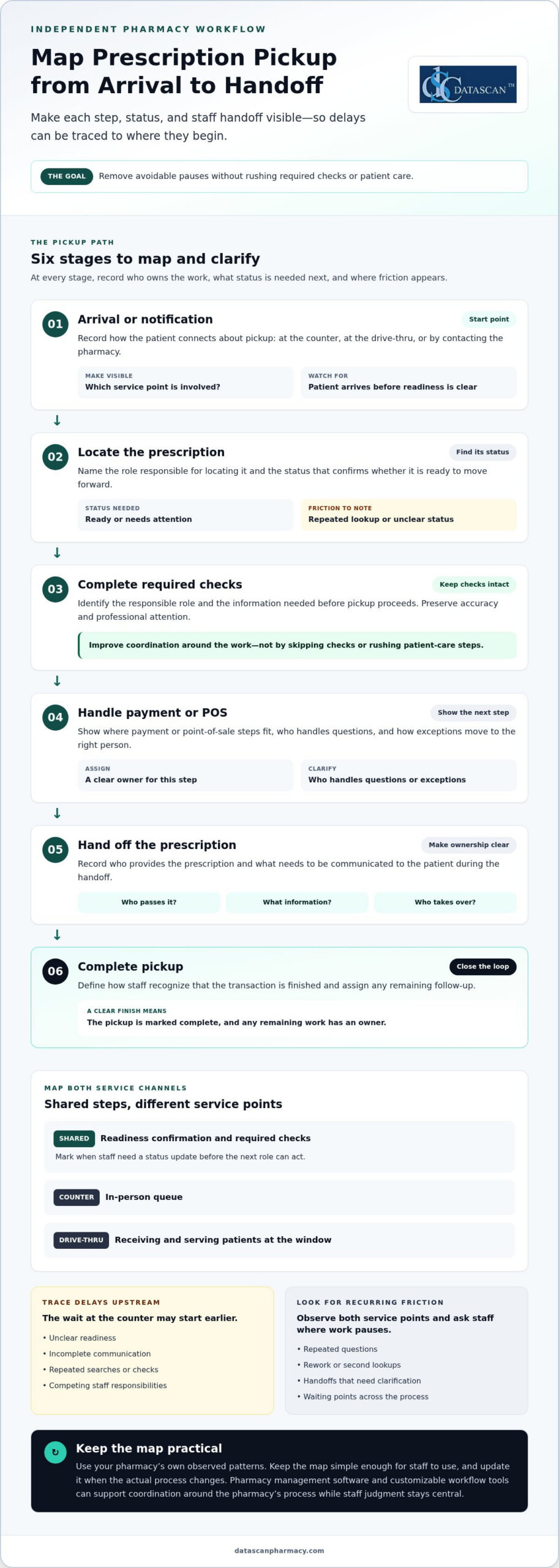
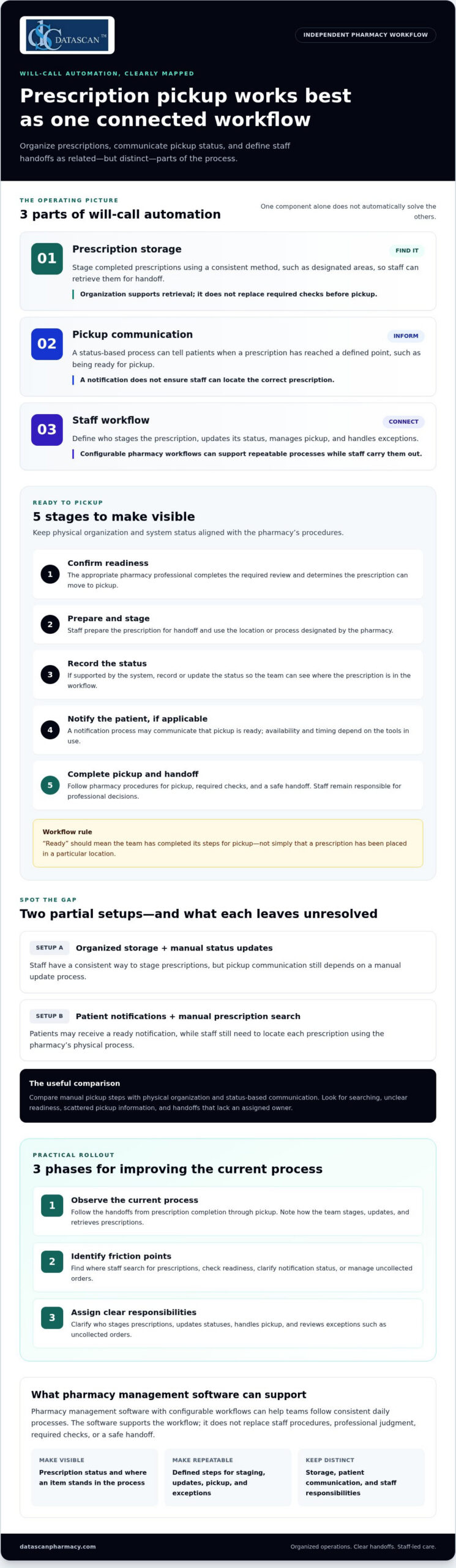
A repeatable workflow gives each prescription a defined path, even during a busy shift. Assign clear responsibilities for intake, data entry, preparation, pharmacist review, and handoff. When pharmacy technicians know which step they own, fewer tasks get lost between coworkers. A written process also makes it easier to identify where mistakes happened and improve the routine. Teams aiming to reduce prescription filling errors can start by mapping these handoffs.
Keep each patient’s prescriptions together and separate them from other work in progress. Return stock promptly after selecting a medication, and clear unused products from the filling area before starting another order. For example, finish preparing one patient’s prescription and attach its label before moving to the next. This reduces the chance of mixing products, labels, or instructions across orders.
Set up the physical workspace to support the process. Keep frequently used tools in consistent locations, remove clutter from the counting area, and ensure only the active prescription is on the immediate work surface. A standardized shelf layout helps staff return products to the correct location. If the pharmacy uses an automated pill-counting machine, include routine checks and maintenance in its workflow.
Use a clear sequence that staff can follow for every fill:
Receive the prescription and route it to the assigned team member.
Enter and prepare the order using the pharmacy’s established steps.
Keep the product and patient label together during preparation.
Complete pharmacist review before the prescription moves to pickup.
Return stock and reset the work area before starting another order.
Define how staff should handle interruptions. If a phone call or patient question pauses a fill, leave the order in a marked, secure location and note the step completed. On returning, restart at the last verified point rather than relying on memory. An interactive voice response system can handle routine calls and refills, reducing interruptions during dispensing.
Workload management matters to accuracy. Pharmacy leaders can monitor queues, balance assignments, and provide breaks so fatigue and competing tasks don’t undermine focus. Build training into the workflow for new and existing staff, including pharmacy technicians, and review procedures when errors or near misses reveal a weak handoff. Report dispensing errors so the team can identify patterns and prevent similar problems.
A computer-supported workflow can make status and ownership easier to track, but staff still need clear steps for exceptions. Define who contacts the doctor when clarification is needed, who records the response, and who resumes the order. Reducing filling errors also means checking whether each stage has a clear owner and documented next step. A customizable pharmacy workflow can organize responsibilities around how the pharmacy operates. Consistency makes the process easier to follow, even when work shifts between team members.
Datascan Pharmacy Software provides Datascan Pharmacy Management Software for independent and community pharmacies. If your team is reviewing how prescriptions move from entry through verification and pickup, pharmacy management software can support that operational review. Map the steps staff follow, identify where handoffs or interruptions create friction, and assess whether your current system supports the way your pharmacy works.
Datascan also offers Datascan Point of Sale (POS), MobileScripts Patient Mobile App, and Datascan Mobile Delivery App. These tools support different parts of pharmacy operations, while prescription accuracy still depends on clear procedures and careful staff checks.
Contact Datascan Pharmacy Software or visit datascanpharmacy.com to learn more.
Make safer checks part of your next improvement
A practical answer to how to reduce prescription filling errors is to treat accuracy as an operating standard, not just a final inspection. Next, review how your pharmacy’s procedures and technology work together during a real shift. Which handoffs are hardest to manage? Where do staff need clearer steps to keep prescriptions moving without skipping verification?
Use those questions to guide a focused conversation with your team. A process that works on paper should also make sense at the counter, in the filling area, and during a busy pickup period. Aligning pharmacy management software with consistent procedures can help staff follow the workflow more easily.
If you’re considering how Datascan Pharmacy Software could support your pharmacy’s operations, contact Datascan Pharmacy Software to discuss your needs. Every deliberate improvement helps build a more dependable process for your team and patients.
Frequently Asked Questions
How can patients verify a prescription is filled correctly before leaving the pharmacy?
Ask the pharmacist to identify the medication’s active ingredient and explain whether the dispensed product matches the treatment your prescriber intended. If the packaging or manufacturer looks unfamiliar, ask whether that reflects a product change. Patients can also ask what to do if the medication’s appearance changes at a later refill. Resolve those questions before leaving, so you know whom to contact if the next supply differs.
How can pharmacists reduce dispensing errors during prescription processing?
Build safeguards into the order queue so duplicate requests, early refills, and incomplete prescriptions receive attention before moving forward. For example, if a refill request arrives while the same prescription is already being processed, flag it for review rather than treating it as a separate routine order. Clear status labels also help staff distinguish new, pending, and completed work without relying on memory during a busy period.
How can patients prevent errors with generic substitutions and look-alike medication names?
Ask the pharmacist to explain a substitution by its active ingredient, strength, and dosage form, then confirm whether the prescribed directions remain the same. Don’t switch products or adjust how you take them based only on packaging or tablet appearance. If a refill looks different, bring the container or a clear photo of the previous product to the pharmacy and ask the pharmacist to explain the difference.
How should patients use medication lists and patient portals to catch prescription discrepancies?
Use the portal as a comparison tool, not as the only record of current treatment. After a specialist visit, urgent-care appointment, or hospital stay, review the medication section for entries that may no longer reflect the plan you were given. Note which clinician prescribed each medicine and when the information changed. If portal details conflict with discharge papers or current instructions, ask the care team to reconcile the records before relying on an outdated entry.
A refill workflow can move faster without making every refill fully automatic. Software to manage prescription refills can centralize routine intake, work queues, and status tracking, while staff handle exceptions that need clinical or operational review. The goal is fewer scattered steps, not removing judgment from the process.
It’s understandable to want software to manage prescription refills that cuts down on calls, manual follow-ups, and time spent piecing together a prescription’s status. The right workflow tools organize refill requests and help pharmacy teams see what needs attention, giving owners more time for patient care and business operations.
This guide explains how centralized refill management works, which software and workflow costs to consider, and how pharmacies can coordinate fill dates while handling early-refill exceptions. You’ll also learn where automation helps, why staff review remains important, and what to look for in pharmacy management software for an independent or community pharmacy.
Key Takeaways
Centralize refill requests and status tracking so staff can see what needs action without piecing together updates across disconnected workflows.
Assess software costs alongside staff time, training, and workflow changes to understand the full operational impact.
Use medication synchronization to coordinate fill dates and make pickup routines easier for patients with multiple prescriptions.
Build a clear review process for early refill exceptions so automation organizes requests while staff handle cases needing attention.
Compare pharmacy management software by how well it fits your refill workflow, patient communication needs, and daily pharmacy operations.
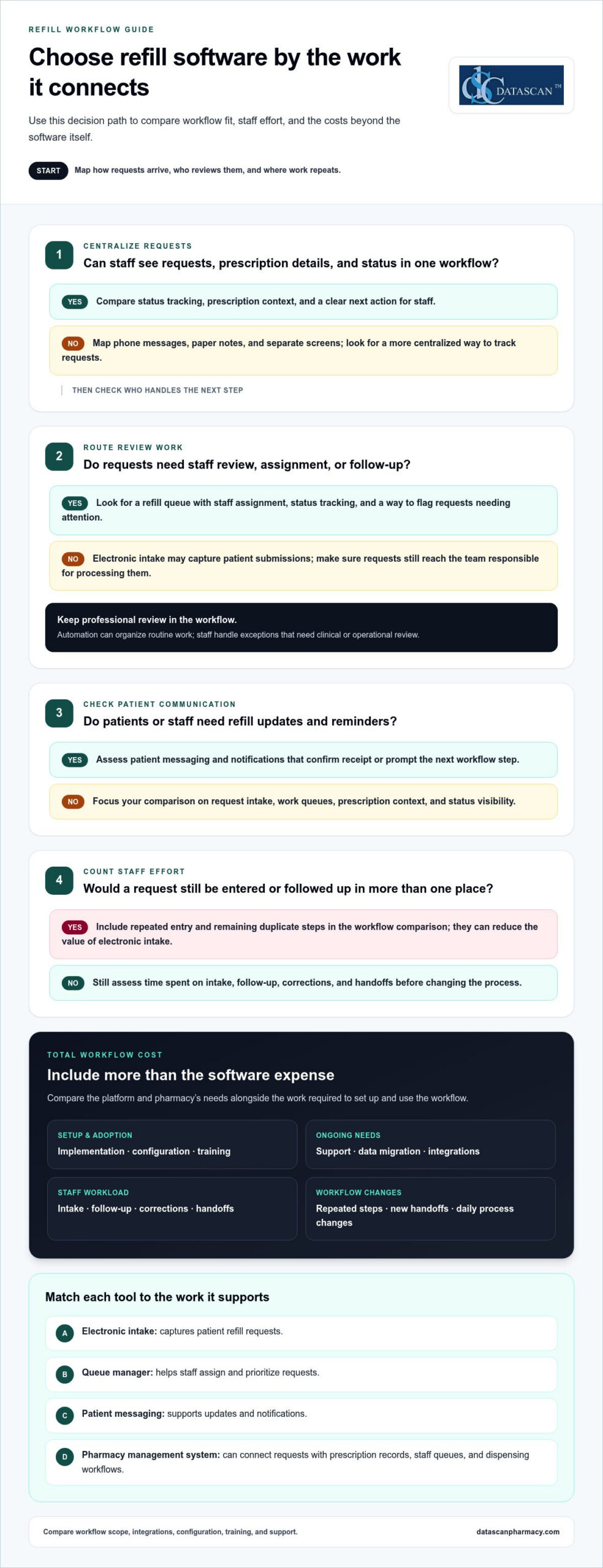
Centralized electronic refill management brings incoming requests, prescription details, and staff follow-up into one pharmacy workflow. Instead of tracking a request across phone messages, paper notes, and separate screens, staff can review its status, identify the next action, and route exceptions for attention. The goal is organized work, not the removal of professional review.
What are the best prescription refill management platforms for independent pharmacies?
Choose pharmacy management software with refill tools that fit your team’s workflow, along with a patient communication option for electronic requests. A good fit keeps requests and prescription records visible to the staff handling them, including requests that need follow-up.
What HIPAA and state privacy requirements apply to prescription refill software?
Medication apps that handle health data should comply with HIPAA standards and applicable health-data management and storage regulations. Pharmacy teams should also account for privacy rules in the states where they operate when setting access and information-handling procedures.
What features should prescription refill software include?
Look for electronic request intake, a refill work queue, prescription and patient context, status tracking, staff assignment, and patient notifications. A queue, for example, should show whether a request is awaiting review, being processed, or needs follow-up, so staff can see the next action.
Does prescription refill software integrate with pharmacy management systems and EHRs?
Integration depends on the platform and its supported connections. A pharmacy management system should share the information needed for its refill workflow; EHR integration depends on whether the systems support an appropriate exchange. Pharmacy management software can serve as the operational center for prescription workflows.
How does software automate refill reminders and patient notifications?
A reminder tool can use refill timing or request status to prompt a patient or staff member to take the next step. An electronic notice might confirm that the pharmacy received a request, while a work queue flags requests that still need staff review.
How can pharmacies implement prescription refill management software?
Start by mapping how requests arrive and who handles each step. Configure the queue, access, notification rules, and escalation path. Then test routine requests and exceptions with staff before rolling out the workflow across the pharmacy. Testing can reveal unclear handoffs and give the team a chance to adjust its process before issues affect daily work.
Are there prescription refill apps patients can use with U.S. pharmacies?
Yes. Patients can use pharmacy-linked mobile apps to submit refill requests or receive pharmacy notifications, where those functions are available. Connect the patient-facing process to the pharmacy’s internal workflow so requests reach the team responsible for processing them, rather than remaining in a separate channel.
Pharmacy management system: Organizes prescription records and refill work.
Patient mobile app: Gives patients an electronic route to submit requests and receive updates.
Notification tool: Prompts patients or staff about the next workflow step.
Pricing models and workflow costs
Compare refill systems by the work they support, not by a feature list alone. A basic electronic request tool may capture patient submissions, while a broader pharmacy management system can connect requests with prescription records, staff queues, and dispensing workflows. That distinction matters when a request needs review, clarification, or follow-up. Start by comparing your current process with the tasks a new system would change.
How do pharmacy refill management systems compare in features and pricing? Systems vary in request intake, queue management, patient messaging, reporting, and connections to pharmacy operations. Software costs depend on the platform and pharmacy’s needs. Compare workflow scope, integrations, configuration, training, and support when evaluating the total cost.
Separate software expenses from the staff time and workflow changes needed to use it. Account for implementation, training, data migration, ongoing support, and any duplicate steps that remain. If staff must enter a refill request into both a patient tool and the pharmacy system, for example, that repeated work can reduce the value of electronic intake.
Use this evaluation sequence before comparing proposals:
Map current work: Note how requests arrive, who reviews them, and where staff repeat entry or follow-up.
Match tools to tasks: Compare a patient request portal, messaging tool, work-queue manager, and pharmacy management system by the work each supports.
Assess staff effort: Track time spent on intake, follow-up, corrections, and handoffs before changing the workflow.
Review total scope: Include setup, training, support, and the integrations needed for medication management.
Each tool serves a distinct purpose. Electronic intake captures requests, a queue manager helps staff assign and prioritize them, patient messaging supports updates, and reporting can reveal recurring workflow bottlenecks. Clinical review remains important when a refill request raises a question about therapy or adherence.
To assess operational value, compare the work removed with the work added. Fewer phone-based intake steps can help, for instance, but only if staff can process app requests without re-entering the same information elsewhere. Follow the workflow from the patient’s first request through staff follow-up, noting each time-consuming handoff or source of duplicate work.
Use those findings to define the system requirements before reviewing options. A workflow discussion can help you frame the pharmacy’s priorities and evaluate how refill tasks fit into daily operations.
Use these findings to compare expected time savings with the labor and workflow costs of each option. Treat estimates as planning inputs, not guaranteed outcomes. Consider them alongside your assessment of the pharmacy’s actual workflow.
Adjusting prescription fill dates
Medication synchronization helps patients coordinate multiple prescriptions around one planned pharmacy visit each month. Pharmacy teams can use a medication management calendar and refill queue to identify prescriptions with different due dates, then coordinate eligible fills through the established workflow. This can reduce separate pickup trips without treating every prescription as interchangeable.
Start with the patient’s medication profile. Identify the prescriptions the patient wants to align, review their current fill timing, and mark the intended synchronization date. A calendar view helps staff see which prescriptions fit that date and which need separate review. Seeing the dates together is useful, but automatically changing every date is not.
A pharmacy can leave a prescription unenrolled on its first fill, then use a short-fill approach on a subsequent refill to synchronize it with the patient’s other prescriptions. If one medication’s refill timing falls out of step, for example, staff can consider a short fill during a later refill to align the schedule. Any adjustment should follow the pharmacy’s review process and applicable coverage details.
Medication synchronization tools: Group prescriptions by patient and target date, helping staff plan coordinated fills.
Refill calendars: Show upcoming dates and highlight prescriptions that may need alignment.
Work queues: Assign review tasks and keep exceptions visible instead of burying them in notes.
Patient communication tools: Explain the planned date and help patients understand which medications are included.
Keep the workflow clear. First, confirm the patient’s preferred pickup timing and the prescriptions they want coordinated. Next, review each medication’s refill status and identify dates that do not align. Route prescriptions that need a short fill or another decision to staff review. Finally, record the agreed schedule and communicate it to the patient. A defined sequence limits repeated data entry and unclear handoffs.
Synchronization also needs ongoing maintenance. If a prescription changes, a patient starts a medication, or a fill is delayed, review the schedule again. Staff can flag the affected profile in a refill queue, update the planned date, and notify the patient. Targeted follow-up is easier than rebuilding the entire schedule from scattered messages.
Assess the process by reviewing missed pickups, repeated date corrections, and staff follow-up tasks over time. If patients repeatedly arrive for only part of a synchronized set, check whether the calendar, communication, or queue handoff failed. These practical checks help pharmacies refine the workflow and keep medication timing visible to the team.
Avoiding refill-too-soon exceptions
A refill-too-soon exception is easier to resolve when the pharmacy can see the request, prescription history, and claim status together. Pharmacy management software can help staff identify what needs review, but an exception is not permission to bypass plan rules or dispense automatically. Keep it visible until the underlying issue is resolved.
Begin by comparing the recorded fill date with the new request. If a patient asks for a refill but the pharmacy record shows a recent completed transaction, confirm whether the request is a duplicate or the prescription record needs attention. A refill work queue can assign the task to a staff member instead of leaving it in an intake message.
Common workflow causes include:
Duplicate requests: A patient submits an app request after calling the pharmacy, creating two open tasks for one medication.
Outdated status: A prescription appears unprocessed in one screen even though its transaction has moved forward elsewhere.
Changed directions: A prescription’s recorded instructions differ from the current information being used to assess the request.
Unclear follow-up: Staff need information from the patient, but the request lacks an owner or next action.
A pharmacy platform can reduce avoidable exceptions by organizing the steps before claim submission. Use a structured intake form to capture the medication, patient request, and relevant notes. Then have staff compare the request with the prescription record and current workflow status. If details conflict, route the item for review instead of repeatedly resubmitting it.
Reminders can also prevent avoidable last-minute requests. A patient notification can prompt them to contact the pharmacy before they run out, while an internal task can flag a request that still needs action. Keep messages focused on the next step, such as contacting the pharmacy about a request, rather than implying a fill is guaranteed.
For a practical exception process, use these steps:
Review the alert: Open the exception and identify the medication and request details.
Check the record: Compare fill and transaction status with the submitted request.
Resolve the cause: Correct duplicate intake, clarify mismatched information, or follow the pharmacy’s established review path.
Document the outcome: Record the action and update the task so another staff member can see its status.
Track recurring causes in a simple exception report. If duplicate patient requests are common, refine the intake instructions. If outdated statuses recur, review how staff update transactions. Targeted changes can reduce repeat work while keeping each refill exception visible and accountable.
What software manages prescription refill requests for pharmacies?
Pharmacies use pharmacy management systems, patient request tools, and workflow software to handle prescription refills. For independent pharmacies, the system also needs to make reimbursement-related work visible. PBM reform may change the operating environment, but software cannot set reimbursement terms. It can help teams organize prescription and claim information, spot items needing review, and keep follow-up visible during busy daily operations.
A pharmacy management system can connect prescription activity with financial review. For example, a team can follow a consistent process to examine a refill-related claim, record its outcome, and identify recurring issues that need attention. This context can support conversations about PBM reimbursements by helping owners see operational patterns instead of relying on scattered notes or staff recollection.
Pharmacy management system: Keeps prescription workflows and related work visible to pharmacy staff.
Patient request tool: Collects refill requests through a patient-facing channel, which can reduce separate intake paths.
Claim review workflow: Helps staff organize reimbursement questions and route them for follow-up.
Reporting tools: Help owners review recurring issues and identify where more analysis is needed.
These tools address different needs. Patient-facing intake captures the request, the pharmacy system supports the prescription workflow, and a review process connects relevant claim concerns to the appropriate transaction. Coordinating these functions can help owners understand how prescription operations intersect with reimbursement pressures, without suggesting software can resolve PBM policy or contract terms on its own.
When assessing a platform, test a refill that raises a reimbursement question. Follow the transaction through staff review and see whether the relevant records and next steps are accessible. Consider whether the team can distinguish a routine refill task from one requiring financial review. That separation helps keep reimbursement work from getting lost among ordinary prescription tasks.
Use this evaluation sequence:
Identify the issue: Define the reimbursement question the pharmacy wants to track.
Trace the workflow: Find where staff can record and review the related claim information.
Assign follow-up: Make ownership and the next action clear to the team.
Review patterns: Use available reporting to guide internal analysis and reimbursement discussions.
For independent pharmacies looking to connect refill operations with broader financial workflows, discuss your pharmacy software needs with Datascan Pharmacy Software.
For an independent pharmacy, look for a pharmacy management system that works with a patient-facing refill request tool, claim review workflow, and reporting tools. Evaluate how well it tracks a refill-related claim, assigns follow-up, and separates routine refill tasks from items needing financial review.
Medication synchronization can also coordinate a patient’s medications to support adherence and improve pharmacy efficiency. State legislation and updated practice acts frequently recognize these expanded clinical services in connection with modern pharmacists’ practice authority.
Datascan Pharmacy Software offers the Datascan Pharmacy Management Software Suite for independent and community pharmacies seeking to organize prescription workflows. Its customizable workflow can shape refill tasks around how your team handles intake, review, and follow-up, rather than forcing every request through the same path.
For patient-facing refill communication, the MobileScripts Patient Mobile App lets patients view their history, send refill requests, and use two-way chat. Datascan Point of Sale (POS) and Datascan Mobile Delivery App support other pharmacy operations alongside prescription management. Together, these tools connect day-to-day tasks and give pharmacy owners more room to focus on patients and business decisions.
If your current refill process creates disconnected steps or extra staff work, explore whether the Datascan Pharmacy Management Software Suite fits your pharmacy’s needs. Contact Datascan Pharmacy Software or visit datascanpharmacy.com to learn more.
Make your next workflow change count
Choose one refill bottleneck to address first, such as repeated status checks or requests that stall between intake and review. Map who handles each step, what information they need, and where the handoff breaks down. This gives your team a practical way to assess whether software to manage prescription refills fits the workflow you want to improve.
Then define what a useful change would look like for your pharmacy. It might mean clearer task ownership, fewer duplicate entries, or more time for patient care and business decisions. Starting with a focused goal makes conversations about pharmacy management software more productive and helps you prioritize operational needs over a long feature list.
When you’re ready to discuss your pharmacy’s workflow, contact Datascan Pharmacy Software. Take the next step toward a refill process that gives your team greater clarity and control.
Frequently Asked Questions
Can refill management be fully automated?
No. Software can automate administrative steps, but staff review is still needed when a request involves a changed prescription, unclear patient information, or a question about therapy. For example, a patient might submit a routine request and later report that their directions have changed. The system can route the request for attention, while a qualified team member reviews the new information before processing continues.
What is prescription refill management software?
Software to manage prescription refills helps a pharmacy organize requests and related work from intake through completion. It may include staff-facing tools for sorting and assigning requests, alongside patient-facing options for submitting requests or receiving messages. For example, a patient app can collect a request, while the pharmacy’s internal system lets staff review its status and record follow-up.
What are the risks of automating prescription refill approvals?
Automated approvals can create problems if the system acts on outdated records, incomplete requests, or information that no longer matches the prescription. A request might move forward without staff noticing that the patient provided new details. Reduce this risk by limiting automation to suitable routine tasks, routing exceptions for review, and keeping a clear record of what the system processed and what staff changed.
A useful prescription refill reminder system starts early enough to leave time to request, process, and pick up medication. For standard prescriptions in the United States, set the first reminder 7-10 days before the last dose; allow 14 days for controlled-substance refills. Specialty or mail-order prescriptions may need 10-14 days.
A single reminder is easy to miss, especially when a refill needs a response or follow-up. A clear schedule and escalation plan help pharmacy teams prompt patients without adding unnecessary manual work.
This guide explains how to choose reminder timing, build follow-up workflows, protect patient privacy, and handle opt-outs. It also compares features to look for in refill reminder apps. About the author: The Datascan Pharmacy Software team focuses on pharmacy management solutions for independent and retail pharmacies.
Key Takeaways
Set refill alerts around the time patients need to act, allowing extra lead time for specialty or mail-order prescriptions.
Build a follow-up workflow for patients who don’t respond, and route unresolved refill issues to pharmacy staff.
Keep reminder messages discreet and limit patient information to what’s needed to prompt a refill.
Make opt-outs easy to record and honor across reminder channels.
Compare apps by how well they fit your pharmacy’s workflow, support patient communication, and surface refill issues that need attention.
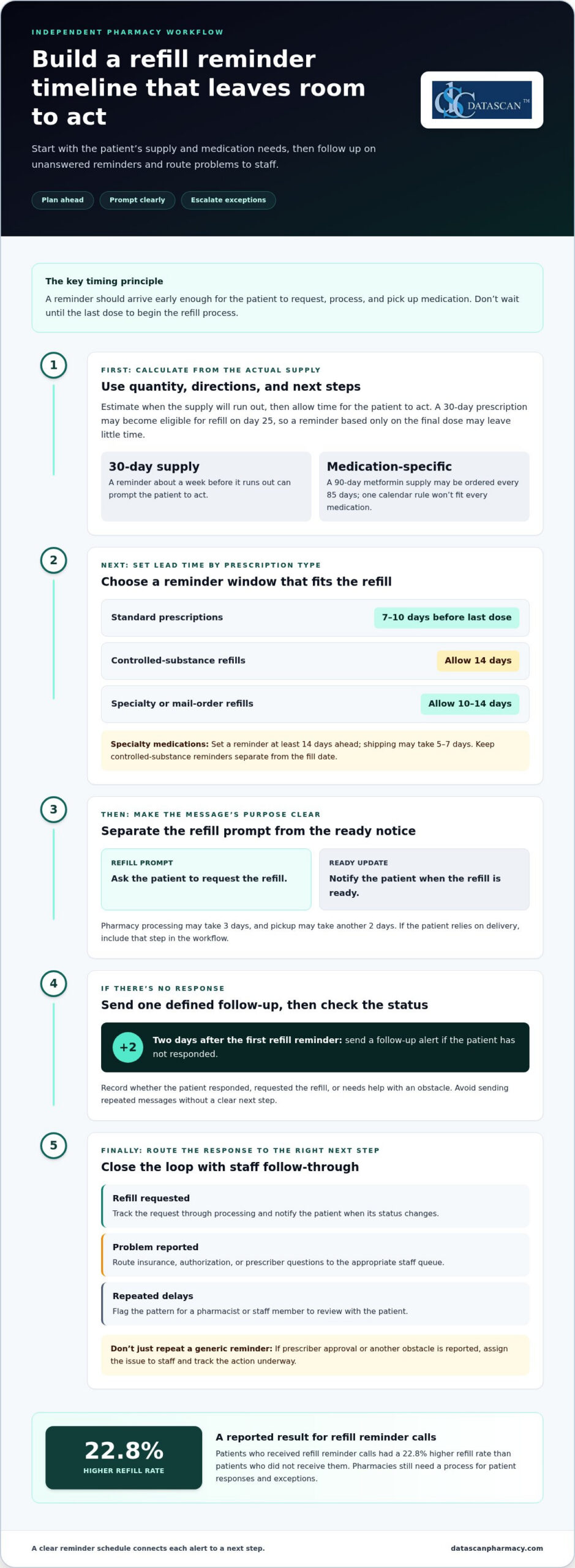
For standard prescriptions in the United States, a practical starting point is 7-10 days before the last dose. That interval gives patients time to request a refill and handle the steps before pickup. A 30-day prescription may become eligible for refill on day 25, so timing a reminder only around the final dose can leave little room to act.
Reminder schedules vary by purpose. A proactive pharmacy reminder may arrive a week before a 30-day supply runs out; another common practice is to send the first refill reminder about five days before the supply runs out. Pharmacy reminders can also arrive 2-3 days before a refill is ready. Separate the prompt to request a refill from the update that says it is ready.
Standard prescriptions: Use 7-10 days before the last dose as a starting point for a refill prompt.
Controlled-substance refills: Allow 14 days in the planning schedule, while keeping the reminder separate from the fill date.
Specialty medications: Set a reminder at least 14 days ahead; shipping may take 5-7 days.
Specialty or mail-order refills: Allow 10-14 days for the overall refill process.
Thirty-day supplies: A reminder a week before the supply runs out can prompt the patient to act.
Build the schedule around the medication quantity, directions, and next steps. Pharmacy processing may take 3 days, and pickup may take another 2 days. Those intervals illustrate why the last dose is a poor trigger for starting the refill process. For a caregiver coordinating treatment for a family member, an earlier prompt can provide time to arrange the request and pickup.
Use the actual supply and directions to estimate a useful reminder date. For example, a 90-day metformin supply may be ordered every 85 days. A 6-month birth control prescription can use reminders on January 15 and July 15. These examples show why a single calendar rule may not fit every medication.
Keep refill prompts distinct from clinical directions. A reminder should prompt a patient to request or collect medication, not suggest changing how they take it. If the patient relies on delivery, include that step in the workflow; an electronic delivery system can support that part of the refill journey.
2. Escalation workflows
Refill reminders can be missed, ignored, or mistaken for confirmation that a medication is ready. Treat each alert as a prompt to check the refill status, then route unanswered or unresolved cases to staff for follow-up.
A reliable escalation workflow defines what happens after each notification, so patients don’t receive repeated messages without a clear next step. Send a reminder, then record whether the patient responded, requested the refill, or needs help resolving an obstacle.
No response: Send a follow-up alert two days after the first refill reminder.
Refill requested: Track the request through processing and notify the patient when the status changes.
Problem reported: Route insurance, authorization, or prescriber questions to the appropriate staff queue.
Repeated delays: Flag the pattern for a pharmacist or staff member to review with the patient.
Keep the workflow tied to actionable events. If a patient says they need prescriber approval, another generic reminder won’t solve the problem. Mark the issue, assign it to a staff member, and use an appropriate channel to explain what action is underway.
Refill patterns can also signal that a patient needs a conversation rather than another alert. A patient who takes 45 or 50 days to refill a 30-day prescription may be missing doses. Staff can review the refill history, ask about barriers, and direct medication questions to the pharmacist instead of assuming the patient simply forgot.
Automation can reduce routine follow-up, but it shouldn’t replace staff judgment. An insurance authorization issue, for example, may not be caught by an auto-refill process. Choose a system that flags unresolved cases for review and tells staff what needs attention, so the issue doesn’t keep cycling through the queue.
Measure workflow performance through operational signals, such as unanswered alerts, unresolved refill requests, and recurring barriers. Patients who received refill reminder calls had a 22.8% higher refill rate than patients who didn’t receive them. That finding supports consistent follow-up, while each pharmacy still needs a process for exceptions and patient responses.
For independent pharmacies, a customizable workflow can connect reminders with staff tasks and reduce manual tracking. Map each message to a next action, define who handles exceptions, and review the queue routinely. If you’re refining refill follow-up processes, discuss your pharmacy workflow with the team.
3. HIPAA and communication privacy
HIPAA generally treats communications about refilling existing prescriptions as part of a patient’s treatment. The U.S. Department of Health and Human Services explains that covered entities may use or disclose protected health information for treatment without patient authorization. For refill reminders by text or phone, the practical focus is to follow privacy best practices and disclose only what the message needs to say.
Start with the patient’s recorded contact details and communication preferences. Before sending an automated text, follow your pharmacy’s process to confirm the number belongs to the intended recipient. Shared family phones, outdated numbers, and lock-screen previews can expose a message to someone else, even when it’s sent to the number on file.
Keep messages discreet: “Your prescription may be ready for refill. Contact us to request it” avoids naming the medication.
Limit sensitive details: Leave out diagnoses, treatment history, and a doctor’s name from routine reminders.
Respect channel preferences: Use the patient’s recorded choice for text or phone communication.
Restrict access: Give reminder records only to team members who need them for refill work.
Route clinical questions: Move questions about medication or treatment to an appropriate conversation with pharmacy staff.
Medication adherence involves more than receiving an alert. A patient may reply that a doctor changed the treatment or that an appointment is needed before a refill. Don’t let an automated sequence treat that reply as a routine request. Pause reminders, record the issue in the appropriate workflow, and direct the patient to the right pharmacy contact.
Privacy also depends on what happens after a message is sent. Establish a process for correcting a wrong number, updating communication preferences, and stopping messages to a contact who no longer manages the patient’s prescriptions. If a family member says they no longer coordinate refills, for example, update the record through the pharmacy’s established process before sending further reminders to that contact.
Review the communication process from message creation through reply handling. Identify who can edit reminder text, where replies appear, and how staff handle a response from the wrong recipient. Concise messages, limited access, and clear follow-up help protect patient information while keeping refill communication useful.
4. Patient opt-outs and TCPA
The Telephone Consumer Protection Act can apply to certain reminder calls or texts, and patients should have the option to opt out. Make that option easy to find, record, and honor throughout the pharmacy’s reminder program. A clear process also helps staff distinguish a request to stop messages from a refill request that still needs attention.
Include clear opt-out instructions in the text message or call flow. For example, a text can tell patients how to stop future refill reminders. Use direct wording that matches the channel they received, and don’t bury the option in a long message about a prescription or treatment.
Build opt-out handling into the daily workflow rather than relying on memory. When a patient asks to stop reminders, staff should record the request in the appropriate communication preference and ensure future reminders reflect it. Give staff a consistent way to capture requests made by phone or at the counter, too.
Capture the request: Record the patient, the channel, and the date the opt-out was received.
Update preferences: Apply the change to the relevant reminder program, not just the message thread.
Stop the right alerts: Identify whether the patient wants to stop texts, calls, or refill reminders through a specific channel.
Preserve other service needs: Keep the refill record active so staff can still handle a patient-initiated request.
Review exceptions: If a patient’s request is unclear, route it to staff rather than sending another automated message.
If a patient replies “stop” to a refill text, the workflow should register the opt-out before the next scheduled notification while retaining prescription information needed for pharmacy operations. If a family member contacts the pharmacy, staff should clarify whose communication preference is changing before updating the patient’s record.
Keep channel preferences distinct. A patient may want to stop text reminders but still accept a phone call, or may prefer to contact the pharmacy themselves. Record the specific choice instead of treating one opt-out as a change to every communication setting. Review the process whenever reminder templates or channels change.
Test the process with a sample message and a staff-handled request. Confirm that the opt-out instruction is visible, the request reaches the right workflow, and later alerts follow the recorded preference. A prescription refill reminder system should make opt-outs manageable without turning a patient’s choice into a missed refill task.
U.S. pharmacies fill an estimated 110 million prescriptions each year that patients never pick up. About half of U.S. patients with chronic conditions do not take their medications as directed. These figures underscore why reminder programs need to respect a patient’s communication choices while keeping a path open for patient-initiated help. An opt-out should stop the selected reminders, not prevent someone from contacting the pharmacy or receiving assistance with a refill they request.
Routine reviews can help staff confirm that recorded preferences are being followed and patients know how to reach the pharmacy without automated reminders. Clear procedures support respectful communication without assuming that every missed pickup or medication concern calls for another message.
5. Prescription refill reminder apps
Refill apps can help patients track upcoming prescriptions, while pharmacy reminders prompt them to request a refill. Compare tools by their purpose, message options, privacy controls, and ability to flag cases that need staff follow-up.
What types of prescription refill reminders are available, such as text, app, phone, or email? Pharmacies may send reminders by text or phone, while apps can display medication alerts on a smartphone. Email may also be available, depending on the service and the patient’s preferences.
How do pharmacy refill reminders compare with pill reminder apps and caregiver alerts? Pharmacy reminders focus on requesting or coordinating a refill; a pill reminder app prompts patients to take scheduled doses. Caregiver alerts can help family members notice missed tasks, but they don’t replace pharmacy processing or clinical guidance.
How much do prescription refill reminder services and apps cost? There’s no single standard price. Costs depend on whether the tool is a patient app or pharmacy service, its features, and any integrations or user plans. Compare what each option includes, such as refill prompts, dose reminders, and caregiver access.
What information is needed to enroll in prescription refill reminders? Patients typically need to identify themselves, provide contact details, and select the prescription or pharmacy service involved. Before receiving patient-related notifications, a caregiver should also be identified in the appropriate workflow.
Can prescription refill reminders handle insurance limits, prior authorization, and refill-too-soon rules? Reminders can prompt action, but they don’t resolve coverage limits or authorization requirements. Choose a workflow that flags these issues for pharmacy staff instead of treating every delayed refill as a missed patient response.
Medication reminder apps and pharmacy tools serve different needs. A pill app may let patients record doses or track a measure such as blood pressure, while a pharmacy workflow focuses on refill status and requests. Choose based on the task the patient needs help completing.
Evidence suggests reminders can support adherence, though results depend on consistent use. In a 2019 study, patients using medication reminder apps had better adherence after 3 months than patients who didn’t use the apps. In a 2017 study, daily text reminders over 2 weeks reduced reported forgetting from 46% to 5% and medication delays from 85% to 18%.
Before choosing an app, compare how it handles refill prompts, dose schedules, caregiver access, and patient responses. Check whether it tracks refill tasks separately from doses already taken. For help comparing pharmacy technology workflows, discuss your pharmacy’s needs.
In 2023, 98 million new prescriptions were abandoned in the United States. That figure highlights why refill prompts should make the next step clear, rather than merely announce that a prescription is due. Patients may need to know whether to contact the pharmacy, confirm a request, or ask staff about a delay. A reminder system is most useful when it supports that follow-through and leaves unresolved coverage or authorization questions for the pharmacy team. Patients should still seek clinical guidance when unsure whether to continue or change a medication.
Datascan Pharmacy Management Software gives independent and community pharmacies a platform for managing core operations. If refill coordination involves disconnected tasks or adds to staff workload, pharmacy management software can help bring workflows into a more organized process.
Datascan Pharmacy Software also offers Datascan Point of Sale (POS), the MobileScripts Patient Mobile App, and the Datascan Mobile Delivery App. These tools support pharmacy management, point-of-sale operations, patient mobile access, and delivery workflows. Choose tools that fit the operational challenge rather than expecting a reminder app to handle every part of prescription management.
To discuss how Datascan Pharmacy Management Software can fit your pharmacy’s workflow, contact Datascan Pharmacy Software.
Make your next workflow decision with confidence
Before changing tools, map one refill journey from the patient’s first request to the pharmacy’s final handoff. Note where staff switch systems, repeat data entry, or pause other work. This gives your team a practical starting point for deciding whether a prescription refill reminder system fits existing operations or would add another disconnected task.
Choose a workflow to improve, agree on what a smoother process should look like, and involve the staff who handle it every day. Then explore how Datascan Pharmacy Management Software and related pharmacy tools could support that operational goal. Contact Datascan Pharmacy Software to discuss your pharmacy’s needs and take the next step toward a more manageable workflow.
Independent pharmacies can keep moving forward with solutions shaped around their day-to-day work.
Frequently Asked Questions
What is a prescription refill reminder system and how does it work?
A refill reminder helps patients notice when a prescription may need attention and prompts them to take the next step. A pharmacy or app may send a message directing the patient to request the refill or contact the pharmacy. Unlike a dose alarm, it focuses on the refill process, not reminders to take each dose. Patients should continue to follow their prescription directions.
Which pharmacies and medication management apps offer refill reminders in the United States?
Pharmacies may send refill reminders by text or phone, while medication management apps can provide smartphone alerts. A prescription refill reminder system may be built into a pharmacy’s patient app or communication workflow. Enrollment steps vary. Start with the pharmacy that fills the prescription and ask whether its app includes refill alerts alongside dose-tracking tools.
How do I set up automatic refill reminders with a pharmacy or health app?
Ask your pharmacy how to enroll in notifications, or open your health app’s medication settings and add the prescription. Confirm the medication, contact method, and reminder preference, then make sure the app has current information. A prescription refill reminder system depends on accurate contact and prescription details to send useful prompts. If your phone number changes, update it with the pharmacy and in the app.
How do HIPAA and privacy rules apply to pharmacy refill reminder texts and calls?
HIPAA generally treats communications about refilling existing prescriptions as part of treatment, so special authorization is generally not needed for reminders by text or phone when privacy best practices are followed. Patients can reduce accidental disclosure by checking message previews and keeping contact details current. Pharmacies should use discreet wording and follow recorded communication preferences, especially when a phone is shared with a family member.
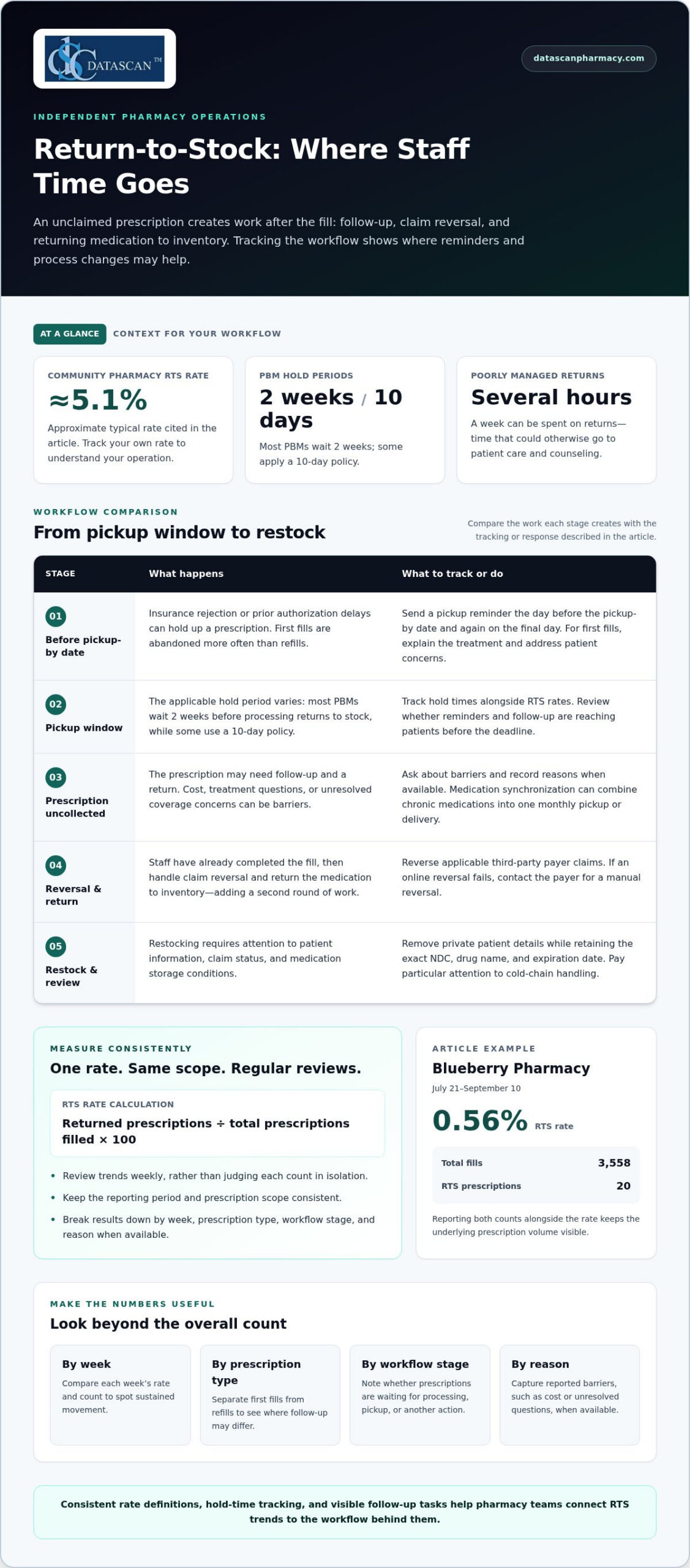
An unclaimed prescription can cost a pharmacy twice: staff fill it, then handle the claim reversal and return it to stock. A pharmacy return to stock (RTS) occurs when a prescription isn’t picked up or delivered within the applicable hold period; reducing return-to-stock rates in pharmacy starts with understanding both that workflow and the time it consumes. Most PBMs wait 2 weeks before processing returns to stock, while some apply a 10-day policy.
For independent and community pharmacies, those repeat tasks compete with patient care and the daily work of running the business. The typical community pharmacy’s return-to-stock rate is approximately 5.1%, but tracking your own rate and hold times can reveal where prescriptions are being left behind.
This article explains what RTS means, how returns use staff time, and how to assess their operational costs and trends. You’ll learn how to monitor return rates and hold times, and how workflow technology can make the process easier to track and manage.
Key Takeaways
Define a consistent return-to-stock rate so you can compare performance across reporting periods and spot meaningful changes.
Break trends down by prescription type and workflow stage to identify where unclaimed medications are accumulating.
Assess the operational impact by including staff tasks and inventory tied up in returned prescriptions, not just the prescription count.
Track hold times alongside return rates to see whether pickup reminders and workflow adjustments are reaching patients in time.
Look for common reasons prescriptions go uncollected, then tailor patient outreach to address barriers such as cost or treatment questions.
Each return-to-stock prescription creates work beyond the original fill, from patient follow-up and claim reversal to inventory handling. Tracking each step shows where the workflow takes time and where a change could help.
The most effective ways to reduce returns include timely pickup reminders, clear conversations with patients, and medication synchronization. Automated messages, text alerts, or personal calls can let patients know when prescriptions are ready.
Insurance rejections and prior authorization delays can hold up a prescription before the patient receives it. If approval or coverage questions remain unresolved as the pickup deadline approaches, the prescription may go uncollected and require return-to-stock processing.
Workflow changes can reduce unclaimed prescriptions by making follow-up tasks visible and consistent. Staff can prioritize unresolved prescriptions, ask patients about barriers, and discuss medication concerns, including its purpose, side effects, or effectiveness.
Staff Time in Return-to-Stock Workflows
A return-to-stock workflow covers the staff work needed to reverse an uncollected prescription and restore its medication to inventory. Each affected prescription can double the handling work: staff complete the fill, then process the return. Poorly managed returns can take several hours a week, time that could otherwise go to patient care, counseling, and adherence support.
Patient outreach can prevent some returns before staff begin the reversal process. Send a pickup reminder the day before the pickup-by date and another on the final day. For first fills, staff can explain the treatment and address patient concerns. First fills are abandoned more often than refills, so clear communication when treatment begins can make a difference.
Restocking Risks for Medications
Restocking risks include mishandled patient information, incomplete claim reversals, and medication stored outside required conditions. Remove private patient details from the label while retaining the exact NDC, drug name, and expiration date. Reverse applicable third-party payer claims. If an online reversal fails, contact the payer for a manual reversal.
Cold-chain handling needs particular attention. Recommended refrigerator storage for medications is 2°C to 8°C (36°F to 46°F); room-temperature storage is 20°C to 25°C, with excursions allowed between 15°C and 30°C. Many regulatory frameworks prohibit controlled substances from being returned to stock at retail pharmacies. The U.S. Drug Enforcement Administration classifies certain products strictly; pharmacies must include all controlled substances in inventory conducted according to federal and state standards.
For prescriptions returned after delivery, reuse may be possible when the pharmacy’s own staff or local delivery service attempted delivery. For prescriptions returned after delivery, packaging and prompt return can affect whether medication may be reused. The delivery route and packaging therefore matter to the return decision, not just the prescription status.
Staff can also support adherence by identifying why a prescription remains uncollected. A higher copay may make a patient more likely to leave a prescription behind. Medication synchronization can combine chronic medications into one monthly pickup or delivery, reducing separate collection tasks for patients and pharmacy staff.
Analysis of RTS trends
Review return-to-stock (RTS) trends weekly rather than treating each count in isolation. Regular reviews show whether rates are rising, falling, or holding steady. Compare the same measures across periods and investigate changes before they become routine. A single busy day can distort the picture; recurring weekly patterns offer a stronger basis for operational decisions.
Use one consistent calculation: divide returned prescriptions by total prescriptions filled, then multiply by 100. Keep the reporting period and prescription scope consistent. For example, don’t compare a week of all prescriptions with a week containing only chronic medication. Consistent definitions help staff interpret results and judge whether a process change affected the rate.
A Blueberry Pharmacy example shows how a numerator and denominator clarify a trend. Between July 21 and September 10, it recorded 3,558 total fills and 20 return-to-stock prescriptions. Its RTS rate for that period was 0.56%. The example illustrates how to report both the rate and underlying counts, so a percentage doesn’t hide the number of prescriptions involved.
Pair the overall rate with practical breakdowns. These views help staff connect a trend to a workflow or patient group:
By week: Compare each week’s rate and count to spot sustained movement.
By prescription type: Separate first fills from refills to see where follow-up effort may differ.
By workflow stage: Note whether prescriptions were waiting for processing, pickup, or another action.
By reason: Record patient-reported barriers, such as cost or unresolved questions, when available.
Returned prescriptions can contribute to overstock and fewer inventory turns, tying up money in medication. Record whether repeat returns involve the same items or follow a particular pattern. Inventory software can organize records for review, while staff observations add context that counts alone cannot provide. A recurring item may warrant a closer look at purchasing and prescription activity.
Trend reviews can also support proactive patient care. A rise in returns for a medication used to manage a chronic disease may prompt staff to examine communication and pickup patterns. The data does not establish why a patient did not collect a prescription, but it can show where a conversation may help. Record the action taken alongside later weekly results, then assess whether the trend changes.
When reducing return-to-stock rates in pharmacy, interpret each change alongside relevant operational context, such as unusual prescription volume or a shift in the patient mix. This helps distinguish a meaningful pattern from a temporary fluctuation, without treating the rate alone as an explanation.
Consistent, complete records are essential to reducing return-to-stock rates in pharmacy. Missing return reasons or inconsistent prescription categories can distort comparisons. Document exceptions clearly and use the same definitions in every reporting period.
Measuring return-to-stock costs
Return-to-stock prescriptions affect revenue when the pharmacy reverses the related claim and the patient never receives the medication. Reversal helps prevent payment for an unreceived prescription, but staff time, inventory tied up, and handling still consume resources.
Start with a defined review period, such as one week, and record each returned prescription. For every return, capture the tasks involved: locating the prescription, contacting the patient, reversing the claim, removing patient details, and restoring the medication to inventory. Use the same task categories each period to compare workload fairly.
Measure labor in minutes rather than relying on a general impression. For example, record the time spent on each return during a staff shift, then total those minutes for the review period. Pharmacy leaders can use their own labor-cost method to estimate staff expense. Keep that calculation separate from medication acquisition cost, since the item may later be dispensed to another patient.
Track inventory impact separately. A returned medication can contribute to overstock and reduce inventory turns, leaving money tied up in stock. Record the drug, quantity, return date, and whether the item is dispensed again, remains on hand, or cannot be sold. Some returned medication cannot go back to the wholesaler or be sold unless another prescription for the same item arrives.
Staff effort: Track handling and follow-up time for each return.
Claim activity: Record whether the third-party claim was reversed and whether manual follow-up was needed.
Inventory status: Note whether the medication returns to usable stock or remains unsold.
Delivery handling: Separate delivery returns from pickup returns, since packaging and return timing affect whether medication can be reused.
For a simple example, compare two weeks with different return counts. If the second week has fewer returns but more staff minutes per return, the count alone hides the labor trend. Reviewing both measures helps show whether a new message, workflow change, or follow-up practice reduced the total effort.
Connect the cost review to reimbursement records without treating every reversed claim as a lost payment. A claim reversal removes the payment request for medication the patient did not receive. The operational concern is the work needed to complete the reversal, plus stock that may remain unused while the pharmacy waits for another prescription.
Finally, separate clinical follow-up from financial measurement. Note when a patient raises a copay concern, side-effect question, or delivery issue, then compare those reasons with later return patterns. This helps the pharmacy see which changes may support pickup and which costs arise from inventory or repeated processing.
Monitoring RTS rates and hold times
Track each prescription from ready status through pickup, delivery, or return to stock. Record when it became available, the applicable payer deadline, and its final disposition. This timeline helps staff see whether prescriptions are reaching patients before claim reversal becomes necessary.
U.S. pharmacies should follow their state board of pharmacy regulations and the applicable PBM’s return-to-stock time limits. No single hold period applies across every payer and state. Keep the relevant deadline visible in the prescription record so staff can act on the specific prescription rather than rely on a general rule.
The average RTS rate is a reference for comparison, not a target every pharmacy must meet. Calculate a useful local measure by comparing returned prescriptions with total fills over the same reporting period. Keep the numerator and denominator with the rate, since changes in prescription volume can make percentages harder to interpret on their own.
Build a monitoring view that separates each prescription’s status and deadline. Include the fields staff need to act:
Ready status: The date the prescription became available to the patient.
Applicable deadline: The payer’s pickup or delivery limit for that prescription.
Current status: Whether it remains awaiting pickup, is arranged for delivery, or has been received.
Final disposition: Whether the medication was collected, delivered, or returned to stock.
Prescriptions left in a pharmacy bin for more than 10 to 14 days can create business issues. An aging queue can occupy counter space and make it harder to identify prescriptions that need timely follow-up. Use a status view to distinguish items nearing their deadlines from prescriptions already past them, then assign the next action to a staff member.
PBM return-to-stock time limits help prevent payment for medications patients never received. Compare each prescription’s recorded outcome with its claim status. Review the related claim activity for prescriptions marked returned, and match completed pickups or deliveries with the final status.
Separate hold-time results by payer and pickup or delivery method. A longer interval may reflect a different payer deadline, a patient scheduling issue, or an unresolved delivery arrangement. Keeping these categories distinct gives pharmacy leaders a more useful view than one average hold time.
Automated reports can flag incomplete records, such as prescriptions without a final disposition or claim status. Assign staff to resolve those exceptions, then confirm that the record reflects what happened. Reliable monitoring depends on consistent entries, clear responsibility, and timely action on prescriptions approaching payer deadlines.
What causes prescriptions to be returned to stock at U.S. pharmacies?
Prescriptions are usually returned to stock when patients do not pick them up or receive them before the applicable deadline. PBMs set time limits for pickup or delivery. Once the limit passes, the pharmacy must reverse the claim and return the medication to inventory.
Cost is a common barrier. Patients may be more likely to leave a prescription unpicked when its copay is higher. For example, a patient who expected a lower copay may delay pickup while deciding whether they can afford the medication. Without a conversation about cost, the pharmacy may not learn why the prescription remains uncollected.
Coverage problems can also stall a prescription. An insurance rejection may require staff to investigate eligibility, billing details, or covered alternatives before the patient can obtain the medication. Prior authorization delays can keep a prescription from being ready for pickup while approval is pending. If the issue persists near the PBM deadline, the prescription may ultimately be returned to stock.
Unresolved coverage: A rejection or pending authorization interrupts the path from prescription processing to pickup.
Unexpected copay: A patient may postpone collection after learning the out-of-pocket amount.
Missed communication: A patient may not see or respond to a ready-for-pickup notice.
Pickup or delivery friction: A schedule change or delivery coordination problem can prevent the patient from receiving the medication in time.
Treatment questions: Concerns about side effects, effectiveness, or starting a new medication may lead a patient to wait.
Give first fills particular attention because patients abandon them more often than refills. Starting a new therapy can raise questions about its purpose, use, or possible effects. A pharmacist’s conversation can surface those concerns and help the patient understand the treatment. A reminder may be enough for a refill, while a first fill may call for a more direct check-in.
Operational gaps can compound these causes. A ready notice sent too early, a missed follow-up task, or unclear delivery status can leave a patient unsure about the next step. Review each return reason and distinguish patient barriers from workflow delays. For instance, repeated returns after unresolved coverage issues call for a different response than missed pickup messages.
Record each return reason when staff learn it rather than assigning every case a generic “not picked up” label. Separate cost, coverage, patient questions, and pickup or delivery barriers. This gives the pharmacy a practical basis for choosing outreach, resolving prescription issues, or adjusting its follow-up routine.
Frequent return-to-stock prescriptions may point to adherence concerns and affect pharmacy performance. Each affected prescription adds a second round of handling work. Pharmacy software systems can track claim reversals, helping staff review whether they are completed correctly.
When returning a prescription to stock, pharmacies should remove private patient information from its label while retaining the exact NDC, drug name, and expiration date. Blueberry Pharmacy recorded a return-to-stock rate of 0.56% for prescriptions filled between July 21 and September 10. First fills may warrant extra treatment education.
Datascan Pharmacy Software’s Datascan Pharmacy Management Software can help pharmacies coordinate prescription operations in one workflow. The platform supports pharmacy management, and its customizable workflow can be aligned with how your team handles daily tasks.
Consider pharmacy management software when return-to-stock reviews reveal friction between prescription processing, patient communication, and follow-up. A clearer workflow can help staff manage competing responsibilities and make operational patterns easier to address. Datascan’s pharmacy tools also include the MobileScripts Patient Mobile App and Datascan Mobile Delivery App.
To discuss how Datascan Pharmacy Management Software can fit your pharmacy’s workflow, contact Datascan Pharmacy Software.
Make RTS monitoring part of your routine
A disciplined approach to reducing return-to-stock rates in pharmacy turns hold-time data into a practical operating habit. Assign someone to review results, discuss recurring barriers with the team, and use the findings to refine patient communication and workflows. Deliberate adjustments help staff learn from each reporting period instead of treating returns as isolated events.
Technology can support this work by connecting pharmacy operations with patient-facing tools. Datascan Pharmacy Software offers Datascan Pharmacy Management Software, Datascan Point of Sale (POS), and the MobileScripts Patient Mobile App. Consider how these tools fit your pharmacy’s priorities as you plan your next workflow improvement.
Ready to discuss your pharmacy’s needs and possible next steps? Contact Datascan Pharmacy Software. Your team can keep building a more visible, manageable process, one informed change at a time.
Frequently Asked Questions
What’s a Pharmacy Return to Stock (RTS)?
A pharmacy return to stock (RTS) is a prescription prepared for a patient but not picked up or delivered, then returned to inventory after required processing. In pharmacy records, distinguish an RTS from a prescription stopped before filling: the RTS record tracks a prescription that reached the ready stage. For controlled-substance guidance relevant to pharmacy operations, consult the Drug Enforcement Administration’s official diversion resources.
Which pharmacy software or analytics tools help track and reduce return-to-stock rates?
Look for pharmacy management software or analytics tools that can report prescription status, return outcomes, and patient communication activity together. A useful report should let managers filter results by date range, payer, and prescription category, then export or review exceptions for follow-up. Datascan Pharmacy Management Software includes an adherence dashboard and automatic patient communication, helping teams connect operational tracking with patient outreach.
About the author: Datascan Pharmacy Software publishes information about pharmacy management software and independent pharmacy operations.
Improving prescription pickup workflow starts with making the work visible and clarifying who owns each handoff. That helps teams spot why patients arrive before prescriptions are ready and where staff are repeating status checks, rather than simply asking everyone to move faster.
If pickup interruptions pull your team away from dispensing and patient care, a predictable process can help reduce avoidable delays without making speed more important than accuracy or service. The first step is to trace delays back to where they begin, not just focus on the wait at the counter.
This guide shows how to map staff handoffs, build a repeatable pickup process, and identify where technology can reduce manual coordination. Pharmacy management software and customizable workflow tools can help independent pharmacies organize work around their own processes. The goal is a more dependable pickup experience that gives your team more room to focus on patient care.
Key Takeaways
Trace pickup delays from patient arrival back to prescription readiness and staff handoffs to find where bottlenecks begin.
Map each step across counter and drive-thru pickup to clarify shared tasks, channel-specific steps, and ownership.
Improve coordination by removing avoidable waits and clarifying staff roles, not by skipping accuracy checks or patient-care steps.
Test one change at a time and review practical measures, such as repeat lookups or status inquiries.
Use pharmacy management software and customizable workflow tools to support coordination while keeping staff judgment central.
What makes prescription pickup workflow break down in independent pharmacies?
Prescription pickup workflow is the sequence connecting prescription readiness, patient arrival, required verification, the medication handoff, and completion of the pickup. A delay at the counter may begin earlier, when readiness is unclear, an update doesn’t reach the right person, or the next step has no clear owner.
The visible wait isn’t always where the problem started. A team can protect time for accurate processing and patient care while removing avoidable pauses, such as searching for a prescription with an unclear status or repeating a check because information wasn’t passed along. Improving the workflow means addressing those process gaps, not rushing work that requires professional attention.
Where do prescription pickup delays usually begin?
Look upstream from the pickup counter. Common sources include unclear readiness, incomplete communication, repeated searches, and competing staff responsibilities. Because pharmacy work includes dispensing and patient care, pickup depends on coordinated steps across the team, not only the moment a patient arrives.
For example, a patient arrives while a technician is helping someone else. A colleague checks the prescription, but the available information doesn’t show whether it’s ready or who owns the remaining work. The delay appears at pickup, but the cause may be an earlier status update or an unassigned task. Trace the sequence before changing the counter routine.
Why do clear handoffs matter at pickup?
As work moves between dispensing, support, and pickup staff, responsibility can become unclear. If each person assumes someone else will share a status change or handle the next step, work can stall. AHRQ’s Patient Safety Network identifies handoffs as points where clear communication matters for continuity; its overview of handoffs and signouts offers relevant context for designing reliable transitions.
Define each handoff plainly: who passes the work, what information the next person needs, and who takes responsibility for moving it forward. When a prescription moves from dispensing toward pickup, make the next role and required status clear. Predictable coordination helps staff serve patients without encouraging rushed checks.
Independent pharmacies can use a workflow map to identify gaps across counter and drive-thru service, then align responsibilities with the steps staff actually perform. Datascan customizable workflow tools support processes designed around a pharmacy’s needs, helping structure coordination while leaving professional judgment with pharmacy staff.
How should a pharmacy map the prescription pickup workflow?
Map pickup from patient arrival or notification through the final handoff. For every step, record its owner, the status needed to proceed, and any friction. Include counter and drive-thru service so the map reflects how work moves across the pharmacy, not just through one channel.
What stages belong on a prescription pickup workflow map?
Start with the patient-facing journey, then add the staff actions behind it. Focus dispensing details on the status needed at pickup, and connect those steps to your pharmacy management software, which supports the broader prescription workflow.
Arrival or notification: Record whether the patient arrives at the counter, uses the drive-thru, or contacts the pharmacy about pickup.
Locate the prescription: Note who finds it and what status confirms it is ready to move forward.
Complete required checks: Identify the responsible role and the information needed before pickup can proceed. Keep required checks intact.
Handle payment or POS: Show where payment or point-of-sale steps fit, and who handles questions or exceptions.
Hand off the prescription: Record who provides it to the patient and what needs to be communicated during the handoff.
Complete pickup: Define how staff recognize that the transaction is finished and assign any remaining follow-up.
Some steps are shared across channels, such as confirming readiness and completing required checks. Others differ: counter pickup involves an in-person queue, while drive-thru work includes receiving and serving patients at the window. Map the channels side by side and mark each point where staff need a status update before the next role can act.
Use a simple working template. Add a row for each stage, then fill in the owner, the status needed, the friction observed, and a possible improvement.
Stage
Owner
Status needed
Friction point
Proposed improvement
Locate prescription
Assigned role
Ready or needs attention
Repeated lookup
Clarify status and handoff
Patient handoff
Pickup role
Checks complete
Unclear next step
Define handoff ownership
How can a team identify recurring pickup bottlenecks?
Observe representative shifts at both service points and note repeated questions, rework, and waiting points. Ask staff which handoffs most often need clarification or a second lookup. Existing operational records can add context; use your pharmacy’s own patterns rather than imposing an unsupported benchmark.
As the team maps each step, improving prescription pickup workflow becomes a practical exercise in spotting where work pauses and making ownership visible. Keep the map simple enough for staff to use, and update it when the actual process changes.
How can pharmacies improve pickup speed without compromising accuracy?
Improve pickup speed by removing avoidable pauses, clarifying staff responsibilities, and making information easier to use at each step. Don’t speed up required prescription checks or patient-care conversations. Faster coordination means less idle time between tasks, not faster clinical or safety checks. Give those checks the attention they require.
Choose an intervention based on the friction you observe. A written handoff may address uncertainty about who acts next, while a process change may eliminate an unnecessary repeat lookup. Pharmacy management software can support connected operational workflows, but the pharmacy’s process design should determine what needs coordination, and staff judgment should guide each patient interaction.
Intervention
Suitable bottleneck
Expected workflow effect
Watch-out
Clarify handoff ownership
Staff aren’t sure who handles the next step
Makes responsibility and the next action easier to identify
Keep role expectations clear when the usual owner is occupied
Standardize status communication
Repeated questions or searches for prescription status
Helps staff locate relevant information with less back-and-forth
Don’t treat a status update as a substitute for required checks
Define an exception path
Unusual cases interrupt the usual pickup sequence
Gives staff a consistent way to route work that needs attention
Allow for individual circumstances rather than forcing every case into one path
Align workflow tools with the process
Manual coordination makes handoffs harder to follow
Supports a workflow designed around the pharmacy’s operations
Technology should support staff, not make decisions in their place
Which workflow changes reduce avoidable waiting?
Make the next action clear at each transition. Staff should know who receives a task and what information signals that it can move forward. If team members repeatedly check the same status, review whether the information is easy to locate and communicated consistently. For exceptions, define how staff route the case for attention while preserving the flexibility to handle individual needs.
When can pharmacy management software support pickup coordination?
Software is useful when the team needs a more structured way to support its operational workflow. First decide what the process requires, then consider how pharmacy management software and customizable workflow tools fit that design. Datascan’s pharmacy workflow optimization software supports this approach: align workflow tools with the pharmacy’s chosen processes rather than expecting technology to replace staff judgment. Improving prescription pickup workflow is a deliberate operational effort, not a push to rush every transaction.
How can a pharmacy test and refine a better pickup process?
Test one change at a time: choose a specific friction point, trial a practical adjustment, gather staff and patient feedback, then refine the process based on what happened. Use a few pharmacy-defined measures and the same observation method before and during the trial. This helps the team judge whether coordination improved without setting arbitrary targets or assuming a particular result.
Select one friction point. Choose an observable issue, such as repeat status inquiries or a handoff that often needs clarification.
Describe the change. Specify what staff will do differently, which roles are involved, and how exceptions will be handled during the trial.
Observe the process. Use the same method used to document the original issue, and note where the revised step helps or creates a new pause.
Review and refine. Consider staff feedback, patient comments, and patient-care needs before deciding whether to keep, adjust, or stop the change.
What should a pharmacy measure during a workflow pilot?
Track a small set of signs connected to the chosen friction point, such as repeat lookups, unclear handoffs, status inquiries, or patient questions. Observe the workflow consistently before and during the trial so the comparison is useful. Pair those observations with staff feedback and patient-care considerations. Fewer interruptions matter only if the process still supports appropriate attention and service.
Keep the record simple. For each observation, note the step involved, what happened, whether rework or clarification was needed, and any relevant feedback. Use existing operational records where they help explain a pattern, but don’t treat a single busy shift as proof that a change succeeded or failed. Look for a practical explanation of what the team experienced.
How can pharmacy teams make a workflow change stick?
Explain the reason for the change in plain language and make each role’s responsibility clear. Invite staff to flag exceptions or new friction during the trial, then revise steps that don’t fit the pharmacy’s actual work. A concise reference covering the agreed process, status cues, and follow-up owner gives staff something useful to rely on during busy shifts.
Close the loop by documenting what changed, what the team observed, and who owns the next review. If the workflow needs further adjustment, assign follow-up rather than leaving the decision open-ended. Customizable workflow tools can support a process shaped around a pharmacy’s operations, while the team remains responsible for evaluating how it works in practice. Improving prescription pickup workflow is an ongoing cycle of observation and refinement, not a one-time instruction.
How can pharmacy technology support a more reliable pickup workflow?
Pharmacy technology can support a reliable pickup process when it reflects how the pharmacy handles prescriptions, staff responsibilities, and handoffs. It should help organize operational work, not replace staff judgment or change the attention required for patient care. Start with the workflow: identify where information or coordination is needed, then assess how pharmacy management software and customizable workflow tools can support that process.
What should independent pharmacies look for in workflow technology?
Start with practical fit, not a long list of features. Compare the tool with the stages and responsibilities your team has mapped, including where staff need relevant prescription information to take the next step. Consider how it fits with the pharmacy’s existing system and processes. Technology is most useful when it supports work staff already need to coordinate, without creating another disconnected task or source of uncertainty.
Workflow alignment: Can the tool support the pharmacy’s actual pickup stages and role assignments?
Operational fit: Does it relate to the pharmacy’s existing system and everyday processes?
Staff usability: Can team members understand how it supports their work without obscuring who owns a handoff?
Patient engagement: Could a patient-facing option support refill engagement as part of the broader pickup experience?
These questions keep the evaluation grounded in needs the pharmacy has already identified, such as repeated status inquiries or unclear transitions. They also help pharmacy owners focus technology discussions on operational priorities instead of assuming a system will resolve every bottleneck on its own.
How can Datascan support pharmacy workflow improvement?
Datascan Pharmacy Management Software and customizable workflow tools help pharmacies organize their operational processes. Use your pickup stages and handoffs to evaluate how these tools fit the workflow. Consider pharmacy management software in light of the needs your team has identified, rather than treating software as a substitute for process design or professional judgment.
Patient refill engagement may also be part of the pickup picture. The MobileScripts Patient Mobile App gives pharmacies a tool for patient engagement around refills. An app alone does not resolve readiness gaps or staff handoffs: the operational process still needs clear ownership, and the pharmacy team remains central to managing individual needs.
For independent pharmacy owners balancing daily operations with patient care, improving prescription pickup workflow is an opportunity to use technology purposefully: support coordination, reduce avoidable manual effort, and preserve staff time for work that needs their attention. Talk with Datascan about your pharmacy’s workflow needs and explore how pharmacy management software and customizable workflow tools fit your process.
Make your next workflow change count
A pickup process shouldn’t depend on staff remembering unwritten workarounds. Turn what your team learns into a clear, repeatable approach, then adjust it as patient needs and pharmacy operations evolve. Improving prescription pickup workflow is an ongoing commitment to smoother coordination, not a demand to rush care.
Technology can support that commitment by helping your pharmacy align operational tools with the process your team has designed. Datascan is family-owned and operated and provides U.S.-based support as part of its service model. That support can help independent pharmacy owners consider how workflow technology fits their daily operations and priorities.
How can a pharmacy reduce prescription pickup wait times?
Set realistic pickup expectations when patients request a prescription, based on what the pharmacy can reliably communicate. If a patient plans to visit, explain how they can check readiness before leaving home using the pharmacy’s established communication options. Improving prescription pickup workflow also means noticing whether a particular day, request type, or service channel repeatedly creates uncertainty, then addressing that pattern rather than treating every wait as the same problem.
Can pharmacy software help staff coordinate prescription pickup?
Yes. Pharmacy software can support consistent operations when staff use it as a shared reference for the information it contains. Pharmacy management software and customizable workflow tools can fit into a pharmacy’s process design. Owners can also review available operational records to spot recurring sources of pickup friction. Software should support the team’s chosen approach, while staff remain responsible for interpreting information and responding to each patient’s circumstances.
What should a pharmacy do when a patient arrives before a prescription is ready?
First, find out whether the patient has a time-sensitive concern, such as being close to running out of a medication, and involve the pharmacist when clinical judgment is needed. Then explain the next available options clearly and respectfully, without promising a completion time the team can’t support. A brief, private conversation can help staff understand the patient’s immediate concern and determine an appropriate next step.
How can patients request prescription refills before pickup?
Patients can request refills through the channels their pharmacy provides, including the MobileScripts Patient Mobile App. They should provide the information requested by the channel and flag any changes to their medication routine. The app supports patient refill engagement. Patients should still follow the pharmacy’s instructions to understand whether a refill request has been processed and is ready for pickup.
Does medication synchronization affect prescription pickup workflow?
It can help coordinate refill timing for a patient’s medications, but synchronization doesn’t mean every prescription will be filled or ready on the same day. The pharmacy must account for each medication’s refill timing and the patient’s individual circumstances. A discussion with the pharmacy team can clarify which medications may be coordinated and what the patient should expect for pickup, avoiding assumptions based only on a shared refill schedule.
How can a pharmacy improve pickup workflow without adding more staff?
Review how the existing team divides attention during pickup periods. For example, note whether routine questions repeatedly pull the same staff member away from another task, then consider a clear way to route those questions without disrupting essential work. Reviewing recurring interruptions can help owners decide whether a process adjustment or clearer task prioritization would make better use of current capacity without compromising prescription checks or patient care.
Should pharmacies use the same pickup process at the counter and drive-thru?
Keep patient-care standards consistent, but tailor service details to each channel. The counter may be better suited to a conversation that needs privacy or more explanation, while the drive-thru offers a different way to serve patients who use that option. Give staff a clear way to move a conversation to a more appropriate setting when needed, so convenience doesn’t come at the expense of a patient’s ability to ask questions.
What if a smoother prescription pickup didn’t require adding another complicated task to an already busy shift? Pharmacy will-call automation works best when prescription organization, pickup communication, and staff workflow are treated as connected but distinct needs.
It’s frustrating when staff have to search for prescriptions, piece together pickup status, or manage uncollected orders while patients wait. Automation can help by making it easier to organize finished prescriptions and follow consistent steps from storage to handoff, while clear communication helps patients know when to collect them.
This guide explains the different parts of will-call automation, how to spot a practical workflow improvement, and what to consider when evaluating pharmacy management software. You’ll also see how configurable workflows can help independent pharmacies create consistent daily processes and free staff time for patient care and other priorities. With PBM reimbursement pressures adding to the demands on pharmacy owners, the right technology should support more organized operations without creating unnecessary complexity.
About the author: Datascan Pharmacy Software provides pharmacy management software and customizable workflow capabilities for independent and retail pharmacies.
Key Takeaways
Pharmacy will-call automation combines related but distinct elements: prescription organization, pickup communication, and staff workflow.
Map each handoff from prescription completion to pickup so staff know who manages staging, status updates, and exceptions.
Compare manual pickup steps with physical organization and status-based communication to pinpoint where bottlenecks occur.
Roll out workflow changes in phases: observe the current process, identify friction points, then assign clear responsibilities.
Pharmacy management software and customizable workflows can support more consistent daily processes without replacing professional judgment.
What Is Pharmacy Will-Call Automation, and Which Pickup Problems Can It Address?
Pharmacy will-call automation uses systems or defined processes to support the pickup of completed prescriptions. It can include tools for organizing prescription storage, sending patients status-based notifications, or guiding staff through preparation and handoff. These parts work together, but they aren’t the same thing.
For example, a pharmacy might use designated, organized storage while staff update pickup status manually. Another pharmacy might notify patients when prescriptions are ready but rely on staff to locate each bag. Thinking of will-call as a workflow, rather than a single device or notification, helps independent pharmacies identify which part needs attention.
Pickup storage helps staff organize completed prescriptions so they can be retrieved for handoff.
Patient notification communicates a relevant pickup status through a chosen process or system.
Staff workflow connects prescription completion, staging, status updates, and pickup responsibilities.
These distinctions matter because buying or adopting one component doesn’t automatically address the others. A storage method won’t tell a patient a prescription is ready, and a notification won’t ensure staff can quickly find the correct prescription. Broader pharmacy automation can involve mechanical processes for handling and distributing medications, but a pharmacy’s will-call process also depends on clear staff procedures.
Organized storage is one possible component. Prescriptions can be staged according to a consistent method, such as designated areas or another system the team can follow. The purpose is to make retrieval more orderly, not to replace the checks staff perform before handing a prescription to a patient.
Status-based notifications are a separate component. They communicate that a prescription has reached a defined point in the process, such as being ready for pickup. Staff procedures connect the steps: who stages the prescription, who updates its status, and who handles the pickup or an exception. Configurable pharmacy workflow software can support repeatable processes, while staff remain responsible for carrying them out.
Why do pharmacies automate the will-call process?
During a busy shift, staff may spend time searching for a prescription, checking whether it’s ready, or clarifying whether a patient has already been notified. These tasks can interrupt other work, particularly when pickup information is spread across separate notes or when team members use different handoff habits.
A more defined process can make responsibilities and prescription status easier to follow. For instance, if a bag is staged but its status hasn’t been updated, the workflow should make clear who completes that step. If a prescription remains uncollected, the team should know who reviews its status and what procedure to follow. The right approach depends on the pharmacy’s existing process, but clarifying these handoffs may reduce avoidable searching and uncertainty without promising specific time savings or error elimination.
How Does an Automated Pharmacy Will-Call Workflow Move from Ready to Pickup?
A will-call workflow moves a completed prescription through preparation, staging, any applicable patient notification, and pickup. Pharmacy will-call automation can make the process easier to follow, but the exact system actions depend on the tools in use. Pharmacists and staff remain responsible for professional decisions, required checks, and a safe handoff.
A clear sequence also makes it easier to see where an item stands. A system record might show a status, while physical organization helps staff locate the prescription. Those signals need to align with the pharmacy’s procedures: “ready” should mean the team has completed its steps for pickup, not simply that a prescription has been placed in a particular location.
What happens after a prescription is marked ready?
Once the prescription is complete and the pharmacy’s checks are finished, staff prepare it for pickup according to established procedures. Depending on the pharmacy’s setup, the team may use physical organization, system records, or both to keep the prescription identifiable and retrievable. A notification may also be part of the workflow, but it’s a separate action whose availability and timing depend on the tools being used.
Confirm readiness: The appropriate pharmacy professional completes the required review and determines that the prescription can move to pickup.
Prepare and stage: Staff prepare the prescription for handoff and place it in the location or process designated by the pharmacy.
Record the status: If the system supports it, staff record or update the relevant status so the team can understand where the prescription is in the workflow.
Notify the patient, if applicable: A notification process may communicate that pickup is ready. The pharmacy’s procedures should clarify who initiates or oversees that step.
These steps can be handled through a mix of technology and staff action. A status display, for example, is only useful if staff know what each status means and keep it current. Configurable pharmacy workflow software can support consistent processes, while the pharmacy defines staff responsibilities and safeguards.
How should staff complete the pickup handoff?
At pickup, staff should follow a consistent method to locate the prescription, confirm it’s the correct item for the intended patient, and complete the pharmacy’s handoff process. Avoid relying on a shelf location or a ready status alone as proof that the prescription is appropriate to release. Staff must follow the pharmacy’s established dispensing and privacy safeguards.
After the handoff, the designated staff member should update the pickup status according to pharmacy procedures, if the tools support that action. This keeps the record aligned with what happened and helps colleagues distinguish prescriptions that are still waiting from those already collected. If the patient doesn’t collect the prescription, staff should follow the pharmacy’s process for reviewing its status rather than assuming that a notification or elapsed time resolves the item.
Before adopting a new workflow, map who handles each transition and how exceptions are managed. If you’re considering how configurable pharmacy workflows could support your team’s process, talk with Datascan about your workflow needs.
Will-Call Automation vs. Manual Pickup: What Should Your Pharmacy Compare?
Will-call automation supports pharmacy staff; it doesn’t replace professional judgment or patient care. The right comparison isn’t simply “manual versus automated.” Look at the specific bottleneck: finding staged prescriptions, repeating patient outreach, or keeping the team aligned on status and handoffs. A process may combine staff-led steps with physical organization or technology, depending on the pharmacy’s needs.
Choose automation based on the bottleneck, not the label. Before comparing approaches, consider which tasks take staff attention, what information they can see, and what procedures or tools each approach depends on.
Does will-call automation replace pharmacy staff?
No. Staff remain responsible for pharmacy-specific review, dispensing safeguards, and patient interactions. Automation may support repetitive coordination, such as organizing pickup information or handling a defined notification step, but it doesn’t take over professional responsibilities. It also shouldn’t be treated as a guarantee of accuracy, compliance, or labor savings. The pharmacy’s procedures and staff oversight still matter.
Compare each approach against the work it supports:
Approach
Workflow fit
Staff tasks and visibility
Operational dependencies
Manual process
Useful when the existing pickup volume and process are manageable through staff-led steps.
Staff locate prescriptions, communicate status, and coordinate handoffs using the pharmacy’s current procedures. Visibility depends on how consistently the team records and shares updates.
Clear task ownership and consistent communication between team members.
Physical organization
Addresses difficulty locating prescriptions that have already been staged for pickup.
Staff follow an organized storage method to retrieve the correct item. Physical organization can improve visibility of where an item is staged, but doesn’t by itself notify patients or confirm pickup status.
A consistent method for staging and retrieving prescriptions, plus staff adherence to it.
Status-based notification
May help with repetitive patient outreach tied to a defined prescription status.
A notification process communicates a status to patients. Staff still need to manage prescription preparation, exceptions, and the pickup handoff.
Accurate status updates and a clear process for initiating or overseeing notifications.
Which will-call approach fits which operational need?
Match the change to the friction your team observes. If staff spend time searching for staged items, improve physical organization. If repeated outreach takes attention away from other work, assess whether status-based notifications fit the workflow. If people aren’t sure who updates status or handles exceptions, clarify the process first. Pharmacy will-call automation works best when its role is specific and staff responsibilities remain clear.
A pharmacy management software workflow may support consistent staff processes, but the fit depends on how the pharmacy uses its tools. For independent pharmacies, customizable pharmacy workflows can help align repeatable steps with daily operations without confusing software coordination with professional judgment.
How Can an Independent Pharmacy Plan a Will-Call Automation Rollout?
Plan a will-call rollout in phases: observe how pickup works now, identify the recurring bottleneck, define the change you want, then test it with staff before expanding. This keeps pharmacy will-call automation focused on a real operational need instead of adding tools or steps that don’t solve the problem.
Start with a short workflow review during representative shifts. Note where staff pause to locate prescriptions, verify pickup status, communicate with patients, or clarify who owns the next step. Look for patterns across the process, while keeping occasional exceptions separate so they don’t drive a broad change the pharmacy rarely needs.
How do you identify the right process to automate?
Choose a focused problem first. For example, if prescriptions are usually staged correctly but staff regularly have to ask whether a patient was notified, the main issue may be status ownership rather than storage. If the team knows an item is ready but takes time finding it, physical organization may deserve attention before notification changes.
Use observations and staff feedback to define what should improve. A useful goal is specific and practical, such as making pickup status easier for the team to interpret or clarifying who updates it. Avoid assuming that a particular automation type will fix every friction point.
How do you prepare staff and systems?
Document the current steps, then map the proposed process from prescription readiness through pickup. At each handoff, name the role responsible, the status information staff need, and what happens if the usual path doesn’t apply. Review how pharmacy management software and other workflow tools fit into those steps, without assuming that every tool performs the same actions.
Before expanding the change, test it with a defined workflow and gather input from the staff using it. Check whether responsibilities are clear, status information stays aligned with the work completed, and exceptions have a practical path. If a step creates confusion or extra work, adjust the process and test again. Pharmacy workflow optimization software can support repeatable processes, but the team’s feedback helps determine whether the workflow fits daily operations.
Observe: Follow the existing pickup process and note recurring delays, repeated checks, or unclear handoffs.
Prioritize: Select one high-friction issue and describe the intended change in plain language.
Map: Document staff roles, status ownership, system touchpoints, and exception handling.
Test: Try the defined process with the team and collect feedback on what works and what needs adjustment.
Refine: Update the workflow before considering whether to apply it more broadly.
A phased approach helps independent pharmacies make deliberate changes while protecting the responsibilities and patient care at the center of pickup. To discuss how pharmacy software and configurable workflows can support your operational goals, connect with the Datascan team.
How Can Pharmacy Management Software Support a More Consistent Will-Call Workflow?
Pharmacy management software can help organize operational information and support repeatable workflows, giving staff a clearer framework for completing routine steps. It should complement pharmacy procedures, not be mistaken for physical pickup equipment or a substitute for staff judgment. The right setup depends on how the pharmacy manages its work and which tools it uses.
For will-call, consistency matters at the points where work moves between people or stages. Staff need to understand what information guides the next step, who is responsible for it, and how the pharmacy handles exceptions. Software may support that broader workflow, while the pharmacy’s procedures define how the team uses it.
What should pharmacy management software contribute to will-call operations?
Look for ways software can support a shared, repeatable process without assuming it includes a specific notification, kiosk, or storage function. A pharmacy can map its own procedures around how work is prepared, how staff communicate status, and how pickup is handled. The goal is to reduce ambiguity in everyday coordination, not to automate professional review or patient-facing responsibilities.
Customizable workflow is valuable because independent pharmacies may have different staffing patterns, service mix, and operating practices. A process that fits one pharmacy may not fit another. Configurable steps can help a team align routine work with its own procedures, while staff remain responsible for following safeguards and responding to exceptions. Physical storage equipment serves a different role: it organizes where prescriptions are placed and retrieved. Software workflow support and storage may complement each other, but one does not automatically provide the other.
How can Datascan support an independent pharmacy’s broader workflow?
Datascan Pharmacy Software serves independent and retail pharmacies with pharmacy management software and customizable workflow capabilities. Used thoughtfully, a pharmacy management system can be part of a broader effort to make daily work more consistent, including how the team defines and follows pickup-related steps. It shouldn’t be described as a specific will-call notification or storage solution.
Pharmacy owners also need a technology partner that understands independent pharmacy operations. Datascan is family-owned and was founded in 1981, and it offers U.S.-based technical support. That experience provides relevant context as pharmacies consider how software fits their operating needs. For a broader view of the platform, explore Datascan pharmacy management software.
As you assess your process, identify the steps that need clearer ownership, more consistent information, or a better fit with your existing workflow. Then consider how configurable pharmacy management software can support those needs alongside your team’s established procedures. A practical discussion starts with how your pharmacy works today and what you want to improve.
Your next step doesn’t have to be a major technology overhaul. Choose one pickup task that regularly interrupts the team, define what a smoother process would look like, and use that goal to guide decisions about pharmacy will-call automation. A focused improvement can give your staff a practical starting point while keeping patient care and professional judgment at the center.
As you plan, consider how pharmacy management software and customizable workflows could support the way your independent pharmacy operates. Datascan brings experience serving pharmacies and a personal approach to helping owners think through their technology needs.
Pharmacy will-call automation uses technology or structured processes to help manage prescription pickup. It may support organizing completed prescriptions, tracking their status, or communicating pickup readiness to patients. These are separate functions: organized storage helps staff retrieve an item, while a notification communicates information to a patient. A pharmacy can improve one part of will-call without automating every part of the pickup process.
How does an automated pharmacy will-call system work?
The process generally starts after the pharmacy completes its required prescription review and marks the item ready for pickup. Staff then prepare and stage it using the pharmacy’s process. If the tools support it, a status update may prompt patient communication. At pickup, staff follow established procedures to confirm the correct handoff and record the outcome. Clear status definitions help prevent a “ready” label from being mistaken for “collected.”
Does pharmacy will-call automation replace pharmacy staff?
No. Automation can support coordination, but pharmacy staff remain responsible for professional review, dispensing safeguards, and patient interaction. For example, a system may help organize routine information, while a pharmacist or staff member addresses a question about a prescription or an exception to the usual process. Technology doesn’t guarantee accuracy, compliance, or labor savings. Its role is to support the pharmacy’s procedures, not replace staff judgment.
Can pharmacy will-call automation work with pharmacy management software?
It may, but compatibility depends on the software and other tools involved. Before changing a workflow, map what information needs to move between systems, such as a prescription’s readiness or pickup status, and identify who keeps that information current. Pharmacy management software can support consistent operations, but specific will-call functions vary. Avoid assuming that separate storage, messaging, or pickup tools automatically share information with the pharmacy system.
What is the difference between a pharmacy pickup kiosk and will-call notification automation?
A pickup kiosk is a physical interface intended to support the patient pickup experience; its exact functions depend on the system. Will-call notification automation communicates information about pickup readiness through a notification process. One concerns the pickup point, while the other concerns patient communication. Neither term alone explains how prescriptions are staged, how staff oversee the handoff, or how the pharmacy handles exceptions.
How can an independent pharmacy decide what part of will-call to automate?
Start with the recurring bottleneck, not a product category. Notice whether staff most often search for staged prescriptions, check unclear statuses, repeat patient outreach, or pause because handoff ownership is uncertain. Separate routine friction from unusual exceptions, then choose one process to improve first. Define what should become clearer or easier for staff, test the change, and use their feedback to decide whether to adjust or expand it.