The right controlled substance dispensing log software helps your team record and review dispensing activity as part of its daily workflow. For an independent or community pharmacy, the practical test is whether staff can complete entries consistently, find records when needed, and follow clear steps for review and follow-up.
Digital recordkeeping should simplify daily work, not add another disconnected task. This guide explains how to evaluate controlled substance dispensing log software for documentation, accountability, reporting, and fit with your pharmacy’s operations.
You’ll also see how to compare a separate logging process with the workflows supported by broader pharmacy management software. Use the steps and questions below to identify your team’s needs before evaluating a system.
About the author: The Datascan Pharmacy Software editorial team covers pharmacy technology and operations for independent and retail pharmacies.
Key Takeaways
Evaluate controlled substance dispensing log software for how it supports accurate entries, review, accountability, and reporting.
Compare standalone logging with a workflow connected to pharmacy management software. Look for repeated entry and unclear staff handoffs.
Define who handles routine entries, reviews, corrections, and escalation before introducing a new process.
Train staff on their specific tasks, then review the workflow after launch to identify gaps.
Assess how Datascan pharmacy management software and customizable workflows fit your documented processes and broader pharmacy operations.
What should controlled substance dispensing log software do for a pharmacy?
Controlled substance dispensing log software supports the digital recording and review of controlled-substance dispensing activity. For an independent or community pharmacy, it should fit the steps staff already follow, make records straightforward to retrieve, and clarify who is responsible for review and follow-up.
Software supports recordkeeping; it doesn’t take responsibility away from the pharmacy. Owners and staff still need to understand and follow the requirements that apply to their operations, and evaluate a system against those procedures. The Controlled Substances Act provides foundational context for controlled-substance regulation in the United States, but software alone doesn’t establish that a pharmacy’s records or practices meet applicable requirements.
Keep dispensing documentation distinct from inventory tracking. A dispensing record concerns the activity of dispensing medication. Inventory records concern stock and its movement or quantities. The records may relate to the same medication, but they serve different purposes. Define what each process needs to capture and which system is responsible for maintaining it.
Use workflow fit as a practical test. If staff must leave the dispensing process, enter the same information elsewhere, or rely on memory to complete documentation later, the log may simply move the manual work to another step. Map how recordkeeping fits into your pharmacy management software and daily process, including handoffs and review. A connected workflow can reduce duplicate work when the system supports it, so compare the actual steps rather than assuming every log tool connects to a pharmacy system.
What is the difference between a dispensing log and an inventory log?
A dispensing log records information associated with medication dispensing activity. An inventory record tracks stock movement and quantities according to the pharmacy’s process. One describes a dispensing event; the other helps account for medication held and moved through inventory workflows. They can support related accountability, but neither substitutes for the other. Before choosing a system, map each record to its purpose and identify who maintains it.
Why consider digital controlled substance records?
Paper records can require staff to locate files, write entries consistently, and coordinate reviews manually. Digital records may make information easier to access and review, depending on how the system is configured and used. They don’t guarantee accuracy or compliance. Staff need a consistent process, and the pharmacy needs a way to identify and address incomplete entries. That matters when a small team is balancing documentation with dispensing and patient care.
Controlled substance dispensing log software is a digital tool for recording and reviewing dispensing activity, not a universal compliance solution. Evaluate whether the system can support your documented workflow and whether staff can use it consistently. Datascan’s pharmacy management software is designed for independent and retail pharmacy operations, making workflow fit an important part of a broader software evaluation.
Which controlled substance dispensing log features should pharmacies evaluate?
Assess controlled substance dispensing log software against the tasks your pharmacy actually performs: capturing entries, reviewing records, assigning accountability, producing useful reports, and fitting the broader workflow. Features vary by product. When defining your requirements, the federal recordkeeping rules in 21 CFR Part 1304 can serve as a reference.
Match each feature to a specific pharmacy task and responsible staff member. Decide who enters information during dispensing, who reviews records, and how the team follows up when an entry is incomplete. Then compare those tasks with the system’s documented capabilities, rather than relying on general claims such as “audit-ready” or “automated.”
Feature area
What to assess
Entry capture
Can staff record the fields your process requires? How does the system flag or handle missing information?
Review history
Can reviewers locate records and understand what was reviewed or corrected? Confirm what history the system retains.
User accountability
How are users identified, and can access be matched to staff roles?
Reporting
Can staff search, review, or export records in ways that support the pharmacy’s actual review process?
Workflow connection
Does documentation fit the dispensing process, or does it require separate entry and additional handoffs?
Can the software support accurate, accountable entries?
Start by listing the fields your pharmacy expects staff to record. Then ask how the system handles a missing field, a correction, or an entry that needs follow-up. Review product documentation or a demonstration against those situations. Check whether each user is identifiable and whether access can reflect different responsibilities. These capabilities can support a consistent process, but they don’t prevent every mistake or guarantee compliance.
Can staff review records and identify exceptions efficiently?
Walk through a realistic review task: a staff member finds a record, checks its details, and documents or routes a discrepancy according to pharmacy procedure. Assess the available search, review, and export functions against that task. Ask what history is retained and how corrections appear. Reporting varies, so distinguish documented functions from assumptions about a particular report or automated alert.
For an independent pharmacy, a useful feature should reduce friction without creating another disconnected workflow. Consider how logging relates to the rest of your pharmacy workflow software, and whether handoffs are clear for the staff who use it. Broader workflow fit matters when the team is balancing documentation with dispensing, patient care, and reimbursement-related work.
How do you compare controlled substance log software with your pharmacy system?
Compare a standalone log process with a workflow connected to pharmacy management software. The practical question is how information moves through your pharmacy: where staff enter it, who handles the next step, and how records are reviewed without unnecessary duplicate work.
A digital log records information; workflow connection determines how staff reach it. With a standalone tool, staff may open a separate system and enter details apart from dispensing. A connected workflow may reduce handoffs or repeated entry if the products and configuration support it. Compare the actual steps, not the system’s label.
Comparison area
Standalone log process
Workflow connected to pharmacy management software
Workflow location
Staff access a separate log process.
Staff may reach documentation through a broader workflow, depending on the setup.
Repeated entry
Information may need to be entered separately.
Assess whether information is shared or still requires duplicate entry.
User handoffs
Staff may need to move between systems or communicate a task separately.
Map which staff members handle each step and where the handoff occurs.
Record review
Review happens within the log tool’s available process.
Confirm how reviewers access the records and document follow-up.
Reporting needs
Check what records can be searched or produced from the log.
Determine whether reporting spans the systems your pharmacy uses.
Does controlled substance log software integrate with pharmacy management software?
Integration depends on the products, configuration, and pharmacy system in use. Before comparing integration claims, list the information that should move between processes, which staff need it, and where each handoff occurs. Datascan’s pharmacy management software is part of a broader operational picture, so buyers can consider how documentation fits alongside established pharmacy workflows. Product documentation can help distinguish a supported connection from a process that still relies on manual steps.
How can a pharmacy judge workflow fit before choosing?
Map a typical workday from entry through review and follow-up. Identify who creates, checks, corrects, and escalates a record, then compare those responsibilities with each system’s documented process. Test realistic scenarios, such as a missing detail or a reviewer tracing a prior entry. Note extra logins, repeated entry, and unclear handoffs. Each can add friction for a small team already managing dispensing and patient needs.
Datascan offers customizable workflow capabilities, which can help pharmacies assess technology in the context of how their operations are organized. For a broader evaluation of your pharmacy’s workflow needs, start a conversation with Datascan.
How can a pharmacy plan implementation and staff adoption?
Prepare for new controlled substance dispensing log software by mapping the current process, assigning clear ownership, configuring access, training staff, and reviewing how the workflow performs. Pharmacy policies and applicable requirements should guide how the team uses the software. Plan around the way your independent pharmacy operates, not just around the software’s screens.
Use a practical rollout sequence:
Map the current process. Document where entries begin, which forms or systems staff use, how reviews happen, and where delays or handoffs occur.
Define responsibilities. Assign ownership for routine entry, review, correction, and escalation. Make clear who takes the next step when information is missing or needs attention.
Configure access. Align user access with staff roles and assigned responsibilities. Include a plan for handling role changes.
Train by role. Practice the tasks each staff member will perform, using familiar pharmacy situations and the process they’ll follow in the system.
Test and review. Walk through representative workflows before broader adoption. After launch, review how the process is working and address gaps through established pharmacy procedures.
What should a pharmacy document before implementation?
Capture current forms, entry points, review practices, and handoffs, along with recurring delays that make documentation harder to complete. List the staff roles involved and the situations that require escalation or supervisor review. Separate essential process requirements from optional software features. This gives owners a focused basis for evaluating pharmacy management software without letting a long feature list distract from daily needs.
How can owners make the new workflow easier to adopt?
Keep training short and role-based, with examples drawn from the pharmacy’s actual dispensing workflow. Staff should know how to complete their assigned tasks, where to raise questions, and what to do when an entry needs correction or escalation. Set a regular review cadence so the team can discuss process issues before workarounds become routine.
Before wider use, test representative situations with the people who will handle them. Follow an entry from initial documentation through review, then walk through how staff would handle an incomplete record under pharmacy policy. Record confusion points, unclear ownership, and unnecessary handoffs, then refine the process before relying on it during a busy shift. A successful demonstration alone doesn’t show how every real-world situation will be handled.
Implementation works best when one person or role is responsible for keeping the process clear and staff know how to flag issues. For broader planning, Datascan can help pharmacies consider software in the context of their operations. Discuss your pharmacy’s workflow needs with Datascan.
How can Datascan pharmacy management software fit a controlled-substance workflow?
Datascan provides pharmacy management software for independent and retail pharmacies, with customizable workflow capabilities. Buyers can compare the platform’s documented capabilities with their pharmacy’s dispensing and recordkeeping processes. Start with the broader operational fit, then assess each specific requirement against what the software documents.
Use the workflow you mapped: how staff handle dispensing, where related information is recorded, who reviews it, and how questions or exceptions are routed. Compare those steps with the platform’s documented capabilities. This keeps the evaluation grounded in operational fit rather than a feature name alone. It also helps owners consider whether a broader pharmacy system can support day-to-day work while staff manage patient care and reimbursement pressures.
What should buyers discuss when evaluating a pharmacy software platform?
Bring a clear description of your current documentation process, staff roles, and operational priorities. Explain where work moves between team members and identify steps that create duplication or delays. Then review how the platform’s documented functions align with the workflow you need. Keep controlled-substance log requirements distinct from broader pharmacy management needs, and evaluate specific requirements against documented capabilities.
Useful evaluation topics include:
Workflow fit: Which tasks should take place within the pharmacy management process, and which remain separate?
Staff responsibilities: Who handles each step, and how does the workflow reflect those roles?
Operational priorities: Which changes would reduce avoidable work or clarify handoffs for your team?
Documented capabilities: Which needs are supported by the platform as described, and which depend on a separate process?
Datascan’s pharmacy management software serves independent and retail pharmacy operations and includes customizable workflow capabilities. Evaluate that flexibility against your documented processes and the tasks your team needs technology to support.
Why consider an experienced pharmacy software partner?
Datascan is family-owned and has operated since 1981. Its U.S.-based support and customizable workflow capabilities are relevant as pharmacies assess how technology should fit their operations. A focused evaluation starts with real tasks and staff responsibilities, then compares those needs with the platform’s documented capabilities.
Bring your workflow priorities into the conversation and discuss your pharmacy software needs with Datascan. A clear view of your current process helps keep the evaluation focused on operational fit, staff time, and the work your pharmacy needs its technology to support.
Turn Your Workflow Review Into a Practical Next Step
Turn your evaluation into a decision your team can act on. Set a clear priority for the next stage, such as agreeing on what a successful software demonstration must show or recording the requirements that matter most before comparing options. This gives the review a useful endpoint and keeps the decision grounded in your pharmacy’s priorities.
As you assess controlled substance dispensing log software, keep a short record of open questions and the evidence needed to resolve them. Share the decision framework with the staff who will use the process so their experience can inform the final choice.
Is controlled substance dispensing log software required for U.S. pharmacies?
Requirements depend on applicable federal and state rules and the pharmacy’s circumstances; buying software alone doesn’t establish compliance. Before selecting controlled substance dispensing log software, consult current official DEA and state board guidance for your situation. Then compare that guidance with the tool’s documented recordkeeping capabilities and your pharmacy procedures. A product description or general marketing claim can’t determine which requirements apply to your pharmacy.
Can digital software replace a paper controlled substance logbook?
Whether digital records can replace a paper process depends on applicable requirements and your pharmacy’s recordkeeping procedures. Don’t assume a digital log meets every rule or that paper records are unnecessary. Compare the system’s documented record creation, retention, access, and review capabilities with relevant official guidance. Identify whether your procedures require a particular record format or access method, then determine whether the documented system supports that need.
Does controlled substance dispensing log software automatically report to a state monitoring program?
No, a dispensing log isn’t automatically the same as a prescription monitoring program submission, and reporting capabilities vary by system, configuration, and jurisdiction. Review the exact scope of any reporting function and consult official state guidance about applicable procedures. Clarify whether a feature creates a report for staff or sends information to a state program. Don’t treat one function as proof that a separate reporting obligation is complete.
What should a pharmacy do when a controlled substance record shows a discrepancy?
Follow your pharmacy’s established escalation and documentation procedures, preserve the relevant record, and involve the responsible pharmacist or designated manager. Don’t silently overwrite or remove an entry just to make figures align. Document the discrepancy through the pharmacy’s approved process and gather the information needed for review. Assess the facts promptly, then consult applicable official requirements to determine whether additional documentation or action is needed.
Can pharmacy management software and a controlled substance log share information?
They may share information, depending on the products, configuration, and supported interfaces. Identify the specific data flow: what information moves, when it moves, and how staff can spot an incomplete or failed transfer. A general integration statement doesn’t prove that a particular record is synchronized. In a demonstration, trace a representative record through the pharmacy’s setup and identify any manual steps that remain.
How can an independent pharmacy assess whether a digital log will save staff time?
Compare the current workflow with the proposed one, including each staff handoff and repeated entry. Trace a representative task from initial documentation through later retrieval, and note where staff switch tools, wait for information, or re-enter details. A feature may reduce friction only if it fits the pharmacy’s process and staff use it consistently. Ask for a workflow demonstration based on your pharmacy’s steps rather than relying on a general time-saving claim.
What questions should pharmacy staff ask during a software demonstration?
Ask the presenter to walk through a realistic dispensing and review scenario using the product and configuration being considered. Have staff observe how a record is created, who can access it, how a correction is handled, and what reports are available. Ask which functions are documented and record any gaps against your requirements. A demonstration can clarify product behavior, but it doesn’t determine every operational or regulatory need.
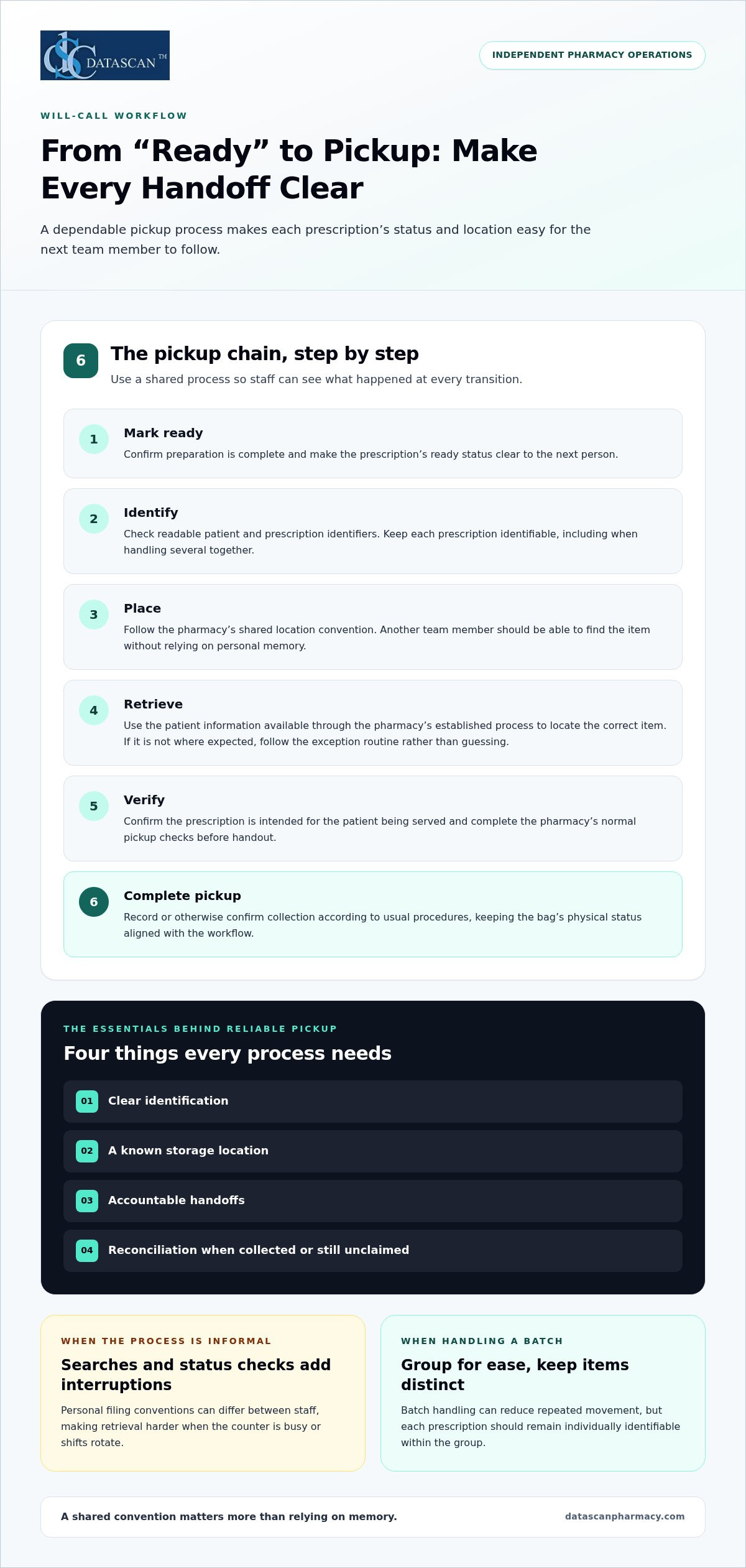
A dependable prescription pickup workflow depends on more than alphabetizing bags. Will-call bin management systems connect a prescription’s ready status, storage location, and pickup check, helping staff spend less time searching and patients avoid unnecessary delays.
If your team has paused a busy pickup line to track down a bag, clearer shelves alone may not solve the problem. Staff need a process that makes every handoff easier to follow. This article explains how will-call management works, compares common approaches, and outlines how to assess software and automation for your pharmacy’s existing workflow.
About the author: Datascan Pharmacy Software shares practical information about operations and technology for independent and community pharmacies.
Key Takeaways
Reliable pickup depends on clear identification, consistent prescription locations, and accountable handoffs.
Use a ready-for-pickup process that helps staff place, retrieve, verify, and complete each handout consistently.
Compare manual bins, barcode scanning, and RFID based on how each fits your pharmacy’s workflow and staff needs.
Improve will-call bin management systems by observing where searches and repeat work occur, then standardizing the process and reviewing results.
Pharmacy management software and customizable workflows can help independent pharmacies refine established operations without changing processes for technology’s sake.
What is a will-call bin management system, and why does pickup get complicated?
A reliable prescription pickup process needs four things: clear identification, a known storage location, accountable handoffs, and reconciliation when a prescription is collected or remains unclaimed. Will-call bin management systems are the processes and tools pharmacies use to organize prescriptions that are ready and waiting for pickup. The goal is not just to find a bag quickly. Staff also need to confirm its status and match it to the right patient.
The will-call process sits between prescription preparation and the customer-facing pickup transaction. Patient notifications tell people when a prescription is ready, while the point-of-sale (POS) transaction handles payment and sale. These steps may connect to the broader workflow, but neither replaces orderly storage and reliable retrieval. Keeping the steps distinct helps teams pinpoint where a delay begins.
What happens between a prescription being ready and being picked up?
Once a prescription is ready, a staff member identifies it, places it in the designated will-call location, and makes that location clear to the next person handling pickup. When the patient arrives, a team member retrieves the prescription, checks that it belongs to the right patient, and completes the handout through the pharmacy’s pickup process. Roles differ by pharmacy. Consistent handoffs matter more than assigning every task to a specific job title.
A consistent label or identifier helps staff locate the correct prescription without relying on memory. The team should be able to follow a simple chain: ready, stored, retrieved, and picked up. If a prescription is moved or its status changes, the process should make that change visible to the next staff member.
Why do pharmacies outgrow informal bin habits?
Informal systems can work until the counter gets busy, staff rotate, or several prescriptions are ready at once. If one person files bags using a personal convention and another expects a different order, retrieval can turn into repeated searches and status checks. Those interruptions slow the line and pull staff away from other work, even when every prescription was prepared correctly.
That’s a process problem, not automatically a staffing or patient-notification problem. A notification can tell a patient to come in, but it can’t tell staff where a bag was placed. More hands at the counter won’t resolve unclear placement rules either. A defined handoff and reconciliation routine gives the team a shared way to confirm whether an item is waiting, has been retrieved, or has completed pickup.
Pharmacies can use pharmacy automation in different ways, but a sound approach starts with understanding the steps staff already follow. Pharmacy management software supports broader pharmacy operations, and customizable pharmacy workflows help pharmacies shape processes around established routines. Start by making each handoff clear, then consider which tools can support the process.
How does a will-call bin management workflow work from ready status to pickup?
A dependable workflow makes each transition visible: a prescription is marked ready, identified, placed in a known location, retrieved, verified, and recorded as picked up. Will-call bin management systems can use different tools, but the team still needs a shared process that shows what happened at each handoff. Assigning the steps to roles already used in your pharmacy clarifies responsibility without requiring a new staffing model.
Mark ready. The staff member completing the preparation confirms the prescription is ready for pickup using the pharmacy’s established process. The next person should be able to distinguish it from work that is still in progress.
Identify. The person moving the prescription checks its readable patient and prescription identifiers. Keep each prescription identifiable, even when several prescriptions are handled together.
Place. The staff member responsible for storage follows the pharmacy’s shared location convention. Another team member should be able to find the item using that convention, without depending on personal memory.
Retrieve. At pickup, the staff member uses the patient information available through the pharmacy’s established process to locate the correct item. If it isn’t in the expected place, pause and follow the exception routine rather than guessing.
Verify. Before handout, staff confirm the prescription is intended for the patient being served and follow the pharmacy’s normal pickup checks. Complete the handoff only when the match is clear.
Complete pickup. The team records or otherwise confirms that the prescription has been collected according to its usual procedures. This keeps the physical status of the bag aligned with the pharmacy’s workflow.
Batch handling can reduce repeated movement between preparation and storage when several prescriptions are ready for the same patient or household. Keep each prescription individually identifiable within the group. Grouping should simplify handling, not blur which items are included or make later retrieval depend on memory.
How should staff identify and place prescriptions in will-call?
Choose a placement convention that the whole team can explain and follow, then use it consistently across shifts. For example, a pharmacy might organize storage alphabetically or by designated sections. The best convention is one staff can apply reliably. Readable identifiers help distinguish patients with similar names, while a clear handoff from preparation to storage confirms that the item reached its intended location.
What should happen when a prescription cannot be found or collected?
Start with the expected location, then check nearby or designated exception areas and ask the staff involved in the most recent handoff. If the search doesn’t resolve the issue, record and escalate it through the pharmacy’s established procedure rather than silently resetting the status. Uncollected prescriptions also need a defined review and return-to-workflow process, so staff know what happens next and the storage area doesn’t accumulate items with unclear status.
Pharmacies refining these handoffs can use customizable workflows to support their established routines. Datascan works with pharmacies on workflow needs and connected operations. Discuss your pharmacy operations with Datascan.
Should a pharmacy use manual bins, barcode scanning, or RFID for will-call?
Choose the method that addresses your pharmacy’s actual workflow bottlenecks, not the option that sounds newest. Manual bins can work when placement is consistent and easy to teach. Barcode scanning adds an identification step, while RFID can support item identification without requiring a direct line of sight. Each approach still depends on clear handoffs and staff following the process.
Compare how each option fits your current routine before changing equipment or adding steps. Setup, staff training, prescription identification, retrieval, and exception handling all matter. Specific implementation details depend on the pharmacy and tools selected.
Approach
Identification and staff steps
Workflow fit to consider
Manual bins
Staff use a shared physical layout and locate prescriptions by their identifiers.
Can suit a process that remains easy to follow across shifts; relies on consistent placement and training.
Barcode scanning
Staff scan a barcode to identify a prescription or support a transaction. Scanning generally requires a direct line of sight and handles items one at a time.
Consider whether scanning fits naturally into placement and pickup without creating unnecessary extra handling.
RFID
Radio-frequency identification uses tags and readers to identify items without a direct line of sight; some systems can read multiple tagged items together.
Consider the equipment, process changes, and staff steps involved in using it within your pharmacy.
When can a manual will-call process be enough?
A manual approach may meet the need when staff can place and retrieve prescriptions using one shared convention, including during shift changes and busy pickup periods. Assign responsibility for keeping the layout consistent, and train team members to use the same method. Repeated searches, staff asking one another where bags were placed, or uncertainty about pickup status are signs the routine needs attention.
What do barcode and RFID approaches change?
Barcode scanning makes identification part of a staff action: find the code, scan it, and follow the pharmacy’s next step. RM Solutions describes an approach that batches prescriptions and uses a barcode during the sale process. RFID uses radio waves to identify tagged items, and Parata describes tracking prescriptions through processing with an RFID cabinet solution. These are examples of specific approaches, not evidence that either method eliminates errors or suits every pharmacy.
Evaluate the trade-off against your own workflow. If the main issue is inconsistent placement, clarify the routine before investing in a different identification method. If staff need a more structured way to identify and retrieve items, assess how scanning would fit into existing handoffs and how RFID equipment would change those steps. Keep process needs at the center of technology decisions.
How can an independent pharmacy improve will-call bin management?
Improve the process by finding where will-call work creates friction, making targeted changes, and reviewing the results. A consistent workflow can reduce avoidable searching and repeat work, giving a busy owner and team more time for other operational priorities. It won’t change PBM reimbursement terms, but better-organized daily work can help protect time for reviewing reimbursement concerns and managing the business.
Observe: Watch pickup during busy and quieter periods. Note where staff pause, repeat checks, or leave the counter to search.
Map handoffs: Trace the process from prescription readiness through storage and pickup. Identify where ownership, location, or status becomes unclear.
Standardize placement: Set a shared convention using language and locations the team understands. Keep responsibilities clear as changes are introduced.
Train the team: Explain the revised routine and how to handle exceptions. Consistent training helps avoid shifting the same uncertainty from one employee to another.
Review and adjust: Compare staff experience before and after a change, then refine the specific steps that continue to cause friction.
Make changes in manageable stages. For example, begin by standardizing placement across shifts while keeping current roles intact. Once the team has adopted the change, review whether it has reduced unnecessary searching or repeated checks before adjusting another part of the workflow. This approach preserves established responsibilities while making room for improvement.
Retrieval delays: Note when staff take longer than expected to locate an item.
Unresolved searches: Track searches that need escalation or remain unexplained.
Repeat work: Record avoidable repeated checks, movements, or handoffs.
How can a pharmacy find its will-call bottlenecks?
Observe pickup at different levels of activity, then ask staff where they lose time or need extra clarification. Compare those observations with the handoffs mapped in the process. Staff feedback can show whether a problem is an isolated mix-up or a recurring point of friction. This kind of operational review also helps owners distinguish will-call issues from separate challenges, including PBM reimbursement pressures.
How should teams standardize and review the process?
Write a concise placement and retrieval procedure in the pharmacy’s own terminology. Make responsibilities and the exception pathway clear, then train the team on the same expectations. Review selected indicators consistently and adjust the step that evidence shows is creating friction. More dependable daily routines can give owners clearer visibility into operations and more room to focus on broader business priorities.
Pharmacy workflow optimization software can support pharmacies refining established routines. Datascan offers customizable workflows for pharmacies improving their operations. Talk with Datascan about your pharmacy workflow and identify a practical next step for your team.
How can pharmacy management software support a dependable will-call process?
Pharmacy management software can support a dependable will-call process by helping a pharmacy organize broader operations around clear staff responsibilities and established routines. Choose a fit that makes handoffs easier to understand and supports the way the pharmacy works. Review how a tool fits your current workflow, how staff handle information, and whether it can reduce avoidable repeat work for the team and owner.
What should pharmacy management software contribute to the workflow?
Start with your pharmacy’s process, then assess how the software fits. Consider whether staff can follow the same handoff expectations across preparation, storage, and pickup, and whether the workflow makes responsibilities clear. These are practical evaluation criteria for choosing pharmacy management software. A good fit can give staff a clearer routine and help owners spend less time untangling operational questions.
Connected operations matter because will-call pickup sits alongside other pharmacy work. Pharmacy management software supports the broader operational picture, while pharmacy point-of-sale tools relate to the transaction at pickup. Storage and retrieval, patient communication, and the sale are distinct activities. Evaluating each in context helps avoid expecting one tool to solve every handoff.
Fit: Does the workflow align with how your team already divides responsibilities?
Clarity: Can staff understand what happens next at each handoff?
Practical value: Could the process reduce repeated checks or time spent resolving routine questions?
Change management: Can the pharmacy introduce adjustments in manageable stages?
These questions help separate useful process support from features that sound appealing but don’t address the pharmacy’s actual bottleneck. Keep the focus on practical outcomes: less operational friction, more staff time for patient care, and a more consistent pickup experience.
How can Datascan help independent pharmacies move forward?
Datascan is a family-owned pharmacy software company founded in 1981. Its offerings include pharmacy management software, point-of-sale tools, and customizable workflows. For an independent pharmacy refining established routines, customizable workflows can help make operational processes fit the way the team works. Datascan’s pharmacy software can be part of that broader evaluation.
Bring your current process into the conversation: where handoffs feel unclear, which tasks create repeat work, and what your team wants to preserve. A practical discussion can connect workflow priorities with software considerations. Talk with Datascan about your pharmacy workflow.
Make your next workflow improvement count
Choose one operational question to guide your next step: what would give your team more confidence and consistency at pickup? Use the answer to set a practical priority, then assess whether your current process supports it. Improvements don’t have to start with a major system change. A focused adjustment, followed by staff feedback, can show whether the workflow is becoming easier to manage.
As you evaluate will-call bin management systems, keep the goal broader than faster retrieval alone. A dependable process should support the pharmacy’s daily operations and leave staff with more time for work that needs their attention. The best path forward is one your team can understand, adopt, and sustain.
A will-call bin management system is the process and tools a pharmacy uses to organize prescriptions that are ready but haven’t been collected. Will-call bin management systems cover identifying each prescription, assigning or following a storage location, retrieving it for the right patient, and confirming pickup is complete. Physical bins provide storage; barcode or RFID tools may support identification or tracking. The setup should fit the pharmacy’s established procedures and operational needs.
Can a pharmacy manage will-call prescriptions without an automated cabinet?
Yes. A pharmacy can use physical bins without an automated cabinet if staff follow a shared placement and retrieval routine. For example, the team can use the same labeled sections across shifts and make sure new staff learn the convention. Review whether searches, repeated checks, or unclear handoffs keep recurring. A manual process may fit some pharmacies, but each team should assess its own volume, layout, and operational needs.
How does barcode scanning help with will-call pickup?
Barcode scanning can add an identification step when prescriptions are handled for pickup. RM Solutions describes a workflow that batches prescriptions under a single barcode and scans that barcode at sale. That is a provider-described approach, not a capability to assume across all systems. A pharmacy evaluating scanning should map where staff would scan, what the scan confirms, and how the step fits its prescription identification and pickup procedures.
What is the difference between barcode and RFID will-call systems?
Barcode workflows use a scannable code to identify an item or group of items at defined steps, while RFID uses radio-frequency identification to read tagged items. Parata describes its RFID cabinet solution as tracking medications through prescription processing. The methods differ in how items are identified and followed through the workflow. Neither approach automatically prevents errors, so pharmacies should consider staff steps, equipment, and process fit before choosing one.
How should a pharmacy handle a prescription that staff cannot find in will-call?
Follow a written search and escalation procedure rather than relying on memory or repeating informal checks. Staff can retrace the last documented handoff, check locations covered by the pharmacy’s established convention, and notify the responsible team member if the item remains missing. Keep a record of unresolved searches using the pharmacy’s procedures. Staff should also follow approved processes for confirming prescription status and communicating with the patient.
What should a pharmacy measure when improving will-call bin management?
Track practical indicators tied to the pharmacy’s pickup process, such as retrieval time, unresolved searches, repeated checks, and staff-reported friction. Use the same method to review these indicators before and after a process change, so the comparison is useful. For example, note whether searches cluster around a particular shift handoff or storage area. No single measure proves better patient care, so review patterns alongside staff feedback.
Can pharmacy management software replace a pharmacy’s will-call procedures?
No. Pharmacy management software can support pharmacy operations, but staff still need clear procedures for identifying prescriptions, handing them off, locating them, and managing exceptions. Align the team’s process with the tools it uses, then train staff on the steps and responsibilities. For example, decide how the team will handle a location mismatch before it occurs. Software decisions should support the pharmacy’s operating routine, not replace sound procedures.
In 2021, 8.2% of U.S. adults aged 18 to 64 who were prescribed medication said they didn’t take it as prescribed because of cost, according to the CDC. Improving patient medication adherence rates starts with finding out what’s getting in the way, not assuming patients simply forgot. A reminder may help with forgetfulness, but it won’t address every barrier.
For independent pharmacies, pickup is just one moment in a patient’s care. A repeatable approach can help busy teams ask about barriers without blame and offer support that fits each patient’s needs.
This guide covers how to identify common barriers, choose practical support, and build follow-up into everyday pharmacy workflows. It also explains how to select useful measures and review your approach over time.
About the author: Datascan Pharmacy Software shares practical guidance for independent and community pharmacies on pharmacy operations and patient-care workflows.
Key Takeaways
Use open-ended questions to understand what makes taking medication difficult, without blaming patients.
Match support to the barrier. A reminder may help with forgetfulness, while other challenges need a different response.
Build improving patient medication adherence rates into a repeatable workflow with clear ownership and follow-up.
Compare counseling, regimen support, synchronization, and digital engagement in light of patient needs and staff capacity.
Use pharmacy management software to organize adherence-related work, then review appropriate measures to assess your process.
What does improving patient medication adherence rates actually involve?
Medication adherence means taking medication as prescribed. Improving it means understanding why doses are missed and responding to the reason. A number may flag a concern, but it can’t tell a pharmacy team whether a patient needs a simpler routine, clearer information, help with access, or another kind of support.
A practical definition: A clinical taxonomy by Vrijens and colleagues defines medication adherence as the process of taking medication as prescribed, including starting treatment, following the agreed plan, and stopping treatment. Persistence describes the time from starting a medication until it is stopped. These definitions help pharmacy teams describe different patterns without treating them as personal failings. The medication-adherence taxonomy provides the definitions.
Nonadherence can be intentional, such as choosing not to take a medicine because of concerns or unwanted effects, or unintentional, such as forgetting a dose or misunderstanding directions. Neither label is a judgment of the patient. It’s a starting point for understanding what happened and what might make the prescribed plan more manageable.
A single adherence rate has limits. It summarizes a pattern over a measurement period, but it doesn’t explain a person’s daily circumstances or show whether missed doses stem from one barrier or several. Use a measure to identify where follow-up may be useful, then talk with the patient before deciding what action fits.
Why do patients have difficulty taking medication as prescribed?
Adherence barriers can arise in four connected areas. A patient may face more than one at a time, so avoid assuming there’s a single cause:
Patient factors: Forgetfulness, competing demands, or difficulty fitting doses into a routine.
Provider factors: Communication gaps that leave directions or medication concerns unclear.
Treatment factors: A complex regimen that’s hard to manage consistently.
Health-system factors: Access challenges that make obtaining or continuing medication difficult.
These categories help organize questions, not assign fault. A patient who misses refills might be managing a complicated schedule, unclear instructions, an access problem, or a combination of factors.
Why should pharmacies focus on the reason behind a missed dose?
The same behavior can have different causes. A late refill might reflect forgetfulness, uncertainty about how to take a medicine, or difficulty accessing it. Ask, “What has made it hard to take this medication?” rather than, “Why aren’t you taking it?” The first invites context; the second can sound like blame. Listening helps the pharmacy team choose a relevant next step instead of guessing, while keeping the conversation focused on support.
How can a pharmacy identify a patient’s adherence barriers?
Use a brief, repeatable conversation to understand the patient’s experience before recommending a solution. A useful flow is invite, listen, clarify, agree, and document. It gives the team a consistent starting point while leaving room for each patient’s circumstances and clinical judgment.
Invite: Ask permission to discuss how the medication plan is going. “Would it be okay if we talked about how this medicine fits into your routine?”
Listen: Let the patient explain what’s working or difficult before offering a reminder or another solution.
Clarify: Ask follow-up questions to understand whether the issue is unclear instructions, a medication concern, a demanding routine, or difficulty obtaining the prescription.
Agree: Work with the patient on a practical next step that addresses the barrier they described.
Document: Record the patient’s concern and the agreed action in the appropriate pharmacy workflow, so follow-up has context.
What questions help uncover barriers without blaming patients?
Try neutral, open-ended prompts: “How do you usually fit your medicines into your day?” “What questions do you have about how to take this?” “Have you noticed anything about the medicine that concerns you?” “Has anything made it hard to obtain or pay for it?” Listen before suggesting an intervention. A knowledge gap may call for clearer counseling; a busy routine, medication concern, or access problem calls for a different response.
Clarify what the patient means before choosing a next step. If they’re unsure about directions, ask which part is confusing and use pharmacist judgment to address it. If the directions are clear but doses are hard to fit into the day, explore the routine. A concern about effects or treatment may require pharmacist assessment or coordination with the prescriber. Don’t assume a reminder will resolve every missed dose.
How should the pharmacy record and prioritize what it learns?
Keep notes concise and useful. When possible, record the barrier in the patient’s own words, the agreed next step, and whether follow-up or pharmacist review is needed. Prioritize concerns that require clinical judgment or coordination with the prescriber. Treat the record as a snapshot, not a complete adherence assessment. A patient’s needs or circumstances may change.
A consistent process helps teams carry what they learn into routine patient care. A customizable pharmacy workflow can provide a defined place for adherence-related tasks, so the next step is less likely to depend on one staff member’s memory. Barrier-first assessment makes improving patient medication adherence rates more individualized: understand the obstacle, agree on relevant support, and revisit the plan as appropriate. Discuss your workflow needs with Datascan.
Which medication adherence strategies should a pharmacy compare?
Choose adherence support based on the barrier the patient describes, not a one-size-fits-all program. Counseling, regimen support, medication synchronization, follow-up, and digital engagement can each play a role. Each option also needs a workable staff process and a clear reason for using it.
Counseling May address: Questions, concerns, or uncertainty about medication instructions. Workflow: Make time for a pharmacist conversation and determine whether the concern needs further clinical review.
Regimen support May address: Difficulty managing a complicated medication routine. Workflow: Review the regimen with the patient and identify a practical support approach within the pharmacy’s patient-care process.
Medication synchronization May address: Challenges coordinating prescription refill timing. Workflow: Review eligible prescriptions and coordinate timing through the pharmacy’s established synchronization process.
Follow-up May address: A barrier that needs another conversation or a check-in after an agreed action. Workflow: Assign responsibility and record the next step, so follow-up doesn’t rely on memory alone.
Digital engagement May address: A patient’s preference for a digital channel as part of pharmacy communication. Workflow: Offer a patient-facing tool as one support option, while keeping pharmacist communication available for questions that need personal attention.
This comparison organizes possible approaches; it doesn’t promise a particular result. The right fit depends on what the patient says, the care required, and what the team can consistently support. Avoid claiming an intervention improves adherence by a set amount unless you can cite current evidence and explain the study population and date.
When is personal counseling more useful than a reminder?
A reminder may suit a patient who understands the plan but has trouble fitting doses into a routine. It can’t explain unclear directions or resolve a concern about treatment. Those situations call for a conversation in which a pharmacist can understand the question and use clinical judgment. Treat reminders as one possible tool, not a universal solution or a substitute for listening.
How can synchronization and digital tools complement pharmacy care?
Medication synchronization is an option for coordinating prescription timing. It may fit when timing or refill coordination is part of the patient’s challenge, but it won’t address every barrier. E-care plans and patient-facing apps can complement pharmacy care as support channels; they don’t replace individualized assessment or pharmacist communication.
For patients who prefer a digital option, a patient medication refill app may provide another way to engage with the pharmacy. Ask whether the approach fits the identified need and can be incorporated into the team’s existing workflow. Matching the support to the barrier is central to improving patient medication adherence rates.
How can an independent pharmacy build a sustainable adherence workflow?
A sustainable workflow is simple enough for the team to repeat and specific enough to make the next step clear. Define a patient group, assign ownership, assess barriers, take an appropriate action, and review the work and selected measures. Build each step around existing dispensing or patient-care touchpoints rather than promising outreach the team can’t consistently deliver.
Select a patient group. Begin with a clearly defined group that fits your pharmacy’s care priorities and capacity. A focused start makes it easier to test and refine the process before expanding it.
Assign workflow ownership. Decide who identifies patients for follow-up, who handles outreach, and when a pharmacist should review a concern. Keep clinical decisions with the pharmacist.
Assess barriers. Use a routine pickup, refill, or patient-care interaction to ask what is making the medication plan difficult. Record the patient’s concern and any needed follow-up.
Act. Match the next step to the patient’s needs. Depending on the barrier and appropriate clinical judgment, this could mean counseling, regimen support, synchronization, or follow-up.
Review. Check whether the agreed task was completed and whether the selected measures are useful. Adjust the workflow if outreach is routinely missed or the data don’t answer the question you set.
Keep the first version manageable. For example, a team might flag a follow-up during refill processing, route questions requiring clinical judgment to the pharmacist, and review outstanding tasks during an existing team check-in. The best touchpoints depend on the pharmacy’s staffing and operations. The goal is to make adherence work visible without creating a separate, unsustainable process.
What should a pharmacy measure to understand progress?
Separate process measures from patient outcomes. For example, the number of planned outreach attempts completed shows whether the workflow is happening, not whether medication-taking behavior changed. Proportion of days covered (PDC) is a claims-based adherence measure that estimates the share of a measurement period in which a patient had medication available. It doesn’t confirm that doses were taken or explain why gaps occurred.
Before using PDC, define the medication, patient group, measurement period, and applicable exclusions. Follow current CMS or Pharmacy Quality Alliance specifications for the measure being used, and document the source and date. Avoid comparing results based on different populations or calculation rules, and don’t treat one figure as a complete assessment of an individual patient.
How can pharmacy software support a repeatable process?
Pharmacy management software can help organize appropriate tasks and patient information within the pharmacy’s workflow, while leaving assessment and clinical decisions to the care team. A pharmacy workflow optimization software approach can make ownership and next steps part of routine operations. Follow-up also helps keep the patient’s agreed plan connected across relevant pharmacy touchpoints.
For independent pharmacies shaping this process, discuss your pharmacy workflow needs. A practical, reviewable routine gives improving patient medication adherence rates a stronger foundation than reminders or outreach that aren’t tied to an identified need.
How can pharmacy management software support better adherence?
Pharmacy management software can help organize day-to-day work and give teams more room for patient care, but it can’t change PBM reimbursement terms or replace financial review. For independent pharmacies managing reimbursement pressure, PBM requirements, and limited staff time, technology is most useful when it supports reliable operations without overstating what the system can do.
What should an adherence-supporting pharmacy system help a team do?
Start with the work your pharmacy needs to coordinate. Define which tasks support patient care, who is responsible, and how each task fits existing operations. A clear workflow can reduce reliance on memory and help the team handle routine responsibilities consistently, while pharmacists retain responsibility for clinical decisions.
For example, medication synchronization and e-care plans can be part of a pharmacy’s broader patient-care approach. Datascan’s pharmacy management software supports pharmacy operations, while the pharmacy’s documented workflow determines how staff incorporate these capabilities into care. Technology can help teams organize their work; it should not be presented as a tool that changes PBM reimbursement or resolves claim disputes.
As you assess a system, consider whether it supports a workflow that makes these points clear:
Which adherence-related tasks the team has chosen to perform and who owns them.
What information staff need to carry out the next appropriate step.
When a patient conversation or pharmacist judgment is necessary.
How the team reviews outstanding work alongside other operational priorities.
Keep expectations practical. A defined process can help staff manage agreed tasks, but it doesn’t replace separate review of PBM contracts, reimbursement terms, or payment records.
How can pharmacies balance digital convenience with personal care?
Digital tools provide another engagement channel, but patients differ in preference, access, and comfort with technology. Datascan offers the MobileScripts Patient Mobile App as a patient-facing option, and its pharmacy management solutions include e-care plans. These tools can be part of a broader approach, but the pharmacy team still needs to decide when personal communication is appropriate.
A mobile channel may complement routine pharmacy interactions, while medication questions and concerns call for appropriate personal attention. Use the communication method that fits the patient and the pharmacy’s care process. An app or software feature doesn’t establish that a patient understands or follows a medication plan, and it shouldn’t be treated as a guaranteed adherence result.
Technology works best when it supports operational discipline and patient care without promising to solve reimbursement pressures on its own. If you’re considering how pharmacy management software can fit your pharmacy’s workflow and priorities, discuss your goals with Datascan.
Make your next adherence step achievable
Progress starts with a manageable commitment: choose one part of your pharmacy’s adherence workflow to strengthen, then give the team a clear way to carry it forward. You might clarify follow-up ownership, give patients a consistent way to share concerns, or review whether your process supports the care you want to provide. Improving patient medication adherence rates is ongoing work, and a practical workflow can help your team build on what it learns.
Datascan is a family-owned pharmacy software company founded in 1981, with U.S.-based support for independent pharmacies. The next step is to connect your patient-care priorities with workflows your team can sustain.
Is medication adherence the same as taking every dose perfectly?
No. Adherence isn’t a test of whether someone is a “good” or “bad” patient, and a missed dose alone doesn’t explain what happened. A patient may have misunderstood directions, faced an access problem, or had a concern about treatment. Ask about the specific situation, avoid drawing conclusions from one data point, and refer clinical questions to an appropriate healthcare professional.
Can a pharmacy improve adherence without adding a large new program?
Yes. Start with a narrow, manageable effort, such as asking patients in a chosen group whether they have questions during an existing pickup interaction. Decide who will handle those conversations and how the team will record the next step. After trying the process, review whether staff can complete it reliably and whether patients find it useful before considering an expansion.
How much can medication synchronization improve adherence?
There’s no single improvement amount that applies to every patient. Synchronization coordinates prescription timing, but a patient may still face treatment concerns, access difficulties, or other challenges that timing alone won’t address. For example, a patient managing several prescriptions may value coordinated refills, while another may need a pharmacist to discuss a concern first. Assess the individual situation, and avoid promising a specific result without relevant evidence.
What happens if a patient says they cannot afford a medication?
Take the concern seriously and respond without judgment. The pharmacist can discuss appropriate options within their professional role and coordinate with the prescriber when needed. Don’t assume synchronization or a digital reminder will solve an affordability barrier. Agree on a specific next step, record it according to pharmacy procedures, and make sure the team knows who is responsible for follow-up.
Is a patient app enough to improve medication adherence?
An app is best treated as one possible channel, not a complete solution. It may suit a patient who prefers digital engagement and can comfortably use the app’s available functions. Someone with questions about directions or concerns about treatment may need a direct conversation instead. Match the communication method to the patient’s preference and needs, and don’t assume app use alone changes medication-taking behavior.
How often should a pharmacy review its adherence workflow?
Set a review schedule that fits the pharmacy’s operations, then check whether assigned tasks are being completed and whether the process remains practical. For example, a team might review unresolved follow-ups during an existing operations meeting. Keep task-completion measures separate from patient outcome measures, protect patient information, and revise the workflow when staff capacity, patient needs, or care priorities change.
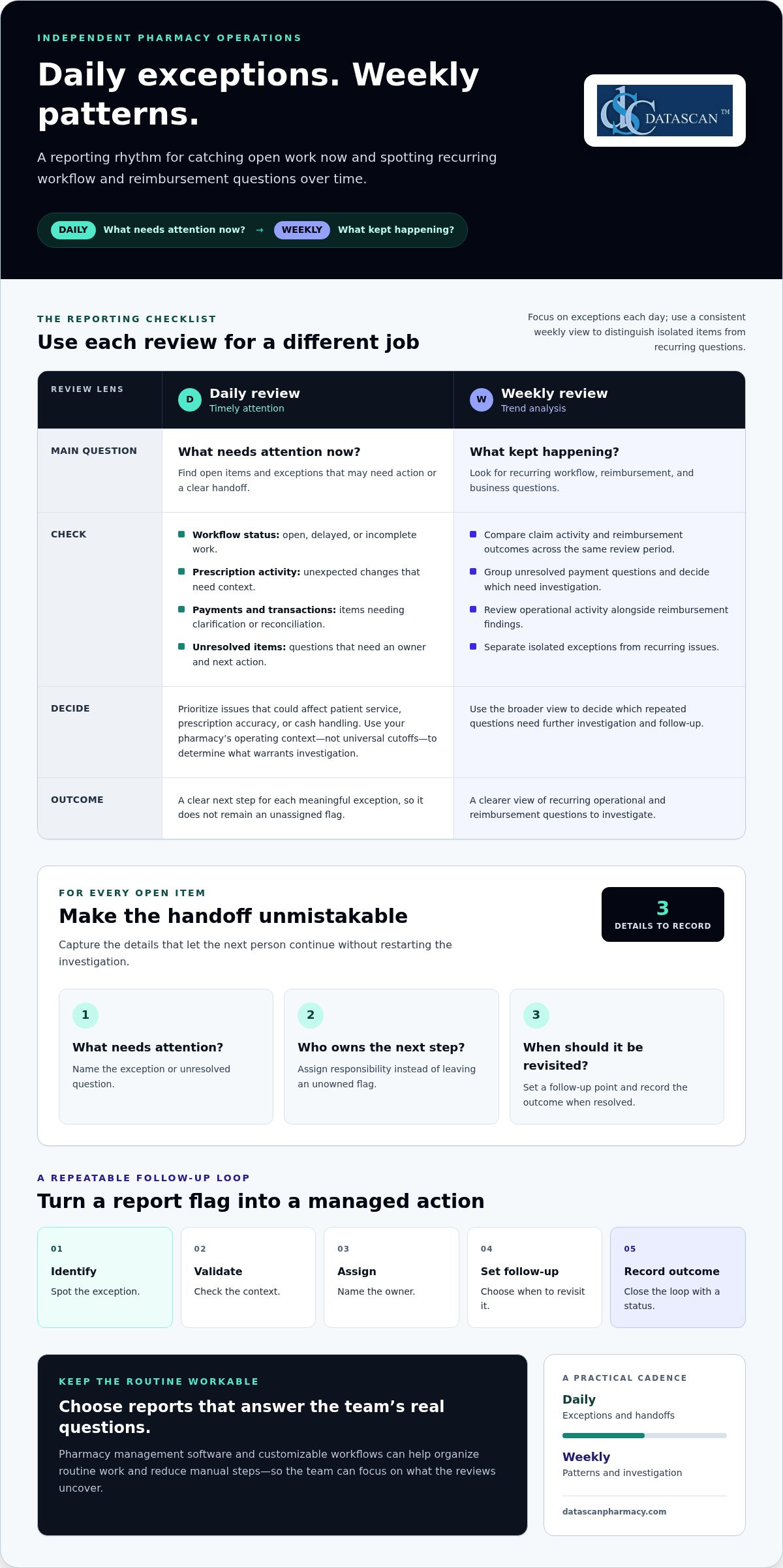
A useful pharmacy manager daily and weekly reporting checklist separates urgent exceptions from patterns that need a closer look. Review daily activity to decide what needs attention now, then use a weekly review to spot recurring workflow and reimbursement questions.
Reports can compete for time with dispensing, staffing, inventory, and patient needs. A focused routine helps prevent open items from getting lost and makes it easier to assess PBM reimbursement patterns without reviewing every figure every day.
This checklist covers daily workflow and transaction checks, weekly reimbursement and business reviews, and a straightforward way to assign follow-up. Pharmacy management software and customizable workflows can help organize routine work and reduce manual steps, giving independent pharmacy teams more time to act on what they find.
Author bio: Datascan Pharmacy Software provides pharmacy management software for independent and retail pharmacies.
Key Takeaways
Separate urgent daily exceptions from patterns that need a weekly review.
For every open item, record what needs attention, who owns the next step, and when it should be revisited.
Review claim activity, reimbursement outcomes, and unresolved payment questions weekly to identify recurring issues.
Use a consistent follow-up process: identify the exception, validate the context, assign responsibility, set a follow-up point, and record the outcome.
Use pharmacy management software and customizable workflows to support a repeatable reporting routine.
What should a pharmacy manager review in daily and weekly reports?
Review workflow exceptions and transaction questions daily, then use a weekly review to look for patterns in operations and reimbursement. A report is most useful when it answers a specific management question, such as which work items remain open or which payment questions need investigation.
Daily monitoring helps surface issues that may need timely action, while weekly analysis helps reveal whether they are recurring. Scanning every available figure each day can overwhelm a busy team. Inconsistent reviews, on the other hand, make it harder to track outstanding questions. Treat this cadence as a practical approach, then shape it around your pharmacy’s workflow and priorities.
A useful pharmacy manager daily and weekly reporting checklist distinguishes operational oversight from trend analysis. Ask, “What needs attention now?” during the daily review. During the weekly review, ask, “What kept happening, and what should we investigate?” A pharmacy management system helps structure pharmacy operations. Choose reports that answer the questions your team needs to resolve.
Which daily reports help a manager catch issues early?
Focus on exceptions rather than scanning every data point. Review open or delayed workflow items, prescription activity that needs context, and unresolved payment or transaction questions. For each item, decide whether it needs action, then record the next step so it is not left as an unassigned flag.
Workflow status: Find prescriptions or other work items that remain open, delayed, or incomplete.
Prescription activity: Review unexpected changes and determine whether they need follow-up.
Payments and transactions: Identify items that need clarification or reconciliation.
For each exception, record what needs attention, who owns the next step, and when it should be revisited. This gives the next person a clear handoff instead of an unassigned note.
What belongs in a weekly pharmacy review?
Use the weekly review to look beyond individual exceptions and assess patterns across a consistent period. Consider operational activity alongside reimbursement and business questions. CMS’s Medicare Part D rule effective January 1, 2024, requires nearly all pharmacy price concessions to be reflected in the negotiated price at the point of sale. Consistent attention to reimbursement outcomes and cash-flow signals is therefore a relevant management practice. The rule does not prescribe a particular review frequency.
Compare claim activity and reimbursement outcomes across the same review period.
Group unresolved payment questions and decide which need further investigation.
Review operational activity alongside those findings to identify recurring issues.
Weekly analysis complements daily oversight; it does not replace it. Use the broader view to distinguish isolated items from recurring questions and assign follow-up. Pharmacy management software can help organize routine work, while a pharmacy management software workflow can support a repeatable review process.
Which reports should pharmacy managers check every day?
Check the daily information that helps you address workflow exceptions, transaction discrepancies, and unresolved items before they carry into the next shift. Prioritize issues that could affect patient service, prescription accuracy, or cash handling instead of treating every figure as equally urgent.
A practical daily checklist can include:
Workflow exceptions: Find open, delayed, or incomplete work that needs review or staff follow-up.
Prescription activity: Look for activity that appears unusual in context and decide whether it needs attention.
Payment and transaction checks: Review transaction totals and exceptions as part of the pharmacy’s established closing process.
Unresolved items: Carry open questions forward with a named owner and a clear next action.
Use your pharmacy’s operating context to decide what warrants investigation. A delayed item during a busy period may call for a different response than work that remains unresolved after an expected handoff. Avoid universal cutoffs that ignore the way your team works. The pharmacy manager daily and weekly reporting checklist should help distinguish meaningful exceptions from normal variation.
How should a manager review daily workflow and prescription activity?
Scan open or delayed work, identify where tasks are accumulating, and decide what support or follow-up is needed. The goal is to understand the workflow, not assign blame. For example, if prescriptions are waiting at one stage, identify what is holding them up and who can move the work forward. Pharmacy workflow tools can help teams organize repeatable processes. For broader management context, the American Pharmacists Association’s pharmacy management resource offers a professional reference point.
For every exception, capture three details: what needs attention, who owns the follow-up, and what action comes next. Add a brief status or outcome when the issue is resolved. That record gives the next person enough context to continue without restarting the investigation.
What daily payment and transaction checks are useful?
Compare transaction totals and exceptions with the pharmacy’s established closing process. If something does not align, note the item, identify who will review it, and follow the process for resolving it. A pharmacy point-of-sale system can support this operational check, but a daily transaction review is not a full profitability or accounting analysis.
Keep the routine proportionate to the day’s needs. A focused review that flags service, accuracy, or cash-handling concerns is more useful than an exhaustive scan that leaves no time for follow-up. Pharmacy management software and consistent workflows can support a repeatable review, while the manager applies local controls and judgment.
How can weekly reporting reveal reimbursement and business patterns?
Weekly reporting helps managers determine whether claim activity, reimbursement outcomes, and unresolved payment questions are isolated or recurring. A useful review connects those patterns to a specific question and a clear next step.
Daily reviews surface exceptions that may need timely attention. Weekly analysis adds context: it can show whether similar questions keep coming up, whether an operational bottleneck is repeating, or whether a change deserves a closer look. The pharmacy manager daily and weekly reporting checklist works best when these reviews have distinct purposes.
Review focus
Daily monitoring
Weekly analysis
Claim activity
Flag an item that needs attention
Look for recurring changes or questions
Reimbursement outcomes
Record an exception for follow-up
Compare related information across a consistent period
Unresolved payment questions
Assign the next action
Check what remains open and whether similar issues recur
Operations
Address an immediate disruption
Identify repeated bottlenecks or shifts in activity
How should pharmacy managers review PBM reimbursement patterns?
Choose a consistent review period and compare relevant claim and reimbursement information using your pharmacy’s records. Group similar open questions to see whether they share a pattern. Document what needs investigation and assign someone to follow up. A recurring discrepancy is a reason to examine supporting records and the reconciliation process, not proof that a particular amount will be recovered.
Ground the review in the information available to your pharmacy. Differences can have different causes, so avoid applying a universal benchmark across payers and claims. Note the details needed for follow-up, track whether each question is resolved, and carry open items into the next review. This creates a clearer record for management decisions without overstating what the data shows.
Which business trends deserve weekly follow-up?
Look for recurring operational bottlenecks, shifts in prescription or claim activity, and payment questions that remain unresolved. One unusual result may reflect a one-off circumstance; a pattern across the review period deserves investigation. Check the context before deciding whether to adjust a process, gather more information, or keep monitoring.
For broader financial context, compare operational observations with the concepts covered in the published Calculating Pharmacy Gross Profit: 2026 Guide. The goal is not to turn a weekly report into a full accounting review. Identify which questions merit deeper analysis and assign a practical next step. Pharmacy management software can help organize routine activity for review, while consistent records make it easier to discuss reimbursement concerns and operational changes with the right team members.
How do you turn pharmacy reports into clear follow-up actions?
A report becomes useful when each exception leads to a decision, an owner, and a recorded outcome. Verify what happened, decide how soon it needs attention, and make the next step visible so the issue does not disappear into the day’s workload.
Use this sequence for each item that needs follow-up:
Identify the exception. Describe the specific workflow, transaction, or payment item that needs attention.
Validate the context. Check the underlying transaction or workflow record before drawing a conclusion. An exception is a prompt to investigate, not proof of an error.
Assign an owner. Name the person responsible for the next step so responsibility is clear.
Set the follow-up point. Decide when to review the issue again based on its impact and the information still needed.
Record the resolution. Note what you found and whether the item is resolved or needs further investigation.
What should a manager do when a report shows an exception?
Start with the source record and compare it with the relevant workflow or transaction context. If a payment question looks unusual, document what information needs to be reconciled before deciding what it means. Assign a team member to review or gather that information, set the next review point, and update the record when there is an answer. If the facts remain unclear, keep the item open with a defined next action.
Set timing according to potential impact rather than an invented universal threshold. An issue that could affect service, prescription accuracy, or cash handling may warrant same-day attention under the pharmacy’s own procedures. A recurring question without an immediate operational impact may fit the weekly review, where related items can be compared and further investigation considered. Let local controls and context guide the decision.
How can the team keep reporting manageable?
Reporting does not have to become a second workload. Use a short, repeatable checklist and capture only what moves an issue forward: what happened, who owns it, the next action, and the outcome. Match the review frequency to the decision. Address immediate exceptions promptly; assess broader patterns in the weekly review. Avoid reopening resolved items unless new information changes the picture.
Clear workflows make handoffs easier because team members can see what needs attention and what happens next. The published Pharmacy Workflow Optimization Software guide offers related workflow context, and pharmacy workflow software can help organize routine work consistently. Keep the pharmacy manager daily and weekly reporting checklist practical: review, assign, follow up, and close the loop.
For questions about how pharmacy technology can support clearer workflows and reporting routines, the Datascan team’s contact page provides a place to discuss your pharmacy’s needs.
How can pharmacy management software support a consistent reporting routine?
Pharmacy management software helps organize operational work and gives managers a more consistent basis for daily and weekly reviews. Its value comes from connecting routine information to a defined management question and follow-up process, not from reviewing every available data point.
A repeatable routine is easier to maintain when it fits the pharmacy’s dispensing and point-of-sale processes. For example, review workflow exceptions as part of an operational check, then assess reimbursement questions separately during the weekly review. Build the checklist around information your team can access and use reliably.
What should pharmacy managers look for in reporting workflows?
Start with the basics: Can the people who need the information access it? Does each review have a clear purpose? Is there a practical way to record who will follow up and what happens next? These questions help show whether the reporting routine supports decisions or simply adds another task to the workday.
Then consider how management software fits your current operations. The review process should work alongside dispensing and point-of-sale routines rather than creating disconnected steps. Pharmacy management software can organize operational work, while a customizable workflow can be shaped around the pharmacy’s needs. That flexibility matters because community pharmacies may have different handoffs and priorities.
Accessible information: Team members can find what they need for the review.
Clear purpose: Each review answers a specific operational or management question.
Defined follow-up: Exceptions have an owner and a next step.
Fit with existing routines: The process complements dispensing and point-of-sale work.
Technology can support consistency, but it does not replace management judgment. For PBM reimbursement monitoring, software can help organize routine pharmacy activity for review. Managers still need to examine relevant records, assess context, and decide which questions require follow-up. Focus on whether the information and workflow support the decisions your team needs to make.
How can managers take the next step?
Before discussing software, write down where the current routine breaks down. Note which daily issues are easy to miss, which weekly patterns are difficult to assess, and where follow-up ownership becomes unclear. Connect those gaps to the pharmacy’s broader workflow and reimbursement priorities. A short list of practical needs gives the conversation a clear starting point.
The pharmacy manager daily and weekly reporting checklist should remain useful as processes evolve. Datascan Pharmacy Software and customizable workflows help independent pharmacies organize routine work and reporting practices. The Datascan contact page is a place to discuss the workflow and reporting needs you have identified.
Make your reporting routine work for your pharmacy
A useful pharmacy manager daily and weekly reporting checklist should evolve with your team. As workflows, reimbursement questions, and management priorities change, revisit which information supports decisions and where follow-up gets stuck. This also helps you assess whether your pharmacy management software supports the routine your pharmacy needs.
Datascan is a family-owned company founded in 1981, with U.S.-based support. When planning a reporting cadence or refining existing workflows, bring your priorities and pain points into the discussion. A clear picture of what your team reviews, what it needs to follow up on, and what takes too much manual effort can guide the next step.
A pharmacy end-of-day report should give the manager enough information to close out the day and hand off anything that still needs attention. Include relevant workflow status, prescription activity, transaction totals or exceptions, and open questions with their current status. A pharmacy manager daily and weekly reporting checklist helps make closeout consistent. Adapt it to your pharmacy’s closing process and the information your team uses.
How often should a pharmacy manager review PBM reimbursements?
Review reimbursement information on a regular weekly cadence to spot recurring questions, and look at an individual item sooner if it needs timely operational follow-up. Keep the review period consistent and retain enough claim context to investigate differences. A weekly review helps organize follow-up, but it does not by itself establish why a reimbursement outcome occurred.
Can pharmacy management software help reduce manual reporting work?
Pharmacy management software can organize routine operational information and support consistent workflows, reducing repeated manual steps. Agree on where staff record an exception and how its status is maintained, rather than copying information into several places. Software can support the routine, but the team still needs to review findings and decide what to do.
What should a manager do when pharmacy reports do not match?
First, check that the reports cover the same date range and type of activity. Then compare the underlying records, such as transaction details or claim status, to identify where the difference appears. A mismatch does not prove an error; timing, report scope, or an unresolved item may explain it. Record what you checked, assign any remaining investigation, and keep the issue open until its status is clear.
Is a weekly pharmacy report the same as a financial statement?
No. A weekly pharmacy report is a management tool for reviewing selected operating activity and identifying questions that need attention. A financial statement serves a broader accounting purpose and follows the pharmacy’s accounting process. A weekly review may help managers decide what financial information to examine more closely, but it is not a substitute for formal financial records, reconciliation, or advice from the pharmacy’s accounting professional.
Who should be responsible for reviewing pharmacy reports?
A designated manager should own the review routine and make sure findings lead to appropriate follow-up. Team members who handle a particular workflow or transaction can provide context or investigate an assigned item, while the manager tracks outstanding questions and confirms their status. Define responsibility in a way that fits your pharmacy’s roles and access controls. Clear ownership prevents duplicate work and helps ensure important findings are not overlooked.
How can a small pharmacy keep reporting manageable?
Keep the routine focused on a small set of decisions the team needs to make regularly. Choose a consistent place to record open items, skip information that does not support a current decision, and fold checks into existing operating routines where practical. Start with the reports your pharmacy already uses, then adjust the cadence if issues are being missed or reviews take too much time. A simple process the team follows is more useful than an exhaustive checklist.
Drive-thru pharmacy workflow efficiency improves when staff can see what needs to happen next and who owns each handoff. The goal is not to rush every transaction. It is to reduce avoidable waiting while preserving careful, personal service. Intouch Insight’s 2026 Annual Drive-Thru Study puts the average pharmacy drive-thru visit at 5 minutes and 24 seconds, but speed matters only when patients still receive attentive service.
If staff repeatedly check prescription status, search for pickup information, or clarify who handles the next step, small delays can add up. Independent pharmacy owners already have plenty to manage, so finding bottlenecks should lead to practical changes, not another complicated project.
This guide explains how to map each handoff, identify avoidable waiting, and create a repeatable process from arrival through pickup. It also shows how to assess Pharmacy management software against your team’s actual responsibilities and workflow, including whether customizable workflow tools can support the way you work. The aim is a smoother drive-thru experience for patients and a more manageable process for staff, without treating speed as a substitute for care.
About the author: Datascan Pharmacy Software focuses on pharmacy technology and operational workflows for independent and retail pharmacies.
Key Takeaways
Trace the pickup journey from arrival to handoff to find delays caused by unclear status, ownership, or extra steps.
Map the process by observing, documenting, assigning responsibility, testing, and reviewing it with the team.
Compare workflow changes by their intended benefit, possible trade-offs, and the measures your team can track consistently.
Test one defined change, assign an owner, and explain the process to the staff it affects.
Assess Pharmacy management software against documented stages and staff responsibilities, including how customizable workflow fits your pickup process.
What slows down drive-thru pharmacy workflow efficiency?
Drive-thru pharmacy workflow efficiency depends on coordinated preparation, clear status communication, and reliable pickup handoffs. A delay may become visible at the window but begin earlier: a prescription is not ready, its status is unclear, or staff do not know who should take the next step.
Drive-thru workflow efficiency is the pharmacy’s ability to move a pickup from patient arrival to a safe, accurate handoff through coordinated tasks and clear status updates. Depending on the pharmacy’s procedures and the pickup, the process may include greeting the patient, identifying the pickup request, checking prescription status, completing required verification and pharmacist review, handling payment, and delivering the prescription to the vehicle.
Not every pause is avoidable. Verification, pharmacist review, and patient questions need the time required for safe and appropriate care. Focus instead on waiting caused by preventable searching, repeated questions, unclear ownership, or tasks that could have been handled before arrival. Pharmacy automation is one broad approach to organizing pharmacy tasks. The Pharmacy Automation overview provides context, but drive-thru handoffs still need to fit the pharmacy’s own process.
Where do drive-thru prescription pickup delays begin?
Look for where a pickup stops moving, not just how long the line is. A queue can grow because several patients arrive together. A processing bottleneck may occur when prescriptions are not ready. A communication bottleneck may show up when staff repeatedly ask whether an order is complete or who is handling it.
Observe the process and use records your pharmacy already keeps. Note when the queue grows, which pickup stages are still in progress, and where staff pause to find information or clarify responsibility. Compare similar service periods rather than relying on assumed industry benchmarks. This helps distinguish a busy arrival window from a recurring workflow gap.
Is the prescription ready when the patient arrives?
Can the staff member at the window identify its current status?
Does the next person know what action will move the pickup forward?
Which handoffs shape the patient pickup experience?
Follow each transition: intake to dispensing, dispensing to final checks, final checks to payment, and payment to vehicle-side service. At every stage, identify who owns the task, what status they communicate, and who receives the update. If ownership is unclear, two people may repeat work while another necessary step waits.
For example, a window staff member may need to confirm whether a prescription has cleared its final check. If that status has not been communicated, the staff member may leave the patient waiting while asking a colleague, even though the prescription is complete. A consistent handoff makes the next action clear without skipping verification or rushing pharmacist review.
How should a pharmacy map its drive-thru pickup workflow?
Map the pickup by observing what happens, documenting each stage, assigning responsibility, testing the map against real shifts, and reviewing it with the team. This gives staff a shared view of how information passes from one person to another, including what happens when a pickup does not follow the usual path.
Observe the work, document each step, assign an owner, test the map, and review it with the team. Keep the map practical. It should reflect the process staff actually follow, including interruptions and exceptions, rather than an idealized version. Record what the patient needs to know, what staff need to know, and how each update reaches the next person.
What should a drive-thru workflow map include?
Start with patient arrival and continue through prescription identification, readiness confirmation, payment, and completed handoff. At each transition, note the responsible role, the information needed to proceed, and the communication method staff use, such as a direct conversation or an available pharmacy system. Mark decision points where the request needs clarification or a question should be routed for appropriate review.
Show exceptions without letting them obscure the usual flow. For example, include a separate path for a prescription that is not ready and another for a question requiring pharmacist attention. These paths help staff see what to do next and who owns the follow-up, while preserving the pharmacy’s established verification and review steps.
How can pharmacy teams identify recurring bottlenecks?
Observe representative busy and quiet periods, then compare what changes and what stays the same. One shift may offer a useful clue, but it should not define the whole operation. Ask team members where they wait for information, repeat a contact, or feel unsure about who owns the next action. Their input can help distinguish recurring process friction from temporary demand or an unusual pickup.
Capture observations in a simple log. Detailed tracking that staff cannot maintain is less useful than consistent notes. Include:
The stage where a delay or repeat contact occurred.
Whether the prescription was ready and its status was clear.
Which role owned the next action and how it was communicated.
Whether the pickup was completed or needed follow-up.
Review the notes with the staff who handle each handoff. Confirm that the map reflects their actual responsibilities, then revise unclear steps before using it to assess changes. This groundwork also helps you decide whether pharmacy workflow software aligns with documented stages and responsibilities. A clear map is a practical starting point for improving drive-thru pharmacy workflow efficiency without asking staff to guess or skip necessary checks.
Which drive-thru workflow changes improve efficiency without sacrificing care?
The most useful changes address a specific point of friction, such as unclear role ownership, delayed status updates, disorganized queue handling, or a process staff manage outside their pharmacy system. Compare options against the process your team has documented. Judge drive-thru pharmacy workflow efficiency by both service flow and reliable, careful handoffs. Results depend on the pharmacy’s process and level of demand, so no change guarantees faster service.
Change
Intended benefit
Trade-off
Measure to review
Clarify role ownership
Reduce uncertainty about who takes the next action.
Responsibilities may need to flex during busy periods.
Repeat contacts and handoffs with unclear ownership.
Standardize status communication
Help staff share pickup status consistently.
A new communication step needs to fit existing work.
Time spent locating status or asking for updates.
Organize queue handling
Make the order and status of waiting pickups easier to follow.
Unexpected arrivals and exceptions can disrupt the sequence.
Waits, incomplete pickups, and queue interruptions.
Review workflow software support
Align system use with documented tasks and responsibilities.
Configuration will not resolve an unclear process by itself.
Manual workarounds and repeated data or status checks.
Should a pharmacy change the process or the software first?
Document the current process before deciding whether software configuration is needed. Start with low-disruption adjustments, such as clarifying ownership or agreeing on a consistent status update. If staff still rely on workarounds because the system does not align with the intended steps, consider a system-level change. Customizable pharmacy workflow software can support a defined process, but it should not be used to hide unclear responsibilities.
How can teams balance pickup speed with prescription accuracy?
Keep verification and appropriate pharmacist review visible in the workflow instead of treating them as obstacles to remove. Define how staff route questions that need pharmacist attention, and make sure routine handoffs do not bypass that path. A well-designed process supports the right review at the right stage while reducing avoidable searching and repeated questions.
Review service flow alongside signs of rework, such as repeated status checks, incomplete pickups, or handoffs that need correction. Treat privacy, prescription accuracy, and appropriate pharmacist involvement as non-negotiable when weighing a proposed change. If a faster step creates confusion or weakens a necessary check, revise the process rather than accepting that trade-off.
How can you test and improve drive-thru pharmacy workflow efficiency?
Test one clearly defined change against a consistent baseline, then review both the patient experience and the work required to complete each pickup. A small, measured pilot helps your team see whether a change reduces friction without creating new handoff problems or weakening necessary checks.
Start with measures staff can collect reliably using existing records or straightforward observations. Define what each measure means before comparing periods. For example, decide which events start and end an arrival-to-handoff measurement, and what counts as a repeat contact. Clear definitions make comparisons more useful and help prevent a busy shift from being mistaken for a process change.
Which measures can reveal drive-thru workflow friction?
Choose a small set that reflects both flow and completeness. Consider arrival-to-handoff time, repeat contacts, unresolved status questions, rework, and pickups that need follow-up. Record the same measures across comparable operating periods, and note unusual demand or exceptions that could affect interpretation. Without a comparable baseline and documented observation period, treat apparent improvement as an observation, not a proven result.
Arrival to handoff: Use the same start and end points each time.
Repeat contacts: Record when staff or patients need to ask again about status or next steps.
Rework and incomplete pickups: Note corrections, repeated actions, or cases that require follow-up.
Staff observations: Capture where the process felt unclear or required a workaround.
How should a pharmacy run a workflow pilot?
Choose one bottleneck the team can describe clearly, such as uncertainty about who communicates a status update. Assign an owner to explain the change, collect observations, and lead the review. Keep the adjustment limited so staff can distinguish its effects from other process changes, and explain what is changing before the pilot begins.
State the problem and the specific change being tested.
Tell affected staff what to do differently and who owns the next step.
Observe the process during the agreed review period and record exceptions.
Discuss results with staff, then continue, adjust, or stop the change.
Review more than timing. Ask whether patients received clear updates, handoffs were complete, staff knew who owned follow-up, and the change introduced extra steps elsewhere. If exceptions increased or staff needed frequent workarounds, revise the approach before expanding it. Do not assume a result will hold under every demand pattern. Record the conditions in which you observed it.
For broader process ideas, the Pharmacy Workflow Optimization Software: The 2026 Efficiency Guide can complement a local pilot. Pharmacy management software and workflow configuration should support the responsibilities your team has defined, not replace clear ownership. Datascan’s customizable pharmacy workflow is one option to assess against your documented process.
How can pharmacy management software support a better drive-thru workflow?
Pharmacy management software can support drive-thru pickup when its workflows align with the pharmacy’s documented stages, staff responsibilities, and patient-service priorities. Evaluate how the system fits the work your team already does rather than assuming software alone will resolve delays or improve drive-thru pharmacy workflow efficiency.
Use your workflow map as an evaluation tool. Follow a pickup through its stages and consider whether staff can access the prescription status information they need, understand who owns the next handoff, and complete payment within the pharmacy’s established process. Datascan Pharmacy Management Software includes customizable workflow capabilities, which can help align system configuration with a pharmacy’s way of working. The setup should support clear responsibilities, not create steps that staff must work around.
What should pharmacy management software support in a pickup workflow?
Assess the system against your actual pickup tasks. Consider prescription status visibility, defined staff handoffs, and whether point-of-sale steps fit the pharmacy’s existing process. Also plan how team members will learn the configured workflow and how you will review it after implementation. These considerations connect software decisions to day-to-day responsibilities rather than evaluating features in isolation.
For example, if the map shows staff often pausing to find out whether a prescription is ready, identify what information the relevant team members need and where they expect to find it. Then discuss how the system and staff process can support that need. Avoid assuming a particular display, alert, or drive-thru function exists unless it is part of the software being evaluated. A useful assessment ties each requirement to a real task and a clear owner.
Review point-of-sale steps just as practically. Consider where payment belongs in the pickup sequence, what information staff need at that stage, and how the process handles exceptions. Datascan Point of Sale is part of the broader set of tools pharmacies can consider alongside pharmacy management software. Review how the pieces fit your operation rather than treating a single feature as a substitute for a coherent workflow.
For a closer look at the broader system, explore Datascan Pharmacy Management Software. As you plan implementation, turn requirements into a straightforward pharmacy software implementation plan: identify the workflow being addressed, determine which staff responsibilities are affected, plan team training, and decide how to assess whether the configured process fits actual work. Keep the plan tied to your pharmacy’s own requirements.
How can independent pharmacies take the next step?
Bring your workflow map, recurring bottlenecks, and pilot observations to a software discussion. These materials connect system requirements to patient service and operational priorities, and help distinguish a configuration need from a process issue. Start with the handoff that most often causes confusion.
Treat drive-thru pharmacy workflow efficiency as an ongoing operational priority, not a one-time fix. As your team tests changes, record what you adjusted and what staff observed. That history can help you make future decisions with more confidence and keep the pickup process aligned with the way your pharmacy works.
If your next step involves technology, bring your documented workflow and priorities into the discussion. Datascan is a family-owned company that has supported independent and retail pharmacies across the United States since 1981, with pharmacy management software and customizable workflow capabilities. Focus on a practical fit for your operation, not change for its own sake.
Improving drive-thru pharmacy workflow efficiency starts with tracing a pickup from arrival to handoff, noting where work pauses, and testing one targeted adjustment at a time. Separate ready prescriptions from cases needing follow-up so different situations are not blended in the same comparison. Use the pharmacy’s own baseline across comparable periods, and keep identity checks, prescription verification, and pharmacist review intact. The aim is less friction, not a promised wait-time result.
What should a drive-thru pharmacy workflow include?
A useful drive-thru workflow covers patient arrival, request and prescription identification, readiness confirmation, payment, routing of questions that need attention, and completed handoff. Assign an owner to each transition and define the status information the next person needs. For example, identify a pickup as awaiting readiness confirmation rather than relying on memory or a second conversation. Adapt the sequence to the pharmacy’s roles, systems, and established operating procedures.
Can pharmacy software improve drive-thru workflow efficiency?
Yes. Pharmacy management software can support drive-thru work when its configuration reflects the pharmacy’s documented stages and staff roles. Assess whether staff can access needed information at the right point, whether handoffs make sense across roles, and how exceptions are handled. Software does not replace staff training, a clear process, or professional judgment. Test the fit with a representative pickup scenario to see whether the system supports the team’s actual workflow.
How should a pharmacy measure drive-thru efficiency?
Track a small, repeatable set of measures, such as arrival-to-handoff time, repeat contacts, unresolved status questions, and corrections or other rework. Define the start, end, and counting rules before collecting data, then compare similar operating periods against a baseline. Note factors such as unusual volume or exception cases so they do not distort interpretation. No single number describes the whole patient experience, so review measures alongside accurate handoffs and appropriate care.
How can a pharmacy handle prescriptions that are not ready at drive-thru pickup?
Create a separate path for a pickup that is not ready: confirm its current status, explain the next step to the patient, and assign a staff owner to follow through. Record what triggered the exception and whether the patient needed another contact, so the team can spot recurring causes. If the interaction raises a clinical question, route it through the pharmacy’s established process for pharmacist attention rather than improvising an answer.
What is the difference between drive-thru workflow efficiency and faster service?
Drive-thru workflow efficiency means coordinating a pickup with less avoidable friction. Faster service refers only to elapsed time. A shorter visit is not a success if the patient leaves without clear information, staff repeat work, or verification is rushed. Review how smoothly tasks move alongside handoff completeness and rework. This broader view helps the pharmacy improve operations without making speed the only measure that matters.