An effective automated prescription refill workflow organizes routine administrative steps, such as capturing requests and tracking what needs to happen next, while keeping pharmacists in control of clinical decisions. It should make routine work easier to coordinate and send requests that need authorization, more information, or individual attention to staff for review.
That balance matters in independent pharmacies, where reminders, status checks, prescriber follow-up, and pickup updates can pull staff away from patients and daily operations. Automation should reduce avoidable sorting, not create another queue of exceptions. Each request needs a visible status, a clear owner, and an appropriate next step.
This guide shows how to map the refill process from identifying a possible need through pickup, decide which repeatable tasks are suitable for automation, and make exceptions visible to the right people. Pharmacy management software can help organize refill work within broader operations, while MobileScripts gives patients a digital way to submit refill requests. The aim is a more consistent process that helps staff focus on work requiring their attention.
Key Takeaways
- Build an automated prescription refill workflow around clear handoffs, so every request has a visible next step from intake to pickup.
- Set routing rules for routine administrative work, and send clinical questions and unresolved exceptions to staff.
- Map your current process, assign responsibility for each stage, and track open requests and unresolved exceptions to guide improvements.
- Use pharmacy management software and customizable workflow tools to organize refill work around your pharmacy’s operations.
- MobileScripts gives patients a digital option for submitting prescription refill requests.
What is an automated prescription refill workflow?
An automated prescription refill workflow is a coordinated process for managing potential refill needs, patient requests, review, preparation, and updates. It gives each request a defined status and next step, helping pharmacy staff distinguish work that can proceed from work that needs attention.
Automation can support repeatable administrative tasks, such as capturing a request or organizing follow-up. It does not determine whether a prescription is appropriate to refill, authorize it, or replace pharmacist review. This is also different from automatic dispensing, which refers to dispensing medication through an automated process or equipment.
A connected workflow matters in independent pharmacies because requests may arrive through different channels and require different follow-up. If a request needs more information or prescriber authorization, the process should make that work visible rather than treating the request as ready for preparation. Industry data indicates that pharmacists spend approximately one-third of their day on administrative tasks, including claims, inventory, and reports. Organizing recurring work can help teams see where time and attention are going, without suggesting that automation removes professional responsibilities.
Which steps belong in a prescription refill workflow?
A typical workflow starts by identifying a possible refill need, then capturing the patient’s request and checking its status. The pharmacy team determines whether the request can move forward or needs more information or authorization. When appropriate, it proceeds to preparation and pharmacist review, followed by communication with the patient about readiness or the next step. The CMS electronic prescribing information provides context on electronic prescribing standards, one part of the broader prescription process.
The route depends on the request. If authorization is needed, for example, the next action may involve the prescriber rather than prescription preparation. Recording who owns that follow-up and what response is pending helps staff understand why a request is waiting and what needs to happen next.
What can automation do, and what should staff still review?
Automation can help organize routine coordination, but staff need a clear way to identify requests that require attention. A practical division looks like this:
- Automation can support: reminders, request capture, administrative status updates, and task routing.
- Staff should review: missing information, authorization needs, and circumstances requiring professional attention.
Pharmacist review remains a distinct checkpoint. Pharmacy management software can help organize refill work within broader operations, while the pharmacy defines its roles and review process. The result should make routine tasks easier to coordinate without hiding exceptions or shifting clinical judgment to automation.
How does an automated prescription refill workflow move from request to pickup?
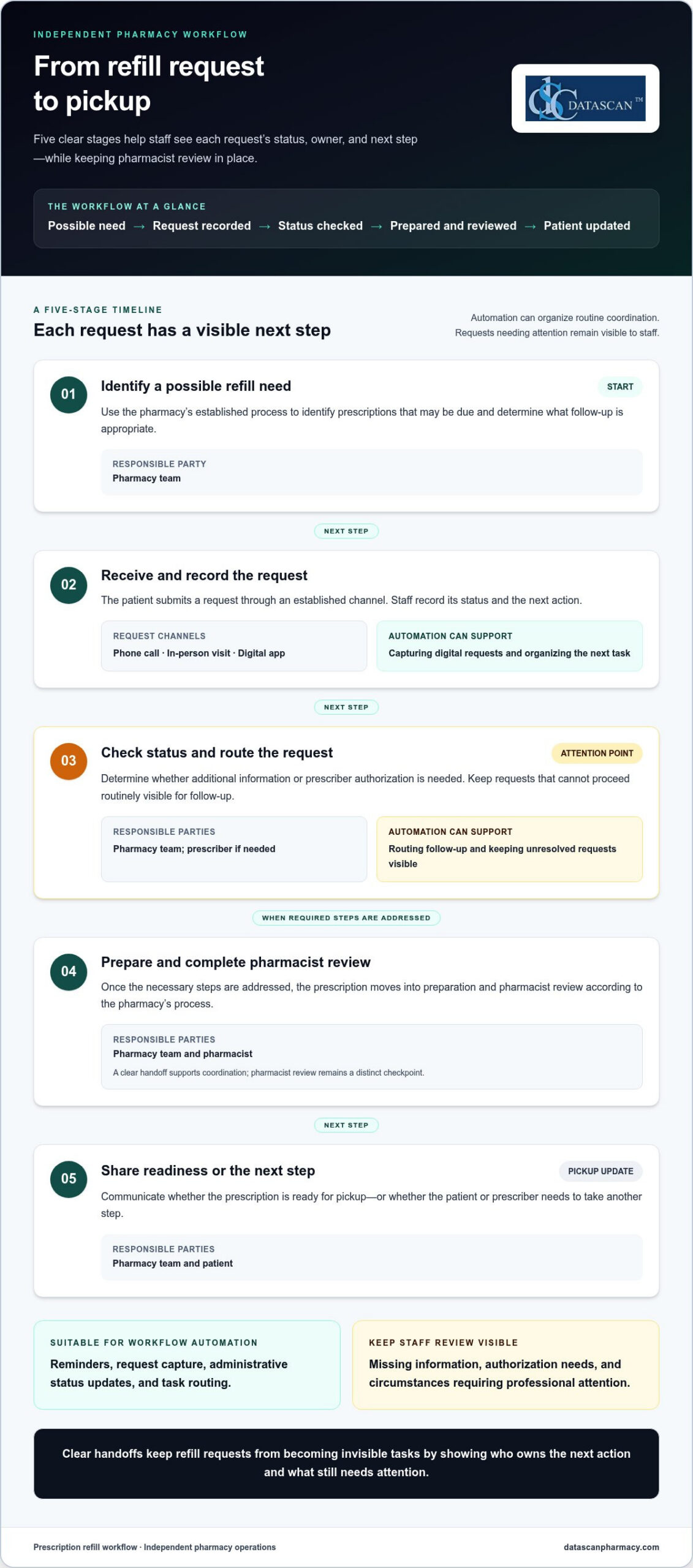
An automated prescription refill workflow moves a request through clear stages: identify a possible refill need, capture the patient’s request, determine what must happen next, prepare the prescription when appropriate, complete pharmacist review, and communicate readiness or another next step. The patient, pharmacy team, prescriber, and pharmacy management software may each have a role, depending on the request.
- Identify a possible refill need. The pharmacy team uses its established process to identify prescriptions that may be due and determine what follow-up is appropriate.
- Receive and record the request. A patient submits a request through an established channel, such as a phone call, an in-person visit, or a digital app. Staff record the request, its status, and the next action.
- Check status and route the request. Staff determine whether additional information or prescriber authorization is needed. Requests that cannot proceed routinely stay visible for follow-up.
- Prepare and review. Once the necessary steps are addressed, the prescription moves into preparation and pharmacist review according to the pharmacy’s process.
- Share readiness or next steps. The pharmacy communicates whether the prescription is ready for pickup or whether the patient or prescriber needs to take another step.
Clear handoffs keep refill requests from becoming invisible tasks by showing who owns the next action and what still needs attention.
| Workflow stage | Responsible party | Automation opportunity |
|---|---|---|
| Request intake | Patient and pharmacy team | Capture digital requests and organize the next task |
| Status and authorization check | Pharmacy team; prescriber if needed | Route follow-up and keep unresolved requests visible |
| Preparation and review | Pharmacy team and pharmacist | Make the handoff to preparation clear; retain pharmacist review |
| Pickup update | Pharmacy team and patient | Share a status update or explain the next step |
How should a pharmacy handle a refill request?
Start with the pharmacy’s established intake channels, and make sure each request has a recorded status and next action. Check the prescription’s status before moving it forward. If information or authorization is needed, assign that follow-up to the appropriate staff member or prescriber. Keep requests that cannot follow the routine path visible and give each one an owner, so they do not disappear into a general queue.
How do teams coordinate filling, review, and pickup communication?
When a request is ready to proceed, staff hand it into prescription preparation, followed by pharmacist review. A status update should tell the team and patient what has happened and what comes next, without implying that a request is ready before it is. For digital intake, the MobileScripts prescription refill app gives patients a way to submit refill requests. Pharmacy management software can help organize refill work within broader operations.
Use the workflow as a shared operating map, not as a promise that every request follows the same path. A pharmacy can tailor handoffs to its staffing and processes while keeping requests that need individual attention visible.
Can automated refills work without bypassing pharmacist oversight?
Yes. A refill workflow can automate routine coordination while keeping pharmacist review and clinical judgment separate from administrative processing. Automation can make requests easier to sort, assign, and track. It should not decide whether a prescription is clinically appropriate or remove the pharmacist’s review checkpoint.
The goal is not to make every request follow an identical path. It is to create a reliable routine route and a visible way to handle requests that need attention. Standardized routing can reduce uncertainty about where work goes next, but rigid rules may send unusual requests down the wrong path. Staff need enough visibility to recognize when a request does not fit the routine process.
Three elements work together:
- Standardized routing gives routine requests a predictable next step, while still allowing for exceptions.
- Staff visibility shows what is waiting and who owns the next action. A status label alone, however, does not resolve a stalled request.
- Exception handling directs requests needing attention to staff, with clear ownership and follow-through.
Small process gaps can undo the benefits. If a patient submits a request through more than one channel, duplicate work may appear unless staff can identify and reconcile the requests. If ownership is unclear, a request awaiting information or authorization can sit without follow-up. And if exceptions are routed out of sight, automation can hide work instead of organizing it.
Which refill requests should be routed for staff review?
Route a request for staff review when information is missing, authorization is needed, or its status prevents it from following the routine path. An exception queue or another visible task process can make these requests easier to monitor, but the process needs a named owner for review and resolution. Staff should be able to see what is blocked, what action is pending, and whether follow-up remains open.
How can a pharmacy keep automation transparent to its team?
Make each stage understandable to the people who use it. Document what each status means, who takes the next action, and how staff should handle incomplete, stalled, or duplicate requests. Train the team on those definitions, then review process issues together. If a request repeatedly lands in the wrong place, refine the routing rather than adding a step that conceals the underlying problem.
A practical automated prescription refill workflow makes responsibility visible from intake through review and follow-up. It supports staff by reducing avoidable sorting and status checks while preserving a deliberate pause for pharmacist judgment. Pharmacy management software and customizable workflow tools can help organize tasks around a pharmacy’s processes, but clear ownership and staff oversight remain essential.
How can an independent pharmacy implement and improve its refill workflow?
Start with the way refill work actually moves through your pharmacy, then make focused changes based on where staff time and requests get stuck. A deliberate process helps independent pharmacies use technology to organize operations without expecting software to solve every business pressure.
What should a pharmacy map before changing its refill process?
Document how requests arrive, where their status is recorded, and how work moves between roles. Mark authorization, missing information, preparation, pharmacist review, and patient communication as distinct handoffs. This makes it easier to see where work pauses and what needs attention before you change the process.
Use a practical implementation sequence:
- Map the current process. Follow a request from intake to its final update, noting the channels and handoffs involved.
- Identify repeated tasks. Separate recurring administrative work from decisions that require professional review.
- List common exceptions. Note where requests wait for information, authorization, or staff follow-up.
- Assign owners. Define responsibility for each stage and for requests that cannot proceed as planned.
- Test a focused change. Adjust one part of the process, explain the change to staff, and review what happens.
For pharmacies facing PBM reimbursement pressure, a refill workflow will not change reimbursement terms. It can help organize routine work and reduce avoidable administrative friction, giving leaders more room to monitor pharmacy operations and focus on financial decisions. Staff feedback matters: a bottleneck may come from unclear responsibilities or a difficult handoff, not a software setting. Ask the team where work pauses and which steps trigger repeat checks.
How can pharmacy management software support consistent refill work?
Pharmacy management software can help organize information and workflow within broader pharmacy operations, giving a pharmacy a system to support its chosen processes. Consider how staff will use the system to see work in progress and coordinate daily operations.
Different pharmacies have different staffing and operating processes, so workflow configuration should fit the way each team works. Datascan’s customizable workflow offering supports that effort. Pharmacies planning how to shape their processes can use pharmacy workflow software information as context for configuration around their needs.
Define measures before judging a change. Track open requests, unresolved exceptions, requests waiting for authorization, and requests without a recorded next action. Compare those measures over time with your own starting point rather than an assumed industry benchmark. Review the results with staff, then refine confusing handoffs or role assignments. Small, deliberate adjustments can make refill work more consistent and help the team protect time for other pharmacy operations.
How can Datascan help pharmacies organize refill workflows?
Datascan helps pharmacies organize refill work through pharmacy management software and customizable workflow tools. MobileScripts gives patients a digital way to submit prescription refill requests. These offerings can support a clearer process, while the pharmacy defines its handoffs and staff retain responsibility for review and clinical decisions.
Where do pharmacy management software and patient refill tools fit?
Pharmacy management software provides an operational foundation for organizing pharmacy work. For refill requests, the aim is to make the process easier for the team to manage within broader operations, with clear responsibility for follow-up and review. MobileScripts adds a patient-facing intake option by supporting prescription refill requests. It gives patients a way to submit requests, while pharmacy staff manage later steps according to the pharmacy’s process.
Each pharmacy’s staffing and operating processes are different, so workflow configuration should reflect how the team handles requests, handoffs, and exceptions. Datascan’s customizable workflow offering can support pharmacies seeking processes suited to their operations. Learn about pharmacy workflow software when considering how workflow configuration fits into the broader refill process.
Technology can help bring structure to the work, but it does not replace decisions about who reviews requests, how exceptions are handled, or what staff communicate to patients. A useful system supports a process the pharmacy has deliberately designed rather than assuming every request should move in the same way.
What should a pharmacy discuss when planning its refill workflow?
Begin with the current process, not a software feature list. Describe where requests come in, how staff record them, where handoffs occur, and which situations most often interrupt routine processing. That context makes the discussion specific to the pharmacy’s actual workload.
- Request channels: How do patients submit requests today, and where do staff bring those requests together?
- Handoffs: Where does work pass between the patient, pharmacy team, pharmacist, and prescriber?
- Bottlenecks: Which steps lead to repeat status checks, delayed follow-up, or confusion about what happens next?
- Exceptions: What types of requests need additional information, authorization, or staff attention?
- Ownership: How should staff see who owns each open task and what action is due next?
These details give a workflow conversation a practical starting point and help pharmacy leaders focus on changes that address real friction. Datascan is family-owned, has operated since 1981, and provides U.S.-based support. For independent pharmacies balancing refill coordination with daily operations, that experience and support can be part of the conversation about organizing work around the team’s needs.
Use the Datascan contact page to discuss your pharmacy’s workflow and the processes you want your team to manage more clearly.
Make your refill workflow easier to sustain
A refill process should keep working as your pharmacy’s daily demands shift. Treat your automated prescription refill workflow as an operating practice to revisit, not a one-time setup. As staffing patterns, request channels, or recurring bottlenecks change, review whether each step still has a clear owner and whether exceptions remain visible to the people responsible for resolving them.
Ongoing attention helps technology stay aligned with the way your team works. Pharmacy software and customizable workflows can support consistency, but staff insight is essential for spotting friction that a configuration change alone will not fix. Small, deliberate adjustments can help protect time for patient care and the many other responsibilities involved in running an independent pharmacy.
Choose one point in the refill process your team wants to make clearer, then use it to guide your next workflow conversation. Talk with Datascan about your refill workflow and explore a practical next step for your pharmacy. Shape the process around the work that matters most to your team.
Frequently Asked Questions
Can prescription refills be automated?
Yes. Pharmacies can automate selected administrative tasks, such as capturing incoming requests or organizing reminders. A request that needs additional information, authorization, or individual attention should remain visible for staff follow-up. For example, a pharmacy can use a consistent status for requests waiting on a response, making them easier to distinguish from work that can move to the next operational step.
How does an automated prescription refill workflow work?
An automated prescription refill workflow coordinates request intake, status tracking, task handoffs, preparation, review, and patient updates. A request might arrive digitally, be recorded for the pharmacy team, and then be routed for follow-up if something is needed before processing continues. Clear status information helps staff recognize whether a request is progressing, waiting on someone, or ready for its next step.
Does automated refill processing replace pharmacist review?
No. Automation can help organize administrative work, but it does not replace a pharmacist’s professional judgment. A pharmacy should make review responsibilities clear and ensure staff can tell when a request needs pharmacist attention. For example, an automated notification may tell staff that a request needs review, but the notification is not a clinical assessment or approval.
What happens if a prescription has no refills remaining?
The pharmacy team should treat the request as needing follow-up rather than assuming it can proceed as a routine refill. Staff can identify that no refills remain, determine the appropriate next action, and communicate what the patient should expect. A clear record of the pending action helps the team track the request while waiting for the information or response needed to proceed.
Can patients request refills through a pharmacy app?
Yes. Patients can submit refill requests through a pharmacy app that supports this function. MobileScripts, Datascan’s patient mobile app, supports prescription refill requests. The app gives patients a digital way to send a request to the pharmacy; it does not mean every later step is automatically completed. Pharmacy staff still manage the request according to the pharmacy’s process.
How can an independent pharmacy measure whether its refill workflow is improving?
Choose measures that answer practical questions about the work, such as how many requests remain open, how many are waiting on follow-up, and which types of exceptions recur. Compare results with the pharmacy’s own starting point and review them with staff. If a measure changes, ask what happened in the workflow before drawing conclusions. The purpose is to find process friction, not chase an unsupported benchmark.
About the author: This guide is published by Datascan Pharmacy Software, which provides pharmacy management software for independent and retail pharmacies.
 Kevin Minassian is the President of Datascan Software. Under his leadership, the company rapidly expanded to provide pharmacy management software on a national level. Over the last 15+ years, he has ensured that Datascan has continuously evolved to offer innovative solutions for independent pharmacies while still offering world-class customer support. He is passionate about helping independent pharmacies to remain competitive, achieve success, and offer the very best service to their communities.