
Drive-thru pharmacy workflow efficiency improves when staff can see what needs to happen next and who owns each handoff. The goal is not to rush every transaction. It is to reduce avoidable waiting while preserving careful, personal service. Intouch Insight’s 2026 Annual Drive-Thru Study puts the average pharmacy drive-thru visit at 5 minutes and 24 seconds, but speed matters only when patients still receive attentive service.
If staff repeatedly check prescription status, search for pickup information, or clarify who handles the next step, small delays can add up. Independent pharmacy owners already have plenty to manage, so finding bottlenecks should lead to practical changes, not another complicated project.
This guide explains how to map each handoff, identify avoidable waiting, and create a repeatable process from arrival through pickup. It also shows how to assess Pharmacy management software against your team’s actual responsibilities and workflow, including whether customizable workflow tools can support the way you work. The aim is a smoother drive-thru experience for patients and a more manageable process for staff, without treating speed as a substitute for care.
About the author: Datascan Pharmacy Software focuses on pharmacy technology and operational workflows for independent and retail pharmacies.
Key Takeaways
- Trace the pickup journey from arrival to handoff to find delays caused by unclear status, ownership, or extra steps.
- Map the process by observing, documenting, assigning responsibility, testing, and reviewing it with the team.
- Compare workflow changes by their intended benefit, possible trade-offs, and the measures your team can track consistently.
- Test one defined change, assign an owner, and explain the process to the staff it affects.
- Assess Pharmacy management software against documented stages and staff responsibilities, including how customizable workflow fits your pickup process.
What slows down drive-thru pharmacy workflow efficiency?
Drive-thru pharmacy workflow efficiency depends on coordinated preparation, clear status communication, and reliable pickup handoffs. A delay may become visible at the window but begin earlier: a prescription is not ready, its status is unclear, or staff do not know who should take the next step.
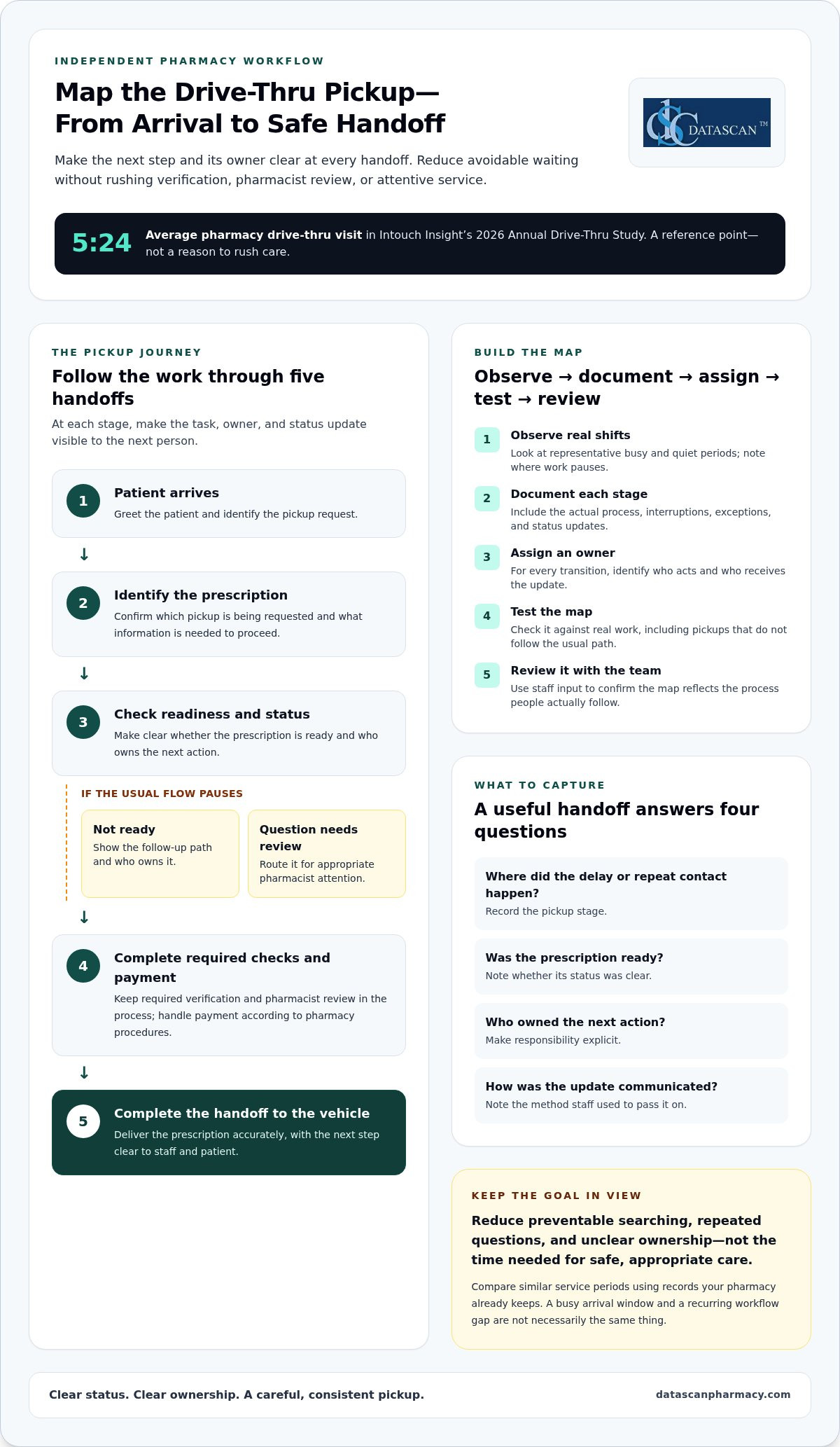
Drive-thru workflow efficiency is the pharmacy’s ability to move a pickup from patient arrival to a safe, accurate handoff through coordinated tasks and clear status updates. Depending on the pharmacy’s procedures and the pickup, the process may include greeting the patient, identifying the pickup request, checking prescription status, completing required verification and pharmacist review, handling payment, and delivering the prescription to the vehicle.
Not every pause is avoidable. Verification, pharmacist review, and patient questions need the time required for safe and appropriate care. Focus instead on waiting caused by preventable searching, repeated questions, unclear ownership, or tasks that could have been handled before arrival. Pharmacy automation is one broad approach to organizing pharmacy tasks. The Pharmacy Automation overview provides context, but drive-thru handoffs still need to fit the pharmacy’s own process.
Where do drive-thru prescription pickup delays begin?
Look for where a pickup stops moving, not just how long the line is. A queue can grow because several patients arrive together. A processing bottleneck may occur when prescriptions are not ready. A communication bottleneck may show up when staff repeatedly ask whether an order is complete or who is handling it.
Observe the process and use records your pharmacy already keeps. Note when the queue grows, which pickup stages are still in progress, and where staff pause to find information or clarify responsibility. Compare similar service periods rather than relying on assumed industry benchmarks. This helps distinguish a busy arrival window from a recurring workflow gap.
- Is the prescription ready when the patient arrives?
- Can the staff member at the window identify its current status?
- Does the next person know what action will move the pickup forward?
Which handoffs shape the patient pickup experience?
Follow each transition: intake to dispensing, dispensing to final checks, final checks to payment, and payment to vehicle-side service. At every stage, identify who owns the task, what status they communicate, and who receives the update. If ownership is unclear, two people may repeat work while another necessary step waits.
For example, a window staff member may need to confirm whether a prescription has cleared its final check. If that status has not been communicated, the staff member may leave the patient waiting while asking a colleague, even though the prescription is complete. A consistent handoff makes the next action clear without skipping verification or rushing pharmacist review.
How should a pharmacy map its drive-thru pickup workflow?
Map the pickup by observing what happens, documenting each stage, assigning responsibility, testing the map against real shifts, and reviewing it with the team. This gives staff a shared view of how information passes from one person to another, including what happens when a pickup does not follow the usual path.
Observe the work, document each step, assign an owner, test the map, and review it with the team. Keep the map practical. It should reflect the process staff actually follow, including interruptions and exceptions, rather than an idealized version. Record what the patient needs to know, what staff need to know, and how each update reaches the next person.
What should a drive-thru workflow map include?
Start with patient arrival and continue through prescription identification, readiness confirmation, payment, and completed handoff. At each transition, note the responsible role, the information needed to proceed, and the communication method staff use, such as a direct conversation or an available pharmacy system. Mark decision points where the request needs clarification or a question should be routed for appropriate review.
Show exceptions without letting them obscure the usual flow. For example, include a separate path for a prescription that is not ready and another for a question requiring pharmacist attention. These paths help staff see what to do next and who owns the follow-up, while preserving the pharmacy’s established verification and review steps.
How can pharmacy teams identify recurring bottlenecks?
Observe representative busy and quiet periods, then compare what changes and what stays the same. One shift may offer a useful clue, but it should not define the whole operation. Ask team members where they wait for information, repeat a contact, or feel unsure about who owns the next action. Their input can help distinguish recurring process friction from temporary demand or an unusual pickup.
Capture observations in a simple log. Detailed tracking that staff cannot maintain is less useful than consistent notes. Include:
- The stage where a delay or repeat contact occurred.
- Whether the prescription was ready and its status was clear.
- Which role owned the next action and how it was communicated.
- Whether the pickup was completed or needed follow-up.
Review the notes with the staff who handle each handoff. Confirm that the map reflects their actual responsibilities, then revise unclear steps before using it to assess changes. This groundwork also helps you decide whether pharmacy workflow software aligns with documented stages and responsibilities. A clear map is a practical starting point for improving drive-thru pharmacy workflow efficiency without asking staff to guess or skip necessary checks.
Datascan’s customizable workflow can be considered against your documented process. Discuss your pharmacy workflow with Datascan.
Which drive-thru workflow changes improve efficiency without sacrificing care?
The most useful changes address a specific point of friction, such as unclear role ownership, delayed status updates, disorganized queue handling, or a process staff manage outside their pharmacy system. Compare options against the process your team has documented. Judge drive-thru pharmacy workflow efficiency by both service flow and reliable, careful handoffs. Results depend on the pharmacy’s process and level of demand, so no change guarantees faster service.
| Change | Intended benefit | Trade-off | Measure to review |
|---|---|---|---|
| Clarify role ownership | Reduce uncertainty about who takes the next action. | Responsibilities may need to flex during busy periods. | Repeat contacts and handoffs with unclear ownership. |
| Standardize status communication | Help staff share pickup status consistently. | A new communication step needs to fit existing work. | Time spent locating status or asking for updates. |
| Organize queue handling | Make the order and status of waiting pickups easier to follow. | Unexpected arrivals and exceptions can disrupt the sequence. | Waits, incomplete pickups, and queue interruptions. |
| Review workflow software support | Align system use with documented tasks and responsibilities. | Configuration will not resolve an unclear process by itself. | Manual workarounds and repeated data or status checks. |
Should a pharmacy change the process or the software first?
Document the current process before deciding whether software configuration is needed. Start with low-disruption adjustments, such as clarifying ownership or agreeing on a consistent status update. If staff still rely on workarounds because the system does not align with the intended steps, consider a system-level change. Customizable pharmacy workflow software can support a defined process, but it should not be used to hide unclear responsibilities.
How can teams balance pickup speed with prescription accuracy?
Keep verification and appropriate pharmacist review visible in the workflow instead of treating them as obstacles to remove. Define how staff route questions that need pharmacist attention, and make sure routine handoffs do not bypass that path. A well-designed process supports the right review at the right stage while reducing avoidable searching and repeated questions.
Review service flow alongside signs of rework, such as repeated status checks, incomplete pickups, or handoffs that need correction. Treat privacy, prescription accuracy, and appropriate pharmacist involvement as non-negotiable when weighing a proposed change. If a faster step creates confusion or weakens a necessary check, revise the process rather than accepting that trade-off.
How can you test and improve drive-thru pharmacy workflow efficiency?
Test one clearly defined change against a consistent baseline, then review both the patient experience and the work required to complete each pickup. A small, measured pilot helps your team see whether a change reduces friction without creating new handoff problems or weakening necessary checks.
Start with measures staff can collect reliably using existing records or straightforward observations. Define what each measure means before comparing periods. For example, decide which events start and end an arrival-to-handoff measurement, and what counts as a repeat contact. Clear definitions make comparisons more useful and help prevent a busy shift from being mistaken for a process change.
Which measures can reveal drive-thru workflow friction?
Choose a small set that reflects both flow and completeness. Consider arrival-to-handoff time, repeat contacts, unresolved status questions, rework, and pickups that need follow-up. Record the same measures across comparable operating periods, and note unusual demand or exceptions that could affect interpretation. Without a comparable baseline and documented observation period, treat apparent improvement as an observation, not a proven result.
- Arrival to handoff: Use the same start and end points each time.
- Repeat contacts: Record when staff or patients need to ask again about status or next steps.
- Rework and incomplete pickups: Note corrections, repeated actions, or cases that require follow-up.
- Staff observations: Capture where the process felt unclear or required a workaround.
How should a pharmacy run a workflow pilot?
Choose one bottleneck the team can describe clearly, such as uncertainty about who communicates a status update. Assign an owner to explain the change, collect observations, and lead the review. Keep the adjustment limited so staff can distinguish its effects from other process changes, and explain what is changing before the pilot begins.
- State the problem and the specific change being tested.
- Tell affected staff what to do differently and who owns the next step.
- Observe the process during the agreed review period and record exceptions.
- Discuss results with staff, then continue, adjust, or stop the change.
Review more than timing. Ask whether patients received clear updates, handoffs were complete, staff knew who owned follow-up, and the change introduced extra steps elsewhere. If exceptions increased or staff needed frequent workarounds, revise the approach before expanding it. Do not assume a result will hold under every demand pattern. Record the conditions in which you observed it.
For broader process ideas, the Pharmacy Workflow Optimization Software: The 2026 Efficiency Guide can complement a local pilot. Pharmacy management software and workflow configuration should support the responsibilities your team has defined, not replace clear ownership. Datascan’s customizable pharmacy workflow is one option to assess against your documented process.
Use your workflow map and pilot observations to guide a discussion about configuration. Talk with Datascan about your workflow.
How can pharmacy management software support a better drive-thru workflow?
Pharmacy management software can support drive-thru pickup when its workflows align with the pharmacy’s documented stages, staff responsibilities, and patient-service priorities. Evaluate how the system fits the work your team already does rather than assuming software alone will resolve delays or improve drive-thru pharmacy workflow efficiency.
Use your workflow map as an evaluation tool. Follow a pickup through its stages and consider whether staff can access the prescription status information they need, understand who owns the next handoff, and complete payment within the pharmacy’s established process. Datascan Pharmacy Management Software includes customizable workflow capabilities, which can help align system configuration with a pharmacy’s way of working. The setup should support clear responsibilities, not create steps that staff must work around.
What should pharmacy management software support in a pickup workflow?
Assess the system against your actual pickup tasks. Consider prescription status visibility, defined staff handoffs, and whether point-of-sale steps fit the pharmacy’s existing process. Also plan how team members will learn the configured workflow and how you will review it after implementation. These considerations connect software decisions to day-to-day responsibilities rather than evaluating features in isolation.
For example, if the map shows staff often pausing to find out whether a prescription is ready, identify what information the relevant team members need and where they expect to find it. Then discuss how the system and staff process can support that need. Avoid assuming a particular display, alert, or drive-thru function exists unless it is part of the software being evaluated. A useful assessment ties each requirement to a real task and a clear owner.
Review point-of-sale steps just as practically. Consider where payment belongs in the pickup sequence, what information staff need at that stage, and how the process handles exceptions. Datascan Point of Sale is part of the broader set of tools pharmacies can consider alongside pharmacy management software. Review how the pieces fit your operation rather than treating a single feature as a substitute for a coherent workflow.
For a closer look at the broader system, explore Datascan Pharmacy Management Software. As you plan implementation, turn requirements into a straightforward pharmacy software implementation plan: identify the workflow being addressed, determine which staff responsibilities are affected, plan team training, and decide how to assess whether the configured process fits actual work. Keep the plan tied to your pharmacy’s own requirements.
How can independent pharmacies take the next step?
Bring your workflow map, recurring bottlenecks, and pilot observations to a software discussion. These materials connect system requirements to patient service and operational priorities, and help distinguish a configuration need from a process issue. Start with the handoff that most often causes confusion.
Datascan’s customizable workflow can be discussed in relation to your pharmacy’s documented needs. Discuss your pharmacy workflow with Datascan.
Make your next workflow decision with confidence
Treat drive-thru pharmacy workflow efficiency as an ongoing operational priority, not a one-time fix. As your team tests changes, record what you adjusted and what staff observed. That history can help you make future decisions with more confidence and keep the pickup process aligned with the way your pharmacy works.
If your next step involves technology, bring your documented workflow and priorities into the discussion. Datascan is a family-owned company that has supported independent and retail pharmacies across the United States since 1981, with pharmacy management software and customizable workflow capabilities. Focus on a practical fit for your operation, not change for its own sake.
Use your documented process to decide what to improve and what support you need. Start a conversation about your pharmacy’s workflow.
Frequently Asked Questions
How can a pharmacy reduce drive-thru wait times?
Improving drive-thru pharmacy workflow efficiency starts with tracing a pickup from arrival to handoff, noting where work pauses, and testing one targeted adjustment at a time. Separate ready prescriptions from cases needing follow-up so different situations are not blended in the same comparison. Use the pharmacy’s own baseline across comparable periods, and keep identity checks, prescription verification, and pharmacist review intact. The aim is less friction, not a promised wait-time result.
What should a drive-thru pharmacy workflow include?
A useful drive-thru workflow covers patient arrival, request and prescription identification, readiness confirmation, payment, routing of questions that need attention, and completed handoff. Assign an owner to each transition and define the status information the next person needs. For example, identify a pickup as awaiting readiness confirmation rather than relying on memory or a second conversation. Adapt the sequence to the pharmacy’s roles, systems, and established operating procedures.
Can pharmacy software improve drive-thru workflow efficiency?
Yes. Pharmacy management software can support drive-thru work when its configuration reflects the pharmacy’s documented stages and staff roles. Assess whether staff can access needed information at the right point, whether handoffs make sense across roles, and how exceptions are handled. Software does not replace staff training, a clear process, or professional judgment. Test the fit with a representative pickup scenario to see whether the system supports the team’s actual workflow.
How should a pharmacy measure drive-thru efficiency?
Track a small, repeatable set of measures, such as arrival-to-handoff time, repeat contacts, unresolved status questions, and corrections or other rework. Define the start, end, and counting rules before collecting data, then compare similar operating periods against a baseline. Note factors such as unusual volume or exception cases so they do not distort interpretation. No single number describes the whole patient experience, so review measures alongside accurate handoffs and appropriate care.
How can a pharmacy handle prescriptions that are not ready at drive-thru pickup?
Create a separate path for a pickup that is not ready: confirm its current status, explain the next step to the patient, and assign a staff owner to follow through. Record what triggered the exception and whether the patient needed another contact, so the team can spot recurring causes. If the interaction raises a clinical question, route it through the pharmacy’s established process for pharmacist attention rather than improvising an answer.
What is the difference between drive-thru workflow efficiency and faster service?
Drive-thru workflow efficiency means coordinating a pickup with less avoidable friction. Faster service refers only to elapsed time. A shorter visit is not a success if the patient leaves without clear information, staff repeat work, or verification is rushed. Review how smoothly tasks move alongside handoff completeness and rework. This broader view helps the pharmacy improve operations without making speed the only measure that matters.

Article by
Sarah Callioras
Sarah Callioras is Vice President at Datascan Pharmacy Software, bringing nearly 25 years of experience across independent pharmacy operations and pharmacy technology. Since joining Datascan in 2016, she has played a key role in driving business growth, strengthening client relationships, and supporting independent pharmacies through innovative software solutions. With a strong background in pharmacy operations, business development, and strategic leadership, Sarah is passionate about helping independent pharmacies succeed in an evolving healthcare landscape.
 Kevin Minassian is the President of Datascan Software. Under his leadership, the company rapidly expanded to provide pharmacy management software on a national level. Over the last 15+ years, he has ensured that Datascan has continuously evolved to offer innovative solutions for independent pharmacies while still offering world-class customer support. He is passionate about helping independent pharmacies to remain competitive, achieve success, and offer the very best service to their communities.