Accurate central pharmacy patient profile management starts with a complete, up-to-date record, not just a prescription list. Track medication history, current use, allergies, and prescriber details, then reconcile the profile with what the patient reports taking. This gives pharmacy staff a clearer view of prescriptions that may need review.
Keeping details current takes time, especially when information is spread across pharmacy records and electronic health records. This guide covers the profile details that matter, ways to reconcile medication lists across care settings, and how pharmacy management software can support organized, accurate records. Practical features can make routine profile work easier, giving staff less time searching for information and more time to support patients.
About the authors: This guide is prepared by an editorial team focused on pharmacy management software and operational workflows for independent and community pharmacies.
Key Takeaways
- Build patient records around medication history, current medications, allergies, and prescriber details so teams can review a more complete picture.
- Understand how pharmacy records and electronic health records can support medication reconciliation across care settings.
- Use consistent intake and update steps to catch changes in a patient’s medications and health information.
- Explore how pharmacy management software can organize profiles and support everyday pharmacy workflows.
- Learn where Datascan Pharmacy Management Software fits when you’re looking to streamline pharmacy operations.
1. Patient profiles with medication histories, allergies, and doctor information
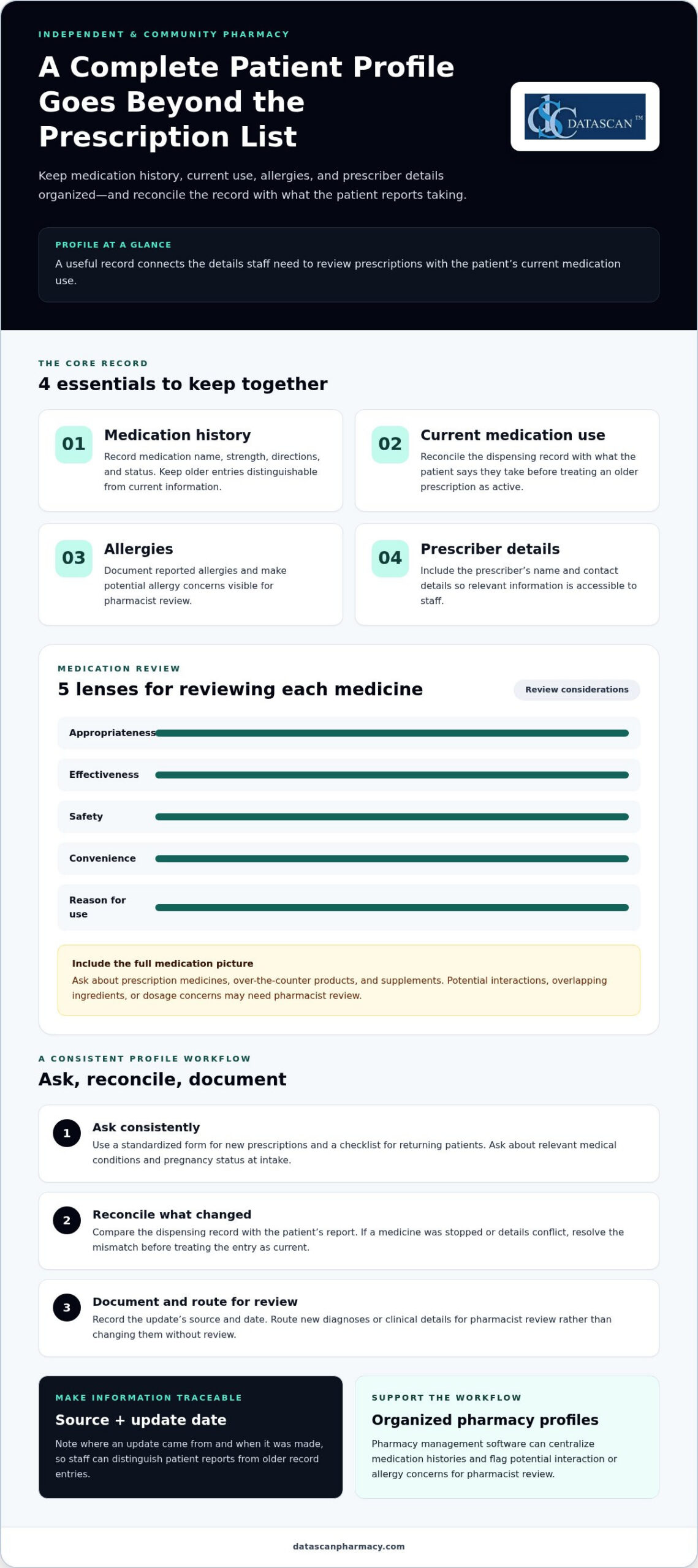
A complete patient record connects medication history and current use with allergies and prescriber details. Central pharmacy patient profile management should make these details accessible to staff handling prescription fulfillment. Record each medication’s name, strength, directions, and status, along with the prescriber’s name and contact details. Include the source and date of updates so staff can distinguish current information from older entries.
At intake, ask about relevant medical conditions and pregnancy status, and record the response and its source. A patient, for example, may report a new diagnosis after a prescription is entered. Document the update and route it for pharmacist review rather than changing clinical details without review. A standardized form for new prescriptions, paired with a checklist for returning patients, helps staff ask consistently.
Medication reviews should consider each medicine’s appropriateness, effectiveness, safety, convenience, and reason for use. Ask about prescription drugs, over-the-counter products, and supplements to create a fuller view of medication use. The FDA’s medication safety guidance encourages patients to keep an up-to-date medicine list and share it with healthcare professionals. A pharmacist can assess potential interactions, overlapping ingredients, and dosage concerns involving age, weight, or condition.
Coordinated fulfillment and renewals depend on staff seeing the same relevant profile information. Reconcile the dispensing record with what the patient currently takes before treating an older prescription as active. If a patient says a medication was stopped, document the report and resolve conflicting renewal details before dispensing. Pharmacy management software can centralize histories and flag potential interaction or allergy concerns for pharmacist review.
How does central pharmacy patient profile management compare with retail pharmacy systems? A central pharmacy process coordinates records across fulfillment workflows, while a retail system typically supports dispensing and patient service at a pharmacy. Both need usable records when a prescription changes.
What HIPAA and state privacy rules apply to pharmacy patient profiles in the United States? HHS explains that HIPAA privacy requirements apply to protected health information handled by covered entities and business associates. State laws may provide stronger privacy protections; HHS guidance on HIPAA and state laws explains when more protective state requirements can remain in effect.
How long must central pharmacies retain patient profile and prescription records? Retention depends on applicable state rules and record type, so pharmacies need a schedule for each category. Apply it consistently to profiles, prescriptions, and related documentation.
How do central pharmacies manage allergies, medication histories, and drug interaction alerts? Staff document reported allergies and medication use, then reconcile the details with dispensing records. Software checks can flag potential concerns for pharmacist review before a prescription proceeds.
For central pharmacy patient profile management, clear documentation and pharmacist review help keep records useful as prescriptions and patient circumstances change.
2. Integration with electronic health records
An electronic health record (EHR) can provide clinical context beyond a pharmacy’s dispensing record. Integration can help authorized staff access relevant information without repeatedly entering it. The goal is to streamline a defined task, such as reviewing a discharge medication list before processing a prescription. The Office of the National Coordinator for Health Information Technology describes interoperability as the ability of systems to exchange and use health information.
Start by mapping the information that needs to move between systems. This may include patient identifiers, medication name and strength, directions, status, prescriber, allergy details, and update date. For example, a discharge list may show a medication as stopped while the pharmacy record still shows an active refill. Staff should review the mismatch before treating either entry as current.
Then define how the connection handles matching and updates. Use approved patient identifiers to reduce the risk of matching records to the wrong person. Set a process for duplicate records, missing fields, and conflicting medication statuses. HL7 FHIR provides a standard for exchanging healthcare information electronically, but pharmacies still need clear local rules for reviewing incoming data.
Consider each handoff in the pharmacy workflow. A hospital discharge, prescriber medication change, or refill request can introduce new information. Staff should know where updates appear, who reviews them, and how decisions are documented. For instance, a medication marked discontinued in an EHR should prompt reconciliation with dispensing history before another renewal proceeds.
Keep the source and timing of information visible. A patient-reported supplement, an EHR medication order, and a pharmacy fill history come from different sources. Recording the source helps a pharmacist interpret mismatches and determine what needs clarification. A timestamp also helps staff distinguish a recent care transition from an older entry that may no longer reflect current treatment.
Test the integration with realistic cases before relying on it in daily work. Include a changed dose, a discontinued medication, a duplicate patient, and an incomplete entry. Confirm that each item reaches the intended profile, displays a clear status, and can be corrected through the usual workflow. Assign responsibility for unresolved exceptions so they do not go unnoticed in a queue.
Review the process after staff begin using it. Track recurring mismatches, manual corrections, and delays between an update and its review. These patterns can point to data mapping problems, patient matching issues, or unclear responsibilities. A brief review with pharmacists and technicians can turn recurring exceptions into a clearer workflow.
If your team is planning an EHR-related workflow change, discuss your pharmacy workflow needs as part of the planning process.
3. Maintaining accurate patient profiles
Accuracy depends on capturing changes, correcting mismatches, and documenting who supplied each update. Effective central pharmacy patient profile management also needs a clear audit trail, so staff can understand why a record changed. Record the information source, date received, staff action, and any unresolved question. For example, note whether a medication change came from the patient, caregiver, prescriber, or discharge paperwork.
How do central pharmacies verify patient identity and prevent duplicate profiles? Staff should compare approved identifiers, such as full name and date of birth, before creating or changing a record. Search existing profiles first, then resolve close matches through the pharmacy’s identity-check workflow instead of creating another profile.
Use a repeatable process when a patient reports a change. Confirm which medication or detail changed, when it changed, and who provided the information. Then reconcile the entry with available prescription and dispensing records. If sources conflict, flag the discrepancy for review instead of silently replacing information. This gives central pharmacy patient profile management a documented trail of how each update was handled.
What are common risks and errors in central pharmacy patient profile management? Duplicate profiles, outdated medication statuses, misspelled identifiers, and overlooked allergy or prescriber updates can leave records incomplete. A discontinued medicine left active, for example, may appear during a later renewal. Staff need a defined method for correcting discrepancies and recording the decision.
Patients and caregivers can help keep records current by sharing an updated list of prescription medicines, non-prescription products, and natural health products with healthcare providers, especially during transitions of care. Ask whether the list reflects what the patient currently takes. Record reported changes and their source, then route clinical questions for pharmacist review.
How can patients request access to, correction of, or transfer of their pharmacy profile? They can contact the pharmacy and specify whether they want to review information, request a correction, or have records transferred. The pharmacy should verify the requester’s identity and handle the request through its records process, following applicable privacy requirements.
For a correction request, identify the exact entry and proposed change. A patient may report no longer taking a medication while the profile shows it as active. Staff can document the request, compare relevant records, and refer medication-status questions for review. A central pharmacy patient profile management workflow should preserve a clear history of the original entry and its correction.
Transfers also need a documented handoff. Confirm the destination pharmacy and the information needed for continued care, then record the request and completion in the appropriate workflow. A consistent checklist helps staff avoid sending an incomplete profile or leaving the patient unsure which pharmacy holds the current record.
4. Pharmacy management software features
Pharmacy management software brings patient records and daily dispensing work into one coordinated system. For a central pharmacy, useful features include searchable patient histories, prescription processing, refill workflows, reporting, inventory management, billing, and claims tracking. The value comes from connecting these tasks, so staff can move from a prescription record to its related workflow without keeping separate, disconnected notes.
What software systems are used for central pharmacy patient profile management? Pharmacies use pharmacy management systems that combine dispensing functions with patient records and operational tools. Depending on the setup, staff may also use electronic health records or separate inventory and claims processes. Clear data ownership helps prevent conflicting entries.
Look for features that support specific tasks, not just a long list of labels. Profile search should help staff find the right record, while workflow queues show which prescriptions need attention. Reporting helps teams review operational activity, and claims tracking makes it easier to follow claim status during billing. These features work best when they fit existing responsibilities and handoffs.
- Patient history: Keep a centralized record that staff can access while processing prescriptions and reviewing prior activity.
- Refill coordination: Medication synchronization aligns prescription refills so patients can pick them up or have them delivered on the same day each month.
- Refill preparation: Automatic refill services can track prescriptions and prepare them ahead of time, supporting a more orderly workflow.
- Inventory workflows: Inventory tools can support medication ordering, receiving, tracking, reconciliation, and expiration-date workflows.
Medication synchronization can make refill timing easier to coordinate for patients and pharmacy staff. Aligned refill dates, for example, give the team a shared point for planning prescription preparation. Automatic refill services address a different step by tracking eligible prescriptions and preparing them ahead. Staff still need a clear process for reviewing changes and handling prescriptions that require attention.
Pharmacy management systems can also support medication therapy management, educational sessions, support groups, and vaccinations. These functions connect patient-facing services with pharmacy operations, but each needs a defined workflow. A medication therapy management process, for instance, can give staff a consistent place to record a completed review and its follow-up tasks.
Test a workflow before changing systems or processes. Follow one prescription from intake through processing, claim tracking, refill planning, and inventory reconciliation. Note where staff re-enter information or switch tasks, then identify which feature could simplify that step. This practical review helps pharmacy owners focus on tools that address real workload pressures while preserving time for patient care.
Reconcile the medication list with the dispensing software profile so active prescriptions reflect current medication use. Pharmacy professionals can include this comparison in profile reviews rather than assuming the software profile alone reflects current use. If the list and profile differ, staff can review the information and follow the pharmacy’s process for resolving the mismatch. Connecting reconciliation with prescription processing helps keep the profile aligned with the medication information used in pharmacy work.
5. How do central pharmacies create and update patient profiles?
Create a profile through a consistent intake process, then update it when relevant information changes. In central pharmacy patient profile management, each record should be useful to the staff handling the next workflow. Start by searching for an existing record, confirming the patient’s identity, and recording the source of new information. This sequence helps limit duplicate records and gives later reviewers useful context.
A standardized intake form helps staff capture consistent details for a new prescription. Record the identifiers needed to locate the patient, prescriber details, and information required for prescription processing. Ask what has changed since the patient’s last interaction. If a caregiver provides an update, note the source so a pharmacist can consider it appropriately.
For returning patients, use a checklist to prompt updates rather than assuming the existing profile is current. Ask whether medication use or prescriber information has changed, then compare the answer with the pharmacy record. A patient may report a new direction, for example, while an older entry remains in the system. Route the discrepancy for review before staff rely on either entry for fulfillment.
A practical workflow can follow these steps:
- Search for an existing patient record before opening a new profile.
- Confirm identity using the pharmacy’s established verification process.
- Enter new information with its source and date.
- Compare conflicting details with available prescription records.
- Save the update and route clinical questions for pharmacist review.
Assign clear ownership at each handoff. Intake staff can record a reported change, while a pharmacist reviews medication questions before the information guides a clinical decision. Pharmacy management software can centralize histories, but staff still need a defined process for incomplete entries and unresolved discrepancies. Document who handled the issue and how the profile was updated.
Build profile checks into routine work, such as prescription intake, renewal processing, or a care transition. When an update arrives, capture its source and direct conflicts to the right reviewer. This makes central pharmacy patient profile management part of everyday operations, not a separate task that can be delayed. Review staff workflows periodically to identify unclear handoffs or recurring corrections.
If your team wants to refine its profile workflow, discuss your pharmacy workflow needs with Datascan Pharmacy Software.
Use a standardized intake form for new prescriptions and a checklist for returning patients to capture information and updates. Keep prompts focused on details staff need and provide space for clear responses. At intake, follow the form in a consistent order so information is not left to memory. For returning patients, use the checklist to confirm what remains accurate and identify what has changed, rather than treating prior entries as automatically current.
These tools work best when staff apply them consistently. If a response is unclear or incomplete, flag it for follow-up rather than treating it as settled. A completed form or checklist helps the next staff member see which topics were covered and where clarification is still needed. Review the prompts against questions that arise in routine work and adjust them when recurring gaps appear. Keep the process simple enough to use reliably.
Datascan Pharmacy Software: Datascan Pharmacy Management Software
Datascan Pharmacy Software offers Datascan Pharmacy Management Software for independent and retail pharmacies looking to organize daily operations. If your team is reviewing how profile work fits with dispensing and other pharmacy tasks, pharmacy management software can connect related workflows and reduce manual handoffs.
Review how your current process handles patient intake, profile updates, prescription processing, and follow-up. Datascan’s customizable workflow can be aligned with how your pharmacy operates, helping staff manage routine work while keeping attention on patient care. Discuss your pharmacy’s workflow needs with Datascan to see how pharmacy software can support them.
Contact Datascan Pharmacy Software or visit datascanpharmacy.com to learn more.
Make your next workflow improvement practical
To improve central pharmacy patient profile management, choose one workflow where staff lose time or updates are hard to follow. Map the handoffs, assign ownership for each update, and identify where clearer records would support daily work. A focused improvement gives your team a practical way to build consistency without changing every process at once.
Datascan Pharmacy Software offers Datascan Pharmacy Management Software, Datascan Point of Sale (POS), and MobileScripts Patient Mobile App. These products support pharmacy management, point-of-sale, and patient mobile app needs. Discuss your workflow with Datascan to consider how pharmacy software fits your priorities.
Contact Datascan Pharmacy Software to discuss your pharmacy’s needs. Take the next step at a pace that works for your team, and keep improving the workflows that support patient care.
Frequently Asked Questions
What information is included in a central pharmacy patient profile?
A central pharmacy patient profile typically includes patient identifiers and contact details, prescription records, medication history, allergies, prescriber information, and relevant health details. It should distinguish active prescriptions from discontinued or historical entries so staff can interpret the record correctly. For each update, capture its source and date. For example, note whether a medication change came from a new prescription or a patient-reported update awaiting review.
How long must central pharmacies retain patient profile and prescription records?
Retention depends on applicable state rules and record type. Pharmacies should set and consistently apply a retention schedule for each category.
 Kevin Minassian is the President of Datascan Software. Under his leadership, the company rapidly expanded to provide pharmacy management software on a national level. Over the last 15+ years, he has ensured that Datascan has continuously evolved to offer innovative solutions for independent pharmacies while still offering world-class customer support. He is passionate about helping independent pharmacies to remain competitive, achieve success, and offer the very best service to their communities.