The best fit depends on how well a pharmacy system supports your daily workflow, staff, and business priorities, not on name recognition alone. A comprehensive comparison can help you evaluate security, support, ease of use, value, ratings, and user reviews side by side. No single system is right for every pharmacy.
It’s worth looking beyond feature lists: a system affects how your team handles prescriptions, serves patients, and manages routine work. This comparison focuses on what to evaluate and how the differences may matter in an independent pharmacy. Use it to compare the options, interpret ratings and reviews, and identify the questions to prioritize before choosing pharmacy software.
Key Takeaways
- Compare security practices and support in the context of your pharmacy’s day-to-day needs, not feature lists alone.
- Assess value by considering the full workflow your team needs, including point of sale, inventory, and automation.
- Read user reviews for recurring patterns about usability and support, and weigh them against your own pharmacy’s priorities.
- Use consistent criteria to compare ratings and ease of use across pharmacy management systems.
- Identify which system best aligns with your operations, staff, and plans for serving patients.
How do pharmacy systems handle data security and support?
Compare security and support by asking each vendor to demonstrate the same pharmacy scenarios. Evaluate access controls, backup and recovery procedures, support channels, and escalation steps. The U.S. Department of Health and Human Services explains that the HIPAA Security Rule sets safeguards for electronic protected health information. Use that guidance as a framework for your questions, not as proof that a particular system meets your needs.
Ask each representative to explain how staff access is assigned and updated. For example, discuss what happens when an employee leaves or changes roles. Then ask how the pharmacy would respond if a workstation became unavailable during a busy shift. Record the steps, responsible roles, and support process described for PioneerRx, PrimeRx, Liberty, and Datascan.
| System | Security review | Support review | Pharmacy scenario |
|---|---|---|---|
| PioneerRx | Document demonstrated access and recovery procedures. | Record contact and escalation steps. | Test a workstation interruption. |
| PrimeRx | Document demonstrated access and recovery procedures. | Record contact and escalation steps. | Test a workstation interruption. |
| Liberty | Document demonstrated access and recovery procedures. | Record contact and escalation steps. | Test a workstation interruption. |
| Fourth system | Document demonstrated access and recovery procedures. | Record contact and escalation steps. | Test a workstation interruption. |
Which systems integrate with wholesalers, accounting software, e-prescribing, and pharmacy automation equipment? Integration depends on the systems and setup involved. Compare each option against the wholesaler, accounting platform, e-prescribing workflow, and equipment your pharmacy uses.
How do the systems compare for reporting, analytics, and business intelligence? Ask each vendor to demonstrate reports on prescription activity, inventory, and business operations. Compare how staff find the information and use it to answer the same business question.
Which pharmacy software best supports multiple locations, compounding, and specialty services? Look for a system that demonstrates your oversight needs and the workflows for your specialized services. Ask to see one relevant process from intake through completion.
What data migration and implementation steps are involved when switching pharmacy software? Identify which records will move, assign staff to review them, test migrated data, and rehearse daily workflows before launch. Include patient profiles, prescription records, and inventory in the test plan, with a named person responsible for resolving discrepancies.
Choose the system whose demonstrated safeguards, support process, integrations, and workflows fit your pharmacy’s needs. Keep your comparison notes with the implementation plan so staff can refer to agreed procedures during the transition.
How do ease of use and value for money compare?
A pharmacy system’s value depends on how well it supports your team’s work, not just its quoted price. Compare PioneerRx, PrimeRx, and Liberty against the tasks your staff performs every day, then consider the full scope of each proposal. A good workflow fit can reduce friction, while an unsuitable setup may add steps.
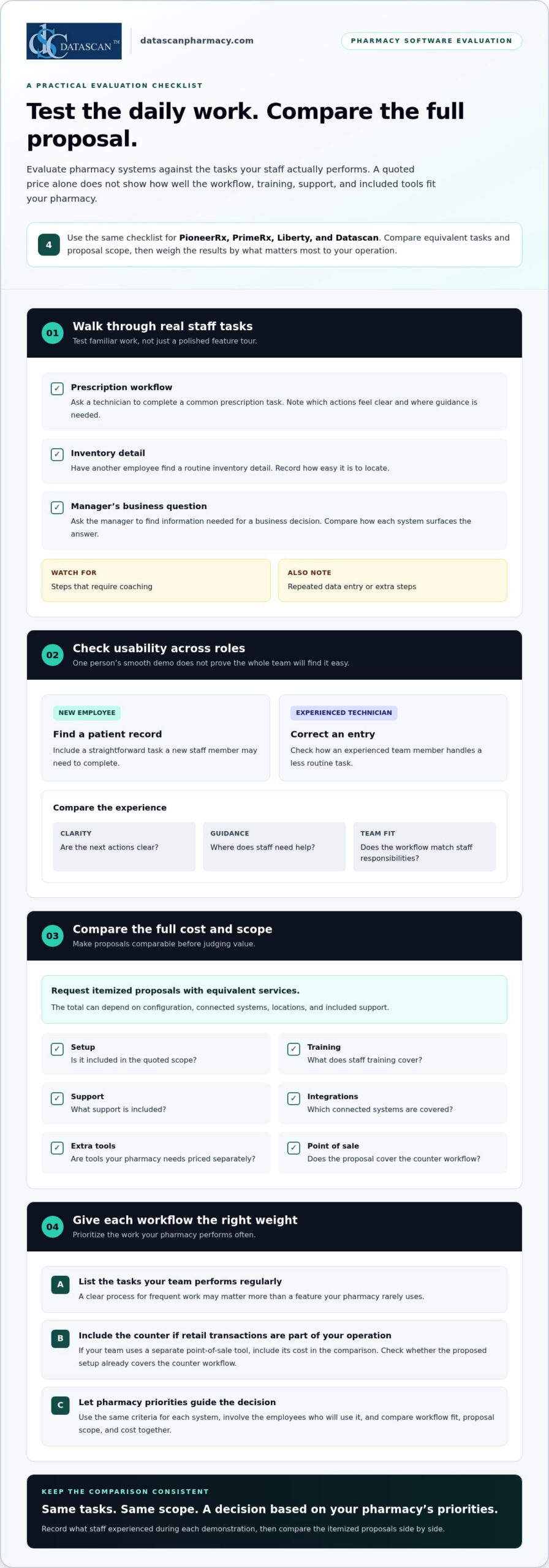
Test more than one role during a demonstration. Have a technician complete a familiar prescription task, then ask a manager to find an operational report. Note which actions are clear, where staff need guidance, and whether the screens match how your pharmacy divides responsibilities. A smooth demonstration for one employee doesn’t guarantee the same experience across the team.
Use a consistent task list for each product:
- Ask a staff member to complete a common prescription workflow.
- Have a second employee find a routine inventory detail.
- Ask the manager to locate information needed for a business decision.
- Record steps that require coaching or repeat data entry.
Look beyond the proposal’s headline amount. Review what the quoted scope includes, such as setup, training, support, integrations, and any separately priced tools your pharmacy needs. The total can depend on configuration, connected systems, locations, and included support. Request itemized proposals so you can compare equivalent services.
Consider how each system handles a task your team performs often. If retail transactions are part of your operation, include a counter workflow in the evaluation. If staff move information between systems, note where that happens and whether the proposed setup addresses it. These observations connect the software decision to the time spent on actual pharmacy work.
Ask each vendor what training covers and how staff can learn less common tasks. For example, a new employee may need to find a patient record, while an experienced technician may need to correct an entry. Include both cases when evaluating usability and the practical value of training.
Compare every system using the same criteria, and involve the employees who will use it. A feature your pharmacy rarely needs may matter less than a clear process for a task performed every shift. Let the importance of each task guide how you weigh usability, scope, and cost.
If you’re mapping pharmacy software requirements to your workflows, discuss your pharmacy software needs as part of the evaluation.
If your evaluation includes a separate point-of-sale tool, include its cost alongside the pharmacy system proposal. Check whether the quoted setup already covers the counter workflow your team needs, and compare the scope before assuming an extra tool is necessary. Keeping this cost visible makes proposals easier to assess on the same basis.
For Datascan, ask for an itemized proposal that explains the pricing and scope, including setup, training, support, integrations, and any tools your pharmacy would need separately. Compare those details with the tasks staff tested during demonstrations. A proposal is useful when its scope supports your team’s work and employees can complete routine tasks clearly. This keeps usability and value in view, rather than judging a system by its headline amount alone.
What do pharmacy software ratings and user reviews reveal?
Ratings offer a starting point, not a universal ranking. Compare PioneerRx, PrimeRx, and Liberty on the same review platforms, and check the number, recency, and detail of their reviews. Platforms such as Capterra, G2, and Software Advice can help you find user feedback to assess.
Overall User Ratings
Compare each system’s rating on the same platform before comparing scores across platforms. Review counts and rating scales can differ, so a score from one site isn’t directly equivalent to a score elsewhere. Read the reviews behind each score, note their dates, and check whether the reviewer describes a pharmacy operation like yours.
Look for specific examples, not praise or criticism alone. A review describing how staff handle a medication workflow gives you a task to evaluate in a product demonstration. Record the platform, score, review count, and date you checked it. This creates a dated snapshot instead of treating a changing online rating as permanent.
User-Reported Drawbacks and Risks
Common issues to investigate include training effort, workflow fit, integration challenges, and support experiences. Treat these as review categories, not verified complaints about PioneerRx, PrimeRx, or Liberty. One review reflects an individual user’s experience; recurring, detailed accounts deserve closer attention, especially when they concern work your pharmacy performs.
What drawbacks, complaints, or risks do users report for each system? Reviews may discuss usability, implementation, integrations, or support, but concerns vary by reviewer and pharmacy. Compare recurring, specific examples across platforms, and don’t attribute a complaint to a system unless the reviews support that conclusion.
Use a simple review log to turn feedback into useful questions:
- Record the software name, platform, and date reviewed.
- Group comments by training, workflow, integrations, or support.
- Note whether a review explains a specific task or situation.
- Bring recurring issues into your own evaluation.
If reviews repeatedly describe difficulty learning a task, for example, ask the vendor to demonstrate that workflow. If users mention an integration concern, test the related process in your pharmacy’s environment. Ratings can help identify what to investigate, but they can’t predict how every team will experience a system.
Keep the comparison fair by applying the same standards to all three options. Give more weight to detailed reviews that explain the pharmacy context, task, and outcome. Then use your team’s own evaluation to decide whether the issues described would affect daily operations.
Which pharmacy management system is easiest to use and has the best customer support?
No system can be identified as the easiest to use or best supported based on the information here. Compare PioneerRx, PrimeRx, and Liberty using the same staff tasks and support scenarios. Then choose the system your team can use confidently and whose support process meets your pharmacy’s needs.
To evaluate ease of use, test a routine task rather than relying on a prepared product tour. Ask a technician to find a patient profile, process a sample refill, and correct an entry. Watch how the screen guides each step, where the technician pauses, and whether they need help. Repeat the same tasks in each system.
Include staff with different responsibilities. A pharmacist, technician, and manager may use different screens and workflows in PioneerRx, PrimeRx, or Liberty. Ask each person to complete a familiar task and a less common one. Their experience can show whether the system is clear across roles, not just to the person leading the demonstration.
Evaluate customer support with a specific scenario, such as a workstation problem during prescription processing. Ask each vendor how a pharmacy submits a support request, what information helps diagnose the issue, and how an urgent problem is escalated. Record the stated process; similar product features don’t guarantee similar support.
Use a simple scorecard to keep the comparison consistent:
- Rate task clarity after the same staff member tests each system.
- Record steps that caused confusion or required assistance.
- Write down the support contact method and escalation path described.
- Note how clearly each representative explains the resolution process.
A score is useful only if your team applies the same standard to each system. For example, define a strong usability result as completing a task without coaching. Define a strong support response as a clear explanation of the next step, the information needed, and the escalation route. These are evaluation criteria, not claims about a vendor’s performance.
Compare results by role and task. If a technician finds refill processing easy but struggles with corrections, ask for another demonstration focused on corrections. If the manager still has questions about support escalation, request a walkthrough of that process before deciding. Each follow-up should address an observed gap.
For an independent pharmacy, the best fit is a system that makes frequent tasks understandable and gives staff a support process they can follow. Use the same demonstration script for PioneerRx, PrimeRx, and Liberty, and let your team’s documented results guide the decision.
If Datascan is also under consideration, apply the same evaluation to its included programs: Datascan pharmacy software includes IVR, patient adherence, and clinical programs. Ask staff to demonstrate the functions they would actually use, and note whether they can find the relevant steps without coaching. Include questions about how to request help with those programs and how an urgent issue would be escalated. Keep the results separate by task, role, and support scenario so that a smooth demonstration in one area does not stand in for the whole system. Compare only what your team observed using the same criteria.
How do PioneerRx, PrimeRx, Liberty, and Datascan handle point of sale, inventory, and workflow automation?
Compare PioneerRx, PrimeRx, Liberty, and Datascan by testing the same retail transaction, inventory task, and prescription handoff. Product names alone don’t show how those steps work in your pharmacy. Use a repeatable demonstration and record what staff can complete, where information moves, and which tasks still require manual entry.
Start with a point-of-sale scenario that reflects your counter. Ask the representative to process a sample purchase, apply the relevant pharmacy workflow, and show how the transaction appears in the records. Observe whether staff can move between the sale and pharmacy work without re-entering information. Use the same scenario for all four systems.
For inventory, choose a product your pharmacy regularly orders and follow its path through the system. Review how staff find the item, record a receipt, and view the resulting inventory information. Ask the representative to explain each screen and action. Your team can then compare the steps, visibility, and any separate tasks required.
Evaluate workflow automation by testing a real sequence, not by relying on a feature label. Map one prescription from intake through processing and pickup. At each handoff, note who acts next, what information appears, and whether a staff member must repeat an entry. Test the same sequence in PioneerRx, PrimeRx, Liberty, and Datascan.
Capture observations in a shared evaluation sheet:
- Record the point-of-sale steps and any pharmacy handoffs.
- Note how the selected inventory item is found and updated.
- Mark manual entries or repeated information during the sample workflow.
- Ask staff to identify the step that felt least clear.
Then compare operational fit by role. A cashier may focus on the sale, while a technician tracks prescription progress and inventory. Have both roles participate in each demonstration. Their observations can show whether one sequence supports work across the counter, pharmacy, and inventory tasks.
Don’t treat automation as an all-or-nothing claim. Ask each representative to show exactly what triggers the next step and what staff must still do. For example, distinguish an automatically displayed status from a task that requires an employee to open another screen and update it manually.
Use the results to identify the system that best matches your actual process, not a generic workflow. If a step is unclear, ask for that exact task to be demonstrated again. A side-by-side test of PioneerRx, PrimeRx, Liberty, and Datascan gives your pharmacy a practical basis for comparing POS, inventory, and workflow fit.
Datascan Pharmacy Software: Datascan Pharmacy Management Software
Datascan Pharmacy Software offers Datascan Pharmacy Management Software for independent and retail pharmacies evaluating their next system. If your comparison points to a need for pharmacy management software alongside patient and transaction tools, consider how these offerings fit your daily operations.
Datascan Point of Sale (POS) supports pharmacies evaluating how checkout fits into their technology choices. MobileScripts Patient Mobile App and Datascan Mobile Delivery App add tools for patient communication and delivery workflows. Together, the platform’s components support pharmacy operations through integrated dispensing, POS, mobile, delivery, and workflow tools.
Use your comparison criteria to identify the workflows that matter most, then explore how Datascan’s platform aligns with them. Contact Datascan Pharmacy Software to discuss your pharmacy’s needs.
Turn your comparison into a confident next step
A PioneerRx, PrimeRx, Liberty, and Datascan comparison is most useful when it leads to a decision grounded in your pharmacy’s priorities. Choose the workflow your team most wants to improve, then use it to guide the next conversation. This keeps your evaluation focused on operational fit, not just a long feature list.
Datascan Pharmacy Software offers the Datascan Pharmacy Management Software Suite, Datascan Point of Sale (POS), and MobileScripts Patient Mobile App as part of its integrated platform. Consider how these offerings fit the tasks your staff handles and the patient experience you want to support. Contact Datascan to discuss how the platform aligns with your pharmacy’s needs.
Contact Datascan Pharmacy Software to discuss your pharmacy’s requirements and explore a practical path forward. The right system should support the way your team works today and the direction you want your pharmacy to grow. Take the next step with clarity and confidence.
Frequently Asked Questions
How do the four systems compare for reporting, analytics, and business intelligence?
Ask each vendor to demonstrate reports on prescription activity, inventory, and business operations. Compare how staff find the information and use it to answer the same business question.
What HIPAA, NCPDP, and state-specific requirements should pharmacies consider when choosing software?
Use the HIPAA Security Rule as a framework for asking about safeguards for electronic protected health information, including access controls and backup and recovery procedures. The material provides no specific NCPDP or state-specific requirements.

Article by
Sarah Callioras
Sarah Callioras is Vice President at Datascan Pharmacy Software, bringing nearly 25 years of experience across independent pharmacy operations and pharmacy technology. Since joining Datascan in 2016, she has played a key role in driving business growth, strengthening client relationships, and supporting independent pharmacies through innovative software solutions. With a strong background in pharmacy operations, business development, and strategic leadership, Sarah is passionate about helping independent pharmacies succeed in an evolving healthcare landscape.
 Kevin Minassian is the President of Datascan Software. Under his leadership, the company rapidly expanded to provide pharmacy management software on a national level. Over the last 15+ years, he has ensured that Datascan has continuously evolved to offer innovative solutions for independent pharmacies while still offering world-class customer support. He is passionate about helping independent pharmacies to remain competitive, achieve success, and offer the very best service to their communities.