Better documentation starts with a system that makes the right details easy to capture and review. The best approach to documenting patient interventions in software is to evaluate how well it supports clear, consistent notes, connects interventions to care goals, and preserves a reliable record of changes. Security and applicable privacy requirements, including HIPAA and 42 CFR Part 2, also belong in the selection process.
When intervention records are scattered across workflows or entered inconsistently, staff may struggle to see what happened and what needs to happen next. Software can help make records and processes more consistent without adding unnecessary steps. This guide explains what to consider when documenting patient interventions in software, how to create clear notes, and how to assess workflow fit and privacy.
Key Takeaways
- Choose documentation software that helps staff record interventions clearly, connect them to care goals, and maintain a dependable record of changes.
- Use consistent note structures and workflows so documentation reflects the service provided and supports continuity across care teams.
- Evaluate how a system fits existing processes, supports access to relevant patient history, and helps identify incomplete documentation.
- Include privacy and security in your selection criteria, including HIPAA considerations, 42 CFR Part 2 applicability, and how vendors handle protected information.
- Build a practical review process so clinicians check notes for accuracy and completeness before signing.
1. Audit-ready notes and documenting interventions
For independent pharmacies, intervention records should help staff explain services and manage related reimbursement documentation. A useful workflow connects a patient interaction with the service provided and the pharmacy’s supporting records, without treating a note as proof of payment. For example, keep patient-care documentation distinct from claim details, then make the relevant records retrievable together during review.
How should intervention outcomes and patient responses be recorded? Describe the result plainly, separating the patient’s report from the pharmacist’s assessment. If counseling addresses a medication-access concern, note whether the patient understood the options and what follow-up they agreed to pursue.
Set a consistent process for documenting each service while details are fresh. Staff should identify the interaction, use the appropriate workflow, and link it to the relevant patient record. Define who reviews entries for completeness and how staff can find related claim or service information. This helps avoid reconstructing events when reimbursement questions arise.
For audit readiness, use records that make the service understandable to someone who wasn’t present. The Centers for Medicare & Medicaid Services’ Medicare Program Integrity Manual, chapter 3, describes record review, including signature requirements. Pharmacy teams can use that as a reference for clear records, while following the specific documentation requirements tied to each service and payer.
Technology can reduce administrative effort when it organizes routine work and makes records easier to retrieve. Before adopting a process, test it with a common pharmacy scenario, such as documenting a patient discussion and later finding the supporting service information. A customizable pharmacy workflow can help structure repeatable steps, while staff retain responsibility for accurate entries.
- Keep patient-intervention records distinguishable from claim and payment records.
- Make the service type and related documentation easy for staff to find.
- Assign a reviewer to identify incomplete entries before reimbursement questions arise.
- Track recurring documentation gaps and adjust the workflow that causes them.
Common documentation risks include missing context, inaccurate entries, and unclear links to the service. These gaps can complicate reimbursement reviews and consume staff time. A repeatable review process helps catch them before anyone needs to reconstruct the interaction.
For pharmacy owners with limited time, the aim is to capture useful information without duplicating work. Look for places where staff re-enter details or search across disconnected records, then prioritize changes that simplify those steps. This keeps intervention documentation practical for daily operations.
2. Choosing and switching documentation software
Independent pharmacies need software that supports patient services alongside the financial work surrounding each claim. Reimbursement reviews depend on being able to retrieve transaction details, understand adjustments, and compare records across workflows. Choose a system that makes these tasks manageable without creating another manual tracking process.
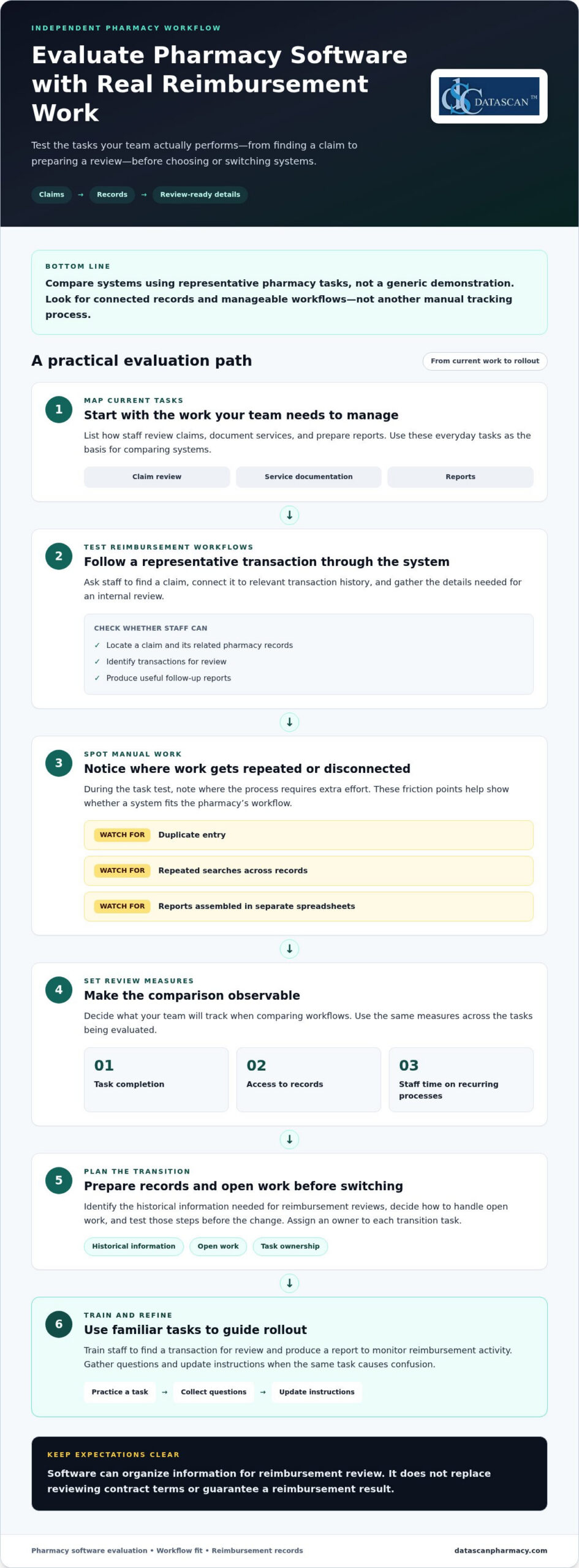
Start by listing the reimbursement questions your team needs to answer. Can staff locate a claim and its related pharmacy records? Can they identify transactions for review and produce useful follow-up reports? These capabilities help a pharmacy investigate payment patterns and prepare for changing PBM requirements. Software can organize information, but it cannot replace reviewing contract terms or guarantee a reimbursement result.
Compare systems using tasks from your pharmacy, not a generic demonstration. Ask staff to find a claim, connect it to the relevant transaction history, and gather details for an internal review. Note where the process requires duplicate entry, repeated searches, or separate spreadsheets. These friction points show whether the software can improve efficiency or merely move the work elsewhere.
- Map current tasks: Note how staff review claims, document services, and prepare reports.
- Test reimbursement workflows: Use representative transactions and check how quickly staff can retrieve supporting details.
- Identify manual work: Flag repeat entry, disconnected records, and reports assembled outside the system.
- Set review measures: Track task completion, record access, and staff time spent on recurring processes.
Plan a transition around the records and tasks your team relies on. Identify the historical information needed for reimbursement reviews, decide how to handle open work, and test these steps before switching systems. Assign an owner to each transition task so pharmacy owners are not left coordinating every detail while running daily operations.
Train staff using familiar tasks, such as finding a transaction for review or producing a report to monitor reimbursement activity. Gather questions during rollout and update instructions when the same task causes confusion. This makes workflow changes observable instead of relying on broad claims about time saved.
A useful pharmacy management software evaluation should show how records and operational workflows fit together in the system your pharmacy is considering. Documentation products vary: mental health documentation software may include full EHR systems, template-based note software, AI scribes, and documentation layers that integrate with an existing EHR. The right comparison is therefore not just about where notes are entered, but whether the chosen approach fits the records and routine tasks staff need to manage. An electronic medical record or electronic health record system can combine documentation features with practice management functions. Consider whether that combination aligns with the work you want supported, and assess it using the same representative tasks used to compare claim access, transaction history, and reporting. Keep the evaluation grounded in what staff can locate and complete in practice. Bring your reimbursement review steps into the comparison, and assess whether the system can reduce duplicate work while keeping necessary information accessible. To discuss your pharmacy’s needs, contact the team at Datascan Pharmacy Software.
3. Consistency between services and documentation
Independent pharmacies need documentation that reflects the service staff actually performed. A medication synchronization conversation, refill coordination, and a point-of-sale interaction involve different work, so one generic entry can blur important distinctions. Define service categories and connect each to the workflow staff use. Clear categories make records easier to interpret across pharmacists, technicians, and reimbursement reviews.
Map each service from the patient’s request to completion. For medication synchronization, staff might discuss aligning refill timing, record the patient’s decision, and note the next operational step. Document the interaction accurately, while keeping dispensing and claim records distinct. A patient-service note should not be treated as a substitute for transaction information.
Consistency does not require identical wording in every entry. It means applying the same definitions and process to comparable services. Establish the categories your team uses, what information belongs in each, and how categories appear in reports. Review entries from different staff members to catch inconsistent labels, unclear descriptions, or records filed under the wrong service type.
- Define service categories: Use labels that distinguish counseling, refill coordination, and other pharmacy interactions.
- Align workflow steps: Make clear who records the service and where the entry belongs.
- Keep records connected: Help staff locate related patient and transaction information without merging their purposes.
- Review reporting: Compare service categories with the reports used to monitor operations and reimbursement activity.
Consistent categories help an independent pharmacy understand how services are recorded and where staff time goes. If a report groups unrelated interactions, owners may struggle to interpret activity or spot process bottlenecks. Clear labels make internal reviews more useful, support consistent discussions about reimbursement questions, and help new staff learn how to document each type of work.
Technology should support the process your pharmacy has defined. Datascan Point of Sale (POS) handles checkout and front-end inventory, while Datascan’s customizable workflow engine helps organize repeatable operational steps. Align service documentation with those workflows, rather than assuming a point-of-sale record captures every detail of a patient interaction. Make clear which record staff should use for each task.
Review the workflow when the pharmacy adds a service or changes how staff handle an existing one. For example, if medication synchronization becomes part of a routine refill process, make sure staff can distinguish the patient-service interaction from the refill transaction. A customizable pharmacy workflow can support consistent steps, while the pharmacy sets the service definitions and review practices that fit its operation.
4. Evaluation of documentation software
Evaluate documentation software using real pharmacy tasks, not just a feature list. Test whether staff can record an intervention, retrieve the entry, and use it to support follow-up. The system should streamline routine work while keeping information useful for patient care and treatment decisions.
Start by checking access to relevant records. Staff reviewing a patient interaction may need clinical summaries and notes from other disciplines. See how the software organizes history and whether staff can find relevant details without searching across separate records. Test a realistic scenario, such as reviewing a medication concern before documenting the pharmacy’s response.
Next, assess note formats and workflow fit. Documentation tools may offer structured templates or narrative notes. Decide which formats suit each service, then test whether templates capture the necessary context without encouraging empty or copied text. Ask staff to complete the same sample task and compare clarity, completeness, and ease of retrieval.
Use practical measures to compare options. Record whether staff can complete a sample entry, find it later, and identify the next action. Track steps that cause confusion or duplicate work. This helps distinguish a system that improves efficiency from one that simply shifts manual tasks elsewhere.
- Workflow fit: Can staff complete common tasks without unnecessary duplicate entry?
- Record access: Can authorized users find relevant summaries and prior notes?
- Note quality: Do templates support clear, service-specific entries?
- Reporting: Can the team review completion and identify process gaps?
Review security separately with the vendor. Ask how information is encrypted in transit and at rest, how retention and deletion work, and which subprocessors handle data. If the product uses artificial intelligence, ask whether vendor systems use pharmacy data to train models. Document the answers and compare them with your organization’s policies before adoption.
Run a controlled evaluation with staff who handle different parts of the workflow. Have one person enter a sample intervention, another retrieve it, and a supervisor review the record. This tests handoffs as well as individual screens. Include common exceptions, such as an incomplete entry or a patient response that changes the planned follow-up.
Set decision criteria before the trial and record findings consistently. A simple scorecard can cover usability, access, documentation quality, reporting, security, and fit with existing processes. Ask the vendor to demonstrate each criterion using the same pharmacy scenario. This keeps comparisons focused on daily work, reliable records, and patient care.
5. HIPAA and 42 CFR Part 2 considerations
Before entering patient information into documentation software, identify which privacy rules apply and how the tool handles protected health information (PHI). HIPAA governs what patient information may be released, who may receive it, and whether direct patient consent is required. Patients also have a legal right to access their medical records.
42 CFR Part 2 applies to federally assisted programs that diagnose, treat, or refer patients for substance use disorders and meet the definition of a Part 2 program. A pharmacy should assess whether its work falls within that scope before designing access and disclosure workflows. Don’t assume every record containing substance-use information automatically falls under Part 2.
HIPAA provides extra protection for psychotherapy notes when clinicians keep them separate from the record. This distinction matters when a system stores therapy notes alongside other clinical documentation. Decide where each record belongs, who needs access, and how staff will prevent accidental disclosure. Permissions should reflect the organization’s actual roles and approved workflows.
Before PHI flows through a new documentation tool, establish whether the vendor will sign a business associate agreement (BAA). The U.S. Department of Health & Human Services’ Business Associate Contracts resource explains these agreements. Include the agreement in procurement review and document who is responsible for vendor oversight.
- Map information: Identify which records contain PHI and where they are stored.
- Define access: Assign access according to job responsibilities and workflow needs.
- Review disclosure: Set a process for handling requests and recording authorized releases.
- Assess vendors: Review the BAA, encryption, retention, deletion, and subprocessors.
Test the workflow before adoption. Have staff enter a routine pharmacy intervention, find the record, and identify which roles can view it. Then test an information request and confirm that the organization’s process routes it to the appropriate staff. This can reveal overly broad permissions or unclear handoffs before the workflow is used with real records.
Privacy controls should also cover how information leaves the system. Review export, printing, messaging, and user-access procedures with the staff who handle those tasks. If a feature uses artificial intelligence, establish whether vendor systems use submitted information to train models. Record decisions in organizational procedures and revisit them when workflows or vendors change.
Clear privacy processes help staff document accurately while protecting sensitive information. To discuss how pharmacy workflows and documentation needs fit together, contact Datascan Pharmacy Software.
Assess how the software supports services and include that in your review. HIPAA compliance is a baseline requirement for clinical documentation improvement software, so make it part of your evaluation.
Datascan Pharmacy Software: Datascan Pharmacy Management Software
Datascan Pharmacy Software provides the Datascan Pharmacy Management Software Suite for independent community pharmacies. Its Independence-First platform supports pharmacy operations with a customizable workflow engine and integrated dispensing, patient records, claims, and day-to-day management. If documentation workflows need to fit more closely with pharmacy operations, consider how the platform could support that fit.
Datascan Point of Sale (POS), MobileScripts Patient Mobile App, and Datascan Mobile Delivery App support other parts of pharmacy operations. Assess each against the tasks your team wants to improve, and keep intervention documentation accurate, complete, and aligned with your procedures.
Discuss your pharmacy’s workflows and documentation goals with Datascan Pharmacy Software. Contact Datascan to explore how its Independence-First platform can fit your operations.
Make your next software decision operational
Use your documentation goals to plan the next step: identify who owns the process, which workflows need attention, and how the team will review progress. Treat documenting patient interventions in software as part of pharmacy operations, not as an isolated recordkeeping task. This connects staff responsibilities with service delivery and the information your pharmacy needs to manage its work.
For independent pharmacies, this planning can also clarify where technology fits into wider operational pressures, including time spent on administrative work and the need to understand reimbursement activity. Bring specific workflow examples to the discussion, such as a service that requires repeated entry or a handoff that leaves staff searching for details. Concrete scenarios make it easier to focus on practical needs rather than abstract feature lists.
Datascan Pharmacy Software can help you explore how pharmacy management technology may fit your operation. Contact Datascan Pharmacy Software to discuss your pharmacy’s goals and take a clear next step toward a workflow that supports your team.
Frequently Asked Questions
What is clinical intervention documentation in healthcare software?
Clinical intervention documentation is a structured record of a healthcare professional’s action during patient care. In a pharmacy, it might capture a medication concern, the pharmacist’s response, and agreed follow-up. Documenting patient interventions in software means entering that information digitally so authorized staff can retrieve it and understand the interaction’s context.
What information should be included when documenting a patient intervention?
Include enough detail to identify the interaction and explain the action taken. Record the relevant medication concern, information the patient shared, counseling or other intervention provided, the patient’s response, and any follow-up discussed. Separate reported information from observations and avoid unsupported conclusions. If the patient declines a recommendation, record that clearly rather than implying they accepted the plan.
What are the legal and regulatory requirements for documenting patient interventions in the United States?
Requirements depend on the organization, service, and information involved. HIPAA governs what patient information can be released, who may receive it, and whether direct patient consent is required. Federally assisted programs that diagnose, treat, or refer patients for substance use disorders may be subject to 42 CFR Part 2 if they meet the definition of a Part 2 program. Apply the rules relevant to the specific setting and record.
How do you protect patient privacy and maintain an audit trail in intervention records?
Limit access to staff who need the information for their roles, and establish a process for reviewing disclosure requests. Use system controls that identify changes and preserve the original entry. Record later corrections as addenda rather than silently replacing signed notes. The U.S. Department of Health & Human Services’ Business Associate Contracts resource addresses agreements with business associates. Review vendor data handling and internal access procedures together.
 Kevin Minassian is the President of Datascan Software. Under his leadership, the company rapidly expanded to provide pharmacy management software on a national level. Over the last 15+ years, he has ensured that Datascan has continuously evolved to offer innovative solutions for independent pharmacies while still offering world-class customer support. He is passionate about helping independent pharmacies to remain competitive, achieve success, and offer the very best service to their communities.