A pharmacy POS with credit card processing should do more than accept cards. Look for support for FSA and HSA payments, EMV and contactless transactions, integrated reporting, security protections, and a clear process for network outages. The right setup connects payments with daily pharmacy workflows instead of adding another disconnected task.
For independent pharmacies, checkout is only one part of the decision. Processor practices, compatibility with pharmacy software, and the quality of sales and inventory reports all affect daily operations and how clearly owners can assess business activity.
This guide covers payment features to prioritize, what to assess when choosing a processor, and how reporting and security factor into the decision. It also explains why pharmacy-focused POS software matters, from handling eligible health benefit card purchases to supporting customer service and efficient operations.
Author bio: The Datascan Pharmacy Software editorial team covers pharmacy software and operational workflows for independent pharmacies.
Key Takeaways
- Assess processor practices such as funding, support, and dispute handling to understand how payment issues are managed.
- Use sales reports to spot transaction patterns, identify problem areas, and make more informed business decisions.
- Make payment security part of your evaluation, including how the system supports compliance and protects sensitive information.
- Choose pharmacy POS software that fits your existing workflows and connects checkout with useful inventory and customer tools.
- Explore how pharmacy management software can reduce disconnected tasks and give your team more time for patient care and operations.
What Credit Card Processing Features Really Matter in Your Pharmacy?
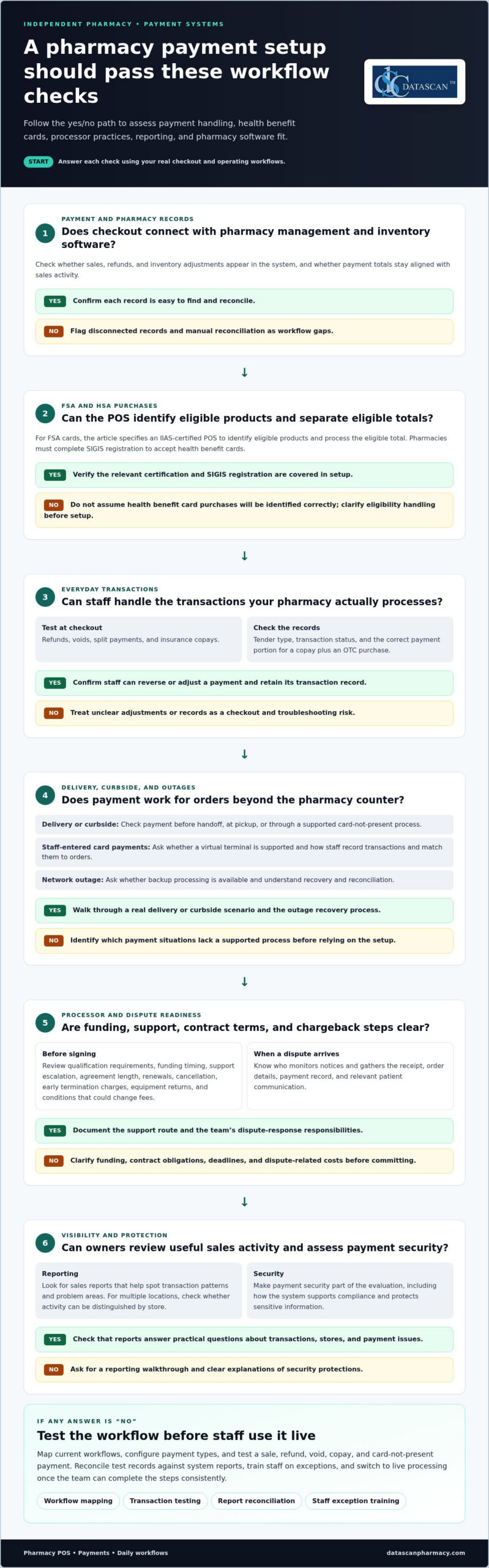
Prioritize processing that connects the POS with pharmacy management and inventory software. It should handle common payment methods, delivery transactions, refunds, and troubleshooting without adding avoidable checkout steps.
Integrated Pharmacy Payments
Integration with pharmacy management and inventory software can connect checkout activity with transaction and item records. Look for a connection that keeps payment totals and sales activity aligned, rather than forcing staff to reconcile separate systems manually. Ask how a sale, refund, and inventory adjustment appear in the system.
For FSA and HSA purchases, confirm how the POS identifies eligible products and separates eligible totals. Pharmacies accepting FSA cards need an IIAS-certified POS system to identify eligible products and process the eligible total. Pharmacies must complete SIGIS registration to accept health benefit cards.
Transaction Handling and Payment Support
Test transactions your team handles every day: refunds, voids, split payments, and insurance copays. The POS should make it clear how to reverse or adjust a payment and retain a transaction record. For a copay combined with an over-the-counter purchase, confirm that each payment portion is recorded correctly.
Compare terminal support for EMV chip cards and NFC contactless payments, along with credit and debit card acceptance. Ask how receipts and transaction records identify each tender type. Clear records help staff resolve checkout questions without searching through separate systems.
Delivery and curbside orders need a payment process that fits how the prescription or order reaches the patient. Check whether the POS can accept payment before handoff, at pickup, or through a supported card-not-present process. For example, a curbside customer might pay by phone before staff brings the order outside. Include delivery scenarios in your evaluation, not just counter sales.
For card-not-present payments, ask whether the processor supports a virtual terminal for staff-entered transactions. Clarify how employees access it, record transactions, and match payment details to orders. Also ask what happens during a network outage. Some payment services offer backup processing, but understand the recovery and reconciliation process before staff need it.
When comparing a POS and card processor, assess integration, accepted payment methods, reporting, security, support, and funding practices. For businesses evaluating merchant providers and terminal setups, independent comparison resources like PaySelect can help illustrate how different POS and payment solutions measure up. Compare these criteria against real workflows, such as a delivery payment or FSA purchase, rather than relying on a general feature list.
Set up a new POS by mapping current workflows, configuring payment types, and testing transactions before staff use it live. For migration, document existing tender types and recurring processes, then test a sale, refund, void, copay, and card-not-present payment. Reconcile test records against system reports, train staff on exceptions, and switch to live processing once the team can complete the steps consistently.
Processor selection and chargeback management
Choose a processor that understands pharmacy transactions, health benefit cards, and the records your team needs during disputes. Compare qualification requirements, funding practices, support, contract terms, and how the POS handles patient and location workflows.
Before setup, pharmacies need to qualify and certify for either IIAS or 90/10 certification. They also need an eligible Merchant Category Code (MCC) that identifies the business as a healthcare provider. These details affect how health benefit card processing is configured, so include them in the processor’s onboarding steps.
Compare processor support and deposit handling in practical terms. Payment services can fund a deposit account of the pharmacy’s choice. Ask how funding timing, transaction records, and support escalation fit your operating schedule.
Read contract terms closely before signing. Review the agreement length, renewal language, cancellation process, early termination charges, equipment return terms, and conditions that could change fees. Understand chargeback responsibilities, response deadlines, and any dispute-related costs before committing.
When a chargeback arrives, staff should connect the disputed transaction to its supporting records. A consistent process helps the team locate the receipt, order details, payment record, and relevant patient communication. Assign someone to monitor processor notices, gather evidence, and record the response. A delivery dispute, for example, may require matching the payment to the order and delivery record.
Pharmacy management adds another layer. Payment workflows should fit prescription pickup and patient account processes without displaying unnecessary details at the terminal. For a copay, staff need a clear record of the amount collected and transaction status. Keep payment records organized so the right team member can resolve questions without interrupting dispensing work.
For multiple locations, compare how the processor and POS organize transactions by store. A manager reviewing two branches should be able to distinguish each location’s activity and identify where a payment issue occurred. Ask how staff permissions, deposits, and reports work across stores, and whether each pharmacy can follow a consistent dispute process.
Include every payment device and hardware component in the review. Confirm that terminals work with the selected POS, and map how a replacement device or connection issue affects checkout. A written escalation path, clear support channel, and documented transaction-recovery steps help staff respond consistently.
For a pharmacy reviewing payment workflows alongside its POS, discuss your pharmacy’s processing needs as a practical next step.
Sales reporting and analytics
Use pharmacy management reports to examine PBM reimbursement patterns alongside payment activity, not as one blended sales total. For each claim, compare the submitted amount, reimbursement received, adjustments, and dispensing record. This can help owners identify recurring gaps and prepare focused questions for PBM discussions, contract reviews, and reform efforts without confusing retail sales with prescription revenue.
Detailed sales reporting
Start with a defined review process. Choose a reporting period, group claims by PBM or plan, and compare claim records with remittance details. Look for repeated differences, reversals, or adjustments associated with a drug or transaction type. A single claim exception may need follow-up; a recurring pattern may point to a broader issue to document for a contract discussion.
Keep underlying records accessible. For a claim with unexpected reimbursement, staff should be able to trace the prescription, submitted claim, response, and payment record. Pharmacy software that makes these details easier to find can reduce manual searching and help owners spend less time assembling evidence. Record the issue, its status, and the next action so unresolved items don’t get lost in a spreadsheet.
Keep PBM reimbursement analysis separate from front-store reporting. A POS report can explain retail sales and payment totals, while claim and remittance records are needed to assess prescription reimbursement. Reviewing both prevents a strong checkout day from obscuring reimbursement problems. It also clarifies which questions belong with the POS and which require claim-level review.
Aggregated reporting across locations
For independent operators with multiple stores, compare equivalent claim and reimbursement fields by location and PBM. Consolidated results can show whether a pattern appears across stores or is concentrated in one. Retain store-level details: group totals may reveal a trend, but individual records help explain where and how it occurs.
Use consistent categories before comparing branches. If one store records adjustments differently, its totals may not mean the same as another store’s. Define shared report labels for claim status, adjustment type, and follow-up outcome. Then review the same measures across locations so comparisons support decisions instead of producing misleading conclusions.
PBM reform discussions often focus on transparency and accountability. Organized reporting gives pharmacy owners concrete records for those discussions, such as recurring reimbursement differences or unresolved claim adjustments. It won’t change a PBM’s payment terms on its own, but it can help the pharmacy explain an issue precisely and track whether follow-up resolves it.
Create a routine that turns findings into action: review claim exceptions, assign an owner, document the next step, and revisit unresolved items. For example, an owner can flag a repeated adjustment pattern, gather related records, and use them in a PBM inquiry. This builds a clearer evidence trail while keeping day-to-day work manageable.
Compliance and security features
Secure card handling depends on clear responsibilities across the pharmacy, POS, and payment processor. The PCI Security Standards Council publishes the Payment Card Industry Data Security Standard (PCI DSS), which sets security requirements for organizations that store, process, or transmit payment card data. Review how those responsibilities apply to your pharmacy’s payment setup and staff procedures.
PCI DSS and HIPAA address different parts of pharmacy operations. The U.S. Department of Health and Human Services’ HIPAA Security Rule sets standards for protecting electronic protected health information. A POS feature described as HIPAA-compliant doesn’t, by itself, explain how the pharmacy’s full workflow meets its obligations. Ask how staff access is controlled, what appears on receipts, and how transaction records are protected. For example, check whether a receipt shows payment details without exposing unnecessary patient information.
Build a practical review around the specific functions staff use:
- Access: Identify which roles can process refunds, view records, or change payment settings.
- Receipts: Review printed and electronic examples for patient and card details.
- Terminals: Confirm how staff recognize an approved device and report a problem.
- Records: Understand how the pharmacy retrieves transaction details when investigating an issue.
Age verification, ID capture, and signature capture may be available in pharmacy POS systems, but they serve different purposes. An age-verification prompt at retail checkout, for example, differs from capturing a signature for a pharmacy transaction. Map each function to the staff process that uses it, then review how the resulting record is handled.
For ecommerce, ask whether the payment flow supports 3-D Secure. EMVCo describes 3-D Secure as a protocol that helps authenticate cardholders during online card-not-present transactions. Review how the extra step appears on a mobile device and what customers see if authentication cannot be completed. A clear flow helps staff explain an interrupted payment without collecting card details through an insecure channel.
Keep payment security separate from prescription and patient-care decisions. A card decline should prompt staff to follow approved troubleshooting steps, not to enter sensitive card information in free-text notes. Document who handles payment exceptions, where transaction records are accessed, and how terminal issues are escalated.
Before selecting payment services, review the provider’s PCI-DSS and HIPAA-related information against your pharmacy’s workflows. Ask how each control applies to in-store retail payments, mobile transactions, and online checkout. Then test a sample transaction, receipt, and staff permission before regular use.
Point-of-sale software for pharmacies
A pharmacy POS should connect retail checkout with the systems and routines the pharmacy already uses. More than a sales system, it can support inventory tracking, customer service, and store-level decisions. The right fit depends on how the pharmacy sells, serves patients, and manages daily operations.
Start with compatibility. A POS should work with the pharmacy’s current system so staff don’t re-enter the same sale details in separate tools. Walk through a real transaction, such as selling an over-the-counter item alongside a prescription pickup. Note where the sale is recorded, how inventory changes, and what staff need to do next.
Volume shapes the workflow. A pharmacy processing 75 prescriptions a day may organize staffing and checkout differently from one processing 750. In either case, map peak counter activity, front-store purchases, and pickup routines before selecting features. A system that fits actual work can help streamline repetitive steps and leave staff more time for patient questions.
Inventory tracking can connect a completed retail sale with stock records. For a popular seasonal product, the team needs to see what sold and whether the inventory record reflects that sale. During evaluation, trace a sample item from checkout to the inventory view. Confirm that staff can identify and correct mismatches through a defined process.
Pharmacy POS software can also support marketing and customer communication. Depending on the system, features may include gift cards, specialized reporting, and customer communications. A pharmacy could, for example, review front-store sales categories before planning a promotion. Assess whether these tools fit your customer service approach and staff can use them without adding complicated steps.
FSA acceptance is another practical POS consideration. Pharmacies accepting FSA cards need an IIAS-certified point-of-sale system to identify eligible products and process the eligible total. Pharmacies must also complete SIGIS registration to accept health benefit cards. Include both requirements in your workflow review, especially if the store sells eligible and noneligible items in one basket.
During a demonstration, ask staff to complete a short sequence: ring up a retail purchase, apply a gift card, check the inventory record, and find the sale in a report. Repeat the process for a prescription pickup and a separate front-store purchase. These examples show whether the POS supports real pharmacy tasks, not just a polished checkout screen.
Look for advanced features only when they solve a clear operational need. A feature that saves time for one location may add unnecessary steps at another. Compare staff roles, store layout, and customer service priorities, then document which workflows the system should support. To discuss POS requirements for your pharmacy, connect with the pharmacy software team.
Datascan Pharmacy Software: Datascan Pharmacy Management Software
Datascan Pharmacy Software offers Datascan Pharmacy Management Software and Datascan Point of Sale (POS) for independent pharmacies assessing how management and checkout workflows fit together. Its Independence-First platform can support pharmacies looking to organize daily operations and payment workflows.
MobileScripts Patient Mobile App and Datascan Mobile Delivery App can also support patient communication and delivery processes. Start by identifying where your team spends time, such as prescription pickups, retail checkout, or delivery orders. Then consider how these tools fit those workflows.
For a closer look at how Datascan Pharmacy Management Software may fit your pharmacy, contact Datascan Pharmacy Software.
Build a Checkout Workflow That Fits Your Pharmacy
Choosing a pharmacy POS with credit card processing is an opportunity to make checkout work better for the whole pharmacy. Before changing systems, map the steps staff follow from patient pickup to payment. Note where information is re-entered, exceptions slow the line, and tasks pull the team away from patient care. This gives your system evaluation a practical starting point.
Datascan Pharmacy Software offers Datascan Pharmacy Management Software, Datascan Point of Sale (POS), and the MobileScripts Patient Mobile App. Its Independence-First platform brings together management, checkout, and mobile tools. Consider how these offerings fit your pharmacy’s priorities, such as coordinating workflows or supporting patient interactions.
Take the next step with your workflow priorities in hand. Contact Datascan Pharmacy Software to discuss how its pharmacy software offerings may fit your operations. A well-planned evaluation can help your team move toward a more manageable checkout process and keep attention on the people your pharmacy serves.
Frequently Asked Questions
What’s the Best Pharmacy POS System?
The best pharmacy POS system fits your pharmacy’s workflows and existing systems. Compare how it handles prescription pickup, front-store purchases, patient payments, inventory records, and transaction reporting. For example, ask staff to process a prescription pickup and a separate retail purchase during a demonstration. A smooth workflow should keep each sale clear without adding steps or confusing records.
Which pharmacy POS systems include integrated credit card processing?
A pharmacy POS with credit card processing connects checkout with payment handling, but integration varies by system and processor. Look for clear transaction status in the POS, matched payment records, and a defined support path for processing issues. Confirm that the setup works with your intended processor. Datascan Point of Sale (POS) does not require a specific card processor.
What are the best pharmacy POS systems for independent pharmacies in the United States?
Independent pharmacies should prioritize pharmacy-specific workflows, management software compatibility, and practical support for front-store sales. Datascan Point of Sale (POS) is designed for pharmacy checkout. Its features include SIGIS certification, PSE tracking, coupon tracking, loyalty rewards, and customizable reports. Compare these capabilities with your store’s daily needs, including handling eligible products and reviewing sales activity.
What credit card processing fees and monthly costs do pharmacy POS providers charge?
Costs depend on the system configuration, processor agreement, transaction mix, and whether hardware or software is part of the arrangement. Review transaction charges, recurring charges, cancellation terms, and any separate equipment costs as distinct contract items. Datascan’s pricing depends on the pharmacy’s case and is provided after a quote request; relevant factors include the software and processing setup being considered.
Can pharmacy POS systems process HSA and FSA cards, copays, and prescription payments?
Some pharmacy POS setups support health benefit cards and patient payments, but workflows differ. Pharmacies accepting FSA cards need an IIAS-certified POS system to identify eligible products and process the eligible total. Pharmacies must complete SIGIS registration to accept health benefit cards. For copays, assess how the system records patient payments alongside prescription transactions, then test a prescription pickup with a separate retail item.
What PCI DSS requirements apply to pharmacies accepting credit cards?
Pharmacies accepting cards need to maintain PCI compliance as part of payment security. Merchants that aren’t PCI compliant and experience a breach could be assigned liability for that breach. Assess the payment setup’s security controls, staff access, terminal handling, and incident procedures. Review the processor’s PCI-DSS information and clarify which responsibilities belong to the pharmacy and which to the payment service.
How do pharmacy POS systems protect patient payment data and support HIPAA compliance?
A POS can support secure handling through controlled access, careful receipt design, and clear procedures for transaction records, but software alone doesn’t establish compliance. Review which staff roles can view payment details and how the system limits information shown during checkout. For example, examine a sample receipt and mobile payment workflow. Keep patient details out of informal notes used to troubleshoot declined cards.
 Kevin Minassian is the President of Datascan Software. Under his leadership, the company rapidly expanded to provide pharmacy management software on a national level. Over the last 15+ years, he has ensured that Datascan has continuously evolved to offer innovative solutions for independent pharmacies while still offering world-class customer support. He is passionate about helping independent pharmacies to remain competitive, achieve success, and offer the very best service to their communities.