Automation handles repeatable pharmacy steps; AI analyzes patterns and can support decisions. In pharmacy workflow automation vs AI, the key difference is rules versus interpretation: automation follows configured instructions, while AI analyzes information and may suggest next steps. Both can support prescription processing, but pharmacists retain responsibility for clinical decisions and patient safety.
This distinction matters when your team is balancing prescriptions with patient questions, refill requests, and daily operations. Technology can take on routine tasks, but it should support staff and preserve pharmacist oversight.
This article explains how automation and AI differ in prescription processing, where pharmacist review fits, and how the tools are used across pharmacy settings. You’ll see which tasks suit rule-based workflows, where AI can assist, and how pharmacy management software can help connect everyday operations without confusing automation with clinical decision-making as your team evaluates its own operational priorities.
Key Takeaways
- Match rule-based automation to consistent, repeatable tasks, and use AI where interpreting patterns or supporting decisions adds value.
- Keep pharmacists involved in reviewing clinical information and acting on safety alerts.
- Consider how AI could support distinct needs across community, hospital, and remote pharmacy settings.
- Compare AI agents with conventional pharmacy software by the work each handles and the level of human input required.
- Use pharmacy management software to organize everyday workflows, then explore where additional tools could better support your team and patients.
Prescription processing and workflow automation
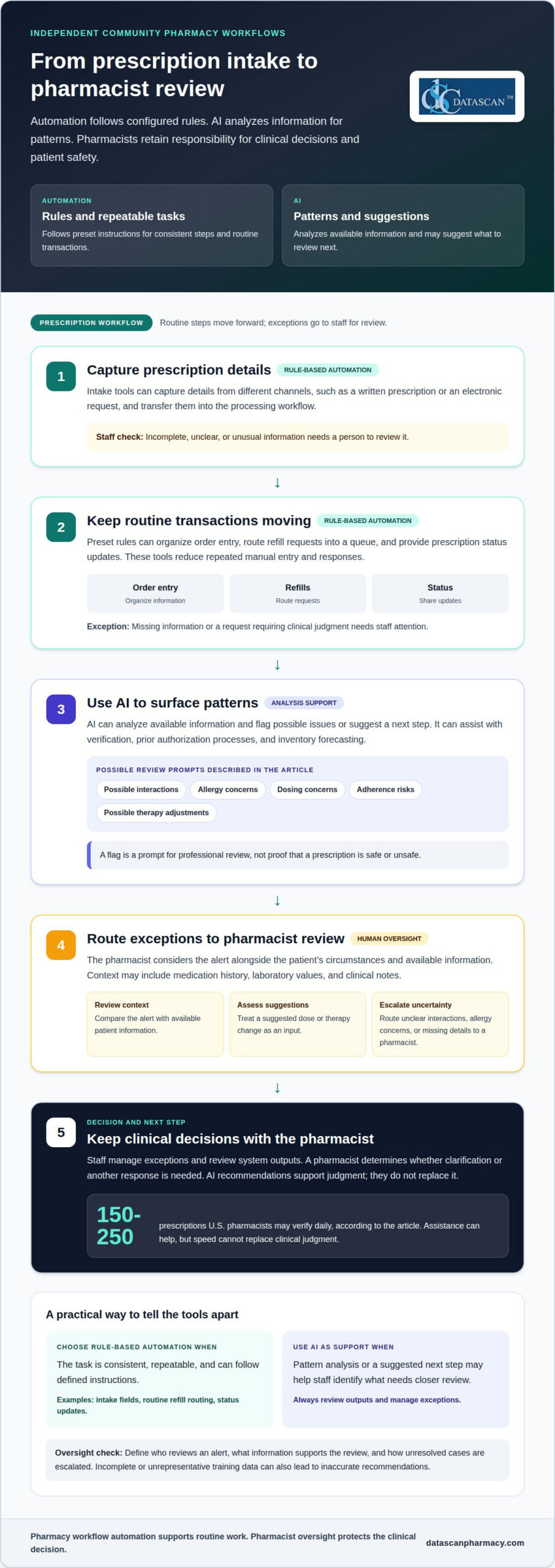
Rule-based automation follows preset instructions for repeatable tasks, while AI analyzes data to identify patterns. When comparing pharmacy workflow automation vs AI, ask which steps follow consistent rules and which require interpretation.
Automated Prescription Intake and Data Entry
Prescription intake automation captures prescription details and transfers them into a pharmacy’s processing workflow. It can reduce repeated manual entry when prescriptions arrive through different channels, such as a written prescription or an electronic request. Staff can then focus on incomplete records, corrections, and exceptions before the prescription moves forward. Automation works from defined fields and instructions, so unusual or unclear information still needs a person to review it.
Order Entry, Refills, and Status Checks
Automated order entry applies preset rules to organize prescription information, while refill and status tools handle routine requests and updates. For example, software can route a refill request into a queue or provide a prescription status. These functions keep common transactions moving without repeated manual entry or responses. Missing information or a request requiring clinical judgment needs staff attention.
Prescription Verification and Dosage Planning
Verification is more than data entry. AI can review prescription information and surface possible issues; dosage planning may use patient-specific information to inform a recommendation. A pharmacist still needs to assess whether that information fits the patient’s circumstances. A flagged prescription, for example, may require context that a processing rule cannot interpret. Treat recommendations as inputs for review, not final clinical decisions.
Where Does AI Fit in Prescription Processing?
AI can assist with data entry, prior authorization processes, verification, and inventory forecasting. Unlike a fixed script, it can analyze available data and suggest a next step, helping staff distinguish routine work from records needing closer review. A practical pharmacy workflow automation vs AI comparison asks whether a task needs a consistent rule or pattern analysis. Staff should review outputs and manage exceptions rather than assume every suggestion is correct.
What Are the Costs of Automation and AI Software?
In the United States, pharmacy automation and AI software prices depend on the case and are provided after a quote request. Cost factors include workflow scope, system integrations, implementation needs, ongoing support, and the level of AI capability. Compare these factors with the specific tasks the software handles and staff time needed to manage it. A tool for a narrow, predictable process may require different capabilities than a system designed to support several workflows.
Pharmacist oversight and patient safety
AI can flag possible medication risks, but a pharmacist must interpret alerts in the patient’s clinical context. Human review matters because incomplete data or unsuitable recommendations can affect care.
An AI system may compare a patient’s medication history, laboratory values, and clinical notes to identify possible interactions, adherence risks, or therapy adjustments. It can also flag potential medication errors, allergies, and dosing concerns. These are prompts for professional review, not proof that a prescription is safe or unsafe. A pharmacist can consider the patient’s circumstances before deciding what action fits.
Consider a prescription that triggers a possible interaction alert. Software may identify two medications that warrant attention, but it may not have the complete patient history or relevant clinical context. A pharmacist can review the alert and available information, then determine whether clarification or another response is needed. This check prevents an AI suggestion from being treated as a final clinical decision.
Effective oversight makes each handoff clear. Define who reviews an alert, what information supports that review, and how unresolved cases are escalated. If a system flags a possible allergy, for example, staff can route the case for pharmacist assessment instead of letting the alert pass unnoticed. Clear responsibility also helps teams identify recurring false alarms and refine their workflow.
- Review the context: Compare an alert with the patient’s medication history and available clinical information.
- Assess the recommendation: Treat a suggested dose or therapy change as an input for judgment.
- Escalate exceptions: Route unclear interactions, allergy concerns, or missing details to a pharmacist.
- Watch for bias: Consider whether incomplete or unrepresentative training data could lead to inaccurate recommendations for some patients.
AI models can produce inaccurate or unfair recommendations when their training data does not represent the patient being assessed. Pharmacists should look beyond a confident-sounding result and consider what information the system used. AI agents also operate within defined boundaries and rely on human inputs, so staff remain part of the process.
The goal is support, not substitution. U.S. pharmacists may verify 150-250 prescriptions daily, making well-designed assistance valuable, but speed cannot replace clinical judgment. If your team is evaluating where workflow tools fit, discuss pharmacy workflow needs as part of that review.
AI adoption across pharmacy settings
Assess automation or AI by identifying a specific workflow, the information it needs, and the decisions staff must retain. Start with a defined use case, connect the tool to existing pharmacy systems, and review its output, exceptions, and effect on staff workload before expanding its role.
Adoption varies by task, not just by pharmacy type. In a Sermo pharmacist community poll, 31% of respondents said they currently use AI tools in practice. Reported uses included predicting patients at high risk for certain conditions, at 21%, and supporting diagnosis or assessment, at 14%. These figures describe poll respondents, not every pharmacy or pharmacist.
Community pharmacies may encounter AI through patient communication tools. Chatbots and phone assistants can answer common questions, send refill reminders, and support adherence tracking. A routine pickup question, for example, could receive an automated response, while a complex medication question goes to a pharmacist. This approach helps separate standard inquiries from conversations needing professional input.
Other reported uses focus on pharmacy operations. In the Sermo poll, 15% of pharmacists said they used AI to help with scheduling or billing, 13% used it to analyze information or reports, and 11% used it to improve note-taking. A pharmacy assessing these tasks can identify where repetitive administration interrupts patient-facing work, then decide whether rules-based automation or AI better suits the task.
Hospitals show a different adoption picture. In the 2023 ASHP National Survey of Pharmacy Practice in Hospital Settings, 5.7% of hospitals reported using advanced analytics, including artificial intelligence, machine learning, or predictive analytics. That figure highlights the value of distinguishing an operational tool from advanced analytics. A hospital evaluating either should define the data involved, the staff who review outputs, and how exceptions reach the right person.
Telepharmacy and remote care create other possible applications. AI may assist with remote consultations, medication management, and common medication questions, while wearable or remote-monitoring data could help pharmacists follow measures such as heart rate or glucose. These uses depend on relevant patient information and a clear pharmacist role, not simply adding another automated channel.
Use a practical assessment to keep adoption focused on pharmacy needs:
- Name the task: Choose a defined workflow, such as scheduling, refill reminders, or report analysis.
- Map the handoffs: Identify what information enters the process and who handles exceptions.
- Choose the tool type: Use fixed rules for predictable steps; consider AI for pattern analysis or flexible responses.
- Review performance: Track whether the workflow reduces repetitive effort and routes uncertain cases appropriately.
AI use cases are expanding, but reported adoption differs by survey, setting, and task. A small-sample Sermo poll found that 26% of pharmacists had used AI for decision-making support, while 25% reported using AI tools to find evidence-based drug information faster. For each pharmacy, the useful question is whether a specific application fits its workflow and gives staff a clear, reviewable result.
AI agents versus conventional pharmacy software
Conventional pharmacy software follows configured rules to manage defined tasks. AI agents interpret requests and select responses within set boundaries.
Workflow Automation Compared With AI
Pharmacy workflow automation applies predefined instructions to repeatable steps, while AI uses data patterns to respond to less predictable inputs. This distinction helps pharmacies match each task to the right tool. A rule can route a standard request consistently, while an AI agent can interpret a routine question and choose a response within its assigned limits.
Tasks for Automation and AI
Automation suits predictable actions, such as routing a refill request or sending a pickup reminder. AI can support knowledge-based tasks, including interpreting a customer inquiry or surfacing information for review. Pharmacies can reserve adaptive tools for work requiring interpretation while keeping routine transactions consistent. A clinical question should go to a pharmacist, not be treated as an ordinary status request.
An AI agent is more than conventional software with a conversational interface. It can use probabilistic or other adaptive logic to interpret an input and select a response. A pharmacy call agent, for example, might handle a routine prescription status inquiry, then pass a complex medication question to a pharmacist with relevant context. Its defined boundaries determine what it can address.
Conventional pharmacy software remains useful because predictable processes benefit from clear rules. A configured workflow can move a refill request through known steps without interpreting an unfamiliar question. AI can add flexibility when requests vary, but its interpretation depends on the input and system limits. Either way, the pharmacy must decide who handles exceptions.
- Use fixed rules for repeatable routing, reminders, and standard transaction steps.
- Consider an AI agent for routine inquiries that arrive in varied language.
- Set an escalation path for clinical questions or requests outside the agent’s boundaries.
- Keep a human handoff when a response needs judgment or additional context.
The distinction is not always absolute. Modern robotic process automation can connect with APIs and machine learning, while AI workflows may also use fixed rules. A pharmacy should therefore assess what a system actually does, rather than relying on its label. Identify its inputs, actions, decision boundaries, and handoff process before assigning it a role.
AI agents can make routine interactions more flexible, but their complexity and cost may make them unsuitable for some workflows. A pharmacy with consistent, well-defined tasks may gain more from conventional software rules. Where requests vary, an AI agent may help if its limits and pharmacist escalation route are clear.
AI and traditional pharmacy automation
Traditional pharmacy automation follows predefined steps, while AI identifies patterns and adapts its output. The right choice depends on the task, system connections, and how staff review the result.
Regulation of Pharmacy AI and Automation
Federal and state requirements relevant to pharmacy AI can govern patient information, pharmacy practice, and health data. Applicable requirements depend on the information a tool processes, the decisions it supports, and the pharmacy’s jurisdiction. Map those factors before introducing a system, then build review and escalation into the workflow.
An AI tool that processes patient information, for example, needs a different review from software that simply routes an internal task. Define who can access the information, who reviews the output, and how the pharmacy responds to an unexpected result. These operational safeguards help staff use automation without treating every output as authoritative.
Productivity, Accuracy, and Cost Benefits
Automation can reduce repeated handling by applying consistent rules to routine steps. AI can analyze data and surface patterns for staff review. Neither guarantees accuracy: incomplete records, incorrect inputs, or unsuitable recommendations can still cause errors. Assess value by tracking rework, exceptions, staff time spent on repeated tasks, and the quality of human review.
Integration also affects productivity. Pharmacy automation and AI can connect with pharmacy management systems and EHRs by passing relevant information into established workflows. Map which system supplies each input, where the output appears, and who reviews it. If staff must copy data between screens or reconcile conflicting records, the technology may add work instead of reducing it.
Costs depend on workflow scope, implementation, system connections, maintenance, and staff training. Compare those demands with the tasks a system will support. A pharmacy with predictable routing needs may benefit from configured rules, while varied inquiries may call for AI assistance. Judge the fit against the pharmacy’s actual work, not the technology label.
Pharmacy Automation and AI Vendors
No single vendor leads for every U.S. pharmacy automation or AI need. Providers work across categories such as pharmacy management systems, dispensing automation, analytics, and AI-assisted communication. Identify the task first, then compare systems by workflow fit, integration requirements, review controls, and operating complexity.
A pharmacy prioritizing repeatable prescription steps can assess conventional software and automation functions. One considering AI for patient inquiries can evaluate how the tool responds to routine requests and routes clinical questions. Compare capabilities with a defined need, including how staff will review outputs and handle exceptions.
Datascan Pharmacy Software: Datascan Pharmacy Management Software
Datascan Pharmacy Software offers the Datascan Pharmacy Management Software Suite, an Independence-First platform for independent community pharmacies. Its pharmacy management software supports daily operations and customizable workflows, providing a structured foundation for organizing work without treating every task as an AI decision.
The platform also includes Datascan Point of Sale (POS), MobileScripts Patient Mobile App, and Datascan Mobile Delivery App. These tools support different parts of pharmacy operations, from checkout to patient communication and delivery management. The right combination depends on the workflows your pharmacy wants to manage through technology.
To discuss how Datascan’s Independence-First pharmacy platform could fit your team’s workflow, contact Datascan Pharmacy Software.
Choose the Next Workflow to Improve
A sound decision about pharmacy workflow automation vs AI starts with a practical question: which task takes the most attention from your team? Choose a specific workflow, then define what a useful result would look like for staff and patients. This gives you a clear basis for discussing technology instead of starting with a tool’s label or broad claims.
Bring the people who handle that work into the conversation. They can identify repeated data entry, stalled handoffs, and difficult exceptions. Then agree on a simple way to assess whether a change helps, such as reviewing staff feedback and recurring workflow bottlenecks. This creates a grounded starting point for considering pharmacy management software and prioritizing improvements. Keep the scope focused, learn from the first change, and use those observations to guide the next decision.
Ready to explore a practical next step for your pharmacy? Start a conversation with Datascan Pharmacy Software. A clear operational priority can help your team shape a thoughtful path forward, one that supports the people doing the work and the patients who rely on them.
Frequently Asked Questions
How Is AI Being Used in Pharmacy Today?
Pharmacies use AI to analyze information, support routine communications, and identify patterns for staff review. A retail pharmacy might use an AI tool to summarize a patient inquiry before a pharmacist responds, while a pharmacy team could use analytics to spot changing prescription demand. Applications vary, and AI-generated results should be treated as staff inputs, not final clinical decisions.
How can pharmacists stay competitive as AI advances?
Pharmacists can stay competitive by building confidence with data, workflow tools, and AI-assisted information review while strengthening skills technology cannot replace. Practice evaluating suggestions against a patient’s circumstances, explaining medication decisions clearly, and recognizing incomplete information. For example, understanding how a tool generated a risk flag can help a pharmacist question its assumptions rather than accept the output at face value.
Is AI safe in pharmacy practice?
AI can support pharmacy practice, but safety depends on how it is used, the quality of its information, and safeguards around its output. A system might miss context or recommend an action based on incomplete data. Keep clinical decisions under pharmacist review, define which tasks AI may handle, and provide a fallback if the system is unavailable or returns an uncertain result.
What can AI agents automate in a pharmacy?
AI agents can assist with routine communication and administrative requests, such as answering common questions, sharing prescription status, or directing a refill inquiry to the right queue. A sound setup distinguishes a simple pickup question from a request involving a possible side effect. The agent can handle the first within its defined scope and route the second to a pharmacist for clinical judgment.
What happens if AI makes a dispensing error?
If a dispensing concern arises, prioritize the patient, pause the affected workflow, and have qualified staff assess the prescription and dispensing record. Preserve relevant system information, follow the pharmacy’s established incident process, and communicate with the patient as appropriate. Do not treat an AI output as proof of what happened; staff need to review the source data, decisions, and handoffs involved.
What are examples of AI used in retail and hospital pharmacies?
In a retail pharmacy, an AI assistant could sort routine customer messages, while an inventory tool could help identify changing medication demand. In other pharmacy settings, analytics might help staff organize medication information for review or identify patients who may need closer attention. These are possible uses, not substitutes for pharmacist assessment. Match each tool to the workflow and review responsibilities.
What privacy, security, safety, and liability risks come with pharmacy AI?
Risks include exposure of patient information, unauthorized access, inaccurate recommendations, biased outputs, and uncertainty about responsibility when a workflow fails. Reduce exposure by limiting access to appropriate staff, understanding what information a tool processes, and keeping a reviewable record of outputs and human decisions. Clear escalation procedures also help teams respond when an AI result is incomplete, unexpected, or potentially unsafe.

Article by
Sarah Callioras
Sarah Callioras is Vice President at Datascan Pharmacy Software, bringing nearly 25 years of experience across independent pharmacy operations and pharmacy technology. Since joining Datascan in 2016, she has played a key role in driving business growth, strengthening client relationships, and supporting independent pharmacies through innovative software solutions. With a strong background in pharmacy operations, business development, and strategic leadership, Sarah is passionate about helping independent pharmacies succeed in an evolving healthcare landscape.
 Kevin Minassian is the President of Datascan Software. Under his leadership, the company rapidly expanded to provide pharmacy management software on a national level. Over the last 15+ years, he has ensured that Datascan has continuously evolved to offer innovative solutions for independent pharmacies while still offering world-class customer support. He is passionate about helping independent pharmacies to remain competitive, achieve success, and offer the very best service to their communities.