

Prescription refill reminder system: Choose timing and appsOctober 20, 2026
A useful prescription refill reminder system starts early enough to leave time to request, process, and pick up medication. For standard prescriptions in the United States, set the first reminder 7-10 days before the last dose; allow 14 days for controlled-substance refills. Specialty or mail-order prescriptions may need 10-14 days.
A single reminder is easy to miss, especially when a refill needs a response or follow-up. A clear schedule and escalation plan help pharmacy teams prompt patients without adding unnecessary manual work.
This guide explains how to choose reminder timing, build follow-up workflows, protect patient privacy, and handle opt-outs. It also compares features to look for in refill reminder apps. About the author: The Datascan Pharmacy Software team focuses on pharmacy management solutions for independent and retail pharmacies.
Key Takeaways
- Set refill alerts around the time patients need to act, allowing extra lead time for specialty or mail-order prescriptions.
- Build a follow-up workflow for patients who don’t respond, and route unresolved refill issues to pharmacy staff.
- Keep reminder messages discreet and limit patient information to what’s needed to prompt a refill.
- Make opt-outs easy to record and honor across reminder channels.
- Compare apps by how well they fit your pharmacy’s workflow, support patient communication, and surface refill issues that need attention.
1. Choosing how far in advance to set reminders
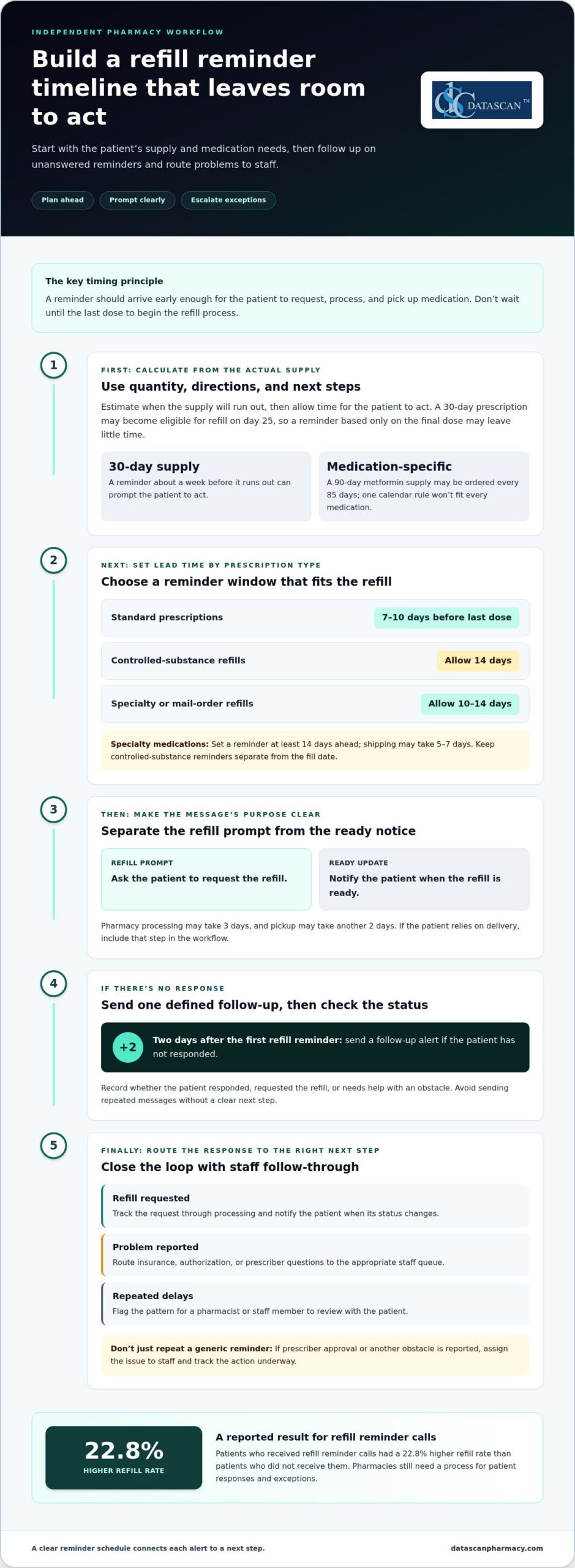
For standard prescriptions in the United States, a practical starting point is 7-10 days before the last dose. That interval gives patients time to request a refill and handle the steps before pickup. A 30-day prescription may become eligible for refill on day 25, so timing a reminder only around the final dose can leave little room to act.
Reminder schedules vary by purpose. A proactive pharmacy reminder may arrive a week before a 30-day supply runs out; another common practice is to send the first refill reminder about five days before the supply runs out. Pharmacy reminders can also arrive 2-3 days before a refill is ready. Separate the prompt to request a refill from the update that says it is ready.
- Standard prescriptions: Use 7-10 days before the last dose as a starting point for a refill prompt.
- Controlled-substance refills: Allow 14 days in the planning schedule, while keeping the reminder separate from the fill date.
- Specialty medications: Set a reminder at least 14 days ahead; shipping may take 5-7 days.
- Specialty or mail-order refills: Allow 10-14 days for the overall refill process.
- Thirty-day supplies: A reminder a week before the supply runs out can prompt the patient to act.
Build the schedule around the medication quantity, directions, and next steps. Pharmacy processing may take 3 days, and pickup may take another 2 days. Those intervals illustrate why the last dose is a poor trigger for starting the refill process. For a caregiver coordinating treatment for a family member, an earlier prompt can provide time to arrange the request and pickup.
Use the actual supply and directions to estimate a useful reminder date. For example, a 90-day metformin supply may be ordered every 85 days. A 6-month birth control prescription can use reminders on January 15 and July 15. These examples show why a single calendar rule may not fit every medication.
Keep refill prompts distinct from clinical directions. A reminder should prompt a patient to request or collect medication, not suggest changing how they take it. If the patient relies on delivery, include that step in the workflow; an electronic delivery system can support that part of the refill journey.
2. Escalation workflows
Refill reminders can be missed, ignored, or mistaken for confirmation that a medication is ready. Treat each alert as a prompt to check the refill status, then route unanswered or unresolved cases to staff for follow-up.
A reliable escalation workflow defines what happens after each notification, so patients don’t receive repeated messages without a clear next step. Send a reminder, then record whether the patient responded, requested the refill, or needs help resolving an obstacle.
- No response: Send a follow-up alert two days after the first refill reminder.
- Refill requested: Track the request through processing and notify the patient when the status changes.
- Problem reported: Route insurance, authorization, or prescriber questions to the appropriate staff queue.
- Repeated delays: Flag the pattern for a pharmacist or staff member to review with the patient.
Keep the workflow tied to actionable events. If a patient says they need prescriber approval, another generic reminder won’t solve the problem. Mark the issue, assign it to a staff member, and use an appropriate channel to explain what action is underway.
Refill patterns can also signal that a patient needs a conversation rather than another alert. A patient who takes 45 or 50 days to refill a 30-day prescription may be missing doses. Staff can review the refill history, ask about barriers, and direct medication questions to the pharmacist instead of assuming the patient simply forgot.
Automation can reduce routine follow-up, but it shouldn’t replace staff judgment. An insurance authorization issue, for example, may not be caught by an auto-refill process. Choose a system that flags unresolved cases for review and tells staff what needs attention, so the issue doesn’t keep cycling through the queue.
Measure workflow performance through operational signals, such as unanswered alerts, unresolved refill requests, and recurring barriers. Patients who received refill reminder calls had a 22.8% higher refill rate than patients who didn’t receive them. That finding supports consistent follow-up, while each pharmacy still needs a process for exceptions and patient responses. For healthcare organizations and call centers managing larger volumes of outbound patient outreach, platforms like dialgame.ai show how dedicated dialer systems can optimize calling workflows and agent productivity.
For independent pharmacies, a customizable workflow can connect reminders with staff tasks and reduce manual tracking. Map each message to a next action, define who handles exceptions, and review the queue routinely. If you’re refining refill follow-up processes, discuss your pharmacy workflow with the team.
3. HIPAA and communication privacy
HIPAA generally treats communications about refilling existing prescriptions as part of a patient’s treatment. The U.S. Department of Health and Human Services explains that covered entities may use or disclose protected health information for treatment without patient authorization. For refill reminders by text or phone, the practical focus is to follow privacy best practices and disclose only what the message needs to say.
Start with the patient’s recorded contact details and communication preferences. Before sending an automated text, follow your pharmacy’s process to confirm the number belongs to the intended recipient. Shared family phones, outdated numbers, and lock-screen previews can expose a message to someone else, even when it’s sent to the number on file.
- Keep messages discreet: “Your prescription may be ready for refill. Contact us to request it” avoids naming the medication.
- Limit sensitive details: Leave out diagnoses, treatment history, and a doctor’s name from routine reminders.
- Respect channel preferences: Use the patient’s recorded choice for text or phone communication.
- Restrict access: Give reminder records only to team members who need them for refill work.
- Route clinical questions: Move questions about medication or treatment to an appropriate conversation with pharmacy staff.
Medication adherence involves more than receiving an alert. A patient may reply that a doctor changed the treatment or that an appointment is needed before a refill. Don’t let an automated sequence treat that reply as a routine request. Pause reminders, record the issue in the appropriate workflow, and direct the patient to the right pharmacy contact.
Privacy also depends on what happens after a message is sent. Establish a process for correcting a wrong number, updating communication preferences, and stopping messages to a contact who no longer manages the patient’s prescriptions. If a family member says they no longer coordinate refills, for example, update the record through the pharmacy’s established process before sending further reminders to that contact.
Review the communication process from message creation through reply handling. Identify who can edit reminder text, where replies appear, and how staff handle a response from the wrong recipient. Concise messages, limited access, and clear follow-up help protect patient information while keeping refill communication useful.
4. Patient opt-outs and TCPA
The Telephone Consumer Protection Act can apply to certain reminder calls or texts, and patients should have the option to opt out. Make that option easy to find, record, and honor throughout the pharmacy’s reminder program. A clear process also helps staff distinguish a request to stop messages from a refill request that still needs attention.
Include clear opt-out instructions in the text message or call flow. For example, a text can tell patients how to stop future refill reminders. Use direct wording that matches the channel they received, and don’t bury the option in a long message about a prescription or treatment.
Build opt-out handling into the daily workflow rather than relying on memory. When a patient asks to stop reminders, staff should record the request in the appropriate communication preference and ensure future reminders reflect it. Give staff a consistent way to capture requests made by phone or at the counter, too.
- Capture the request: Record the patient, the channel, and the date the opt-out was received.
- Update preferences: Apply the change to the relevant reminder program, not just the message thread.
- Stop the right alerts: Identify whether the patient wants to stop texts, calls, or refill reminders through a specific channel.
- Preserve other service needs: Keep the refill record active so staff can still handle a patient-initiated request.
- Review exceptions: If a patient’s request is unclear, route it to staff rather than sending another automated message.
If a patient replies “stop” to a refill text, the workflow should register the opt-out before the next scheduled notification while retaining prescription information needed for pharmacy operations. If a family member contacts the pharmacy, staff should clarify whose communication preference is changing before updating the patient’s record.
Keep channel preferences distinct. A patient may want to stop text reminders but still accept a phone call, or may prefer to contact the pharmacy themselves. Record the specific choice instead of treating one opt-out as a change to every communication setting. Review the process whenever reminder templates or channels change.
Test the process with a sample message and a staff-handled request. Confirm that the opt-out instruction is visible, the request reaches the right workflow, and later alerts follow the recorded preference. A prescription refill reminder system should make opt-outs manageable without turning a patient’s choice into a missed refill task.
U.S. pharmacies fill an estimated 110 million prescriptions each year that patients never pick up. About half of U.S. patients with chronic conditions do not take their medications as directed. These figures underscore why reminder programs need to respect a patient’s communication choices while keeping a path open for patient-initiated help. An opt-out should stop the selected reminders, not prevent someone from contacting the pharmacy or receiving assistance with a refill they request.
Routine reviews can help staff confirm that recorded preferences are being followed and patients know how to reach the pharmacy without automated reminders. Clear procedures support respectful communication without assuming that every missed pickup or medication concern calls for another message.
5. Prescription refill reminder apps
Refill apps can help patients track upcoming prescriptions, while pharmacy reminders prompt them to request a refill. Compare tools by their purpose, message options, privacy controls, and ability to flag cases that need staff follow-up.
What types of prescription refill reminders are available, such as text, app, phone, or email? Pharmacies may send reminders by text or phone, while apps can display medication alerts on a smartphone. Email may also be available, depending on the service and the patient’s preferences.
How do pharmacy refill reminders compare with pill reminder apps and caregiver alerts? Pharmacy reminders focus on requesting or coordinating a refill; a pill reminder app prompts patients to take scheduled doses. Caregiver alerts can help family members notice missed tasks, but they don’t replace pharmacy processing or clinical guidance.
How much do prescription refill reminder services and apps cost? There’s no single standard price. Costs depend on whether the tool is a patient app or pharmacy service, its features, and any integrations or user plans. Compare what each option includes, such as refill prompts, dose reminders, and caregiver access.
What information is needed to enroll in prescription refill reminders? Patients typically need to identify themselves, provide contact details, and select the prescription or pharmacy service involved. Before receiving patient-related notifications, a caregiver should also be identified in the appropriate workflow.
Can prescription refill reminders handle insurance limits, prior authorization, and refill-too-soon rules? Reminders can prompt action, but they don’t resolve coverage limits or authorization requirements. Choose a workflow that flags these issues for pharmacy staff instead of treating every delayed refill as a missed patient response.
Medication reminder apps and pharmacy tools serve different needs. A pill app may let patients record doses or track a measure such as blood pressure, while a pharmacy workflow focuses on refill status and requests. Choose based on the task the patient needs help completing.
Evidence suggests reminders can support adherence, though results depend on consistent use. In a 2019 study, patients using medication reminder apps had better adherence after 3 months than patients who didn’t use the apps. In a 2017 study, daily text reminders over 2 weeks reduced reported forgetting from 46% to 5% and medication delays from 85% to 18%.
Before choosing an app, compare how it handles refill prompts, dose schedules, caregiver access, and patient responses. Check whether it tracks refill tasks separately from doses already taken. For help comparing pharmacy technology workflows, discuss your pharmacy’s needs.
In 2023, 98 million new prescriptions were abandoned in the United States. That figure highlights why refill prompts should make the next step clear, rather than merely announce that a prescription is due. Patients may need to know whether to contact the pharmacy, confirm a request, or ask staff about a delay. A reminder system is most useful when it supports that follow-through and leaves unresolved coverage or authorization questions for the pharmacy team. Patients should still seek clinical guidance when unsure whether to continue or change a medication.
Datascan Pharmacy Software: Datascan Pharmacy Management Software
Datascan Pharmacy Management Software gives independent and community pharmacies a platform for managing core operations. If refill coordination involves disconnected tasks or adds to staff workload, pharmacy management software can help bring workflows into a more organized process.
Datascan Pharmacy Software also offers Datascan Point of Sale (POS), the MobileScripts Patient Mobile App, and the Datascan Mobile Delivery App. These tools support pharmacy management, point-of-sale operations, patient mobile access, and delivery workflows. Choose tools that fit the operational challenge rather than expecting a reminder app to handle every part of prescription management.
To discuss how Datascan Pharmacy Management Software can fit your pharmacy’s workflow, contact Datascan Pharmacy Software.
Make your next workflow decision with confidence
Before changing tools, map one refill journey from the patient’s first request to the pharmacy’s final handoff. Note where staff switch systems, repeat data entry, or pause other work. This gives your team a practical starting point for deciding whether a prescription refill reminder system fits existing operations or would add another disconnected task.
Choose a workflow to improve, agree on what a smoother process should look like, and involve the staff who handle it every day. Then explore how Datascan Pharmacy Management Software and related pharmacy tools could support that operational goal. Contact Datascan Pharmacy Software to discuss your pharmacy’s needs and take the next step toward a more manageable workflow.
Independent pharmacies can keep moving forward with solutions shaped around their day-to-day work.
Frequently Asked Questions
What is a prescription refill reminder system and how does it work?
A refill reminder helps patients notice when a prescription may need attention and prompts them to take the next step. A pharmacy or app may send a message directing the patient to request the refill or contact the pharmacy. Unlike a dose alarm, it focuses on the refill process, not reminders to take each dose. Patients should continue to follow their prescription directions.
Which pharmacies and medication management apps offer refill reminders in the United States?
Pharmacies may send refill reminders by text or phone, while medication management apps can provide smartphone alerts. A prescription refill reminder system may be built into a pharmacy’s patient app or communication workflow. Enrollment steps vary. Start with the pharmacy that fills the prescription and ask whether its app includes refill alerts alongside dose-tracking tools.
How do I set up automatic refill reminders with a pharmacy or health app?
Ask your pharmacy how to enroll in notifications, or open your health app’s medication settings and add the prescription. Confirm the medication, contact method, and reminder preference, then make sure the app has current information. A prescription refill reminder system depends on accurate contact and prescription details to send useful prompts. If your phone number changes, update it with the pharmacy and in the app.
How do HIPAA and privacy rules apply to pharmacy refill reminder texts and calls?
HIPAA generally treats communications about refilling existing prescriptions as part of treatment, so special authorization is generally not needed for reminders by text or phone when privacy best practices are followed. Patients can reduce accidental disclosure by checking message previews and keeping contact details current. Pharmacies should use discreet wording and follow recorded communication preferences, especially when a phone is shared with a family member.

Article by
Sarah Callioras
Sarah Callioras is Vice President at Datascan Pharmacy Software, bringing nearly 25 years of experience across independent pharmacy operations and pharmacy technology. Since joining Datascan in 2016, she has played a key role in driving business growth, strengthening client relationships, and supporting independent pharmacies through innovative software solutions. With a strong background in pharmacy operations, business development, and strategic leadership, Sarah is passionate about helping independent pharmacies succeed in an evolving healthcare landscape.