Patient engagement shouldn’t become one more task your team can’t sustain. To understand how to increase patient engagement in a pharmacy, pair useful conversations with repeatable workflows and communication channels that fit patients and staff.
That can be difficult when the counter is busy, outreach time is limited, and generic messages don’t reflect what a patient needs. Engagement doesn’t mean contacting everyone the same way or adding manual steps. Pharmacy management software can help organize routine processes, while medication synchronization, e-care plans, and a patient mobile app can support relevant communication. Technology should make room for better pharmacist conversations, not replace them.
This guide explains how to build patient relationships around practical needs, choose channels your community will use, and create workflows your team can maintain alongside daily pharmacy work. It also covers how to assess whether outreach is useful, so engagement becomes part of patient care rather than another disconnected initiative.
Key Takeaways
Build engagement around patient needs with clear, respectful conversations that invite questions and check understanding.
Choose in-person, phone, or digital outreach based on the message and what works for each patient.
Make engagement manageable by starting with one patient need and a simple, assigned workflow.
Follow up consistently and review whether your outreach helps patients take part in their care.
Use pharmacy management software, medication synchronization, e-care plans, and patient-facing tools to support consistent interactions without replacing personal care.
What does patient engagement mean in a pharmacy, and why does it matter?
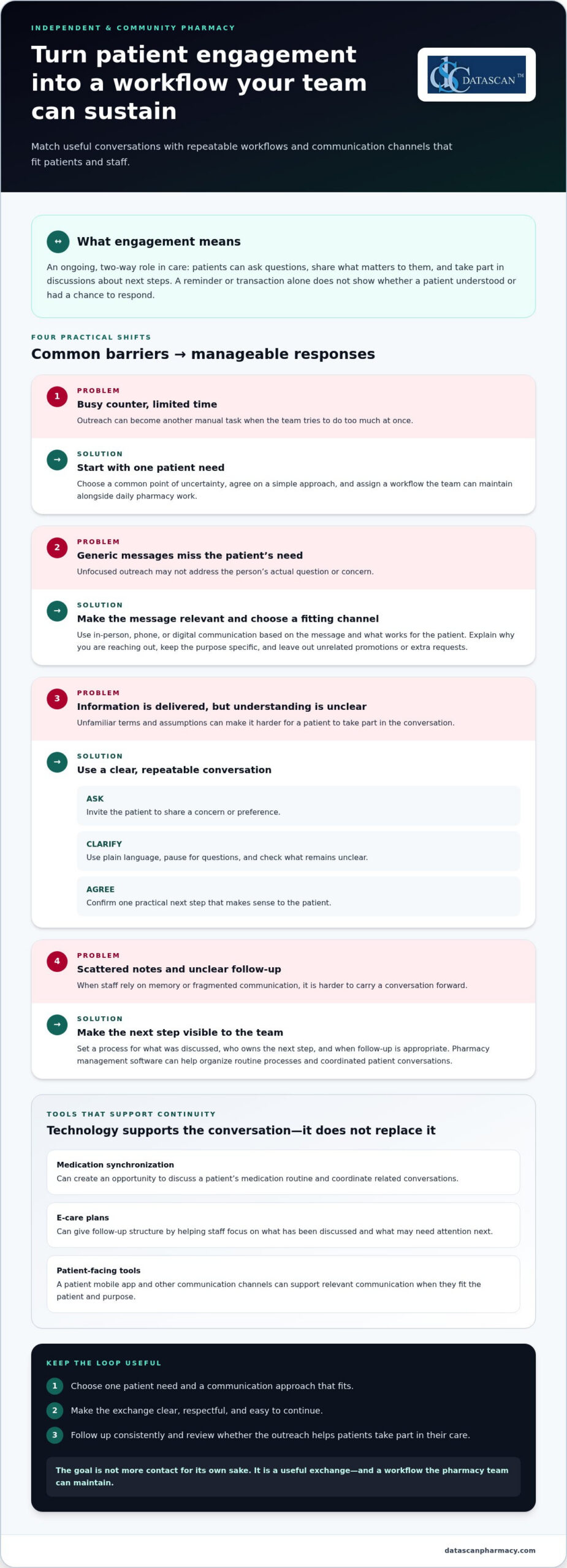
Patient engagement is an ongoing, two-way role in a person’s care. In a pharmacy, it means patients can ask questions, share what matters to them, and take part in discussions about next steps. A reminder or transaction can provide information, but it doesn’t show whether the patient understood it or had a chance to respond.
Meaningful participation depends on communication patients can understand and use. The Agency for Healthcare Research and Quality’s Health Literacy Universal Precautions Toolkit recommends making health information easier to understand and act on. Pharmacy teams can apply this by using plain language, inviting questions, and checking whether instructions are clear instead of assuming information has landed because it was delivered.
Engagement can make pharmacy interactions more responsive and understandable, but it doesn’t guarantee a clinical outcome. In independent and community pharmacies, trust and continuity matter to the day-to-day relationship. Patients should feel able to raise a concern, receive a clear answer, and know how to continue the conversation. That makes an interaction useful, not just efficient.
What does patient engagement look like at a community pharmacy?
It can happen during a brief interaction. A patient asks how to follow a prescription’s directions; a staff member listens, explains the relevant information in clear terms, and asks what questions remain. At a later visit, the patient may raise a related concern. Recognizing this as part of an ongoing conversation helps staff respond with context instead of treating every visit as an unrelated transaction. The goal is a clear exchange, not a longer conversation for its own sake.
What gets in the way of patient engagement?
Limited staff time, fragmented communication, and generic outreach can make interactions less relevant. Unfamiliar terms or unclear next steps can also create friction. These barriers don’t mean patients are unwilling to participate. They show where the pharmacy can make communication more accessible and coordinated.
Independent pharmacies need processes that fit the pace of daily operations. When staff have to reconstruct previous conversations from scattered notes or repeat manual coordination, continuity gets harder. Pharmacy management software can support organized workflows, while pharmacy staff provide the judgment and personal attention that make engagement meaningful.
How can a pharmacy build stronger patient engagement?
Build engagement around a patient’s immediate needs, then make the next interaction easy to continue. Start by identifying a common point of uncertainty, such as understanding prescription directions or coordinating a medication routine, and shape communication around it. This is more useful than launching several disconnected outreach tactics at once. To increase patient engagement in a pharmacy, make each interaction clear, respectful, and relevant to the person receiving it.
How can pharmacists make everyday conversations more engaging?
Open-ended questions give patients room to share what matters. Try, “What questions do you have about your medications?” or “What would make this easier to manage?” Explain information in plain language, pause for questions, and don’t assume silence means understanding. Before the conversation ends, agree on one clear next step, such as when the patient will follow up or what to do if another question comes up.
A short, repeatable conversation can help staff keep the exchange focused:
Ask: Invite the patient to describe a concern or preference.
Clarify: Explain the relevant information in familiar language and check what remains unclear.
Agree: Confirm a practical next step that makes sense to the patient.
The aim isn’t to use a script word for word. It’s to make space for the patient’s perspective, even during a brief interaction. Respectful questions also help staff avoid sending information that doesn’t address the person’s actual concern.
How can personalized pharmacy services support ongoing engagement?
Medication synchronization can create an opportunity to discuss a patient’s medication routine and coordinate related conversations. E-care plans can provide structure for relevant follow-up, helping staff focus on what has been discussed and what may need attention next. Neither guarantees a particular result; both can support purposeful, continued communication when used in a way that fits the patient.
Keep outreach specific to its purpose. A message about a planned check-in should explain why you’re contacting the patient and give them a simple way to respond or ask for clarification. Avoid adding unrelated promotions or packing several requests into one message. Clear communication respects the patient’s time and helps staff keep follow-up focused.
Consistency also depends on whether the team can carry an interaction forward without relying on memory or scattered notes. A defined process can help staff know what was discussed, who owns the next step, and when follow-up is appropriate. Pharmacy workflow software can support organized processes and coordinated patient conversations.
To strengthen engagement without stretching the team, choose one patient need, agree on a shared approach, and refine it as staff learn what questions come up. Related pharmacy patient retention strategies can connect consistent, patient-centered interactions with the broader goal of maintaining lasting relationships.
Will patient engagement add work, or can technology make it manageable?
Patient engagement can add work if every reminder, follow-up, and patient question becomes a separate manual task. Technology can help organize repeatable steps and keep communication connected, but it can’t replace trust built through thoughtful conversation. For an independent pharmacy, the goal is to use digital tools where they fit and protect staff time for interactions that need human attention.
Different channels suit different needs. Choose based on the patient’s preference, the purpose of the contact, and whether a response or conversation is needed.
Channel
Patient fit and access
Staff effort and continuity
In-person conversation
Useful when a patient wants to ask questions directly or discuss a concern during a visit.
Requires staff time in the moment; a clear process for documenting next steps can support continuity.
Phone outreach
Offers direct interaction for questions that may need clarification or discussion.
Takes staff time to place and manage calls; a consistent follow-up record helps the team stay coordinated.
Patient-facing digital tools
Can offer another way to access pharmacy communication for patients who prefer digital channels.
Can support routine touchpoints, while personal questions may still call for a staff conversation.
Which engagement channel fits different patient needs?
Use in-person or phone contact when a patient’s question needs discussion, clarification, or a chance to explain preferences. A patient app may suit someone who prefers digital access for routine interactions. The MobileScripts patient app can be one option in a broader approach, not a replacement for staff contact. Match the channel to the interaction instead of assuming one method works for everyone.
How can pharmacy management software reduce disconnected work?
When staff rely on separate reminders, notes, and handoffs, it takes extra effort to see what has already happened and what needs attention. Pharmacy management software can support repeatable processes and help keep routine work organized. It doesn’t decide what a patient needs or provide empathy; pharmacy staff bring the judgment and personal communication. An organized system can help make that attention easier to sustain.
As you consider how to increase patient engagement in a pharmacy, identify which steps are routine and which need a personal response. Use technology to support consistency around routine work, then reserve staff attention for questions, preferences, and follow-up that benefit from direct interaction. Pharmacy management software can help connect pharmacy processes while the team keeps the patient relationship at the center.
How can a pharmacy put patient engagement into a sustainable workflow?
A sustainable patient engagement workflow gives each interaction a clear purpose, an owner, and a next step. Start with one recurring patient need, try a practical approach, and review whether the process is useful before expanding it. This keeps outreach from becoming a collection of disconnected tasks competing with daily pharmacy operations.
How should a pharmacy start an engagement workflow?
Ask the team to identify a recurring patient need that fits the pharmacy’s services. Choose a suitable communication approach and decide who will handle the next step. Keep the first workflow straightforward: staff should know what action to take and where to record its status. Review the process together and adjust it when a handoff or instruction creates friction.
Choose a need. Select one recurring situation patients ask about or need help coordinating.
Select an approach. Pick a communication channel and a clear purpose for the interaction.
Assign ownership. Identify who initiates outreach, handles responses, and records follow-up.
Follow up. Complete the agreed next step and note whether it happened or remains outstanding.
Review and refine. Discuss what worked, where the process stalled, and what should change before continuing.
For example, if the team chooses a recurring need related to medication synchronization, define how staff will explain the service, who will respond to patient questions, and how agreed follow-up will be tracked. Start with that process instead of launching several initiatives at once. A manageable beginning gives the team room to learn without adding unnecessary coordination.
What should a pharmacy measure to review engagement?
Track measures the team can observe: whether planned outreach was completed, whether a patient responded, and whether agreed follow-up is still open or finished. These measures show where the workflow is moving or getting stuck; they aren’t proof of a clinical result. Pair them with staff feedback and, where appropriate, patient comments to understand whether the interaction felt clear and useful.
Keep the review focused. If outreach is often incomplete, examine whether ownership is clear or the steps are too cumbersome. If patients respond but still need the same clarification, reconsider the message or next step. Avoid setting an arbitrary target before the pharmacy understands its own workflow. The goal is practical improvement, not reporting that consumes the time the process is meant to protect.
Pharmacy management software and configurable workflows can help organize task ownership and follow-up details, reducing avoidable manual coordination. Pharmacy workflow software can support repeatable processes while staff remain responsible for personal judgment and patient communication. As you refine the process, ask whether each step makes the patient interaction clearer or simply adds work.
How can pharmacy management software support patient engagement?
Pharmacy management software can support consistent patient-facing workflows while helping independent pharmacy owners manage a demanding operation. That matters as PBM reimbursement pressures and reforms shape pharmacy finances. Technology can help organize routine work, but it can’t change a PBM contract or guarantee better reimbursement. Its practical value is reducing disconnected manual steps, giving owners and staff more time to focus on patient care and review business pressures.
What can Datascan tools contribute to patient-facing pharmacy workflows?
Datascan Pharmacy Management Software supports pharmacy operations, and its customizable workflow capabilities can help organize routine processes. Reducing avoidable coordination can give pharmacy owners more room to assess operational needs, including reimbursement pressures. The software doesn’t determine reimbursement terms or replace financial review. The team remains responsible for understanding its circumstances and deciding how to respond.
Patient-facing tools can support a pharmacy’s engagement approach. MobileScripts is a patient mobile app, and medication synchronization and e-care plans are supported features that can help structure patient interactions and follow-up. These tools don’t guarantee a particular patient response, clinical outcome, or financial result. They support pharmacy processes while staff provide the judgment and communication patients need.
For example, a pharmacy can use a consistent workflow to coordinate an engagement activity and organize follow-up, while staff handle patient questions and next steps. Owners can also use time spent less on manual coordination to review operational challenges, including PBM reimbursement concerns. Technology can support that work, but it doesn’t replace a careful review of pharmacy finances.
What is a practical next step for an independent pharmacy?
Choose one engagement workflow the team wants to make easier, then identify the manual handoffs or repeated tasks that slow it down. Consider how simplifying that process could give staff more time for patient communication and owners more capacity to focus on business priorities, including reimbursement pressures. A specific workflow makes it easier to discuss the pharmacy’s needs, staff capacity, and patient communication goals.
Datascan’s pharmacy management software and workflow tools support pharmacy operations, while the team remains at the center of patient relationships. Start a technology conversation with the work your pharmacy needs to manage, not an expectation that software alone will resolve PBM reimbursement challenges.
Stronger patient engagement doesn’t require a sweeping change. Choose one interaction your team wants to make easier, then consider how workflows and tools can support it without taking the human element out of care. That focused first step gives your pharmacy a practical way to build on what already works.
Datascan is a family-owned company that has operated since 1981, with U.S.-based support for independent and retail pharmacies. If you’re considering how to increase patient engagement in a pharmacy, bring one workflow or patient communication goal into the conversation. A useful starting point is one that fits your team’s capacity and the ways your patients prefer to connect.
What is the difference between patient engagement and patient satisfaction?
Patient satisfaction reflects how a patient evaluates an experience, while engagement describes their involvement in care-related conversations and decisions. Someone might be pleased with a quick, friendly visit without asking questions or discussing next steps. Engagement involves taking part, such as sharing a concern or confirming a plan. Pharmacies can gather patient feedback to understand the experience and consider whether interactions give people a meaningful opportunity to participate.
How can a small pharmacy improve patient engagement with limited staff?
A small pharmacy can focus its effort on a specific patient need instead of trying to contact everyone. For example, the team might identify a common question at prescription pickup and prepare a clear way to address it. Make the handoff visible so another staff member can continue if the person who started the conversation becomes busy. This keeps engagement connected to routine work rather than creating a separate outreach task for every concern.
Can a pharmacy app replace conversations with a pharmacist?
No. An app can provide a digital way to interact with the pharmacy, but it can’t replace a pharmacist’s professional judgment or a conversation tailored to a patient’s question. A routine request may suit a digital tool, while uncertainty about medication directions may need direct discussion. Make it clear how patients can reach the pharmacy team when they need help, and treat digital access as one part of patient communication.
How often should a pharmacy contact patients about their care?
There isn’t one contact schedule that fits every patient or purpose. Base timing on why the pharmacy is reaching out, any next step agreed with the patient, and their communication preferences. Before sending another message, consider whether it adds useful information or simply repeats an earlier contact. Asking patients which channel they prefer can help staff tailor future communication and avoid unnecessary outreach.
What should pharmacy staff do when a patient does not respond to outreach?
A lack of response doesn’t explain why a patient hasn’t replied. The message may have been missed, the channel may not suit them, or they may not need help at that time. Avoid repeated contact without a clear purpose. For routine outreach, staff can note the status and offer another way to connect during a later interaction. If the matter needs timely attention, follow the pharmacy’s established procedures for that situation.
How can a pharmacy tell whether its patient engagement efforts are useful?
Review more than the number of messages sent. Consider whether patients responded, whether staff completed the intended follow-up, and whether feedback suggests the communication was clear. For example, if patients continue to ask what action to take, the message may need revision. Review one engagement effort at a time and use staff observations alongside patient comments to decide what to change. Activity counts alone don’t show whether outreach was useful.
About the author: This FAQ was prepared by the Datascan Pharmacy Software editorial team, which focuses on pharmacy management software and tools for independent and retail pharmacies.
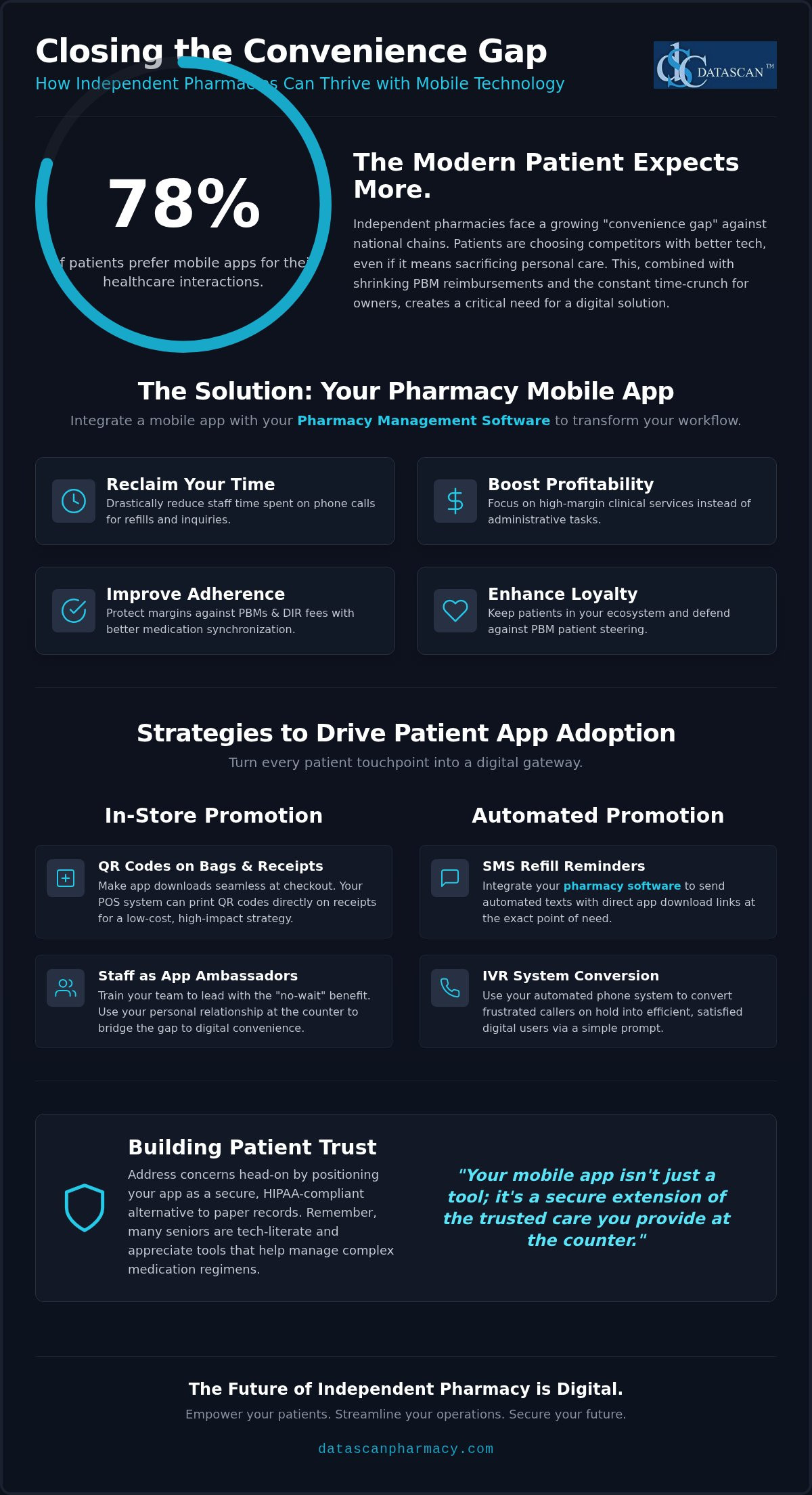
Did you know that over 78% of your patients now prefer using mobile apps for their healthcare interactions, yet many independent pharmacies still lose those same customers to big-box retailers simply because of “better tech”? Successfully promoting a new pharmacy mobile app to patients in 2026 requires integrating the platform into every patient touchpoint, ensuring they understand that digital refills mean their medication is ready the moment they walk through your door. By making your app the focal point of your workflow, you can drastically reduce the time your staff spends on the phone and focus on higher-margin clinical services.
We know the struggle of maintaining a family-oriented legacy while PBM reimbursements continue to squeeze your bottom line. It’s time to stop the drain on your resources. This guide reveals the exact strategies successful independents use to drive app adoption, improve medication adherence, and increase brand loyalty through digital engagement. You’ll discover how tools like MobileScripts and your existing pharmacy management software can transform operational burdens into streamlined successes. We’ll show you how the right pharmacy software empowers you to compete with the giants while keeping the personal touch that defines your business.
Key Takeaways
Learn how to leverage in-store physical prompts, such as QR codes on prescription bags, to make app downloads a seamless part of the patient checkout experience.
Discover how integrating automated SMS refill reminders within your pharmacy management software can drive adoption by providing direct download links at the point of need.
Master the art of promoting a new pharmacy mobile app to patients by using your IVR system to convert frustrated callers into efficient digital users.
Understand the link between mobile engagement and improved medication adherence, which helps protect your margins against aggressive PBM reimbursements and DIR fees.
Gain the language needed to reassure patients about data security, using simple analogies that position your pharmacy software as a secure, HIPAA-compliant alternative to paper records.
How do you get patients to download your pharmacy mobile app?
Successful app promotion requires a multi-channel approach that combines in-store physical prompts with automated digital triggers built into your pharmacy management software. The primary driver for patient adoption is convenience, specifically the ability to skip hold music and manage prescriptions on their own schedule. Promoting a new pharmacy mobile app to patients isn’t a one-time marketing campaign; it’s a permanent addition to your patient onboarding workflow that protects your independent brand from national chains.
You aren’t just selling an app; you’re selling time. Patients are increasingly frustrated by traditional pharmacy bottlenecks. When you offer a digital alternative, you solve their biggest pain point while simultaneously reducing the operational burden on your staff. This transition is essential for any pharmacy owner who feels they have too little time to run their business effectively.
Why is a mobile app essential for independent pharmacies in 2026?
Independents face a growing “convenience gap” as national chains and mail-order giants pour millions into digital tools that prioritize speed. You can close this gap by offering a high-touch, digital experience that keeps patients within your ecosystem. Your pharmacy software should act as the anchor for these interactions, driving medication synchronization and higher adherence rates. This digital engagement is your best defense against PBM-driven patient steering. When a patient uses your app, they’re less likely to be swayed by aggressive mail-order marketing because the path of least resistance is already in their pocket. By providing tools like MobileScripts, you empower your patients to choose your local expertise over a faceless corporation.
Defining the ‘Mobile-First’ pharmacy patient
The shift toward mHealth (mobile health) interactions has accelerated, with over 78% of patients now preferring mobile apps for non-emergency healthcare. Don’t fall for the myth that your older patients won’t use technology. Many seniors are tech-literate and appreciate the clarity of a user-friendly interface that helps them manage complex medication regimens. Identifying your most frequent refillers and synchronization candidates is the first step in promoting a new pharmacy mobile app to patients. These segments value the precision and speed that a mobile platform provides. As your adoption rates grow, your staff spends less time on the phone and more time on high-value clinical services that actually drive profitability in the face of tightening PBM reimbursements.
What are the best ways to promote a mobile app inside the pharmacy?
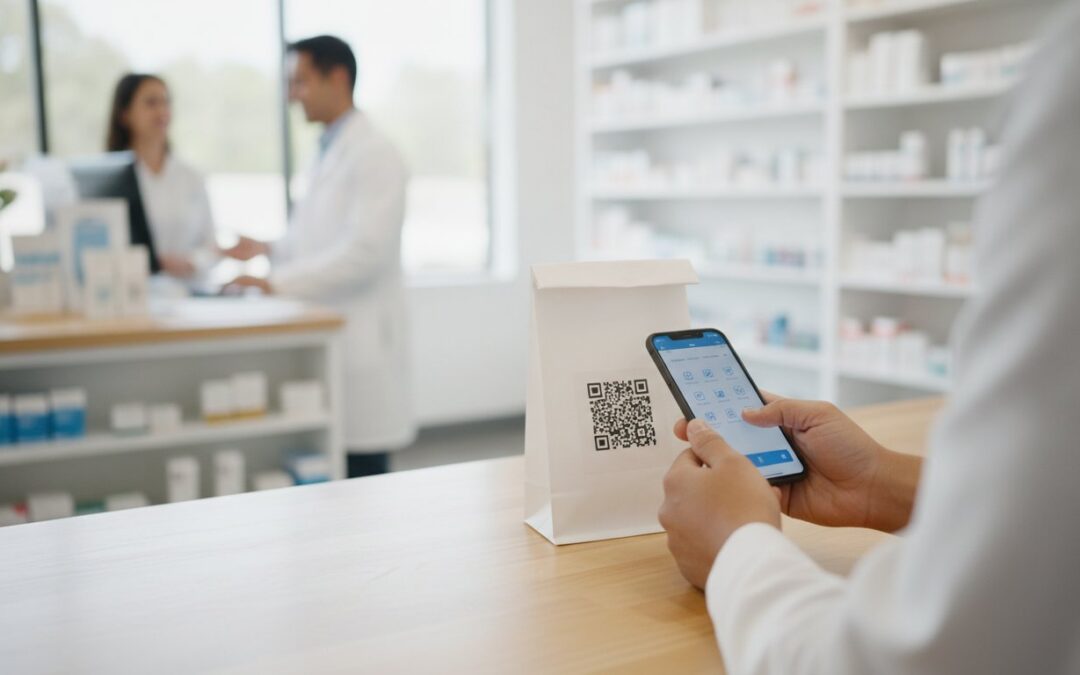
Promote your app by turning every physical touchpoint into a digital gateway, using QR codes on prescription bags and receipts to provide instant access to the app store. This face-to-face engagement ensures patients understand the immediate benefit of skipping the phone queue for their next refill. Successful in-store promotion relies on consistent visibility and staff advocacy, transforming a simple checkout into a long-term digital connection.
Independent pharmacies have a unique advantage: the personal relationship at the counter. While national chains try to automate every interaction, you can use your staff to bridge the gap between physical care and digital convenience. Using your Datascan Point of Sale (POS) system to print QR codes directly on receipts is a high-impact, low-cost strategy. This makes promoting a new pharmacy mobile app to patients a natural extension of the checkout process. You can even implement a ‘Download and Refill’ station near the pickup window where a staff member walks patients through the one-time setup, ensuring they leave with the power to manage their health in their pocket.
Turning your pharmacy staff into app ambassadors
Your team is your most effective marketing asset. Training technicians to lead with the ‘no-wait’ benefit is crucial for adoption. Instead of asking a generic question, they should tell the patient, “Next time, you can skip the hold music by using our app.” This specific logic links the tool to a tangible benefit. Create internal competitions to reward the team member who registers the most new users each month. This keeps the energy high and ensures your pharmacy management software features are actually being utilized. Simple scripts work best. A 10-second pitch like, “I see you have three refills next month; if you use our app, we’ll text you when they’re ready,” changes the patient’s perspective instantly.
Visual marketing touchpoints that drive downloads
Visual cues serve as constant reminders of your digital presence. High-visibility bag stuffers should highlight specific MobileScripts features, such as medication synchronization or delivery tracking. Use window clings and floor decals to capture attention before the patient even reaches the counter. Every piece of signage must be professional and brand-aligned to build trust. When patients see your logo integrated with modern tech, it reinforces your position as a forward-thinking leader. If you need help tailoring these tools to your specific workflow, you can reach out to our support team for guidance on best practices.
How can pharmacy management software automate app promotion?
Your pharmacy management software automates app promotion by embedding digital triggers into the communication channels you already use, such as SMS notifications and IVR menus. This ensures that promoting a new pharmacy mobile app to patients becomes a hands-free process that converts high-volume phone traffic into streamlined digital refills. By letting your pharmacy software handle the heavy lifting, you free up your staff to focus on high-value clinical tasks and PBM reform advocacy.
Automation isn’t just about efficiency; it’s about meeting the patient where they are. When your system detects a patient who frequently calls for refills, it can automatically trigger an invitation to download MobileScripts. This targeted approach ensures your marketing efforts reach the people most likely to benefit from them, reducing the friction of adoption. Syncing these interactions with your workflow software ensures that every digital refill flows directly into your processing queue without manual data entry.
Using SMS and email triggers to drive adoption
The moment a patient joins your pharmacy is the best time to introduce your technology. Your pharmacy management software can be configured to send a “Welcome” email or text that includes a direct link to the app store. Using “short codes” in these messages makes installation friction-free, as patients don’t have to search for your name manually. Timing is everything. Sending a download prompt alongside a pickup notification reminds the patient of the convenience they’ll gain for their next visit. Since pharmacy apps can reduce medication errors by 41% in certain populations, these digital prompts also serve as a vital tool for patient safety and adherence. Pairing these automated alerts with a secure messaging with patients app creates a HIPAA-compliant communication channel that can further reduce your daily phone volume while keeping patients engaged with their care.
IVR integration: The ultimate ‘hold-time’ converter
Your IVR system is often the first point of frustration for a patient, but it’s also your best opportunity to sell convenience. You can record a custom IVR message that suggests the app while patients are waiting on hold, offering them an “SMS me the app link” option directly through the phone menu. This transforms a negative experience—waiting on hold—into a positive solution that saves them time in the future. Shifting phone refills to digital refills through your pharmacy software doesn’t just improve the patient experience; it dramatically reduces the administrative burden on your team. This allows you to reclaim hours of your day, providing the breathing room needed to manage your business and navigate the complexities of modern PBM reimbursements.
How do you address patient concerns about mobile app security?
Security is often the final hurdle when promoting a new pharmacy mobile app to patients, but you can overcome it by explaining HIPAA compliance and data encryption in plain English. Your patients need to know that their health data is protected by the same “Bank-Level Security” used by major financial institutions, making it significantly safer than a paper prescription that can be lost or misplaced. By emphasizing that your pharmacy management software creates a direct, secure link between their phone and your pharmacy, you eliminate fears about third-party brokers selling their sensitive medical information.
Don’t just tell them it’s secure; show them why it’s better. Explain that encryption scrambles their data so that even if a signal were intercepted, the information remains unreadable to unauthorized parties. Many patients also fear that digital tools will erode the personal relationship they have with their local pharmacist. Reassure them that the app is an extension of your family-owned service, not a replacement for it. When they use the app for routine refills, it frees your staff from the phone so you can provide better clinical care and face-to-face consultation when they actually visit the store.
Building trust through transparency
Provide a simple, one-page “Privacy Promise” that explicitly states you do not share data with pharmaceutical marketers. Since Datascan has been family-owned since 1981, you can leverage that long-standing trust to reassure patients that their privacy is your top priority. Unlike national chains that might aggregate data for external use, your pharmacy software keeps their information within the local business they already know. Under federal law, healthcare organizations must notify patients of any data breach within 60 days, and our technical safeguards are designed to prevent those issues before they ever start.
Overcoming technical barriers for non-tech-savvy patients
Make technology approachable by highlighting simplified login features like FaceID and TouchID, which eliminate the need to remember complex passwords. Our “Grandparent Test” ensures that the MobileScripts interface is intuitive enough for all ages to navigate without frustration. For those who still feel hesitant, consider hosting a monthly “App Clinic” where staff members help patients set up their profiles in person. This turns a technical barrier into a loyalty-building event. If you want to see how our secure mobile solutions integrate with your current workflow, contact our US-based support team today for a personalized demonstration.
Why is a patient app critical for independent pharmacy profitability?
A patient app is a direct engine for profitability that protects your margins by automating low-value tasks and boosting the clinical performance metrics PBMs use to determine reimbursements. In an era where PBM reimbursements are under constant pressure, promoting a new pharmacy mobile app to patients isn’t just about modernizing; it’s about reclaiming the profitability that PBMs often strip away through DIR fees and low star ratings. By treating your mobile platform as a core business tool rather than an optional add-on, your pharmacy software becomes a shield for your bottom line.
Profitability in a modern independent pharmacy requires a relentless focus on efficiency and clinical outcomes. When you integrate your app directly with your pharmacy management system, you create a seamless data flow that reduces manual entry and human error. This technology allows you to compete with national giants while maintaining the personal touch that defines your brand. Beyond prescription volume, the app serves as a digital storefront where you can increase front-end sales through targeted OTC promotions and app-based coupons, ensuring every patient interaction contributes to your financial health.
The financial impact of reduced phone time
Consider the math of a traditional refill. A three-minute phone call might seem minor, but when multiplied across hundreds of patients each week, it represents a massive drain on your most expensive resource: staff time. By shifting these interactions to your pharmacy management software, you transform a manual labor cost into an automated process. This efficiency allows you to reallocate your team to higher-margin activities like immunizations, med-sync, or PBM reform advocacy. You’ll find that you can handle higher script volumes and provide better care without the need to increase your headcount, directly improving your operational efficiency.
Improving star ratings and reimbursement levels
Your pharmacy’s PDC (Proportion of Days Covered) scores are a primary metric used by PBMs to calculate reimbursements and assess performance. There’s a direct link between app-based refill reminders and improved medication adherence, which naturally boosts your star ratings. Higher ratings protect your independent brand from aggressive PBM audits and ensure you’re positioned for the best possible reimbursement tiers. Utilizing the MobileScripts Patient App ensures that promoting a new pharmacy mobile app to patients results in a measurable increase in PDC scores. This proactive approach to patient health is the most effective way to secure the future of your business in an increasingly competitive landscape.
Take Command of Your Digital Growth
Mastering the art of promoting a new pharmacy mobile app to patients is the most effective way to reclaim your time and protect your bottom line. By shifting routine refills to an automated digital platform, you turn your Pharmacy management software into a shield against PBM reimbursement pressures and operational burnout. This isn’t just about technology; it’s about ensuring your independent brand remains the first choice for convenience and care in your community.
Datascan has been family-owned and operated since 1981, providing the stability and expertise you need to navigate a changing industry. Our fully integrated pharmacy management and POS ecosystem is supported by an industry-leading US-based team that treats your business like our own. You don’t have to sacrifice your personal touch to compete with national chains. See how MobileScripts can transform your patient engagement; schedule a Datascan Demo today. The future of your pharmacy is digital, and we’re here to help you lead the way.
Frequently Asked Questions
Is it worth the time to promote a pharmacy app to older patients?
Yes, seniors are increasingly tech-literate and value the clarity of mobile interfaces for managing complex medication schedules. Many older patients appreciate the convenience of avoiding hold times and receiving digital notifications when their scripts are ready. Successfully promoting a new pharmacy mobile app to patients in this demographic requires highlighting the “no-wait” benefit. This reduces the strain on your staff while improving adherence for your most frequent customers.
How do I know if my pharmacy management software supports a mobile app?
You should consult your vendor documentation or contact their support team to verify native integration with a patient-facing application. High-quality pharmacy management software should offer a direct link to an app like MobileScripts to ensure data flows seamlessly without manual entry. If your current provider requires clunky third-party workarounds, it’s time to evaluate a more integrated pharmacy system that treats mobile engagement as a core feature.
Can patients use the app to pay for their prescriptions?
Yes, modern pharmacy apps allow patients to securely store payment information and settle co-pays before they arrive at the store. This feature is a major driver for adoption because it enables a true “grab-and-go” experience for the user. When integrated with your Datascan Point of Sale (POS), these payments are recorded instantly. This functionality reduces front-end congestion and provides the high-tech convenience that patients typically associate with national big-box retailers.
What features should I look for in the best pharmacy software for mobile engagement?
Look for deep integration between the mobile app and your pharmacy software workflow to ensure real-time synchronization. Key features include:
Automated refill requests and status notifications
Secure HIPAA-compliant messaging
Medication synchronization tools
Integration with delivery tracking systems
The best pharmacy software will also include business intelligence tools to help you identify which patients are most likely to benefit from digital engagement based on their refill history.
How does a mobile app help with PBM reimbursements?
Mobile apps improve medication adherence, which directly boosts your PDC scores and pharmacy star ratings. PBMs use these metrics to determine reimbursement levels and DIR fees. By promoting a new pharmacy mobile app to patients, you encourage consistent refills and reduce the likelihood of abandoned prescriptions. Better clinical performance leads to higher reimbursement tiers and protects your independent business from aggressive PBM audits and the resulting financial penalties.
Do I need a separate website if I have a pharmacy mobile app?
Yes, a website and a mobile app serve different but complementary roles in your digital strategy. Your website is essential for SEO and attracting new patients who are searching for local services online. In contrast, the mobile app is a retention tool designed for existing patients to manage their ongoing care. Both should be linked within your pharmacy management software ecosystem to provide a unified brand experience across all digital touchpoints.
How can I track how many patients are actually using the app?
Your pharmacy software should provide detailed reporting on app registrations, active users, and the volume of refills processed digitally. These metrics are vital for measuring the success of your promotional efforts and calculating your return on investment. By monitoring these trends, you can identify staff members who are most effective at driving sign-ups and adjust your workflow to further reduce phone traffic based on real usage data.
Is the MobileScripts app HIPAA compliant?
Yes, MobileScripts is fully HIPAA compliant and utilizes advanced data encryption to protect Protected Health Information (PHI). All communications between the patient’s device and your pharmacy management software are secured using administrative and technical safeguards. This ensures that patient data is safer than traditional paper records or standard email. We provide the transparency and security needed to reassure even your most privacy-conscious patients during the onboarding process. If your pharmacy also offers delivery services, be sure your entire digital workflow is protected end-to-end, including implementing HIPAA compliant delivery signature capture to safeguard every prescription handoff and protect against PBM audit recoupments.