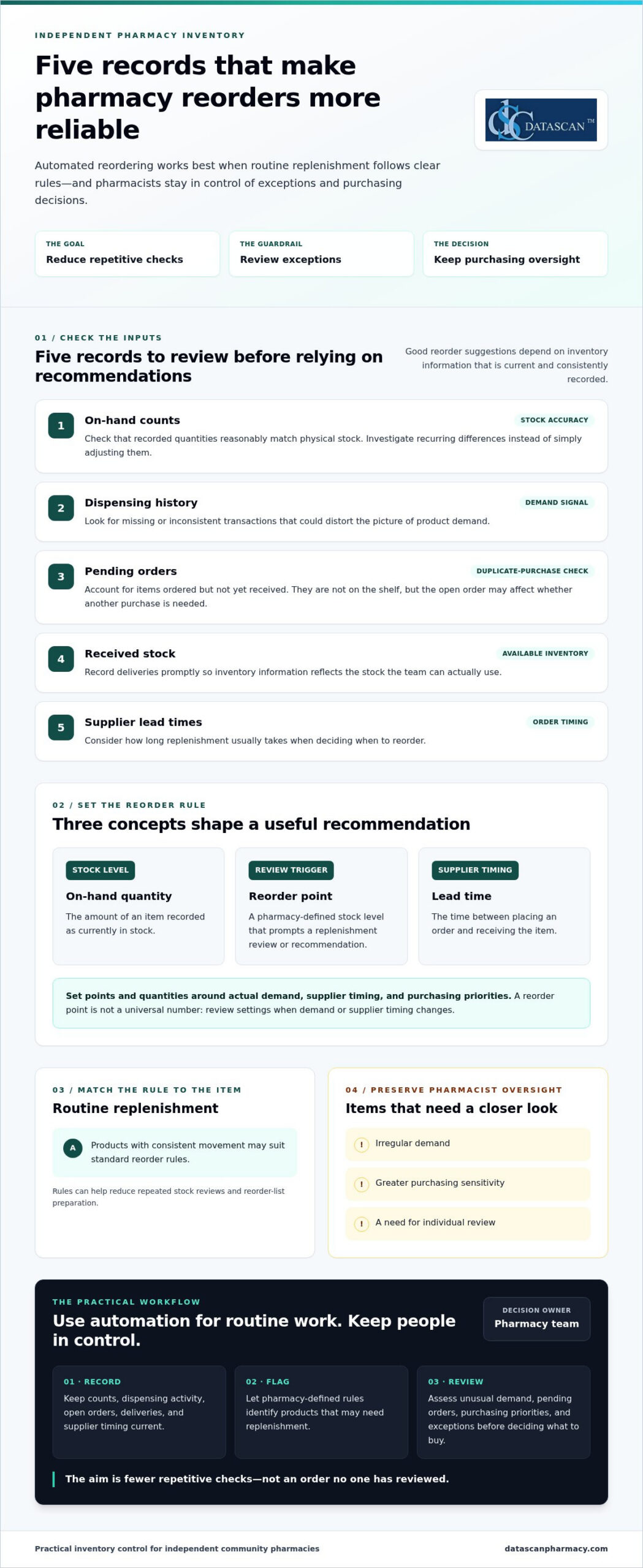
Automated inventory reordering for pharmacy works best when routine replenishment follows clear rules and pharmacists stay in control of exceptions and purchasing decisions. Automation should reduce repetitive work, not turn every reorder into an order no one has reviewed.
If your team spends valuable time checking shelves and repeating purchase orders, small inefficiencies can quickly add up. When PBM reimbursements pressure margins, excess stock can tie up cash, while a poorly timed reorder can leave essential items unavailable.
This guide explains how to build a practical approach: set reorder rules around actual demand, purchasing priorities, and stock levels; identify items that need pharmacist review; and assess how pharmacy management software fits your inventory, purchasing, and dispensing workflow. You’ll also learn what to look for in software so your team can reduce manual tasks, protect working capital, and make informed decisions without handing over control. The goal is a replenishment process that supports the realities of an independent pharmacy and gives owners and pharmacists more time for work that needs their attention.
Key Takeaways
Automated inventory reordering for pharmacy can guide routine replenishment while leaving exceptions and purchasing decisions under pharmacist oversight.
Review on-hand counts, dispensing history, pending orders, and supplier lead times before setting reorder rules.
Separate routine items from products that need closer individual review to reduce the risk of unsuitable orders.
Start with a manageable group of routine items, test the process, and refine the rules before expanding.
Compare pharmacy software based on inventory visibility, configurable rules, exception handling, workflow fit, reporting, training, and support.
What does automated inventory reordering for a pharmacy actually do?
Automated inventory reordering for a pharmacy uses inventory records and pharmacy-defined rules to guide replenishment. It can identify products that may need to be reordered and prepare a recommendation or reorder list. Whether the system only suggests an order or submits one without staff review depends on the software and how the pharmacy sets up its process.
The goal is to reduce routine stock checking while supporting product availability and keeping purchasing oversight with the pharmacy team. For independent pharmacies managing tight budgets and reimbursement pressure, a useful process makes replenishment more deliberate. Staff can focus on items that need review instead of repeatedly checking every product. Pharmacy automation covers a range of tasks, including inventory management. The right level of automation depends on the pharmacy’s workflow and purchasing decisions.
Three terms help explain how the process works:
On-hand quantity: The amount of an item recorded as currently in stock.
Reorder point: The stock level set to prompt a replenishment review or recommendation.
Lead time: The time between placing an order and receiving the item. Supplier lead times help inform when to reorder.
How is an automated reorder recommendation created?
Pharmacy software can compare recorded stock with a threshold set by the pharmacy. When an item reaches or falls below its reorder point, the system may flag it for replenishment. Dispensing history helps the team assess demand, while supplier lead times inform when to reorder and what quantity may be appropriate. Recommendations are only as useful as their inputs, so counts and transactions need to be recorded and updated consistently.
What pharmacy tasks can automation reduce?
Replenishment rules can reduce repeated stock reviews, reorder-list preparation, and routine follow-up on items flagged for purchase. They don’t replace professional judgment. Staff still need to assess unusual demand, pending orders, purchasing priorities, and other exceptions before deciding what to buy. The practical benefit is fewer repetitive checks competing for attention, giving pharmacists and owners more room to manage daily operations and focus on work that requires their expertise. Pharmacy management software should support this broader workflow rather than create another disconnected task.
What data and reorder rules does a pharmacy need before automating?
Before automating replenishment, a pharmacy needs reliable inventory records and reorder rules that reflect its demand and purchasing practices. This matters for independent pharmacies managing cash carefully while PBM reimbursements can pressure margins or arrive later than acquisition costs. Reordering too much may tie up funds the pharmacy needs elsewhere; ordering too little can put routine availability at risk. Review the underlying data first, then decide which products suit routine replenishment and which call for closer review.
Which inventory records affect reorder accuracy?
Start with the quantity recorded on hand and whether dispensing activity is entered consistently. Compare system counts with physical stock, and investigate recurring differences instead of simply adjusting them. Review open purchase orders too. An item already ordered but not received isn’t available on the shelf, but the pending order may affect whether another purchase is needed. Record deliveries promptly so inventory information reflects stock the team can actually use.
Before relying on automated inventory reordering for pharmacy workflows, review these inputs:
On-hand counts: Check that recorded quantities reasonably match physical stock.
Dispensing history: Look for missing or inconsistent transactions that could distort the picture of demand.
Pending orders: Account for items ordered but not yet received to help avoid duplicate purchases.
Received stock: Record deliveries so available inventory is represented accurately.
Supplier lead times: Consider how long replenishment usually takes when planning order timing.
Resolve recurring discrepancies before using recommendations to guide purchasing. Reliable records help the pharmacy judge whether a proposed quantity suits real demand and current purchasing priorities, rather than committing cash based on incomplete information.
How should a pharmacy set reorder points and quantities?
A reorder point is a pharmacy-defined trigger for reviewing replenishment, not a universal number for every product. Set it by considering demand, supplier lead time, and the pharmacy’s preferred ordering cadence. Determine quantities with purchasing priorities in mind, balancing availability with cash committed to stock. Review settings when demand or supplier timing changes rather than assuming an old threshold still fits.
Routine products with consistent movement may suit standard rules. Items with irregular demand, greater purchasing sensitivity, or a need for individual oversight may warrant staff review. This distinction helps teams reduce repetitive checks while applying extra care to purchases that could have a greater effect on cash flow, especially when reimbursement pressure makes working capital important.
Pharmacy management software is part of the wider process for recording information and coordinating daily work. Datascan’s pharmacy management software is designed for independent and retail pharmacies and includes customizable workflow capabilities.
Can automated pharmacy reordering create unwanted orders?
Yes. Automated pharmacy reordering can create unsuitable recommendations or orders when inventory records are inaccurate, reorder rules are outdated, or unusual conditions go unreviewed. Automation is most useful for consistent, routine decisions. The process should also make exceptions visible so staff can apply purchasing judgment before an order affects cash flow or stock availability.
A reorder recommendation and a submitted order are different levels of automation. In a recommendation-only workflow, software flags items for staff to review and approve. A workflow that submits orders automatically can reduce more manual steps, but it also makes clear approval rules and exception handling especially important. Neither approach is right for every product or pharmacy. The choice depends on how much purchasing control the team wants to retain and how dependable its inventory information is.
Which reorder recommendations deserve staff review?
Staff review is valuable when a recommendation doesn’t match what the team knows about current conditions. Common prompts include an unexpected change in dispensing demand, a stock count that doesn’t match what’s on the shelf, or a supplier issue that could affect an open order. Products with irregular or highly variable use may also need closer attention, since a short-term change can make past demand a poor guide to the next purchase.
Pharmacist oversight isn’t a failure of automation. It’s a deliberate control that lets software handle repeatable work while experienced staff assess exceptions, purchasing priorities, and the risk of tying up cash in unnecessary stock.
How can a pharmacy balance automation and purchasing control?
Start by defining staff responsibilities. Decide who reviews recommendations, who can approve or submit orders, and how the team records the reason for an override or unusual purchase. Then assess whether the software and workflow support controls such as approval thresholds, an exception queue, and periodic checks of reorder rules.
For routine items, a team may find that recommendations requiring approval offer a practical balance: they reduce repetitive list-building while keeping a person between a suggestion and a purchase. Automatic submission may suit a narrower set of well-understood orders, provided the pharmacy has clear limits and a process for exceptions. Revisit that choice as demand, supplier reliability, and purchasing priorities change.
Purchasing discipline also connects to gross profit. A reorder should support availability without ignoring the financial effect of buying more than the pharmacy can use efficiently. Reviewing inventory decisions alongside gross profit calculations helps owners consider both the need to keep products available and the cash committed to stock. With automated inventory reordering for pharmacy, the aim isn’t to remove judgment. It’s to focus that judgment where it matters most.
How can a pharmacy implement automated reordering step by step?
Implement automated reordering gradually: document how orders are handled now, validate inventory records, define pharmacy-specific rules, test recommendations on routine items, and refine the process before expanding. Assign clear responsibility for reviewing recommendations and exceptions so automation reduces repetitive work without weakening purchasing oversight.
Map the current process. Record how staff check stock, build reorder lists, account for pending orders, and follow up on deliveries. Note where tasks are repeated or handoffs create delays.
Review inventory records. Check recorded on-hand quantities against physical stock, and look for recurring discrepancies in dispensing or receiving records. Correct the underlying process where possible before using recommendations to guide orders.
Define rules and responsibility. Set reorder triggers and quantities based on each item’s demand, supplier lead time, and your purchasing preferences. Name who reviews recommendations, handles exceptions, and approves changes to the rules.
Test a manageable group. Begin with routine items that have relatively consistent demand. Keep staff involved and compare recommendations with recent dispensing and purchasing activity before relying on them.
Refine, then expand. Adjust rules when recommendations don’t fit actual conditions. Broaden the process only when the team understands how the workflow handles exceptions and pending orders.
What should a pharmacy test before expanding automation?
Check whether recommendations make sense alongside recent dispensing and purchasing activity. Review how pending orders, stock corrections, and exceptions appear to staff, and ask the people responsible for inventory and purchasing where the process is unclear or adds work. Track measures that matter to your pharmacy, such as staff effort, product availability, and purchasing exceptions. Set a local baseline and review the same indicators as the process changes.
How does pharmacy management software fit the process?
Pharmacy management software should fit the way your team records inventory, shares purchasing information, and hands off routine tasks. Evaluate how clearly staff can view relevant information and whether the system fits the workflow you mapped. Datascan’s pharmacy management software is designed for independent and retail pharmacies, with customizable workflow capabilities.
Keep the rollout practical: make responsibilities clear, capture staff feedback, and revisit the rules as purchasing needs change. To discuss your pharmacy workflow and software needs, connect with Datascan.
How should you choose pharmacy software for automated reordering?
Choose pharmacy software that helps your team see inventory clearly, manage repeatable work efficiently, and retain control over purchasing decisions. For an independent pharmacy facing PBM reimbursement pressure, an effective operational workflow can help staff make informed purchasing decisions and avoid tying up cash unnecessarily. Compare systems against your actual processes and the controls your team needs.
What to evaluate
Questions to ask
Why it matters
Inventory visibility
Can staff quickly understand stock information and related purchasing tasks?
Clearer visibility can reduce time spent hunting for information and support informed buying.
Configurable workflow
Can the process reflect the pharmacy’s ordering routines and priorities?
A fit with daily work can reduce duplicate effort and keep purchasing decisions grounded in the pharmacy’s needs.
Exception handling
Can staff identify recommendations or situations that need individual review?
Oversight helps the team respond thoughtfully to unusual conditions and protect purchasing discipline.
Integration fit
How does the system fit with existing pharmacy processes and information flows?
Better fit may help avoid disconnected tasks and repeated data handling.
Reporting, training, and support
Can staff understand the reports, learn the workflow, and access ongoing support?
Practical tools and support matter when owners and pharmacists have limited time to manage operations.
What questions reveal whether a system fits your pharmacy?
Ask how staff will find inventory information, handle purchasing tasks, and review exceptions during a busy day. Consider whether reports make it easier to understand purchasing activity and whether the workflow avoids adding manual steps. For pharmacies managing PBM reimbursement pressure, purchasing visibility can support more deliberate decisions about cash committed to inventory. Training and ongoing support also matter because a process is only useful if the team can apply it consistently.
Datascan Pharmacy Management Software is designed for independent and retail pharmacies, with customizable workflow capabilities to support broader operational needs. Explore the pharmacy management software overview as part of your evaluation.
What should the next step be for an independent pharmacy?
Write down how orders are handled today, where staff time is going, which purchasing decisions need oversight, and how reimbursement pressure affects inventory priorities. Bring those needs into a focused discussion about your pharmacy’s workflow and software requirements with Datascan. Discuss your pharmacy workflow with Datascan.
Build a Reordering Process That Works for Your Pharmacy
Effective automated inventory reordering for pharmacy operations isn’t about handing purchasing decisions to software. It’s about using accurate inventory records and pharmacy-specific rules to handle repeatable tasks, while keeping staff involved when demand shifts, records don’t match, or an order needs closer review.
Start with reliable stock information, set reorder points around your pharmacy’s demand and purchasing practices, then test the process with routine items before expanding. Clear staff responsibilities and regular reviews help keep recommendations useful, protect purchasing oversight, and reduce time spent on repetitive checks.
Pharmacy management software should fit the way your team works across inventory and daily operations. Datascan is a family-owned pharmacy software company operating since 1981, with U.S.-based support and customizable workflow capabilities. These features give independent pharmacies a way to consider software in the context of their broader workflow and operational needs.
Ready to explore how your pharmacy’s ordering process and software needs fit together? Discuss your pharmacy workflow with Datascan. A practical, well-managed process can give your team more room to focus on the work that needs its expertise.
Frequently Asked Questions
What is automated inventory reordering for a pharmacy?
Automated inventory reordering for a pharmacy uses inventory records and pharmacy-defined rules to flag products for replenishment. Depending on the workflow, software may suggest an order for staff review or submit an order automatically. These are different levels of automation, so pharmacies should define which products need approval. The Pharmacy automation overview provides general background on the subject.
How does pharmacy inventory reordering software decide what to reorder?
Software can compare recorded stock with a pharmacy-set reorder point, then use dispensing history and supplier lead times to inform a recommendation. Pending orders and received stock also affect the inventory picture. The pharmacy sets its own thresholds and purchasing practices. Recommendations depend on accurate, consistently updated records, and staff should review exceptions when actual conditions don’t match the information or rules the software is using.
Can automated reordering place orders without pharmacist approval?
It depends on the software and the pharmacy’s configured workflow. A recommendation-only process leaves the order for staff to review, while another process may submit orders automatically. Pharmacies should decide who reviews exceptions and approves purchases, and which products require closer oversight. Automatic submission may reduce manual steps, but clear limits and a process for addressing unusual demand or supplier issues help preserve purchasing control.
What data does a pharmacy need for automated reordering?
A pharmacy needs current on-hand counts, consistently recorded dispensing activity, pending purchase orders, received stock, and supplier lead times. It also needs reorder points and quantities based on its demand and purchasing practices. Review recurring record mismatches before relying on recommendations. For example, account for a purchase that has been placed but not received so staff can make an informed decision about whether another order is needed.
How can automated reordering help an independent pharmacy save time?
Automated reordering can reduce repeated stock checks, manual preparation of reorder lists, and routine follow-up on replenishment needs. This can free pharmacy staff to focus on exceptions and other daily operational responsibilities. It doesn’t eliminate professional purchasing judgment: staff still need to assess unusual demand, discrepancies, and products that require individual review. The goal is to make suitable routine tasks more consistent, not to automate every purchasing decision.
What should I look for in pharmacy management software for reordering?
Look for clear inventory visibility, configurable workflows, understandable reporting, and a practical way for staff to review recommendations and exceptions. Also consider how the software fits existing processes, plus training and ongoing support. Datascan Pharmacy Management Software is designed for independent and retail pharmacies and includes customizable workflow capabilities.
Author information: This FAQ is published by Datascan Pharmacy Software, a family-owned pharmacy software company operating since 1981. The company provides pharmacy management software for independent and retail pharmacies and U.S.-based support. No individual author credentials are stated here.
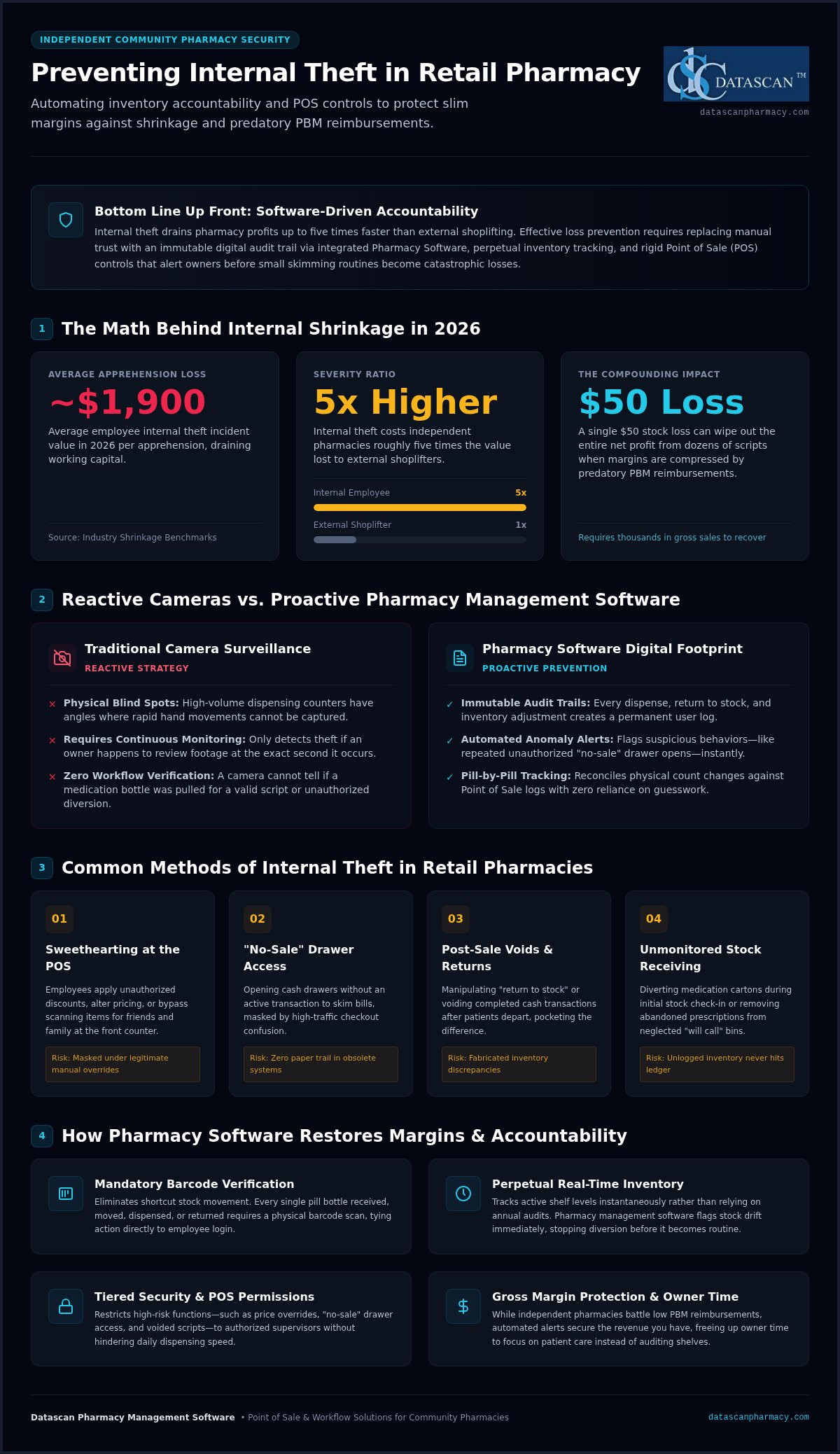
Did you know that internal employee theft incidents in 2026 average nearly $1,900 per apprehension, which is roughly five times the value lost to external shoplifters? Preventing internal theft in a pharmacy requires a strategic shift from emotional trust to automated accountability through integrated pharmacy management software and rigid POS controls. While you likely view your team as family, the reality of unexplained shrinkage in high-value inventory often points toward systemic gaps in your daily workflow. It’s an agonizing position to be in, especially when predatory PBM reimbursements are already squeezing your gross profit margins to the breaking point.
You’ll discover how to identify hidden shrinkage and secure your independent pharmacy using advanced Pharmacy Software that replaces manual oversight with precise, automated alerts. We will show you how to implement a clear system for monitoring transactions and reconciling POS data with actual stock levels. By the end of this guide, you’ll have a roadmap to eliminate hidden losses; moving your business from operational struggle to optimized efficiency while freeing up your time to focus on patient care rather than auditing shelves.
Key Takeaways
Understand why internal theft is often invisible and how it drains your profitability up to five times faster than external shoplifting.
Master the essential strategies for preventing internal theft in a pharmacy by replacing blind trust with automated software alerts and perpetual inventory tracking.
Identify common vulnerabilities like “sweethearting” at the register and see how integrated pharmacy management software closes the gaps between the counter and the script.
Learn to implement tiered security permissions that restrict unauthorized access to high-value inventory and sensitive POS functions without slowing down your workflow.
Discover how securing your inventory serves as a critical defense for your gross profit margins against predatory PBM reimbursements.
What is internal pharmacy theft and how does it impact independent pharmacies?
Internal pharmacy theft is the unauthorized removal of medication, cash, or merchandise by employees, and it is best prevented through strict pharmacy software permissions and perpetual inventory tracking. While external shoplifting is often a visible, one-time event, internal shrinkage is a silent, ongoing drain on your bottom line. It often goes unnoticed because the culprits are trusted team members who understand your daily routines and security gaps. In an era where independent pharmacies are already battling predatory PBM reimbursements, losing inventory to drug diversion or register skimming can be the difference between staying open and closing your doors.
Effective preventing internal theft in a pharmacy requires moving beyond simple trust. Dishonest employees often use legitimate workflows to mask their actions, such as manipulating “return to stock” procedures or voiding sales after a customer leaves. This makes the theft invisible to the naked eye. Your pharmacy management software must serve as an immutable audit trail, tracking every pill and every penny with total precision. By creating a digital footprint for every action, you eliminate the “gray areas” where theft typically thrives.
The true cost of shrinkage in 2026
A $50 loss in inventory doesn’t just cost you $50. It wipes out the net profit of dozens of prescriptions. Because independent margins are so thin, you might need to generate thousands of dollars in new sales just to recover from a single instance of theft. This math is especially brutal when you consider the compounding effect of low PBM reimbursements. When you’re fighting for every cent, you cannot afford to have your gross profit cannibalized from within. Unmonitored front-end sales are a common vulnerability, as small, repetitive skimming incidents add up to significant annual losses. Utilizing an integrated Datascan Point of Sale (POS) ensures that every transaction is accounted for, protecting your cash flow while you focus on navigating PBM reform.
Why traditional security cameras are not enough
Security cameras have blind spots, particularly in high-volume dispensing areas where hands move faster than a lens can capture. Relying on video surveillance is a reactive strategy; it only works if you happen to be watching the footage at the exact right moment. A digital audit trail doesn’t blink. While a staff member might hide a bottle to avoid a camera, they can’t hide a dispense that wasn’t logged or a “no sale” that wasn’t authorized in the Pharmacy Software. Transitioning from reactive “catching” to proactive prevention means using your pharmacy computer system to flag suspicious activity before it becomes a pattern. Digital logs provide the transparency and accountability that physical hardware simply cannot match.
What are the most common methods of internal theft in a retail pharmacy?
Internal theft in retail pharmacies typically manifests through point-of-sale manipulation, inventory diversion during check-in, and exploiting unmonitored “will call” bins. Success in preventing internal theft in a pharmacy relies on closing these specific workflow loopholes with integrated software that requires barcode verification for every stock movement. If your current system allows for “shortcuts” or manual overrides without a digital paper trail, you’re essentially providing a roadmap for dishonest behavior.
Point of Sale (POS) manipulation
The “sweethearting” technique is one of the most pervasive threats at the front counter. This occurs when an employee gives unauthorized discounts or simply doesn’t scan items for friends and family. Without strict controls in your pharmacy point of sale, these losses are often buried under the guise of legitimate price overrides or employee benefits. Another red flag is the “no-sale” drawer opening. This trick allows staff to access the cash drawer without a transaction record, a move that modern systems should immediately flag for owner review. Similarly, voided transactions and post-sale edits are frequently used to mask cash skimming after a customer has already walked out the door with their receipt.
Inventory and “Will Call” loopholes
Medication diversion often begins the moment a wholesaler delivery arrives. If your check-in process isn’t digitized and verified tablet-by-tablet, it’s easy for high-value bottles to go “missing” before they ever reach the shelf. The “will call” bin represents another significant risk. When prescriptions sit for extended periods, they become targets for incremental theft. An employee might “pinch” a few pills from a bottle before processing a return to stock, assuming the discrepancy won’t be noticed. Because these losses involve controlled substances, they trigger strict DEA theft and loss reporting guidelines, which can lead to heavy fines if your records don’t match your physical counts. Utilizing a customizable workflow that forces barcode verification at every step is the only way to ensure total accountability. Implementing these tech-driven barriers is the most effective way of preventing internal theft in a pharmacy while protecting your hard-earned margins. If you suspect your current workflow has these gaps, it’s time to reach out for a security audit of your technology stack.
Myth vs. Reality: Why trusting your staff isn’t a substitute for pharmacy system security
Trusting your staff is a vital part of a healthy workplace culture, but it’s never a substitute for the objective security of preventing internal theft in a pharmacy through automated system controls. Professional theft is rarely a one-time heist; it’s usually an incremental, slow-moving process performed by those who know your system’s blind spots better than you do. Relying on “gut feelings” or personal relationships to manage inventory is a dangerous gamble in an industry where razor-thin margins can’t absorb even small losses.
Many independent owners fall into the trap of believing long-term tenure equals immunity to dishonesty. In reality, employees with years of experience are often the most capable of exploiting manual gaps because they’ve mastered every workaround. They don’t typically “grab and run”; they skim slowly, taking a few tablets here or a few dollars there. Without robust Pharmacy Software that forces accountability, these small variances are easily dismissed as rounding errors or wholesaler mishaps. Furthermore, the “chaos” of a disorganized back-end provides the perfect cover for these activities. A lack of integrated pharmacy workflow software creates the very environment that thieves thrive in, as it’s impossible to pin down where a discrepancy occurred.
The “Family-Owned” trap
Independent pharmacies pride themselves on a family-oriented culture, but this warmth becomes a liability if it leads to “blind trust.” While conducting thorough pre-employment screening through Elevated Background Checks helps ensure you hire trustworthy staff from the start, you still need systems in place to maintain professional accountability. “Trust but verify” isn’t just a slogan; it’s a survival strategy when battling underwater PBM reimbursements. In manual environments, “trusted” employees can easily manipulate paper logs or bypass unforced steps, knowing there’s no digital audit trail to challenge them. By the time you notice the shrinkage, the financial damage is often irreparable.
Standardizing safety to protect your team
Implementing clear, tech-driven protocols in your pharmacy management software removes the “temptation” factor entirely. Honest employees actually prefer systems that track their accuracy because it provides concrete, irrefutable proof of their integrity. When every transaction is verified and every pill is tracked through barcode verification, your team doesn’t have to worry about being blamed for unexplained shrinkage. This level of precision doesn’t just protect your bottom line; it also saves you the immense emotional stress of investigating a team you care about. By automating these checks, you’re preventing internal theft in a pharmacy while simultaneously freeing up your time to focus on clinical services and PBM reform.
How can you use pharmacy software to prevent internal theft?
Pharmacy owners can stop shrinkage by implementing tiered user permissions, setting automated transaction alerts, and utilizing perpetual inventory system for pharmacy tracking within their pharmacy management software. These digital controls create an immutable audit trail that makes it nearly impossible for internal theft to go undetected. While traditional security measures like cameras offer a visual record, your software provides the data-driven proof needed to identify and stop dishonest behavior before it cripples your bottom line.
Permission-based POS security
Restricting access is your first line of defense. By using your Pharmacy management software to assign specific roles, you ensure that only authorized personnel can perform high-risk actions. For example, “Price Override” and “Tax Exempt” buttons should be restricted to management only. This prevents the unauthorized discounting and price manipulation that often mask theft at the front counter. You can also configure the system to require dual-verification for dispensing high-value medications. Every time a cash drawer opens without a completed sale, the system must log a “Drawer Open” event. This allows you to review a precise list of every time the till was accessed without a transaction, removing the anonymity that thieves rely on.
Leveraging business intelligence dashboards
Data is a powerful ally in preventing internal theft in a pharmacy. Modern Pharmacy software provides business intelligence dashboards that highlight suspicious patterns in real-time. By calculating pharmacy gross profit regularly, you can spot downward margin trends that might indicate inventory skimming or cash register manipulation. You should look for “outlier” employees whose transaction patterns differ from the team. If one technician has ten times more voids or overrides than others, your system will flag this for immediate investigation. Reconciling inventory against wholesaler invoices automatically ensures that every bottle you pay for actually reaches your shelves. These automated alerts for voids, overrides, and controlled substance access turn your pharmacy computer system into a 24/7 security guard. If you’re ready to lock down your inventory and protect your margins, contact our team for a software demonstration today.
Why Datascan Pharmacy Management Software is the ultimate defense against shrinkage
Datascan provides an integrated ecosystem of Pharmacy management software and POS tools that eliminate security gaps by forcing compliance through customizable workflows. This system ensures every pill and penny is tracked with an immutable audit trail, making it the most effective solution for preventing internal theft in a pharmacy while protecting your gross profit from predatory PBM reimbursements. When your dispensing and sale processes are perfectly synced, the “invisible” losses that plague manual systems become impossible to hide.
The primary vulnerability in many pharmacies is a lack of communication between the filling counter and the register. With the Datascan Point of Sale, every transaction is tied directly to the prescription record, closing the loopholes that allow for “sweethearting” or unauthorized voids. Our customizable workflow allows you to mandate barcode verification at every stage of the process. This forces your staff to follow your specific security protocols, eliminating the shortcuts that often lead to diversion or cash skimming. By automating these barriers, you aren’t just catching theft; you’re preventing it from ever starting.
Built for independent pharmacy owners, by family owners
We’ve been family-owned since 1981, which means we understand the specific pressures you face as an independent owner. We know that with PBM reform still a work in progress, you don’t have the luxury of losing even 1% of your inventory to shrinkage. Our non-cloud, locally-hosted approach offers superior reliability and data control, ensuring your security systems stay active even if your internet connection wavers. Our US-based technical support team is always available to help you interpret security reports and configure alerts, giving you the tools of a large corporation with the personal touch of a private partner. This technology acts as a time-multiplier, freeing you from the burden of manual auditing so you can focus on clinical growth.
Take control of your pharmacy’s future
Securing your business shouldn’t feel like an uphill battle against your own team. By shifting from a culture of vulnerability to one of total operational control, you protect your honest employees and your bottom line simultaneously. The peace of mind that comes with a fully audited dispensing process allows you to lead with confidence, knowing your inventory is safe and your business is optimized for maximum profitability. Don’t let hidden shrinkage undermine your hard work. It’s time to see the difference that the right Pharmacy software can make for your community pharmacy. Schedule a demo of Datascan Pharmacy Management Software today.
Reclaim Your Profits with Total Operational Control
Internal theft shouldn’t be an inevitable cost of doing business. By implementing rigid workflows and tiered permissions, you transform your pharmacy management software into a 24/7 security partner. We’ve explored how professional theft exploits the gaps in manual systems, making integrated POS and Rx tracking essential for any independent owner fighting thin PBM margins. Preventing internal theft in a pharmacy is about more than just catching a culprit; it’s about building a culture of accountability that protects your honest staff and your hard-earned gross profit.
Since 1981, Datascan has been a family-owned ally for independent pharmacies, providing US-based expert support and the most comprehensive POS and Rx integration in the industry. It’s time to stop the invisible drain on your bottom line and focus on your business growth. Protect your pharmacy with Datascan Management Software today. You have the power to reclaim your time and your profits with a system built to support your independence.
Frequently Asked Questions
What is the most common sign of internal theft in a pharmacy?
Unexplained inventory shrinkage is the most frequent indicator that internal theft is occurring within your pharmacy. This often manifests as discrepancies between your physical stock and the records in your pharmacy management system, especially regarding high-value or controlled medications. You should also watch for patterns of excessive “no-sale” drawer openings or frequent voided transactions at the register. Monitoring these red flags through automated software alerts is the most effective way of identifying dishonest behavior early.
Can pharmacy software really track individual pill discrepancies?
Yes, modern pharmacy management software utilizes perpetual inventory system for pharmacy tracking to monitor every single tablet from the moment it is checked in from the wholesaler. By requiring barcode verification during the dispensing process, the system maintains a real-time count of your on-hand stock. This level of precision is essential for preventing internal theft in a pharmacy because it allows owners to pinpoint exactly when a discrepancy occurred and which staff member was logged into the station.
How often should I audit my POS transaction logs?
You should review high-risk transaction alerts daily and conduct a more comprehensive audit of your POS logs every week. Daily reviews should focus on immediate red flags like price overrides, tax-exempt sales, and cash drawer openings that aren’t tied to a completed transaction. Weekly audits help you identify broader trends or outlier behaviors among specific employees. Utilizing integrated business intelligence tools simplifies this process by highlighting suspicious patterns automatically, saving you hours of manual work.
Is it legal to use software to monitor employee sales patterns?
It is entirely legal and considered a standard industry practice to monitor employee transactions within your pharmacy management software for security and compliance purposes. Most employment agreements and pharmacy regulations allow for the tracking of transaction logs, login timestamps, and inventory adjustments to ensure patient safety and business integrity. These digital audit trails are necessary for meeting federal reporting requirements and protecting your gross profit. It’s always wise to outline these monitoring policies clearly in your employee handbook.
What should I do if my pharmacy management system flags a suspicious transaction?
You should immediately investigate the flagged event by reviewing the digital audit trail and comparing it against your staff schedule and security footage. Start by identifying the specific user ID associated with the transaction and look for a history of similar overrides or voids. If internal findings reveal extensive theft or employee fraud that requires outside expertise, check out Canadian Special Investigations to see how licensed investigators gather evidence in workplace cases. If the discrepancy involves controlled substances, you must follow mandatory DEA protocols for reporting significant losses within the required timeframe. Having US-based support can help you pull the detailed reports needed to verify the data before taking action.
How does perpetual inventory help prevent employee theft?
Perpetual inventory creates a continuous, real-time record of every stock movement, leaving no room for the “invisible” shrinkage that thieves rely on. When preventing internal theft in a pharmacy, this system forces accountability by requiring a digital footprint for every pill added or removed from your shelves. Since the software calculates the expected on-hand balance after every dispense, any shortage becomes immediately apparent during cycle counts, which discourages staff from attempting to divert medication or manipulate stock levels.
Will implementing strict software permissions slow down my pharmacy workflow?
While tiered permissions add a layer of verification, a high-quality pharmacy management system integrates these security checks seamlessly into your existing workflow. Forcing a manager’s authorization for high-risk actions like a price override only takes a few seconds but protects thousands of dollars in potential profit. Most independent pharmacy owners find that the time saved by avoiding manual inventory reconciliations and theft investigations far outweighs the minimal time spent on secure authorization steps during the day.
How much does internal theft typically cost an independent pharmacy?
Internal employee theft incidents in 2026 average nearly $1,900 per apprehension, which is roughly five times the cost of an average external shoplifting incident. For an independent pharmacy operating on thin margins, a single $2,000 loss can require $100,000 in new sales just to recover the lost profit. These financial drains are particularly dangerous when combined with low PBM reimbursements, making robust, software-driven security a critical requirement for maintaining your business’s solvency and long-term health.