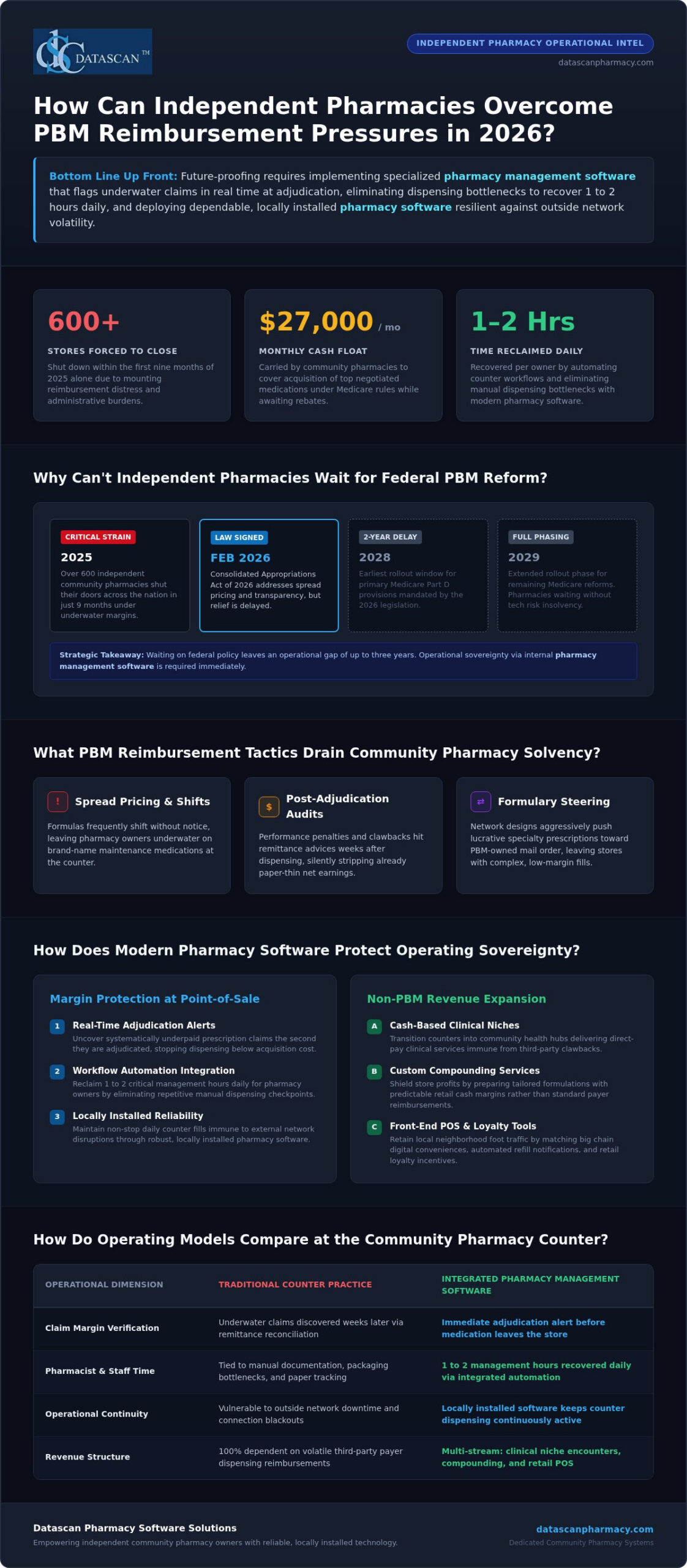
Future-proofing your independent pharmacy in 2026 requires stopping profit leaks at the counter and reclaiming critical business hours through dependable pharmacy management software. With more than 600 independent pharmacies forced to close in the first nine months of 2025 alone, waiting on federal PBM relief that won’t take effect until 2028 is a luxury independent owners don’t have.
You already feel the strain of unpredictable clawbacks, shrinking margins, and exhausting administrative bottlenecks that pull you away from your patients. In this guide, you’ll discover how to protect your store against aggressive PBM practices, spot underpaid prescription claims in real time, and streamline dispensing tasks with integrated pharmacy software. We’ll explore the practical technology and operational upgrades you need right now to safeguard your gross margins, retain loyal community patients, and run an enduring, profitable pharmacy on your own terms.
Key Takeaways
Achieve true independence by future-proofing your independent pharmacy with modern tools that neutralize predatory PBM clawbacks.
Uncover systematically underpaid prescription claims at the exact point of adjudication using advanced pharmacy management software.
Eliminate dispensing bottlenecks and reclaim 1 to 2 management hours daily through fully integrated workflow automation.
Shield your bottom line from insurance volatility by expanding into cash-based clinical niches, compounding, and retail point of sale loyalty.
Protect continuous daily operations against costly network disruptions by choosing dependable, locally installed pharmacy software.
What Does Future-Proofing Your Independent Pharmacy Mean in 2026?
Future-proofing your independent pharmacy means achieving operational sovereignty: securing predictable prescription margins, eliminating administrative chaos, and relying on dependable technology that keeps running regardless of outside network volatility. Buying groups and federal policy debates can’t protect your store tomorrow morning. Long-term viability requires taking total control over your internal counter workflows, verifying every insurance claim before filling, and serving community patients with modern digital conveniences.
Modern independent stores can’t survive on traditional dispensing alone. Surviving requires upgrading everyday operations with specialized tools designed specifically for community stores.
Margin Verification: Stopping underwater reimbursements at the exact moment of intake instead of absorbing clawbacks weeks later.
Workflow Autonomy: Automating repetitive dispensing steps to recover hours of pharmacist time every day.
Patient Convenience: Giving patients mobile refill tools and delivery transparency that match retail chains.
What Industry Pressures Are Threatening Community Pharmacies Today?
Independent stores are caught between aggressive payer models and lean staffing reality. While the Consolidated Appropriations Act of 2026 was signed into law in February 2026 to address spread pricing and rebate transparency, its primary Medicare Part D provisions don’t roll out until 2028 and 2029. Meanwhile, predatory pharmacy benefit manager (PBM) clawbacks, underwater reimbursements, and complex DIR fee evolutions threaten day-to-day solvency. Staffing shortages make it harder for technicians and pharmacists to keep up, turning daily fills into exhausting administrative marathons. Without robust pharmacy management software that automates documentation and monitors inventory costs, operating overhead quietly eats away your cash flow.
Why Is Relying Solely on Traditional Dispensing Margins No Longer Viable?
Dispensing commoditized medications at negative margins is a losing proposition. Modern community pharmacy practice has shifted, requiring independent owners to treat their counters as multifaceted healthcare hubs rather than simple prescription pickup counters. Independent businesses must generate non-PBM revenue by expanding clinical encounters, compounding, and retail front-end sales. Achieving this level of agility requires high-performance pharmacy software that flags underwater claims instantly, protecting your staff from dispensing high-cost drugs below acquisition value while freeing up the time needed to build profitable clinical programs.
How Are PBM Reimbursement Pressures Impacting Pharmacy Viability?
PBM reimbursement pressures threaten independent pharmacy viability by systematically slashing dispensing margins below acquisition costs, imposing opaque post-adjudication clawbacks, and creating severe cash flow deficits. Defending your balance sheet and future-proofing your independent pharmacy against these financial drains requires advanced pharmacy management software that flags underwater claims in real time before medications leave the building.
Buying groups and wholesaler rebates help, but they cannot prevent sudden negative margins at the dispensing counter. Many independent pharmacies now float upwards of $27,000 monthly just to cover the acquisition costs of top negotiated medications under Medicare transaction rules while waiting for delayed manufacturer refunds. When low reimbursements pair with aggressive audits, relying on old billing practices quickly drains working capital.
What PBM Reimbursement Tactics Drain Independent Pharmacy Profitability?
PBMs use intricate contractual mechanisms that strip revenue long after patient pickup:
Opaque Spread Pricing and Contract Revisions: Reimbursement formulas frequently shift without advance notice, leaving pharmacies underwater on brand-name Maintenance medications.
Post-Adjudication Adjustments: Performance-based adjustments and administrative penalties hit remittance advices weeks after dispensing, eroding already paper-thin net earnings.
Formulary Steering: Restrictive network designs push lucrative specialty patients toward PBM-owned mail-order operations, leaving community stores with complex, low-margin claims.
How Can Pharmacies Identify Underpaid Claims and Monitor Margin Erosion?
Waiting for monthly bank reconciliations guarantees margin loss. Modern independent operations require defensive technology embedded directly inside their primary pharmacy software. Real-time margin auditing compares your exact acquisition costs against adjudicated payer rates during label generation. If a claim yields a negative return, the system triggers an immediate alert so your staff can evaluate alternatives, request prior authorizations, or discuss therapeutic substitutions before dispensing.
Reviewing detailed metrics is essential for long-term survival. Understanding how your pharmacy performs across specific payer contracts starts with mastering the fundamentals of calculating pharmacy gross profit to stop invisible revenue leaks. While identifying external initiatives like NCPA’s Diversified Revenue Opportunities provides helpful pathways for future clinical income, intercepting negative-margin fills at the register keeps your business solvent today. If you want to see how modern claim verification protects everyday dispensary margins, you can contact our team for a practical demonstration.
Which Core Pharmacy Software Features Protect Margins and Patient Retention?
The core pharmacy software features that protect margins and drive patient retention include reliable local on-premise system architecture, integrated front-end point-of-sale management, and native mobile refill applications. Securing long-term stability and future-proofing your independent pharmacy means unifying these tools into one cohesive operational hub. When your prescription dispensing, customer checkout, and digital communications talk to each other without friction, your pharmacy captures higher front-end profits, eliminates redundant data entry, and gives patients the polished digital conveniences they expect from big-box chains.
A fragmented system slows down your staff and frustrates customers. Real operational resilience requires a unified technology ecosystem built on three pillars:
System Reliability: Independent on-premise architecture that keeps processing and dispensing prescriptions even when outside web connections fail.
Synchronized Front-End Checkout: Native point of sale integration tracking FSA and HSA eligibility, over-the-counter purchases, customer loyalty perks, and signed delivery confirmations.
Mobile Patient Access: Digital smartphone portals enabling self-service refills, delivery notifications, and direct communication.
Why Is Local On-Premise Pharmacy Management Software Crucial for Reliability?
Unstable web infrastructure shouldn’t bring your pharmacy to a dead stop. A local, on-premise pharmacy management software setup stores and runs your data directly on your in-house server, giving you complete stability. If a regional commercial internet outage knocks out external connections, your dispensary workflow keeps moving forward without frozen screens or dropped fill queues. Local database architecture eliminates the latency issues often caused by distant offsite hosting during peak 4:00 PM afternoon rushes. You keep total, uncompromised administrative ownership over patient records and transaction logs, sidestepping third-party service blackouts that disrupt prescription intake.
How Do Built-In Point of Sale and Mobile Refill Tools Retain Patients?
Big-box retail giants spend heavily to convince consumers that independent stores can’t match their convenience. You can beat them at their own game by uniting your dispensary system with front-of-house technology. Connecting your front-end registers using our dedicated Datascan Point of Sale platform gives your team real-time visibility into over-the-counter margins, tracks patient loyalty rewards, and handles electronic signatures at pickup or curbside. Integrating these register tools with the dispensing queue ensures non-prescription revenue helps offset slim prescription reimbursement spreads.
Convenience dictates where patients send their next fill. When you deploy the MobileScripts patient mobile app, you place your store’s brand directly on your patients’ smartphones. Customers can review medication profiles, set dosage reminders, and request refills in seconds without tying up your phone lines. Pairing simple mobile access with front-end rewards keeps community patients loyal to your business rather than drifting to corporate pharmacy apps.
How Can Independent Pharmacies Diversify Revenue Beyond Standard Dispensing?
Independent pharmacies diversify revenue beyond standard dispensing by expanding into specialized, high-margin cash niches like compounding and veterinary prescriptions while monetizing structured clinical consultations. Future-proofing your independent pharmacy requires breaking free from complete reliance on commoditized prescription fills. The average independent store already pulls approximately 20% of its total revenue from front-end over-the-counter sales; expanding this cash-based foundation shields your business from unpredictable payer clawbacks and strengthens net profitability.
Generating revenue outside traditional PBM structures stabilizes your bottom line through three proven channels:
Specialized Cash Dispensing: Compounded medications and veterinary therapies carry healthy margins and bypass third-party insurance adjudication entirely.
Clinical Service Billing: Medication Therapy Management (MTM) and expanding point-of-care consultations create recurring professional fee revenue. For instance, managing just 50 active MTM patients can produce $7,500 to $15,000 annually in non-PBM revenue.
Synchronized Care Models: Aligning patient refill schedules eliminates inventory guesswork and establishes predictable monthly cash inflows.
How Do Compounding and Veterinary Prescriptions Create Resilient Margins?
Compounding transforms standard dispensing into personalized care that commands dependable, direct-pay margins. Preparing custom pediatric dosages, bioidentical hormones, or allergen-free suspensions delivers immense clinical value while removing insurance clawback risk. Pairing human formulations with pet care unlocks an equally lucrative customer base. Pet owners routinely pay cash for customized veterinary medications. Utilizing dedicated compounding solutions integrated inside your core dispensary software lets you calculate ingredient formulas, track chemical lot numbers, and price custom mixtures accurately. To learn how to tap into animal healthcare, review our comprehensive veterinary prescription software guide.
What Role Do Medication Synchronization and Clinical Services Play in Consistent Cash Flow?
Chaotic refill requests create uneven inventory turns and frantic counter rushes. Medication synchronization aligns a patient’s entire maintenance regimen to a single, coordinated monthly pickup date. This synchronization stabilizes wholesale purchasing, cuts down on uncollected prescriptions, and drives higher medication adherence scores. Pharmacists can pair that scheduled monthly encounter with reimbursable clinical assessments. Billing for deprescribing and chronic care management turns routine consultations into structured income, provided your primary pharmacy software documents interventions cleanly.
Expanding your clinical service portfolio shouldn’t require complex, disconnected software platforms. If you’re ready to deploy integrated compounding tools and streamline clinical documentation across your counter, contact our team today to schedule a software demonstration.
How Does Integrated Workflow Automation Free Up Critical Time for Owners?
Integrated workflow automation frees up critical business hours by systematically guiding every prescription through digital intake, verification, filling, and pickup queues without manual staff intervention. Reclaiming owner management time is essential when future-proofing your independent pharmacy against rising labor costs and administrative burnout. Industry research indicates that delegating manual dispensing tasks to automated support workflows can reclaim 1 to 2 hours of a pharmacist’s time daily; hours you can immediately redirect toward financial strategy, clinical expansion, and store growth.
Eliminating operational drag behind the counter comes down to removing four primary friction points:
Intake Triage: Automatically sorting digital refills, doctor call-ins, and electronic prescriptions into discrete, prioritized processing buckets.
Filling Verification: Mandating physical barcode scanning before medications can be packaged, ending dispensing errors before they happen.
Release Coordination: Grouping completed orders by counter pickup, curbside delivery, or home transit routes.
Delivery Tracking: Arming couriers with mobile signature capture that updates the patient’s central profile automatically.
How Can Automating Prescription Dispensing Queues Eliminate Daily Bottlenecks?
Pharmacy owners waste countless weekly hours untangling dispensing bottlenecks and chasing misplaced orders. Implementing dedicated pharmacy workflow software creates clear division of labor across every workstation. Prescriptions enter customizable digital queues that filter routine refills away from complex prior authorizations, preventing order pile-ups during afternoon rushes. Integrated national drug code (NDC) barcode verification prevents staff from bottling the wrong strength or package size, ensuring total fill accuracy without slowing down your bench. Pair this with our integrated mobile delivery tools, and your drivers can capture electronic, HIPAA-compliant patient signatures curbside that sync back to the main register system in real time.
Why Is Dependable US-Based Software Support Critical for Long-Term Continuity?
Automation is only as strong as the technical support team standing behind it. When technical questions or claim transmission errors stall your dispensing line, waiting hours for an overseas call center or an automated email ticket system paralyzes your business. That is why independent stores require Datascan Pharmacy Management Software, supported by experienced, domestic personnel with rapid response times. Family-owned and operated since 1981, Datascan understands community dispensary pressures firsthand. Having knowledgeable U.S.-based technicians resolve questions quickly ensures continuous dispensing, protects your daily cash flow, and keeps your operational hours focused squarely on serving patients.
Take Control of Your Pharmacy’s Future Today
Successfully future-proofing your independent pharmacy requires decisive action right behind your own counter. You don’t have to stay trapped between predatory PBM reimbursement clawbacks and exhausting manual operations. By auditing underwater claims during adjudication, eliminating daily dispensing bottlenecks, and building cash-based revenue streams, you protect both your bottom line and your staff.
True operational freedom comes from partnering with technology built exclusively for community dispensary success. Datascan has stood as a family-owned champion for independent pharmacies across America since 1981. Our full-featured pharmacy management software combines native point of sale, mobile patient apps, and automated bench workflows, all supported by a dedicated, 100% U.S.-based client service team that answers when you call.
Your community relies on your doors staying open. Reclaim your operational hours and build an enduring, highly profitable dispensary on your own terms. Schedule a personalized demo of Datascan Pharmacy Software today to discover what purpose-built independence can do for your business.
Frequently Asked Questions
What does future-proofing your independent pharmacy mean in today’s healthcare market?
Future-proofing your independent pharmacy means building an operationally self-sufficient business that thrives despite restrictive PBM contracts and volatile drug pricing changes. This strategy combines reliable in-house dispensing technology, strict claim margin auditing, and automated daily bench routines. By reducing overhead expenses and launching high-margin clinical revenue programs, independent owners protect their cash flow and keep their business viable for decades to come.
How can independent pharmacies protect profit margins against ongoing PBM reimbursement cuts?
Pharmacies protect gross margins by deploying pharmacy management software that flags underwater claims in real time during the adjudication process. Catching underpaid prescriptions before dispensing stops margin loss immediately. Pairing live claim alerts with aggressive wholesaler acquisition tracking and non-PBM revenue channels, such as specialized compounding or expanded clinical services, shields working capital from post-adjudication surprises.
Why should an independent pharmacy choose on-premise software over other systems?
An on-premise pharmacy system ensures uninterrupted prescription filling by housing your database directly on local in-house hardware. If external internet connections experience regional outages, your dispensary workflow keeps moving without dropped screens or frozen queues. Independent owners maintain total administrative control over their operational records while eliminating the latency issues that often disrupt peak filling hours.
How does workflow automation software reduce pharmacist and technician burnout?
Workflow automation software eliminates repetitive manual tasks by routing prescription intake, data verification, NDC barcode scanning, and pickup coordination into specialized digital stages. Automating these bench steps eliminates dispensing errors before medications leave the pharmacy. Freeing staff from chaotic manual entry reclaims critical business hours daily, drastically reducing technician stress and owner exhaustion.
What alternative revenue opportunities offer the highest profit margins for retail pharmacies?
Specialized non-sterile compounding and customized veterinary prescriptions offer some of the strongest profit margins because they operate as cash transactions free from insurance claim clawbacks. Clinical initiatives like billable deprescribing consultations and comprehensive Medication Therapy Management also establish predictable professional service income, supplementing front-end retail point-of-sale sales to build financial stability.
Can an independent community pharmacy effectively compete with national chain store apps?
Independent stores compete directly with retail chains by deploying dedicated smartphone solutions like the MobileScripts patient mobile app. Branded mobile applications give community patients modern conveniences, including digital refill submissions, dosage tracking, and home delivery updates. Combining mobile convenience with personalized, community-focused patient relationships keeps neighborhood customers loyal to your dispensary.
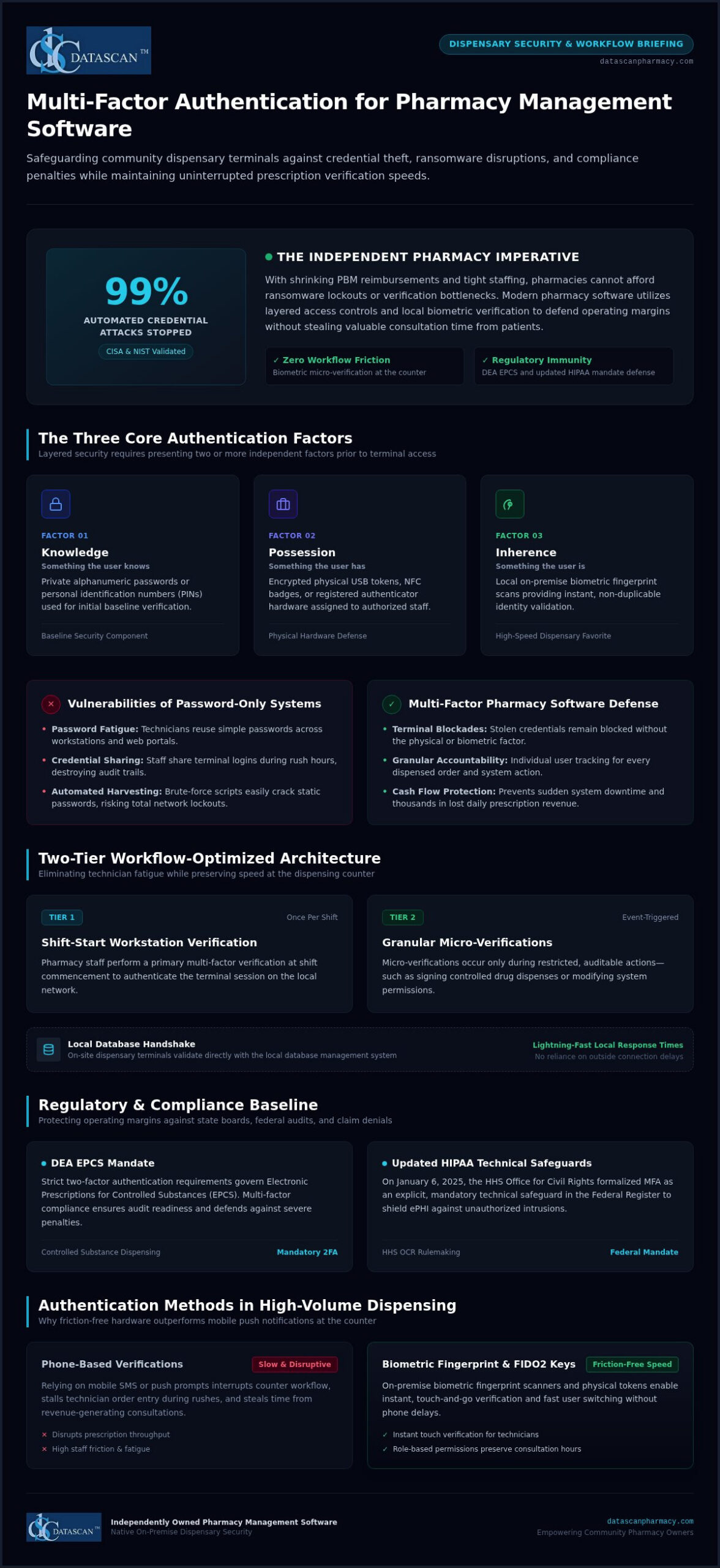
According to CISA and NIST assessments, multi-factor authentication stops up to 99% of automated credential attacks, and implementing multi-factor authentication for pharmacy software doesn’t have to slow down your dispensing counter. As an independent pharmacy owner, you already carry the heavy burden of shrinking PBM reimbursements and tight staffing. The last thing your technicians need during the afternoon rush is frustrating phone-based verification prompts that disrupt prescription throughput and steal time from patient consultations.
The right pharmacy management software solves this dilemma by pairing robust access controls with high-speed dispensary workflows, using on-premise biometric fingerprint scanners and fast user switching to keep staff productive and fully compliant. In this 2026 security guide, you’ll discover how to safeguard your pharmacy software against devastating ransomware disruptions, satisfy DEA EPCS and updated HIPAA mandates, and defend your operating margins without sacrificing a second of patient care.
Key Takeaways
Deploying multi-factor authentication for pharmacy software safeguards your dispensary terminals against credential theft while maintaining uninterrupted prescription verification speeds.
Meeting DEA EPCS two-factor mandates and updated HIPAA technical safeguards protects your dispensary from catastrophic audit fines and insurer claim denials.
Biometric fingerprint scanners and FIDO2 physical keys provide fast, friction-free verification that eliminates phone-prompt delays for busy technicians.
Role-based access permissions and customizable workflow configurations prevent staff fatigue while preserving valuable hours for revenue-generating patient consultations.
Choosing an independently owned pharmacy management software partner ensures native on-premise security designed specifically to protect community pharmacy operating margins.
What is multi-factor authentication for pharmacy software?
Multi-factor authentication (MFA) is a layered security defense that requires pharmacy staff to present two or more independent credentials before gaining entry to dispensing records, point-of-sale data, or operational controls. Instead of trusting a solitary password, multi-factor authentication verifies user identity by cross-referencing distinct categories to guarantee that an unauthorized actor cannot access the local system using compromised credentials alone.
Every effective access management framework relies on three standard credential factors:
Knowledge: Something the user knows, such as a private alphanumeric password or a personal identification number (PIN).
Possession: Something the user has, such as an encrypted physical USB token, an NFC badge, or a registered authenticator device.
Inherence: Something the user is, verified through biometric data like a local fingerprint scan.
Relying on standard passwords leaves community pharmacies dangerously exposed. When an external threat actor intercepts or guesses a password, single-factor defense collapses instantly. Implementing multi-factor authentication for pharmacy software ensures that even if login credentials are stolen in an automated credential-stuffing attack, unauthorized access remains completely blocked at the terminal. That defense stops catastrophic network lockouts and prevents unexpected downtime that can halt prescription dispensing, disrupt cash flow, and cost thousands in lost daily revenue.
Why do standard passwords fail to protect modern pharmacy computer systems?
Dispensary teams work in high-speed environments where password fatigue causes technicians to reuse simple passwords across internal workstations and personal web portals. In many busy community pharmacies, staff fall into the dangerous habit of sharing terminal logins to speed up order entry. This creates enormous compliance blind spots. Brute-force scripts and automated credential harvesting easily crack static passwords, leaving on-premise servers vulnerable to severe intrusions without an audit trail identifying who performed the action.
How does multi-factor authentication work across pharmacy management software?
Modern dispensary security splits access verification into strategic tiers to prevent workflow disruption. A pharmacy team member performs a primary multi-factor verification at the start of their shift to validate the workstation session on the local network. Throughout the day, secondary micro-verifications occur only when performing restricted, auditable actions, such as signing controlled drug dispenses or altering system permissions.
This design relies on secure local authentication handshakes between on-site dispensing terminals and your on-premise database management system. Secure local validation eliminates dependence on outside connections while maintaining lightning-fast terminal response times. As detailed in our guide to pharmacy management software, embedding multi-factor authentication for pharmacy software directly into everyday dispensing operations gives independent pharmacies ironclad data security without delaying patient pickups at the counter.
Why is multi-factor authentication essential for pharmacy regulatory compliance?
Enforcing multi-factor authentication for pharmacy software is no longer an optional security recommendation; it’s a mandatory operational baseline across federal healthcare rules, controlled substance regulations, and commercial underwriting standards. State boards of pharmacy and federal regulators hold independent pharmacy owners personally accountable for securing dispensing records against unauthorized access. If your pharmacy computer systems experience an intrusion due to single-factor authentication vulnerabilities, the legal and financial repercussions can easily destroy your dispensary operating margins.
How does MFA satisfy HIPAA Security Rule and ePHI requirements?
On January 6, 2025, the U.S. Department of Health and Human Services (HHS) Office for Civil Rights published a Notice of Proposed Rulemaking in the Federal Register formalizing MFA as an explicit, mandatory technical safeguard under HIPAA Security Rule standards. This regulatory shift eliminates the historical ambiguity between “addressable” and “required” specifications. Your on-premise local servers and dispensing workstations must enforce multi-factor authentication for any workforce member accessing electronic protected health information (ePHI).
HIPAA compliance audits scrutinize granular system audit trails to verify unique user accountability. When technicians use shared accounts or simple passwords, proving which employee viewed or exported sensitive patient data becomes legally impossible. Unauthorized access to ePHI triggers mandatory federal breach notifications, severe financial penalties from the HHS, and public disclosure requirements that undermine local community trust.
What are the EPCS DEA requirements for two-factor authentication?
The Drug Enforcement Administration strictly regulates Electronic Prescriptions for Controlled Substances (EPCS) under 21 CFR § 1311.115. Pharmacists who digitally sign, approve, or alter controlled substance dispenses must authenticate using two distinct factors:
Knowledge factor: A secure password or PIN.
Possession factor: A hard token key that meets FIPS 140-2 Security Level 1 standards, kept completely separate from the workstation.
Inherent factor: A biometric scanner (such as a fingerprint reader) engineered with a false match rate of 0.001% or lower per 21 CFR § 1311.116.
Every Schedule II electronic prescription requires a DEA-validated digital signature that permanently binds the dispensing pharmacist’s verified credentials to the internal dispensing record. Compliant pharmacy management software enforces these protocols automatically during verification, creating unalterable daily audit logs that protect your DEA registration during unexpected inspections.
How do cyber insurance providers evaluate independent pharmacy authentication?
Commercial cyber liability carriers have turned MFA into a strict underwriting mandate rather than an optional discount. Actuarial reports reveal that over 80% of healthcare cyber insurance claims subjected to forensic investigation face coverage disputes, reduced payouts, or total claim denials if MFA was inactive on the breached endpoint.
With the average healthcare data breach climbing to $7.42 million according to IBM Security, insurance underwriters routinely exclude coverage for credential-theft ransomware incidents when basic controls are bypassed. Verifying your security posture against the 2026 pharmacy self-inspection checklist helps safeguard your operating capital against devastating policy exclusions. If you want to confirm that your local dispensary terminals meet current state board and federal standards, contact our software specialists to review your dispensary setup.
Which multi-factor authentication methods work best in a high-volume pharmacy?
High-volume dispensaries process hundreds of prescriptions every shift, meaning identity verification tools must combine bulletproof access control with sub-two-second execution. Generic corporate IT security setups fail behind a busy retail counter. Selecting the correct multi-factor authentication for pharmacy software requires matching authentication hardware to the physical realities of pill trays, barcode scanners, and rotating dispensary staff.
Authentication Method
Speed
Dispensing Reliability
Sanitation Impact
Regulatory Standing
Biometric Fingerprint Scanners
Under 2 seconds
Very High
Requires optical sensors resistant to counting dust
Meets DEA EPCS thresholds (21 CFR § 1311.116)
FIDO2 Physical Hardware Keys
2–3 seconds (tap/insert)
High
Easily sanitized with alcohol wipes
Full FIPS 140-2 Level 1 compliance
Time-Based Authenticator Apps (TOTP)
15–30 seconds
Moderate (requires mobile handling)
Cross-contaminates bench via personal phones
Complies with general HIPAA standards
SMS Text Verification Codes
30–90+ seconds
Poor (cellular dead zones)
Slows workflow, encourages mobile distraction
Classified as weak by federal cybersecurity baselines
How do authenticator apps compare to hardware security keys?
Software-based TOTP authenticators generate rolling numerical codes on smartphones, which works well for occasional remote manager logins. In an active dispensary, however, requiring technicians to pull phones out of their pockets while counting tablets introduces cross-contamination and wastes critical minutes. Dedicated FIDO2 physical keys plug directly into local workstation USB ports, allowing staff to authenticate with a physical touch. They eliminate mobile distractions while preventing phishing attacks by validating cryptographic handshakes locally on the terminal.
Why are SMS text verification codes considered a liability for pharmacies?
According to official CISA multi-factor authentication guidance, SMS text messaging codes remain highly vulnerable to SIM-swapping and cellular interception. Beyond these security holes, SMS delivery creates massive operational bottlenecks. Independent pharmacies often feature shielded walls or basement storage where cellular reception drops, causing verification codes to lag by several minutes. When patients are queued at the register, waiting on a one-time code paralyzes your fill counter.
Can biometric verification streamline staff log-in at the dispensary terminal?
Integrated optical fingerprint readers deliver the fastest verification speeds at the dispensing bench. A single touch allows pharmacists to digitally sign controlled orders or switch terminal profiles without typing passwords. While powder residue from split tablets can accumulate on older optical glass, modern commercial scanners handle routine pill dust without false rejections. Using fast biometric switching ensures full personal accountability for every dispensed bottle while keeping dispensary throughput moving at peak speed.
How can independent pharmacies implement MFA without slowing down dispensary workflow?
Independent pharmacies can deploy multi-factor authentication for pharmacy software without slowing down prescription processing by establishing role-based access controls, smart session persistence, and fast local biometric re-authentication. Protecting your dispensary workstations doesn’t require paralyzing your counter staff with constant phone verification prompts. Following a structured rollout blueprint ensures full regulatory defense while keeping your daily dispensing queue moving rapidly:
Audit dispensary access points: Map every local terminal, compounding station, and management computer across your dispensary local area network.
Assign role-based access tiers: Restrict administrative settings and claim ledger access while granting technicians streamlined permissions for daily order entry.
Configure smart session caching: Enforce full multi-factor verification during initial morning boot-up, then rely on instant biometric or PIN re-authentication during daily dispensing.
Deploy hardware redundancies: Pre-register backup security tokens and store them securely on-site to handle misplaced staff keys immediately.
How do you map role-based access across dispensing and point-of-sale stations?
Technicians spend their days typing intake details, counting pills, and printing prescription labels; they don’t require access to wholesale pricing ledgers, tax records, or audit management tools. Cashiers handling retail transactions on your pharmacy POS system need fast checkout capabilities without access to detailed patient clinical profiles. Relief pharmacists need complete clinical verification permissions without access to sensitive store financial data. Segmenting access by job role protects sensitive PBM claim data and stops technicians from facing constant elevated-credential prompts.
How should pharmacy owners configure session duration to reduce pharmacist burnout?
Overly aggressive workstation lockout policies trigger constant friction. If a terminal locks every two minutes, pharmacists spend precious minutes re-authenticating instead of counseling patients or verifying orders. The most effective configuration pairs an all-day authorized primary shift session with a 10-to-15 minute idle screen lock. Once initial authentication occurs at opening, staff unlock terminals using a two-second optical fingerprint scan. Integrating these policies into your customizable workflow software balances physical terminal security with high-throughput dispensing speed.
What staff protocols prevent prescription filling delays during token failures?
Hardware tokens can get dropped, and mobile devices run out of battery charge. To keep your filling counter moving when staff misplace an authenticator, store two pre-configured, encrypted hardware keys inside the dispensary safe under managerial lock. If a technician forgets their device, the pharmacist-in-charge can assign a temporary token through on-premise admin controls in seconds. Running simple five-minute team training drills ensures your staff knows the backup routine before peak dispensary rushes arrive. If you’re ready to upgrade your dispensary security while protecting staff productivity, schedule a workflow demo with our team.
What security capabilities should owners look for in a pharmacy software vendor?
Pharmacy owners should look for native, built-in access controls rather than fragmented third-party add-ons, ensuring that multi-factor authentication for pharmacy software operates seamlessly within daily dispensing routines. Relying on bolted-on security utilities creates workstation software conflicts, introduces latency during prescription verification, and complicates local terminal updates. Built-in authentication guarantees that user identity verification happens instantly at the local database level without interrupting retail transactions.
When evaluating a prospective software partner, look for these vital capabilities:
Native hardware integration: Direct support for optical fingerprint scanners and FIDO2 physical keys without requiring secondary software subscriptions.
Granular role-based controls: The ability to isolate point-of-sale registers, billing ledgers, and dispensing benches under distinct authorization rules.
Immutable system logging: Automated recording of every claim transmission, price override, and prescription verification tied to a verified user profile.
Responsive technical assistance: Direct access to an experienced, in-house support team capable of resolving terminal lockouts immediately.
How does integrated security protect margins against PBM audits and clawbacks?
Independent pharmacy owners face constant margin compression from predatory PBM clawbacks and unpredictable DIR fees. PBM auditors routinely target technical discrepancies and missing verification timestamps to justify recouping reimbursements. When robust security is embedded directly into your pharmacy management software, every prescription intake, adjudication, and dispensing approval generates an unalterable audit log tied to a verified staff member. This tamper-proof tracking defends your claims during aggressive payer audits while eliminating manual documentation, freeing up hours for owners to focus on profitable clinical services. For a broader look at protecting your store against these pressures, explore our complete guide to future-proofing your independent pharmacy with the technology and operational strategies you need in 2026.
Why does experienced U.S.-based software support matter during technical issues?
Dispensary terminals cannot sit idle while staff wait on hold with an outsourced call center. When an authentication key malfunctions or an employee lockout occurs during a busy prescription rush, immediate resolution is essential. Datascan has served community pharmacies as an independent, family-owned provider since 1981, backing its pharmacy software with a dedicated, in-house U.S.-based customer support team. Having access to long-term technicians who understand the daily workflow demands of independent pharmacies ensures that your on-premise systems remain fully protected, compliant, and operational without costing you valuable dispensing time.
Secure Your Dispensary and Accelerate Counter Throughput
Safeguarding patient records and satisfying strict DEA EPCS standards doesn’t mean your dispensary has to grind to a halt. When you implement native multi-factor authentication for pharmacy software, your staff gains the speed of fast biometric switching and physical hardware keys without the distraction of personal smartphone prompts. Reliable local security also protects your dispensing logs, providing immutable proof during aggressive PBM audits while keeping your counter moving at peak efficiency.
Since 1981, Datascan has stood beside independent community pharmacies across the nation as a trusted, family-owned technology partner. Our customizable workflow technology is engineered specifically to maximize retail dispensing efficiency, backed by a dedicated, long-term U.S.-based support team that answers when you need them. You shouldn’t have to choose between total regulatory compliance and rapid prescription throughput. Ready to protect your operating margins and simplify daily operations? Connect with the Datascan team today to see how our pharmacy software keeps your business secure.
Frequently Asked Questions
Is multi-factor authentication legally required for all retail pharmacy software?
Yes, multi-factor authentication is mandatory under federal healthcare regulations and controlled substance laws. The HHS OCR Notice of Proposed Rulemaking published in January 2025 formally establishes MFA as an explicit technical safeguard for all workforce members accessing ePHI. In addition, the DEA mandates two-factor authentication for all electronic prescriptions for controlled substances (EPCS) under 21 CFR § 1311.115, making compliant access controls non-negotiable for retail operations.
Can multi-factor authentication be bypassed during urgent prescription dispensing emergencies?
Multi-factor authentication cannot be disabled or bypassed without violating federal compliance rules, but modern pharmacy software provides break-glass administrative overrides. In critical situations, a supervising pharmacist can authorize emergency access through manager credentials or assign a pre-registered backup hardware key stored on-site. This maintains continuous system accountability and logs the emergency dispensation in your local audit trail without leaving the network open to unauthorized intrusions.
How much time does multi-factor authentication add to filling a daily prescription?
When properly configured, multi-factor authentication adds less than two seconds to routine dispensing tasks. Using integrated biometric fingerprint readers or USB hardware keys allows pharmacists to authenticate verification steps instantly without typing passwords. Implementing multi-factor authentication for pharmacy software alongside smart session persistence ensures your team only completes full credential verification at morning start-up, preserving counter momentum during busy dispensary hours.
What happens if a pharmacy technician loses their authentication token or mobile device?
A lost authentication device is quickly resolved on-site without stopping dispensary operations. The pharmacist-in-charge accesses the administrative management console within the local pharmacy management software, immediately revokes the missing token’s access rights, and pairs a pre-configured spare hardware key to the technician’s profile. This rapid local reassignment protects the database against stolen tokens while ensuring staff return to prescription processing in minutes.
Is SMS text verification compliant with DEA EPCS regulations for controlled substances?
No, standard SMS text messages do not meet DEA EPCS authentication standards. Under 21 CFR § 1311.115, EPCS requires two independent factors using knowledge, biometrics, or a separate hardware cryptographic token certified to FIPS 140-2 standards. Because SMS verification relies on unencrypted cellular networks vulnerable to SIM swapping and interception, federal agencies and cyber insurers classify text codes as restricted authenticators unfit for controlled substance verification.
Does multi-factor authentication protect pharmacy software running on a local server network?
Yes, deploying multi-factor authentication for pharmacy software is vital for securing on-premise local area networks. Most modern ransomware attacks compromise internal networks by stealing static employee credentials and moving laterally across local terminals. Enforcing MFA across on-site workstations, local server consoles, and administrative portals blocks unauthorized network traversal, ensuring that an exposed password on one workstation cannot compromise your entire dispensary database.
How does multi-factor authentication defend independent pharmacies against cyber liability claims?
Active multi-factor authentication prevents insurance carriers from denying breach claims during forensic audits. Commercial cyber liability underwriters require verified proof of enforced MFA across all administrative and dispensary endpoints as a strict policy condition. Maintaining immutable access logs inside your pharmacy software proves regulatory compliance, eliminates policy exclusion loopholes after an incident, and protects your business from devastating out-of-pocket recovery costs.
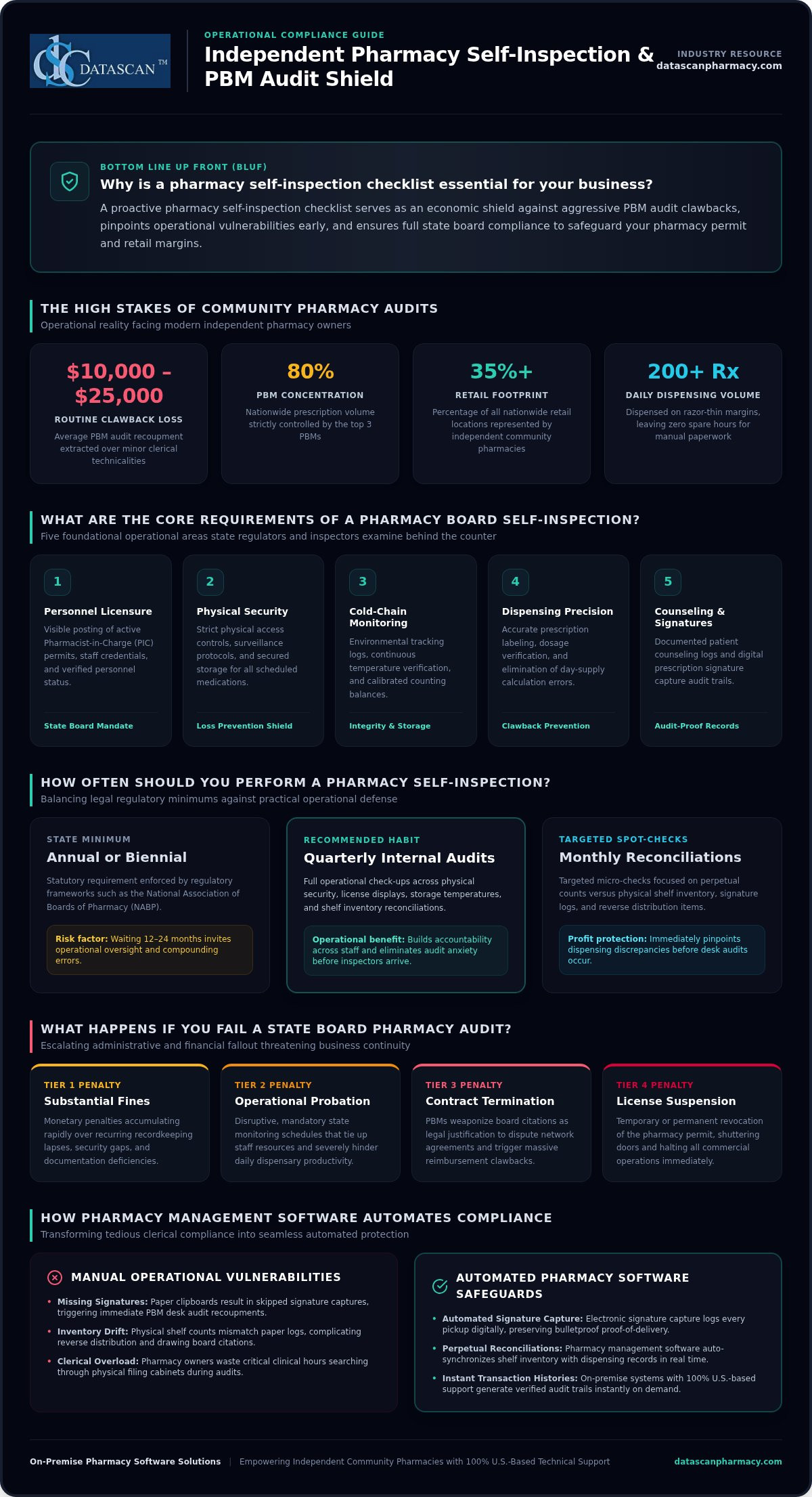
A comprehensive pharmacy self-inspection checklist isn’t just a routine regulatory formality. It’s your strongest operational shield against sudden license citations and aggressive PBM clawbacks, which routinely extract between $10,000 and $25,000 per audit over minor clerical technicalities. As an independent owner dispensing upwards of 200 prescriptions a day on razor-thin margins, you simply don’t have the spare hours to comb through endless regulatory paperwork or live in fear of an unexpected board inspection.
To keep your doors open and profitable, you need an exact roadmap that addresses precisely what state and federal inspectors look for before they arrive. This guide delivers a complete review of your compliance requirements, showing you how to safeguard your license, prevent recoupments, and eliminate audit anxiety. You’ll also learn how reliable pharmacy management software transforms manual inventory reconciliations and signature logging into automated workflows, freeing up valuable time so you can focus on patient care and business growth.
Key Takeaways
Implementing a proactive pharmacy self-inspection checklist pinpoints operational vulnerabilities early, protecting your business against surprise citations and aggressive PBM clawbacks.
Ensure full state board readiness by verifying active license postings, updating security protocols, and enforcing strict physical access controls for all scheduled medications.
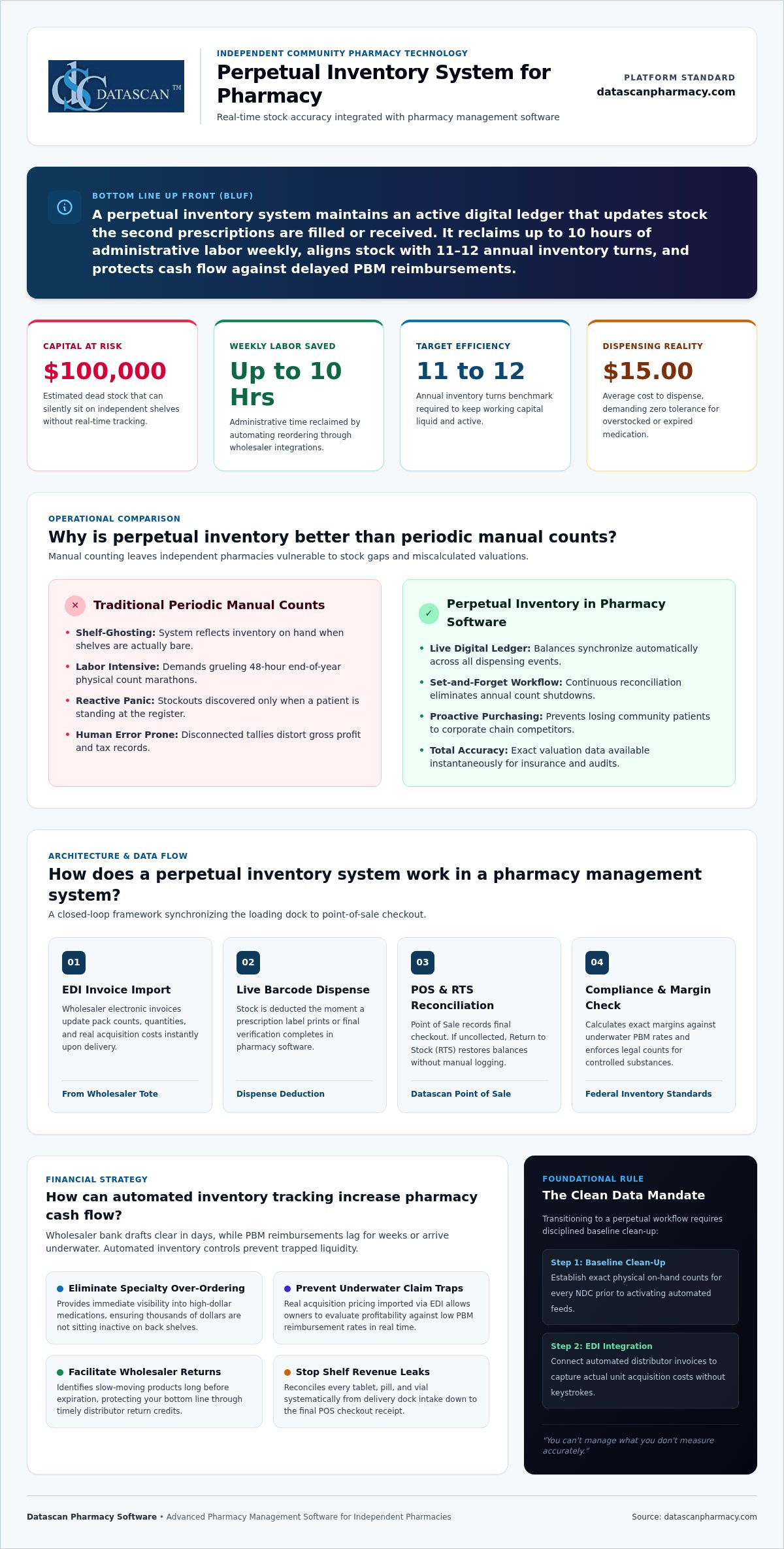
Streamline recordkeeping by reconciling physical shelf inventory with your perpetual counts to eliminate dispensing discrepancies and simplify reverse distribution.
Establish a repeatable, low-stress audit routine by scheduling designated compliance hours and assigning checklist responsibilities to key staff members.
Leverage robust pharmacy management software to automate prescription signature capture and report generation, keeping your records audit-ready while freeing up time for patient care.
Why is a pharmacy self-inspection checklist essential for my business?
A pharmacy self-inspection checklist is a proactive tool used to identify regulatory gaps before a Board of Pharmacy inspector does, protecting your license and bottom line. State regulators enforce strict legal requirements, but treating a self-audit purely as a compliance chore misses its true commercial value. For an independent pharmacy, regular operational self-inspections serve as an economic shield against aggressive pharmacy benefit managers (PBMs). With the top three PBMs controlling roughly 80% of nationwide prescription volume, post-dispense desk audits are routinely weaponized to claw back reimbursements over clerical technicalities like missing signatures or miscalculated day-supply entries. When you routinely audit your operations, you eliminate these vulnerabilities, protect your margins, and prevent dispensing errors before prescriptions leave the counter.
Independent community pharmacies represent over 35% of all retail locations across the country, yet corporate pressure continues to mount. Acting as your own champion means using disciplined self-audits to insulate your enterprise from external scrutiny. Regular operational checks catch workflow bottlenecks, protect clinical integrity, and help you preserve independence in a fiercely competitive market. For a broader look at protecting your store’s long-term viability, explore this comprehensive guide on future-proofing your independent pharmacy against shrinking margins and aggressive PBM practices.
How often should I perform a pharmacy self-inspection?
Mandatory state filings establish the legal minimum, but your operational reality demands a tighter schedule. Many states, following regulatory frameworks promoted by the National Association of Boards of Pharmacy, require the Pharmacist-in-Charge to complete formal assessments annually or biennially. However, waiting twelve months between reviews invites oversight. Community pharmacies dispensing hundreds of prescriptions daily benefit significantly from quarterly internal check-ups and monthly spot-checks on high-risk operational areas. Establishing regular checkpoints builds accountability across your staff, turning complex regulations into daily operational habits.
What happens if I fail a state board pharmacy audit?
Failing an official inspection carries severe financial and administrative fallout. Regulatory agencies enforce escalating disciplinary actions that jeopardize your ability to operate:
Substantial Fines: Monetary penalties accumulate rapidly for repeated recordkeeping lapses, missing physical security protocols, or compounding documentation gaps.
Operational Probation: Put your business under disruptive, mandated monitoring schedules that drain staff productivity.
License Suspension or Revocation: State boards can temporarily shutter your doors or strip your pharmacy permit entirely, instantly halting revenue.
Contract Termination: PBMs frequently utilize official board citations as grounds to dispute in-network provider agreements, triggering massive reimbursement recoupments.
Surviving these audit crises requires complete technical readiness. Operating with proven on-premise pharmacy software supported by 100% U.S.-based technicians ensures your team can instantly generate required transaction histories, verify audit trails, and satisfy inspector inquiries with confidence.
What are the core requirements of a pharmacy board self-inspection?
The core requirements of a pharmacy board self-inspection focus on five critical operational areas: active personnel licensure display, physical security protocols, environmental cold-chain monitoring, prescription labeling precision, and documented patient counseling logs. State regulators do not just verify that you have policies in place; they inspect whether your daily operational records back them up. Standardized templates, such as the California State Board of Pharmacy self-assessment forms, illustrate how granular state reviews can be, demanding everything from the physical posting of your Pharmacist-in-Charge (PIC) permit to the calibration dates on your counting balances. Utilizing a robust, tech-enabled pharmacy self-inspection checklist ensures you systematically examine each compliance domain before an inspector steps behind your counter.
To avoid severe penalties, every independent pharmacy self-inspection checklist must rigorously cover these physical and operational standards:
Prominent Licensure Postings: Pharmacy permits, DEA registrations, and current state licenses for all pharmacists and registered technicians must be clearly visible to the public.
Physical Security and Controlled Access: Verify operational alarm systems, functional motion detectors, and restricted physical key or passcode access to Schedule II vaults.
Environmental and Cold-Chain Controls: Maintain continuous digital temperature logs for refrigerators (36°F to 46°F) and freezers (-13°F to 14°F), alongside clean compounding areas and calibrated scales.
Prescription Labeling and Counseling: Audit dispensed vials to confirm mandated warning labels, auxiliary instructions, expiration dates, and logged patient counseling offers.
Staying on top of these requirements can easily drain hours each week. Deploying reliable on-premise tools like Datascan Pharmacy Management Software simplifies reporting across every operational check, giving you centralized access to audit logs and system controls. If you want to streamline how your store handles compliance, you can always reach out to our U.S.-based team for personalized guidance.
What records must be included in my self-inspection?
Your documentation trail is the first thing a board inspector or PBM auditor investigates. Under 21 CFR § 1304.11, you must maintain a signed biennial controlled substance inventory on-site for at least two years, indicating whether counts took place at the open or close of business. Inspect your electronic DEA Form 222 tracking, verify that prescription records contain secure digital signatures, and review physical waste manifests to ensure full HIPAA compliance during document shredding.
How do I verify staff licensure and training compliance?
Failing to track employee qualifications can trigger immediate administrative citations. Review staff files to confirm that continuing education credits and board registrations are up to date for every technician and pharmacist on your schedule. You should also run monthly checks against the OIG and GSA exclusion lists to confirm clean billing credentials, while verifying that all personnel have documented their annual Fraud, Waste, and Abuse (FWA) training modules.
How do I inspect my pharmacy’s inventory and operational records?
Inspecting inventory and operational records requires matching your on-hand physical stock directly against system counts, reviewing wholesale purchase histories, and auditing third-party claim margins. By incorporating inventory audits into your regular pharmacy self-inspection checklist, you prevent DEA diversion flags while catching underpaid PBM claims that threaten your cash flow.
Start by clearing physical shelves of outdated stock. Pull products ninety days ahead of expiration, sequestering them in a secure holding area before transferring them to licensed reverse distributors for destruction. Concurrently, inspect your front-end regulatory logs. Verifying that your Datascan Point of Sale (POS) accurately records real-time pseudoephedrine purchase thresholds and archives customer signatures ensures full compliance with federal combat meth mandates. Aligning these internal checks with NABP Verified Pharmacy Program inspection standards provides a structured, repeatable framework that withstands rigorous scrutiny.
How do I audit my perpetual inventory for controlled substances?
Executing a controlled substance audit means comparing physical counts of Schedule II through V medications against perpetual logs recorded in your system. Regular variance tracking uncovers dispensing discrepancies early, stopping suspicious order monitoring (SOM) thresholds from choking off future wholesaler deliveries. Local, on-premise pharmacy software streamlines this routine by generating automated “zero-count” alerts and perpetual tracking reports, alerting staff immediately whenever a balance slips out of alignment.
Can self-inspections help identify PBM reimbursement errors?
Operational self-inspections do double duty by exposing predatory payer tactics. Auditing prescription billing logs against actual drug acquisition costs surfaces underwater claims where third-party payments fail to cover dispensing expenses. With the average cost to dispense hovering near $15 per fill, spot-checking claims through robust pharmacy management software lets you flag problematic adjudications, appeal below-cost payments, and protect operational margins. Evaluating claim profitability alongside inventory movement equips independent owners with the hard data necessary to fight unfair reimbursement cuts. Understanding the full scope of these financial pressures is essential to future-proofing your independent pharmacy against unpredictable clawbacks and shrinking gross margins in 2026 and beyond.
What are the steps to conduct a stress-free pharmacy self-audit?
Conducting a stress-free pharmacy self-audit requires transforming a massive compliance burden into an organized, five-step recurring process: scheduling dedicated evaluation windows, delegating responsibilities, generating digital validation reports, walking the floor, and executing rapid corrective plans. Treating internal reviews as an afterthought leads to rushed assessments and missed oversights. By utilizing a structured pharmacy self-inspection checklist alongside purposeful operational habits, independent owners protect their licenses without sacrificing hours of patient service.
Following these practical steps turns compliance into an achievable routine:
Schedule a Dedicated Compliance Window: Set aside a specific two-hour block during low-volume mid-week mornings or after closing. Auditing while juggling phone calls and dispensing queues guarantees missed details.
Assign Specific Sections to Key Staff: Distribute operational portions of your checklist to lead technicians or staff pharmacists. Give technicians ownership over cleanroom logs or refrigerator checks, fostering team-wide accountability.
Pull Audit Reports via Local Workstations: Use your pharmacy workflow optimization software to extract real-time dispensing audit trails, user access records, and inventory variance logs rather than sorting through paper receipts.
Execute a Physical “Mock Audit” Walkthrough: Walk your store through the eyes of an outside inspector. Verify that biohazard bins are secured, counting balances sit level, and patient-sensitive trash never lingers near public counters.
Formalize an Immediate Corrective Action Plan: Log non-compliant items immediately and set strict resolution deadlines instead of letting minor problems linger.
Never rely on loose paperwork or scattered clipboards. Keep a physical “Master Compliance Binder” directly behind the counter alongside an organized local directory on your primary workstation. State board officials expect readily available proof. Ensure every completed checklist, temperature deviation log, and reconciliation report is signed and dated by the Pharmacist-in-Charge (PIC) to establish an airtight documentation trail during unexpected visits.
How do I create a corrective action plan?
A corrective action plan establishes clear accountability with measurable timelines. Assign a 24- to 48-hour resolution deadline for immediate regulatory risks, such as missing alarm tests or physical lock issues. Treat operational gaps as valuable coaching opportunities; retrain staff on system-guided dispensing checks rather than issuing reprimands, ensuring your team actively works to stop repeat mistakes.
How can pharmacy management software automate my compliance workflow?
Pharmacy management software automates your compliance workflow by converting manual verification tasks into enforceable, system-guided hard stops and instant audit reporting. Rather than relying on vulnerable paper binders, a robust on-premise system validates dispensing data in real time, automates state Prescription Monitoring Program (PMP) submissions, and archives required records automatically. Integrating these capabilities directly into your daily routine ensures that maintaining a pharmacy self-inspection checklist isn’t an exhausting after-hours chore, but a seamless operational standard.
Manual paperwork invites clerical oversights that corporate payers and regulatory boards routinely penalize. Modern pharmacy software eliminates these liabilities at the point of interaction. By deploying an integrated electronic delivery system, staff can capture digital signatures for HIPAA privacy notices, prescription pickups, and home deliveries directly on mobile devices. Every signature links immediately to the corresponding patient profile and transaction record, giving you an unalterable digital paper trail that neutralizes audit disputes before clawbacks occur.
How does workflow automation reduce compliance risks?
Workflow automation removes human error by enforcing digital checkpoints at every station. Built-in barcode verification requires technicians to scan stock bottles against prescription data, ensuring the exact National Drug Code (NDC) and dosage form match before dispensing. By integrating the core tenets of your pharmacy self-inspection checklist into daily software queues, your workstations prevent staff from skipping critical steps like patient counseling documentation, prescription origin verification, and required third-party override approvals.
Why is U.S.-based support critical for pharmacy software compliance?
Surviving a surprise inspection or PBM desk audit requires immediate answers, not endless hold times with overseas call centers. Datascan backs its technology with 100% U.S.-based support, connecting you directly to technicians who understand domestic pharmacy laws and board requirements. As an independent, family-owned business since 1981, Datascan understands that downtime during an audit threatens your livelihood. Having knowledgeable partners ready to help you generate historical logs or resolve technical hurdles ensures you never face regulators alone. Strengthening your software environment with multi-factor authentication for pharmacy software adds a critical layer of protection that safeguards your audit trails and patient data against unauthorized access.
Transform Your Compliance Strategy Into an Operational Shield
Treating your pharmacy self-inspection checklist as an ongoing operational strategy does more than satisfy state board inspectors. It safeguards your clinical independence, prevents costly payer clawbacks, and protects your bottom line. By replacing stressful manual paper tracking with structured internal audits and system-guided controls, compliance shifts from an overwhelming distraction into your strongest business defense.
You don’t have to tackle regulatory oversight alone. Datascan has stood as a dedicated partner to community pharmacies since 1981. As a family-owned technology provider, we design our pharmacy management software specifically for independent pharmacies, backing every feature with an expert, 100% U.S.-based support team that understands your daily operational pressures. Schedule a demo with Datascan today to streamline your compliance workflows and reclaim the valuable time you need to serve your patients and expand your business.
Frequently Asked Questions
Is a pharmacy self-inspection required by law in every state?
No, not every state board explicitly mandates a written self-inspection, but conducting one remains an industry standard nationwide. Benchmark jurisdictions require mandatory periodic self-audits or specific filings whenever the Pharmacist-in-Charge changes. Even where unmandated, operating with an internal pharmacy self-inspection checklist is vital. It prepares your team for unannounced state board visits and protects your business from punitive PBM desk audits.
Can I use digital signatures for my pharmacy self-inspection records?
Yes, most state regulatory bodies accept digital signatures as long as your system satisfies strict audit verification criteria. Your platform must capture secure timestamps and unalterable user credentials for the reviewing Pharmacist-in-Charge. Utilizing modern on-premise pharmacy management software ensures digital logs remain fully tamper-evident and immediately exportable whenever inspectors ask to see historical records.
How long should I keep my completed self-inspection checklists on file?
You should retain completed inspection records on-site for a minimum of three years, though DEA inventory mandates require at least two years of retention under federal law. Because major PBM audit lookbacks routinely examine records spanning 12 to 24 months, keeping your documentation readily accessible prevents retroactive clawbacks over historical clerical inquiries.
What are the most common citations found during pharmacy board audits?
The most frequent citations stem from missing biennial controlled substance inventories, unlogged refrigerator temperature excursions, and unposted staff licenses. Regulators also routinely cite facilities for outdated standard operating procedures, gaps in technician ratio tracking, and improper waste disposal. Catching these clerical oversights internally prevents formal reprimands on your public permit.
Does my pharmacy software need specific certifications for compliance?
Yes, your technology platform must meet rigorous regulatory standards, including DEA electronic prescriptions for controlled substances (EPCS) certification and automated state PMP reporting integration. Operating reliable, locally installed pharmacy software ensures strict compliance with state transaction limits, prevents unauthorized dispensing, and automatically archives digital audit trails required by oversight agencies.
How do I handle discrepancies found during my controlled substance inventory?
Address discrepancies immediately by recounting physical stock, reviewing recent electronic invoices, and auditing dispensing logs for unrecorded fills. If an unexplained variance constitutes a theft or significant loss, federal regulations mandate initial written notification to your local DEA Diversion Field Office within one business day, followed by an online DEA Form 106 submission within 15 calendar days.
Can a self-inspection checklist help me prepare for a PBM audit?
Yes, using a comprehensive pharmacy self-inspection checklist directly targets the non-clinical clerical flaws that PBM auditors exploit. Checking electronic signature capture logs, validating days-supply calculations, and confirming correct DAW codes shields your revenue against aggressive post-dispense clawbacks, preserving cash flow that corporate payers routinely attempt to recover.
What is the role of the Pharmacist-in-Charge (PIC) in the self-inspection process?
The Pharmacist-in-Charge bears ultimate legal accountability for verifying regulatory compliance and maintaining operational integrity across the facility. While the PIC can assign routine checklist tasks to senior technicians, they must personally review findings, validate controlled substance counts, sign required annual filings, and enforce corrective action plans whenever operational gaps appear.
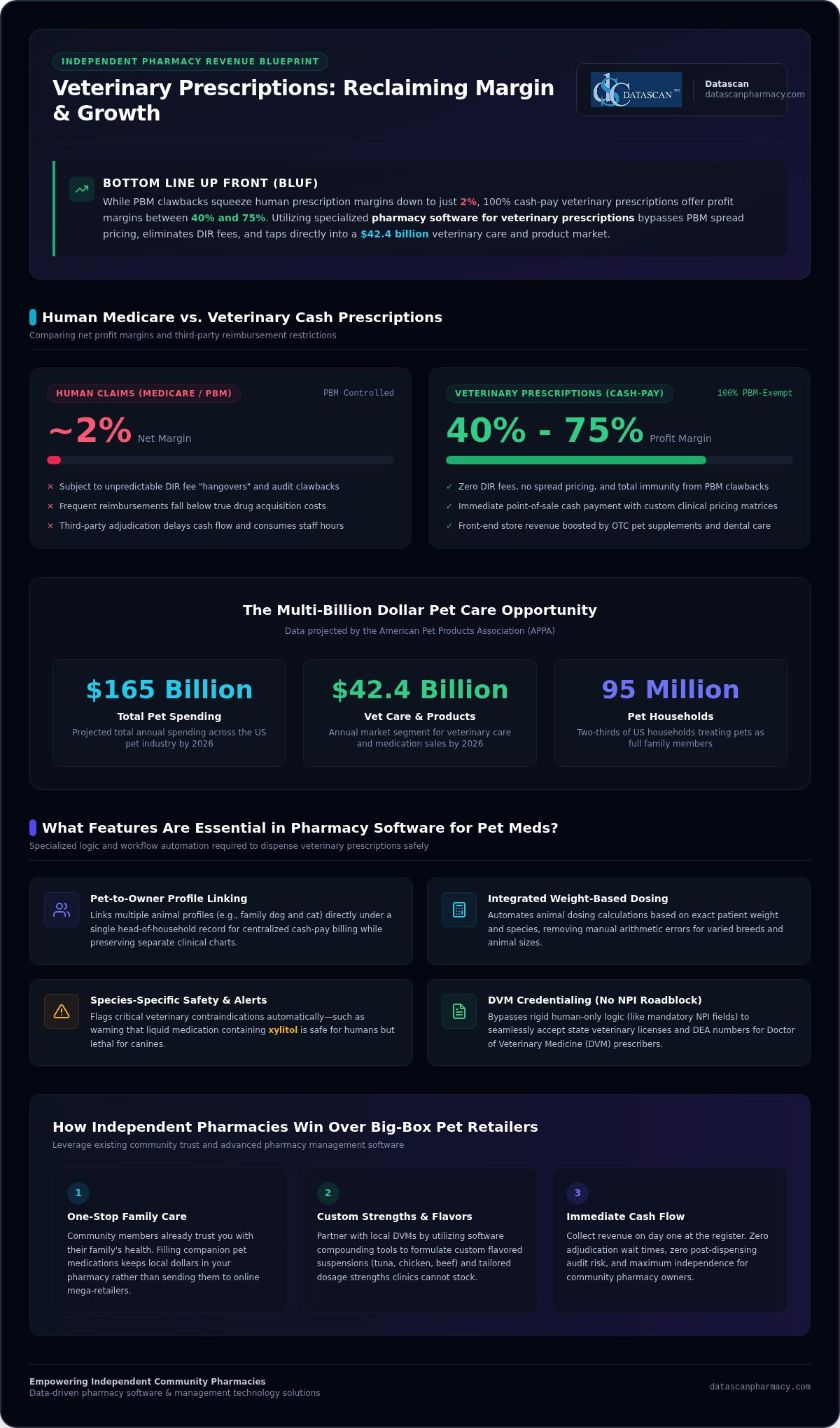
Did you know that while human prescription margins have been squeezed to a mere 2% by PBMs, cash-based veterinary prescriptions routinely command profit margins between 40% and 75%? Implementing specialized pharmacy software for veterinary prescriptions allows independent pharmacies to bypass PBM clawbacks and capture a share of the projected $42.4 billion pet care market by 2026. You’re likely tired of the “DIR hangover” and the constant struggle of being reimbursed below drug acquisition costs on human claims. It’s frustrating to manage a business when your primary revenue stream is controlled by third-party entities that don’t prioritize your survival as an independent owner.
In this guide, you’ll learn how the right pharmacy management software transforms these operational burdens into streamlined successes, allowing you to dispense pet medications with total confidence. We’ll explore how to handle species-specific labeling, manage prescriber credentials without NPI roadblocks, and leverage your pharmacy software to build lucrative relationships with local DVMs. By the end, you’ll have a clear roadmap to diversify your revenue and reclaim the profitability your hard work deserves.
Key Takeaways
Capture your share of the multi-billion dollar pet care market to bypass PBM margin compression and reclaim significant profitability.
Discover how specialized pharmacy software for veterinary prescriptions automates complex species-specific labeling and credential tracking to ensure total regulatory compliance.
Offset shrinking reimbursements and “DIR hangovers” on human medications by leveraging 100% cash-pay veterinary prescriptions that offer margins up to 75%.
Streamline your daily workflow by linking pet profiles directly to human owners, allowing for faster dispensing and improved safety for every patient.
Partner with a family-owned technology leader to implement customized veterinary and compounding modules that protect your independence and future-proof your business.
Why should your pharmacy fill veterinary prescriptions?
Veterinary prescriptions offer a direct path to reclaiming lost revenue by tapping into a $165 billion pet industry that remains 100% exempt from PBM-controlled margins and DIR fees. By utilizing specialized pharmacy software for veterinary prescriptions, independent owners can capture cash-based profits ranging from 40% to 75%, far exceeding the razor-thin 2% net margins typical of human Medicare claims. You don’t have to settle for below-cost reimbursements when two-thirds of American households are already spending billions on pet health.
Independent pharmacies are facing an existential threat from PBM spread pricing and arbitrary audit clawbacks. Diversifying your revenue isn’t just a growth strategy; it’s a survival mechanism. While big-box pet retailers rely on massive volume and distant shipping, your community pharmacy offers immediate, personalized care that pet owners crave. You’re already the trusted health advisor for the family. Extending that expertise to their companion animals creates a “one-stop-shop” convenience that drives loyalty and keeps local dollars in your store rather than sending them to an online mega-corporation.
How do pet meds improve pharmacy profitability?
Pet medications represent a pure cash-pay market, which means you get paid immediately at the point of sale without waiting for third-party adjudication or worrying about the “DIR hangover.” When you implement specialized pharmacy management software, you gain the ability to manage complex pricing matrices that reflect the true value of your clinical services. Beyond the script itself, pet owners are high-value customers who frequently purchase OTC supplements, specialty shampoos, and dental care items, boosting your front-end revenue. By eliminating the administrative burden of PBM audits for these items, you free up your staff to focus on patient counseling rather than fighting for pennies on a claim.
Is the veterinary market growing for independent pharmacies?
The American Pet Products Association (APPA) projects pet industry spending to reach $165 billion in 2026, with veterinary care and product sales accounting for $42.4 billion of that total. This growth is fueled by the “pet humanization” trend, where 95 million U.S. households now view their animals as full family members deserving of human-grade medical care. Modern veterinary pharmacy practice has shifted away from exclusive clinic dispensing as pet owners demand price transparency and portable prescriptions. Local Doctors of Veterinary Medicine (DVMs) are increasingly partnering with community pharmacies that demonstrate the technical capability to handle species-specific dosing. By using pharmacy software for veterinary prescriptions, you can offer the flavored suspensions and custom strengths that veterinarians need, securing a competitive advantage that big-box retailers simply can’t match.
What features are essential in pharmacy software for veterinary prescriptions?
Essential features for veterinary dispensing include species-specific data fields, integrated weight-based dosing calculators, and the capability to link pet patients directly to human “pet parent” profiles for billing and contact management. To capture the pet market effectively, your pharmacy software for veterinary prescriptions must bypass human-only logic, such as mandatory NPI fields, to ensure a seamless and compliant workflow for animal patients.
How do you track species and pet owners effectively?
Human-centric software profiles are fundamentally incompatible with veterinary needs because they lack dedicated fields for species, breed, and weight. Your pharmacy software for veterinary prescriptions should allow you to link multiple animal profiles, such as the family dog and cat, to a single head-of-household record. This architecture ensures you can manage cash-pay billing while maintaining distinct clinical histories for each pet. It also prevents dangerous errors by flagging species-specific contraindications; for instance, a liquid medication containing xylitol is safe for humans but lethal for canines. Additionally, a high-performing system will include:
Weight-based dosing calculators: Integrated tools that convert pounds to kilograms and alert you to dosing outliers based on the animal’s body mass.
Species-specific allergy tracking: Automated alerts for ingredients that are toxic to specific animals, even if they are common in human formulations.
Consolidated family records: A unified view of the household to streamline communication and medication pick-ups for both humans and pets.
What are the requirements for veterinary labeling and regulatory compliance?
State boards of pharmacy have strict mandates for animal medication labels that often exceed standard human requirements. Labels must explicitly state the owner’s full name, the animal’s name, and the species (e.g., “Max Smith – Canine”). Adhering to AVMA veterinary prescription guidance is critical for maintaining compliance and building trust with local DVMs. Because veterinarians are ineligible for NPI numbers, your system must cleanly accept State Veterinary License Numbers or DEA registrations without triggering workflow-stopping errors or requiring manual overrides.
Managing these credentials shouldn’t be a source of anxiety for your staff. Leveraging a robust platform like Datascan Pharmacy Management Software ensures these regulatory hurdles are cleared automatically through specialized modules. This technical agility allows you to operate as a high-functioning veterinary pharmacy, reinforcing your status as a community health leader while protecting your license. If you’re ready to optimize your workflow for the growing pet market, reach out to our team for a personalized demonstration of our veterinary features.
How do veterinary vs. human prescriptions differ in pharmacy software?
Veterinary dispensing differs from human dispensing by requiring non-NPI prescriber validation and species-specific dosing logic, whereas human prescriptions are built around insurance-standardized NDC codes and NPI numbers. Specialized pharmacy software for veterinary prescriptions allows your team to toggle between these two distinct workflows without causing bottlenecks in your daily high-volume retail operations. While human scripts are often rigid and insurance-driven, pet medications require a more clinical, patient-centric approach that accounts for unique biology and non-standard administration methods.
Managing these differences effectively requires Pharmacy Software that understands the nuances of animal health. You shouldn’t have to compromise your efficiency to serve four-legged patients. By automating the transition between human and veterinary logic, your staff can maintain a high pace while ensuring every animal patient receives the exact care prescribed by their DVM.
Why is compounding critical for veterinary prescriptions?
Animals often require strengths and flavors that commercial manufacturers simply don’t produce, such as 2mg capsules for a small dog or tuna-flavored liquids for cats. You need robust Pharmacy management software that includes integrated Compounding Solutions to track bulk ingredients and calculate precise ratios automatically. This functionality ensures compliance with the FDA guidance on animal drug compounding, protecting your pharmacy from the clinical risks associated with manual math errors in small-animal dosing. Providing these customized options is a major competitive advantage that keeps pet owners coming back to your independent store.
How do you manage veterinarians who don’t have NPI numbers?
Since veterinarians are ineligible for NPIs, your Pharmacy Software must accept State Veterinary License Numbers or DEA registrations to move a script through the queue without trigger-jamming clinical alerts. Human-only systems will often block these entries, forcing your staff into time-consuming manual overrides. A sophisticated prescriber database within your Pharmacy management software stores these unique credentials, allowing you to build a reliable local network of DVMs and speed up the verification process. This automation streamlines communications between your pharmacy and the vet clinic, freeing up your time to focus on business growth rather than administrative troubleshooting.
How can technology help pharmacies overcome low PBM reimbursements through pet meds?
Technology helps pharmacies overcome low PBM reimbursements by providing the infrastructure to transition from low-margin human claims to high-profit, cash-based veterinary scripts. By utilizing specialized pharmacy software for veterinary prescriptions, independent owners can leverage business intelligence to identify the most profitable pet med categories and automate the marketing of these services to existing patients. This shift reduces the administrative burden on your staff, as cash transactions eliminate the time-consuming adjudication and audit cycles associated with PBM-controlled medications.
How do cash-pay pet meds bypass the PBM middleman?
Veterinary medications bypass the PBM middleman by operating entirely outside the third-party insurance system, allowing your pharmacy to retain 100% of the gross margin at the point of sale. When you process these transactions through your Pharmacy Software, you’re protected from post-sale clawbacks, spread pricing, and the “DIR hangover” that erodes human prescription profits. This provides your business with immediate liquidity and financial transparency. Understanding how to calculate pharmacy gross profit in a cash-pay environment is critical for recognizing how pet meds can stabilize your pharmacy’s financial health. By using your Pharmacy management software to track these non-insurance scripts, you can effectively offset losses from low-reimbursement human claims without the risk of audit-related recoupments. Pairing this strategy with a thorough pharmacy self-inspection checklist ensures your operations remain fully compliant and protected against the board inspections and PBM audits that can quickly erase those hard-earned cash-pay gains.
How does technology automate pet med patient engagement?
Modern technology automates pet med engagement by integrating digital communication tools directly into your workflow to foster long-term loyalty among pet owners. Integrating the MobileScripts App into your Pharmacy management software allows pet parents to request refills for their companion animals with the same ease as their own prescriptions. Automated text notifications and specialized pet care messaging remind owners that your community pharmacy is their primary source for family health, including their four-legged family members. This level of digital engagement ensures that once a pet owner discovers your expertise, they remain a repeat customer, creating a predictable revenue stream that’s completely insulated from PBM interference. Using robust Pharmacy Software ensures your team has the time to manage these high-value relationships while maintaining peak operational efficiency. To see how these tools can transform your daily operations and boost your cash revenue, schedule a demo with our team today.
Why is Datascan the best pharmacy management software for veterinary growth?
Datascan is the premier choice for pharmacy software for veterinary prescriptions because it provides a locally hosted, fully integrated ecosystem that eliminates the need for disjointed third-party add-ons. Our Pharmacy management software empowers independent owners with specialized modules developed by a family-owned company that has championed the community pharmacist since 1981. This technical foundation allows you to manage high-margin animal medications and complex compounds within a single, high-speed platform that protects your operational independence.
Success in the modern market requires a visionary ally that understands the specific pressures of the independent niche. While corporate competitors often push one-size-fits-all solutions, our Pharmacy Software is built to adapt to your specific volume and clinical needs. By consolidating your dispensing, point-of-sale, and patient engagement tools, we remove the friction from your daily workflow and allow you to focus on the growth of your business.
Why is US-based support and local hosting critical for your pharmacy?
Local hosting ensures your Pharmacy Software operates at peak speed regardless of external internet stability, preventing the frustrating lag that often occurs during peak dispensing hours. You need a system that is as fast as your staff, especially when managing the detailed data required for veterinary labeling and owner-pet linkages. Our US-based technical support team offers direct access to seasoned experts who understand the regulatory landscape of the American pharmacy industry. We provide personalized training for our veterinary and compounding modules, ensuring your team is fully empowered to use every feature to its maximum potential without the delays associated with offshore support centers. Protecting that locally hosted data with multi-factor authentication for pharmacy software is an equally critical layer of defense that safeguards your patient records and DEA-regulated workflows from ransomware and credential attacks.
How does a total software solution future-proof your veterinary business?
A total solution future-proofs your business by integrating Datascan Point of Sale, compounding tools, and mobile engagement apps into a single, cohesive ecosystem. This level of integration allows you to track high-margin veterinary inventory and manage cash-based sales with total transparency. Since 1981, Datascan has used over 40 years of industry experience to build tools that help independent pharmacies fight back against PBM margin compression and reclaim their clinical authority. By consolidating your customizable workflow, you reclaim the time needed to focus on patient care and revenue diversification. To see how our Pharmacy management software can transform your daily operations, schedule a demo to see our specialized veterinary features in action.
Empower Your Pharmacy to Reclaim Profitability in 2026
The path to a more resilient business lies in moving away from PBM-controlled human claims and toward the high-margin, cash-based veterinary market. By implementing the right pharmacy software for veterinary prescriptions, you can capture profit margins between 40% and 75% while automating the complex species-specific labeling that keeps you compliant. It’s time to reclaim your margins with technology that prioritizes your independence and bypasses the “DIR hangover” for good.
Datascan has been a dedicated partner to independent pharmacies since 1981. As a family-owned and operated company, we understand the specific pressures you face daily. Our locally hosted system provides industry-leading US-based technical support and customizable modules for compounding and veterinary care that adapt to your specific workflow. You don’t have to navigate these industry shifts alone; you can transform operational burdens into streamlined successes with a partner that shares your values and understands your bottom line.
Ready to see our platform in action? Request a Demo of Datascan’s Veterinary Pharmacy Module today to see how we help you grow your cash revenue. Your pharmacy’s future is within your control, and we’re ready to help you build it.
Frequently Asked Questions
Can my current pharmacy software handle veterinary prescriptions?
Most standard human-centric systems fail to handle animal patients because they lack dedicated fields for species and breed. You need specialized pharmacy software for veterinary prescriptions that allows you to bypass NPI requirements and manage pet parent relationships. Without these features, your staff will waste time with manual workarounds that increase the risk of labeling errors. Datascan provides a customizable workflow designed to integrate these animal-specific needs into your existing retail operations.
What legal information must be on a veterinary prescription label?
Veterinary labels must include the owner’s full name, the animal’s name, the species, and the prescribing veterinarian’s clinic address. These requirements vary by state board, but species identification is a universal mandate for animal safety. Using specialized pharmacy management software automates these additions to your standard labels, ensuring you remain compliant without manual typing. This prevents confusion for the pet owner and protects your pharmacy license during rigorous state inspections.
Do veterinarians have NPI numbers for electronic prescribing?
Veterinarians are legally ineligible for NPI numbers because they don’t treat human patients under Medicare or Medicaid. Your pharmacy system must be configured to accept State Veterinary License Numbers or DEA registrations for controlled substances. Standard software that mandates an NPI will trigger constant errors during the dispensing process. Datascan’s platform recognizes these unique prescriber credentials, allowing your team to process animal scripts as efficiently as human medications without workflow interruptions.
How do I link a pet patient to a human owner in the software?
You link a pet to a human owner by creating a dual-entity relationship within the patient profile. The software establishes the human as the “pet parent” responsible for payment and contact, while the pet remains the clinical patient with its own species and weight data. This architecture allows for consolidated family records, making it easier for owners to pick up medications for the whole household at once, which improves customer loyalty.
Is compounding software necessary for veterinary prescriptions?
Compounding software is essential because most veterinary prescriptions require customized dosage forms, such as flavored suspensions or transdermal gels. Pets rarely accept standard human tablets, and their weights require precise concentrations that commercial manufacturers don’t offer. Integrated modules automate the complex math for these formulas, ensuring every dose is accurate. This capability allows your independent pharmacy to offer high-margin services that big-box retailers and standard clinics simply cannot match through traditional dispensing.
How does veterinary software help with PBM reimbursements?
Veterinary software helps you overcome low PBM reimbursements by facilitating a 100% cash-pay revenue stream. By utilizing specialized pharmacy software for veterinary prescriptions, you avoid DIR fees, spread pricing, and arbitrary audit clawbacks entirely. This diversification provides immediate liquidity and allows you to retain the full gross margin on every transaction. By shifting a portion of your volume to pet meds, you can effectively offset the financial losses from human insurance claims.
Why is US-based support important for pharmacy systems?
US-based support ensures your technical team understands the specific regulatory landscape and state board requirements of the American pharmacy industry. Datascan has been family-owned and operated since 1981, providing expert assistance from technicians who are familiar with your daily operational pressures. You won’t have to deal with the communication barriers or time-zone delays common with outsourced support. This local expertise is critical when you’re implementing specialized modules for veterinary or compounding care.
Can I use a mobile app for veterinary prescription refills?
You can absolutely use a mobile app to manage animal medications. Datascan’s MobileScripts app allows pet parents to request refills for their dogs, cats, or other animals directly from their smartphones. This digital engagement mirrors the convenience owners expect for their own health needs, driving repeat business and improving medication adherence. By offering this technology, you position your community pharmacy as a modern, one-stop health hub for the entire family’s needs.
Could your pharmacy be hiding $100,000 in dead stock on its shelves right now? A perpetual inventory system for pharmacy solves this by providing real-time stock accuracy and automated reordering, which allows owners to reclaim up to 10 hours of weekly labor while boosting gross profit margins. By integrating these features into your pharmacy management software, you can align your inventory turns with the 11 to 12 annual benchmark. This ensures your capital isn’t trapped in slow-moving medications while wholesaler drafts clear faster than PBM reimbursements arrive.
We understand the burnout that comes from manual end-of-year inventory counts and the stress of seeing your hard-earned margins swallowed by predatory PBM fee models. You deserve a partner that champions your independence through smarter technology. This guide promises to show you how to transform your operations from reactive guesswork into a streamlined, profitable system. We’ll explore the essential steps to automate your workflow, reduce waste, and use your pharmacy software to fight back against the financial pressures of 2026.
Key Takeaways
Discover how a perpetual inventory system for pharmacy eliminates the need for grueling manual counts by providing real-time accuracy across your entire stock.
Learn to automate your ordering process through direct wholesaler integrations to reclaim up to 10 hours of administrative time every week.
Master the strategy of inventory turns to ensure your cash flow isn’t trapped in slow-moving medications while waiting for PBM reimbursements.
Identify how integrated pharmacy management software stops revenue leaks by reconciling every pill from the loading dock to the point of sale.
What is a perpetual inventory system for pharmacy?
A perpetual inventory system for pharmacy is a software-driven method that updates stock levels in real-time as prescriptions are dispensed and shipments are received. This continuous tracking ensures your on-hand balances are always current, allowing you to manage your largest expense with surgical precision without the need for periodic manual counts. By maintaining a live digital ledger, you gain immediate visibility into exactly what is sitting on your shelves at any given moment.
For the independent pharmacy owner, drug stock isn’t just medicine; it’s liquid capital. In an era where the average cost to dispense has risen to $15.00 and PBM reimbursements continue to lag, letting cash sit idle in overstocked medications is a direct threat to your solvency. A perpetual inventory system acts as the financial heartbeat of your business. It tracks every tablet and vial from the moment it leaves the wholesaler’s tote until it’s handed to the patient. This “always-on” nature means your pharmacy management software is constantly reconciling your physical shelf with your digital records, providing a level of financial clarity that manual systems simply cannot match.
How does it differ from traditional manual counting?
Traditional counting is a reactive nightmare that often results in “shelf-ghosting,” a situation where your system claims you have a drug in stock, but the shelf is actually bare. Manual counts are historically prone to human error and require massive labor investments that pull your staff away from patient care. By contrast, an automated system offers a “set it and forget it” workflow. You move away from the grueling 48-hour end-of-year counts and toward proactive stock management. This shift prevents the panic of realizing you’re out of a critical medication only when a patient is waiting, helping you maintain the high level of service that defines independent community pharmacies.
Why is real-time data critical for independent pharmacies?
Independent pharmacies must be leaner and faster than their corporate counterparts to survive PBM margin compression. Real-time data gives you immediate visibility into high-dollar specialty medications, ensuring you aren’t over-ordering products that tie up thousands of dollars in cash flow. This is especially vital as you aim for the industry benchmark of 11 to 12 inventory turns per year.
Prevent Stockouts: Avoid losing patients to big-box chains because of inaccurate inventory levels.
Financial Accuracy: Know the exact valuation of your inventory for tax and insurance purposes at any second.
Waste Reduction: Identify slow-moving stock before it expires to facilitate wholesaler returns and protect your bottom line.
How does a perpetual inventory system work in a pharmacy management system?
A perpetual inventory system for pharmacy functions as a real-time digital ledger that synchronizes your physical stock with your software records through automated data feeds. It eliminates manual entry by using Electronic Data Interchange (EDI) to import wholesaler invoices and barcode scanning to track every dispense. This creates a closed-loop system where your on-hand balances are adjusted the second a drug enters or leaves your building.
When your daily order arrives, you simply scan the wholesaler invoice or import the EDI file. The pharmacy software automatically updates your quantities and acquisition costs. This ensures your gross profit calculations are based on what you actually paid, helping you identify underwater PBM reimbursements immediately. Stock is then deducted the moment a label is printed or when the transaction is finalized at the Datascan Point of Sale. If a patient doesn’t pick up a medication, the Return to Stock (RTS) function reverses that deduction, keeping your counts precise without manual logs. This level of detail is essential for meeting federal inventory requirements for controlled substances, where accuracy is a legal mandate.
What are the steps to implement a perpetual workflow?
Transitioning to an automated workflow requires a methodical approach to ensure your data remains “clean” from day one. You can’t manage what you don’t measure accurately. Follow these steps to get started:
Baseline Count: Conduct a comprehensive clean-up phase to establish exact on-hand counts for every NDC in your pharmacy.
Define PAR Levels: Set minimum and maximum “periodic automatic replenishment” (PAR) levels to trigger automated reordering when stock hits a specific threshold.
System Integration: Ensure your pharmacy management software is fully synced with your POS to capture every depletion event.
How does barcode verification ensure inventory accuracy?
Barcode verification is the ultimate safeguard against “phantom inventory,” which is stock that exists in your system but isn’t actually on your shelf. By requiring a scan at the filling station, the software confirms the NDC and quantity match the prescription exactly. This prevents quantity errors that skew your financial reports and, more importantly, ensures patient safety. It creates an audit-ready environment where every pill is accounted for, protecting your pharmacy from PBM clawbacks and regulatory fines. If you’re ready to stop the manual guesswork, you can reach out to our team to see how these integrated tools work in a live environment.
Why is perpetual inventory better than periodic manual counts?
Perpetual inventory is superior to periodic counting because it provides a real-time valuation of your pharmacy’s largest asset while eliminating the grueling, 48-hour manual audits that lead to staff burnout. Unlike periodic counts that offer a “snapshot” of a single moment, a perpetual inventory system for pharmacy reflects the actual state of your shelves every second. This continuous accuracy is vital for tax reporting and insurance purposes, ensuring you aren’t overpaying premiums on inventory you don’t actually have. It also allows you to identify wholesaler short-ships or preventing internal theft in a pharmacy by flagging variances the moment they occur.
Relying on manual counts means you’re always working with outdated data. If a high-cost medication is stolen or lost on Monday, you might not realize it until the next scheduled count weeks or months later. With a live system, every pill is accounted for from the moment it’s received until it’s scanned at the point of sale. This creates a culture of accountability and precision that manual systems can’t replicate, protecting your bottom line from the “shrinkage” that often goes unnoticed in independent stores.
How much time can pharmacists save with automation?
Pharmacists often lose 5 to 10 hours every week to manual administrative burdens like shelf-scanning and order generation. By switching to automated par level triggers, you eliminate the need to “guess” what needs to be ordered. Your pharmacy software handles the replenishment logic for you, freeing up your time for higher-margin clinical services and Medication Therapy Management (MTM). Simplifying the “putting away the order” process also reduces staff stress, as the system already knows what’s in the tote, making reconciliation a matter of seconds rather than hours.
How does it reduce “dead stock” on your shelves?
Dead stock is essentially cash that’s been frozen on your shelves, and in 2026, no independent pharmacy can afford that. Research shows that roughly 10% of a retail pharmacy’s inventory value approaches expiration annually. Without proactive tracking, much of this becomes non-returnable, resulting in total financial write-offs. A perpetual system identifies medications that haven’t moved in 60 to 90 days, allowing you to return them for wholesaler credit before they expire. Moving toward an optimal turnover rate of 11 to 12 turns per year ensures your capital is working for you, not gathering dust in a bottle of slow-moving tablets.
How can automated inventory tracking increase pharmacy cash flow?
Automated inventory tracking increases cash flow by ensuring your most expensive assets, your medications, are turning over fast enough to cover wholesaler payments before PBM reimbursements arrive. By using a perpetual inventory system for pharmacy, you stop over-purchasing high-cost brands that sit idle, effectively “taking cash off the shelf” and putting it back into your operating account. This strategy is vital for maintaining an optimal turnover rate of 11 to 12 turns per year, which prevents your capital from being trapped in slow-moving stock.
Independent pharmacies currently face an economic paradox where sales grow while net profitability plummets due to underwater reimbursements and non-transparent fee models. A real-time system allows you to see your true acquisition cost via EDI feeds, which is a critical component for calculating pharmacy gross profit with precision. When you have immediate visibility into your margins, you can optimize your generic-to-brand mix to favor higher-margin items, protecting your business from the volatility of PBM clawbacks and DIR fee impacts.
Can inventory systems help overcome PBM reimbursement challenges?
Wholesaler payment cycles typically range from 7 to 14 days, while PBM claim remittances often take 14 to 30 days or longer. This timing gap creates a liquidity crunch that can sink an independent store. Automated tracking identifies underpaid claims by comparing the actual EDI invoice cost against the PBM remittance in real-time. This transparency lets you identify loss-leader drugs that are draining your resources. Better cash management also gives you the leverage to “buy right” from secondary wholesalers when prices are lower, further padding your bottom line. To see how real-time tracking can stabilize your bank balance, contact our team for a software walkthrough.
How does it help with front-end sales and retail profit?
Profitability isn’t limited to the back-end dispensing area. Your front-end retail space is a vital source of non-PBM revenue that isn’t subject to the same reimbursement delays. By using integrated pharmacy management software, you can track OTC trends and implement front-end sales strategies for pharmacies that drive higher basket totals. The system helps you identify which supplements or health products are moving, allowing for targeted patient engagement and cross-selling. This ensures your front end is just as optimized and profitable as your prescription department.
How does Datascan’s pharmacy software simplify inventory management?
Datascan simplifies inventory management by consolidating your dispensing, POS, and stock tracking into a single, cohesive ecosystem. This ensures that every pill counted at the filling station is instantly reflected at the register and in your reorder queue. As a family-owned company since 1981, we build our perpetual inventory system for pharmacy specifically to empower the independent owner who is fighting against corporate chains and PBM margin compression. We don’t just provide tools; we provide a financial defensive strategy that keeps your capital off the shelf and in your bank account.
Our pharmacy management software removes the technical friction often found in larger, generic vendor systems. We provide a customizable reporting suite that focuses on the metrics that actually matter for your bottom line: gross profit, inventory turns, and dead stock identification. By connecting your Datascan Point of Sale directly to your inventory ledger, we close the loop that often leads to revenue leaks. This integrated approach allows you to manage your business with precision, ensuring that your inventory investment is always optimized for maximum profitability.
What makes our US-based support different?
Independent pharmacy owners don’t have time to wait in a phone queue for a technician who doesn’t understand the nuances of their business. Our US-based support team provides direct access to experts who specialize in the specific pressures of community pharmacy. We handle the heavy lifting of wholesaler EDI setups and invoice mapping, ensuring your acquisition costs are accurate from the very first shipment. We also focus on training your staff to use our Workflow Software effectively, so your team can maintain stock accuracy without adding hours of manual labor to their daily shift.
Ready to take control of your pharmacy inventory?
We position ourselves as your Visionary Ally, offering the cutting-edge capabilities of a major corporation with the personal accountability of a family-run business. Transitioning from an error-prone manual count to a perpetual inventory system for pharmacy is the most impactful step you can take to reclaim your time in 2026. We help you navigate the implementation phase with minimal downtime, turning your complex operational burdens into streamlined successes. Request your personalized demo today to see how our technology can stop your revenue leaks and transform your pharmacy’s cash flow.
Secure Your Pharmacy’s Financial Future with Smarter Inventory
Implementing a perpetual inventory system for pharmacy is no longer just an operational upgrade; it’s a financial necessity in the face of 2026’s PBM pressures. By automating your stock levels and integrating your workflow with dedicated pharmacy management software, you reclaim thousands in “dead stock” capital and eliminate the burnout of manual counting. You’ve seen how real-time data allows you to turn inventory 11 to 12 times per year, ensuring your cash flow remains liquid even when reimbursements lag.
Datascan has been the champion of independent pharmacies since 1981, offering a 100% US-based support team and a fully integrated POS and inventory management ecosystem. We understand that your time is best spent with patients, not spreadsheets. It’s time to transform your pharmacy from a struggle for solvency into a streamlined, profitable success. Request a Datascan Demo to See Our Perpetual Inventory in Action and take the first step toward a more secure bottom line. Your independence is your greatest strength; let’s protect it together.
Frequently Asked Questions
How do I start a perpetual inventory system in my pharmacy?
Begin by conducting a thorough physical count to establish an accurate baseline, then configure your pharmacy software with EDI feeds from your wholesalers. This integration ensures every drug received is automatically added to your on-hand counts. Next, set your par levels for each NDC to allow the system to trigger automated reorders. This moves your team away from manual shelf-scanning and toward a proactive, software-driven workflow that saves hours every week.
Is a perpetual inventory system hard to maintain for a small staff?
No, it actually reduces the workload for small teams by automating the most time-consuming tasks like manual ordering and end-of-year audits. Once your par levels are established, the pharmacy management software handles the daily replenishment logic for you. Your staff simply needs to scan wholesaler invoices upon arrival and verify NDCs at the point of sale. This integrated approach frees up significant time, allowing a lean staff to focus on higher-margin clinical services.
Does perpetual inventory help with PBM audits and DIR fees?
Yes, it provides the precise, real-time documentation required to defend against PBM clawbacks and audit variances. By tracking every pill from receipt to dispense, you can prove exactly what was on your shelf at any given time. This transparency helps you identify underwater claims immediately by comparing acquisition costs from EDI feeds against reimbursements. While it doesn’t stop DIR fees directly, it gives you the data needed to optimize your drug mix and protect your margins.
What is the difference between perpetual and periodic inventory?
Perpetual inventory updates in real-time with every transaction, while periodic inventory relies on manual counts performed at set intervals. Periodic systems are often inaccurate because they only provide a snapshot that quickly becomes outdated as stock moves. A perpetual inventory system for pharmacy ensures your software records always match your physical shelf. This continuous accuracy allows you to manage your cash flow more effectively and identify shrinkage or wholesaler short-ships the moment they occur.
Can I track both Rx and OTC items in the same system?
Yes, Datascan’s integrated pharmacy management software and POS allow you to track both prescription medications and front-end OTC items in one loop. This unified approach provides a total view of your pharmacy’s profitability. You can set par levels for supplements and health products just as you do for Rx stock. Using POS data to track retail trends helps you identify high-margin front-end items, ensuring your retail space contributes significantly to your overall cash flow.
Do I need special hardware to run a perpetual inventory system?
You don’t need complex proprietary hardware; standard barcode scanners and a reliable local server are the primary requirements. Because Datascan is not cloud-based, your inventory data remains secure on your on-premise system, ensuring you can still process transactions and track stock even if your internet connection fluctuates. Most modern pharmacies already have the necessary scanners at the filling stations and the point of sale to facilitate the barcode verification needed for a perpetual workflow.
How does perpetual inventory improve my pharmacy gross profit?
It improves gross profit by maximizing your inventory turns and ensuring you aren’t overpaying for stock that sits idle on the shelf. When you turn your inventory 11 to 12 times per year, you’re effectively using your wholesaler’s money to fund your operations. The pharmacy management software also uses real-time EDI acquisition costs to help you identify and avoid loss-leader prescriptions. This data-driven approach is essential for overcoming the margin compression caused by predatory PBM reimbursement models.
Will this software help me identify expiring medications?
Yes, the pharmacy software identifies slow-moving medications that haven’t turned in 60 to 90 days, which are the items most likely to expire on your shelf. By flagging these NDCs early, the system allows you to return them for wholesaler credit while they are still within the return window. This proactive management prevents the 10% annual inventory shrinkage typically seen in stores that don’t use automated tracking, directly protecting your bottom line from unnecessary financial write-offs.