What if the biggest barrier to your front-end profitability isn’t your competition, but the “decline” message appearing on your credit card terminal? To maintain compliance and capture every possible sale, effective FSA and HSA card processing for pharmacy must be handled through an Inventory Information Approval System (IIAS) that’s built directly into your pharmacy management software. This integration ensures that eligible items are identified at the point of sale automatically, preventing the friction of manual tagging and the embarrassment of rejected transactions.
We know that independent pharmacy owners are already fighting uphill against PBM reimbursement pressures and administrative burnout. It’s frustrating to watch potential revenue walk out the door because your system isn’t communicating with SIGIS standards correctly. This guide will teach you how to implement a seamless, IIAS-compliant workflow that improves patient convenience while protecting your bottom line. We’ll break down the 2026 compliance landscape, show you how to automate your inventory identification, and demonstrate how modern technology can finally free up your time to focus on patient care instead of register errors.
Key Takeaways
- Automate the identification of eligible medical expenses to eliminate time-consuming manual tagging and reduce frustrating checkout delays.
- Ensure your pharmacy software and POS are IIAS-certified to prevent card declines and maintain strict regulatory compliance for 2026.
- Streamline FSA and HSA card processing for pharmacy by integrating your inventory with a compliant SIGIS database to protect patients from IRS audits.
- Follow a clear roadmap for auditing your current hardware and inventory systems to support seamless, pre-tax benefit card transactions.
- Leverage specialized technology designed for independent pharmacies to reclaim lost time and drive higher profitability through increased front-end OTC sales.
What is FSA and HSA card processing for pharmacy?
FSA and HSA card processing for pharmacy allows independent pharmacies to accept pre-tax benefit cards for eligible medical expenses through an IIAS-certified point of sale system. This specialized technology ensures your pharmacy software automatically validates IRS-qualified items at checkout, which prevents transaction declines and eliminates the need for your staff to manually tag inventory. By implementing this system, you create a frictionless experience that protects your patients from tax penalties while driving higher front-end sales.
When you prioritize robust FSA and HSA card processing for pharmacy, you’re doing more than just adding a payment method; you’re investing in a tool that captures revenue and builds long-term patient trust. Success in the retail space depends heavily on your Merchant Category Code (MCC), which for pharmacies is 5912. This code signals to card issuers that your business is a legitimate healthcare provider. When your Datascan Point of Sale (POS) is correctly configured with this code and integrated with your pharmacy management software, you open the door to a seamless path to purchase that community members value.
What are FSA and HSA cards?
FSA (Flexible Spending Account) and HSA (Health Savings Account) cards are financial tools linked to employer-sponsored or individual tax-advantaged accounts. While FSAs generally operate on a “use it or lose it” basis within a plan year, HSAs allow funds to roll over and accumulate indefinitely. Both accounts are strictly reserved for IRS-qualified medical expenses, which means they can’t be used for non-medical retail items like snacks or greeting cards. Because these cards are restricted to specific healthcare-related merchants, the card issuer verifies your MCC to ensure the transaction is happening at a legitimate pharmacy.
Why do pharmacies need special processing for these cards?
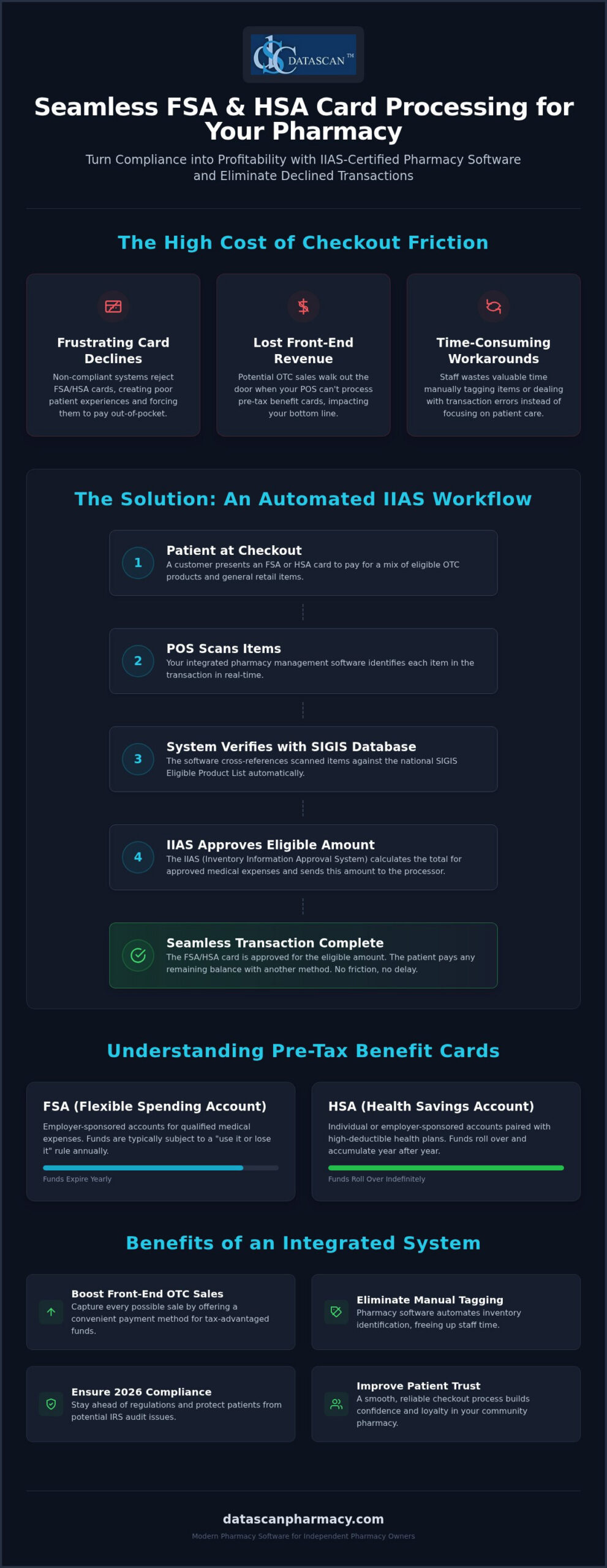
Standard credit card processing falls short for benefit cards because the IRS mandates the use of an Inventory Information Approval System (IIAS). This requirement means your pharmacy software must verify the eligibility of every individual item in a transaction at the moment of sale. If your POS system cannot confirm that the patient is purchasing qualified products, the plan administrator will automatically decline the card to prevent tax non-compliance. Advanced pharmacy management software automates this complex verification by checking items against a national database, allowing your staff to process transactions quickly without manual intervention.
How does IIAS certification work in pharmacy management systems?
IIAS certification ensures that your pharmacy POS system automatically distinguishes between qualified medical expenses and standard retail items at the moment of checkout. This certification is essential for FSA and HSA card processing for pharmacy because it provides the technical validation that card administrators require to approve a transaction instantly. Without this certified system, benefit cards will simply decline at the register, forcing patients to pay out of pocket and file for reimbursement later.
The Datascan Point of Sale (POS) transforms this complex requirement into a background task by utilizing an integrated database that syncs directly with your core pharmacy software. Independent pharmacy owners often struggle with shrinking margins due to unfair PBM reimbursements; you can’t afford to lose additional front-end revenue because of technical checkout friction. By automating the identification of qualified items, you ensure that every OTC sale is captured efficiently. This high-level integration eliminates the need for your staff to manually override transactions, which not only saves time but also reduces the risk of human error during an audit.
What is the role of SIGIS in pharmacy processing?
SIGIS (Special Interest Group for IIAS Standards) functions as the central authority for benefit card compliance. They maintain an extensive “Eligible Product List” that serves as the industry standard for what counts as a medical expense. A robust pharmacy management software system will pull these updates automatically on a regular schedule. This means your inventory remains accurate even as regulations change or new products hit the market. It’s a “set it and forget it” solution that empowers you to compete with big-box chains while maintaining the personal touch of a community pharmacy.
How does the POS identify eligible items?
When a staff member scans a barcode, the system instantly cross-references the UPC against the SIGIS database. If the item is qualified, the POS flags it for benefit card payment. Modern systems utilize “dual-purse” technology to split a single transaction into two distinct totals: the amount covered by the FSA or HSA card and the remaining balance for non-eligible items. The patient can pay for their prescriptions and health supplies with their benefit card and then use a separate card or cash for everything else in one go. If you want to see how this workflow can benefit your store, connect with us today to learn more.
What are the requirements for accepting FSA and HSA cards?
To maintain compliance, an independent pharmacy must utilize an IIAS-certified POS, register with SIGIS, and maintain a Merchant Category Code (MCC) of 5912. These requirements ensure that FSA and HSA card processing for pharmacy remains secure and that every transaction stands up to IRS scrutiny. By meeting these standards, you protect your patients from potential tax penalties and ensure that their benefit cards work exactly as intended at the register.
Compliance isn’t a one-time setup; it’s an ongoing commitment to data accuracy and record-keeping. You must ensure your pharmacy software is properly configured to generate and store digital receipts for a minimum of 90 days, though many experts recommend retaining these records for several years to satisfy potential tax inquiries. Because the lists of eligible items are constantly shifting, your system must perform regular updates to stay current with SIGIS standards. This automation protects your patients from the headache of an IRS audit while keeping your checkout line moving quickly, allowing you to focus on clinical care rather than administrative hurdles.
How do I become SIGIS certified?
Becoming certified involves a few strategic steps that your pharmacy software vendor can help you navigate. First, you’ll need to join SIGIS as a merchant member to gain access to the national eligible product list. After joining, you complete a self-certification process that confirms your POS system meets the technical IIAS standards. Most payment processors won’t enable benefit card acceptance without this membership, so it’s a foundational piece of your technology stack that bridges the gap between your inventory and the card issuer’s requirements.
What items are generally eligible for FSA/HSA funds?
The scope of eligible items is broader than many realize, especially after the 2020 CARES Act expanded the list. Standard eligible categories include prescription drug copays, insulin supplies, and medical equipment like crutches or blood pressure monitors. The expansion also added menstrual care products and OTC medications, such as pain relievers and allergy pills, without the need for a prescription. While most health-related items are covered, “dual-purpose” products like certain vitamins or specialized supplements may still require a Letter of Medical Necessity (LMN). Your pharmacy management software should flag these nuances automatically, ensuring your staff doesn’t have to make judgment calls during a busy shift.
How do I set up FSA and HSA card processing at my pharmacy?
To set up FSA and HSA card processing for pharmacy, you must implement an IIAS-certified point of sale system that integrates directly with your pharmacy management software and a compliant SIGIS inventory database. This technical alignment ensures that every transaction is validated in real time, preventing the “card declined” messages that frustrate patients and slow down your checkout line. By following a methodical setup process, you can transform a complex compliance requirement into a streamlined workflow that protects your revenue and saves your staff valuable time.
Implementing this system involves five critical steps designed to ensure your pharmacy is ready for 2026 standards:
- Step 1: Audit your current POS hardware to confirm it supports the data transmission protocols required for IIAS compliance.
- Step 2: Ensure your pharmacy management software is linked to a compliant inventory database that receives regular updates.
- Step 3: Register as a SIGIS member, which is a mandatory requirement for most independent pharmacies to access the national “Eligible Product List.”
- Step 4: Train your staff on how to manage “mixed” baskets where some items are eligible and others require standard payment.
- Step 5: Run test transactions with a specialized test card to verify that the system splits totals and processes approvals correctly before going live.
Why should I integrate my POS with my pharmacy management software?
A siloed POS system that doesn’t communicate with your core Rx software creates unnecessary manual work and increases the risk of accounting errors. When you use integrated workflow software, prescription copays are automatically flagged as eligible medical expenses, pulling data directly from the patient’s profile. This high-level integration provides centralized reporting that’s indispensable during tax season or a plan audit. It allows you to prove compliance with a few clicks, freeing you up to focus on clinical services rather than digging through disparate paper records. A fully integrated POS also plays a critical role in preventing internal theft in a pharmacy by creating an automated, auditable trail of every transaction that makes it far harder for discrepancies to go undetected.
How can I train my staff to handle benefit card transactions?
Staff training is the key to maintaining a professional environment when technical hurdles arise. Your team should be prepared to explain benefit card declines professionally, often pointing to plan-specific restrictions rather than system errors. You can also use this technology to drive front-end sales by training staff to remind patients they can use their remaining FSA funds on OTC essentials. If a patient’s plan requires additional verification, your team must know how to pull a detailed, IIAS-compliant receipt immediately to satisfy the request. If you’re ready to modernize your checkout experience, contact our team today to get started.
Why is the Datascan POS the best choice for independent pharmacies?
Datascan is the premier choice for independent pharmacies because it offers a fully integrated, IIAS-certified solution that transforms complex compliance into a competitive advantage. Our system is built to ensure that FSA and HSA card processing for pharmacy is automated and error-free, allowing you to capture every possible front-end sale without the administrative burden. As a family-owned company since 1981, we don’t answer to shareholders or private equity; we answer to the community pharmacists we’ve championed for decades.
When you encounter a payment processing issue, you need immediate answers, not a ticket in a global queue. Datascan provides 100% U.S.-based support, ensuring that you speak with experts who understand the nuances of your pharmacy management software and the specific pressures of the retail environment. This partnership is vital as independent pharmacies face aggressive PBM reform challenges and shrinking reimbursements. By driving profitable front-end OTC sales through seamless benefit card acceptance, we help you diversify your revenue streams and stay ahead of market trends.
Streamlining operations to free up time
Automated IIAS updates within our pharmacy software eliminate the need for manual inventory tagging, which is often a major time-sink for understaffed teams. This technical precision ensures your inventory is always current with SIGIS standards, freeing up your staff to focus on high-value clinical services and patient counseling. If you’re currently using a legacy system that feels like a burden, a pharmacy software conversion to Datascan is a direct investment in your store’s future efficiency.
Protecting your bottom line and profitability
In an era of low PBM reimbursements, every dollar of front-end revenue is critical for calculating pharmacy gross profit and maintaining a healthy business. Datascan empowers you to compete with big-box chains by offering the same sophisticated payment technology they use, delivered with the personal accountability of a private partner. Our Datascan Point of Sale (POS) doesn’t just process cards; it acts as a strategic tool to maximize your margins and improve patient retention. We invite you to see the difference for yourself. Connect with us today for a personalized demo of how our technology can transform your daily operations.
Future-Proof Your Front-End Revenue
Mastering FSA and HSA card processing for pharmacy is a strategic move that does more than just satisfy a compliance checklist; it transforms your register into a high-efficiency revenue engine. By automating IIAS and SIGIS updates within your pharmacy management software, you eliminate the friction of manual overrides and ensure your patients can use their pre-tax funds without the frustration of unexpected declines. This technical precision is essential for independent owners who need to reclaim their time and diversify their income in the face of evolving PBM reimbursement challenges.
Since 1981, Datascan has operated as a family-owned ally for independent pharmacies, providing the U.S.-based expert support you need to navigate complex operational shifts. Our seamless POS integration helps you capture every possible sale while maintaining the personal touch that defines community pharmacy. Don’t let technical barriers hold back your growth or patient loyalty. Take the next step toward a more profitable and streamlined operation by choosing a partner that’s fiercely loyal to your success. Request a Demo of Datascan Pharmacy POS Today and see how we can empower your business for 2026 and beyond.
Frequently Asked Questions
Do I need a special merchant account to process FSA and HSA cards?
You don’t necessarily need a brand-new merchant account, but your existing payment processor must be configured to recognize your pharmacy’s specific Merchant Category Code (MCC 5912). While some retailers choose to reduce standard transaction overhead by adopting a credit card processing with surcharge program for ordinary retail sales, benefit cards require strict compliance. Most importantly, your pharmacy software must be IIAS-certified to communicate effectively with the card issuer. Without this technical bridge, the processor cannot verify that the funds are being used for qualified medical expenses, leading to automatic declines at your register.
Why do some HSA cards work at my pharmacy but others get declined?
Declines typically occur because different plan administrators have varying levels of security and compliance requirements. Some cards utilize a “90% Rule” while others strictly require an IIAS-certified POS system to validate every item. If your pharmacy management software isn’t properly synced with the latest SIGIS eligible product list, the system may fail to vouch for an item’s eligibility, causing the transaction to fail even if the product is technically covered.
Is SIGIS membership mandatory for independent pharmacies?
While not a government law, SIGIS membership is effectively mandatory for independent pharmacies that want to automate their checkout workflow. Membership gives you access to the national “Eligible Product List,” which your POS uses to identify qualified items instantly. Without this membership, you’d have to manually identify and tag every eligible item in your store, which is an impossible task for a busy community pharmacy owner looking to save time.
How does the 2020 CARES Act affect what I can sell via FSA cards?
The 2020 CARES Act significantly expanded the range of items you can sell through FSA and HSA card processing for pharmacy. It permanently reinstated the eligibility of over-the-counter (OTC) medications without a doctor’s prescription and added menstrual care products to the list of qualified expenses. This expansion is a major opportunity for independent pharmacies to increase their front-end OTC sales by promoting these now-eligible everyday health essentials to their patients. To make the most of this opportunity, explore proven front-end sales strategies for pharmacies that can help you turn expanded FSA eligibility into measurable retail profit.
Can I process FSA cards for prescriptions only without an IIAS system?
You can technically use the “90% Rule” if 90% of your gross sales come from prescriptions and eligible medical items, but this requires a complex annual registration and manual record-keeping. It’s much more efficient to use an IIAS-certified pharmacy system software. This automation ensures that every transaction is compliant at the line-item level, which protects your patients from IRS audits and eliminates the administrative burden of manual reporting for your staff.
How long should a pharmacy keep records of FSA and HSA transactions?
You should maintain detailed digital records of all benefit card transactions for a minimum of 90 days to satisfy immediate plan administrator requests. However, for tax and audit protection, many experts recommend retaining these records for up to seven years. A robust pharmacy management software system will store these IIAS-compliant receipts automatically, ensuring you can pull them instantly if a patient or an auditor needs verification of a past healthcare purchase.
What happens if a patient tries to buy non-eligible items with an HSA card?
When a patient brings a “mixed” basket to the register, a modern POS system will utilize “dual-purse” technology to handle the transaction. The system automatically calculates the total for eligible medical items and charges that amount to the HSA card. It then prompts the clerk to collect a second form of payment, such as cash or a standard credit card, for the remaining non-eligible items like snacks or greeting cards in a single transaction.
Can I accept FSA cards through my pharmacy mobile app?
Yes, you can accept these cards through your mobile platform if your pharmacy software provider offers an integrated solution like the MobileScripts Patient Mobile App. The app must be linked to the same IIAS-certified inventory database as your in-store POS to ensure that only eligible prescription copays or OTC items are charged to the benefit card. This integration provides the same level of compliance and convenience for home delivery or mobile refills.
 Kevin Minassian is the President of Datascan Software. Under his leadership, the company rapidly expanded to provide pharmacy management software on a national level. Over the last 15+ years, he has ensured that Datascan has continuously evolved to offer innovative solutions for independent pharmacies while still offering world-class customer support. He is passionate about helping independent pharmacies to remain competitive, achieve success, and offer the very best service to their communities.