Your current technology is either a catalyst for growth or a silent drain on your pharmacy’s bottom line. For many independent owners, the fear of data loss or disrupted PBM reimbursements makes sticking with an outdated system feel like the safer choice, even as staff burnout climbs. However, executing a strategic pharmacy software implementation plan is the only way to reclaim your time and protect your margins in a competitive market. You don’t have to sacrifice operational stability to gain the competitive edge of modern pharmacy management software.
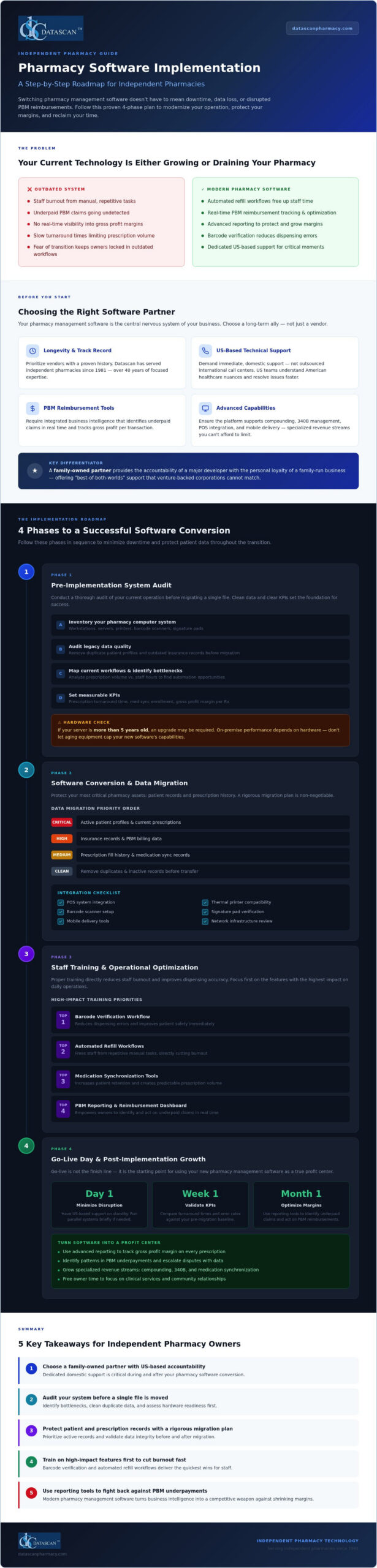
This guide provides a roadmap to master your next pharmacy software conversion with confidence. We’ll show you how to transition to a system that prioritizes your independence, offering a step-by-step approach to maximize profitability and minimize downtime. You’ll learn how to leverage advanced technology to overcome PBM challenges, backed by the reliability of a family-owned partner that provides dedicated, US-based technical support every step of the way.
Key Takeaways
- Choose a family-owned partner that offers the accountability and US-based support needed to protect your independent pharmacy’s unique operational needs.
- Identify and eliminate existing bottlenecks by conducting a comprehensive system audit before you begin the transition to a more modern workflow.
- Protect your critical patient and prescription records by following a rigorous pharmacy software implementation plan during the data migration phase.
- Reduce staff burnout and improve dispensing accuracy by prioritizing training on high-impact features like barcode verification and automated refill workflows.
- Transform your pharmacy management software into a profit center by using advanced reporting tools to overcome PBM reimbursement challenges.
Selecting the Right Pharmacy Management Software Partner
Your pharmacy management software functions as the central nervous system of your independent business. It doesn’t just dispense prescriptions; it manages patient safety, financial health, and operational flow. Choosing the right partner is the most critical step in your pharmacy software implementation plan because you’re selecting a long-term ally rather than just a software vendor. While many venture-backed corporations prioritize short-term profits and shareholder returns, a family-owned partner offers a level of accountability that’s becoming rare in the industry.
Independent pharmacies need tools that handle more than just the basics. Whether you are managing complex compounding solutions or navigating the intricacies of 340B management, your software must be robust enough to support these specialized revenue streams. Evaluating software for pharmacies based on these advanced capabilities ensures you aren’t limited by your technology as your business evolves.
Prioritizing PBM Reimbursement and Profitability Tools
In an era of shrinking margins and aggressive PBM tactics, your technology should be your first line of defense. Don’t settle for a system that leaves money on the table. Your next system must include integrated business intelligence that identifies underpaid claims in real time. It’s not enough to simply process prescriptions. You need to track gross profit margins on every transaction. Understanding how to calculate pharmacy gross profit with precision is essential, as independent pharmacy gross profit margins have plummeted to a ten-year low in 2026. Modern pharmacy software empowers you to fight back against unfair PBM practices by providing the data needed to optimize reimbursements and protect your pharmacy’s financial future. Before committing to any platform, it’s worth reviewing a detailed cost of PioneerRx vs Datascan breakdown to understand the true total cost of ownership beyond base subscription pricing.
Assessing Vendor Support and Longevity
A successful pharmacy software conversion depends heavily on the quality of technical support you receive. You should prioritize vendors that offer immediate, US-based pharmacy software support rather than those that outsource their help desks to international call centers. Domestic support teams understand the specific nuances of the American healthcare landscape and can provide faster resolutions during critical moments. When you’re in the middle of a system switch, you can’t afford to wait on hold.
Ask potential partners about their ownership history. A company like Datascan has served the independent pharmacy community since 1981, providing a unique “best-of-both-worlds” experience. You get the cutting-edge capabilities of a major developer with the personal touch and loyalty of a family-run business. This longevity ensures that your pharmacy software implementation plan is backed by decades of industry expertise and a deep commitment to your success.
Phase 1: The Pre-Implementation System Audit
Success begins long before the first file is transferred. A robust pharmacy software implementation plan requires a transparent look at your current operation to ensure your new technology isn’t hindered by old problems. Before you transition to a modern pharmacy management software, you must conduct a thorough inventory of your existing pharmacy computer system. This isn’t just about counting workstations; it’s about identifying the specific bottlenecks that drain your staff’s energy and eat into your gross profit margins.
Reviewing your legacy data quality is equally vital. Migrating “junk” data, such as duplicate patient profiles or outdated insurance records, only complicates your new workflow. By cleaning your database now, you ensure that your new system operates at peak efficiency from day one. Setting clear Key Performance Indicators (KPIs), such as reducing prescription turnaround time or increasing medication synchronization enrollment, will help you measure the true ROI of your new technology.
Hardware and Infrastructure Evaluation
Your pharmacy software is only as reliable as the hardware it runs on. Since we prioritize stable, high-performance on-premise solutions rather than relying on an internet connection for core functions, your server and workstations must be up to the task. Assess the compatibility of your current thermal printers, barcode scanners, and signature pads. If your server is more than five years old, an upgrade may be necessary to guarantee the speed and security your patients expect.
Don’t forget to plan for peripheral integrations. If you intend to utilize a Datascan Point of Sale (POS) system or mobile delivery tools, your network infrastructure must support these devices seamlessly. Ensuring your hardware is ready now prevents frustrating delays during the go-live phase.
Workflow Mapping for Efficiency
For specialized medical environments that require more than standard office equipment, Synergy Medical Inc. offers high-performance surgical and radiology displays designed for clinical precision.
For pharmacies that also manage their own delivery vehicles or equipment maintenance, a field service tool like Repair-CRM can help digitize those external operations and keep them organized alongside your main system.
Analyze your current prescription volume against your staff hours to find where automation can take over. Many independent owners find that their team is bogged down by manual tasks that a modern system could handle in seconds. Implementing workflow software allows you to standardize the dispensing process, which significantly reduces the risk of errors and helps prevent pharmacist burnout.
This is also the ideal time to plan for medication synchronization. By aligning patient refills to a single date each month, you can stabilize your daily volume and free up your staff to focus on clinical services and PBM reimbursement recovery. If you’re unsure if your current hardware can support these advanced features, it’s a good idea to consult with a technical expert to review your specific needs.
Phase 2: Pharmacy Software Conversion and Data Migration
Moving your data is the most sensitive part of any pharmacy software implementation plan. Unlike generic IT migrations, a pharmacy software conversion involves high-stakes clinical information that directly impacts patient safety. You aren’t just moving files; you’re transferring the lifeblood of your practice. Most conversions follow a methodical timeline, starting with a test conversion to verify how your legacy records map to the new database. During this period, maintaining HIPAA compliance and data integrity is non-negotiable. You’ll often run dual systems briefly to ensure no prescription delays occur while your team gets acclimated to the new pharmacy management software interface.
Precision during this phase prevents the loss of critical patient history and ensures your PBM reimbursement cycles remain uninterrupted. By working with an experienced partner, you can avoid the common pitfalls that lead to “dirty data” or missing insurance profiles. It’s about ensuring a seamless transition where your staff feels confident that the information on their screen is accurate and actionable from the very first day.
Managing Historical Patient and Prescription Records
You don’t need to move every single record from the last twenty years. Focus on active prescriptions, detailed patient profiles, and current insurance information. Archiving old data keeps your new pharmacy software lean and fast. Our dedicated conversion team works closely with you to validate this data, ensuring that every sig code and allergy warning transfers accurately. This meticulous approach prevents dispensing errors and protects your reputation as a trusted community provider. To see how a community-focused pharmacy prioritizes patient education alongside safety, learn more about Sage Creek Pharmacy and their commitment to family health resources. Validating migrated data early allows you to catch mapping issues before they affect your live workflow.
A seamless transition also means ensuring your niche revenue streams remain uninterrupted. If your pharmacy specializes in custom medications, setting up compounding solutions within the new system should happen early in the migration phase. Similarly, pharmacies serving long-term care facilities must configure their nursing and assisted living modules to maintain strict medication administration schedules. Finally, verify that your Datascan Point of Sale is fully synced with your new inventory records to prevent discrepancies in your financial reporting. This integration ensures that every transaction, from a complex compound to a front-end sale, is captured accurately for your gross profit analysis.
Phase 3: Staff Training and Operational Optimization
Technology is only as effective as the people operating it. A successful pharmacy software implementation plan requires a tiered training approach that respects the high-pressure environment of a community pharmacy. Instead of a single, overwhelming session, you should break training down by role. Pharmacists need to master clinical reporting and PBM reconciliation, while technicians should focus on the speed and accuracy of the dispensing queue. This targeted strategy ensures that every team member feels empowered rather than overwhelmed by the transition.
Modern pharmacy management software should serve as an extra set of hands for your business. By automating repetitive, manual tasks, you’re not just improving your pharmacy’s efficiency; you’re actively reducing the mental load that leads to staff burnout. When your team isn’t bogged down by clunky workflows, they can spend more time on patient care and revenue-generating clinical services. For parents who want to apply this same principle of centralized organization to their children’s education, you can check out DormWay to see how a Student OS simplifies academic scheduling.
The first step to optimization is configuring barcode verification at every stage of the fill process. This isn’t just a safety feature. It’s a workflow optimizer that prevents the costly rework associated with dispensing errors. You should also set up automated refill workflows to ensure prescriptions are ready before the patient even reaches the counter, creating a smoother experience for both staff and customers.
Integrating MobileScripts into your daily routine is a game changer for operational flow. By moving refill requests and status inquiries to a mobile app, you drastically reduce the volume of incoming phone calls. This allows your technicians to stay focused on production and helps stabilize your daily prescription volume through better patient adherence.
Empowering Staff with Clinical Tools
Independent pharmacies are increasingly shifting toward clinical service models to offset the challenges of poor PBM reimbursements. You must train your pharmacists to utilize integrated e-care plans and MTM features within the pharmacy software. These tools turn your dispensing system into a clinical revenue generator, allowing you to document and bill for services that go beyond the vial.
Encourage staff buy-in by demonstrating how integrated task management software handles daily chores and compliance tracking. When your team sees that the new system eliminates manual logbooks and redundant paperwork, they’ll quickly embrace the change. If you’re ready to see how these automated tools can transform your daily operations and free up your time, schedule a workflow consultation with our US-based experts today.
Phase 4: Go-Live Day and Post-Implementation Growth
Go-live day represents the culmination of your pharmacy software implementation plan, where months of preparation meet the reality of daily operations. The goal is a transition so smooth that your patients don’t even notice a change occurred. To achieve this, follow a rigid checklist that covers hardware connectivity, label printing, and real-time claim adjudication before the first customer arrives. The first 48 hours are critical. You need the assurance that comes with dedicated, US-based pharmacy software support to handle any unforeseen troubleshooting without delay. You shouldn’t have to navigate technical hurdles alone while trying to serve your community.
Once the initial transition period passes, your focus should pivot from technical stability to financial optimization. Your new pharmacy management software is designed to do more than just fill bottles; it’s a tool for reclaiming your time and improving your bottom line. By transitioning your attention to PBM reconciliation and workflow efficiency, you transform a technical upgrade into a strategic business advantage. Maximizing every claim’s profitability becomes an achievable daily task rather than a monthly struggle.
Immediate Post-Go-Live Priorities
In the first few days, prioritize your pharmacy’s financial health by running your first PBM reimbursement reports. These tools are essential for identifying underpaid claims that often slip through the cracks in legacy systems. You should also ensure your electronic delivery system is fully operational for HIPAA-compliant signature capture and real-time tracking. Use your new system’s advanced dashboards to review the first week’s gross profit margins. This immediate feedback allows you to make data-driven decisions about your inventory and pricing strategies right away. For a deeper understanding of the formulas and benchmarks behind these numbers, review our comprehensive guide on calculating pharmacy gross profit in 2026 to ensure your reporting is as accurate as possible.
Long-Term Success with Your Pharmacy System
A modern pharmacy software system is an evolving asset. Establish a routine for regular software updates and stay engaged with new feature releases to ensure you’re always using the latest tools for efficiency. Building a long-term partnership with your US-based support team provides a layer of accountability that venture-backed vendors can’t match. As you evaluate your platform’s long-term value, a thorough cost of PioneerRx vs Datascan comparison for independent pharmacies can help you confirm you’re maximizing your return on investment. As you look toward the future, stay informed by reading The Ultimate Guide to Pharmacy Management Software in 2026 to ensure your business remains at the cutting edge of the industry. This proactive approach ensures your technology continues to serve as the “Champion of the Independent” for years to come.
Take Control of Your Pharmacy’s Future
A successful pharmacy software implementation plan is more than a technical upgrade; it’s a strategic pivot toward long-term independence and financial stability. By conducting a thorough system audit and executing a meticulous data migration, you protect your patient records while eliminating the bottlenecks that cause staff burnout. Modern pharmacy management software empowers you to fight back against unfair PBM reimbursements by providing the transparency and profitability tools you need to survive in a challenging market.
You don’t have to navigate this transition alone. Partnering with a family-owned and operated company that’s served the industry since 1981 ensures you have an advocate in your corner. With our US-based technical support team and decades of industry experience, we provide the expertise needed to transform your operational struggles into streamlined successes. It’s time to reclaim your time and maximize your gross profit margins with pharmacy software built specifically for the independent pharmacist. Your journey toward a more efficient, profitable pharmacy starts with the right partner by your side.
See how Datascan can transform your pharmacy operations today.
Frequently Asked Questions
How long does a typical pharmacy software conversion take?
A typical pharmacy software conversion generally spans four to six weeks from the initial system audit to the final go-live day. This timeline allows for a thorough data migration test, staff training, and hardware configuration. By following a methodical pharmacy software implementation plan, you ensure that the actual transition happens in a single day, preventing extended operational downtime and protecting your patient care continuity.
Will I lose my historical patient data when switching pharmacy management systems?
You won’t lose your critical records when transitioning to a modern pharmacy management software if you follow a rigorous migration protocol. We prioritize the transfer of active prescriptions, patient profiles, and insurance information to ensure clinical safety. While some extremely old or “dirty” data might be archived to improve system speed, your essential historical records remain accessible and intact throughout the entire conversion process.
Do I need to buy all new hardware for a pharmacy software implementation?
You don’t necessarily need to replace all your existing equipment for a new pharmacy software implementation. During the pre-implementation audit, we assess your current thermal printers, barcode scanners, and workstations for compatibility. While older servers might require an upgrade to ensure on-premise stability and speed, many pharmacies can utilize their existing peripheral hardware, provided it meets the technical requirements for modern dispensing workflows and security standards.
How does modern pharmacy software help with PBM reimbursements?
Modern technology helps you fight back against unfair PBM practices by providing real-time visibility into claim profitability. Our software includes advanced reconciliation tools that automatically identify underpaid claims and track your gross profit margins on every transaction. Instead of waiting for monthly statements, you can use these integrated business intelligence features to optimize your reimbursements and protect your independent pharmacy’s financial health daily.
Is staff training included in the pharmacy software implementation plan?
Comprehensive staff training is a fundamental part of every pharmacy software implementation plan we design. We utilize a tiered approach that targets the specific needs of pharmacists, technicians, and front-end staff. This ensures that your team feels confident using high-impact features like barcode verification and automated refill workflows before the system goes live, which drastically reduces the stress and errors often associated with new technology.
Can I manage compounding and retail prescriptions in the same pharmacy system?
You can absolutely manage both retail and specialized prescriptions within a single, unified pharmacy system. Our platform includes dedicated modules for compounding and 340B management, allowing you to streamline diverse revenue streams without switching between different programs. This integration ensures that your inventory, patient records, and PBM billing are all centralized, providing a total solution for independent pharmacies that offer clinical or specialty services.
What kind of support can I expect during the go-live phase?
You can expect immediate, US-based technical support during the critical go-live phase of your transition. Our team provides real-time troubleshooting to resolve hardware or data issues within the first 48 hours of operation. Since we don’t outsource our help desk, you’ll speak with experienced professionals who understand the American pharmacy landscape, ensuring that your doors stay open and your patients remain well-served throughout the switch.
How does technology help reduce pharmacist burnout in independent pharmacies?
Technology reduces pharmacist burnout by automating the repetitive, manual tasks that drain your staff’s energy and time. Features like medication synchronization, automated refill workflows, and mobile patient engagement tools eliminate constant phone interruptions and stabilize daily prescription volume. By streamlining the dispensing process with pharmacy workflow optimization software, our pharmacy software allows you to spend less time on paperwork and more time on clinical services and growing your business profitably.
 Kevin Minassian is the President of Datascan Software. Under his leadership, the company rapidly expanded to provide pharmacy management software on a national level. Over the last 15+ years, he has ensured that Datascan has continuously evolved to offer innovative solutions for independent pharmacies while still offering world-class customer support. He is passionate about helping independent pharmacies to remain competitive, achieve success, and offer the very best service to their communities.