

Reducing Return-to-Stock Rates in Pharmacy by Tracking Hold TimesOctober 19, 2026
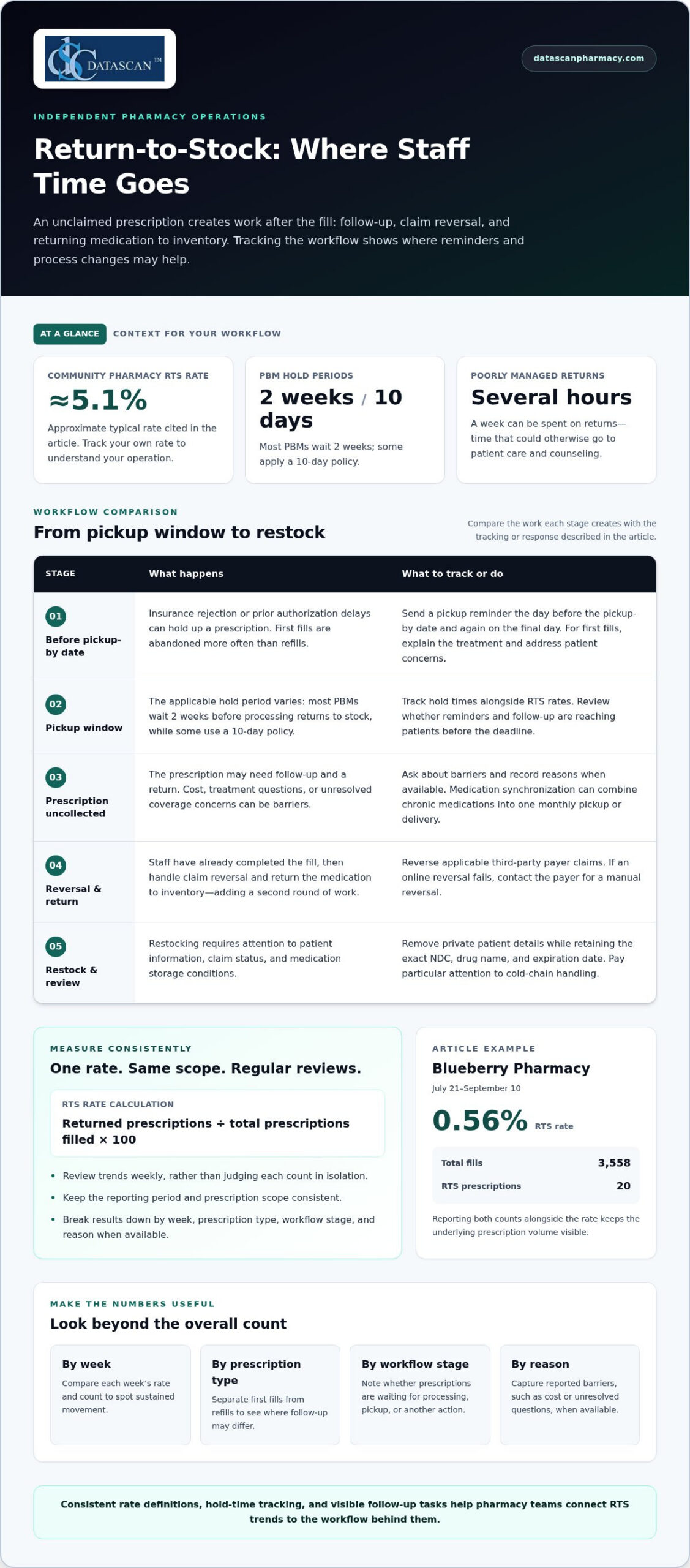
An unclaimed prescription can cost a pharmacy twice: staff fill it, then handle the claim reversal and return it to stock. A pharmacy return to stock (RTS) occurs when a prescription isn’t picked up or delivered within the applicable hold period; reducing return-to-stock rates in pharmacy starts with understanding both that workflow and the time it consumes. Most PBMs wait 2 weeks before processing returns to stock, while some apply a 10-day policy.
For independent and community pharmacies, those repeat tasks compete with patient care and the daily work of running the business. The typical community pharmacy’s return-to-stock rate is approximately 5.1%, but tracking your own rate and hold times can reveal where prescriptions are being left behind.
This article explains what RTS means, how returns use staff time, and how to assess their operational costs and trends. You’ll learn how to monitor return rates and hold times, and how workflow technology can make the process easier to track and manage.
Key Takeaways
- Define a consistent return-to-stock rate so you can compare performance across reporting periods and spot meaningful changes.
- Break trends down by prescription type and workflow stage to identify where unclaimed medications are accumulating.
- Assess the operational impact by including staff tasks and inventory tied up in returned prescriptions, not just the prescription count.
- Track hold times alongside return rates to see whether pickup reminders and workflow adjustments are reaching patients in time.
- Look for common reasons prescriptions go uncollected, then tailor patient outreach to address barriers such as cost or treatment questions.
How return-to-stock workflows use staff time
Each return-to-stock prescription creates work beyond the original fill, from patient follow-up and claim reversal to inventory handling. Tracking each step shows where the workflow takes time and where a change could help.
The most effective ways to reduce returns include timely pickup reminders, clear conversations with patients, and medication synchronization. Automated messages, text alerts, or personal calls can let patients know when prescriptions are ready.
Insurance rejections and prior authorization delays can hold up a prescription before the patient receives it. If approval or coverage questions remain unresolved as the pickup deadline approaches, the prescription may go uncollected and require return-to-stock processing.
Workflow changes can reduce unclaimed prescriptions by making follow-up tasks visible and consistent. Staff can prioritize unresolved prescriptions, ask patients about barriers, and discuss medication concerns, including its purpose, side effects, or effectiveness.
Staff Time in Return-to-Stock Workflows
A return-to-stock workflow covers the staff work needed to reverse an uncollected prescription and restore its medication to inventory. Each affected prescription can double the handling work: staff complete the fill, then process the return. Poorly managed returns can take several hours a week, time that could otherwise go to patient care, counseling, and adherence support.
Patient outreach can prevent some returns before staff begin the reversal process. Send a pickup reminder the day before the pickup-by date and another on the final day. For first fills, staff can explain the treatment and address patient concerns. First fills are abandoned more often than refills, so clear communication when treatment begins can make a difference.
Restocking Risks for Medications
Restocking risks include mishandled patient information, incomplete claim reversals, and medication stored outside required conditions. Remove private patient details from the label while retaining the exact NDC, drug name, and expiration date. Reverse applicable third-party payer claims. If an online reversal fails, contact the payer for a manual reversal.
Cold-chain handling needs particular attention. Recommended refrigerator storage for medications is 2°C to 8°C (36°F to 46°F); room-temperature storage is 20°C to 25°C, with excursions allowed between 15°C and 30°C. Many regulatory frameworks prohibit controlled substances from being returned to stock at retail pharmacies. The U.S. Drug Enforcement Administration classifies certain products strictly; pharmacies must include all controlled substances in inventory conducted according to federal and state standards.
For prescriptions returned after delivery, reuse may be possible when the pharmacy’s own staff or local delivery service attempted delivery. For prescriptions returned after delivery, packaging and prompt return can affect whether medication may be reused. The delivery route and packaging therefore matter to the return decision, not just the prescription status.
Staff can also support adherence by identifying why a prescription remains uncollected. A higher copay may make a patient more likely to leave a prescription behind. Medication synchronization can combine chronic medications into one monthly pickup or delivery, reducing separate collection tasks for patients and pharmacy staff.
Analysis of RTS trends
Review return-to-stock (RTS) trends weekly rather than treating each count in isolation. Regular reviews show whether rates are rising, falling, or holding steady. Compare the same measures across periods and investigate changes before they become routine. A single busy day can distort the picture; recurring weekly patterns offer a stronger basis for operational decisions.
Use one consistent calculation: divide returned prescriptions by total prescriptions filled, then multiply by 100. Keep the reporting period and prescription scope consistent. For example, don’t compare a week of all prescriptions with a week containing only chronic medication. Consistent definitions help staff interpret results and judge whether a process change affected the rate.
A Blueberry Pharmacy example shows how a numerator and denominator clarify a trend. Between July 21 and September 10, it recorded 3,558 total fills and 20 return-to-stock prescriptions. Its RTS rate for that period was 0.56%. The example illustrates how to report both the rate and underlying counts, so a percentage doesn’t hide the number of prescriptions involved.
Pair the overall rate with practical breakdowns. These views help staff connect a trend to a workflow or patient group:
- By week: Compare each week’s rate and count to spot sustained movement.
- By prescription type: Separate first fills from refills to see where follow-up effort may differ.
- By workflow stage: Note whether prescriptions were waiting for processing, pickup, or another action.
- By reason: Record patient-reported barriers, such as cost or unresolved questions, when available.
Returned prescriptions can contribute to overstock and fewer inventory turns, tying up money in medication. Record whether repeat returns involve the same items or follow a particular pattern. Inventory software can organize records for review, while staff observations add context that counts alone cannot provide. A recurring item may warrant a closer look at purchasing and prescription activity.
Trend reviews can also support proactive patient care. A rise in returns for a medication used to manage a chronic disease may prompt staff to examine communication and pickup patterns. The data does not establish why a patient did not collect a prescription, but it can show where a conversation may help. Record the action taken alongside later weekly results, then assess whether the trend changes.
When reducing return-to-stock rates in pharmacy, interpret each change alongside relevant operational context, such as unusual prescription volume or a shift in the patient mix. This helps distinguish a meaningful pattern from a temporary fluctuation, without treating the rate alone as an explanation.
Consistent, complete records are essential to reducing return-to-stock rates in pharmacy. Missing return reasons or inconsistent prescription categories can distort comparisons. Document exceptions clearly and use the same definitions in every reporting period.
Measuring return-to-stock costs
Return-to-stock prescriptions affect revenue when the pharmacy reverses the related claim and the patient never receives the medication. Reversal helps prevent payment for an unreceived prescription, but staff time, inventory tied up, and handling still consume resources.
Start with a defined review period, such as one week, and record each returned prescription. For every return, capture the tasks involved: locating the prescription, contacting the patient, reversing the claim, removing patient details, and restoring the medication to inventory. Use the same task categories each period to compare workload fairly.
Measure labor in minutes rather than relying on a general impression. For example, record the time spent on each return during a staff shift, then total those minutes for the review period. Pharmacy leaders can use their own labor-cost method to estimate staff expense. Keep that calculation separate from medication acquisition cost, since the item may later be dispensed to another patient.
Track inventory impact separately. A returned medication can contribute to overstock and reduce inventory turns, leaving money tied up in stock. Record the drug, quantity, return date, and whether the item is dispensed again, remains on hand, or cannot be sold. Some returned medication cannot go back to the wholesaler or be sold unless another prescription for the same item arrives.
- Staff effort: Track handling and follow-up time for each return.
- Claim activity: Record whether the third-party claim was reversed and whether manual follow-up was needed.
- Inventory status: Note whether the medication returns to usable stock or remains unsold.
- Delivery handling: Separate delivery returns from pickup returns, since packaging and return timing affect whether medication can be reused.
For a simple example, compare two weeks with different return counts. If the second week has fewer returns but more staff minutes per return, the count alone hides the labor trend. Reviewing both measures helps show whether a new message, workflow change, or follow-up practice reduced the total effort.
Connect the cost review to reimbursement records without treating every reversed claim as a lost payment. A claim reversal removes the payment request for medication the patient did not receive. The operational concern is the work needed to complete the reversal, plus stock that may remain unused while the pharmacy waits for another prescription.
Finally, separate clinical follow-up from financial measurement. Note when a patient raises a copay concern, side-effect question, or delivery issue, then compare those reasons with later return patterns. This helps the pharmacy see which changes may support pickup and which costs arise from inventory or repeated processing.
Monitoring RTS rates and hold times
Track each prescription from ready status through pickup, delivery, or return to stock. Record when it became available, the applicable payer deadline, and its final disposition. This timeline helps staff see whether prescriptions are reaching patients before claim reversal becomes necessary.
U.S. pharmacies should follow their state board of pharmacy regulations and the applicable PBM’s return-to-stock time limits. No single hold period applies across every payer and state. Keep the relevant deadline visible in the prescription record so staff can act on the specific prescription rather than rely on a general rule.
The average RTS rate is a reference for comparison, not a target every pharmacy must meet. Calculate a useful local measure by comparing returned prescriptions with total fills over the same reporting period. Keep the numerator and denominator with the rate, since changes in prescription volume can make percentages harder to interpret on their own.
Build a monitoring view that separates each prescription’s status and deadline. Include the fields staff need to act:
- Ready status: The date the prescription became available to the patient.
- Applicable deadline: The payer’s pickup or delivery limit for that prescription.
- Current status: Whether it remains awaiting pickup, is arranged for delivery, or has been received.
- Final disposition: Whether the medication was collected, delivered, or returned to stock.
Prescriptions left in a pharmacy bin for more than 10 to 14 days can create business issues. An aging queue can occupy counter space and make it harder to identify prescriptions that need timely follow-up. Use a status view to distinguish items nearing their deadlines from prescriptions already past them, then assign the next action to a staff member.
PBM return-to-stock time limits help prevent payment for medications patients never received. Compare each prescription’s recorded outcome with its claim status. Review the related claim activity for prescriptions marked returned, and match completed pickups or deliveries with the final status.
Separate hold-time results by payer and pickup or delivery method. A longer interval may reflect a different payer deadline, a patient scheduling issue, or an unresolved delivery arrangement. Keeping these categories distinct gives pharmacy leaders a more useful view than one average hold time.
Automated reports can flag incomplete records, such as prescriptions without a final disposition or claim status. Assign staff to resolve those exceptions, then confirm that the record reflects what happened. Reliable monitoring depends on consistent entries, clear responsibility, and timely action on prescriptions approaching payer deadlines.
What causes prescriptions to be returned to stock at U.S. pharmacies?
Prescriptions are usually returned to stock when patients do not pick them up or receive them before the applicable deadline. PBMs set time limits for pickup or delivery. Once the limit passes, the pharmacy must reverse the claim and return the medication to inventory.
Cost is a common barrier. Patients may be more likely to leave a prescription unpicked when its copay is higher. For example, a patient who expected a lower copay may delay pickup while deciding whether they can afford the medication. Without a conversation about cost, the pharmacy may not learn why the prescription remains uncollected.
Coverage problems can also stall a prescription. An insurance rejection may require staff to investigate eligibility, billing details, or covered alternatives before the patient can obtain the medication. Prior authorization delays can keep a prescription from being ready for pickup while approval is pending. If the issue persists near the PBM deadline, the prescription may ultimately be returned to stock.
- Unresolved coverage: A rejection or pending authorization interrupts the path from prescription processing to pickup.
- Unexpected copay: A patient may postpone collection after learning the out-of-pocket amount.
- Missed communication: A patient may not see or respond to a ready-for-pickup notice.
- Pickup or delivery friction: A schedule change or delivery coordination problem can prevent the patient from receiving the medication in time.
- Treatment questions: Concerns about side effects, effectiveness, or starting a new medication may lead a patient to wait.
Give first fills particular attention because patients abandon them more often than refills. Starting a new therapy can raise questions about its purpose, use, or possible effects. A pharmacist’s conversation can surface those concerns and help the patient understand the treatment. A reminder may be enough for a refill, while a first fill may call for a more direct check-in.
Operational gaps can compound these causes. A ready notice sent too early, a missed follow-up task, or unclear delivery status can leave a patient unsure about the next step. Review each return reason and distinguish patient barriers from workflow delays. For instance, repeated returns after unresolved coverage issues call for a different response than missed pickup messages.
Record each return reason when staff learn it rather than assigning every case a generic “not picked up” label. Separate cost, coverage, patient questions, and pickup or delivery barriers. This gives the pharmacy a practical basis for choosing outreach, resolving prescription issues, or adjusting its follow-up routine.
To connect these return patterns with pharmacy workflow needs, discuss your pharmacy’s workflow.
Frequent return-to-stock prescriptions may point to adherence concerns and affect pharmacy performance. Each affected prescription adds a second round of handling work. Pharmacy software systems can track claim reversals, helping staff review whether they are completed correctly.
When returning a prescription to stock, pharmacies should remove private patient information from its label while retaining the exact NDC, drug name, and expiration date. Blueberry Pharmacy recorded a return-to-stock rate of 0.56% for prescriptions filled between July 21 and September 10. First fills may warrant extra treatment education.
Datascan Pharmacy Software: Datascan Pharmacy Management Software
Datascan Pharmacy Software’s Datascan Pharmacy Management Software can help pharmacies coordinate prescription operations in one workflow. The platform supports pharmacy management, and its customizable workflow can be aligned with how your team handles daily tasks.
Consider pharmacy management software when return-to-stock reviews reveal friction between prescription processing, patient communication, and follow-up. A clearer workflow can help staff manage competing responsibilities and make operational patterns easier to address. Datascan’s pharmacy tools also include the MobileScripts Patient Mobile App and Datascan Mobile Delivery App.
To discuss how Datascan Pharmacy Management Software can fit your pharmacy’s workflow, contact Datascan Pharmacy Software.
Make RTS monitoring part of your routine
A disciplined approach to reducing return-to-stock rates in pharmacy turns hold-time data into a practical operating habit. Assign someone to review results, discuss recurring barriers with the team, and use the findings to refine patient communication and workflows. Deliberate adjustments help staff learn from each reporting period instead of treating returns as isolated events.
Technology can support this work by connecting pharmacy operations with patient-facing tools. Datascan Pharmacy Software offers Datascan Pharmacy Management Software, Datascan Point of Sale (POS), and the MobileScripts Patient Mobile App. Consider how these tools fit your pharmacy’s priorities as you plan your next workflow improvement.
Ready to discuss your pharmacy’s needs and possible next steps? Contact Datascan Pharmacy Software. Your team can keep building a more visible, manageable process, one informed change at a time.
Frequently Asked Questions
What’s a Pharmacy Return to Stock (RTS)?
A pharmacy return to stock (RTS) is a prescription prepared for a patient but not picked up or delivered, then returned to inventory after required processing. In pharmacy records, distinguish an RTS from a prescription stopped before filling: the RTS record tracks a prescription that reached the ready stage. For controlled-substance guidance relevant to pharmacy operations, consult the Drug Enforcement Administration’s official diversion resources.
Which pharmacy software or analytics tools help track and reduce return-to-stock rates?
Look for pharmacy management software or analytics tools that can report prescription status, return outcomes, and patient communication activity together. A useful report should let managers filter results by date range, payer, and prescription category, then export or review exceptions for follow-up. Datascan Pharmacy Management Software includes an adherence dashboard and automatic patient communication, helping teams connect operational tracking with patient outreach.
About the author: Datascan Pharmacy Software publishes information about pharmacy management software and independent pharmacy operations.

Article by
Sarah Callioras
Sarah Callioras is Vice President at Datascan Pharmacy Software, bringing nearly 25 years of experience across independent pharmacy operations and pharmacy technology. Since joining Datascan in 2016, she has played a key role in driving business growth, strengthening client relationships, and supporting independent pharmacies through innovative software solutions. With a strong background in pharmacy operations, business development, and strategic leadership, Sarah is passionate about helping independent pharmacies succeed in an evolving healthcare landscape.