A higher sales total doesn’t always mean a healthier bottom line. Tracking pharmacy sales data accurately means looking beyond revenue to understand what prescriptions and front-end purchases contribute after costs and reimbursement adjustments. If details are spread across prescription, point-of-sale, and payment workflows, getting that picture can take time away from running the pharmacy and caring for patients.
It’s easy to mistake sales activity for profitability, especially when PBM reimbursements put pressure on prescription margins. The right metrics can show where revenue is coming from, flag changes that deserve attention, and support more informed operational decisions. You don’t need to track every number. You need a focused set that answers practical questions.
This guide covers which sales metrics independent pharmacies can monitor, how to interpret prescription and front-end results differently, and why revenue alone doesn’t tell the whole story. It also explains what to consider when evaluating pharmacy management software and POS tools for organizing reports and reducing manual work. Reporting capabilities vary, so confirm that a system supports the views your pharmacy needs.
Key Takeaways
- Use tracking pharmacy sales data to guide specific business decisions, not just to collect numbers.
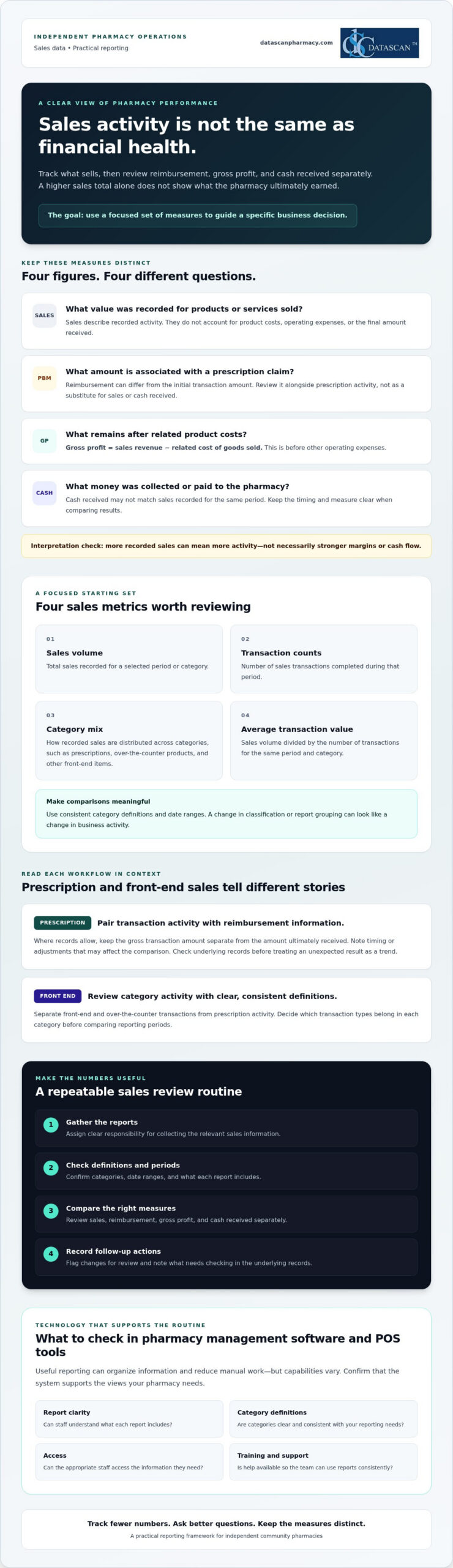
- Start with a small set of measures, including sales volume, transaction counts, category mix, and average transaction value.
- Compare sales, reimbursement, gross profit, and cash received separately to avoid mistaking higher revenue for stronger financial health.
- Build a recurring review routine with clear responsibility for gathering reports, checking definitions, and recording follow-up actions.
- When evaluating pharmacy management software and POS tools, check report clarity, category definitions, access, training, and support.
What does tracking pharmacy sales data actually tell you?
Tracking pharmacy sales data means consistently collecting and reviewing sales measures to guide business decisions. It shows what’s moving through prescription and front-end workflows, but recorded sales activity alone doesn’t tell you how much the pharmacy earned, how much cash it received, or how PBM reimbursement affected a prescription’s final economics.
Sales data records what was sold and for how much. Profit reflects what remains after relevant costs and expenses. That distinction matters. A rise in sales can mean more activity, but it doesn’t automatically mean stronger margins or cash flow. A useful measure, often called a key performance indicator (KPI), connects information to a decision. For a foundational explanation, see this overview of a performance indicator.
Independent pharmacies need a manageable view of prescription and front-end transactions because they represent different kinds of sales activity. Reviewing them with consistent definitions can help owners identify what changed and where a closer look is needed, without treating one sales total as the whole financial picture.
Which pharmacy sales categories should you track?
Start by separating prescription-related activity from front-end and over-the-counter transactions. Set clear category definitions, then use them consistently across staff and reporting periods. For example, decide which transaction types belong in each category before comparing one month with another. Consistent definitions make comparisons more meaningful and reduce the risk of mistaking a reporting change for a real change in sales.
Why can sales totals differ from pharmacy profitability?
A sales total doesn’t account for the cost of acquiring products or the pharmacy’s operating expenses. Prescription economics can also be affected by PBM reimbursement, which may differ from the initial transaction amount. Keep these measures distinct when reviewing results:
- Sales: The value recorded for products or services sold.
- Reimbursement: The amount associated with a prescription claim under the applicable payment arrangement.
- Gross profit: Sales revenue minus the related cost of goods sold, before other operating expenses.
- Cash received: Money collected or paid to the pharmacy, which may not match sales recorded for the same period.
These figures answer different questions, so don’t use one as a substitute for another. For a deeper look at margin calculations, consult a pharmacy gross profit guide and confirm that the method fits your accounting approach.
Which pharmacy sales metrics should you track first?
Start with a short list of measures that can inform a decision, rather than collecting every available data point. Tracking pharmacy sales data is most useful when each metric answers a practical question: Did transaction activity change? Which categories contributed to sales? Where does a shift need investigation?
A practical starting checklist: track sales volume, transaction counts, category mix, and average transaction value, then review each measure in the context of prescription or front-end activity.
- Sales volume: The total sales recorded for a chosen period or category.
- Transaction counts: The number of sales transactions completed during that period.
- Category mix: How recorded sales are distributed among categories, such as prescriptions, over-the-counter products, and other front-end items.
- Average transaction value: Sales volume divided by the number of transactions for the same period and category.
Keep definitions and date ranges consistent. Otherwise, a change in how staff classify transactions or a report groups categories can look like a real shift in business activity. These measures describe sales patterns. Pair them with relevant cost and reimbursement information before drawing conclusions about margins.
How should you track prescription sales?
Review prescription transaction activity alongside available reimbursement information for those claims. Where records allow, keep the gross transaction amount separate from the amount ultimately received, and note timing or adjustments that may affect the comparison. If a measure changes unexpectedly, flag it for follow-up and check the underlying records before treating a single result as a trend.
How should you track front-end pharmacy sales?
For front-end and over-the-counter sales, review transaction counts and sales by useful product categories. Compare equivalent periods and record context, such as a promotion or operating change, that could affect results. This helps distinguish a broad change in shopping activity from a shift limited to one category. For further POS considerations, explore Datascan’s pharmacy point-of-sale tools.
Prescription and front-end measures answer different questions, so avoid forcing them into one interpretation. A change in prescription activity calls for a look at claim and reimbursement context. A front-end category shift may prompt a closer review of product mix or transaction patterns. Choose a few measures your team can define consistently, review them regularly, and use unusual movements to guide the next investigation.
Can sales data alone show whether your pharmacy is doing well?
No. Higher sales don’t automatically mean higher profit or stronger cash flow. Sales show the value of recorded activity, while reimbursement, acquisition costs, expenses, and payment timing help explain what that activity means financially. Tracking pharmacy sales data alongside these related measures gives owners a more useful basis for investigating prescription performance.
What is the difference between sales, reimbursement, and profit?
Each measure answers a different business question. Keep them distinct in reports and conversations so a change in one isn’t mistaken for a change in another.
| Measure | What it tells you | Question for the owner |
|---|---|---|
| Sales | Recorded value of transactions | What activity was recorded? |
| Reimbursement | Payment associated with prescription claims | What was paid or is expected for those claims? |
| Gross profit | Sales revenue minus related cost of goods sold | What remains before other operating expenses? |
| Cash received | Payments collected during a period | What money came in, and when? |
For example, a prescription transaction can appear in sales records before its payment arrives. Its recorded amount also doesn’t show the related acquisition cost or final gross profit on its own. Comparing sales and reimbursement information can help you identify questions to investigate, but it doesn’t establish the reason for a difference. For detailed margin calculations, use a consistent gross profit method and confirm that it matches your accounting approach.
How can you spot a change that needs investigation?
Compare equivalent periods and confirm that report definitions haven’t changed. Then review the context before drawing a conclusion:
- Check whether the transaction mix shifted between prescription and front-end activity.
- Confirm that you’re comparing the same dates, categories, and reporting basis.
- Note timing differences and known operational changes that could affect the comparison.
- Refer possible reimbursement discrepancies to your pharmacy’s established review process.
A change is a prompt to ask questions, not proof of a trend or error. Pharmacy management software may help organize information for review, but verify which reports and fields are available in your configuration. If you’re assessing whether Datascan tools fit your reporting needs, you can discuss your requirements with the team.
How do you build a practical pharmacy sales review routine?
A practical review routine makes tracking pharmacy sales data repeatable without turning it into another major task. Choose a consistent review period, assign responsibility for gathering and checking reports, and end each review with a clear follow-up owner. Keep the process focused on a few measures tied to current business priorities.
What steps should a pharmacy take to review sales data?
- Choose the measures. Select a short list that helps answer current questions, such as whether sales activity changed or which categories need a closer look.
- Assign report gathering. Name a team member to collect relevant reports from pharmacy management and POS workflows. If information comes from separate sources, note where each figure came from rather than assuming the reports are combined.
- Check the reporting basis. Confirm the dates, transaction categories, and definitions before comparing results. Make sure the current report uses the same basis as the prior period.
- Review changes with context. Look for differences in transaction mix, workflow, product mix, or reporting setup that could explain a change. Record known operational events alongside the results.
- Document the next step. For each meaningful finding, write down the finding, a question to resolve, and the person responsible for following up.
The routine works best when responsibilities are clear. The person gathering reports doesn’t need to make every business decision, but they should know who will validate definitions, review unusual results, and close the loop on questions. A brief written record helps the team see whether an issue is recurring or specific to one review period.
How can you avoid misleading comparisons?
Compare equivalent periods and transaction categories, and don’t treat a difference as a trend until you’ve checked the underlying records. If reporting definitions or workflow changed, document that before drawing conclusions. A change in transaction mix may also shift the total even when activity within a particular category is steady. Investigate incomplete or inconsistent records before acting, and route possible reimbursement discrepancies through the pharmacy’s established review process.
Pharmacy management software and POS tools may help organize information from their respective workflows, but confirm which reports, fields, and review options are available in your pharmacy’s configuration. A simple, consistent process can make reports easier to interpret and preserve time for daily operations. Discuss your pharmacy reporting needs to explore what information your current setup can support.
How can pharmacy management software make sales tracking easier?
Pharmacy management software and POS tools may make sales reviews easier by organizing information from prescription and front-end workflows. This can reduce the need to gather figures manually from separate sources. The practical value depends on the available reports and configuration, so verify specific capabilities rather than assuming every system combines data or automates reporting.
Use these criteria to evaluate whether a system will support your tracking process:
- Report clarity: Can your team understand what each total includes and leaves out?
- Category definitions: Are prescription, front-end, and other transaction categories clearly defined?
- Access: Can the people responsible for reviewing the information find the reports they need?
- Training: Is guidance available so staff can apply report definitions consistently?
- Support: Can you get help with reporting questions, and what support is available?
Datascan offers pharmacy management software and Datascan Point of Sale. Review the pharmacy management software overview as you consider how software and POS tools might fit your operation. Treat technology as a way to assess and organize information, not as a guarantee of improved margins, reimbursement outcomes, or cash flow.
What should you ask a pharmacy software vendor about sales reporting?
Ask which prescription and front-end sales reports are available in the configuration you’re considering. Find out how each report defines totals, time periods, categories, and adjustments, and whether reports can be reviewed together or need to be compared separately. Confirm what training and U.S.-based support are available for reporting questions. Ask the vendor to walk through relevant workflows so your team can judge whether the reports answer its actual business questions.
When is it time to improve your current tracking process?
Repeated manual consolidation, unclear category definitions, or reports the team rarely uses can signal that the process needs attention. Before comparing alternatives, identify the decisions your current setup doesn’t support and the information needed to make them. Then verify specific product claims directly, including which reports and fields are available for your pharmacy’s configuration.
A focused review of those needs can help you evaluate Pharmacy Software against the work your team actually does, rather than choosing based on broad promises. Talk with Datascan about sales tracking and discuss the reports and workflows you need to assess.
Turn pharmacy sales reports into confident decisions
Tracking pharmacy sales data works best when you focus on a few consistent measures and connect each one to a decision. Review prescription and front-end activity in context, and keep sales separate from reimbursement, gross profit, and cash received. A simple, recurring review routine can help your team spot changes worth investigating without adding unnecessary reporting work.
Pharmacy management software and point-of-sale tools may help organize information across workflows, but confirm that the reports and definitions fit your pharmacy’s needs. Datascan is a family-owned pharmacy software company founded in 1981, offering pharmacy management software and point-of-sale tools for independent and retail pharmacies, along with U.S.-based technical support.
Ready to explore how your reporting process could better support day-to-day decisions? Talk with Datascan about tracking pharmacy sales data. With clear measures and a practical review process, you can build a stronger understanding of your pharmacy’s business and take the next step with confidence.
Frequently Asked Questions
What is the best way to track pharmacy sales data?
Choose a small set of measures, define them consistently, and review them on a regular schedule. Start with sales volume, transaction counts, category mix, and average transaction value. Separate prescription activity from front-end sales, then compare equivalent periods. Assign someone to gather the reports and record questions or follow-up actions so tracking pharmacy sales data supports decisions rather than creating work without a clear purpose.
Which sales metrics should an independent pharmacy monitor?
Independent pharmacies can begin with sales volume, transaction counts, category mix, and average transaction value. Review prescription and front-end results separately because they reflect different types of activity. For prescription transactions, consider reimbursement information where available. For front-end sales, category and transaction patterns can help show what is changing. Choose measures tied to real business questions, and keep definitions consistent across reports and review periods.
Can pharmacy sales data show whether the pharmacy is profitable?
Sales data alone can’t establish profitability. Sales show recorded transaction activity, but profit calculations also require related product costs and, for net profit, operating expenses. Reimbursement and cash received answer different questions: a recorded sale may not match the amount or timing of payment. Review these measures together using the appropriate records and accounting method before judging financial performance. Higher sales by themselves don’t prove higher profit or stronger cash flow.
How often should a pharmacy review sales data?
Review sales data on a recurring schedule your team can maintain and that fits the decisions you need to make. The right cadence depends on your operation and priorities. Use consistent periods for comparisons, assign responsibility for gathering and checking reports, and document unusual changes or follow-up actions. More frequent reviews may help with time-sensitive questions, while broader comparisons can provide context. Note schedule changes so reporting periods remain clear.
How do PBM reimbursements affect pharmacy sales tracking?
PBM reimbursement information adds context to prescription sales, but it shouldn’t be treated as interchangeable with recorded sales or cash received. A transaction amount, reimbursement amount, and payment timing may represent different views of the same prescription activity. Review these figures separately where records allow, and follow your pharmacy’s established process to investigate possible discrepancies. Sales reports can help identify questions, but may not explain the cause of a reimbursement difference on their own.
Can pharmacy management software track prescription and front-end sales together?
It depends on the software and the pharmacy’s configuration. Pharmacy management software and point-of-sale tools may organize information from prescription and front-end workflows, but don’t assume reports combine those figures or use matching definitions. Ask which reports are available, what each total includes, and whether the relevant results can be reviewed together. Confirm the answer for your specific setup before relying on a combined view for comparisons or business decisions.
What should I ask a pharmacy software vendor about sales reports?
Ask which prescription and front-end sales reports are available in your configuration and how each report defines totals, categories, dates, and adjustments. Find out whether figures can be compared across workflows and how staff can access the reports. Also ask what training and technical support are available for reporting questions. Request a walkthrough using workflows relevant to your pharmacy, then check whether the reports answer the decisions your team needs to make.
About the author: Datascan Pharmacy Software is a family-owned pharmacy software company founded in 1981. It provides pharmacy management software and point-of-sale tools for independent and retail pharmacies, along with U.S.-based technical support.
 Kevin Minassian is the President of Datascan Software. Under his leadership, the company rapidly expanded to provide pharmacy management software on a national level. Over the last 15+ years, he has ensured that Datascan has continuously evolved to offer innovative solutions for independent pharmacies while still offering world-class customer support. He is passionate about helping independent pharmacies to remain competitive, achieve success, and offer the very best service to their communities.