Managing charge accounts for patients works best when clear account terms and a consistent process are backed by an organized pharmacy management software and POS workflow. Link charges, payments, and statements to the correct patient or facility account so staff can review balances without reconstructing them from paper records.
Flexible payment options can support patient convenience, but poorly tracked balances create collection and reconciliation work. That risk grows when staff record transactions in separate ledgers or spreadsheets, especially while independent pharmacies are managing reimbursement pressure and tight operating margins. A consistent process makes charge accounts easier to oversee and helps keep account activity visible.
This guide explains how to set account terms, monitor balances, prepare statements, and follow up on overdue payments. It also covers how pharmacy management software can connect point-of-sale activity with patient ledgers and reduce duplicate entry. About the author: Datascan Pharmacy Software is a family-owned pharmacy software company founded in 1981, serving independent and retail pharmacies with pharmacy management software and related tools.
Key Takeaways
Set clear eligibility rules and payment terms so staff and patients know how charge accounts work.
Use integrated pharmacy management software to reduce duplicate entry and make account balances easier to review.
Review balances regularly and send timely statements to keep receivables organized and support follow-up.
Offer convenient payment options and use patient app notifications to remind customers about outstanding balances.
Connect pharmacy software with POS to simplify charge tracking and reduce manual recordkeeping.
What is a pharmacy charge account and why is it important?
Managing charge accounts for patients means maintaining an internal credit ledger in your pharmacy management software. Approved patients or care facilities can receive prescriptions or over-the-counter (OTC) items and pay later, while the account records purchases, payments, and the remaining balance. This can offer payment flexibility while keeping each transaction organized.
A charge account, sometimes called a “house account,” differs from a standard retail transaction. A retail customer pays at checkout. With a house account, the pharmacy records the sale against an approved patient or facility account for later payment. The balance becomes part of the pharmacy’s accounts receivable, so staff need a reliable way to track charges and payments.
Independent pharmacies may use charge accounts for long-term care (LTC) facilities and established retail patients who value a familiar way to manage purchases. A ledger in pharmacy management software can connect each charge to the right account, rather than leaving staff to match receipts with handwritten notes later. Pharmacy management software can keep account activity in one consistent record for staff to review.
How do charge accounts build patient loyalty?
Flexible billing can make purchases easier for elderly patients, caregivers, and facility staff who may prefer not to carry cash or settle every purchase at the register. Clear account records and predictable statements help make the arrangement feel professional and straightforward. For a community pharmacy, that convenience can reinforce a relationship built on knowing patients and making routine transactions easier.
The benefit is more than credit. A structured account process can help patients continue using a familiar local pharmacy while giving the pharmacy a clear way to record and manage outstanding balances.
What are the common risks of manual account management?
Paper slips and separate spreadsheets can lead to missed sales, duplicate entries, or balances recorded under the wrong patient. When transaction details are scattered across records, staff spend time reconciling the register with individual ledgers instead of helping customers.
Manual records also make it harder to review aging balances and follow up consistently. A clear ledger and itemized statements give patients a record of charges and payments, including details they may need to organize personal paperwork during tax season. Paper receipts may be manageable at first, but become harder to reconcile as account activity grows.
How do you set up an efficient patient charge account system?
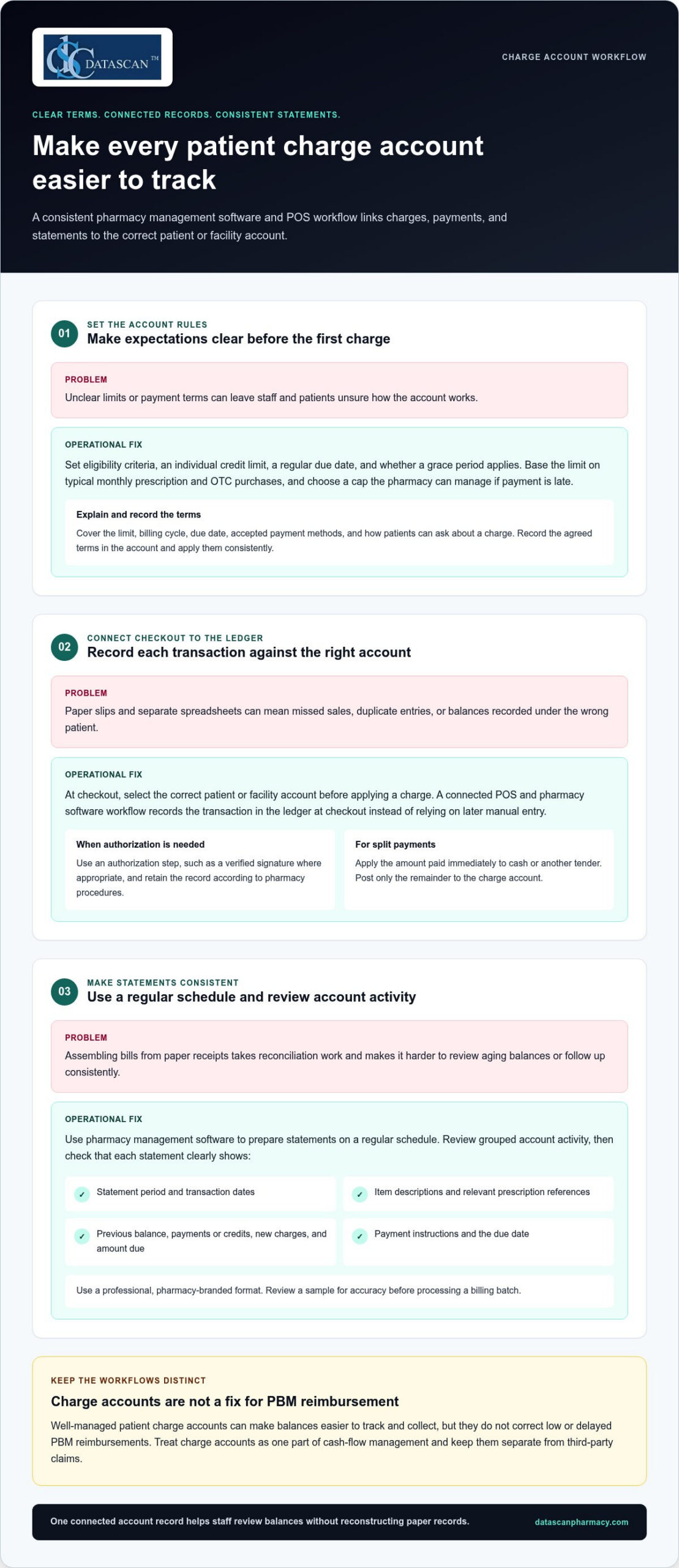
Build the process around clear account rules and one connected ledger. Set eligibility criteria, payment terms, and individual credit limits. Then ensure each charge entered at the register updates the patient’s account in your pharmacy management software. This pharmacy-specific workflow reduces duplicate entry and gives staff a consistent way to review balances and prepare statements.
Step 1: How should you set credit limits and payment terms?
Set each limit with the patient’s or facility’s typical monthly prescription and OTC purchases in mind, and choose a cap your pharmacy can manage if payment is late. Decide on a regular due date and whether to allow a grace period, then apply those terms consistently. At sign-up, explain the limit, billing cycle, due date, accepted payment methods, and how patients can ask about a charge. Record the agreed terms in the account.
Step 2: How do you link POS transactions to the patient ledger?
At checkout, staff should select the correct patient or facility account before applying a charge. Use an authorization step, such as a verified signature where appropriate, and retain the record according to your pharmacy’s procedures. A connected POS and pharmacy software workflow records the transaction against the ledger at checkout instead of relying on a later manual entry. For split payments, apply the amount paid immediately to cash or another tender and post only the remainder to the charge account.
Step 3: How can you make monthly statements consistent?
Use pharmacy management software to prepare statements on a regular schedule. Review grouped account activity rather than assembling each bill from paper receipts. Before sending a statement, check that it clearly shows:
Statement period and transaction dates
Item descriptions and relevant prescription references
Previous balance, payments or credits, new charges, and amount due
Payment instructions and the due date
Use a professional, pharmacy-branded format so patients can identify the statement and understand what they owe. Review a sample for accuracy before processing a billing batch. An integrated pharmacy management software system can support a more consistent account workflow, reducing time spent reconciling records and leaving staff more time to help patients.
How does managing charge accounts impact pharmacy profitability?
Well-managed patient charge accounts can make balances easier to track and collect, but they don’t correct low or delayed PBM reimbursements. They are one part of cash-flow management and should be kept separate from third-party claims. Managing charge accounts for patients through an organized pharmacy software workflow can reduce manual bookkeeping, while other pharmacy management software tools can help teams process claims and review reimbursement activity.
Keep these financial streams distinct. Patient charge accounts record amounts patients or facilities owe your pharmacy. PBM claims track amounts due from third-party payers under reimbursement terms. Technology can help organize both, but review PBM claim and payment records separately from patient receivables to identify processing issues, payment delays, or differences that need follow-up. Charge account collections are not a substitute for PBM reform or a solution to inadequate reimbursement.
How can structured billing support cash flow?
A consistent statement cycle gives patients and facilities a regular reminder to review and pay balances. Aging reports help staff spot overdue accounts and follow up under pharmacy policy before balances become harder to collect. For high-copay medications, an account may record a patient’s responsibility for later payment, but set clear limits and monitor outstanding balances. Until collected, a charge is a receivable, not available cash.
Technology can also support a separate reimbursement workflow. Pharmacy teams can use claim-processing and financial reporting tools to organize payer activity, compare submitted claims with payment records, and flag items for review. These tools don’t determine whether a PBM reimbursement is fair, but organized data can help staff investigate discrepancies and make informed business decisions. Consider sales and product margins as well as collections when evaluating profitability.
How can automation reduce administrative burnout?
Manual posting may require staff to enter and verify transactions in multiple records. Integrated POS and pharmacy management software can connect patient charges, payments, and credits to account records, reducing duplicate work and making discrepancies easier to investigate. Separate claims workflows can help staff manage reimbursement information without mixing payer activity into patient ledgers.
Automation doesn’t guarantee a specific time saving or cash-flow result. It can reduce routine data-entry steps and make financial information easier to review. That can give pharmacists and owners more room to focus on patient care and business decisions instead of reconstructing account histories by hand.
What are the best practices for collecting payments on charge accounts?
Make payment easy, follow up consistently, and handle overdue balances respectfully. Offer practical payment choices, send clear reminders, and review account activity regularly. Pharmacy management software and a patient-facing app can help organize the work, but keep payment terms and communication consistent across channels.
Offer options that suit different preferences, such as paying in-store, mailing a check, or using a digital payment method your pharmacy accepts. Explain how to identify the account and where to send payment so staff can post it accurately. If your POS system supports card-on-file payments, consider offering the option with clear patient authorization and appropriate safeguards. Don’t assume every patient wants the same method.
How can digital tools support faster collections?
A patient app can make balance communication easier to access. MobileScripts can support payment notifications, prompting patients to review an outstanding balance or statement. Learn about the patient-facing tool through the MobileScripts patient app. Avoid promising that a balance appears in real time or that a specific statement alert is available unless that function is part of your configured workflow.
Set a routine for reviewing new charges, payments, credits, and declined transactions. If a charge is declined or an account reaches its limit, pause additional charges under your policy. Explain the situation privately and professionally, and tell the patient what steps are available. A consistent response helps staff avoid awkward surprises at checkout.
How should staff follow up on overdue accounts?
Use a calm, predictable sequence rather than waiting until a balance becomes difficult to resolve. For example, schedule a friendly reminder when an account reaches 15 days past due, then review the account and document each follow-up. The reminder should identify the balance and explain how to pay without disclosing sensitive account details to the wrong person.
Train staff on when to move an account from routine pharmacy-led follow-up to a formal collection process, and apply the same written criteria consistently. Keep conversations focused on resolving the balance while preserving the patient relationship. Review aging reports regularly to see which balances need attention and whether follow-up is keeping pace.
Managing charge accounts for patients works best when payment options, reminders, and escalation steps form one repeatable workflow. Use pharmacy software to keep account activity organized, and make app-based notifications part of a broader, considerate follow-up process.
How can Datascan Pharmacy Management Software automate your charge accounts?
Datascan connects pharmacy management software and POS charge account tools so staff can track balances at the register, apply credit limits, and generate statements without maintaining a separate manual ledger. This integrated workflow helps independent pharmacies organize account activity and reduce duplicate recordkeeping. For busy owners, the practical benefit is clearer account information and fewer billing steps to manage by hand.
With Datascan Point of Sale working alongside pharmacy management software, staff can associate a charge with the relevant patient account during checkout. The balance can then be tracked as part of the pharmacy’s account workflow, rather than reconstructed later from receipts or separate spreadsheets. Staff also have a consistent place to review account activity when a patient asks about a charge.
How does the workflow support independent pharmacies?
Charge account needs differ across community pharmacies. A pharmacy may manage individual retail accounts as well as facility accounts, each with different purchasing patterns and billing routines. Datascan’s customizable workflow features let pharmacies shape processes around how their teams handle account activity. Credit limits help staff keep agreed account boundaries visible at the register.
Statement generation supports a more structured billing cycle than assembling bills manually. Pharmacies can use a consistent statement process and review balances as part of routine follow-up. The goal is not to replace staff judgment, but to give the team organized records for answering questions, checking payments, and identifying accounts that need attention.
What makes Datascan a long-term pharmacy software partner?
Datascan has been family-owned since 1981 and provides US-based support. That history matters to independent owners looking for pharmacy software grounded in the day-to-day realities of community pharmacy operations. Integrated POS and pharmacy management tools bring related workflows together, while customizable options help pharmacies align the system with their established processes.
Technology can’t resolve PBM reimbursement challenges on its own, but it can reduce the operational work surrounding patient accounts. By bringing charge tracking and pharmacy transactions into a coordinated workflow, Datascan helps staff spend less time reconciling records and more time supporting patients and running the business.
Make Charge Account Management Work for Your Pharmacy
Patient charge accounts can support loyalty and give patients more flexibility, but they need clear terms, consistent follow-up, and accurate records. Managing charge accounts for patients is easier when pharmacy management software connects account activity with POS transactions, reducing manual reconciliation and keeping balances visible.
Set individual limits and payment expectations, use a regular statement cycle, and offer convenient ways to pay. Automated account tracking can give your team more time for patient care and daily pharmacy operations, while clearer reporting helps you monitor outstanding balances.
Datascan brings pharmacy software and POS together to support a more connected charge account workflow. Family-owned and operated since 1981, Datascan also provides US-based technical support for its pharmacy tools.
Is it legal for pharmacies to charge interest on patient accounts?
It depends on the credit arrangement and the laws that apply, so don’t assume interest can be added automatically. Under the federal Truth in Lending Act’s Regulation Z, certain consumer-credit arrangements may be covered when a creditor regularly extends credit and the agreement includes a finance charge or requires more than four installments. See the Regulation Z definition of a creditor. State requirements may also apply. Get legal guidance before setting interest or installment terms.
How do I handle charge accounts for nursing homes or assisted living facilities?
Use a separate facility account with written billing terms, designated contacts, and a clear process for approving and documenting purchases. Reconcile account activity with invoices and recorded payments, and organize resident-level details according to your pharmacy’s procedures. These are practical controls, not a substitute for reviewing the facility agreement or applicable privacy and billing requirements with qualified advisers.
What is the difference between a patient credit and a charge account?
A patient credit generally represents an amount available to the patient or owed back to them, such as an overpayment recorded on the account. A charge account tracks purchases the patient or an authorized organization has agreed to pay later. Pharmacy systems may use different labels, so define each term in your policies and make sure staff can distinguish credits, charges, payments, and adjustments in the ledger.
Can I manage charge accounts without separate accounting software like QuickBooks?
Pharmacy management software with integrated charge-account tracking can record account transactions without requiring staff to maintain a separate manual ledger. That doesn’t necessarily replace the accounting system your pharmacy uses for broader books, tax records, and financial reporting. The IRS recommends keeping business records that support income and expenses; see its small-business recordkeeping guidance. Establish a process for reconciling pharmacy records with your accounting workflow.
How often should I send out pharmacy charge account statements?
Choose a statement schedule your pharmacy can maintain consistently, and explain it when the account is opened. A monthly cycle is one practical option, but it isn’t a universal requirement for every pharmacy or account. Make the billing period, transactions, payments or credits, balance, due date, and payment instructions easy to understand. Review account activity between statement runs so staff can follow up according to your written policy.
What should I do if a patient passes away with an outstanding balance?
Pause routine reminders, document the account, and handle communications with care. Don’t assume a relative is personally responsible simply because they’re family. Identify an appropriate estate representative if one is involved, and get legal guidance before deciding whom to contact or how to pursue the balance. The Consumer Financial Protection Bureau explains how a deceased person’s debts may be handled through an estate in its guidance on debts after someone dies.
How does integrated POS software prevent internal theft on charge accounts?
Integrated POS software doesn’t guarantee that theft will be prevented, but it can make account activity easier to review by connecting transactions to patient records. Pair that visibility with pharmacy-defined controls: restrict who can adjust balances, document account changes, and regularly reconcile POS activity with payments and ledger entries. Investigate discrepancies consistently and follow your organization’s procedures for access and review.
Can I set different credit limits for different types of patients?
Yes. A pharmacy can set different limits for individual patient and facility accounts as part of a consistent credit policy. Base each limit on expected account use and your pharmacy’s ability to manage unpaid balances, then record the limit and terms in the account. Review them periodically and explain what happens if a purchase would exceed the limit. Pharmacy management software can help staff see balances while processing charges.
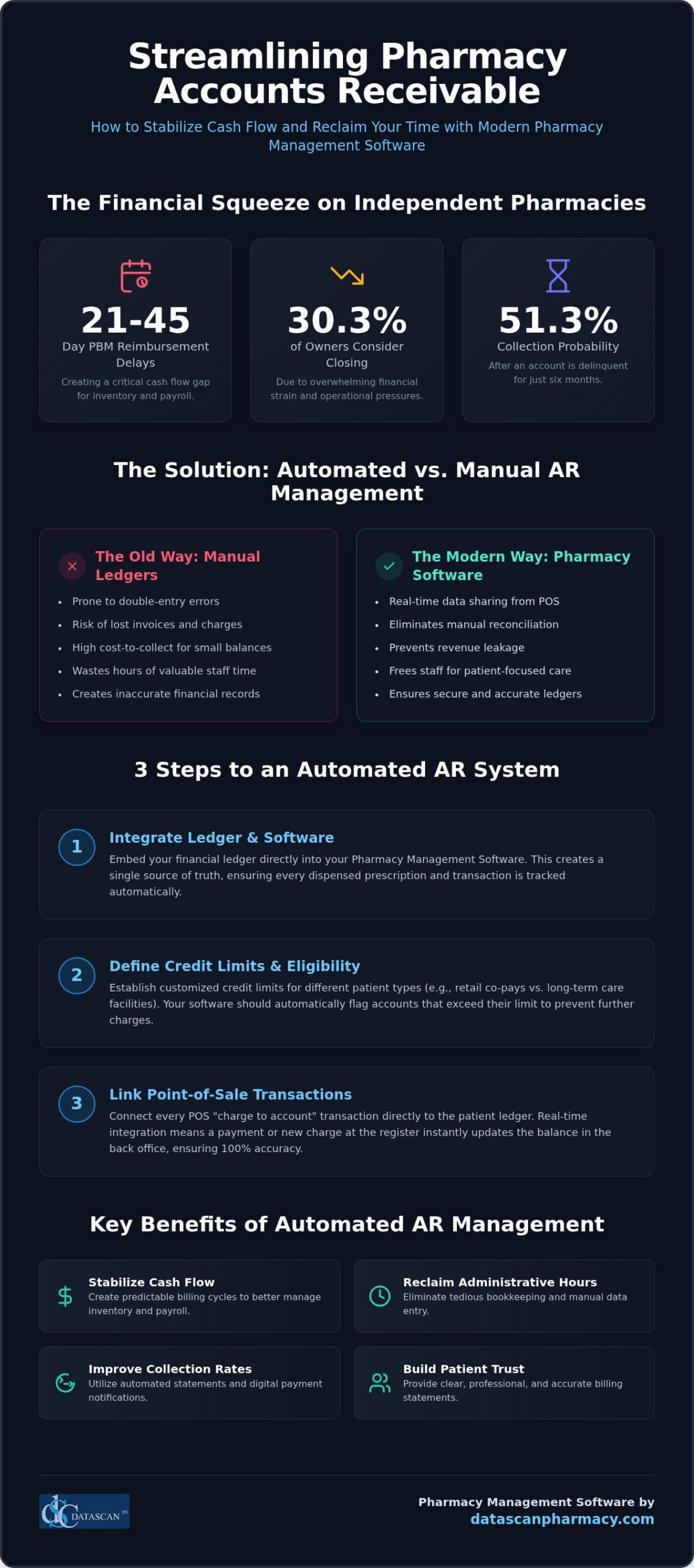
Effective pharmacy accounts receivable management is the most direct way to stabilize your cash flow and counteract the 21 to 45-day reimbursement delays typically forced by PBMs. By utilizing integrated pharmacy management software to automate your ledger, you can eliminate manual errors and reclaim the administrative hours previously spent on tedious bookkeeping. You’ve likely felt the pressure of managing a business where 30.3% of independent owners are considering closing due to financial strain, and it’s frustrating when the probability of collecting on a delinquent account drops to 51.3% after just six months. We understand that chasing small patient balances feels like a losing battle against your time and profitability.
This guide promises to give you the strategies and tools needed to transform your back office into a streamlined, automated engine for growth. We’ll preview how professional statement generation builds patient trust and how high-performance pharmacy software shares data in real-time to ensure your records are always accurate. By the end of this article, you’ll have a clear roadmap to modernizing your operations, automating your billing, and protecting your independent pharmacy’s bottom line.
Key Takeaways
Master the fundamentals of pharmacy accounts receivable management to clearly distinguish between third-party insurance reimbursements and private-pay house accounts.
Integrate your ledger directly within your pharmacy management software to ensure real-time data sharing between your POS and back-office systems.
Stabilize your operational cash flow and protect your bottom line by automating billing cycles, which allows for more predictable inventory and payroll management.
Improve collection rates and build patient trust by utilizing the MobileScripts patient app for instant balance notifications and convenient digital payment options.
Reclaim hours of administrative time by leveraging customizable statement generation and a unified patient record system that eliminates redundant manual data entry.
Pharmacy accounts receivable (AR) management is the systematic tracking and collection of money owed to the pharmacy by patients, facilities, and third-party payers for prescriptions and services already provided. To fully grasp what is pharmacy accounts receivable management?, you have to distinguish between third-party AR, which covers insurance reimbursements, and private-pay house accounts. Independent pharmacies often rely on charge accounts for long-term care (LTC) and assisted living facility billing. In these settings, medications are dispensed throughout the month, but the facility or patient is billed in a single cycle. Your Pharmacy management software serves as the definitive financial record, ensuring that every dispensed prescription is accurately logged and eventually paid.
Why is AR management critical for independent pharmacies?
Cash flow is the lifeblood of your business, yet PBM reimbursement delays typically force you to wait 21 to 45 days for payment. This delay creates a gap that can jeopardize your ability to manage inventory or meet payroll obligations. Professionalizing your pharmacy accounts receivable management through your Pharmacy Software helps you bridge this gap by ensuring patient and facility payments are collected on time. Beyond daily operations, a well-managed AR system provides the financial transparency required during rigorous PBM audits. It also increases your business value, as clear financial ledgers are a top priority for potential buyers or lenders during a valuation.
Why should you choose automated tracking over manual ledgers?
The “shoebox of receipts” method is a dangerous relic that has no place in a modern pharmacy. Manual tracking leads to double-entry errors, lost invoices, and an incredibly high cost-to-collect for small balances. When you integrate your ledger with a Datascan Point of Sale system, the software handles the heavy lifting. Data shares in real-time, meaning a payment made at the register instantly updates the patient’s balance in the back office. This automation prevents revenue leakage and frees your staff from hours of tedious manual reconciliation. By moving away from manual ledgers, you ensure that your local-server system remains a secure, accurate, and efficient tool for protecting your pharmacy’s profitability.
How do you set up an automated pharmacy AR system?
Setting up an automated system requires integrating your financial ledger directly into your pharmacy management software to ensure every charge is tracked in real-time. This creates a closed-loop environment between your dispensing and point-of-sale workflows, eliminating the need for manual data entry and reducing the risk of human error. By shifting to an automated local-server model, you ensure that pharmacy accounts receivable management becomes a background process rather than a weekend-long chore.
How do you define credit limits and eligibility?
Risk management begins with establishing customized credit limits based on the specific needs of your patient base. Retail patients may only require small limits for occasional co-pays, whereas long-term care (LTC) facilities need larger caps tailored to their total bed count and monthly volume. Your pharmacy management software should automatically flag any account that exceeds its limit, allowing your staff to address the balance before more prescriptions are dispensed. Establishing clear due dates and standard 15-day or 30-day grace periods helps you maintain a predictable cash flow that isn’t dependent on unpredictable PBM reimbursement schedules.
How do you link point-of-sale transactions?
Every pharmacy POS transaction must feed directly into your patient ledger to maintain financial accuracy. When a patient or facility representative chooses to “charge to account,” your system should require a verified signature at the register to ensure you are audit-ready. This real-time integration means that the moment a prescription is picked up, the balance is updated across your entire network. Handling complex scenarios like partial payments or split-tender transactions becomes effortless when your POS and back-office pharmacy software share a single patient record, ensuring your daily books always balance without manual reconciliation.
How do you batch process monthly statements?
Batch processing transforms a tedious administrative burden into a one-click task. Instead of manually printing individual invoices, you can generate hundreds of professional, itemized statements simultaneously. These documents must include Rx numbers, dispense dates, and specific costs to build patient trust and minimize the time your staff spends answering questions about individual charges. Professional branding on these financial communications reinforces your identity as a sophisticated, reliable community healthcare provider. If you’re ready to see how these automated features can transform your back office, you can reach out for a demonstration of our integrated technology.
How does AR management improve independent pharmacy profitability?
Effective pharmacy accounts receivable management improves profitability by capturing every dollar owed, reducing bad debt expenses, and creating a predictable cash flow cycle that offsets PBM reimbursement delays. When you automate your ledger, you stop revenue leakage from uncollected co-pays and facility balances while gaining the financial clarity needed to understand how to calculate pharmacy gross profit accurately. This systematic approach ensures that your pharmacy isn’t just dispensing prescriptions, but actually collecting the revenue those prescriptions generate.
Proactive monitoring of aging reports is essential because the probability of collecting on a delinquent account drops to 51.3% after six months. By identifying past-due balances early through your Pharmacy Software, you can prevent them from becoming bad debt expenses that eat into your margins. Additionally, offering flexible payment options for front-end retail items through your house account system encourages higher basket sizes. Patients are more likely to pick up OTC essentials when they can bundle those purchases with their prescriptions and pay in a single, professional monthly cycle.
How does AR management help combat PBM reimbursement challenges?
PBMs often use reimbursement delays and complex fee structures to squeeze independent margins. Efficient AR tracking provides the granular data required for managing pharmacy DIR fees and identifying underpaid claims before the window for appeals closes. With integrated financial reporting, you can spot trends in insurer behavior and reimbursement lags. This data empowers you to negotiate better terms with wholesalers or local facilities based on hard financial performance rather than guesswork, protecting your bottom line from external volatility.
How does automation free up time for clinical services?
Administrative burnout is a major threat to independent owners who have too little time to run their businesses. By utilizing workflow software to automate the billing cycle, you remove the burden of manual debt collection from your staff. This shift allows your team to focus on high-value clinical services, such as MTM or immunizations, which diversify your revenue streams. Real-time data dashboards let you monitor the health of your accounts in minutes, ensuring you stay in control of your finances without spending your entire weekend on tedious bookkeeping.
What are the best practices for pharmacy billing and collections?
Best practices for pharmacy billing and collections center on maintaining a rigid statement schedule and offering frictionless payment options through integrated digital tools. By reviewing aging reports weekly and automating balance notifications, you can significantly reduce the time spent on manual outreach while keeping your cash flow consistent. This proactive approach ensures that pharmacy accounts receivable management remains an organized business process rather than a reactive crisis.
Consistency is the foundation of any successful financial workflow. You should establish a fixed “statement run” schedule, such as the 1st or 15th of every month, to train your patients and facilities to expect their bills. Offering multiple payment methods, including in-store, mail-in, and digital app payments, ensures that you remove every possible barrier to collection. Reviewing your aging reports weekly allows you to identify accounts that are 30, 60, or 90 days past due before they become uncollectible bad debt.
Leveraging technology for faster payments
Modern pharmacies use the MobileScripts patient app to send push notifications the moment a statement is ready for review. This feature allows patients to view their ledger balance in real-time on their own devices, which often leads to faster payments compared to traditional mail. For nursing homes or assisted living facilities, “card on file” features within your Pharmacy management software allow for recurring, automated payments that eliminate the need for monthly check-chasing and manual reconciliation.
Handling delinquent accounts professionally
Managing debt is a sensitive but necessary component of pharmacy accounts receivable management. Your system should be configured to send automated “friendly reminders” for accounts that are 15 days past due to prompt action without staff intervention. It’s equally important to train your staff on how to have respectful financial conversations, ensuring they can explain itemized charges clearly to build trust. When an account reaches a critical delinquency threshold, you must have a clear, firm policy for stopping credit to protect your pharmacy from further revenue leakage. If you’re ready to modernize your collection process with these integrated tools, schedule a personalized demo with our team today.
How can Datascan software streamline your accounts receivable?
Datascan Pharmacy Software streamlines your pharmacy accounts receivable management by integrating your dispensing and point-of-sale systems into a single, local-server environment that shares one patient record. This total integration ensures that every “charge to account” transaction at the register is instantly reflected in the back-office ledger without manual intervention. By maintaining your data on a secure local-server system, you protect your sensitive financial records and ensure 100% uptime for your business operations. Owners gain immediate visibility into their cash flow through robust tracking tools that provide professional-grade reporting without requiring specialized accounting expertise. Our pharmacy management software also includes customizable statement formats designed specifically for the unique needs of community pharmacies, ensuring your billing is professional and easy for patients to understand.
What features are built specifically for independent pharmacies?
Efficiency in the back office translates directly to better patient care and reduced administrative burnout. Datascan Pharmacy Software allows for one-click statement generation for your entire patient base or specialized billing cycles for nursing and assisted living facilities. When a patient attempts to charge a prescription, real-time credit limit flagging at the POS prevents your staff from extending credit to delinquent accounts. If a patient questions a charge, the detailed transaction history allows for instant resolution by showing the exact date, time, and itemized cost of every dispense. This level of transparency builds long-term trust with your community and reduces the time your staff spends on the phone resolving billing disputes.
Why does US-based expertise matter for your financial stability?
Partnering with a family-owned and operated company since 1981 provides a level of stability and advocacy that large corporations simply cannot match. We’ve spent decades as a “champion of the independent,” evolving our technology to meet the specific challenges of PBM reform and declining reimbursements. Our US-based technical support team doesn’t just fix software; they understand the operational pressures you face every day and offer a grounded, reliable warmth in their service. We prioritize the security of your local-server system, protecting your financial data and ensuring your pharmacy stays operational even if external network connections fail. We continuously release software updates driven by the real-world needs of our clients, ensuring your technology remains a future-proof asset for your business. This commitment to supportive partnership ensures that as the industry changes, your pharmacy has the tools needed to remain profitable and independent.
Take Control of Your Pharmacy’s Financial Future
Mastering pharmacy accounts receivable management is no longer just a back-office task; it’s a vital survival strategy for independent owners facing PBM volatility. By automating your ledger and integrating your POS with your dispensing software, you eliminate manual errors and stop revenue leakage before it impacts your bottom line. You’ve seen how professional statement generation and real-time credit flagging can reclaim hours of your administrative time while building deeper trust with your patients and facilities.
Datascan has been a dedicated partner to the independent community since 1981, offering seamless software integration and expert, US-based technical support. We’re here to ensure your technology works as hard as you do, providing the security of local-server systems and the precision of automated billing. Don’t let administrative burnout or reimbursement delays dictate your success. Streamline your pharmacy’s billing with Datascan’s integrated AR tools today. We’re proud to stand as your visionary ally in building a more profitable, future-proof pharmacy.
Frequently Asked Questions
Is it legal for independent pharmacies to charge interest on patient accounts?
Charging interest on past-due balances is generally legal provided you comply with state-specific usury laws and federal Truth in Lending Act requirements. You must clearly disclose your interest rates and late fee policies in a signed credit agreement before applying any charges to a patient’s ledger. Using an integrated pharmacy management software allows you to automate these calculations based on your specific terms, ensuring consistency and transparency while protecting your business from potential legal disputes.
How do I handle charge accounts for nursing homes or assisted living facilities?
Managing facility accounts requires a specialized workflow where medications are dispensed daily but billed in a single monthly cycle. By using the Datascan nursing and assisted living module, you can group individual patient charges under a single facility master account for streamlined oversight. This setup allows you to generate consolidated statements and track facility-wide balances efficiently. Integrated pharmacy accounts receivable management ensures that high-volume facility billing remains accurate and professional without overwhelming your staff with manual data entry.
What is the difference between third-party AR and patient house accounts?
Third-party AR represents money owed to the pharmacy by insurance companies or PBMs for adjudicated claims, whereas patient house accounts are private-pay balances owed directly by individuals or facilities. Third-party collections are often delayed by PBM reimbursement cycles, while house accounts are managed according to your internal credit policies. Distinguishing between these two within your pharmacy management software is critical for maintaining an accurate financial ledger and understanding your true cash flow position at any given time.
Can I manage my pharmacy accounts receivable without separate accounting software?
You don’t need separate accounting software for daily ledger tracking when using a fully integrated pharmacy system. Datascan’s local-server platform includes built-in AR tools that handle credit limits, statement generation, and payment posting directly within your existing workflow. This integration eliminates the need for double-entry and prevents errors between your dispensing data and your financial records. For high-level tax preparation, you can simply export your clean, organized data for your CPA or external accounting package.
How often should I send out pharmacy charge account statements?
Sending out statements on a consistent monthly schedule, typically the 1st or the 15th, is the industry best practice for maintaining predictable cash flow. Regular billing cycles train your patients and facilities to expect and prepare for their payments, which significantly reduces the number of delinquent accounts. Your software should allow you to automate this process, enabling one-click batch printing or digital notifications through the MobileScripts app to ensure your billing is always delivered on time.
What is an aging report and why is it important for my pharmacy?
An aging report is a financial document that categorizes your outstanding receivables by the length of time they have been unpaid, usually in 30, 60, and 90-day increments. This report is vital because it highlights which accounts are becoming high-risk, allowing you to take action before the probability of collection drops. Monitoring these reports weekly helps you identify trends in revenue leakage and ensures you are proactively protecting your pharmacy’s operational profitability and long-term stability.
How does integrated POS software prevent internal theft on charge accounts?
Integrated POS software prevents internal theft by requiring verified signatures for every “charge to account” transaction and creating a permanent, unalterable audit trail for every ledger adjustment. Because the POS and Rx software share a single patient record, employees cannot manipulate balances in one system without it being reflected in the other. Detailed transaction history and automated credit limit flagging ensure that every charge is legitimate and authorized, providing owners with the oversight needed to secure their assets.
Can I set different credit limits for retail patients versus facility accounts?
You can and should set different credit limits for retail patients versus facility accounts based on their specific risk profiles and purchase volumes. Retail patients may only need a small limit for occasional co-pays, while LTC facilities require much higher thresholds to accommodate monthly billing cycles for dozens of residents. Datascan allows you to customize these limits at the individual or facility level, ensuring that your financial management remains flexible enough to support growth while minimizing your total exposure.