What if the problem isn’t that you need new pharmacy software, but that your current system no longer fits the way your pharmacy works? Switching from Computer-Rx is worth considering when specific workflow limitations, changing business needs, or support gaps affect daily operations, not simply because another vendor makes bigger promises.
It’s understandable to hesitate. A pharmacy management software change can affect dispensing, staff routines, and patient service, so the decision takes more than a polished demo. This guide will help you assess whether a switch is justified, compare options against your pharmacy’s needs, and prepare questions for a productive vendor conversation.
We’ll cover how to document workflow friction, evaluate tools that may help your team manage day-to-day work and review PBM reimbursement information, and ask vendors about conversion, training, and support before you commit. The goal isn’t to rush you away from Computer-Rx. It’s to help you choose pharmacy software based on fit for your independent pharmacy and the operations you need to support.
About the author: Datascan Pharmacy Software is a family-owned U.S. pharmacy software provider founded in 1981. Its offerings include pharmacy management software and related tools for pharmacy operations.
Key Takeaways
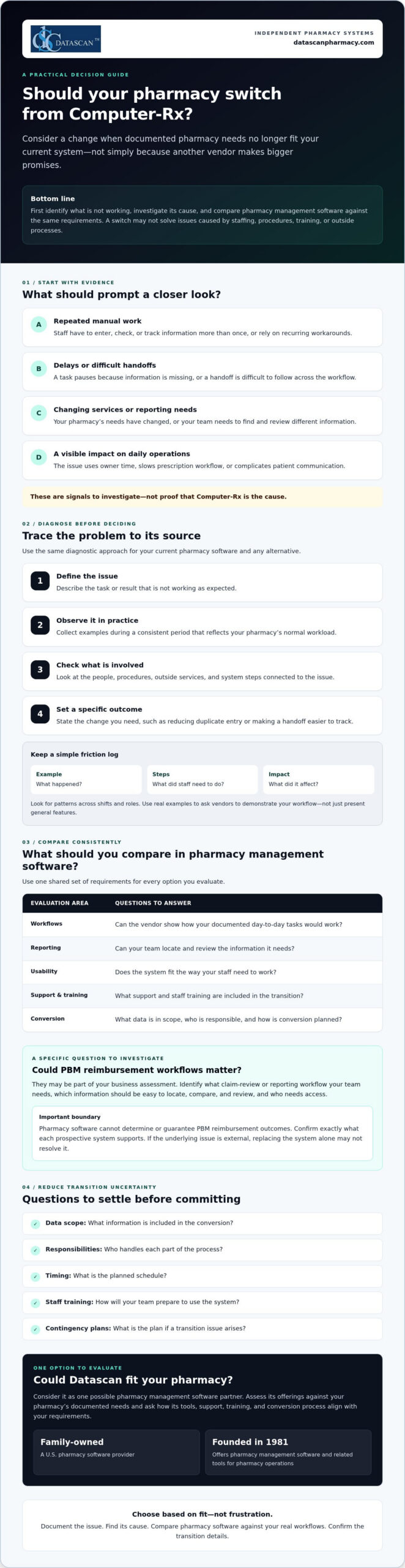
- Consider switching from Computer-Rx when documented pharmacy needs no longer fit your current system, rather than reacting to sales claims alone.
- Investigate recurring workflow problems by checking whether they stem from software, staffing, procedures, training, or third-party processes.
- Compare pharmacy management software options against the same requirements for workflows, reporting, usability, support, training, and conversion.
- Reduce transition uncertainty by confirming data scope, responsibilities, timing, staff training, and contingency plans with a prospective vendor.
- Evaluate Datascan as one possible fit for your independent pharmacy, considering its pharmacy software suite, U.S.-based support, and family-owned history since 1981.
Why are independent pharmacies considering switching from Computer-Rx?
A switch is worth evaluating when your documented pharmacy needs no longer match your current system. That doesn’t mean Computer-Rx is necessarily causing a problem. First, ask whether your pharmacy management software supports the way your team works today and the services you may need to provide next.
For an independent pharmacy, the pressure points are often practical. Are staff repeating manual steps to complete routine tasks? Do workarounds take time away from prescription workflow or patient communication? Have your services or reporting needs changed? Is it difficult for your team to find and review information relevant to reimbursement? Treat these as questions to investigate, not assumptions about Computer-Rx.
A pharmacy software switch is a needs-and-fit decision, not a reaction to dissatisfaction alone. A pharmacy management system supports key pharmacy activities, but whether a different system can address a specific concern depends on its cause and the capabilities you need.
What problems should I document before changing pharmacy software?
Ask staff to record recurring friction when it happens. Note a specific example, the steps involved, and what the issue affects. A short log can help you distinguish a system limitation from a training gap, an unclear procedure, or an outside process your software doesn’t control.
- Manual steps and workarounds: What does staff have to enter, check, or track more than once?
- Delays: Where does a task pause, and what information or handoff is missing?
- Impact: Does the issue use owner time, slow prescription workflow, or complicate patient communication?
Look for patterns across shifts and roles. A clear record makes it easier to ask vendors to demonstrate how they would handle your actual workflow, rather than relying on a general feature presentation.
Could PBM reimbursement challenges be part of the decision?
They may be part of your business assessment, but pharmacy software can’t determine or guarantee PBM reimbursement outcomes. Instead, identify the claim-review or reporting workflow your team needs. Which information must be easy to locate, compare, and review, and who needs access to it? Then confirm exactly what each prospective system supports. For broader financial context, consult a pharmacy gross profit guide alongside your software evaluation.
Keep the decision grounded in evidence. If the root cause is staffing, process design, or an external reimbursement issue, replacing the system alone may not resolve it. If your documented needs point to a genuine mismatch, you’ll be better prepared to compare alternatives based on fit, not frustration.
How do I tell whether my current pharmacy system is the real problem?
Use a simple diagnostic before deciding that changing pharmacy management software is the answer: define the issue, observe it, identify dependencies, and set a specific desired outcome. This helps separate a software constraint from problems caused by staffing, procedures, training, or third-party processes.
- Define the issue: Describe the task or result that isn’t working as expected.
- Observe it: Collect examples during a consistent period that reflects your pharmacy’s normal workload.
- Identify dependencies: Check which people, procedures, external services, or system steps are involved.
- Set an outcome: State what needs to change, such as reducing duplicate entry or making a handoff easier to track.
A recurring workaround is evidence to investigate, not proof a vendor is at fault. As you assess switching from Computer-Rx, use the same diagnostic criteria for your current system and any alternative. The Health IT Playbook also offers broader guidance on technology selection and implementation that can inform your planning.
Which pharmacy workflows should I review first?
Map prescription intake, dispensing, verification, pickup, and refill communication at a high level. Then examine reporting and front-end tasks, noting where information is re-entered, a handoff stalls, or staff need a workaround. Check whether each process fits your pharmacy’s service mix and daily workload. Review POS, delivery, or patient-app needs only if they’re relevant to your operations.
How can I measure whether a workflow needs to change?
Choose a defined observation period and track the same measures throughout it. Keep the measures practical and consistent:
- How often staff repeat a task or enter the same information more than once.
- Where handoffs occur and whether they require follow-up.
- Which steps staff identify as sources of friction, with a brief example.
- How often a task needs rework and what happened immediately before it.
Use your own baseline rather than a vendor’s generalized benchmark. Compare systems using the same definitions and workflow examples, and don’t attribute financial or clinical outcomes to software without evidence. If you want to explore whether another workflow approach fits your needs, you can discuss your pharmacy’s requirements with Datascan.
What should I compare before choosing a Computer-Rx alternative?
Compare each pharmacy management software option against the same written requirements, not the size of its feature list. The best-fit pharmacy software is the one that meets your documented operational requirements and supports the work your team needs to do.
Build a short scorecard from your pharmacy’s priorities, then ask each vendor to demonstrate the same real tasks. For broader system context, review this guide to pharmacy management software as part of your research.
| Area to compare |
Questions to ask |
| Required workflows |
Can you show how the system handles the tasks we identified, including our service needs? |
| Usability |
Can staff complete common tasks in a clear, repeatable way? Show us the steps, not just a feature overview. |
| Reporting and data |
Which reports and data are included? Can we review examples relevant to our operations and claim-review process? |
| Support |
When is support available, how do we contact the team, and what is the escalation process? |
| Training |
Who provides training, what does it cover, and what responsibilities fall to our staff? |
| Conversion |
What data can be transferred, who is responsible for each step, and what should we plan for? |
Which questions should I ask a pharmacy software vendor?
Bring your workflow examples to the demonstration and ask the vendor to walk through them with you. Confirm which data, reports, and integrations are included, and request written clarification for anything that affects your requirements. Ask who handles implementation, staff training, and ongoing support. Before deciding, verify the proposed scope, responsibilities, and timing.
How should I compare support and workflow flexibility?
Support models differ, so confirm availability and escalation paths directly with each vendor rather than assuming they match your needs. Ask whether the system can accommodate your operating model and what changes, if any, that would involve. Don’t assume customization is available or included. Consider workflow software only if task coordination is a documented need, and ask the vendor to demonstrate how it would address that need.
To keep the comparison fair, score each vendor against your requirements using the same scale, such as whether a need is met, partly met, or not met. Add notes from demonstrations and written answers. If switching from Computer-Rx remains under consideration, this process gives your team a clear basis for comparing alternatives and discussing trade-offs before committing.
How can I reduce the risk of switching pharmacy software?
Changing a core pharmacy management system takes planning and should never be treated as risk-free. Before committing, agree with the selected vendor on what the conversion covers, who owns each task, when key steps are expected, how staff will prepare, and what the pharmacy will do if an issue arises.
Put the plan in writing and make sure it reflects your pharmacy’s actual workflow. Clarify how the vendor will communicate progress, who can answer questions, and how concerns will be escalated. A contingency plan should identify who makes decisions if a critical step is delayed or information needs additional review. These discussions won’t remove every uncertainty, but they can make responsibilities and next steps clearer.
What should I confirm about pharmacy software conversion?
Ask which patient, prescription, inventory, and historical records can be transferred, and which information may need separate handling. Confirm who is responsible for preparing, transferring, and reviewing data, as well as the review points and escalation path. Before relying on the new system, use a pharmacy-approved checklist to validate the information your team considers critical.
Don’t assume that “conversion included” means every record or workflow is covered. Ask the vendor to define the scope and identify any dependencies or decisions required from your pharmacy. Record the answers alongside the agreed timing so staff know what to expect and whom to contact with questions.
How should I prepare staff for a system change?
List the roles involved and the tasks each person will need to practice, such as intake, dispensing, verification, pickup, refill communication, or reporting. Agree with the vendor on the training scope and timing, then set a clear process for staff to raise questions and escalate problems. A dedicated implementation roadmap can help organize these responsibilities. Confirm its details with the vendor.
As you plan for switching from Computer-Rx, involve staff who perform the day-to-day work. They can flag role-specific needs and identify where a change may affect patient communication or routine handoffs. Set expectations for how updates will be shared, who will coordinate decisions, and how unresolved issues will be tracked during the transition.
Use the vendor conversation to test whether the proposed conversion, training, and support plan matches your pharmacy’s requirements. Datascan provides pharmacy management software and U.S.-based support. Ask its team to clarify the scope and responsibilities relevant to your situation. Review your conversion and training requirements with Datascan as part of your vendor evaluation.
Could Datascan be the right next pharmacy management software partner?
Datascan is one option for independent pharmacies to evaluate, not an automatic fit for every operation. The company has been family-owned and operated since 1981, provides U.S.-based support, and offers a pharmacy software suite. Whether it’s right for your pharmacy depends on how well its capabilities and proposed support meet your documented needs.
As you consider switching from Computer-Rx, compare Datascan using the same workflows and vendor questions you’re using for other options. Bring concrete examples from your pharmacy, such as how staff manage dispensing, communicate with patients, review reports, or coordinate front-end tasks. Ask the team to explain what the software supports and confirm any conversion, training, or support details directly rather than assuming they’re included.
What does Datascan offer independent pharmacies?
Pharmacy management software is Datascan’s core offering, with related tools available for pharmacy operations. Depending on your requirements, ask about its POS, MobileScripts patient mobile app, mobile delivery app, compounding pharmacy software, and customizable workflow capabilities. Start with the Datascan pharmacy management software overview, then discuss which offerings are relevant to your operation. If workflow coordination is a priority, review its workflow software and ask how it aligns with your specific tasks.
For example, a pharmacy that relies on delivery or patient refill communication may want to evaluate those tools, while a pharmacy with compounding needs can ask about the compounding software. The goal is to assess fit for your service mix, not to adopt features that don’t address an identified need.
What is a practical next step before deciding?
Prepare a concise vendor brief before a conversation. Include recurring pain points, priority workflows, relevant reporting needs, and questions about conversion responsibilities, training, and ongoing support. Ask Datascan to respond to those requirements and clarify the proposed scope. This gives you a practical basis for comparing its pharmacy management software with your other options.
A thoughtful evaluation keeps the decision in your hands. You can review your pharmacy software needs with Datascan as part of that process.
Make Your Next Pharmacy Software Decision With Confidence
Switching from Computer-Rx is worth evaluating when documented operational needs no longer fit your current pharmacy management software. Before you decide, identify what’s causing workflow friction, compare vendors against the same pharmacy-defined requirements, and confirm conversion, training, and support responsibilities directly.
Technology can help organize pharmacy work and make key information easier for your team to review, but it can’t guarantee PBM reimbursement outcomes or resolve issues outside the system. Ground your decision in your pharmacy’s service needs, staff workflows, and patient care priorities.
Datascan is one option to assess. It’s family-owned and operated since 1981, provides U.S.-based support, and offers pharmacy management software and related operational tools. Ask how its capabilities align with your requirements, then verify the details that matter to your pharmacy.
To discuss your requirements and take the next step with a clear set of questions, contact Datascan about your pharmacy software needs. A careful evaluation can help you move forward with confidence, whether you switch or stay.
Frequently Asked Questions
Why are pharmacies switching from Computer-Rx?
Pharmacies may consider switching when their documented needs no longer fit their current system. Possible reasons to investigate include recurring workarounds, delays in daily tasks, changing service needs, or difficulty reviewing reports relevant to reimbursement. These are questions for each pharmacy to assess, not proof of a Computer-Rx shortcoming. Before deciding, check whether the cause is the software, staff training, procedures, or an external process.
Is switching from Computer-Rx difficult?
Switching can be complex because pharmacy management software supports core operations, and a change requires planning. The level of effort depends on the conversion scope, the pharmacy’s workflows, and the vendor’s process. Before committing, ask what data can be transferred, who handles each task, how staff training is planned, and how issues will be escalated. Build a contingency plan with the vendor rather than assuming the transition will be risk-free.
How do I compare Computer-Rx with another pharmacy system?
Compare both systems against the same written requirements from your pharmacy. Prioritize the workflows your team uses, usability, reporting, support availability, training, and conversion responsibilities. Ask each vendor to demonstrate the same real tasks, such as intake, dispensing, refill communication, or reporting. Confirm in writing which data, reports, and integrations are included. A shared scorecard helps your team focus on fit instead of counting features.
What data should I ask about before a pharmacy software conversion?
Ask which patient, prescription, inventory, and historical records can be transferred, and which information may need separate handling. Confirm who prepares, transfers, and reviews the data, what validation steps your pharmacy should complete, and how exceptions will be escalated. Request a written description of the conversion scope and responsibilities. Use a pharmacy-approved checklist to verify critical information before your team relies on the new system.
Will changing pharmacy software improve PBM reimbursements?
Changing software can’t determine or guarantee PBM reimbursement outcomes. It may be useful to assess whether a system supports the reporting or claim-review workflows your pharmacy needs to examine reimbursement. Identify the information your team needs to review, then ask vendors to demonstrate how their system handles that workflow. Also consider broader financial factors, since reimbursement challenges can involve processes and decisions outside the pharmacy software itself.
How long does it take to switch pharmacy management software?
There isn’t one timeline that applies to every pharmacy. The schedule depends on factors such as the agreed conversion scope, data handling, staff training, and the vendor’s implementation plan. Ask for proposed milestones, what your team must complete before each one, and how changes or delays will be communicated. Get the expected timing and responsibilities in writing, and avoid relying on a general estimate that doesn’t reflect your pharmacy’s needs.
What should I ask Datascan before switching from Computer-Rx?
Ask Datascan to explain how its pharmacy management software fits your required workflows, which related operational tools match your service needs, and what data conversion, training, and support would involve. Confirm responsibilities and proposed timing directly with the team. You can review Datascan’s pharmacy management software overview, then compare the information with your documented requirements and confirm any details relevant to your pharmacy directly with Datascan.

Article by
Sarah Callioras
Sarah Callioras is Vice President at Datascan Pharmacy Software, bringing nearly 25 years of experience across independent pharmacy operations and pharmacy technology. Since joining Datascan in 2016, she has played a key role in driving business growth, strengthening client relationships, and supporting independent pharmacies through innovative software solutions. With a strong background in pharmacy operations, business development, and strategic leadership, Sarah is passionate about helping independent pharmacies succeed in an evolving healthcare landscape.

You might think that sticking with a legacy giant like Computer-Rx is the safest bet for your high-volume pharmacy, but in 2026, that safety often comes at the cost of your sanity and your margins. This WinRx software comparison reveals why the industry’s biggest names are falling behind the agile, pharmacist-focused innovations coming from independent leaders. We understand the daily exhaustion of watching DIR fees claw back your hard-earned profits while you wait days for a basic support ticket to be answered by a representative who doesn’t truly understand your business. It’s frustrating to feel like just another number in a corporate database when you are trying to provide vital care to your community.
You deserve a system that acts as a visionary ally, not just a digital filing cabinet. We promise to show you how shifting your technology strategy can transform complex operational burdens into streamlined successes. In this guide, we will break down exactly how Datascan outperforms the competition through immediate U.S.-based support, integrated 340B management, and workflow tools designed specifically to protect your bottom line. From faster prescription processing to Med Sync tools that actually drive adherence, see why the future of independent pharmacy belongs to those who choose better partnerships over bigger brands.
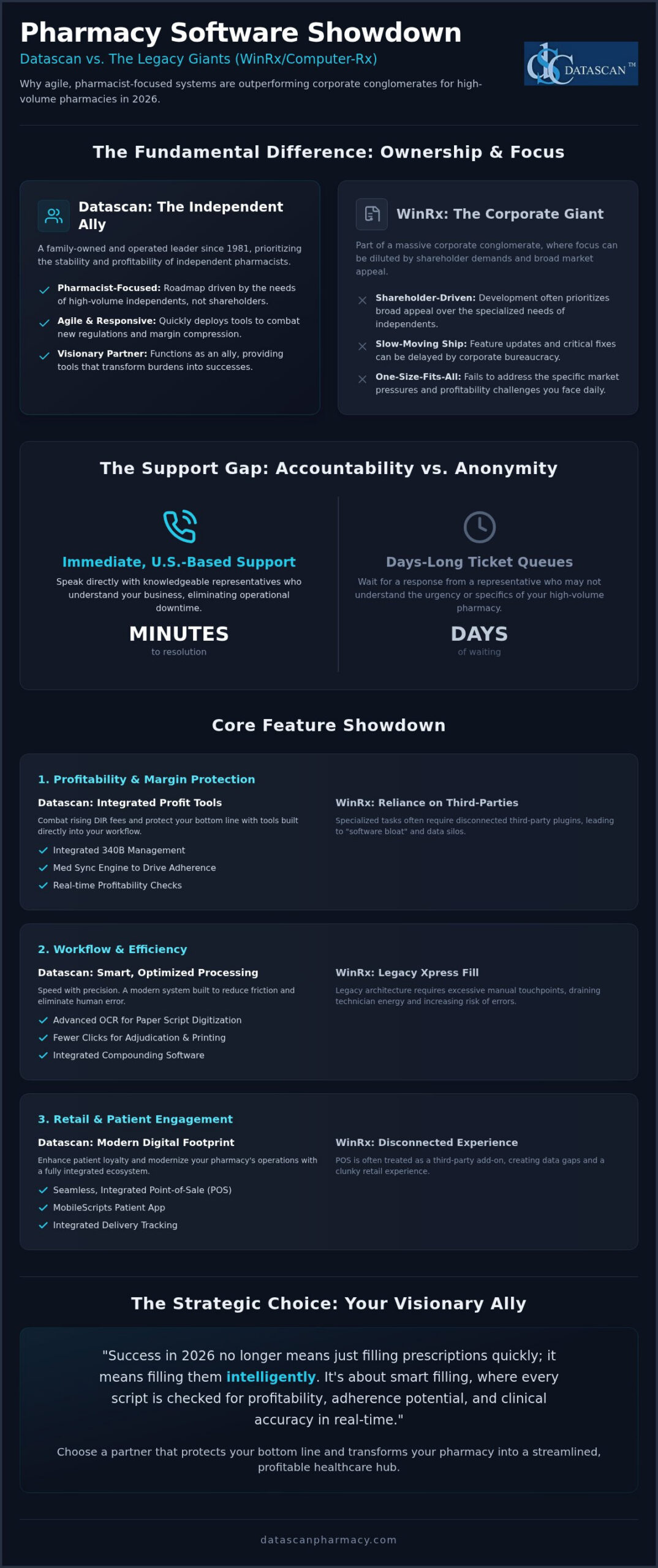
Key Takeaways
- Learn how immediate, U.S.-based support eliminates the operational downtime you’ll often find in corporate-owned legacy systems.
- This WinRx software comparison explores why independent pharmacies are moving away from “big box” providers in favor of specialized profitability tools.
- Discover how you can combat rising DIR fees using integrated 340B management and Medication Synchronization engines that drive predictable revenue.
- Evaluate the impact of a seamless retail experience by comparing legacy Xpress Fill features with modern, optimized prescription processing and POS integration.
- Explore how the MobileScripts patient app and delivery tracking can enhance patient loyalty while modernizing your pharmacy’s digital footprint.
The 2026 Pharmacy Software Landscape: WinRx vs. Datascan
Performing a detailed WinRx software comparison requires looking past the brand names to the corporate entities pulling the strings. Many pharmacists still refer to their system as Computer-Rx, but the reality of 2026 is a landscape defined by massive corporate mergers. WinRx is now part of a large conglomerate that includes Outcomes and other legacy brands. While these mergers promise “synergy,” the reality for the independent owner is often a diluted focus. When a software provider answers to private equity or public shareholders, the roadmap for your pharmacy management system often shifts toward broad market appeal rather than the granular, high-stakes needs of a high-volume independent owner. Datascan stands in stark contrast as a family-owned and operated leader since 1981, prioritizing the stability and profitability of the independent pharmacist over corporate expansion.
The Shift Toward Agile Independent Solutions
Corporate-owned software often feels like a slow-moving ship. When regulations change or a new DIR fee loophole emerges, you can’t afford to wait for a board of directors to approve a feature update. Independent pharmacies are moving away from “big box” providers because they need agility. Datascan functions as a visionary ally, offering the cutting-edge capabilities of a large corporation with the personal accountability of a private business. You aren’t just a license number in a database; you’re a partner. This independence allows for faster deployment of tools that combat margin compression, ensuring your software evolves as quickly as the PBMs do. One-size-fits-all software fails because it ignores the specific pressures of your local market. You need a system built by people who actually know your name.
Defining High-Volume Success in 2026
Success no longer means just filling prescriptions quickly; it means filling them intelligently. High-volume pharmacies in 2026 require clinical integration and advanced financial oversight to survive. This is where a WinRx software comparison reveals a gap in specialized utility. While legacy systems focus on basic throughput, Datascan integrates 340B management tools and compounding pharmacy software directly into the core workflow. This prevents the “software bloat” that happens when you’re forced to use third-party plugins for specialized tasks. We maintain high-volume speed without sacrificing the personal U.S.-based support that keeps your pharmacy running. It’s about smart filling, where every script is checked for profitability, adherence potential, and clinical accuracy in real-time. This level of precision is what transforms a struggling dispensary into a streamlined, profitable healthcare hub.
Feature Comparison: Workflow, POS, and Mobile Integration
A WinRx software comparison often highlights Xpress Fill as a standard for speed, but speed without precision is simply a faster way to make mistakes. Modern pharmacies need a system that balances high throughput with clinical safety and financial accuracy. Datascan’s optimized prescription processing is built to minimize friction, moving beyond the legacy architecture found in older platforms that were built for a different era of pharmacy. By utilizing advanced automation and OCR technology to scan and digitize paper scripts, we help eliminate the human error inherent in manual data entry, allowing your staff to focus on patient care rather than typing.
Workflow Efficiency and Prescription Processing
Legacy systems often require excessive clicks for label printing and claim adjudication, which drains technician energy over a long shift. Datascan reduces these manual touchpoints by streamlining the path from intake to the will-call bin. Our workflow includes automated refills and integrated compounding pharmacy software, ensuring that specialized medications don’t require a separate, disconnected process. This unified approach means your technicians spend less time toggling between screens and more time managing the queue. If you want to see how these efficiencies can transform your daily operations, you can explore our management solutions to see the difference in action.
Retail Success with Integrated POS
Many “big box” software providers treat the Point of Sale as an afterthought or a third-party add-on. This creates a dangerous data silo that leads to inventory headaches. Datascan Pharmacy Software and Datascan POS share a single-source database, meaning every transaction is reflected across your entire system in real-time. When a patient picks up a script, the inventory updates everywhere instantly, eliminating shelf-to-patient discrepancies. This integration is non-negotiable for pharmacies that want to maintain a professional, seamless retail experience.
- Real-time inventory tracking for both front-end and behind-the-counter items prevents stockouts.
- Full HSA/FSA and PCI compliance ensures secure payment processing and protects patient financial data.
- Integrated loyalty programs within the POS help drive repeat business and increase basket size.
While WinRx offers patient portals, they often feel like generic web wrappers that frustrate users. MobileScripts, the Datascan patient mobile app, provides a native experience that patients actually enjoy using. It isn’t just about viewing a profile; it’s about active engagement. Patients can request refills, receive delivery updates via the Datascan Mobile Delivery App, and communicate with your team in real-time. This level of digital integration drives the loyalty that independent pharmacies need to compete with national chains and mail-order giants.
The Support Gap: Why U.S.-Based Accountability Matters
When you conduct a WinRx software comparison, it’s easy to get distracted by flashy interfaces while overlooking the most critical feature: the person who answers the phone when things go wrong. In the wake of corporate consolidations, legacy providers have increasingly shifted toward automated menus and offshore call centers. This corporate distancing has birthed the common industry complaint of waiting days for a human representative. For an independent pharmacy, a support delay isn’t just an inconvenience. It’s a catastrophic break in patient care that erodes community trust and stalls your workflow. You shouldn’t have to plead with a chatbot when your adjudication queue is backed up.
At Datascan, we operate as your visionary ally. Because we’re family-owned and operated, our accountability is personal. We don’t hide behind tiered ticketing systems or scripted responses. Instead, we bundle U.S.-based technical support into every agreement, giving you direct access to experts who understand the high-stakes environment of a busy dispensary. We know that when your system slows down, your profitability does too. Being a champion of the independent means standing by our product with the same dedication you show your patients every day.
The True Cost of Software Downtime
Calculations of software value must include the cost of silence. If your support wait times exceed four hours, you aren’t just losing time; you’re losing scripts to the chain pharmacy down the street. Scripted responses from representatives who’ve never stepped foot in a pharmacy won’t help you navigate a complex 340B rejection or a POS hardware failure. Immediate access to knowledgeable experts protects your reputation and ensures your pharmacy remains the reliable health hub your patients expect. We prioritize immediate resolution because we know that in 2026, downtime is a luxury no independent owner can afford. Our goal is to transform your operational struggles into streamlined successes without the wait.
Implementation and Data Migration
The biggest barrier to upgrading technology is often the fear of the unknown. Many owners stick with outdated legacy platforms because they believe data migration is too risky. This myth keeps pharmacies tethered to inefficient tools that eat into their margins. Our professional implementation team has refined the data conversion process to be as seamless as possible. We handle the heavy lifting, ensuring your patient history and clinical records are securely transitioned into the Datascan ecosystem. Beyond the initial move, we provide ongoing training to ensure your staff remains efficient as we roll out new features. We don’t just hand you the keys; we walk beside you to ensure your transition from WinRx is the best business decision you’ve ever made.
When managing such critical technology shifts, the strategic approach taken by global IT consultancies like Kagool serves as a blueprint for how businesses can successfully navigate complex digital transformations and data migrations.
Maximizing Profitability: DIR Fees, Med Sync, and 340B
In the high-stakes financial landscape of 2026, simply filling prescriptions isn’t enough to keep your doors open. You’re fighting a daily battle against PBM clawbacks and shrinking reimbursements. A comprehensive WinRx software comparison reveals that while legacy platforms track basic sales, they often lack the proactive defensive tools needed to stop profit leaks before they happen. Datascan acts as your visionary ally by providing deep financial visibility, helping you manage complex 340B programs without the headache of third-party middlemen. By integrating e-care plans and clinical service documentation directly into the patient profile, we help you unlock new revenue streams that diversify your income beyond the traditional dispensing model; for those looking to expand into medical nutrition therapy, you can visit TeleDIETS to see how AI-driven software supports healthcare professionals.
Mitigating DIR Fees and Improving Margins
Legacy software often leaves you in the dark until the clawback occurs, but you can’t manage what you can’t see. Datascan’s reporting suite allows you to track and contest unfair fees by providing real-time data on every claim. Our system triggers profitability alerts during the adjudication process, warning your staff if a script is being filled below cost or if a high DIR fee is likely. Effective DIR fee mitigation has evolved into a non-negotiable core software requirement for any pharmacy seeking to remain solvent in 2026. These tools give you the power to make informed decisions at the point of sale, ensuring that every transaction contributes to your bottom line rather than draining it.
The Power of Medication Synchronization
Predictable revenue is the bedrock of a stable business. Datascan’s Medication Synchronization tools turn the chaotic refill cycle into a streamlined engine for growth. By aligning patient pickups, you increase refill rates and improve adherence scores, which directly impacts your performance-based reimbursements. This synchronization does more than just help the patient; it allows for precise demand forecasting. When you know exactly what drugs will be needed and when, you can reduce inventory waste and optimize your shelf space.
- Increased adherence scores lead to better Payer contracting terms and lower performance penalties.
- Synchronized pickups allow for optimized delivery routing via the Datascan Mobile Delivery App.
- Predictable demand forecasting reduces the capital tied up in slow-moving inventory.
Empowering your pharmacy with these tools isn’t just about efficiency; it’s about survival. You deserve a partner that fights for your margin. Discover how Datascan’s profitability tools can transform your pharmacy’s financial future.
The Strategic Choice: Why Datascan is the Visionary Ally
Choosing a pharmacy management system is the most significant business decision you’ll make this decade. While some reviews suggest legacy platforms are a “solid” choice, a true WinRx software comparison reveals that “solid” often translates to “stagnant” in a rapidly evolving market. You need a partner that doesn’t just keep the lights on but actively pushes your business toward the next level of patient engagement and operational excellence. Datascan provides the technological infrastructure to turn your independent pharmacy into a modern health destination, ensuring you remain competitive against national chains.
Mobile Delivery and Patient Engagement
Paper logs are a significant liability in 2026. The Datascan Mobile Delivery App replaces outdated manual tracking with real-time routing and digital signature capture, ensuring you remain compliant with PBM audits while providing a professional experience to your patients. By integrating this with MobileScripts, you create a closed-loop engagement system. Patients receive refill reminders, secure messages, and delivery updates directly on their smartphones. This level of connectivity boosts retention and ensures your community stays loyal to your brand rather than drifting toward mail-order competitors. It’s about meeting your patients where they are: on their mobile devices.
Investing in Your Pharmacy’s Future
Your software choice determines your pharmacy’s trajectory for years to come. When you partner with a family-owned technology leader, you gain peace of mind that corporate-owned entities simply can’t offer. We aren’t beholden to shareholders; we’re beholden to you. This independence allows us to focus on the long-term health of independent pharmacy, developing specialized 340B management tools and compounding pharmacy software that protect your specific niche. We have seen the industry evolve since 1981, and we use that historical perspective to build future-proof solutions. As you finalize your WinRx software comparison, remember that the best technology is the one that grows alongside your vision.
Don’t settle for legacy limitations when you can have visionary innovation. Contact Datascan today to request your custom demo and personalized ROI analysis. Let’s transform your operational burdens into streamlined successes together and secure the future of your independent pharmacy.
Secure Your Pharmacy’s Legacy with Future-Proof Technology
Your pharmacy is more than just a business; it’s a community cornerstone that deserves technology as dedicated as you are. This WinRx software comparison makes one thing clear: corporate-owned legacy systems can’t keep pace with the agile, profit-focused needs of 2026. You’ve seen how immediate, U.S.-based expert support and integrated 340B and Med Sync tools can transform your daily workflow from a struggle into a streamlined success. By choosing a partner that’s been family-owned since 1981, you ensure your pharmacy isn’t just a ticket number in a corporate database.
It’s time to stop fighting your software and start letting it fight for your margins. You have the power to reclaim your time and protect your profitability against rising DIR fees and complex regulations. Upgrade your pharmacy with Datascan’s independent-first software solution today to experience the difference a visionary ally makes. Your future is bright, and we’re ready to help you build it.
Frequently Asked Questions
Is WinRx the same as Computer-Rx?
WinRx is indeed the core software platform developed by Computer-Rx. While many long-term users still use the names interchangeably, recent industry consolidations have placed these legacy brands under larger corporate umbrellas. This shift often leads to a different support experience compared to independent providers. Datascan offers a stable alternative for owners who prefer a family-owned partner that understands the specific pressures of the independent market without corporate bureaucracy.
How long does it take to switch from WinRx to Datascan?
Transition timelines depend on your specific data volume and staff training needs, but our implementation team works to make the process as efficient as possible. We handle the heavy lifting of data conversion to ensure your patient records and clinical history migrate securely. Most pharmacies find that our intuitive interface reduces the learning curve for staff. We provide hands-on training to ensure you’re operational and confident before your go-live date.
Does Datascan support 340B management and compounding?
Datascan provides fully integrated 340B management tools and compounding pharmacy software within the primary management platform. You don’t need expensive third-party plugins to manage these specialized workflows. Our system automates the tracking and reporting required for 340B compliance while providing the precise calculations necessary for complex compounding. This WinRx software comparison highlights the value of having these high-margin tools built directly into your core pharmacy workflow.
What kind of support can I expect from Datascan?
You can expect immediate access to U.S.-based technical experts who understand the daily realities of running a pharmacy. We don’t use offshore call centers or frustrating automated menus that delay resolution. Our support is bundled into every agreement because we believe accountability is a core part of our partnership. If you have a question about adjudication or hardware, you’ll speak with a knowledgeable professional dedicated to keeping your pharmacy running smoothly.
Can Datascan help my pharmacy reduce DIR fees?
Our software includes proactive reporting tools and real-time profitability alerts designed to help you identify and mitigate the impact of DIR fees. During the adjudication process, the system flags claims that may result in high clawbacks or negative margins. This visibility allows you to make informed decisions before the prescription leaves the building. We focus on protecting your bottom line by providing the financial oversight legacy systems often lack.
Is the Datascan POS system fully integrated with the management software?
The Datascan POS system is built on a single-source database that communicates instantly with our pharmacy management software. This means your inventory updates in real-time across both platforms when a sale occurs at the counter. You won’t have to deal with the data silos or synchronization errors common in third-party POS integrations. This seamless connection ensures that your front-end and behind-the-counter operations are always perfectly aligned for better financial accuracy.
Does Datascan offer a patient mobile app for refills?
We offer MobileScripts, a native patient mobile app that allows your customers to request refills, view their profiles, and receive secure messages. Unlike generic web portals, MobileScripts is designed for high engagement and patient loyalty. It integrates directly with your management system to streamline refill requests and improve adherence. This tool is essential for pharmacies looking to compete with chain stores by offering a modern, convenient digital experience for their patients.
How does Datascan handle DSCSA compliance?
Datascan includes integrated tools to help your pharmacy meet the rigorous requirements of DSCSA compliance. Our system simplifies the tracking and tracing of prescription drugs from the wholesaler to your shelves, ensuring you have the necessary documentation for audits. We automate the collection of transaction data so your staff doesn’t have to manage manual logs. This built-in functionality protects your pharmacy from regulatory risk while maintaining high operational efficiency during every shift.
Article by
Sarah Callioras
Sarah Callioras is Vice President at Datascan Pharmacy Software, bringing nearly 25 years of experience across independent pharmacy operations and pharmacy technology. Since joining Datascan in 2016, she has played a key role in driving business growth, strengthening client relationships, and supporting independent pharmacies through innovative software solutions. With a strong background in pharmacy operations, business development, and strategic leadership, Sarah is passionate about helping independent pharmacies succeed in an evolving healthcare landscape.